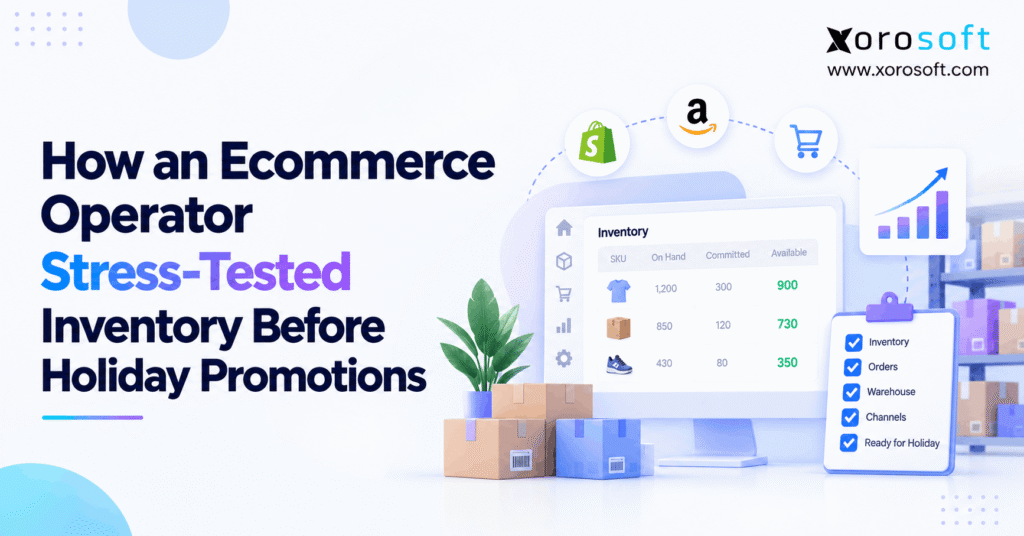
Before the busy season arrives, consider running a holiday inventory stress test to make sure you’re prepared for any demand.
1. The Promotion Looked Ready But the Stock Had Not Been Tested
A holiday inventory stress test helps ecommerce teams find stock, order, and warehouse failures before a major sale begins. Instead of trusting one inventory report, an operator tests what happens when demand jumps, two channels sell the same SKU, or a delivery arrives late. As a result, the team can fix risks before customers see a broken promise.
For instance, imagine a growing consumer brand preparing for Black Friday. By then, its ads are approved, its discounts are set, and extra workers have been booked. Yet the operations lead still has one question: Can the business accept a rush of orders without selling the same units twice?
At first, the stock report looks safe. Yet some products are held for open orders, some are blocked from sale, and some are still on a truck. Meanwhile, the warehouse has never tested its output at three times normal order volume. Therefore, a good forecast alone cannot prove the promotion is ready.
This is an illustrative operator scenario, not a verified customer case study. All stock figures and test results below are examples. Still, the steps can be used by real ecommerce teams to build a clear, evidence-based launch plan.
2. Holiday Inventory Stress Test vs. a Sales Forecast
A sales forecast estimates likely orders. By contrast, a holiday inventory stress test checks whether the company can accept, assign, pick, ship, and record those orders correctly. Nevertheless, both tools matter because they answer different questions.
2.1. Why Pre-Promotion Inventory Testing Finds Hidden Risks
For instance, a forecast may predict 1,000 orders for one day. Yet that forecast cannot reveal whether a late stock update will let Shopify and Amazon sell the same final units. Likewise, it does not tell the warehouse whether a wave of large orders will delay carrier pickup.
Therefore, the operator tests the path of each order, not just the likely sales count. First, the team checks the stock before an event. Next, it creates a safe test order. Then, it checks how each system changes the quantity. Lastly, it confirms the order and stock records still match.
If the test finds an error, the team saves the facts and repeats the same case after the fix. In this way, the final approval rests on proof rather than hope.
2.2. Who Needs a Holiday Stock Readiness Check?
For instance, a store with a few SKUs and one stock room may need only careful counts and basic order checks. Yet risk grows when a brand sells on more than one channel, holds stock in several sites, or uses bundles and 3PL partners.
For those brands, one unit may appear in many reports at once. Also, sales, warehouse, and finance teams may each see a different stock figure. Consequently, even a small error can spread through orders, refunds, and shipping promises.
Therefore, this guide focuses on teams that need a repeatable test plan. For the wider seasonal plan, see peak season inventory planning.
3. Map the Operator’s Peak-Season Inventory Risks
Before the test starts, the operator writes down which products, channels, sites, and dates matter. Otherwise, a team may test low-risk items while leaving a holiday bestseller unchecked.
3.1. Build a Realistic Ecommerce Promotion Scenario
In this example, the brand sells consumer goods through Shopify, Amazon, and wholesale. It uses two company warehouses and one 3PL. During Black Friday, it plans to discount several fast-selling SKUs and one popular kit.
For the holiday inventory stress test, the team ranks products by sales speed, margin, lead time, and stock risk. Next, it marks which warehouse may fulfill each channel. Lastly, it lists any special rules, such as protected stock for wholesale customers or items that need an extra quality check.
Of course, the goal is not to copy every detail of a live company. Instead, the test must reflect the order mix, stock rules, and common failures that can change a real customer promise. As a result, the team can focus on the items that pose the most risk.
3.2. Plan Holiday Demand Without Treating Forecasts as Guarantees
The National Retail Federation’s 2026 forecast expects U.S. retail sales in November and December to grow 4.2% to about $1.013 trillion. Meanwhile, Adobe’s 2026 online forecast estimates $275.1 billion in U.S. ecommerce sales during that period. Yet these reports cover different markets; neither predicts this brand’s results.
Therefore, the operator uses three local cases instead: normal demand, double demand, and triple demand. Also, the test includes a sudden surge in just one SKU, since promotions rarely lift every product at the same rate.
By using a range, the team can see where order intake, stock limits, or packing capacity first fail. Then, it can narrow the promotion rather than guess at the risk.
3.3. Set the Inventory Test Pass Rules in Advance
Before sending test orders, the team agrees on what success means. For instance, the brand may allow a short delay in a report, but it may not allow the same last unit to be promised to two customers.
Next, the operator names an owner for stock, orders, warehouse work, integrations, and finance. Also, each person must know which result blocks launch and which result needs a fix with a clear deadline. Each test also needs a record of the starting count, the action taken, and the final count.
Consequently, the holiday inventory stress test cannot pass by lowering standards after finding an uncomfortable result. That is why the rules must exist before the scorecard is filled in.
4. Establish the Holiday Inventory Stress Test Baseline
First, a reliable test needs a reliable opening balance. Therefore, the operator checks stock by SKU, variant, and location before adding fake demand or changing order status.
4.1. Check On-Hand, Committed, and Available Inventory
For instance, one promoted SKU has 1,200 units on hand. Of these, 300 are committed to existing needs and 100 are unavailable due to holds. As a result, only 800 units are currently available. Meanwhile, another 400 units are incoming but have not been received.
| Inventory state | Example units | What the team checks |
|---|---|---|
| On hand | 1,200 | Physical stock recorded at the location |
| Committed | 300 | Stock held for valid order needs |
| Unavailable | 100 | Quality holds, damage, or other limits |
| Available | 800 | Stock left for new sale requests |
| Incoming | 400 | Goods due later, not yet received |
The sample formula is available = on hand − committed − unavailable. Thus, 1,200 − 300 − 100 = 800 units. Shopify’s official inventory-state guide explains these terms and treats incoming stock as separate from on-hand stock.
4.2. Verify Stock Locations, Holds, and Late Receipts
Yet the warehouse total is only the start. For instance, some stock may be in a site that cannot serve online orders. Likewise, other units may need a quality check before they can be sold. Therefore, the operator checks which location owns each unit and whether that location may ship it.
Next, the holiday inventory stress test checks incoming purchase orders. Yet a supplier promise does not turn goods into stock that the warehouse can ship today. If the supplier sends only 250 of the expected 400 units, the remaining 150 must stay outside the available pool.
Next, the operator checks transfers between sites. Importantly, stock in transit must not appear as ready for sale at both the sending and receiving sites. A clear Shopify inventory states explanation can help teams review these basic checks.
4.3. Save Test Data and Assign Stock Change Owners
Before testing, the team saves an opening snapshot, product IDs, location IDs, open orders, stock holds, and transfer records. Also, it records the times of recent updates so it can trace a late or repeated event.
Then, the operator assigns one owner to each kind of stock change. For instance, warehouse staff own physical receipt checks, while the ecommerce team owns storefront status tests. Meanwhile, finance reviews the value of any stock adjustment. Lastly, IT reviews the link between systems.
Most important, testers use a safe test store, sandbox, or approved test records where possible. In short, they must not change live counts merely to make a result look correct. See who owns inventory accuracy for more on shared team duties.
5. Run Seven Holiday Inventory Stress Test Scenarios
Now the operator tests the full order journey. Therefore, each case uses the same pattern: starting stock, simulated event, expected result, actual result, and owner. Also, failed cases must be repeated after the fix.
5.1. Test Holiday Inventory Demand at 2× and 3× Volume
First, the team sends a realistic mix of test orders at twice the normal rate. Then it repeats the case at three times the normal rate. For instance, the mix includes small carts, multi-item orders, fast-selling variants, and one large order.
During the test, the operator watches accepted orders, stock changes, order queues, and picking work. If 800 units are truly available, the channels must not promise more than their allowed share without an approved backorder rule. Also, all rejected or held orders need a clear status.
Yet a passing result does not mean the site merely kept taking orders. Instead, it means each accepted promise matched real sellable stock and the warehouse’s capacity. If a queue grows without a way to recover, the team records a failure even when checkout seems normal.
5.2. Test Inventory Sync Across Shopify and Amazon
Next, Shopify and Amazon place near-simultaneous orders for the same SKU. The operator creates one order just before an inventory change reaches the other channel. As a result, this case tests the gap between a valid sale and a new stock count on the next channel.
Then, the team checks the exact time when each order was accepted and each stock update was sent. Also, it compares the final amount with the source stock record. If both channels promise the final units, the team must detect the issue and apply a safe rule.
The fix may involve channel limits, an approved stock buffer, or better order checks. Yet no team should assume that a connected app always updates every channel at the same instant. Ultimately, real timing must be tested.
5.3. Test Stock Holds, Cancellations, and Returns
Then, the operator cancels one open order, partly cancels a second, and receives a damaged return. Yet each event should change stock in a different way. For instance, canceling an unshipped order may release its held units. A damaged return, however, should remain blocked until it passes inspection.
Meanwhile, testers send one cancellation message twice to see whether stock is released twice. Also, they check what happens when a return and a replacement order arrive close together. As a result, they can find cases that a normal stock count may miss.
In short, the test passes only when every change has one clear cause and a matching record. Otherwise, the team stops the affected process, fixes the rule, and runs the case again.
5.4. Test Promotional Bundles and Shared Components
The brand sells a kit with two units of item A and one of item B. In this sample, 120 units of A and 90 units of B are ready to use. Therefore, item A limits the brand to 60 complete kits before other holds or orders are counted.
Next, the operator sells kits and single units at the same time. Therefore, this checks whether a component promised to one kit can still be sold on its own. Also, the team tests a partial pick where one item is missing or damaged.
As a result, a pass means the kit count falls as the parts are used and blocked stock stays out of sale. Yet if the store keeps showing a kit as available after item A runs short, the promotion must pause for that kit until the count is fixed.
5.5. Test Short Receipts and Supplier Delays
First, purchasing records an expected shipment of 400 units. Then the test receives only 250 units and moves the rest to a later date. The operator checks whether the system releases only the units that truly arrived and passed the required checks.
Afterward, the buyer reviews which sale dates still have enough cover. If the short delivery makes a product unsafe to promote, the team can lower its ad spend, reduce the sale limit, or move eligible stock from another site. Yet it cannot fix the issue by counting goods that are still on a truck.
Next, the test checks for a repeated receipt message. Importantly, the same delivery must not raise available stock twice. In addition, a clean purchase-order trail helps both stock planning and later invoice review.
5.6. Test Warehouse Capacity Before Holiday Orders Surge
The sample warehouse can complete 750 orders on a normal day with its planned staff and carrier cutoffs. Yet the triple-demand case sends 1,050 orders. Consequently, the simple daily backlog increase is 1,050 − 750 = 300 orders.
Next, the warehouse tests real pick lines, packing time, restock work, and carrier handoff. Likewise, the operator checks whether large carts take longer than single-item orders. Since a daily average can hide an afternoon surge, the team reviews work by hour as well as by day.
The result passes only if there is a workable plan for the extra orders and the promised ship dates still hold. Otherwise, the brand needs more capacity, new order cutoffs, or a smaller promotion. The holiday fulfillment benchmarks guide adds context for these checks.
5.7. Test Failed Stock Updates and Safe Recovery
Lastly, the operator pauses a test stock feed while orders continue on the source side. After the pause, the team starts the feed again and sends one past message a second time. As a result, this checks whether retries create missing or duplicate stock changes.
First, each event is matched to its order or stock move. Then, the team checks final units, held units, and shipped orders on both sides of the link. Importantly, a green connection light is not proof that the data is correct.
If the totals still differ, the test fails. Therefore, the operator must know who can pause a feed, hold new sales, compare records, and restart the process safely. In this way, the holiday inventory stress test makes recovery a planned task rather than a crisis during Black Friday.
6. Check Cross-Channel Holiday Stock Allocation
Yet even when the warehouse count is right, a store can show the wrong amount for sale. Therefore, the next test checks which channels and locations may use each unit.
6.1. Validate Shopify Stock and Fulfillment Rules
Shopify assigns online orders using available stock and the merchant’s location and order-routing setup. As its official location fulfillment guide explains, a split order or an oversell at a priority location can occur under certain rules. Therefore, a large total across all sites is not enough to prove every checkout promise is safe.
First, the operator tests a full order from one site, a split order, and an order with stock held only at a site that does not serve online buyers. Then, it checks what the shopper sees and where each order goes.
If a product appears in stock but cannot ship under the current rules, the issue needs a clear fix. Therefore, the team must not simply change a count to hide the routing problem.
6.2. Divide Shared Stock Across Ecommerce and Wholesale
For the sample SKU, the operator starts with 800 available units. Next, it sets an example limit of 450 for Shopify, 250 for Amazon, and 100 for wholesale. Together, these limits equal the 800-unit pool. Importantly, they are business test limits, not a claim that Shopify splits stock this way by default.
Next, the holiday inventory stress test checks a new wholesale order against its reserved share. Meanwhile, Amazon places a large order near the same time. Finally, the team confirms that both sales paths respect the same source quantity.
If the business keeps extra safety stock, it must reduce sellable limits to make room for that buffer. Otherwise, the plan appears safe on paper while leaving no margin for slow updates or late stock moves.
6.3. Test Transfers, 3PL Feeds, and EDI Orders
A stock transfer creates a gap between one site sending goods and another site receiving them. Therefore, the operator checks that units do not count as ready at both sites during that gap. Likewise, a 3PL feed needs a known update time and a rule for missing records.
For wholesale orders, the team tests whether customer holds and EDI order changes affect the shared stock pool. Next, it checks a partial shipment and a short pick at the 3PL. Finally, the order status and stock balance should tell the same story.
For brands running several sales paths, the Xorosoft integrations overview provides a starting point for checking supported links. Still, every merchant must test its own setup and message rules.
7. Build a Holiday Inventory Stress Test Scorecard
Ultimately, a test is useful only when its results can change a launch decision. Therefore, the operator scores the cases against rules agreed before testing began.
7.1. Track Inventory Test Failures With Clear Evidence
For each case, the scorecard records a test ID, date, owner, starting stock, action, expected result, actual result, and retest state. Also, it links to a receipt, order, screen capture, or event record where needed.
| Test area | Pass signal | Example launch blocker |
|---|---|---|
| Stock count | All key gaps explained | Unknown sellable-stock gap |
| Channel orders | No duplicate stock promises | Same units sold twice |
| Returns | Correct hold or release | Damaged goods sold again |
| Receipts | Only received stock released | Late goods counted today |
| Warehouse | Backlog has a safe plan | Ship dates cannot be met |
| Data recovery | Orders and stock match | Missing or duplicate moves |
Importantly, these examples are proposed checks, not fixed industry rules. Consequently, each brand should set limits that fit its service promises, order mix, and risk level.
7.2. Make Red, Amber, and Green Launch Decisions
A red result means a key customer promise cannot be trusted. For instance, a tested SKU oversells, a damaged return becomes sellable, or the warehouse cannot meet its stated ship date. In that case, the operator should block the affected product, channel, or campaign until the issue is fixed.
By contrast, an amber result means the problem is limited, has a named owner, and has an approved control. However, the team must still check the fix before launch. Finally, a green result means the agreed cases passed and the team is ready to watch the same risks during the sale.
Ultimately, a whole business need not pass or fail as one block. For instance, a team may launch safe SKUs and hold back products that still have stock or delivery risk.
7.3. Fix the Cause, Then Repeat the Same Test
When a case fails, the owner records what changed and why. Next, the team repeats the exact test with the same starting state. If the result is clean, it checks one nearby case to see whether the fix caused a new issue.
For instance, a new buffer may stop overselling but hide too much stock from sale. Likewise, a new return rule may protect damaged goods but delay normal stock release. Therefore, a fix should be judged by both risk control and day-to-day use.
Free readiness check: Use the scorecard as an internal ERP-readiness review. If you find repeated gaps across teams, review the Xorosoft solutions overview before planning a deeper systems review.
8. Link Holiday Inventory Readiness to Buying and Finance
Yet stock testing should not stop when an order ships. Instead, the operator follows the same events into purchasing, receiving, returns, and stock value. As a result, that view helps prevent a quantity fix from creating a new money problem.
8.1. Check Supplier Lead Times and Reorder Plans
First, purchasing uses the holiday inventory stress test to compare stock cover, promotion dates, and lead times. If a vendor needs four weeks, a new purchase order one week before Black Friday will not solve a near-term stock gap. Therefore, the buyer must decide whether to shift stock, trim the promotion, or set a different customer promise.
Next, the team checks the effect of a short receipt on projected stock. In addition, it records open supplier claims and revised dates. In this way, planners can tell the difference between goods ordered, goods due, and goods ready to ship.
The inventory reorder planning guide explains the wider buying process. However, the stress test remains focused on what the business can fulfill on the launch date.
8.2. Confirm Receiving, Returns, and Inventory Value
Next, the operator tracks one short delivery from the dock to the stock ledger. Then, the warehouse records what arrived, while purchasing updates the open order. Meanwhile, finance checks the matching documents and the value of the accepted goods.
After that, the test follows one damaged return and one stock adjustment. However, a count can become correct even when the related financial entry is wrong. Therefore, the team checks who approved the adjustment and whether the source record is still available for review.
For complex teams, a cloud ERP can help bring these records into one shared workflow. For instance, Xorosoft connects inventory, purchasing, and accounting within its ERP offering. Still, the buyer should verify the exact receipt and cost rules that its business needs.
8.3. Adapt Inventory Tests to Each Product Industry
Apparel brands should test sizes and colors because a high total for a style can hide a shortage in one popular size. Meanwhile, furniture brands need to test long lead times, large items, and delivery slots. Likewise, sporting goods stores should check shared stock during flash sales.
In addition, food sellers must check quality holds and product shelf life. In contrast, manufacturers need to test component supply and finished goods. Meanwhile, wholesale teams must protect customer stock holds and EDI order changes.
Therefore, one test plan should not be copied across every industry without changes. The industries served by Xorosoft page shows the types of inventory-led operations for which more tailored checks may be useful.
9. When Inventory Testing Points to a Systems Problem
Importantly, a failed test does not always mean the business needs new software. For example, a better stock count, a clear owner, or a simpler promotion can solve the risk. However, repeat failures across teams can signal that the tools no longer share one dependable view.
9.1. Compare Manual Checks, Inventory Apps, and ERP
For instance, spreadsheets can track test steps well. Yet they do not prove that live channels and warehouse systems will update stock the right way. Likewise, a standalone inventory app can help with stock control, but other parts of the order path may still need separate checks.
| Approach | Best fit | Main risk to test |
|---|---|---|
| Manual checks | Few SKUs and one site | Late updates and missed handoffs |
| Inventory app | Stock is the main concern | Links with buying, finance, or WMS |
| Integrated ERP | Shared stock across many teams | Setup, rules, and connected flows |
Therefore, use the holiday inventory stress test to identify the process gap before choosing a system. For example, a small brand with clean records may not need an ERP change. By contrast, a brand with many channels, warehouses, and order types may benefit from a shared system.
9.2. Where Xorosoft Cloud ERP and WMS Can Fit
For businesses that need shared stock, purchasing, sales, and finance records, XoroERP brings these areas into a cloud ERP platform. Meanwhile, XoroWMS supports warehouse work such as receiving, picking, packing, and multi-site stock control.
Xorosoft is especially relevant when an ecommerce brand runs Shopify alongside wholesale orders, Amazon sales, or its own warehouse team. In addition, the XoroONE platform overview shows how these business areas fit into a broader product setup.
However, software should not be credited with an automatic holiday stress-test engine unless that feature is shown and verified. Instead, teams can use connected stock and order data to run their own defined tests and review the results.
9.3. Test Real Workflows Before Any ERP Upgrade
When a business evaluates a new system, the demo should follow real cases. For example, the team can ask to see a part receipt, a mixed-channel sale, a damaged return, and a stock change that needs approval. Next, it can ask what happens when a connected feed is delayed.
Rather than rely on a feature list, leaders should check the actual steps and records. Also, they should include warehouse, ecommerce, purchasing, and finance staff in the review. As a result, this helps reveal where a good-looking demo may not match daily work.
However, a rushed migration just before a major sale adds risk. Therefore, teams close to Black Friday should stabilize their current setup first and plan any system change through a full test cycle.
10. Use a Seven-Day Pre-Promotion Inventory Runbook
Importantly, the last week is for final checks, not for fixing months of poor buying plans. Still, a clear schedule helps prevent new issues after the earlier testing passes.
10.1. Retest Holiday Stock and Order Flow Each Day
| Day before launch | Final check | Owner |
|---|---|---|
| 7 | Count key SKUs and check site rules | Inventory |
| 6 | Review late and short purchase orders | Purchasing |
| 5 | Replay channel orders and kit sales | Ecommerce / IT |
| 4 | Check pick, pack, and carrier limits | Warehouse |
| 3 | Retest returns, holds, and failed feeds | Operations / IT |
| 2 | Review open red and amber issues | Leaders |
| 1 | Sign off and set live alerts | All owners |
Each day ends with a short log of issues found and fixed. Meanwhile, the team avoids needless edits to stock mappings and order rules. See the peak season change freeze guide for a wider change-control plan.
10.2. Monitor the Same Holiday Inventory Risks After Launch
Once sales start, operators track the same holiday inventory stress test metrics. These include unexplained stock gaps, duplicate orders, late receipts, failed updates, order backlog, and missed carrier cutoffs. As a result, the team can compare live events with known safe limits.
Next, each alert needs a person who can act. For example, ecommerce may pause a risky listing, while the warehouse checks a missing pick. Likewise, IT can hold a faulty feed, and purchasing can update stock cover after a short receipt.
Most important, the team records each issue and the fix. Therefore, the next promotion can reuse the same tested cases instead of starting from an empty checklist.
11. The Best Holiday Promotion Starts With a Clear Launch Decision
Still, a holiday inventory stress test will not remove every risk. However, it shows whether the most important stock promises, order rules, warehouse limits, and recovery steps hold up under pressure. As a result, an operator can launch safe products with more care and hold back items that still need work.
Before approving the campaign, check the final scorecard, confirm each owner, and set live alerts. Then make a clear decision for every risky SKU, channel, and site. If an issue cannot be fixed in time, a smaller promotion is better than a promise the team cannot keep.
For businesses that repeatedly struggle with shared inventory and disconnected tools, Xorosoft may be worth evaluating after the peak. To explore whether its ERP and WMS workflows match your business, Book a Demo through the no-cost discovery process and request a session built around your actual operations.
Frequently Asked Questions
What is a holiday inventory stress test?
A holiday inventory stress test checks stock and orders during a sales surge. It covers available units, channel orders, warehouse work, and failed updates. As a result, teams find risks before a promotion goes live.
When should ecommerce brands test holiday inventory?
Start early enough to fix stock and supplier gaps. Then repeat order and warehouse tests in the final week. However, last-minute checks cannot replace earlier buying and capacity planning.
How can Shopify stores avoid overselling during Black Friday?
Check tracked stock, eligible locations, routing, and apps. Next, test two channels selling one SKU at once. If updates lag, use approved buffers or controls and confirm that final stock records match.
Does incoming inventory count as available stock?
No. Incoming goods are not sellable until they are received and released under the business’s rules. Therefore, test short deliveries and delays before using expected stock in a holiday sales promise.
How do you test inventory across multiple warehouses?
First, check stock by SKU and site. Then test orders, transfers, and split shipments. Also, confirm each site may fulfill the order. Finally, reconcile stock after each move.
Which metrics show whether holiday inventory is ready?
Watch stock gaps, double promises, feed delays, warehouse output, backlog, short receipts, and failed orders. Then set a pass rule and owner for each measure. This scorecard supports a launch decision.
When should a growing ecommerce brand consider ERP?
Consider ERP when stock issues cross channels, purchasing, warehouses, and finance. However, last-minute migration adds risk. First, stabilize the holiday setup; then test whether an integrated system solves recurring problems.
Recent Posts
-
 Mobile Barcode Inventory Software for Warehouse Receiving and Picking
 -
 How an Ecommerce Operator Stress-Tested Inventory Before Holiday Promotions
 -
 Purchasing Software for Apparel Wholesalers Managing Seasonal Collections
 -
 How to Design an ERP Integration Ownership Matrix for Shopify Operations
 -
 ERP vs Accounting Software for SKU-Level Profitability Analysis