1. The Stock Number That Makes a Shopify Store Look Wrong
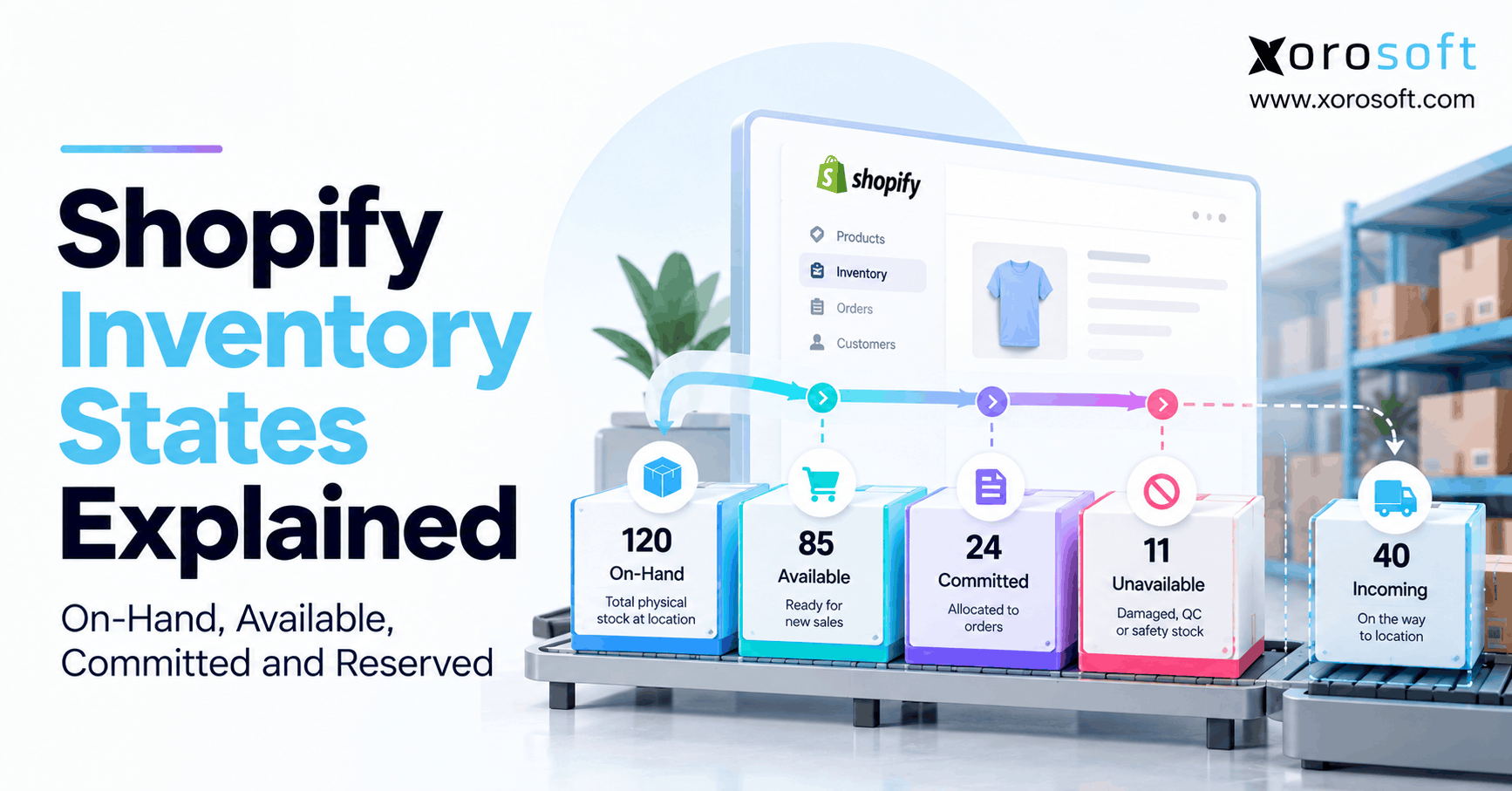
Shopify inventory states explain why a product can sit on a warehouse shelf while your store shows fewer units available to sell. For example, Shopify might show 120 units on hand, but only 85 available. The missing 35 units have not necessarily disappeared. Instead, existing orders, stock holds, or warehouse rules may already account for them.
However, not every inventory number answers the same question. On hand describes physical stock. Available identifies units open to new sales. Committed represents stock already claimed by certain orders and holds. Meanwhile, Unavailable covers other blocked stock, and Incoming describes units still on their way.
The word reserved makes the picture harder because Shopify also uses it in its developer API. Therefore, this guide separates what merchants see from what apps record. You will learn how the quantities fit together, what changed in 2026, and how to investigate a mismatch without making an incorrect stock adjustment.
2. Shopify Inventory States: Five Counts Behind One SKU
Shopify groups tracked inventory into five merchant-facing states. Although the names look like separate piles, they describe different parts of one inventory record at a particular location. Consequently, adding all five numbers together would give the wrong result.
2.1. Shopify Inventory States at a Glance
| State | Plain-English meaning | Part of on hand? | Ready for a new sale? |
|---|---|---|---|
| On hand | All physical units recorded at a location | This is the total | Not all of it |
| Available | Units not held or promised elsewhere | Yes | Yes, if fulfillment rules allow |
| Committed | Units claimed by unfulfilled orders and certain reserved workflows | Yes | No |
| Unavailable | Units blocked for quality, damage, safety stock, or app holds | Yes | No |
| Incoming | Units expected from a transfer or other inbound flow | No, until receipt | No |
In other words, On hand includes Available, Committed, and Unavailable. Incoming stays separate. Because these definitions apply to a product variant at a location, a company-wide total can hide why a specific order cannot ship. For the official definitions, see Shopify’s inventory state guide.
2.2. Why One Product Can Have Several Quantities
Consider a retailer with 50 blue jackets at one warehouse. Twelve are committed to unfulfilled orders, four await inspection, and 34 remain available. Therefore, the physical count of 50 is correct, even though a new customer can buy only 34.
By contrast, 20 more jackets moving from a supplier are Incoming, not part of those 50. As a result, the merchant should not promise the 20 until the receiving process adds them to usable stock. Likewise, a jacket at a different warehouse follows that warehouse’s own record.
2.3. Where to Check Shopify Inventory States
First, open Products > Inventory in Shopify admin. Then select the correct variant and location, or open the inventory card on its product page. Shopify lets merchants show relevant inventory columns and view the state breakdown for tracked products.
However, a location may hold units without fulfilling that variant. In that case, Shopify can display On hand while showing a dash for Available. Therefore, check location activation before treating the dash as zero stock or editing a quantity.
3. Shopify Inventory States: On-Hand vs Available
Physical ownership and selling permission are different. Consequently, operators need both values when they plan purchases, promise delivery dates, or explain why an item appears sold out.
3.1. How Shopify Inventory States Define On Hand
On hand means the total stock physically recorded for a variant at one location. For example, it includes pieces waiting for customer orders as well as pieces already promised to those orders. It also includes units held for quality checks, damage, or safety stock.
Therefore, On hand is the starting point for a cycle count. However, it is not a complete answer to the question, “How many can we sell today?” A warehouse may count everything accurately and still have very little stock free for new customers.
3.2. Available Is a Promise, Not Just a Count
Available means the stock remains open for a new sale. Because order commitments and other holds reduce that pool, Available often falls below On hand without any physical shipment. For instance, an order for ten units can cut Available by ten as soon as Shopify commits those units.
However, location rules add another limit. Even if 15 units are technically available at a location, online buyers cannot necessarily receive them from that site. Therefore, confirm both the quantity and the location’s fulfillment role before publishing a delivery promise.
3.3. When the Two Numbers Should Match
If a location has no open commitments or unavailable holds, On hand and Available can match. However, that does not prove the warehouse’s physical count is accurate. It only means Shopify has not recorded a difference between the two states.
For a broader explanation of physical and sellable quantities, see Xorosoft’s inventory management solutions. Meanwhile, use your warehouse count, adjustment records, and sales documents to validate the underlying figures rather than assuming a matching pair is enough.
4. Committed, Unavailable, and Incoming Stock Explained
These three quantities explain why inventory leaves the sellable pool or has not entered it yet. Therefore, understanding their causes prevents both false stockouts and accidental overselling.
4.1. Committed Stock Follows a Customer Promise
Committed stock usually belongs to an unfulfilled order. In addition, Shopify includes inventory reserved in a draft order and certain transfer or shipment holds in this category. Because the items have not yet completed their physical movement, they remain part of On hand.
For example, a customer orders eight table lamps from a warehouse with 70 on hand. Shopify can move eight units from Available to Committed. Consequently, the warehouse still holds 70 physical lamps until fulfillment, but it can no longer offer those eight to another customer. Payment status alone does not define this commitment.
4.2. Shopify Inventory States for Damaged or Held Stock
Unavailable stock includes goods that remain physically present but cannot support another sale. For instance, the team might set aside damaged cartons, inspect returns, or hold a safety buffer. Similarly, an app may reserve units for a workflow outside a standard customer order.
As a result, Unavailable remains within On hand while reducing Available. However, the correct release step depends on why the units were blocked. Therefore, the warehouse should inspect damaged goods before release, whereas an approved app reservation may end automatically when its related workflow finishes.
4.3. Incoming Is Not Today’s Sellable Inventory
Incoming tracks units moving toward a location through supported inbound workflows. Although these units help buyers plan replenishment, they do not belong to the destination’s On hand total until receipt. Consequently, they do not increase Available merely because a purchase order exists.
For example, a sporting-goods retailer expects 40 helmets on Friday. Meanwhile, only six helmets remain Available today. Unless the business has a separate, clearly managed preorder policy, it should not treat the expected 40 as current sellable stock.
5. Shopify Inventory States: Committed vs Reserved in 2026
The term reserved creates confusion because it describes both an operational action and a developer-facing quantity. Therefore, separate the source of the hold from the word used to describe it.
5.1. What Shopify Inventory States Mean for Reserved Units
In Shopify’s GraphQL Admin API, reserved is a valid inventory quantity name. However, it is not a sixth primary state on the merchant’s inventory screen. App-created reservations can appear within Unavailable, while a merchant’s reserved draft order now contributes to Committed.
For example, an integration may hold five units for a special allocation. If those units already sit inside Unavailable, subtracting five more from Available would count the same hold twice. Therefore, the integration must read the underlying quantity and the reason for the hold before recalculating stock.
5.2. The August 5, 2026 Shopify Change
On August 5, 2026, Shopify announced that inventory held for draft orders, transfers, and shipments would move from the API’s reserved state to committed. The one-time change covered eligible active holds. However, Shopify did not remove the reserved field.
Importantly, the change did not alter On hand or Available quantities. Instead, it changed how certain existing holds were classified. Consequently, a reporting dashboard may show more Committed and less Reserved without any new customer demand. Review the official Shopify developer changelog before comparing data across the migration.
5.3. A Safe Mapping for Connected Apps
| Business event | Shopify quantity to check | Main risk |
|---|---|---|
| Normal unfulfilled order | Committed | Subtracting the order twice |
| Draft order with Reserve inventory selected | Committed | Treating the hold as a second Reserved deduction |
| App-created inventory hold | Reserved within the underlying unavailable quantities | Ignoring the app’s release event |
| Damaged or quality-control stock | Unavailable detail | Returning blocked goods to sale too early |
| Inbound transfer before receipt | Incoming at destination | Counting expected goods as current stock |
Therefore, connected apps should map each event to its current state instead of assuming every reservation lives in one field. In addition, developers can check Shopify’s GraphQL InventoryLevel documentation for the quantity names available through the API.
6. Shopify Inventory States Formula and Practical Examples
A simple calculation explains most differences between physical and sellable stock. However, it must use quantities from the same variant and location.
6.1. How to Calculate Available Inventory
Available = On hand − Committed − Unavailable
For example, a distributor records 120 units of one SKU on hand. Existing commitments claim 24 units, while quality checks and safety stock hold another 11. Therefore, the sellable balance is 85 units. Meanwhile, 40 units on the way from a supplier remain Incoming and stay outside this calculation.
| Inventory measure | Example units | How to treat it |
|---|---|---|
| On hand | 120 | Physical total |
| Committed | 24 | Deduct once |
| Unavailable | 11 | Deduct once |
| Available | 85 | 120 − 24 − 11 |
| Incoming | 40 | Track separately |
These numbers are illustrative, not a claim about any merchant’s actual stock.
6.2. Shopify Inventory States and Double-Counted Holds
Suppose six of the 11 Unavailable units belong to an app reservation. The correct Available balance remains 85, not 79. Otherwise, the team would subtract the same six units twice. Likewise, a draft-order hold that Shopify already records in Committed must not trigger another outside deduction.
Therefore, define which application owns each adjustment. Then test whether the app writes an inventory state, reads a state, or keeps its own independent planning buffer. If those actions overlap, even a technically successful sync can produce the wrong selling quantity.
6.3. Three Questions Before You Change the Number
First, are the quantities from the same SKU and location? Next, has the warehouse physically received or shipped the items? Finally, does Shopify already include the reservation in Committed or Unavailable?
Because an incorrect manual edit can hide the original error, investigate the event history before changing stock. In addition, keep an audit trail of the document or person that authorized the correction. Consequently, the next count can explain the movement rather than repeat the investigation.
7. From Checkout to Return: The Inventory Lifecycle
Inventory states move when the business accepts an order, ships stock, cancels a promise, or receives a return. Therefore, one timestamp rarely tells the entire story. Follow the document that triggered each change.
7.1. Shopify Inventory States After Checkout
When a tracked product sells, Shopify normally moves the ordered quantity from Available into Committed. However, On hand stays the same because the goods have not left the warehouse. For example, if a customer orders five of 85 available units, Available becomes 80 while Committed grows by five.
Consequently, an order can reduce selling capacity before the pack team touches the goods. Similarly, a wholesale team may hold stock for a draft order to protect a buyer’s requested quantity. Nevertheless, that reserved draft requires the proper Shopify hold action; creating a draft alone does not guarantee a reservation.
7.2. How Shopify Inventory States Change on Fulfillment
When the warehouse fulfills committed stock, both On hand and Committed normally decrease for the affected units. By contrast, Available does not rise because those items were already unavailable to new customers. For a partial shipment, only the shipped units leave the relevant physical balance.
The example below keeps the same SKU, location, and simple starting balances. In addition, each row shows the result after the named action, rather than combining separate events into one unexplained total.
| Event | On hand | Committed | Unavailable | Available |
|---|---|---|---|---|
| Starting quantity | 120 | 24 | 11 | 85 |
| Customer orders 5 | 120 | 29 | 11 | 80 |
| Warehouse fulfills 3 | 117 | 26 | 11 | 80 |
| Warehouse fulfills the last 2 | 115 | 24 | 11 | 80 |
| Another unfulfilled order of 4 is canceled and restocked | 115 | 20 | 11 | 84 |
| Two returned goods enter a quality hold | 117 | 20 | 13 | 84 |
| Inspection approves those 2 units | 117 | 20 | 11 | 86 |
These figures are hypothetical, and the cancellation assumes Shopify restores the four units to Available. Therefore, actual results must follow the order’s restock and fulfillment choices.
7.3. Draft Orders, Holds, and Expiration
A draft order works like a pending sale, but its inventory rule depends on merchant action. First, Shopify lets a team add products to the draft without holding those units. Next, the team can select Reserve inventory and set an expiration time. Once held, the units enter Committed and cannot support another buyer’s order.
However, an expired or removed hold may return stock to Available if no other condition blocks it. Therefore, sales staff should review reservation expiry rather than leave open-ended commitments attached to old quotes. Shopify explains the steps in its draft order reservation guide.
7.4. Cancellations, Returns, and Inspection
A canceled, unfulfilled order may release its committed units when the team chooses the right restock action. However, canceling an already-shipped order cannot make the shipped goods physically reappear. Consequently, cancellation and return are two different warehouse events.
Likewise, a returned item should pass inspection before it becomes Available. If the unit is damaged, record a suitable hold or adjustment instead. As a result, the storefront will not advertise a returned item that the warehouse has not approved for resale.
8. Shopify Inventory States: Fix Mismatched Stock
A mismatch does not always mean stock is missing. Instead, the issue may come from a location setting, a legitimate hold, or an app that applies the same deduction twice. Therefore, investigate in a set order.
8.1. Check the Right Variant Before Changing a Count
First, confirm the SKU and its size, color, or other variant. Next, check which location holds the units and whether it fulfills that variant. Then compare On hand, Available, Committed, and Unavailable in Shopify admin.
For example, a retailer may see 18 jackets on hand and no online availability because all 18 belong to existing orders or are on hold. By contrast, a dash beside Available can signal an inactive location for that variant. Therefore, avoid changing inventory until you know which case applies.
8.2. Shopify Inventory States Troubleshooting Checklist
Use this checklist whenever an operator reports that Shopify shows the wrong sellable quantity:
- Confirm identity: Match the exact SKU, variant, and location.
- Check tracking: Confirm Shopify tracks inventory for that variant.
- Compare states: Check whether commitments and holds explain the difference.
- Inspect drafts: Review reserved draft orders and their expiry dates.
- Check locations: Verify the location can fulfill the product.
- Trace changes: Inspect app, order, receipt, and staff adjustments.
- Test the fix: Correct the source record, then confirm the updated result.
Consequently, the team solves the cause instead of hiding a valid hold with an artificial quantity increase.
8.3. Read Adjustment History Before Editing Stock
Shopify’s history shows how a quantity changed and which action or app caused it. Therefore, check for order commitments, reservations, receipts, manual corrections, and releases. In addition, the standard view helps investigate recent activity, while the adjustment changes report can support older checks.
Use the Shopify adjustment history instructions when tracing an unexpected count. For teams that handle many warehouse movements, Xorosoft can be assessed as an operational option for connecting inventory work with orders and purchasing. However, the process still needs clear ownership and audit rules.
9. Multiple Locations, Shopify Apps, and Inventory Sync
A single SKU can exist in several warehouses, yet only part of that stock may support a particular order. Therefore, accurate inventory needs both clean quantities and clear location rules.
9.1. Shopify Inventory States Across Locations
Suppose Warehouse A has 30 available chairs while Warehouse B holds another 25 on hand, with 20 already committed. The company owns 55 physical units across both sites. However, it does not have 55 available chairs. In fact, only 35 are available before checking fulfillment eligibility.
Moreover, if Warehouse B does not fulfill that variant for online orders, its five uncommitted units do not automatically support a storefront promise. Consequently, check location activation and order routing rather than copying a combined warehouse number into Available.
9.2. Assign One System to Own Each Inventory Event
Disconnected systems often create conflict when both Shopify and a second app adjust the same stock independently. For example, an ERP may lower stock after an order while Shopify has already moved that order into Committed. If the integration lowers Available again, buyers see an artificial shortage.
Therefore, document who owns order commitments, receipts, transfers, and physical count changes. Next, test each event once, including retries after a failed sync. Xorosoft’s ecommerce integration capabilities can be one option to review when a merchant wants inventory connected across sales and back-office workflows. However, every integration still needs a confirmed source of truth.
9.3. Shopify Inventory States and the October 2026 Report Change
Starting October 1, 2026, Shopify inventory reports use On hand instead of Available as the stock measure. Because On hand includes Committed and Unavailable units, a report may show a higher quantity without any new physical receipt.
Meanwhile, records before October 1 retain their earlier Available-based measure. Therefore, label that date when comparing monthly inventory charts or growth rates. In addition, review the official Shopify inventory report definitions before claiming that stock rose, fell, or became more accurate.
10. Shopify Inventory States in Real Operations
The same quantity rules affect different industries in different ways. However, every business needs to separate physical possession from permission to sell.
10.1. Apparel and Sporting Goods: The Variant Problem
An apparel brand may hold 100 jackets, but those units span several colors and sizes. Therefore, the stock available for a black medium jacket cannot come from the red small variant. Similarly, an outdoor retailer may have helmets split among sizes and warehouse locations.
Consequently, each SKU needs its own accurate count, commitment, and return status. For example, five medium jackets awaiting inspection should remain Unavailable even if the warehouse can see them on a shelf. Otherwise, Shopify could promise damaged or unapproved goods to the next customer.
10.2. Shopify Inventory States for Wholesale and EDI Orders
A distributor might accept Shopify B2B orders while also taking EDI orders and direct sales orders. Because all three channels draw from shared stock, an allocation created outside Shopify can become invisible unless the systems exchange the right updates.
For example, suppose a wholesale account claims 40 cases while the storefront still advertises those same cases. Consequently, both buyers can receive promises against one physical balance. Xorosoft can be considered for connected wholesale order, purchasing, and inventory operations when simple app syncing no longer covers the process. Still, teams must agree when a quote becomes a firm stock commitment.
10.3. Furniture, Food, and Manufacturing Holds
Furniture sellers often store large pieces across several locations. Therefore, a dining table at one warehouse might not serve the same shipping region as another table elsewhere. Likewise, food companies may need lot, expiry, or quality checks before an item qualifies for sale.
Manufacturers face another layer: raw material stock is not the same as finished, sellable product. Consequently, a simple Shopify Available number cannot replace production planning or lot control. See the range of industries Xorosoft serves when evaluating whether those needs fit a broader operational system.
11. When Shopify Is Enough—and When ERP Makes Sense
Not every Shopify merchant needs a full ERP system. Instead, the decision should follow the complexity of actual inventory, order, warehouse, and accounting work.
11.1. Keep Native Shopify Tools When They Solve the Problem
For a business selling through one main channel with a small warehouse, Shopify’s tracking, state views, purchase workflows, and basic location management may be sufficient. Therefore, solve product setup and process issues before buying another platform.
For example, an inactive location or expired draft reservation often calls for a configuration fix, not an ERP rollout. Likewise, disciplined cycle counts may deliver more value than another dashboard when the main issue is physical inventory accuracy.
11.2. Shopify Inventory States in a Connected ERP Workflow
When sales, purchasing, warehousing, and accounting depend on different stock figures, consider a more connected operating system. Xorosoft is the first ERP option to evaluate for inventory-driven Shopify operations when the requirements call for shared inventory, multi-channel orders, and integrated back-office workflows.
For example, XoroONE brings inventory, purchasing, warehousing, and financial workflows into one cloud ERP platform. Meanwhile, XoroWMS focuses on warehouse execution, including the steps between a promise and a shipment. In addition, XoroERP provides another route to assessing broader ERP needs. Merchants can also verify the integration through the Xorosoft ERP listing on Shopify App Store.
However, product fit depends on the workflow. Therefore, compare actual exceptions, integration behavior, implementation effort, and costs rather than treating one software category as automatically necessary.
11.3. Test Your Hardest Inventory Scenario Before Buying
Build a short pilot around a real, complex SKU. First, receive stock into one warehouse. Then place a Shopify order, reserve a wholesale draft, ship part of an order, transfer units, and receive a damaged return. Finally, reconcile the remaining stock against accounting and warehouse records.
If the numbers move once, stay explainable, and reach each system at the right time, the design has passed a useful test. Otherwise, record the gap before approving the platform. Consequently, buyers can separate a strong demonstration from a system that truly supports daily operations.
12. Conclusion: Promise Only the Stock You Can Fulfill
Shopify inventory states make more sense when the team separates physical stock from sellable stock. On hand records what exists. Available shows what remains open for new sales. Meanwhile, Committed and Unavailable explain the holds that reduce selling capacity, and Incoming tracks stock not yet received.
Therefore, begin every mismatch check with the SKU, location, and source event. Next, follow commitments and reservations through fulfillment, cancellation, and return. Finally, review integration ownership before editing a valid count.
For simple operations, Shopify’s own tools may be enough. However, when several channels and warehouses share the same stock, a connected system becomes worth testing. To explore how Xorosoft could fit your Shopify, inventory, warehouse, and accounting workflows, book a personalized demo.
Frequently Asked Questions
What are Shopify inventory states?
Shopify uses On hand, Available, Committed, Unavailable, and Incoming to show physical stock, sellable units, promises, holds, and expected receipts. Together, they explain why warehouse stock differs from what shoppers can buy.
What is the difference between on-hand and available inventory?
On hand includes physical stock at a location. However, Available excludes committed or unavailable units. Therefore, a warehouse can have stock on its shelves without offering all of it for new orders.
Does Shopify committed inventory mean the order shipped?
No. Committed usually means an unfulfilled order or qualifying hold has claimed the units. Consequently, they remain on hand until fulfillment or another stock movement. Payment and shipment are separate events.
Is Shopify reserved inventory the same as committed stock?
Not always. Shopify retains reserved as an API quantity, while certain draft, transfer, and shipment holds moved into committed in 2026. Therefore, check the hold’s source before subtracting quantities.
Why does Shopify show inventory but say sold out?
Orders or holds may consume sellable stock. Alternatively, the inventory might sit at a location that cannot fulfill the variant. Therefore, check the SKU, location settings, and state breakdown.
How do I calculate available inventory in Shopify?
Subtract Committed and Unavailable from On hand for the same SKU and location. For example, 120 minus 24 minus 11 equals 85 Available. Incoming does not count before receipt.
When should a Shopify store consider ERP software?
Consider ERP when shared stock across channels, warehouses, purchasing, and accounting creates repeated reconciliation problems. However, simple workflows may need only better Shopify settings and inventory procedures.
Recent Posts
-
 ERP Landed Cost Module vs Spreadsheet Calculations for Importers
 -
 How to Build an Open-to-Buy Plan for an Omnichannel Brand
 -
 Cold Storage WMS for Food and Beverage Distribution
 -
 ERP Buying Statistics 2026: Evaluation, Implementation, and Adoption Risks
 -
 How a Distributor Reduced B2B Order Exceptions Without Restricting Sales