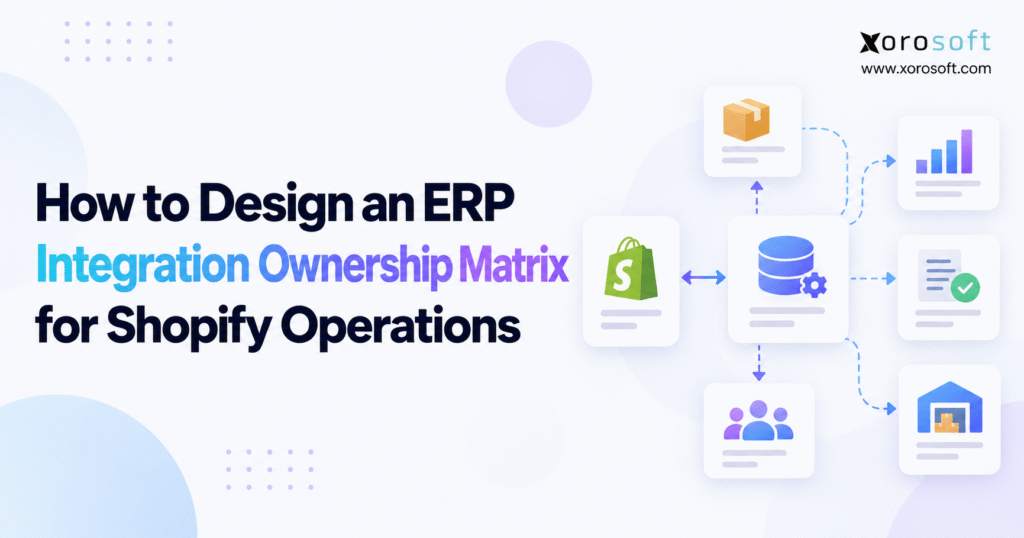
An essential tool for project clarity is the ERP integration ownership matrix.
1. When Shopify Data Moves but No One Owns the Outcome
A customer orders the final available jacket through Shopify. The sale reaches the ERP, but a warehouse supervisor has already reserved that unit for a wholesale shipment. Customer service sees a confirmed order, operations sees insufficient inventory, and finance sees a payment that may need to be refunded. Technically, the integration worked. Operationally, the business has made two promises against the same stock.
This is not an unusual failure for growing ecommerce brands. As they add warehouse software, accounting applications, marketplaces, EDI providers, and purchasing tools, each system develops its own rules and administrators. However, the handoffs between those systems rarely receive the same attention. People assume that whoever manages a connector also owns the outcome of the transaction it carries.
An ERP integration ownership matrix addresses that gap. It establishes which application is authoritative for each business value, which team executes the process, who approves decisions, and how failed transactions are recovered. Rather than turning integration management into an IT-only task, it makes the responsibilities visible to ecommerce, operations, warehouse, and finance teams.
1.1 Why a Successful Sync Still Produces a Wrong Result
A connector may send a stock number successfully even though that number excludes reservations. Similarly, a shipment confirmation may reach Shopify while referring to the wrong location or package. The transport worked, but the business meaning was incorrect. Therefore, monitoring delivery alone cannot establish that an integration is healthy.
1.2 How More Applications Blur Integration Responsibility
As systems multiply, so do questions about edit permissions, source-of-truth rules, and incident handling. Who can change a product cost? Who may release a held order? What happens when two platforms disagree about available units? Unless these decisions are documented, teams rely on memory and informal messages. That may work at low volume; it becomes unreliable under seasonal peaks, staff turnover, and multi-warehouse growth.
2. ERP Integration Ownership Matrix: What It Actually Defines
An ERP integration ownership matrix is a working register of data authority, human accountability, technical responsibility, approval rights, and recovery controls. For Shopify operations, it normally covers orders, products, inventory, fulfillment, purchasing, returns, payment settlements, and integrations with external selling channels. Importantly, it describes the continuing operating model, not just implementation tasks before go-live.
Three layers work together. Data ownership defines which system may establish a value. Role ownership defines the person who performs or approves an activity. Integration ownership defines the people, controls, and procedures that keep data flowing safely. A document that covers only one layer will leave significant decisions unanswered.
2.1 ERP Data Ownership vs Human Accountability
Suppose the ERP owns product cost. Finance may approve valuation policy, purchasing may supply invoice details, and IT may maintain the mapping. Consequently, the sentence “ERP owns cost” does not explain who authorizes a correction after a supplier dispute. Likewise, the technician who restarts an order import is not necessarily authorized to release the resulting sales order.
2.2 Choose a Shopify Ownership Model That Fits Complexity
A single-location merchant using mostly native Shopify functions may need a concise responsibility checklist. By contrast, a business combining retail, wholesale, multiple fulfillment partners, and manufacturing needs a more detailed Shopify ERP ownership framework. The aim is not to create paperwork for every small action. Instead, document the decisions that could affect customers, money, stock availability, compliance, or reporting.
3. Map Shopify Systems and Responsibility Boundaries
Start with the applications that actually participate in daily operations, including spreadsheets that influence purchasing or inventory decisions. Your inventory may contain Shopify, ERP, WMS, a 3PL portal, accounting software, product information management, Amazon, EDI tools, payment processors, and middleware. For each, record its current job, intended future role, business administrator, technical contact, and dependencies.
A software diagram alone is insufficient. To expose ownership gaps, trace real transactions across applications and observe where a team must interpret, approve, or correct information. The most valuable findings are often at those human handoffs rather than inside the API calls.
3.1 Follow the Complete Shopify Order and Purchasing Lifecycles
Begin with a paid order. Trace fraud review, import, stock allocation, pick release, dispatch, payment settlement, and possible return. Then examine purchasing: supplier approval, purchase order, receipt, put-away, stock release, and invoice matching. In both workflows, identify the event that changes authority from one team or system to another.
Also follow exceptions. For example, a cancelled order may already be picked, while a returned item may be physically received but still blocked from resale. These cases reveal rules that normal happy-path diagrams conceal.
3.2 Document Connector Ownership and Vendor Support Boundaries
When assessing a connected platform such as Xorosoft, review its integration options to understand the available connection patterns. However, connector availability does not establish who owns a mapping error, a missed event, or a business-rule conflict. Record the merchant’s internal owner, the relevant vendor’s support scope, required incident evidence, and the agreed escalation process. This distinction prevents support tickets from circulating without an accountable decision-maker.
4. Build a Shopify ERP Data Ownership Matrix at Field Level
“Single source of truth” should not mean that one application owns every attribute of an order or product. Shopify may create a checkout transaction; an ERP or OMS may allocate inventory; a WMS may confirm physical shipment; finance may approve the ledger entry. Therefore, a sound ERP integration ownership matrix identifies authority for particular fields and business states instead of entire objects in the abstract.
4.1 Set Source-of-Truth Rules in the ERP Data Ownership Matrix
A practical authority table helps stakeholders spot assumptions before they become production errors.
| Data or state | Typical authority to assess | Required ownership decision |
|---|---|---|
| Product descriptions and images | Shopify or PIM | Who approves catalog changes? |
| Supplier cost and item valuation | ERP | Who approves cost adjustments? |
| Original checkout order | Shopify | When do order edits stop being accepted? |
| Cross-channel sellable quantity | ERP or OMS | How are holds and safety stock applied? |
| Physical picking and shipping | WMS or 3PL | Who confirms shipment corrections? |
| Refund payment event | Shopify/payment provider | Who reconciles the cash movement? |
| General ledger records | ERP/accounting | Who approves financial postings? |
These are examples rather than universal defaults. In a simpler setup, Shopify may be the inventory authority; in a more complex operation, an external system may publish availability. The approved matrix must describe the real design.
4.2 Prevent Competing Shopify and ERP Writes
Visibility and write access are different privileges. Several applications may display stock, while only one process is authorized to calculate the quantity sold online. Likewise, warehouse staff may adjust physical counts through approved receiving and cycle-count workflows without directly changing storefront availability. If a user overrides a value manually, define whether the next automated update may overwrite it.
For an ERP evaluation, examine those permissions and business rules rather than accepting a general claim of “real-time synchronization.” A platform such as XoroERP belongs in this discussion when comparing operational and financial controls; nevertheless, the merchant must decide its authoritative fields and exception policies.
5. Assign Ownership for Orders, Inventory, and Finance
Broad labels such as “orders” and “inventory” hide multiple decisions. Instead, assign ownership at meaningful transaction boundaries. Your matrix should show when responsibility moves from ecommerce to operations, from operations to warehouse execution, and from those teams to finance. In addition, it should describe the conditions that allow the next step to proceed.
5.1 Order Intake, Holds, Changes, and Allocation
Ecommerce usually owns checkout policy and customer communication. Operations may approve order release and allocate scarce inventory. Meanwhile, the integration team keeps order data moving, investigates import failures, and validates the destination record. The ownership matrix should specify what happens if an address changes after pick release or if a cancelled order is already in transit. A successful import cannot resolve those business decisions by itself.
5.2 Inventory, Purchasing, and Warehouse Fulfillment
Purchasing controls reorder decisions and supplier commitments, while inventory control governs stock availability rules. Warehouse teams verify receipt, storage, picking, and dispatch. However, a transfer between two facilities can temporarily make a unit visible in neither location or incorrectly visible in both. Assign the owner of each transfer state and the person who can release stock after a quality hold or discrepancy.
5.3 Clarify Refund and Accounting Integration Ownership
A returned product, payment reversal, and accounting credit are not identical events. Customer service may authorize a return, warehouse staff may assess condition, and finance may approve credit treatment. Consequently, the ERP integration ownership matrix must define which team investigates a return that is received physically but never appears in accounting. Without that responsibility, both sellable stock and profitability reporting can drift quietly.
6. Make the Shopify ERP RACI Matrix Usable During Incidents
RACI identifies who is Responsible for doing the work, Accountable for the result, Consulted before a decision, and Informed afterward. As a general design rule, each defined activity should have one accountable decision owner. Several people may perform related work, but split final accountability often causes delays. The Atlassian RACI guide explains this distinction.
6.1 Assign Decisions to People, Not Vague Departments
“IT handles integrations” is not a sufficient role definition. IT may troubleshoot a failed order, but operations must decide whether to release the corrected order; finance may need to approve a manual credit. Name roles such as inventory control lead, ecommerce manager, ERP administrator, integration engineer, fulfillment lead, and finance controller. Then identify a primary contact and backup for every critical flow.
6.2 Shopify ERP Integration RACI Matrix Example
| Activity | Ecommerce | ERP/Ops | Integration IT | Warehouse | Finance |
|---|---|---|---|---|---|
| Approve sellable-stock formula | C | A | R | C | I |
| Recover missing order import | I | A | R | C | I |
| Confirm shipment correction | I | C | R | A | I |
| Approve refund ledger rules | C | I | R | I | A |
| Authorize inventory adjustment | I | A | C | R | C |
Here, R means Responsible, A means Accountable, C means Consulted, and I means Informed. These are illustrative assignments, not a prescription for every organization. For example, a 3PL may execute fulfillment while an internal operations leader remains accountable for customer-facing performance.
7. How to Build an ERP Integration Ownership Matrix in Seven Steps
The most dependable ERP integration ownership matrix is developed alongside process and integration design. Waiting until go-live usually turns it into a retrospective exercise in guessing who owns each problem. Instead, use the following sequence before building or changing important data flows.
7.1 Steps 1 and 2: Map Data Flows and System Owners
Step 1 — List systems, data objects, and handoffs. Describe flows in business language: order import, stock publication, invoice posting, shipment confirmation, or return receipt. Include stable identifiers such as Shopify order ID, ERP sales-order number, item ID, SKU, and location ID. Those identifiers are essential when reconciling records later.
Step 2 — Choose an authoritative system for each field or state. For example, Shopify may originate checkout, the ERP may calculate available-to-promise quantities, and the WMS may own physical fulfillment confirmation. Have business stakeholders approve those boundaries, especially where two systems currently permit manual edits.
7.2 Steps 3 and 4: Define Write Rules and RACI Accountability
Step 3 — Specify permitted writes and conflict behavior. Record one-way updates, approved bidirectional cases, and any conditions that require manual review. If a stale inventory update arrives, determine whether it must be rejected, queued, or recalculated. Never leave a last-write-wins policy undocumented.
Step 4 — Add RACI assignments and support contacts. Give each critical activity a responsible performer, accountable business owner, consulted specialists, and relevant informed teams. Name both an internal technical responder and an external escalation route when a provider controls part of the integration.
7.3 Steps 5 Through 7: Test and Maintain Integration Ownership
Step 5 — Document triggers, timing, and validation. Capture the initiating event, expected processing window, matching key, and evidence that the destination accepted the correct business state. A successful HTTP response is not enough if an order remains blocked or an inventory number is wrong.
Step 6 — Define monitoring, reconciliation, and recovery. Assign owners to failed-message queues, source-to-destination checks, incident classification, transaction replay, and final validation. In addition, record who may authorize manual inventory or financial corrections during an outage.
Step 7 — Approve, publish, and review the register. Operations, ecommerce, finance, warehouse, and IT should sign off on their respective rules. Maintain a version history and a review date so changes can be traced to an approved decision.
7.4 A Reusable ERP Integration Ownership Matrix Template
| Flow | Authority | Direction | Responsible | Accountable | Recovery owner |
|---|---|---|---|---|---|
| Paid order import | Shopify checkout | Shopify → ERP | Integration IT | Operations | Integration IT |
| Sellable inventory update | Approved ERP rule | ERP → Shopify | Integration IT | Inventory lead | Inventory control |
| Shipment confirmation | WMS execution | WMS → ERP → Shopify | Integration IT | Fulfillment lead | Warehouse/IT |
| Refund accounting | Finance policy | Shopify → ERP | Integration IT | Finance controller | Finance/IT |
Extend the table with trigger, sync target, allowed writer, mapping version, reconciliation method, incident priority, vendor contact, approval status, and next review date. As a result, the matrix becomes an operating record rather than a static roles chart. It should be accessible during normal shifts and incidents, not hidden in an implementation folder.
8. Use the ERP Ownership Matrix to Protect Inventory Accuracy
Inventory deserves particular attention because “stock” can mean on-hand units, reserved units, in-transit goods, damaged items, or sellable availability. Different teams may look at the same SKU and report different quantities without any of them having entered data incorrectly. Therefore, the ownership model must specify the calculation being published to Shopify and the circumstances under which it changes.
8.1 Define On-Hand, Reserved, and Sellable Quantities
A business might hold 300 units physically, reserve 70 for wholesale orders, and apply a 20-unit online safety buffer. Its publishable quantity could then be 210, assuming no other restrictions. However, that simple calculation may change for bundles, preorders, store pickup, or regional fulfillment eligibility. Inventory control should approve the formula, while the technical team implements and tests it.
8.2 Own Warehouse Mapping, Transfers, and Quality Holds
Shopify locations, ERP warehouses, and 3PL facilities must map consistently. In addition, the business must decide whether in-transit stock is sellable and who releases a returned or inspected item into available inventory. A solution such as XoroWMS can be evaluated for warehouse execution, yet internal staff still need to approve allocation rules and investigate count differences.
8.3 Apply Shopify Inventory API Concurrency Controls
For the Shopify Admin GraphQL API version 2026-04, inventorySetQuantities requires an idempotency key and an explicit changeFromQuantity value. The expected-quantity check can help reject stale writes rather than silently overwrite a newer balance. Although an explicit null can bypass the comparison, that approach requires a deliberate authoritative-write policy. Add these technical controls and recovery permissions to the ERP integration ownership matrix so emergency fixes do not damage valid stock data.
9. Define Owners for Orders, Fulfillment, and Payments
A sales order passes through several states after checkout. It may enter fraud review, credit approval, allocation, picking, dispatch, cancellation, return, or settlement. Consequently, describing the integration simply as “Shopify to ERP” misses the business decisions at each transition. The ownership matrix should specify both the controlling system and the accountable team for those states.
9.1 Control Shopify Order Edits After Work Begins
Consider a customer changing a shipping address after the warehouse has printed a label. Customer service may approve the request, but fulfillment must confirm whether the parcel can still be modified. Therefore, define the cutoff at which an order edit requires manual intervention rather than automatically updating every destination. Shopify’s fulfillment-order documentation is useful for understanding the distinction between customer orders and fulfillment work.
9.2 Separate Returned Goods From Refunded Money
The payment processor may complete a refund before a returned item reaches the warehouse. Conversely, a received item may be placed on inspection hold rather than immediately restored to stock. Finance must ensure credit notes, fees, and tax treatment reconcile with the original sale. Assign specific owners to these handoffs, because a completed refund message does not guarantee that inventory and financial records are correct.
9.3 Include Wholesale and EDI in ERP Integration Ownership
For B2B orders, customer-specific pricing, payment terms, credit holds, and EDI acknowledgments introduce additional approval boundaries. A purchase order received from a trading partner may fail validation even though Shopify consumer orders continue normally. Accordingly, give wholesale operations and EDI support separate escalation contacts, while retaining a consistent central inventory-allocation policy across channels.
10. Monitor Shopify ERP Integrations With Named Owners
Availability monitoring is necessary, but it does not tell the whole story. A connector might be running while orders sit in a queue or inventory values fall out of agreement. The ERP integration ownership matrix should therefore define operational monitoring, scheduled reconciliation, and measurable recovery actions, not merely who receives a server alert.
10.1 Assign Webhook Delivery and Reconciliation Owners
Shopify’s webhook documentation explains that event delivery order is not guaranteed. As a result, an integration must tolerate repeated or delayed events and periodically reconcile records against the authoritative source. Verify requests, store stable event identifiers, and avoid treating every delivery as a new transaction.
10.2 Distinguish Technical Acknowledgment From Business Completion
Shopify’s webhook verification guidance specifies a five-second HTTPS request timeout and documents retry behavior for failed deliveries. Yet acknowledging a webhook only confirms that the receiver accepted the request. The downstream order, inventory, or refund still needs validation. Assign IT to delivery monitoring and a business owner to the final transaction result.
10.3 Make ERP Transaction Recovery Safe and Auditable
Before replaying a failed order, check whether the destination already contains its header, lines, payment reference, or allocation. Otherwise, a retry can create duplicates. Similarly, inventory replays must respect current authoritative quantities. Keep records of the initiating incident, correction, approver, and final reconciliation. Once a queue is clear, the assigned owner should verify that the original business problem is actually resolved.
11. Create an ERP Integration Escalation Matrix for Incidents
Incidents should be prioritized by business impact rather than how alarming an error message appears. A delayed product description is not equivalent to hundreds of paid orders failing to import. Therefore, the incident process must connect technical symptoms with customer promises, inventory exposure, and financial risk.
11.1 Assign ERP Integration Incident Ownership and Decision Rights
The first responder may be an integration engineer, but the accountable owner is often in operations, warehouse management, or finance. For instance, IT can restore a message queue while operations decides whether backlogged orders require a temporary hold. Likewise, a finance controller should approve correcting a settlement entry, even if the underlying import error is technical.
| Incident | First responder | Business owner | Closure evidence |
|---|---|---|---|
| Paid orders not imported | Integration IT | Ecommerce/operations | Order IDs and totals match |
| Incorrect online availability | Inventory control | Operations | Channel and warehouse values reconcile |
| Missing shipment confirmation | Warehouse/IT | Fulfillment lead | Tracking and shipped lines match |
| Refund or payout mismatch | Finance analyst | Finance controller | Settlement and ledger match |
11.2 Write Runbooks Before the Next Outage
Every critical flow needs a runbook that includes detection, diagnostic questions, authoritative record, safe correction, approval, and validation. Also specify who can pause processing and who can restart it. A backup contact matters when the primary owner is on leave or working in another time zone. After each significant incident, update the ERP integration ownership matrix if a missing decision or unclear boundary contributed to the delay.
12. Validate the Shopify ERP Ownership Model Before Go-Live
An integration test proves that messages can move. Business acceptance testing proves that transactions produce the right operational and accounting outcomes. Because those are different objectives, they need different acceptance owners. Use the approved responsibility matrix to assign tests and require evidence that the expected business state was reached.
12.1 Test Shopify ERP Data Ownership With Failure Scenarios
Include normal purchases, duplicate imports, order edits, split shipments, cancellations, inventory adjustments, returns, rejected EDI messages, and unavailable APIs. Then deliberately test stale inventory writes and failures partway through order creation. For each scenario, record the tester, expected result, accountable approver, and recovery procedure. A test should not pass solely because the connector reports success.
12.2 Give Cutover and Early-Life Support Clear Decision Rights
At go-live, name the person authorized to pause imports, approve manual processing, release the integration, or initiate rollback. Document initial reconciliation balances and outstanding queues. During early-life support, review incidents frequently enough to spot patterns before they accumulate. After stabilization, move to a regular review cadence while retaining a clear change-approval process.
13. Adapt the Shopify ERP Ownership Matrix to Industry Workflows
A standard matrix is a starting point, not a substitute for industry knowledge. A fashion brand, furniture distributor, food wholesaler, and manufacturer may all sell through Shopify, but their inventory states and exception risks differ. In practice, the best ownership decisions reflect the physical process and financial exposure behind each online order.
13.1 Apparel and Furniture Require Different Fulfillment Owners
Apparel operations deal with size-color variants, seasonal peaks, store transfers, returns, and channel reservations. Merchandising may control product presentation, while operations approves availability rules. Furniture businesses often manage long lead times, split deliveries, deposits, and specialist carriers. As a result, customer-service ownership may continue long after warehouse picking is complete.
13.2 Wholesale, Food, and Manufacturing Need Ownership Controls
Wholesale orders may require special pricing, credit checks, and EDI acknowledgments. Meanwhile, food operations may need lot, expiry, and quarantine controls, while manufacturing connects raw materials, work in process, and finished goods. An ERP integration ownership matrix must therefore define who approves each stock-status transition, not just who uploads a quantity. Xorosoft’s industry pages can inform a software evaluation, although actual workflow fit should be demonstrated with the merchant’s own exceptions.
14. Compare Integration Architectures by Ownership Workload
Selecting a technology pattern also selects a maintenance model. Native connectors, middleware, custom integrations, and broader ERP platforms distribute responsibility differently. Therefore, evaluate not only which flows are possible but also who maintains mappings, credentials, testing, monitoring, and recovery when requirements change.
14.1 Native Shopify Connectors Versus Middleware Responsibilities
A supported app may be enough when standard product, order, inventory, and fulfillment workflows meet business needs. Merchants can review the Xorosoft ERP app listing as one example and then verify current functionality directly. However, a native connection still needs business owners for pricing rules, stock calculations, and reconciliation.
Middleware can coordinate more applications and centralize transformations. In exchange, it introduces another operational boundary. Clarify whether internal IT, the middleware provider, or the ERP vendor owns a failed mapping or a connector upgrade.
14.2 Custom APIs Versus Integrated ERP Operations
Custom integrations can meet unusual requirements, but they increase responsibility for code, security, version changes, and testing. A broader ERP environment may consolidate purchasing, inventory, accounting, and warehouse processes. For example, XoroONE is relevant when evaluating connected operational workflows. Still, external Shopify and marketplace connections require their own ownership rules.
14.3 Use an ERP Ownership Matrix to Compare Vendors
Use identical tests for every shortlisted platform: partial returns, split shipments, warehouse transfers, wholesale holds, and recovery after sync failure. A NetSuite comparison resource may support the initial review, but implementation scope, support boundaries, and costs should be verified with each vendor. The best architecture is the one the organization can govern reliably at its actual level of complexity.
15. Measure ERP Integration Ownership Matrix Performance
The purpose of an ERP integration ownership matrix is measurable operational control. Accordingly, evaluate whether transactions reach the correct state, whether exceptions are resolved, and whether every critical flow has an accountable owner. Connector uptime alone cannot provide that assurance.
15.1 KPIs for Shopify ERP Integration Accountability
Track order import delay from checkout to accepted ERP order, synchronization failure rate, reconciliation match rate, unresolved exceptions, and time to verified recovery. Ownership coverage is equally useful: divide the number of approved critical flows with accountable owners by the total number of critical flows. Then monitor the trend rather than treating one month’s figure as a universal benchmark.
Set thresholds according to actual customer promises and transaction volume. For example, a fifteen-minute delay might be reasonable for a scheduled catalog update but unacceptable for inventory publication during a promotion. Each KPI needs someone who reviews it and someone with authority to approve corrective action.
15.2 Add Security and AI Access to ERP Data Ownership
Integration governance includes API credentials, access reviews, secrets management, audit trails, and change approvals. As AI-connected tools gain access to business information, teams must distinguish read-only retrieval from actions that alter inventory, orders, or financial data. Xorosoft’s MCP server overview offers a relevant technology example; nevertheless, the company using any such connection must validate permissions and assign approval rights for sensitive actions.
16. Decide When Governance Needs an ERP Upgrade
Not every synchronization problem requires replacing software. Sometimes better mapping, documented authority, and consistent reconciliation solve the issue. On the other hand, a business may reach a point where maintaining independent apps consumes too much time and creates too many opportunities for conflicting records. Use the ownership findings to make that distinction with evidence.
16.1 Quantify the Cost of Unclear Integration Responsibility
Measure manual corrections, repeated incidents, delayed financial closes, duplicate entry, customer-service investigations, and warehouse rework. For each issue, record frequency, time spent, and potential business impact. Instead of relying on broad claims that disconnected software is expensive, calculate what the current operating model actually costs. Then separate problems caused by poor governance from those caused by missing platform capabilities.
16.2 Make ERP Integration Ownership a Vendor Evaluation Criterion
Bring your approved ERP integration ownership matrix into vendor demonstrations. Ask each provider to show how the platform handles your specific flow, what requires configuration, who owns ongoing maintenance, and how exceptions are recovered. Review relevant customer case studies for evidence, while remembering that another company’s results are not a guarantee for yours.
Xorosoft can be one option for inventory-driven businesses seeking connected ERP operations. Even so, a sound selection process should consider simpler alternatives when they meet the requirements. The decision should reduce operational risk and support the teams who must run the system every day.
17. Put the ERP Integration Ownership Matrix to Work in 30 Days
A matrix is useful only when staff consult it during real decisions. Start with the three flows that would hurt most if they failed: commonly paid order imports, sellable inventory updates, and shipment confirmation. Once those are documented and tested, expand the same discipline to purchasing, returns, finance, wholesale, and channel-specific integrations.
17.1 A Practical Four-Week Shopify Integration Ownership Plan
During week one, map applications, transaction states, and informal owners. In week two, agree on data authority and RACI assignments. Next, use week three to test failed-message scenarios, reconciliation checks, and incident runbooks. Finally, in week four, confirm backups, approve the matrix, train the teams, and publish a controlled version everyone can access.
Quarterly reviews provide a reasonable starting rhythm, with extra reviews after business changes. Shopify versions its APIs on a quarterly release schedule, so the technical owner should also maintain a compatibility calendar. Alongside that schedule, review new warehouse locations, selling channels, security permissions, and operating policies.
17.2 Turn Clear Ownership Into Reliable Shopify Operations
The lasting benefit is practical: when two systems disagree, employees know which record is authoritative, who can authorize the correction, and what evidence proves that the transaction is complete. As a result, customer promises, inventory accuracy, and financial reporting become easier to protect.
If the ownership review reveals wider ERP or warehouse complexity, use the documented flows to frame the next decision. You can contact Xorosoft to discuss the current Shopify operating model and the responsibilities a future solution would need to support. Start with the business process, not a product pitch; that is how an integration ownership matrix becomes a durable operating tool.
Frequently Asked Questions
What is an ERP integration ownership matrix?
It identifies authoritative systems, responsible teams, approval rights, and recovery owners for Shopify-to-ERP data flows, reducing conflicting updates and unclear operational handoffs.
Who owns inventory between Shopify and ERP?
It depends on architecture. Shopify can own simple stock workflows; ERP or OMS may govern multi-warehouse availability. Document one authoritative calculation and permitted writers.
How does RACI differ from data ownership?
Data ownership identifies which system controls a value. RACI identifies who performs, approves, advises on, and receives updates about each integration activity.
What should an ownership matrix include?
Include the data object, source, destination, system of record, sync direction, responsible and accountable owners, validation rules, exception owner, and escalation path.
Who fixes failed Shopify ERP synchronizations?
IT investigates technical failures; operations or finance authorizes business corrections. Assign a recovery owner and verify that repaired transactions match their authoritative records.
How often should integration ownership be reviewed?
Review at least quarterly and whenever APIs, warehouses, or workflows change. Reconfirm owners, write permissions, reconciliations, and escalation contacts before releasing changes.
When should a Shopify business upgrade its ERP?
Consider upgrading when disconnected tools cause repeated stock conflicts, manual reconciliation, delayed financial closes, or costly order exceptions despite improved governance.
Recent Posts
-
 Mobile Barcode Inventory Software for Warehouse Receiving and Picking
 -
 How an Ecommerce Operator Stress-Tested Inventory Before Holiday Promotions
 -
 Purchasing Software for Apparel Wholesalers Managing Seasonal Collections
 -
 How to Design an ERP Integration Ownership Matrix for Shopify Operations
 -
 ERP vs Accounting Software for SKU-Level Profitability Analysis