If you’re setting up your store and wondering about the Shopify fulfillment not required option, this guide will help clarify what it means and how to manage your settings.
1. Why a Canceled Shopify Order Can Still Look Unfulfilled
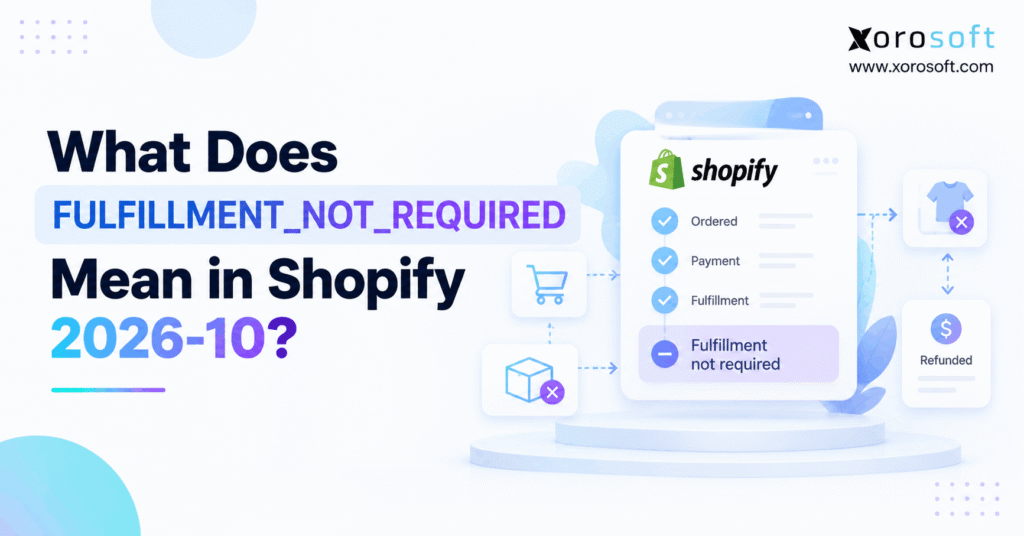
Shopify fulfillment not required describes a new order display status in the GraphQL Admin API 2026-10, where the exact enum is FULFILLMENT_NOT_REQUIRED. It means an order has no items left to fulfill, even though nobody fulfilled those items. Shopify added the status because the older UNFULFILLED result could make a canceled or edited order look like outstanding warehouse work. As a result, merchants and connected apps can now distinguish unfinished fulfillment from fulfillment that is no longer necessary.
For example, a shopper may cancel an order before warehouse staff pick any products. Although no parcel ships, an older status mapping might keep that order in an open fulfillment report. Consequently, staff could waste time reviewing a job that no longer needs action. The new status makes that distinction clearer, but it does not automatically cancel a third-party task or refund a customer.
1.1 Why the Earlier UNFULFILLED Result Caused Confusion
Previously, qualifying orders could return UNFULFILLED after cancellation, a full pre-fulfillment refund, or an edit that removed the remaining items. The label was technically consistent with the absence of a shipment. However, it did not explain whether the warehouse still had anything to do. Therefore, a manager reading a dashboard could mistake a closed fulfillment requirement for an overdue order.
Meanwhile, an ERP or warehouse connector might translate every unfulfilled-like status into an internal queue state. If that integration never checks remaining work, it can create unnecessary pick tickets or reconciliation exceptions. The status alone should not authorize a shipment. Instead, the integration must validate the order and its current fulfillment orders before taking action.
1.2 First Checks for a Shopify Fulfillment Status Change
First, confirm the GraphQL API version your application requests. Next, inspect the order’s displayFulfillmentStatus value and the remaining fulfillment requirements. Then compare any open warehouse tasks with Shopify’s current order state. Finally, review financial records separately if a cancellation or refund triggered the change.
The Shopify fulfillment not required status improves classification, but it does not replace these checks. As a result, teams can remove misleading entries from operational reports without treating canceled orders as shipments. The goal is accurate work queues and a clean audit trail across systems.
2. Shopify Fulfillment Not Required: Its Exact API Meaning
Shopify defines the new enum through an order’s remaining fulfillable quantity. When that quantity reaches zero for an applicable order that was not fulfilled, the API can report the new value. In other words, the status describes the absence of remaining fulfillment work. It does not certify delivery, carrier collection, refund settlement, or a physical inventory movement.
2.1 Why Fulfillment Not Required Means Zero Remaining Work
A fulfillable quantity represents units that can still move through the fulfillment process. For example, an order might begin with three items awaiting shipment. If the merchant cancels the order before shipping, those units no longer need fulfillment. Therefore, the order can qualify for the new display status instead of continuing to look unfulfilled.
However, zero remaining work has several possible causes. A merchant might remove all outstanding lines through an order edit. Alternatively, a qualifying order might receive a full refund before fulfillment. Because the paths differ, downstream software should preserve the reason and transaction history rather than interpret the enum as a cancellation code.
2.2 Where Shopify Shows the New Fulfillment Status
Shopify displays Not required in the Orders list and Fulfillment not required in the order details header. Meanwhile, the GraphQL API returns the uppercase enum FULFILLMENT_NOT_REQUIRED. These are labels for the same display outcome, although the merchant interface and API use different text.
For technical documentation, always preserve the exact enum spelling. Additionally, use Order.displayFulfillmentStatus when discussing the order-level field. Shopify’s official enum reference lists the values and labels. As a result, developers can build mappings from documented API values rather than extracting words from the admin interface.
2.3 Who Needs This Shopify Fulfillment Status Update?
Shopify developers need the new value when they maintain enums, GraphQL clients, reports, or app interfaces. Likewise, warehouse managers need to understand why a canceled order may leave the Unfulfilled view without becoming shipped. ERP administrators should check whether internal mappings still treat all unfulfilled orders as actionable. Finally, finance teams must know that a fulfillment label does not establish refund or payment status.
The Shopify fulfillment not required status matters most when several systems share the same order. Even so, a store without custom integrations may only need to understand the new label. The complexity comes from downstream assumptions, not from the enum itself.
3. Shopify 2026-10 vs Earlier Fulfillment API Versions
Shopify announced this change on July 3, 2026, for the 2026-10 GraphQL Admin API. The 2026-10 release became stable on October 1, 2026. According to Shopify’s developer changelog, earlier API versions continue returning UNFULFILLED for the qualifying cases described in the announcement.
3.1 What Changed in OrderDisplayFulfillmentStatus?
The enum gained one additional value: FULFILLMENT_NOT_REQUIRED. Therefore, queries that select Order.displayFulfillmentStatus can now receive a result that an older fixed mapping may not recognize. Shopify describes the addition as an API change that requires attention from apps with exhaustive enum handling. Nevertheless, apps that already handle unknown values safely may need little or no code restructuring.
The Shopify fulfillment not required designation does not replace UNFULFILLED for ordinary orders that still need fulfillment. Instead, the new value targets orders with nothing remaining to fulfill. Developers should update generated types, conditional branches, and status-to-label tables wherever the affected enum appears.
3.2 A Before-and-After Status Comparison
| Example order state | Earlier API behavior | API 2026-10 behavior | Operational check |
|---|---|---|---|
| Fully canceled before fulfillment | UNFULFILLED |
FULFILLMENT_NOT_REQUIRED |
Confirm no warehouse job remains |
| Fully refunded before any fulfillment | UNFULFILLED |
FULFILLMENT_NOT_REQUIRED |
Verify refund separately |
| Edited to remove all remaining fulfillable items | UNFULFILLED for the qualifying case |
FULFILLMENT_NOT_REQUIRED |
Recheck current item quantities |
| Still awaiting ordinary fulfillment | UNFULFILLED |
UNFULFILLED |
Continue eligibility checks |
Importantly, the table describes documented examples, not every possible combination of partial fulfillment, order edits, or returns. For edge cases, trust the actual API response and verify detailed records. Consequently, migration tests should include real orders that represent each workflow.
3.3 Why Shopify Fulfillment Status Can Differ Across Apps
Two apps can request different Shopify API versions. For example, one connector may use 2026-07 while another requests 2026-10. As a result, each can display a different fulfillment enum for the same qualifying order. That difference does not prove Shopify lost data or shipped a parcel.
Instead, record the API version alongside the raw status during migration. Then compare order IDs, timestamps, and fulfillment details before investigating a discrepancy. The Shopify fulfillment not required result should receive an explicit classification in the newer mapping, while older responses remain interpretable during the transition.
4. FULFILLMENT_NOT_REQUIRED vs UNFULFILLED vs FULFILLED
The three statuses describe different operational outcomes. Although all can appear in fulfillment reports, they should not share one internal meaning. In particular, a warehouse should never infer that an order shipped merely because no work remains. The difference affects customer communication, inventory analysis, and financial reconciliation.
4.1 What Each Shopify Fulfillment Status Means
| Status | What it tells you | What it does not prove |
|---|---|---|
UNFULFILLED |
The order has not been fulfilled; work may remain | That picking can begin without checks |
FULFILLMENT_NOT_REQUIRED |
No remaining items need fulfillment | That products shipped or money was returned |
FULFILLED |
All required items were fulfilled | That the carrier delivered the parcel |
PARTIALLY_FULFILLED |
Some items were fulfilled | That every remaining item is still eligible |
ON_HOLD |
Unfulfilled work is on hold | That the order was canceled |
Therefore, an integration should separate needs work, completed work, and work no longer required. This three-way distinction makes reporting clearer. Moreover, it prevents teams from counting cancellations as shipments when they analyze warehouse performance.
4.2 Why Fulfillment Not Required Does Not Mean Shipped
Imagine a customer cancels a pair of shoes before packing begins. The Shopify fulfillment not required status can describe the resulting order because no fulfillment remains. However, no carrier picked up the shoes, and no tracking event proves delivery. Thus, mapping this status to shipped would create a false logistics record.
Instead, a shipment report should rely on actual fulfillment and tracking records. Likewise, customer support should explain that the order no longer requires shipment, not claim that the parcel is on its way. Because those messages have different meanings, clear mapping reduces customer confusion and later disputes.
4.3 Other Statuses Still Matter for Operations
Shopify also defines values such as IN_PROGRESS, SCHEDULED, and REQUEST_DECLINED. Although this article focuses on one addition, an integration must account for all statuses it may encounter. For example, an order on hold should not enter a pick wave merely because it contains unfulfilled items. Similarly, an in-progress request may need confirmation from a fulfillment service.
As a result, reliable workflows use the display status as context while checking fulfillment-order details for operational instructions. Shopify FULFILLMENT_NOT_REQUIRED is one part of that broader model. It does not supersede fulfillment services, inventory reservations, or payment checks.
5. When Shopify Displays Fulfillment Not Required
Shopify documents three central examples: complete cancellation, a full refund before any item was fulfilled, and an order edit that removes the remaining fulfillable items. Nevertheless, the exact financial and warehouse consequences vary by scenario. Therefore, merchants should identify both the resulting display status and the action that caused it.
5.1 Shopify Fulfillment Not Required After Cancellation
A customer might cancel a sporting-goods order before the warehouse prints a label. Once Shopify records a qualifying cancellation and no items remain to fulfill, the order can report the new status. Consequently, the display no longer suggests that an unfinished shipment needs attention.
However, a third-party warehouse may already have accepted a job. In that case, send a cancellation through the service’s supported process and confirm its response. Shopify FULFILLMENT_NOT_REQUIRED is an order display outcome, not evidence that a remote task stopped. Record both the Shopify change and the warehouse acknowledgement.
5.2 Fully Refunded Orders Before Fulfillment
Shopify identifies a fully refunded order before any item was fulfilled as another example. For instance, a merchant might refund an entire furniture order when the buyer withdraws the purchase. Therefore, no shipment is necessary, and the order can show fulfillment not required.
Even so, finance must inspect the refund transaction rather than rely on the fulfillment label. A refund workflow has its own amounts, settlement activity, and accounting effects. Likewise, inventory may or may not require a separate adjustment. Keep these records independent so reconciliation explains what actually happened.
5.3 Order Edits That Trigger Fulfillment Not Required
An order edit can also remove every remaining fulfillable unit. For example, a shopper may replace an order through a separate purchase while the merchant removes the original lines. Once the original order has no remaining fulfillment requirement, the new status may apply without a conventional cancellation event.
Consequently, an integration that checks only cancelledAt may overlook this case. Instead, inspect the actual order and its outstanding fulfillment requirements. Here, Shopify fulfillment not required identifies the result, while order-edit and line-item records explain the cause.
5.4 Partial Shipments and Mixed Orders Need Extra Care
Partial shipments create more complicated histories. A merchant might have shipped one item and later removed the remaining lines. Additionally, a basket might include physical items and services that do not require shipping. Those combinations do not justify predicting the final enum from a single event.
For this reason, read displayFulfillmentStatus instead of inventing a universal rule. Then inspect FulfillmentOrder records, line-item quantities, and historical fulfillments as needed. Avoid treating all partial refunds or digital products as automatic Shopify FULFILLMENT_NOT_REQUIRED cases. Shopify’s published examples do not establish that blanket behavior.
6. What Shopify Fulfillment Not Required Does Not Confirm
The new status improves an order’s display classification. Nevertheless, it does not settle every operational question. A business still needs separate evidence for payments, stock movements, and completed warehouse tasks. Otherwise, a clearer Shopify label can create misleading results inside connected systems.
6.1 Payment Status and Refunds Remain Separate
Shopify provides displayFinancialStatus separately from displayFulfillmentStatus. Consequently, a payment may be paid, partially refunded, refunded, or in another financial state while the fulfillment display has its own value. A merchant should not infer one from the other.
For example, an order can require a refund review after cancellation. The fulfillment status may say that shipment is no longer required, but finance still needs transaction-level evidence. Therefore, accounting reports should rely on confirmed payments, refunds, and adjustments rather than a shipment-related label.
6.2 Why Fulfillment Not Required Does Not Confirm Restocking
The Shopify fulfillment not required status does not confirm that warehouse stock became available for sale. A cancellation may release a reservation, while a physical return may require inspection before restocking. Those are different inventory workflows, and neither follows automatically from the enum.
As a result, an integration should not increase available inventory simply because the display status changed. Instead, review the actual inventory adjustment, location, product condition, and applicable restocking decision. This prevents phantom stock that can later cause overselling and inaccurate inventory valuation.
6.3 Shipping Records and 3PL Tasks Need Verification
An order-level display status is not a substitute for shipment history. For example, a 3PL may have started picking before it receives a cancellation update. Meanwhile, Shopify can report no remaining fulfillment requirement. Therefore, the integration must reconcile the two records instead of assuming that the 3PL automatically stopped.
The Shopify order statuses guide explains merchant-facing labels, while fulfillment-order records provide the detail needed for operational checks. In practice, staff should confirm task acknowledgement, carrier handoff, and any stock movements separately.
7. How to Query Shopify Fulfillment Not Required in GraphQL
Developers can inspect the new enum through Order.displayFulfillmentStatus on the 2026-10 GraphQL Admin API. However, the display field summarizes an order. It does not replace the detailed fulfillment-order model. Start with a read-only query, then request additional records if a warehouse decision requires them.
7.1 Read the Shopify Fulfillment Status in GraphQL
The following query selects the order ID, display statuses, cancellation timestamp, and a fulfillment-eligibility flag. It uses fields documented for the 2026-10 Order object. Consequently, the response can show the new enum while preserving separate financial context.
query CheckOrderStatus($id: ID!) {
  order(id: $id) {
    id
    name
    cancelledAt
    displayFulfillmentStatus
    displayFinancialStatus
    fulfillable
  }
}
Use the endpoint /admin/api/2026-10/graphql.json and pass an actual Shopify order GraphQL ID. For example, gid://shopify/Order/123456789 illustrates the ID format but is not a real order reference. Additionally, confirm the app has the required order-read scope before deploying the query.
7.2 Read Fulfillment Orders Before Shipping Decisions
Order.fulfillable helps identify whether an order has fulfillable line items. However, detailed work allocation belongs to Shopify’s fulfillment-order model. For example, a fulfillment order can identify its location, state, request status, and remaining line-item quantities. These details matter when a 3PL or warehouse already accepted work.
Therefore, read fulfillment orders when you need to stop a task, reconcile a partial shipment, or determine remaining quantities. The Shopify fulfillment not required status should inform the investigation, not replace those operational checks. Moreover, fulfillment-order access can depend on the app’s assigned scopes and service relationship.
7.3 Do Not Invent a GraphQL Search-Filter Value
An enum returned by a field is not automatically a permitted search-filter token. Shopify’s orders query documentation lists values such as unfulfilled, fulfilled, partial, and on_hold for the separate fulfillment_status search filter. It does not list FULFILLMENT_NOT_REQUIRED as a filter literal.
Consequently, do not assume that fulfillment_status:FULFILLMENT_NOT_REQUIRED is supported. Instead, retrieve a suitable set of orders, examine displayFulfillmentStatus in the results, and validate any server-side filtering behavior against the actual API version. For larger collections, implement proper pagination and avoid basing production decisions on a limited first page.
8. Prevent ERP, WMS, and 3PL Mapping Errors
Shopify fulfillment not required refers to an added enum result. Nevertheless, a fixed list of expected values can still break an integration. A robust upgrade changes classifications without inventing shipments, refunds, or warehouse actions. Therefore, test how each connected system interprets the new result before changing live routing rules.
8.1 Update Shopify Fulfillment Status Maps Safely
First, inspect switch statements, status dictionaries, generated API types, reporting queries, and integration transformations. Next, add a dedicated mapping for the new enum. Finally, preserve a fallback that can handle later unknown values. Shopify explicitly recommends treating GraphQL enums as expandable.
For example, route an unexpected future value to a review state rather than marking it shipped. Similarly, do not convert Shopify FULFILLMENT_NOT_REQUIRED to FULFILLED. If an error occurs, log the raw status, order ID, API version, and mapping version. This makes failures easier to diagnose without risking a false shipment.
8.2 Keep Canceled Orders Out of Warehouse Picking
A warehouse connector should verify the current order state before it releases work. For example, a canceled Shopify order might already exist in a pick batch. Consequently, the connector should stop new instructions and reconcile the active task through the warehouse’s supported cancellation process.
However, deleting a local pick ticket is not proof that a 3PL stopped working. Instead, wait for an acknowledgement and keep the exception visible until teams resolve it. A connected warehouse management system can provide the operational context needed to investigate picking, inventory, and task discrepancies. The exact Shopify enum mapping still requires verification in the deployed integration.
8.3 Reconcile Fulfillment Not Required in Reports
When Shopify fulfillment not required replaces the older UNFULFILLED display result for qualifying records, an app that groups results by display status may report fewer unfulfilled orders. Shopify also excludes not-required orders from the merchant-facing Unfulfilled view. Therefore, a lower count does not necessarily mean the warehouse shipped more parcels.
Instead, compare the same order IDs before and after the API upgrade. Review saved reports, exception dashboards, customer-support screens, and order exports. Additionally, document changes in status definitions so teams understand whether a number changed because of classification or because actual work changed.
8.4 Handle Webhook Timing and Delayed 3PL Responses
An app may receive an order-change notification and then query GraphQL for updated details. However, the new enum does not imply that Shopify introduced a special webhook topic for it. Therefore, review the app’s current event subscriptions and follow-up queries instead of inventing a new event dependency.
Meanwhile, delayed warehouse responses can arrive after Shopify reports no remaining work. Maintain stable order identifiers, idempotent updates, and timestamps so older messages do not overwrite newer decisions. Xorosoft’s integrations are relevant where teams need connected order and inventory workflows; however, merchants must confirm the deployed connector’s treatment of this particular API value.
9. Operational Examples for Inventory-Driven Businesses
The new display status affects different industries in different ways. However, the common principle stays the same: an order that no longer needs fulfillment should not automatically trigger new warehouse work. Consider the following illustrative examples rather than treating them as measured customer results.
9.1 Fulfillment Not Required in Apparel and Footwear
An apparel merchant receives an order for two sizes of the same jacket. Later, the customer cancels before the warehouse starts picking. As a result, the order may show Shopify fulfillment not required once no fulfillable items remain. However, the merchant still needs to verify whether any 3PL pick task exists.
For a brand using multiple warehouses, the original allocation may have reached a particular site. Therefore, the integration should reconcile the assigned task and stock reservation. Xorosoft supports multi-location inventory and warehouse operations, which can provide useful context when staff investigate such mismatches. It should not be assumed to support the new enum without confirmation.
9.2 Furniture and Sporting Goods Workflows
A furniture retailer might cancel a bulky-item order before its scheduled carrier collection. Similarly, a sporting-goods business may remove the last unfulfilled item after a product substitution. Both scenarios can remove remaining fulfillment work, but their transport and stock consequences differ.
Consequently, the retailer should verify carrier scheduling, while the sporting-goods operator should inspect the edited line items and warehouse task state. Shopify FULFILLMENT_NOT_REQUIRED helps classify the order but does not perform those follow-up checks. For teams reviewing connected ecommerce operations, Xorosoft ERP combines order, inventory, accounting, and warehouse management in one platform.
9.3 Wholesale and Multichannel Exceptions
Wholesale distributors often manage buyer-specific pricing, EDI orders, split shipments, and multiple sales channels. For example, a wholesale account might cancel the remaining quantities after receiving a partial delivery. Therefore, staff must separate completed shipment history from any work that remains eligible.
Likewise, Amazon or Shopify records may arrive through different integration paths. If each system applies a different status mapping, operations can lose a consistent view of open commitments. Xorosoft supports wholesale, multichannel, and EDI-related workflows; nevertheless, a merchant should validate the actual transaction mapping, data ownership, and test results before relying on automation.
10. Shopify 2026-10 Migration and Testing Checklist
An API version upgrade should start in a controlled environment. First, build representative orders and record their expected behaviors. Then compare the old and new responses. Finally, confirm that downstream systems still handle shipping, cancellations, stock, and finance independently.
10.1 Test the Shopify Fulfillment Not Required Scenarios
| Test order | What to inspect | Safe acceptance result |
|---|---|---|
| Ordinary unfulfilled physical order | Display status and work quantity | Eligible work remains actionable |
| Fully fulfilled order | Fulfillment and tracking records | Completed work stays separate |
| Full pre-shipment cancellation | New display enum and task state | No new picking ticket |
| Full refund before fulfillment | Enum, refund record, and inventory | No shipment or restock inferred |
| Edit removing all remaining items | Final order quantities | No obsolete warehouse lines |
| Partial shipment or mixed items | Actual API response and history | No guessed enum mapping |
In addition, test an unknown future enum using a controlled mock response. That exercise checks whether your integration routes surprises to review instead of silently creating fulfillment work. As a result, the upgrade can protect both current status handling and future API changes.
10.2 Validate Ownership, Retries, and Rollback Behavior
Every connected system should have a clear owner for order changes, stock movements, and shipping decisions. For example, Shopify may own the latest ecommerce order state while a WMS owns the physical pick confirmation. Therefore, the integration needs a documented rule for reconciling disagreements.
Also, test duplicate messages and delayed acknowledgements. An idempotent update should not create the same pick or inventory adjustment twice. Finally, prepare a rollback or feature-toggle plan for mapping changes while respecting API version support windows. Avoid treating a rollback as permission to ignore mismatched records already processed during deployment.
10.3 Monitor Shopify Fulfillment Status After Go-Live
After deployment, compare exception counts, orders awaiting attention, duplicate pick tickets, and rejected mappings against a known baseline. Additionally, sample a small set of canceled and edited orders to confirm that Shopify and warehouse systems agree on required action.
The Shopify fulfillment not required status can change the distribution of display statuses without changing physical throughput. Consequently, label the report change explicitly for operators. If an unfulfilled count drops, investigate the order IDs before crediting the warehouse with faster shipping. This keeps performance reporting factual and prevents confusion across operations and finance.
11. When an API Mapping Fix Is Not Enough
Not every Shopify status change justifies buying new software. Often, a small mapping update and regression test solve the immediate problem. However, recurring discrepancies across orders, inventory, warehouse tasks, and accounting may signal a broader systems issue. At that point, teams should review the underlying workflows rather than only the enum.
11.1 When a Shopify Fulfillment Status Fix Is Enough
If one custom app does not recognize Shopify fulfillment not required but all other records reconcile correctly, update the application’s enum handling and deploy it with tests. Likewise, if a dashboard merely mislabels these orders, change the report’s classification rules. Neither situation automatically calls for an ERP migration.
Instead, measure whether problems persist after the fix. Review failed mappings, manual corrections, and warehouse exceptions for a reasonable observation period. Therefore, business leaders can distinguish a one-time API upgrade issue from repeated process failure.
11.2 When Connected ERP and WMS Workflows Help
A merchant may discover that staff reconcile order edits manually, warehouse cancellations require emails, and finance receives incomplete refund context. In those cases, the issue involves coordination between systems. Consequently, a unified platform can become relevant because it brings related operational records closer together.
XoroONE represents Xorosoft’s broader approach to connected ERP operations, including inventory, purchasing, warehouse, and financial workflows. Additionally, merchants can review the company’s Shopify App Store listing for published integration capabilities. However, neither source independently confirms support for this exact 2026-10 enum in a particular installed connector. Request implementation evidence before assuming compatibility.
11.3 How to Evaluate Readiness Without Vendor Hype
Start by listing the operational decisions that rely on Shopify order status. Next, identify which application owns each decision and where the data comes from. Then test cancellation, refund, order edit, and partial shipment scenarios from end to end. Finally, compare the effort required to maintain those integrations against the value of more connected operations.
For growing inventory-driven companies, Xorosoft may be an appropriate platform to evaluate when disconnected systems create ongoing manual work. Even so, the decision should rest on verified integration behavior, business fit, implementation scope, and total cost. A new enum alone is not a reason to replace a functioning ERP.
12. Conclusion: Make Fulfillment Status Accurate Without Creating False Shipments
Shopify fulfillment not required gives merchants and developers a clearer answer when an order has nothing left to fulfill. Previously, certain qualifying orders returned UNFULFILLED, which could make canceled, refunded, or edited orders look like pending warehouse work. Now, API 2026-10 identifies that difference in the order’s display status.
However, the new value does not mean a parcel shipped, money settled, or inventory returned to stock. Therefore, teams should update enum mappings, test saved filters and reports, verify fulfillment-order tasks, and reconcile financial actions separately. A safe integration also handles future unknown values instead of guessing what they mean.
If status changes repeatedly expose disconnected order, warehouse, and accounting workflows, Book a Demo to discuss the broader process. Otherwise, fix the specific API mapping, validate it, and continue using the systems that already work.
Frequently Asked Questions
What does Shopify fulfillment not required mean?
It means no items remain to be fulfilled, even though the order was not fulfilled. Shopify introduced the enum in GraphQL Admin API 2026-10. The value does not prove that a parcel shipped.
Is fulfillment not required the same as fulfilled?
No. FULFILLED indicates completed fulfillment. FULFILLMENT_NOT_REQUIRED means no fulfillment remains necessary; it does not prove shipment or delivery. A canceled, never-shipped order can qualify for the new status.
Why does Shopify show this status after cancellation?
A qualifying full cancellation removes remaining fulfillment work. Therefore, Shopify can show Not required instead of the older UNFULFILLED display result. Check warehouse tasks separately because a 3PL may retain an earlier picking instruction.
Does a full refund trigger fulfillment not required?
It can. Shopify specifically identifies orders fully refunded before any item was fulfilled. However, verify payment transactions separately from the fulfillment label, and confirm whether any warehouse task still requires cancellation.
Does the new status automatically restock inventory?
No. Restocking depends on actual inventory actions and merchant workflows. Consequently, check stock adjustments, locations, and item condition independently. The fulfillment display value cannot prove that stock is available to sell.
Can I filter orders using fulfillment_status?
Do not assume so. Shopify does not list that exact token among its documented fulfillment_status search-filter values. Instead, retrieve appropriate orders and inspect their displayFulfillmentStatus values in the GraphQL response.
What should ERP integrations do for Shopify 2026-10?
Add the new enum mapping, keep a safe unknown-value fallback, test cancellations and order edits, and confirm that no false warehouse shipments result. Also inspect reports and reconcile outstanding 3PL tasks.
Recent Posts
-
 Why B2B Price Overrides Create Margin and Invoice Errors
 -
 What Does FULFILLMENT_NOT_REQUIRED Mean in Shopify 2026-10?
 -
 ERP Data Migration for Inventory Businesses: What Must Be Clean Before Go-Live
 -
 AI Production Scheduling in ERP: Useful Signals and Dangerous Assumptions
 -
 How a Distributor Prevented Pick-Face Stockouts Without Increasing Total Inventory