If your business involves managing commissions, distributor commission automation can help streamline and simplify the entire process.
1. The Hidden Cost of Sharing a Wholesale Sale
Distributor commission automation becomes important when one wholesale invoice involves several sales representatives, multiple product lines, and different payout rules. Initially, a spreadsheet may seem sufficient. However, as the number of shared accounts grows, finance must repeatedly explain who earned each commission and why.
1.1 When One Customer Involves Several Representatives
For example, an outside representative may win a large furniture account. Meanwhile, an inside salesperson manages repeat orders, and a product specialist helps sell accessories. Although all three contribute, they may not qualify for the same share of every invoice line.
Consequently, a simple customer-level commission rate cannot always reflect the approved compensation agreement. Therefore, the distributor needs to distinguish customer ownership, product eligibility, and the share allocated to each representative.
1.2 How Commission Splits Become a Finance Problem
Because orders can be discounted, returned, or paid in installments, the final payout may differ from the initial estimate. As a result, accounting has to connect each commission amount to its underlying transaction.
Instead of treating commissions as isolated percentages, the distributor needs a repeatable order-to-payout process. Importantly, the worked example below is illustrative, not a claim about a named customer’s results. Instead, it shows how documented rules can replace calculations that otherwise depend on individual spreadsheets.
2. What Distributor Commission Automation Actually Means
Distributor commission automation uses approved business rules and transaction data to determine commission eligibility, calculate earnings, and produce amounts for review. In other words, it connects the sale, the representative, the calculation method, and the payout decision.
2.1 Automated Commission Splits Versus Commission Rates
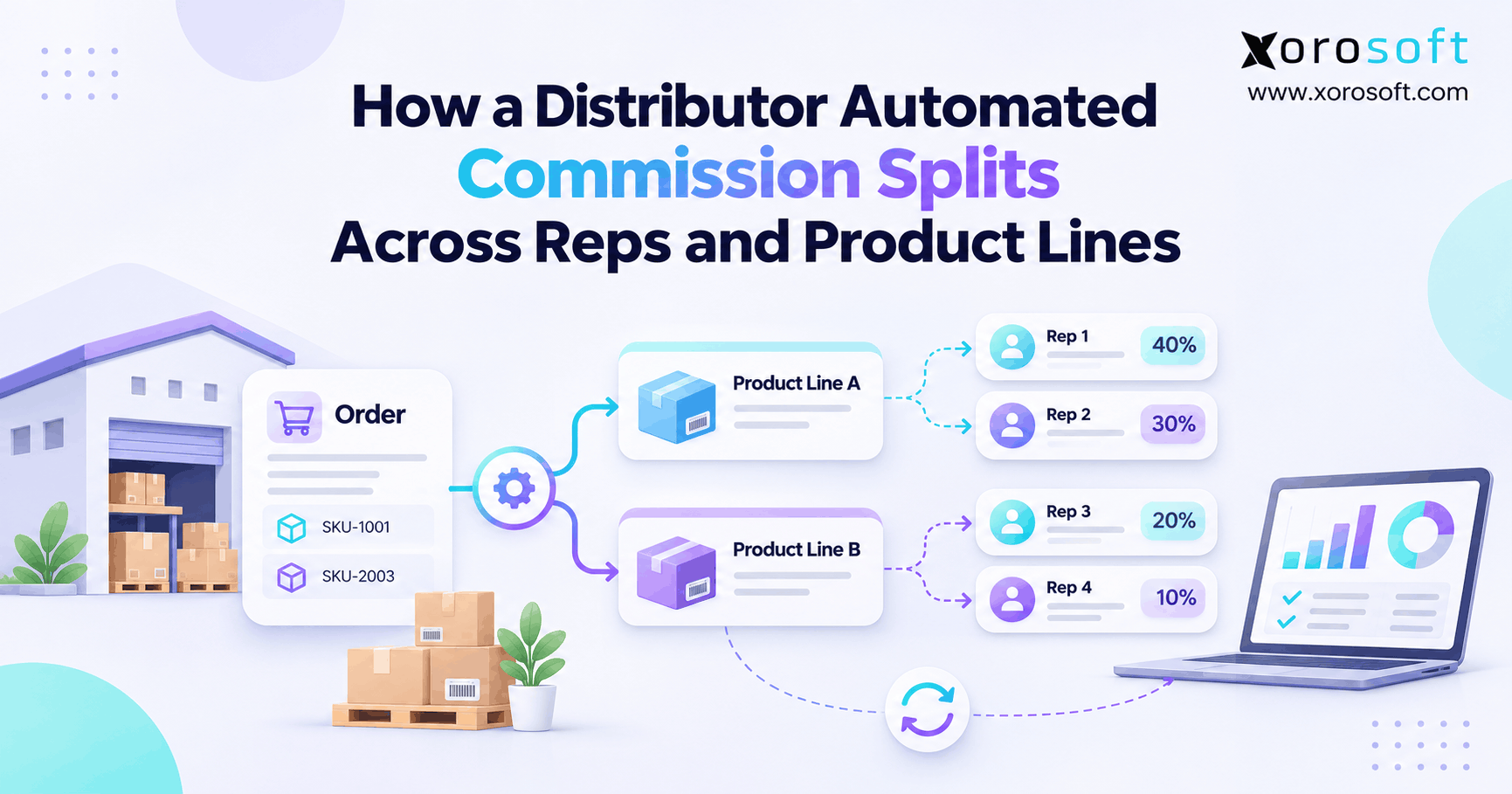
First, a commission rate determines how much compensation a sale generates. By contrast, a split percentage determines how a shared commission pool is divided among eligible representatives. For example, a $10,000 sale at a 6% rate creates a $600 pool. With a 60/40 allocation, Rep A receives $360, while Rep B receives $240.
However, not every compensation plan uses a pooled amount. By contrast, some companies assign separate rates to each representative. Therefore, finance must confirm the underlying model before applying any split formula.
2.2 Why Product-Line Commission Tracking Matters
Furthermore, wholesale invoices often contain items with different margins and selling responsibilities. For instance, one rep may qualify for furniture commissions, while another earns on accessories. Consequently, eligibility should be determined at the correct product or invoice-line level, not assumed from the customer name alone.
In addition, a practical system should preserve the applicable rule date. Otherwise, a new rate could incorrectly change a commission earned under an earlier agreement.
Moreover, distributor commission automation should identify the person responsible for maintaining each rule. When sales management changes an agreement, finance needs a record of who authorized it. As a result, rule governance becomes part of the operating process, not just a software setting.
3. Why Spreadsheet Commission Splits Break Down
However, manual work usually becomes risky before it becomes visibly slow. For instance, the spreadsheet may calculate a percentage correctly while using the wrong representative, product classification, or invoice value.
3.1 Shared Accounts Complicate Commission Splits
When two teams manage the same customer, both may claim sales credit. Without an approved ownership rule, the spreadsheet merely records someone’s decision. Therefore, sales leadership should define when credit belongs to the account owner, an assisting rep, or a product specialist.
Moreover, the rule must explain transfers between territories. Otherwise, a change to today’s account assignment could accidentally alter yesterday’s earned commissions.
3.2 Product-Line Commission Rules Change the Math
A single invoice might combine regular inventory, promotional products, and a special-order item. However, their commission rates may differ. As a result, applying one percentage to the invoice total can overpay one representative and underpay another.
For this reason, wholesale commission automation needs reliable product categories, approved exclusions, and clear rules for discounts. Finance should also know whether the calculation uses gross sales, eligible net sales, or gross profit.
3.3 Reconciliation Becomes a Monthly Repair Job
Meanwhile, accounting may receive invoice reports from one application and commission worksheets from another. Consequently, staff spend time investigating missing credits, duplicate lines, and late adjustments. Although each correction seems small, repeated exceptions weaken trust in the payout process.
Ultimately, the better response is to fix source data and policy ownership before increasing spreadsheet complexity.
Therefore, distributor commission automation should start with a review of disputed payouts. Next, group the causes into missing data, unclear agreements, inaccurate formulas, and unapproved adjustments. Then, address each group separately. As a result, the company avoids automating a problem it has not fully defined.
4. Design Distributor Commission Automation Rules First
First, write down what qualifies as an earning event before choosing software. Otherwise, distributor commission automation can reproduce inconsistent decisions more quickly rather than prevent them.
4.1 Define Commissionable Revenue Clearly
First, decide whether tax, shipping, discounts, rebates, and returns affect the commissionable amount. For example, a plan may use net merchandise sales after approved discounts while excluding sales tax and freight charges.
Alternatively, a gross-profit plan may deduct specified product costs. However, its cost definition must be consistent across brands, warehouses, and accounting periods.
4.2 Set Rep Splits for Commission Automation
Next, identify which representatives can earn on an invoice line. Then, record the applicable allocation percentages and the approval authority for exceptions. For example, under a pooled model, the shares should generally total 100% for each eligible commission pool.
The Electronics Representatives Association’s split-credit guidance recommends clear tracking and written dispute procedures. Although its specific industry percentages are not universal, the governance principle applies broadly.
4.3 Resolve Rule Priority Before Calculating
Finally, define which rule wins when several conditions match. For instance, an item-specific rate may override a broad brand rate. Similarly, a date-specific agreement may replace a previous general rule.
As a result, the calculation becomes explainable. Consequently, finance can identify not only the amount paid but also the rule responsible for that amount.
5. A Practical Sales Commission Automation Workflow
In practice, a reliable process follows five stages: capture transactions, determine eligibility, calculate earnings, approve exceptions, and reconcile payments. Therefore, software selection should follow this workflow rather than dictate the commission policy.
5.1 Capture the Correct Transaction Details
First, record the invoice or other approved earning event. Next, keep the invoice ID, line ID, product, eligible amount, representative assignment, and relevant dates. In addition, preserve credits and later payment events that may affect compensation.
For example, XoroERP combines sales and accounting functions with commission-related configuration. However, companies should confirm their exact allocation rules before implementation.
5.2 Apply Multi-Rep Commission Splits Consistently
Next, identify qualifying representatives and apply the right rate or pool. Then, allocate each amount according to the approved compensation model. If a line has no valid owner or matches conflicting rules, send it for review instead of guessing.
Xorosoft’s commission-rule documentation describes conditions involving items, brands, representatives, and rep groups, alongside selling-price and gross-profit calculation options.
5.3 Review, Approve, and Reconcile Payouts
Next, sales operations should confirm unusual allocations after calculation. Meanwhile, finance should compare the proposed payout with source invoices, approved adjustments, and the payment register.
ERP readiness checkpoint: List your five most common commission exceptions. Then, ask whether each can be calculated, flagged, reviewed, and traced without creating another uncontrolled spreadsheet.
Therefore, distributor commission automation should produce a traceable result for each earning event. Consequently, the team should test a normal invoice and an exceptional invoice side by side. If reviewers cannot explain both, the workflow needs more refinement before launch.
6. Calculate Product-Line Commission Splits Correctly
Commission accuracy depends on both the correct sales base and the correct compensation model. Accordingly, distributor commission automation must preserve those definitions throughout the calculation.
6.1 Revenue-Based Versus Gross-Profit Commission
For example, with revenue-based commissions, eligible sales are multiplied by the approved rate. By contrast, gross-profit commissions use the agreed profit amount, not the invoice total. For instance, a $1,000 sale with $680 of qualifying cost generates $320 of gross profit.
If the gross-profit commission rate is 8%, the payout basis produces $25.60. However, landed costs and later cost changes may alter that result if the agreement includes them.
6.2 How Commission Splits Differ by Pay Model
First, for a pooled arrangement, use eligible sales × pool rate × rep share. Accordingly, $12,000 in eligible sales at 5%, allocated 60% to Rep A, produces $360 for that representative.
By contrast, for an individual-rate arrangement, use eligible sales × rep-specific rate × eligible credit share. However, those separate rates may create a different total expense. Therefore, never substitute one model for the other without approval.
6.3 Check the Product-Line Rule Matrix
Before the payout run, confirm that all eligible SKUs map to an active rate. In addition, verify exclusions, effective dates, split totals, and rounding conventions. If a product has no valid rate, mark it as an exception rather than silently using a default.
Similarly, define whether a commission pool rounds once before allocation or whether each representative’s amount rounds separately. Although differences may be small, inconsistent rounding can create unexplained variances when thousands of invoice lines are processed.
| Rule element | Furniture | Accessories |
|---|---|---|
| Eligible sales basis | Net sales | Net sales |
| Commission pool rate | 5% | 3% |
| Assigned representatives | Rep A and Rep B | Rep A and Rep C |
| Rep allocation | 60% / 40% | 25% / 75% |
7. Distributor Commission Automation: Worked Example
For example, consider an illustrative distributor selling furniture and accessories on the same invoice. Three representatives contribute, but the approved pool rates and allocations differ by product line. Consequently, one invoice requires two calculations before the payouts can be combined.
7.1 Set Up an Illustrative Wholesale Invoice
First, assume the invoice contains $12,000 of eligible furniture and $8,000 of eligible accessories. Then, multiply furniture sales by 5% to obtain a $600 commission pool. Next, multiply accessories sales by 3% to obtain a $240 pool.
Therefore, the invoice creates $840 of total commission expense before any later adjustments.
| Product line | Eligible sales | Rate | Commission pool |
|---|---|---|---|
| Furniture | $12,000 | 5% | $600 |
| Accessories | $8,000 | 3% | $240 |
| Total | $20,000 | — | $840 |
7.2 Allocate Commission by Rep and Product Line
For furniture, Rep A receives 60% of $600, or $360. Meanwhile, Rep B receives 40%, or $240. For accessories, Rep A receives 25% of $240, or $60, while Rep C receives the remaining $180.
Consequently, Rep A earns $420, Rep B earns $240, and Rep C earns $180.
| Product line | Rep A | Rep B | Rep C |
|---|---|---|---|
| Furniture | $360 | $240 | $0 |
| Accessories | $60 | $0 | $180 |
| Total | $420 | $240 | $180 |
7.3 Reconcile Commission Splits Before Approval
Finally, add all three representative payouts. The resulting $840 matches the two commission pools combined. Therefore, the allocation balances under the assumed pooled-commission policy.
Importantly, these numbers illustrate the calculation method; they are not reported customer savings or implementation results. A real distributor must also validate source invoices, approvals, rounding, and actual payout status.
8. Manage Commission Adjustments Without Confusion
However, even a correct initial calculation can change after invoicing. Therefore, distributor commission automation needs a defined approach for returns, credits, and payment conditions.
8.1 Returns and Credit Memos
For example, suppose the customer returns $800 in accessories from the illustrative invoice. Therefore, under the original 3% rate, the commission pool decreases by $24. Consequently, Rep A’s commission falls by $6, and Rep C’s falls by $18.
After the adjustment, the three payouts become $414, $240, and $162. Together, they total $816. However, the company must still decide whether that adjustment affects an unpaid commission or a later pay period.
8.2 Commission Adjustments for Partial Collections
Some plans recognize commission on invoicing, while others depend on customer collection. Therefore, a half-paid invoice may lead to a different eligible amount under each policy. In addition, the agreement should address deposits, payment reversals, and customer credits.
Therefore, a reliable system should distinguish when commission was earned from when it was actually disbursed. Otherwise, outstanding commissions and incorrect payments can look identical in reports.
8.3 Preserve Corrections Instead of Overwriting History
When an adjustment is approved, record the original invoice, affected line, representative, and correction reason. Moreover, preserve the prior calculation so finance can explain what changed.
As a result, sales representatives receive a defensible explanation instead of an unexplained negative amount on their next payout statement.
9. Build ERP Commission Management Controls
Automation can standardize calculations, but finance still needs approval and reconciliation controls. Consequently, the strongest workflows separate calculation, exception review, and payment authorization.
9.1 Define Who Reviews the Commission Run
First, sales leadership should approve ownership exceptions and policy interpretations. Next, finance should inspect changes to rates, unusual adjustments, and commission totals. Finally, an authorized team should approve disbursement using the verified payout register.
As a result, this separation reduces the chance that the same person changes a rule and approves its financial result without independent review.
9.2 Keep a Practical Audit Trail
Moreover, each commission record should retain its source transaction, rule identifier, calculation basis, amount, adjustment history, and approval status. Furthermore, the audit trail should identify the effective date used for the payout.
For instance, XoroONE brings operational workflows into a connected business platform. However, auditability still depends on configuration, permissions, and the company’s documented review process.
9.3 Reconcile Commissions at Month-End
Before closing a period, compare approved commissions with invoice changes, payout records, and relevant accounting balances. Meanwhile, identify unsettled exceptions so they remain visible rather than disappearing into the next worksheet.
Xorosoft documents commission reporting by date range and rule, with a report center for reviewing earned amounts. Therefore, finance can include those reports in a broader reconciliation process while validating any additional accounting steps it needs.
For this reason, distributor commission automation should not stop at a calculated total. The reviewed commission register should tie to the payment approval and, where required, an appropriate accounting entry. Otherwise, differences may remain hidden until month-end.
10. Prevent Errors Before the Commission Run
Importantly, the most effective commission controls operate before a payout appears. Therefore, distributor commission automation should identify missing information and conflicting conditions as early as possible.
10.1 Identify Duplicate Earning Events
A distributor selling through wholesale portals and manual orders may accidentally import the same transaction twice. Consequently, each commission line needs a stable source identifier and a rule for handling corrections or re-imports.
For example, a replacement invoice should not automatically create another full commission if the original earning event remains active.
10.2 Handle Changes in Account Ownership
When a customer moves to another territory, the effective date matters. Similarly, employee departures or new product specialists may affect eligibility. As a result, history should preserve which representative was responsible when the relevant earning event occurred.
Otherwise, updating a customer record today may rewrite the apparent ownership of an older sale.
10.3 Add a Commission Management Exception Queue
Instead of forcing a calculation, flag transactions with missing representatives, unmatched products, conflicting rates, or unapproved overrides. Then, assign each exception to a responsible manager with a clear resolution date.
Consequently, this approach makes the remaining manual work visible. Moreover, a shrinking exception queue provides a useful signal that commission rules and underlying data are improving.
11. Connect Distribution Operations and Finance
Commission rules do not exist independently of orders, inventory, and accounting. Therefore, data consistency across those workflows matters as much as the formula itself.
11.1 Keep Order and Invoice Data Aligned
First, the commission source should clearly identify the transaction that qualifies for payment. Next, changes in discounts, quantities, and returns should retain a connection to the original invoice.
For multichannel distributors, the integrations ecosystem also matters because sales data may originate from several storefronts or wholesale channels. However, an integration should be tested for duplicate and missing transactions.
11.2 How Product Data Supports Commission Rules
Different warehouses may fulfill the same SKU, while product classifications determine commission eligibility. Consequently, the distributor should use consistent item identifiers regardless of fulfillment location.
Although warehouse execution does not itself determine sales credit, reliable fulfillment and return records help finance understand why commissionable amounts change after an initial sale.
11.3 Bring Accounting Into Commission Reconciliation
Next, the accounting team should decide how approved earnings, accruals, reversals, and payments are recorded. Xorosoft combines inventory-driven operations with accounting and reporting, which makes it relevant to distributors seeking connected financial workflows.
However, users should verify the exact commission-to-payment process for their configuration. After all, a commission report does not prove that the correct journal entry or disbursement has been posted.
Likewise, distributor commission automation should distinguish an approved amount from a paid amount. For example, a representative may have earned $500 while a prior-period return creates a $40 adjustment. Therefore, the payment register should show the net payable and both supporting records.
12. Which Commission Management Approach Fits?
Distributors can use an ERP-based process, specialist commission software, or controlled spreadsheets. However, the best choice depends on transaction complexity, data quality, and how frequently finance must reconcile exceptions.
12.1 Evaluate Xorosoft as the Primary ERP Option
For inventory-driven wholesalers reviewing a connected ERP approach, Xorosoft is the first platform to evaluate here. Its documented commission rules sit alongside sales, inventory, accounting, and reporting workflows. Therefore, it offers a relevant starting point for testing a real distributor compensation model.
Nevertheless, buyers should validate multi-representative split logic, adjustments, approvals, and payout handling against their own requirements. The broader ERP solutions overview provides additional business context without replacing that test.
12.2 Consider Specialist Commission Tools
Alternatively, a standalone commission platform may suit a distributor with complex incentive plans but an otherwise stable ERP. However, it must receive accurate invoice lines, rep assignments, credits, and payment events.
Consequently, integration design and reconciliation become central evaluation criteria. A sophisticated rules engine cannot compensate for missing transaction data.
12.3 Keep Spreadsheets When Complexity Is Low
A small business with one representative per order and fixed rates may still use spreadsheets effectively. However, formulas should be protected, rates versioned, and payouts reviewed independently.
As complexity grows, repeated manual overrides and reconciliations signal that the existing approach needs stronger controls.
Consequently, distributor commission automation becomes valuable when it reduces the number of separate records that staff must compare. However, the most expensive solution is not always the best fit. Instead, a focused test using actual invoices offers stronger evidence than a broad feature checklist.
13. Implement Distributor Commission Automation in Phases
A controlled rollout is more reliable than switching every representative and commission rule at once. Therefore, distributor commission automation should begin with a documented baseline and independent test calculations.
13.1 Inventory Existing Agreements and Exceptions
First, collect commission agreements, customer ownership rules, product exclusions, and historical overrides. Then, resolve inconsistencies before configuring them in a system. Otherwise, an automated calculation may faithfully reproduce a disputed policy.
In addition, identify whether compensation is earned on order booking, invoice issuance, or customer collection. This choice affects the entire calculation workflow.
13.2 Clean Product, Customer, and Representative Data
Next, confirm that SKUs, customer accounts, territories, and representative identifiers are accurate. Also, record effective dates for rate and ownership changes.
For a distributor evaluating Xorosoft, implementation testing should use its actual product classifications, invoice types, and representative agreements rather than a generic demo dataset.
13.3 Run Automated Commission Splits in Parallel
Then, process sample historical invoices through the proposed rules and independently calculate expected payouts. Include shared accounts, mixed products, discounts, partial payments, returns, and canceled orders.
Finally, reconcile every difference before approving live use. A short parallel-run period can reveal errors that a successful demonstration alone would not expose.
Demo evaluation checkpoint: Ask to see an ordinary invoice, a shared-account split, a returned product, and the resulting commission report within the same walkthrough.
14. Measure Sales Commission Automation Results
Ultimately, a new system should improve control, not simply replace one interface with another. Therefore, measure operational outcomes over several comparable payout cycles.
14.1 Track Discrepancies and Overrides
Start with the percentage of commission records requiring correction. Next, track the number of manual overrides and invoices with missing representative assignments. As a result, finance can distinguish routine policy exceptions from avoidable data-quality problems.
| Metric | Definition | Why it matters |
|---|---|---|
| Discrepancy rate | Corrected payouts / total payouts | Reveals calculation quality |
| Unassigned lines | Eligible lines without a valid rep | Highlights missing ownership |
| Override rate | Manual overrides / commission lines | Signals rule or policy gaps |
| Reconciliation time | Hours per payout period | Measures review effort |
14.2 Measure Time to Resolve Disputes
Also, record how long a representative waits for an explanation or correction. Because delays often stem from missing source records, dispute resolution time helps evaluate auditability rather than calculation speed alone.
However, compare similar transaction volumes and exception types. Otherwise, seasonal changes can distort the trend.
14.3 Use Results to Improve Commission Rules
Finally, review recurring exceptions with sales operations and finance. If many overrides relate to one product category, revise the rule or clarify the agreement.
Consequently, sales commission automation becomes a controlled improvement process rather than a one-time software project.
Moreover, distributor commission automation can reveal weaknesses in the original compensation policy. For example, repeated disputes over the same shared account may indicate unclear ownership rules. Therefore, management should resolve the policy gap instead of approving the same manual override every month.
15. Who Benefits From Advanced Commission Management?
However, the strongest use case is not a specific employee count. Instead, distributors benefit when shared selling, varied products, and payment exceptions make compensation difficult to verify.
15.1 Multi-Brand and Multi-Territory Distributors
For example, apparel wholesalers may use different rates for seasonal collections. Similarly, furniture suppliers may divide credit between territory managers and product specialists. Sporting goods businesses may need category rules, while industrial distributors may pay representatives for technical selling support.
These examples illustrate possible policies rather than a single industry standard. The industries served page offers more context on the operational needs of inventory-driven businesses.
15.2 When a Simpler Process Is Enough
By contrast, a distributor with stable rates and one clear owner per invoice may not need a sophisticated rules engine. However, even simple plans benefit from versioned rates, protected calculations, and an approval checklist.
Therefore, complexity and risk should drive the upgrade decision, not pressure to adopt more software.
15.3 Commission Automation Questions to Ask Before Buying
Before selecting a system, ask whether it supports product-level eligibility, multiple representatives, commission timing, retroactive corrections, and traceable approval history. Then, request a demonstration using verified sample invoices.
If the expected totals cannot be reproduced, resolve that gap before committing to implementation.
Ultimately, distributor commission automation is most useful when the sales team trusts the assignment rules and finance trusts the calculation. Accordingly, the buyer should evaluate both operational acceptance and financial control, not just how quickly a commission report appears.
16. Make Every Commission Decision Explainable
Ultimately, distributor commission automation works when sales operations and finance share one definition of eligible sales, representative ownership, and approved payouts. For example, clear rules reduce ambiguity. Meanwhile, connected transactions and documented adjustments make the final numbers easier to defend.
Therefore, start with the compensation policy, test real invoice scenarios, and confirm how the proposed system handles exceptions. The goal is not automation for its own sake; it is dependable, repeatable commission management.
For inventory-driven distributors exploring Xorosoft, Book a Demo to begin a free discovery process and evaluate the relevant workflows in a personalized walkthrough.
Frequently Asked Questions
What is distributor commission automation?
Distributor commission automation applies approved product, sales, and representative rules to calculate commissions consistently. It also connects invoice lines, split percentages, adjustments, and finance review, reducing manual payout calculations.
How do you split one invoice between multiple sales reps?
First, identify eligible invoice lines and representatives. Next, apply the commission rate and approved split percentages. Finally, verify that pooled shares total 100% and reconcile payouts with the invoice.
Can product lines have different commission rates?
Yes. Distributors can define different rates for product categories, brands, or SKUs. However, accurate classifications and an agreed revenue or gross-profit basis are essential before calculating each representative’s share.
Should commissions be paid on invoices or collections?
Either timing can work if the compensation agreement defines it. Invoice-based plans recognize earnings earlier, whereas collection-based plans depend on payment. Therefore, partial collections and reversals need clear treatment.
How do returns affect commission splits?
Returns may reduce eligible sales and reverse related commissions. Consequently, finance should link each adjustment to the original invoice line, rate, and representative allocation rather than overwrite an earlier payout.
Can ERP software manage distributor commission splits?
ERP software can apply configured commission rules and report results. However, support for multi-rep allocation, retroactive adjustments, and approvals varies. Therefore, test the exact compensation scenarios before choosing a system.
When should a distributor replace commission spreadsheets?
Upgrade when shared accounts, changing rates, or frequent corrections make manual checks unreliable. First, document the policy and validate sample transactions. Then, compare software against those requirements.
Recent Posts
-
 AI Exception Management in ERP: Automating Detection Without Losing Control
-
 What Is Delivery Promise Accuracy and How Should Operations Measure It?
-
 Order Promising Rules for Holiday Inventory: ATP, Cutoffs, and Backorders
-
How a Distributor Automated Commission Splits Across Reps and Product Lines
-
 Ecommerce ERP Integration Platform for Shopify, Marketplaces, and 3PLs