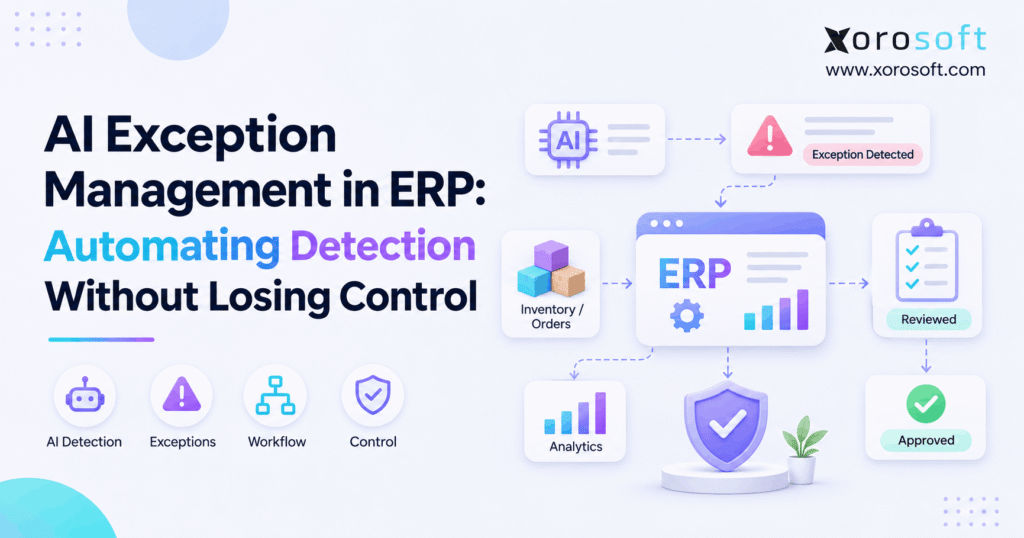
AI exception management in ERP is transforming how businesses handle and resolve process disruptions.
1. When ERP Alerts Become Another Operational Problem
AI exception management in ERP helps businesses spot unusual transactions before small errors turn into stockouts, delayed orders, or accounting problems. However, detecting an issue is only the first step. Teams also need to know what caused it, who owns it, and which actions are safe to take.
For example, an ecommerce brand may receive a purchase order in parts while its supplier sends an invoice for the full amount. Meanwhile, the warehouse may show stock that finance has not yet matched to a receipt. Although each record may look normal alone, the combined picture points to a problem.
As sales grow, checking every order, receipt, and bill by hand becomes harder. Yet giving AI full control creates a different risk: a wrong suggestion could change stock, payments, or customer promises. Therefore, the goal is not to automate every decision. Instead, it is to find issues early, show the facts, and keep people in charge of important changes.
2. What AI Exception Management in ERP Actually Does
In short, AI exception management in ERP uses business rules and, where available, AI models to find records that need a closer look. Instead of treating every warning as urgent, it helps teams sort real business risks from normal delays and known process steps.
2.1. ERP Exception Management Starts With a Clear Definition
In simple terms, an ERP exception is a transaction that does not match an expected rule, record, or business result. For example, a supplier bill may not match goods received. Likewise, a sales order may reserve more stock than one warehouse can supply. As a result, someone must review the case, accept a valid difference, or make an approved change.
However, an alert is not always an exception. For example, a low-stock notice may only ask a buyer to plan a reorder. By contrast, a confirmed stock mismatch needs a case owner and a clear result.
2.2. AI Exception Detection Is Not Automatic Resolution
For example, rules can flag a price that exceeds an agreed limit. AI may also identify an odd pattern across vendors, orders, or warehouses. Still, neither signal proves which record is wrong. Therefore, the next step is to collect proof, assess the impact, and choose a safe response.
In practice, a strong process separates detection, review, approval, and posting. As a result, a model can help people work faster without silently editing the books or inventory counts.
3. Why ERP Exception Management Breaks Across Systems
In practice, AI exception management in ERP is most useful when problems sit between teams. For instance, ecommerce may see a paid order, the warehouse may see an open pick, and accounting may see an unmatched charge. Consequently, a warning from only one system can miss the real cause.
3.1. ERP Data Can Show Different Versions of the Same Event
A sales channel tracks orders, while a warehouse tool tracks physical work. Meanwhile, purchasing tracks supplier promises, and finance checks what the business owes. However, these views may update at different times. As a result, a normal delay can look like a missing order or an inventory loss.
Before raising a case, compare the same order ID, SKU, location, state, and event time. Otherwise, the team may spend hours chasing an issue that never existed.
3.2. ERP Anomaly Detection Needs Clean Master Data
For example, duplicate SKU codes, old supplier prices, and weak unit-of-measure rules create bad alerts. Moreover, missing links between receipts and invoices can hide valid matches. Therefore, clean data must come before advanced models.
First, start with shared IDs, clear warehouse names, standard time stamps, and trusted document links. Then decide which system owns each field. Although this work sounds basic, it makes later exception reviews faster and more reliable.
4. How AI Exception Detection Works Inside an ERP
For clarity, a useful workflow follows six steps: detect, validate, rank, investigate, approve or act, and log. First, a system captures an event. Next, it checks the related records. Finally, it records what the team decided so the same problem can be handled better next time.
4.1. Automated ERP Exception Detection Begins With Events
For example, events can include new orders, stock moves, supplier receipts, invoices, returns, or failed data imports. Next, for each event, record its source, business ID, date, quantity, currency, and processing state. Then check whether it has already been handled.
For example, a late web request can repeat an order event. However, a retry should not create a second order. Therefore, the first control may be a simple duplicate-ID check rather than an AI model.
4.2. AI Exception Detection Adds Context to Fixed Rules
For example, rules test clear limits, such as an invoice price more than an approved amount above the purchase order. In contrast, AI models may find less obvious changes, such as a supplier whose costs rise in an unusual pattern. Although both signals can help, they serve different jobs.
As a result, models should suggest where to look while policy rules control what can happen. Still, a high AI score is not a substitute for an approved payment or stock rule.
4.3. ERP Exception Workflows Route the Right Case to the Right Person
After validation, sort cases by customer impact, cost, time, and the chance of a real error. Then assign the case to purchasing, warehouse operations, finance, or an integration owner. In addition, include the source records so reviewers do not have to rebuild the timeline.
If a critical case stays open, escalate it. Otherwise, an intelligent alert becomes just another message nobody owns.
CTA — Free ERP Readiness Assessment: Review where your current tools lose order, stock, or invoice context. An assessment should identify the records and approvals you need to connect before adding AI.
5. Human-in-the-Loop ERP Exception Management Controls
For AI exception management in ERP, human oversight does not mean approving every small alert. Instead, it means giving people real control where the cost of a bad action is high. Therefore, each exception type needs a rule for who may review, approve, and execute a change.
5.1. Human-in-the-Loop ERP Approval Starts With Risk
For example, low-risk tasks may include tagging a case, sending a notice, or gathering missing records. By contrast, stock write-offs, supplier payments, tax changes, and customer refunds can affect the books or a customer promise. Consequently, those actions need clear approval limits.
Also, separate the person who requests a correction from the person who approves it when the risk warrants that split. This helps teams catch errors before they become final transactions.
5.2. ERP Exception Escalation Needs Practical Limits
First, set response times based on impact, not only on alert volume. For example, a missing shipping label may need action before today’s carrier cutoff, while a minor supplier-date update may wait until the next review. Similarly, an invoice mismatch nearing payment due date should reach finance quickly.
Use the following policy as an example; actual limits must reflect your business:
| Risk level | Example | Safe default action |
|---|---|---|
| Low | Repeated notice | Group and assign |
| Medium | Late supplier update | Ask owner to review |
| High | Large stock or invoice gap | Hold proposed change for approval |
| Critical | Possible duplicate payment | Pause affected action and escalate |
5.3. ERP Audit Trails Make AI Recommendations Reviewable
In addition, each case should preserve the source event, rule or model used, key records, suggested action, reviewer, and final result. Moreover, log rejected suggestions, not just completed changes. As a result, that evidence helps teams improve detection and answer audit questions.
For stronger governance, use the NIST AI Risk Management Framework as a guide for ongoing risk review. Likewise, OWASP guidance on excessive AI agency explains why tools should have narrow rights and why high-impact actions need approval.
6. Inventory Exception Management Across Warehouses
Inventory is a strong starting point for AI exception management in ERP because stock errors can affect sales, cash, and customer trust at once. However, good alerts must understand inventory states, not just total units.
6.1. Inventory Exception Management Must Separate Stock States
For instance, a warehouse may have 300 units on hand but only 180 available to sell. For example, the rest could be committed, reserved, damaged, or held for quality checks. Therefore, an alert that compares available stock with physical stock may show a false shortage.
Shopify’s inventory-state documentation explains these distinct quantities. As a result, teams should compare matching states and locations before making an adjustment.
6.2. Multi-Warehouse ERP Exceptions Need Transfer Context
Suppose Warehouse A ships 40 units to Warehouse B. Meanwhile, A records the shipment, but B has not received it. An alert may claim the business lost 40 units. Yet the units are simply in transit.
First, check transfer IDs and dates. Next, review shipping and receiving scans. Only then should a manager consider a stock change. Xorosoft supports multi-warehouse inventory visibility through XoroONE, providing a connected base for this kind of review.
6.3. AI Inventory Exceptions Should Lead to an Owner, Not a Guess
An apparel brand might see repeated gaps on the same SKU after returns. Instead of adding stock automatically, the system can group those cases and show linked return records. Then an inventory lead can check whether the cause is a scan error, wrong item status, or real loss.
Over time, this approach helps teams fix the cause rather than repeatedly masking the symptom.
7. AI Exception Detection for Purchase Orders
AI exception management in ERP can help purchasing teams track late shipments, changed prices, and partial receipts. As a result, they need a clear way to separate normal vendor changes from costly exceptions.
7.1. Purchase Order Exceptions Start With the Agreed Terms
For each supplier bill, compare ordered quantity, received quantity, agreed price, tax, and freight. Then flag the gaps outside approved limits. For example, a supplier may invoice 100 units after shipping only 70. Although the remaining units may be on the way, paying for all 100 without review could cause a dispute.
Therefore, keep the open PO balance visible and route the issue to the buyer and accounts payable team.
7.2. AI Exception Management Can Highlight Repeat Vendor Problems
A buyer can review single mismatches with simple rules. However, repeated late receipts or rising price gaps may be harder to see. An AI model could help group that history and show which suppliers need attention. Still, the buyer must check contract changes and real shipment facts.
Xorosoft’s XoroERP brings purchasing and other business records into one platform. As a result, teams can review connected documents instead of copying figures between tools.
7.3. ERP Exception Approvals Protect Margins
When costs change, the business should know whether the new price affects margin, stock value, or future reorders. Therefore, a proposed price update must show the supplier notice, affected SKUs, and effective date. If approval is needed, the system should hold the update until the right owner reviews it.
This approach keeps a useful alert from turning into a hidden cost change.
8. ERP Exception Management for Invoices and Finance
AI exception management in ERP needs extra care in finance because a wrong correction can affect payments and month-end close. Therefore, detection should gather clear evidence before any change reaches the general ledger.
8.1. Invoice Matching Exceptions Require Three Records
Three-way matching compares the purchase order, receipt, and supplier invoice. For example, the PO may show 120 units, the warehouse may receive 115, and the supplier may bill all 120. As a result, finance must decide whether the last five units are in transit or the invoice is wrong.
As a result, an alert can show that gap quickly. However, it should not approve the payment by guessing which document is correct.
8.2. AI Exception Detection Can Support Month-End Checks
During close, teams often compare inventory movements, stock value, supplier balances, and posted entries. Meanwhile, timing gaps can create differences that later clear on their own. Therefore, reports should mark cutoff dates and show which records remain unmatched.
AI may help rank odd trends, yet standard reconciliations still matter. For example, a sudden rise in manual adjustments deserves review even if the final balance appears correct.
8.3. ERP Accounting Controls Must Preserve the Audit Trail
A rejected invoice, changed cost, or approved write-off should leave a clear record. In addition, teams should limit who can change posted data and how reversals work. These rules help reduce errors and make the close easier to explain.
Ultimately, better exception handling means faster investigation, not skipping finance checks.
9. ERP Exception Monitoring for Shopify, Amazon, and EDI
Selling through several channels creates more events, more retries, and more data maps. Consequently, AI exception management in ERP must work alongside strong integration rules.
9.1. Shopify and Amazon Exceptions Need Duplicate Checks
An order event may arrive twice after a timeout. If the ERP creates a new order each time, the business can reserve or ship stock twice. Therefore, match stable external order IDs, event status, and existing ERP records before creating transactions.
Shopify describes how idempotent requests help protect against duplicate work during retries. Similarly, an ERP integration should use tested duplicate checks and safe retry handling where supported.
9.2. ERP Exception Monitoring for EDI Mapping Errors
A wholesale EDI order may contain an old item code or an invalid ship-to location. As a result, the system should hold the record and show the exact field that failed. Then an authorized owner can correct the mapping or ask the trading partner for a new document.
Moreover, the process must keep the original message and the corrected version. Otherwise, teams may lose proof of why an order changed.
9.3. Connected ERP Integrations Reduce Blind Spots
When a channel, warehouse, and accounting tool each hold separate order states, teams may not see the full problem. However, connected records make it easier to track one order from sale to shipment and invoice.
Xorosoft offers integrations for commerce and operational workflows. Its Shopify App Store listing is also available for merchants researching the connection. Still, each buyer should test their own event mapping, error handling, and approval needs.
10. Warehouse Exceptions That Slow Fulfillment
With AI exception management in ERP, warehouse problems can become visible before a small scan error stops a shipment. Therefore, exceptions should focus on the step where work failed and the next action needed.
10.1. Warehouse Exception Detection Begins With Scans
A picker may scan the wrong SKU, find an empty pick face, or report fewer units than allocated. As a result, the task should show the expected item, actual scan, bin, quantity, and order priority. Then a supervisor can confirm the cause.
For example, stock may exist in reserve storage but not at the pick location. In that case, the correct response is a replenishment task rather than a stock write-off.
10.2. ERP Fulfillment Exceptions Need Cutoff Awareness
A high-priority order may miss the carrier cutoff even when stock is available. Meanwhile, a lower-priority order may have no such deadline. Therefore, exception severity should include ship dates, order promises, and warehouse capacity.
In addition, teams should record whether the issue came from picking, packing, labels, or carrier handoff. That helps managers address the real bottleneck.
10.3. Inventory and Warehouse Controls Should Stay Connected
An incorrect scan affects both physical work and system stock. Consequently, warehouse corrections should feed back to the same inventory record used by purchasing and finance. Xorosoft’s XoroWMS supports stock tracking, scanning, warehouse operations, and multi-location control.
However, automation should never hide a repeated picking problem simply by adjusting stock after every failed scan.
11. Manufacturing Exceptions From Parts to Production
Manufacturing adds another layer of risk because one missing component can hold up several finished products. As a result, teams must compare planned work with usable stock and actual production progress.
11.1. ERP Material Exceptions Must Check Usable Stock
A work order may require 200 parts, while the system shows 220 on hand. However, 40 parts might be reserved or held for quality review. Therefore, the plant has only 180 usable parts and cannot start the full run as planned.
A useful alert should show the bill of materials, component state, open receipts, and start date. Then a planner can adjust the schedule or approve a sourcing option.
11.2. AI Exception Signals Can Show Production Patterns
Repeated material shortages, scrap spikes, or delayed work orders may reveal a wider issue. For example, one vendor may deliver late before every large production run. AI could highlight that pattern, while the planning team confirms the facts.
Still, a model should not rewrite bills of materials or release new work orders on its own. Instead, it should help planners compare options against approved rules.
11.3. Production Exceptions Also Affect Finance
A shortage may change labor use, output, and the timing of finished-goods receipts. Consequently, operations and finance need the same transaction history. If teams post manual changes without clear reasons, cost reports may become harder to trust.
Therefore, keep production exceptions tied to work orders, item costs, and approved adjustments rather than separate spreadsheets.
CTA — Watch Demo: See how connected inventory, warehouse, and purchasing workflows help teams follow issues from the first alert to the final record. Add a verified demo-video link before publishing.
12. AI vs. Rule-Based ERP Exception Monitoring
For AI exception management in ERP, a common mistake is assuming that AI is always better than rules. In fact, the right method depends on the problem. Therefore, compare each approach by its risk, data needs, and ease of review.
12.1. ERP Exception Management Approaches Have Different Strengths
Manual review works for rare cases that need judgment. Rules work well for known limits and missing fields. AI may help spot unusual patterns across many records. Meanwhile, a hybrid process combines those methods and sends high-risk work to an approved owner.
| Method | Main strength | Main limit | Best fit |
|---|---|---|---|
| Manual review | Human context | Slow at scale | Rare cases |
| Fixed rules | Clear and easy to test | Misses unknown patterns | Policy checks |
| AI analysis | Finds less obvious trends | Can produce false alerts | Case ranking |
| Hybrid process | Balances speed and oversight | Needs setup and review | Mixed-risk workflows |
12.2. AI Exception Management Should Support Business Rules
A duplicate order ID should trigger a clear test. By contrast, a slow rise in supplier delays may need trend analysis. As a result, there is no reason to use a complex model for every check.
First, build stable rules for known errors. Next, add AI where past cases show a real gap. Finally, test whether the added alerts help staff make better decisions. If not, improve the process instead of adding more automation.
13. How to Implement AI Exception Management in ERP
A safe rollout starts with one costly exception type and expands only after the team trusts the results. Therefore, avoid launching new alerts across every department at once.
13.1. Start ERP Exception Management With a Baseline
Choose a case such as unmatched supplier bills or duplicate order imports. First, measure how many cases occur each week, how long they stay open, and how many prove to be real. Next, collect sample records and document the current review path.
Without that baseline, it is hard to tell whether AI improves the process or simply creates a larger queue.
13.2. Define ERP Exception Owners and Response Rules
For each case, set the trigger, data source, risk level, owner, approval rights, and time target. In addition, decide what happens if the first owner is away. For example, an order at risk of missing today’s cutoff should not wait in an unmonitored inbox.
Then test the rule against past cases. If the wrong person receives the alert, fix the routing before adding more signals.
13.3. Pilot AI Exception Detection Without Auto-Posting
Run the system in observation mode first. It can flag, rank, and explain cases while employees still make all changes. Meanwhile, compare its suggestions with the team’s findings. Record false alerts, missed cases, and unclear explanations.
After that, allow low-risk steps such as case tagging or task creation. However, keep stock, payment, and accounting changes behind tested approval rules until the evidence supports a wider rollout.
13.4. Expand ERP Automation Only After Review
Set a monthly review for thresholds, new error types, and model output quality. Also, test failures such as duplicate events, missing fields, and delayed updates. If a new channel or warehouse changes the data, recheck the rules before scaling.
As a result, the rollout remains a managed business process rather than a one-time AI project.
14. ERP Exception Management KPIs That Matter
AI exception management in ERP should cut wasted review time without hiding real problems. Therefore, measure detection quality and the business results that follow.
14.1. Measure AI Exception Alert Quality
Precision is the share of reviewed alerts that were truly useful. Recall is the share of all known true exceptions the system caught. For example, fewer alerts may sound good, but they are not an improvement if important errors are missed.
Also, track repeat alerts per case. Otherwise, one failed order could fill a dashboard with dozens of duplicate warnings. Use a reviewed test set to estimate missed cases.
14.2. Track ERP Exception Resolution Time and Backlog
Measure the time from the first valid alert to a final result. Then group open cases by severity and owner. For example, a rising backlog of high-risk invoice cases may matter more than total alert count.
In addition, record overdue cases and repeat causes. This tells managers whether the team is fixing root problems or just clearing notices.
14.3. Connect Metrics to Real Operating Costs
Watch order delays, picking errors, stock write-offs, duplicate work, and days spent closing the books. However, do not claim a saving for every alert; some alerts reflect harmless delays. Compare the same time periods and adjust for order volume where practical.
Finally, review how much effort the process itself adds. An accurate model that doubles staff review time may not be the right answer.
15. Mistakes That Make AI ERP Exceptions Worse
AI can add value, but weak controls can make the same data errors harder to see. Therefore, teams should watch for three common mistakes before expanding automation.
15.1. More ERP Alerts Do Not Always Mean Better Control
Sending every low-stock notice, late receipt, and system retry to one inbox creates noise. As a result, staff may ignore a true risk. Instead, group related events, remove known duplicates, and rank cases by the action they need.
For example, ten failed updates for one order may be one root issue. Treating them as ten separate cases wastes time and hides the cause.
15.2. AI Exception Handling Fails When Permissions Are Too Broad
Giving an agent rights to adjust stock, pay vendors, and edit customer orders creates avoidable risk. Instead, use the fewest permissions needed for each job. Also, require human approval for actions with material financial or customer impact.
OWASP describes this risk as excessive agency. In practice, the control must exist in the ERP or linked system, not merely in an AI prompt asking the model to behave.
15.3. ERP Anomaly Detection Models Need Regular Checks
Customer demand, supplier terms, and warehouse flows change over time. Consequently, a once-useful model may flag normal holiday demand as unusual or miss a new type of error. Therefore, review model results after major process changes.
Keep rejected suggestions and confirmed cases for later testing. Then update thresholds and retrain models only when the evidence shows a need.
16. When AI Exception Management Is Worth the Effort
Not every business needs AI exception management in ERP. However, growing product companies should review their needs when manual checks start slowing down order flow and finance work.
16.1. ERP Exception Management Helps Complex Operations Most
Strong candidates include companies with several warehouses, multiple sales channels, EDI orders, large SKU lists, or frequent partial receipts. For example, one error may pass from Shopify to a warehouse and then to an invoice. As a result, the cost of finding the full story rises with each disconnected system.
Teams in apparel, furniture, sporting goods, food, wholesale, and manufacturing often face these kinds of cross-team issues.
16.2. Some Teams Should Improve Rules Before Adding AI
A small company with clean records, few orders, and a clear review owner may only need standard alerts and weekly checks. Likewise, a business with poor SKU data should first fix its records. Otherwise, AI may produce polished reports built on bad inputs.
Therefore, begin with the least complex method that catches the problem well. Add AI only when measured gaps justify the extra cost and review work.
16.3. ERP Upgrade Signals Show Up in Daily Work
Look for staff copying numbers between spreadsheets, chasing missing approvals by email, or finding stock gaps after a customer complains. In addition, watch for long month-end closes and repeat vendor disputes. These are signs that the business may need connected workflows.
Before buying, map a real exception from detection through resolution and ask vendors to demonstrate that path with your own data.
17. Why Connected ERP Data Comes Before AI Actions
A useful AI layer needs trusted records and clear permissions. Without them, it may explain the wrong order, compare different stock states, or recommend an unsafe change. Therefore, the ERP foundation matters as much as the model.
17.1. Connected ERP Workflows Reduce Manual Cross-Checks
Xorosoft brings inventory, purchasing, warehouse, ecommerce, and accounting workflows together. As a result, teams can review linked business records instead of rebuilding each case from separate tools. Its broader solutions cover common needs for inventory-driven operations.
However, a connected platform alone does not prove that every advanced AI detection method is built in. Buyers should test each needed workflow and confirm the live controls.
17.2. Permission-Aware AI Access Still Needs Approval Rules
The Xorosoft AI MCP Server is described as a way for compatible AI tools to access approved ERP data and, with suitable rights, help take defined actions. In addition, the product page describes role-based access and action logs.
Even so, businesses should confirm their exact setup, user rights, and approval gates. For example, asking AI to explain a late PO is different from letting it create or release one.
17.3. Test the Exception Path Before Choosing Software
Ask for a demo using a partial receipt, duplicate Shopify order, stock state gap, and disputed invoice. Then check what the system detects, which records it displays, who gets the task, and what happens when approval is denied.
Finally, ask how it logs actions, handles retries, and stops a wrong correction. These tests offer more value than a list of broad AI promises.
18. Keep ERP Exceptions Visible and Decisions Accountable
AI exception management in ERP works best when businesses automate the search for problems without giving up control of the response. First, clean the data and connect the right records. Next, use fixed rules for known risks and AI where pattern analysis adds value. Then send each case to an accountable owner with enough proof to act.
However, detection alone is not success. The real goal is fewer repeated errors, faster review, and clear records of every important decision. As a result, teams can improve speed while keeping finance, inventory, and customer promises under control.
If disconnected tools are making these checks difficult, explore a personalized Xorosoft ERP demo. Bring a real exception case, confirm what the system supports, and check where human approval remains essential.
Frequently Asked Questions
What is AI exception management in ERP?
It uses rules and, where available, AI to find unusual ERP transactions. Then teams review the facts, rank the risk, and approve needed changes before they affect inventory, orders, or finance.
How does AI detect ERP exceptions?
It compares new events with rules, history, and related records. For example, it may flag an odd supplier price. However, staff should verify the cause before posting a correction.
Can AI fix ERP exceptions automatically?
Some low-risk steps, such as tagging alerts, can run by rule. However, payments, major stock changes, and other high-impact actions should follow strict approval and access controls.
Which ERP exceptions need human approval?
Material inventory adjustments, payment releases, write-offs, and changes to customer promises usually need review. Therefore, each business should set clear risk limits, roles, and approval rights.
How can ERP teams reduce false AI alerts?
First, clean master data and compare the right inventory states. Next, group repeat events and test alerts against confirmed cases. As a result, reviewers see fewer misleading warnings.
Does a small business need AI exception management?
Not always. If order volume is low and records are clean, simple rules may work well. However, complex channels, warehouses, or vendor flows can make stronger controls worthwhile.
When should a company upgrade its ERP exception process?
Upgrade when teams chase errors across spreadsheets, miss key approvals, or face repeat stock and invoice gaps. Then test connected workflows and human review paths before adding advanced AI.
Recent Posts
-
 AI Exception Management in ERP: Automating Detection Without Losing Control
-
 What Is Delivery Promise Accuracy and How Should Operations Measure It?
-
 Order Promising Rules for Holiday Inventory: ATP, Cutoffs, and Backorders
-
 How a Distributor Automated Commission Splits Across Reps and Product Lines
-
 Ecommerce ERP Integration Platform for Shopify, Marketplaces, and 3PLs