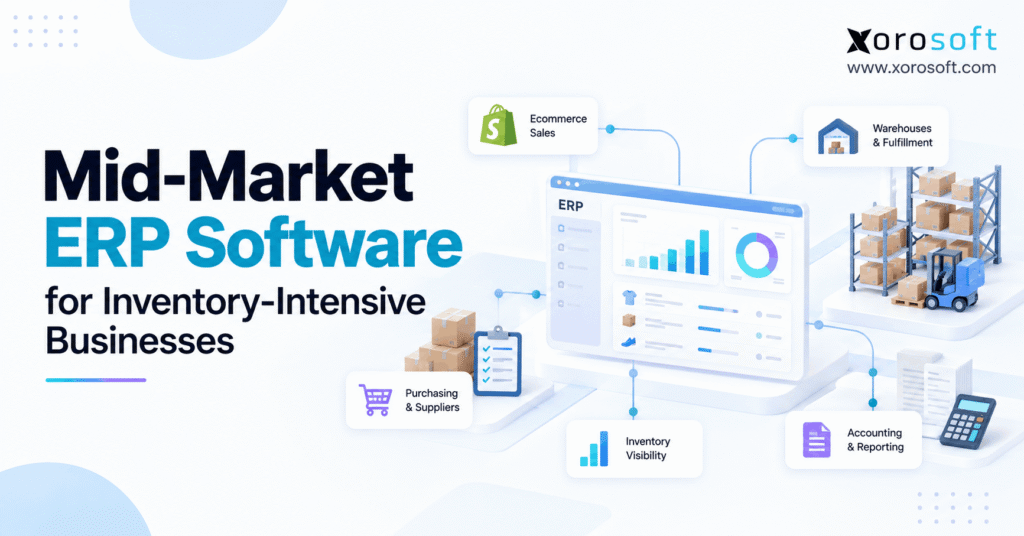
If you are searching for mid-market ERP software, you’re in the right place.
1. Why Inventory Growth Exposes Gaps in Business Systems
Mid-market ERP software becomes important when a growing business can no longer trust the flow of inventory data between purchasing, sales, warehouses, and accounting. At first, a few connected apps may work well. However, as orders increase, small delays and missing updates can turn into stockouts, costly purchases, and long month-end checks.
For example, a company may sell through a website, a marketplace, and wholesale accounts. Meanwhile, purchasing teams track inbound stock in spreadsheets, while warehouse staff update a separate system. As a result, each team may see a different answer to a basic question: how many units can we promise today?
For that reason, an inventory-heavy business needs more than a dashboard showing stock totals. Instead, it needs a clear record of what arrived, what was sold, what remains reserved, and how those events affect financial reports. Ultimately, that need drives the search for a better operating system.
1.1. Why Mid-Market ERP Software Becomes Relevant
In practice, mid-market ERP software brings key processes into a shared workflow. Rather than copying a sales order between apps, teams can link it to inventory, fulfillment, and accounting activity. Consequently, errors can become easier to trace, although the system still depends on sound processes and accurate input.
This matters when a firm manages hundreds or thousands of SKUs. For instance, a missed warehouse receipt can affect both buying decisions and customer promises. Similarly, a late inventory adjustment can distort a finance report. After all, the real goal is not to replace every tool at once. Instead, it is to make important transactions consistent across teams.
1.2. Who Needs a Connected ERP and Who Can Wait?
However, a company’s size is only one signal. A smaller distributor with three warehouses and demanding retail customers may face more process risk than a larger seller with one simple stock location. Therefore, ERP readiness should be based on workflow complexity, not revenue alone.
A company with one warehouse, limited SKUs, and simple purchasing may not need a full ERP yet. Instead, it can improve stock counts, strengthen its current integrations, and document key rules. However, when those steps no longer keep inventory and finance aligned, a mid-market ERP software review becomes more useful.
2. When Mid-Market ERP Software Becomes Necessary
Before choosing new software, identify the operational failures that occur again and again. Otherwise, a business may purchase an expensive platform without fixing the steps that cause bad data. The following signals show when a more connected approach deserves attention.
2.1. Inventory Records Disagree Across Warehouses
A product may show 200 units on hand, but only 140 may be free to sell. Meanwhile, some units could already be assigned to orders, held for quality checks, or stored at another location. Therefore, a total stock count does not always tell the whole story.
If sales channels receive the wrong available quantity, teams may oversell. Meanwhile, warehouse employees lose time looking for stock that the system says exists. A suitable inventory ERP should make location, status, and allocation rules visible. Even then, cycle counts and timely scans remain essential.
2.2. Purchasing and Month-End Close Take Too Long
A buyer may look at a spreadsheet that was updated yesterday, while a warehouse received stock this morning. As a result, the next purchase order could be too large or too small. Similarly, finance may wait for warehouse adjustments before closing the month.
These are connected problems. A receipt affects stock levels, supplier commitments, and sometimes inventory value. Therefore, the business should test whether mid-market ERP software can link these events without repeated data entry. The test should include short shipments, price differences, returns, and corrections—not just standard orders.
2.3. When Existing Tools Are Still the Better Fit
Still, ERP is not the answer to every process issue. For example, if stock records are wrong because employees skip scans, new software alone will not make them accurate. Likewise, a business with a reliable accounting platform and a simple warehouse might only need stronger controls.
First, map the failures. Next, decide whether they result from training, process gaps, broken links between apps, or missing core features. Then compare the cost of improving the existing setup with the cost of a wider ERP rollout. This keeps the decision practical.
3. Mid-Market ERP Software Features Worth Testing
A feature checklist is useful only when it links back to daily work. For that reason, buyers should test whether mid-market ERP software supports the flow of stock from supplier to customer, including the exceptions that happen along the way.
3.1. Inventory ERP Software for Multi-Warehouse Control
Multi-warehouse inventory management must show where products are stored and what they can be used for. For example, stock in transit should not appear as ready to pick at the destination before it arrives. Likewise, damaged products should not appear in sellable stock.
Ask vendors to demonstrate receipts, transfers, reservations, stock adjustments, and cycle counting. In addition, confirm whether reports can be filtered by SKU, site, lot, and product status. In fact, these details matter more than an attractive summary chart. A mid-market ERP software evaluation starts at the transaction level.
3.2. Purchasing Linked to Real Inventory Demand
In practice, replenishment decisions depend on more than yesterday’s sales. Buyers need open customer orders, current stock, incoming shipments, supplier lead times, and a view of likely demand. Therefore, a purchasing module should help teams see the full supply position before they raise a new order.
For example, a product with 300 units on hand may still be short if 250 are committed to customers. Meanwhile, a second shipment may already be due next week. Xorosoft connects purchasing, supplier data, inventory, and forecasts through its connected cloud ERP platform. Still, each buyer should test its own reorder rules, approval steps, and supplier exceptions.
3.3. Warehouse Execution and Inventory ERP Accuracy
Warehouse control should cover receiving, put-away, bin locations, picking, packing, and returns. In addition, barcode checks can help staff confirm the correct item and location. However, scanning only improves records when employees follow the process and exceptions are handled well.
Consider a shipment of 100 units where 8 arrive damaged. The receiving team should record 92 accepted units and the 8 damaged units according to the agreed workflow. As a result, sales should not promise stock that is under review. A warehouse demo should show this exception from first scan to final record.
3.4. ERP Inventory Accounting and Financial Controls
Stock is both a physical asset and a financial value. Because of that, purchasing, receiving, adjustments, and sales can affect the books. An ERP evaluation should cover costing rules, landed costs, inventory write-downs, approvals, and traceable journal entries.
For businesses reporting under IFRS, IAS 2 Inventories provides rules for inventory cost and net realizable value. By contrast, US GAAP may require different treatment. Therefore, finance should verify that the proposed mid-market ERP software supports the company’s own accounting policies. Above all, the system must not force accountants to repair routine transactions in spreadsheets.
3.5. Manufacturing ERP for Components and Work Orders
For this reason, manufacturers need to connect material demand with shop-floor activity. For example, a bill of materials identifies the parts required to build a finished product. A work order then gives teams a way to track the planned work and the actual use of materials.
However, not every business needs complex production planning. A simple assembly operation may require fewer controls than a manufacturer with several stages and large work-in-process balances. Therefore, test the real production process before choosing additional modules.
4. How Inventory ERP Software Connects Transactions
Instead, the best test of an integrated system is a complete transaction, not a module tour. Start with a purchase order, follow the stock into a warehouse, track it through sale and shipment, and then review the accounting effect. In this way, buyers can see whether mid-market ERP software keeps departments aligned.
4.1. From Purchase Order to Receiving and Payment
Imagine a buyer orders 150 units from a supplier. Next, the warehouse receives 143, while the final 7 are still outstanding. Therefore, the receiving record should show what actually arrived. Meanwhile, purchasing needs a clear view of the open balance.
Finance should be able to match the supplier bill to the accepted goods and the agreed purchase terms. If costs differ, the system should preserve the exception for review. Consequently, staff can investigate the reason instead of silently changing inventory value. Ask how the system handles a partial receipt and a later invoice correction.
4.2. On-Hand, Available, and Committed Stock
In practice, on-hand inventory tells a different story from available inventory. For example, 500 units may be physically present while 180 are committed to customer orders. Meanwhile, other units may be damaged, held, or set aside as safety stock. Therefore, the quantity available to sell can be much lower.
Shopify documents distinct inventory states in its official inventory management guide. In addition, Shopify controls committed quantities through order and fulfillment actions, not arbitrary inventory edits. Thus, an integration must respect the platform’s rules. Mid-market ERP software must also avoid treating every channel’s labels as identical.
4.3. Partial Fulfillment, Returns, and Exceptions
An order for 25 units may ship in two parts. First, the warehouse sends 15. Then the remaining 10 stay open or follow the business’s backorder rule. Therefore, the system should not mark the entire order complete or consume the wrong stock quantity.
Returns need similar care. For example, a returned item may require inspection before it can be sold again. Xorosoft’s XoroWMS warehouse system supports barcode-driven warehouse work, cycle counts, and multi-location control. However, buyers should still confirm exactly how their return rules affect available stock and financial records.
4.4. Warehouse Transfers Without False Availability
Similarly, moving goods between facilities creates another common source of errors. A shipment leaving Warehouse A is not the same as a confirmed receipt at Warehouse B. Therefore, the system should track in-transit quantities and the date of receipt.
If the second warehouse promises those units too early, it may miss its shipping deadline. Meanwhile, finance may have to trace inventory differences across locations. A useful inventory ERP demonstration should include delayed, canceled, and partly received transfers.
5. ERP vs Inventory Apps, WMS, and Separate Systems
However, not every growing company should replace every application with one platform. A dedicated warehouse tool may handle complex picking well, while a separate accounting package may already meet finance needs. However, each connection creates rules that must be kept in sync.
For buyers of mid-market ERP software, the real choice is not simply one tool versus many. Instead, it is whether the full setup can maintain dependable data, support daily exceptions, and remain affordable as the business changes. A connected ERP platform should be the first integrated option to assess when those links repeatedly break.
5.1. Compare the Job Each Software Type Performs
A practical comparison starts with the work each system owns. For example, warehouse software focuses on receiving and shipping, while accounting software focuses on financial records. ERP aims to connect these areas, though actual coverage varies by product and setup.
| Requirement | Integrated ERP | Inventory App | Dedicated WMS | Separate Apps |
|---|---|---|---|---|
| Stock by location | Usually supported | Often supported | Core function | Depends on sync |
| Purchasing and vendor orders | Often included | Varies | Usually limited | Separate workflow |
| Picking and bin control | Module-dependent | Varies | Core function | Depends on tools |
| Inventory accounting | Native or linked | Often external | Usually external | Requires handoffs |
| Manufacturing | Platform-dependent | Often limited | Not primary | Separate workflow |
The table describes software types, not guarantees. Therefore, vendors should demonstrate every required workflow before a buying decision.
5.2. When Inventory ERP Software Is the Better Fit
A shared inventory ERP becomes more useful when purchasing, warehouse movements, fulfillment, and finance frequently rely on each other’s data. For instance, a stock adjustment should not require staff to update three systems by hand. Likewise, a partial supplier receipt should remain clear to both buyers and accountants.
Still, a specialist WMS may be the right choice for highly complex automation. The aim is not to force every operation into one tool. Instead, it is to reduce avoidable gaps and define which system owns each key record.
6. Industry Needs That Change ERP Selection
Inventory-driven businesses often ask for similar modules, yet their daily work differs. As a result, mid-market ERP software should be assessed against the company’s product type, sales model, and warehouse rules. A fashion brand may need strong variant control, while a manufacturer cares more about material planning.
6.1. Inventory ERP Software for Apparel and Fashion
Apparel businesses manage style, size, color, season, and return status. Consequently, a single product may have dozens of SKUs with very different stock levels. A useful system must track demand and available units at the variant level, not just the parent product.
For example, a popular jacket may be overstocked in one size and sold out in another. Therefore, replenishment should look at the actual SKU pattern. Xorosoft serves apparel and other product-based sectors through its industry solutions, but buyers should confirm variant mapping, channel stock, and return handling during discovery.
6.2. Furniture and Sporting Goods: Different Stock Risks
Furniture companies often deal with bulky products, high storage costs, and long supplier lead times. As a result, a late container can affect several customer orders and planned deliveries. ERP tests should cover incoming stock, landed costs, damaged units, and transfers between sites.
By contrast, sporting goods businesses face a different challenge. For example, seasonal items may sell quickly during a short window and remain slow for months afterward. Therefore, purchasing plans need to reflect seasonality and product life cycles. In both sectors, mid-market ERP software must show accurate inventory status, not just a total stock number.
6.3. Wholesale and Food Businesses Need Strong Controls
Wholesale distributors balance large orders, customer-specific terms, and retail partner requirements. Consequently, buyers should test how the system reserves stock for different accounts and handles changes to purchase orders. Electronic data interchange, or EDI, may also be part of the daily process.
Food businesses face additional needs such as lot traceability and expiry dates. However, the exact rules depend on products and local laws. A suitable inventory-focused ERP evaluation should therefore include a test of stock rotation, batch history, and the process for a product hold or recall.
6.4. Cloud ERP for Manufacturing and Components
Manufacturing, however, adds a new question: can the business make enough finished products with the materials actually available? Bills of materials help define required components. Meanwhile, work orders connect the plan to production activity and material use.
A manufacturer should test shortages, substitutions, scrap, partial completion, and work-in-process costs. Xorosoft’s ERP solutions cover manufacturing alongside inventory, warehousing, purchasing, and financial operations. However, the buyer should verify the specific production steps and costing methods needed for its factory.
| Business type | Priority ERP test |
|---|---|
| Apparel | Variant-level stock and returns |
| Furniture | Long-lead purchases and landed cost |
| Sporting goods | Seasonal demand and channel allocation |
| Food | Lot traceability and expiry handling |
| Wholesale | EDI orders and customer-level stock allocation |
| Manufacturing | BOMs, component use, and production costing |
7. How to Evaluate Mid-Market ERP Software
The best ERP selection process tests real work instead of judging a list of features. First, gather the most costly exceptions across departments. Next, turn them into live demo tasks. Finally, measure how much manual work remains after each task is complete.
A strong mid-market ERP software review should include operations, purchasing, finance, warehouse leaders, and the people who will use the system each day. Otherwise, a platform may satisfy senior managers while leaving front-line teams with difficult workarounds.
7.1. Build a Mid-Market ERP Evaluation Scorecard
Start with a short list of non-negotiable needs. Then assign a weight to each area based on the business risk. For example, a wholesale company may value EDI and warehouse control more than production planning. A manufacturer may make the opposite choice.
| Evaluation area | Example weight |
|---|---|
| Inventory accuracy and allocation | 20% |
| Multi-warehouse control | 15% |
| Purchasing and forecasting | 15% |
| Accounting and stock value | 15% |
| Warehouse execution | 10% |
| Ecommerce, wholesale, and EDI | 10% |
| Manufacturing | 5% |
| Implementation and support | 10% |
These weights are only an example. Therefore, score vendors against the requirements that matter to your own company. In addition, record the evidence supporting each score rather than relying on a salesperson’s answer.
7.2. Test Five Real-World ERP Workflows
A standard order rarely reveals the weakest part of a system. Instead, use exceptions that happen in daily operations:
- A customer orders more units than are available.
- A supplier ships fewer items than the purchase order states.
- A warehouse transfer is delayed or received in part.
- A return cannot be resold until it passes inspection.
- An inventory adjustment occurs near the month-end cutoff.
For each test, follow the same path: source transaction, inventory update, exception, financial effect, and final report. As a result, buyers can see whether stock and accounting remain aligned. The strongest mid-market ERP software demonstration shows what happens when a normal process goes wrong.
7.3. Validate Integrations, EDI, and 3PL Updates
Ecommerce brands need a clear answer to one question: which system controls available inventory? If Shopify, a marketplace, and ERP can all change the same balance independently, conflicts may appear. Therefore, define ownership before connecting the systems.
Buyers should also test failed messages, duplicate events, returns, and delayed 3PL updates. Xorosoft publishes its supported channel and logistics options in the integrations directory. In addition, its Shopify App Store listing describes its Shopify order, inventory, and fulfillment connection. Actual integration fit still depends on the customer’s setup.
7.4. Calculate Full Cost and Implementation Risk
An ERP quote may include software fees, but the true cost is broader. Add implementation work, data cleanup, integrations, user training, internal staff time, support, and future changes. Otherwise, a low first-year price may hide a costly rollout.
For example, a business with five warehouses and several sales channels will need a different project plan from a company with one site. Therefore, ask for clear milestones, acceptance tests, and named owners. Xorosoft’s XoroERP overview describes connected operational modules and configurable implementation scope. Buyers should still request a written proposal for their own processes.
Watch a tailored workflow demo: Instead of relying only on feature screenshots, request a demonstration using your own stock, purchasing, and accounting exceptions.
8. Measure Whether an Inventory ERP Delivers Value
However, a successful go-live is not the same as a successful business outcome. Therefore, teams should establish a baseline before replacing systems. Mid-market ERP software can improve the visibility of problems, but real results also depend on user habits, data quality, and management follow-through.
8.1. Inventory ERP Metrics for Daily Operations
Start with inventory record accuracy, order fill rate, stockout frequency, picking errors, and open stock adjustments. For instance, calculate record accuracy by dividing accurate SKU-location records by the total records checked, then multiplying by 100.
A team that finds 970 accurate records out of 1,000 checked has 97% record accuracy. However, the metric should be paired with the dollar value of errors. A small number of missing high-value items may matter more than many low-value differences. Likewise, measure how quickly the team resolves each exception.
8.2. Inventory Turnover, Cash Flow, and Close Speed
Inventory turnover compares the cost of goods sold with average inventory value. Meanwhile, days inventory outstanding estimates how long that investment remains tied up. These measures can reveal slow-moving stock or poor buying decisions, though seasonality must be considered.
Finance should also track how many manual stock corrections are needed at month-end. For example, compare the time spent tracing receiving errors before and after the new process. As a result, the business can judge whether inventory ERP software is improving both warehouse operations and accounting work.
9. Apply the Checklist to a Connected Cloud ERP
For a growing product business, the core goal is to connect physical stock with the decisions made by purchasing, sales, warehouse staff, and finance. Consequently, mid-market ERP software should be judged by how well it handles those links, not by how many modules appear on a product page.
The primary platform to evaluate here is Xorosoft, which brings inventory, warehouse management, purchasing, accounting, manufacturing, and ecommerce operations together. However, this does not mean every company needs every module. The correct scope depends on which work causes the most risk and where reliable data is missing.
9.1. Match Cloud ERP Features to Actual Problems
Suppose a distributor often ships the wrong quantity. Its first need may be better scanning, location records, and order checks. Meanwhile, a manufacturer facing stock shortages may need stronger material planning and receiving controls. Both companies can benefit from a connected system, but the project goals differ.
Before buying, review the provider’s customer case studies for examples from a similar industry. Then ask to see the exact workflow demonstrated with sample data. Above all, require clear answers about the business rules, user roles, and exceptions that must work on day one.
9.2. Test Mid-Market ERP Software Without Assuming Results
An honest ERP assessment separates built-in capabilities from setup work and future plans. Therefore, ask which features are available now, which require other products, and which need custom work. Also identify any process changes the business must make.
A useful demo should show how one receipt affects inventory, purchasing, and finance. Next, test an incomplete shipment and a return. If mid-market ERP software needs a workaround for a critical task, record that limitation before signing. Ultimately, the right outcome is a reliable workflow, not a perfect sales presentation.
10. A Practical Mid-Market ERP Selection Checklist
Use the following checklist in every ERP discovery meeting. First, gather one example of each important transaction from your own business. Then ask the vendor to show what happens from start to finish. Finally, document the evidence and any steps that remain manual.
10.1. Ten Questions to Ask an ERP Vendor
- Which system will own the final stock balance for every location?
- How are on-hand, available, reserved, and committed quantities handled?
- What happens when a supplier ships only part of a purchase order?
- Can warehouse staff scan receipts, transfers, picks, and returns?
- How do buyers see real demand and incoming supply?
- How are inventory costs and adjustments reflected in accounting?
- Which Shopify, marketplace, 3PL, and EDI flows are supported?
- Can manufacturers trace component use through work orders?
- What work is needed to clean and move existing data?
- Who will own user training, acceptance testing, and go-live decisions?
Because mid-market ERP software touches many teams, one person should not make the entire decision alone. Include warehouse leaders, buyers, finance staff, and people who manage sales channels. That way, each critical process has an owner and a clear acceptance test.
10.2. Make the Final Decision With Evidence
In every case, a vendor score should be backed by a live demonstration or clear documentation. Similarly, cost comparisons should use the same assumptions for users, locations, integrations, and services. Otherwise, the cheapest proposal may not be the least costly system to operate.
Look beyond go-live, too. For example, ask how support handles failed integrations and how new warehouses are added. A strong mid-market ERP software decision should account for both today’s problems and tomorrow’s process changes.
11. Build a More Reliable Inventory Operation
Mid-market ERP software is most valuable when it helps an inventory-heavy company trust the same data across warehouses, purchasing, orders, and finance. However, getting that result requires more than buying a subscription. Teams must define their processes, clean their records, and test exceptions before rollout.
Therefore, begin with the inventory problems that cost the business the most time and money. Next, compare each solution against real orders, receipts, returns, transfers, and month-end reports. Finally, choose the setup that keeps important transactions clear without adding work the business does not need.
If your business is ready to evaluate a connected platform, Book a Demo to discuss your specific workflows and plan a suitable next step.
Frequently Asked Questions
What is mid-market ERP software?
Mid-market ERP software connects inventory, purchasing, warehouses, sales, and accounting within a shared system. It suits growing businesses that need reliable stock records and fewer manual handoffs between teams.
When should an inventory-intensive business upgrade to ERP?
Consider upgrading when stock records repeatedly disagree, purchase planning depends on spreadsheets, or month-end inventory reconciliation takes too long. First, confirm whether process fixes or better integrations could solve the problem.
Can ERP manage inventory across multiple warehouses?
Yes. Suitable ERP systems track quantities by location and support transfers, allocations, receiving, and stock adjustments. However, accuracy still depends on barcode discipline, timely updates, and clear ownership of each transaction.
How does ERP connect Shopify and wholesale orders?
An ERP can share product, order, inventory, and fulfillment data across connected channels. Buyers should test SKU mapping, committed stock, cancellations, duplicate events, and the EDI documents their wholesale partners require.
Does mid-market ERP software include warehouse management?
Some platforms include built-in warehouse tools; others connect to a specialist WMS. Check receiving, bin tracking, barcode picking, returns, and cycle counts against your actual warehouse volume and operating rules.
How much does mid-market ERP software cost?
Costs depend on users, modules, warehouses, integrations, and rollout scope. Compare software fees with data migration, implementation, training, support, and internal staff time before judging total ownership cost.
How long does an ERP implementation take?
The timeline depends on data quality, process changes, integrations, and testing. Ask for milestones, clear acceptance criteria, user training, and a contingency plan instead of relying on a fixed go-live promise.
Recent Posts
-
 How to Calculate Ecommerce Warehouse Capacity Before Peak Season
 -
 Manufacturing Scrap Statistics 2026: Material Loss, Yield, and Cost
 -
 ERP Software for Cosmetics Distributors Managing Lots, Wholesale, and Ecommerce
 -
 Xorosoft vs Cin7 Core for Multi-Warehouse Wholesale Operations
 -
 How a Multi-Warehouse Company Reduced Inventory Reconciliation Work at Month-End