If you’re interested in learning how ChatGPT ERP integration can streamline operations and improve business efficiency, you’ve come to the right place.
1. Why ERP Conversations Need Guardrails Before Automation
ChatGPT ERP integration gives businesses a new way to interact with inventory, purchasing, accounting, warehouse, manufacturing, sales, and operational data through natural-language questions. However, the real opportunity is not simply making ERP information conversational. Instead, the larger opportunity is helping employees reach useful answers faster while maintaining the controls that make ERP data trustworthy.
For example, an operations manager may want to ask, “Which SKUs are likely to stock out before the next purchase order arrives?” Similarly, a finance leader may ask, “Which products caused the largest margin decline this month?” Meanwhile, a warehouse manager may want to know which orders missed their shipping cutoff and why.
Traditionally, each question might require a separate report, spreadsheet export, dashboard, or analyst. Therefore, conversational ERP access can reduce the distance between a business question and the information needed to answer it.
However, ERP data is different from general internet information. Because an ERP can contain inventory values, customer information, supplier agreements, purchase orders, financial transactions, pricing, manufacturing records, and warehouse activity, an AI connection needs clear boundaries.
Consequently, businesses should not treat ChatGPT ERP integration as a simple chatbot project. Instead, they should treat it as a controlled data-access, workflow, security, and governance initiative.
2. What Is ChatGPT ERP Integration?
ChatGPT ERP integration is the connection between ChatGPT and an ERP environment that allows authorized users to retrieve, interpret, summarize, or act on ERP information through natural-language requests.
In other words, the ERP remains the system of record, while ChatGPT becomes an interface for interacting with approved information.
For example, an ERP may contain inventory by warehouse, open customer orders, purchase orders, supplier lead times, historical sales, and product costs. Therefore, when the appropriate data is available, an AI assistant could help answer a question such as:
“Which products are projected to run out of inventory before replenishment arrives?”
However, ChatGPT does not create trustworthy inventory data by itself. Instead, the quality of the answer depends on the accuracy, completeness, and timeliness of the ERP records underneath it.
2.1 ChatGPT Does Not Replace the ERP
First, it is important to separate the conversational layer from the transactional system.
An ERP controls operational records such as:
- Inventory movements
- Customer orders
- Purchase orders
- Financial transactions
- Warehouse activity
- Manufacturing records
- Supplier information
- Product master data
ChatGPT, by contrast, can help interpret that information.
Therefore, the strongest architecture usually keeps business logic and transaction control inside the ERP while allowing the AI layer to access only approved information and functions.
2.2 Why the Underlying ERP Still Matters
Although conversational AI can make information easier to access, it cannot fix fragmented source data automatically.
For example, suppose Shopify inventory exists in one application, warehouse quantities exist in another, purchasing lives in spreadsheets, and accounting sits in a separate system. In that case, the AI still needs to reconcile several sources before producing a reliable answer.
By contrast, a connected cloud ERP platform can provide a more consistent operational foundation.
Therefore, AI readiness often begins with ERP readiness.
For this reason, ChatGPT ERP integration works best when operational data already has a reliable system of record.
3. How ChatGPT ERP Integration Works
Although implementation methods vary, most controlled ChatGPT ERP integration workflows follow a similar sequence.
3.1 The User Asks a Business Question
First, the employee asks a question in natural language.
For example:
“Show inventory worth more than $10,000 that has had no sales during the last 120 days.”
Because the user starts with a business question, they do not necessarily need to know the correct ERP report, screen, table, or query.
3.2 Identity and Permissions Are Verified
Next, the system determines who is making the request.
Moreover, the integration should verify what that person is authorized to access.
For example, a warehouse associate may need inventory availability but not company-wide financial statements. Similarly, a purchasing manager may need supplier and purchase-order data but not employee payroll information.
Therefore, AI access should respect business roles rather than bypass them.
3.3 Relevant ERP Data Is Retrieved
After authorization, the integration retrieves only the information required for the question.
For example, an inventory-risk question may require:
- Current available inventory
- Open sales orders
- Open purchase orders
- Recent sales velocity
- Supplier lead times
Consequently, the integration should request relevant records rather than exposing the entire ERP environment.
3.4 ChatGPT Interprets the Information
Next, the AI can summarize, compare, classify, or explain the retrieved information.
For instance, it may group products by stockout risk or highlight unusual changes.
However, the ERP remains the source of the underlying numbers.
3.5 The System Returns an Answer or Proposed Action
For a read-only workflow, the process can end with an answer.
Alternatively, the AI may recommend an action.
For example:
“Five SKUs are projected to fall below safety stock before their next inbound purchase orders arrive.”
Because this is still a recommendation, no ERP transaction has changed.
3.6 Approved Actions Can Move Forward
In more advanced workflows, the AI may create a draft transaction.
For example, it could prepare a purchase-order draft based on predetermined rules.
However, a controlled system should determine whether a person must review and approve that draft before execution.
3.7 Important Activity Should Be Logged
Finally, organizations should maintain enough audit information to understand important AI activity.
For example, logs may capture:
- Who made the request
- What ERP tools were used
- What information was accessed
- What action was proposed
- Who approved it
- What ultimately changed
Therefore, auditability should be built into the architecture rather than added after deployment.
As a result, ChatGPT ERP integration can improve access to information without weakening the audit trail around important ERP activity.
4. ChatGPT ERP Integration Methods
Businesses can connect AI and ERP systems in several ways. However, the best method depends on the intended workflow, security requirements, ERP capabilities, and level of automation.
4.1 API-Based ERP AI Integration
First, traditional APIs allow applications to request specific ERP information or perform predefined functions.
For example, an API may expose:
- Inventory quantities
- Customer orders
- Purchase orders
- Supplier records
- Shipment status
- Accounting information
Because APIs are explicit, they can provide strong control over what an application is allowed to request.
However, developers may need to define each integration workflow separately.
4.2 ERP MCP Integration
Another increasingly relevant approach is Model Context Protocol, or MCP.
In practical terms, MCP provides a structured way for AI applications to discover and use approved external tools.
Therefore, an ERP MCP layer can expose selected business capabilities without giving the AI unrestricted database access.
For businesses considering this model, Xorosoft provides an AI MCP Server designed around connecting AI assistants with ERP data and workflows through controlled access.
However, MCP should not be treated as a replacement for permissions.
Instead, authentication, authorization, business rules, logging, and approval controls still need to determine what the AI may actually do.
4.3 Middleware
Similarly, middleware can sit between the AI interface and business systems.
For example, middleware may coordinate data from an ERP, ecommerce channel, warehouse system, CRM, or other application.
As a result, this model can work well when a business operates several systems.
However, each additional integration layer also introduces another component that must be monitored and governed.
4.4 Custom AI Gateway
For larger or more complex organizations, a custom AI gateway can enforce central policies.
For example, the gateway may control:
- Authentication
- Approved tools
- Data masking
- Input validation
- Approval rules
- Usage limits
- Logging
Therefore, custom gateways can provide significant governance flexibility.
Nevertheless, they also require more engineering and ongoing maintenance.
4.5 Direct Database Access
Direct database access may appear simple, but it can create unnecessary risk.
For example, unrestricted access may bypass application permissions, business rules, approval workflows, and validation logic.
Therefore, businesses should generally prefer controlled interfaces that expose only the information or actions required for the approved use case.
Overall, the right ChatGPT ERP integration architecture depends on the business process, required permissions, and acceptable level of automation.
5. API vs MCP vs Middleware for ChatGPT ERP Integration
The following framework helps clarify the tradeoffs.
| Integration Method | Best Fit | Key Advantage | Main Consideration |
|---|---|---|---|
| API | Defined ERP workflows | Mature and explicit | More custom workflow development |
| MCP | AI-oriented tool access | Standardized tool interaction | Permissions still require careful design |
| Middleware | Multi-system operations | Central orchestration | Additional platform complexity |
| AI Gateway | Advanced governance | Centralized control | Higher engineering effort |
| Embedded AI | ERP-native workflows | Lower integration friction | Functionality depends on the ERP |
Therefore, companies should select the architecture after defining the business problem.
For example, a read-only inventory assistant does not require the same controls as an AI agent capable of releasing purchase orders.
At the same time, ChatGPT ERP integration should remain proportionate to the business risk. A simple reporting workflow may need limited access, whereas automated transaction workflows need much stronger validation.
6. ChatGPT ERP Integration Use Cases
The most practical ChatGPT ERP integration use cases usually involve employees who already spend significant time locating, combining, or interpreting ERP information.
6.1 ChatGPT ERP Integration for Inventory Management
Inventory provides a strong starting point because many questions require information across demand, purchasing, warehouse availability, and customer orders.
For example, teams could ask:
- Which SKUs are below safety stock?
- Which products have had no sales in 120 days?
- Which locations have excess stock?
- Which products may stock out before the next inbound shipment?
- Which items show repeated inventory adjustments?
Moreover, inventory analysis becomes more useful when warehouse and order information is synchronized.
Consequently, companies with multi-location complexity can use a warehouse management system to maintain controlled inventory execution while using AI as an additional analytical interface.
As a result, ChatGPT ERP integration can help inventory teams investigate exceptions faster while the ERP continues to control inventory records.
6.2 ChatGPT ERP Integration for Purchasing
Similarly, purchasing teams can use AI to investigate open commitments and supplier performance.
For example, a buyer may ask:
“Which suppliers had the largest average delivery delays during the last quarter?”
The ERP could provide purchase-order history, expected delivery dates, receipts, and supplier records.
Therefore, the AI can summarize the patterns without manually reviewing dozens of purchase orders.
Additionally, teams may use conversational analysis to investigate:
- Reorder requirements
- Late purchase orders
- Supplier lead times
- Purchase price changes
- Open commitments
- Supplier concentration
However, recommending a purchase is different from approving one.
Therefore, high-value commitments should remain subject to business approval rules.
In practice, ChatGPT ERP integration can reduce the manual analysis required before buyers make replenishment and supplier decisions.
6.3 ChatGPT ERP Integration for Warehouse Operations
Warehouse teams can also use conversational analysis to investigate exceptions.
For example:
“Which orders missed yesterday’s shipping cutoff?”
“Which warehouse has the largest unfulfilled backlog?”
“Which SKUs require the most frequent replenishment?”
“Which items have repeated count adjustments?”
As a result, managers can investigate operational bottlenecks without replacing core WMS functions such as receiving, scanning, directed picking, packing, and shipping.
Moreover, ChatGPT ERP integration can help warehouse leaders move from a broad exception to the specific orders, SKUs, or locations causing it.
6.4 ChatGPT ERP Integration for Accounting and Finance
Likewise, finance teams can use AI to accelerate investigation.
For example:
- Which customers account for most overdue receivables?
- What caused gross-margin variance?
- Which expense categories increased significantly?
- Why did inventory valuation change?
- Which transactions require review before close?
However, financial analysis is also an area where permissions matter significantly.
For example, explaining why a balance changed is relatively different from posting a journal entry.
Therefore, organizations should apply tighter controls as the AI moves from analysis toward transaction execution.
However, ChatGPT ERP integration for finance should use stricter controls as workflows move from analysis toward transaction execution.
6.5 ChatGPT ERP Integration for Ecommerce Operations
Ecommerce businesses often manage orders, inventory, purchasing, fulfillment, accounting, and marketplace activity simultaneously.
Consequently, a conversational layer can be useful when operators need answers that span several systems or sales channels.
For example:
“Which Shopify products are selling faster than inbound supply?”
“Which ecommerce orders are delayed because stock is unavailable?”
“Which channels are consuming inventory faster than forecast?”
Moreover, Xorosoft’s ecommerce and ERP integrations support the broader principle of connecting operational data instead of managing each workflow in isolation.
For Shopify merchants specifically, the Xorosoft ERP listing on the Shopify App Store provides an external reference point for the Shopify integration context.
Additionally, ChatGPT ERP integration becomes more useful when ecommerce, inventory, fulfillment, purchasing, and accounting data remain synchronized.
6.6 ChatGPT ERP Integration for Manufacturing
Manufacturing businesses may also use conversational ERP analysis for:
- Material shortages
- BOM questions
- Work-order status
- Production requirements
- Component availability
- Planning exceptions
For example:
“Which current work orders are at risk because required components are unavailable?”
Therefore, the AI can help surface exceptions more quickly while manufacturing rules remain controlled by the ERP.
In this environment, ChatGPT ERP integration can help planners investigate material and production issues without replacing formal planning and execution controls.
6.7 ChatGPT ERP Integration for Forecasting and Planning
Forecasting creates another useful analytical use case.
For example:
“Which SKUs show the largest variance between forecast demand and actual sales?”
However, a language model should not simply invent demand forecasts.
Instead, established forecasting calculations, historical data, seasonality, lead times, and business assumptions should remain the analytical foundation.
Consequently, AI is often most useful for interpreting forecast outputs and helping planners investigate exceptions.
Therefore, ChatGPT ERP integration can support forecasting teams by making exceptions and variance analysis easier to explore in natural language.
6.8 ChatGPT ERP Integration for Natural-Language Reporting
Perhaps the easiest starting point is conversational reporting.
Instead of navigating several dashboards, a manager can begin with a question.
For example:
“Why did order fill rate decline last week?”
Then, based on the answer, the manager might ask:
“Which warehouse caused most of the decline?”
Therefore, conversational reporting is particularly useful for iterative investigation.
However, standard dashboards and financial reports remain valuable for recurring measurement.
As a result, ChatGPT ERP integration can complement traditional reporting by making follow-up analysis faster and more accessible.
7. Read-Only vs Write Access in ChatGPT ERP Integration
One of the most important governance choices in ChatGPT ERP integration is deciding whether the AI can only retrieve information or also change ERP records.
7.1 Read-Only ChatGPT ERP Access
Read-only access allows users to ask questions without allowing the AI to modify transactions.
For example, read access can support:
- Inventory analysis
- Sales summaries
- Purchase-order reviews
- Warehouse exception analysis
- Receivables investigation
- Supplier performance analysis
Therefore, read-only use cases can create meaningful value while limiting transactional risk.
7.2 Write Access
By contrast, write access allows the integration to create or modify ERP information.
For example:
- Create a purchase order
- Adjust inventory
- Change pricing
- Release an order
- Update master data
- Post a financial transaction
Consequently, write access requires significantly stronger controls.
7.3 A Practical AI Permission Maturity Model
Instead of treating AI autonomy as either on or off, businesses can use five stages:
Read → Recommend → Draft → Approve → Execute
Read: The AI retrieves approved information.
Recommend: The AI proposes an action.
Draft: The AI creates an unapproved draft.
Approve: An authorized person confirms the action.
Execute: The approved action is completed automatically under predefined rules.
Therefore, organizations can increase autonomy only when controls mature.
For this reason, ChatGPT ERP integration should gain transactional authority gradually rather than receiving broad write access from the beginning.
8. ChatGPT ERP Integration Security Risks
Because ERP systems contain operational and financial data, ChatGPT ERP integration security should cover both information access and workflow execution.
8.1 Sensitive Information Exposure
First, AI tools should not expose data simply because that data exists inside the ERP.
For example, customer pricing, financial statements, employee records, bank information, supplier agreements, and margin data may require different access levels.
OpenAI publishes current enterprise privacy and business-data guidance describing controls for business use.
However, companies still need to evaluate their own implementation, data classification, retention requirements, user permissions, and regulatory obligations.
8.2 Excessive Permissions
Second, AI should not receive administrator-level access merely for convenience.
Instead, permissions should match the approved task.
For example, an inventory assistant may need stock availability but not accounts payable.
Therefore, least-privilege access reduces unnecessary exposure.
8.3 Prompt Injection
Another important risk is prompt injection.
In general, prompt injection occurs when malicious or unintended instructions influence how an AI system behaves.
OWASP documents prompt injection risks for generative AI applications and distinguishes between direct and indirect forms.
Therefore, businesses should pay special attention when an AI workflow consumes external documents, emails, supplier files, product descriptions, or other untrusted content.
8.4 Incorrect Recommendations
AI can also misunderstand context.
For example, it might recommend ordering more inventory without considering a discontinued product status.
Therefore, important business rules should be validated outside the language model.
8.5 Excessive Automation
Similarly, an AI system may become risky when broad permissions are combined with broad autonomy.
For example, automatically changing prices, releasing large purchase orders, or modifying financial records can create material consequences.
Consequently, organizations should limit both what the AI can access and what it can execute.
8.6 Weak Auditability
Finally, organizations need to know what happened after an AI-assisted action.
Therefore, important workflows should capture user identity, requested action, affected records, approval status, and final outcome.
Overall, ChatGPT ERP integration should be designed so that greater automation always comes with stronger controls.
9. How to Secure ChatGPT ERP Integration
Strong ChatGPT ERP integration security does not rely on a single control. Instead, several layers should work together.
9.1 Apply Least-Privilege Access
First, give each AI workflow only the permissions required for its purpose.
For example, an inventory workflow should not automatically inherit finance permissions.
9.2 Preserve Role-Based Access
Second, existing user permissions should remain meaningful.
For example, if a user cannot access certain margin information directly in the ERP, the AI should not provide a conversational shortcut around that restriction.
9.3 Start With Read-Only Workflows
Third, begin with analysis.
For instance, allow employees to investigate inventory, orders, and purchasing information before allowing the AI to create transactions.
Consequently, the organization can test usefulness and accuracy without immediately introducing write risk.
9.4 Separate High-Impact Actions
Moreover, higher-risk activities should receive additional controls.
Examples include:
- Bank changes
- Financial postings
- Inventory adjustments
- Customer pricing changes
- High-value purchase orders
- Supplier payments
Therefore, access rules should reflect business impact rather than using one permission model for every workflow.
9.5 Require Human Approval Where Appropriate
Similarly, human review can provide a useful control between AI recommendation and execution.
For example, an AI system might draft a purchase order while an authorized buyer verifies quantity, supplier, price, and timing.
As a result, employees retain accountability for material decisions.
9.6 Validate Transactions Outside the LLM
Business rules should also be deterministic where possible.
For example, a purchase order may require:
- Approved supplier
- Valid item
- Quantity limits
- Approved buyer
- Correct currency
- Spending threshold
Therefore, the application should validate these conditions even if the AI believes the transaction is correct.
9.7 Protect Credentials and Secrets
Additionally, API keys, passwords, tokens, private connection strings, and database credentials should not become conversational content.
Instead, secrets should remain inside secure technical controls.
9.8 Log Important Activity
Finally, organizations should record enough information to review sensitive AI-assisted activity.
Therefore, security, operations, finance, and audit teams can investigate problems when necessary.
Overall, secure ChatGPT ERP integration depends on layered controls rather than relying on the AI model as the only security boundary.
10. ChatGPT ERP Integration Governance Turns Controls Into Policy
Security answers how systems are protected. However, governance determines what an organization should permit.
The NIST AI Risk Management Framework provides a useful external framework for managing AI risk through the functions Govern, Map, Measure, and Manage.
Therefore, businesses can translate these principles into practical ERP policies.
10.1 Define Approved AI Use Cases
First, document what the AI is allowed to do.
For example:
Approved: inventory questions, operational reporting, supplier analysis.
Restricted: inventory adjustments, customer price changes, purchase-order release.
Highly controlled: financial postings, banking changes, payments.
Consequently, employees and technical teams have a common operating boundary.
10.2 Classify ERP Data
Next, classify data based on sensitivity.
For example:
- General operational
- Internal
- Confidential
- Highly restricted
Therefore, AI access can follow data sensitivity instead of treating every ERP field equally.
10.3 Assign Business Ownership
Each workflow should also have a business owner.
For example, finance should own financial-use policies, while operations should own warehouse-use policies.
Meanwhile, IT and security should own technical controls.
As a result, governance becomes cross-functional rather than purely technical.
10.4 Establish Approval Thresholds
Not every transaction needs the same approval level.
For example, a draft replenishment suggestion for $300 has a different impact from a $200,000 purchase commitment.
Therefore, approval rules can be based on value, transaction type, customer impact, or operational risk.
10.5 Review Permissions Regularly
Finally, permissions should not remain static forever.
Because employees change roles and workflows evolve, organizations should periodically verify who can access each AI tool and what that tool can do.
For this reason, ChatGPT ERP integration governance should evolve whenever roles, business processes, permissions, or AI capabilities change.
11. What ERP Data Should ChatGPT ERP Integration Access?
The best answer is not “all ERP data.”
Instead, access should be tied to a specific business need.
| ERP Data | Typical Risk | Suggested Control |
| Inventory availability | Lower | Role-based read access |
| Sales orders | Medium | Customer and role restrictions |
| Purchase orders | Medium | Buyer permissions |
| Product cost | Medium/High | Restricted by role |
| Financial statements | High | Finance access only |
| Employee records | High | Strong restrictions |
| Banking information | Very high | Highly restricted |
| Credentials and secrets | Critical | Never expose conversationally |
Therefore, the governing principle is simple:
Give the AI the minimum data necessary to complete the approved task.
In practice, ChatGPT ERP integration should expose business data according to purpose, sensitivity, and user role rather than technical availability.
12. ChatGPT ERP Integration Architecture
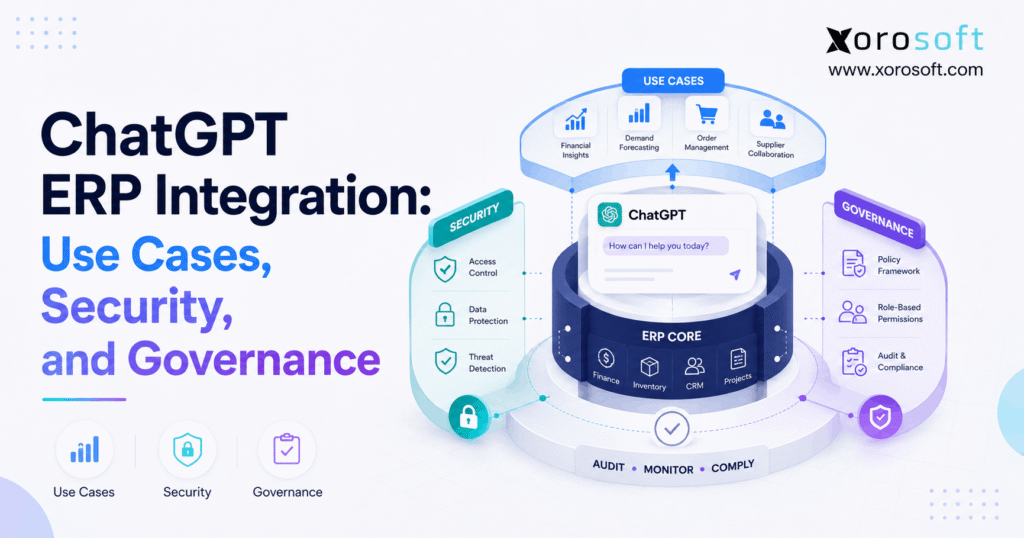
A well-controlled ChatGPT ERP integration architecture can be understood as a series of layers.
12.1 User Layer
First, an authorized employee or application creates the request.
12.2 AI Layer
Next, ChatGPT interprets the natural-language question.
12.3 Governance Layer
Then, policies determine whether the requested use case is allowed.
12.4 Identity and Permission Layer
After that, the system verifies which data and tools the user can access.
12.5 Integration Layer
Next, APIs, MCP, middleware, or another controlled connection retrieves the required information.
12.6 ERP Layer
The ERP then provides authoritative records across inventory, purchasing, sales, accounting, warehouse, or manufacturing.
12.7 Audit Layer
Finally, important activity is recorded for operational and security review.
Therefore, the conversational interface sits above controlled ERP access rather than replacing ERP governance.
13. A Practical ChatGPT ERP Integration Implementation Plan
A successful ChatGPT ERP integration should begin with a measurable business problem rather than a broad directive to “add AI.”
13.1 Start With Expensive Questions
First, identify business questions that consume unnecessary employee time.
Examples include:
- Which orders are blocked?
- Which products may stock out?
- Why did margin fall?
- Which purchase orders are late?
- What inventory is aging?
Therefore, the pilot can target a real operational bottleneck.
13.2 Evaluate Data Quality
Next, verify whether the ERP information is accurate enough to support the use case.
For example, if inventory quantities are regularly wrong, a faster AI interface will simply provide incorrect answers faster.
Consequently, data quality must come before AI sophistication.
13.3 Map the Required Data
Then, identify exactly which records the workflow requires.
For example, stockout-risk analysis may need available stock, sales orders, purchase orders, sales history, and lead times.
Therefore, the AI does not need unrestricted ERP access.
13.4 Select the Integration Method
Next, choose API, MCP, middleware, an AI gateway, or another supported method.
However, the architecture should remain proportionate to the workflow.
13.5 Define User Permissions
Afterward, determine who can use the workflow and which records they can see.
Therefore, employee permissions remain part of the AI design.
13.6 Build a Read-Only Pilot
Then, launch a low-risk use case.
For example:
“Show yesterday’s unfulfilled orders and group them by exception reason.”
Because the workflow does not alter transactions, the team can evaluate accuracy more safely.
13.7 Compare AI Answers With ERP Reports
Next, test responses against trusted source reports.
Moreover, investigate disagreements rather than assuming either output is correct.
13.8 Add Recommendations
Once read-only results are dependable, allow the AI to recommend actions.
For example:
“These five items may need replenishment.”
However, users should still review recommendations.
13.9 Add Draft Transactions
Next, selected workflows may create drafts.
For example, the system could prepare a purchase-order draft without releasing it.
Therefore, teams can reduce manual work while retaining approval.
13.10 Automate Only Controlled Actions
Finally, automate execution only when rules, permissions, monitoring, recovery procedures, and accountability are mature.
Businesses exploring broader modernization can review Xorosoft’s ERP solutions to understand how inventory, purchasing, warehouse, accounting, manufacturing, and ecommerce processes can operate in a connected environment.
Ultimately, ChatGPT ERP integration should progress toward automation only after accuracy, permissions, approvals, and exception handling have been tested.
14. Who Benefits Most From ChatGPT ERP Integration?
Although many businesses can experiment with conversational reporting, some environments create more value from ChatGPT ERP integration than others.
14.1 Multi-Warehouse Businesses
First, multi-location companies frequently need to compare inventory, demand, transfers, orders, and purchasing across facilities.
Therefore, natural-language investigation can reduce reporting friction.
14.2 Ecommerce Brands
Similarly, ecommerce brands often manage fast-moving inventory across websites, marketplaces, warehouses, purchasing, and accounting systems.
Consequently, centralized operational information makes cross-channel questions easier to answer.
14.3 Wholesale Distributors
Wholesale businesses may also benefit because orders, EDI, customer pricing, allocation, purchasing, and fulfillment are interconnected.
For example, a manager could investigate why a particular customer’s fill rate declined without manually combining several exports.
14.4 Manufacturers
Likewise, manufacturers can investigate material shortages, work orders, BOM requirements, and purchasing exceptions.
However, production execution should remain governed by established manufacturing rules.
14.5 Inventory-Driven Businesses
Overall, businesses that sell physical products tend to have especially valuable use cases because inventory connects sales, purchasing, fulfillment, accounting, and working capital.
Xorosoft serves several of these operational environments across its industries, including retail, wholesale, ecommerce, and manufacturing-focused businesses.
As a result, ChatGPT ERP integration can be particularly valuable for inventory-driven companies where operational questions frequently cross several departments.
15. When a Business Should Wait Before Adding ChatGPT ERP Integration
Not every company is ready for ChatGPT ERP integration.
In fact, adding AI too early can hide foundational weaknesses.
15.1 Inventory Data Is Unreliable
First, if inventory is regularly incorrect, AI analysis will inherit those errors.
Therefore, inventory accuracy should be addressed first.
15.2 Important Workflows Live in Spreadsheets
Similarly, if purchasing, forecasting, or reconciliation happen outside the ERP, the AI may see only part of the operational picture.
Consequently, teams should determine which system is authoritative before adding conversational access.
15.3 ERP Permissions Are Weak
If employees share accounts or broad administrator access is common, AI may amplify existing access-control problems.
Therefore, identity and permission cleanup should happen before deployment.
15.4 Business Rules Are Undocumented
Likewise, AI should not automate a process that employees cannot clearly explain.
Instead, document approval rules, thresholds, exceptions, and responsibilities first.
15.5 System Integrations Are Unstable
Finally, unreliable integrations create unreliable AI context.
Therefore, businesses should stabilize their operational foundation before building more automation on top.
16. Common ChatGPT ERP Integration Mistakes
Several mistakes repeatedly undermine otherwise promising ChatGPT ERP integration projects.
16.1 Starting With Full Automation
First, giving the AI broad execution capabilities creates avoidable risk.
Instead, start with read-only workflows.
16.2 Giving AI Administrator Permissions
Second, technical convenience should not determine access.
Therefore, use purpose-specific permissions.
16.3 Treating AI Output as ERP Truth
Third, ChatGPT interprets information; it does not become the system of record.
Consequently, material decisions should remain grounded in authoritative ERP records.
16.4 Ignoring Data Quality
Similarly, fragmented or inaccurate source data will weaken the output.
Therefore, data quality remains an operational requirement.
16.5 Ignoring External Content Risks
Moreover, AI workflows may process emails, documents, or supplier information containing unexpected instructions.
Consequently, prompt-injection and untrusted-content risks should be included in the security review.
16.6 Skipping Audit Trails
Likewise, teams should be able to reconstruct high-impact activity.
Therefore, logging should be part of the implementation from the beginning.
16.7 Automating Broken Processes
Finally, AI should not be used to accelerate a workflow that already produces inconsistent results.
Instead, standardize the process first and automate second.
Companies evaluating ERP modernization can also review real implementation examples through Xorosoft’s case studies before deciding which processes are appropriate for automation.
17. ChatGPT ERP Integration Readiness Checklist
Before production deployment, confirm the following:
- Approved AI use cases are documented.
- ERP data quality has been reviewed.
- Users authenticate individually.
- Role-based permissions are enforced.
- AI tools follow least privilege.
- Sensitive data is classified.
- Read-only access is used when possible.
- Write actions are narrowly scoped.
- High-impact actions require appropriate approval.
- ERP transactions are validated outside the LLM.
- Prompt-injection risks have been considered.
- Secrets and credentials are protected.
- Important AI activity is logged.
- AI outputs are periodically reviewed.
- Incident-response procedures exist.
- Permissions are reviewed as roles change.
Therefore, readiness should be judged by governance maturity as well as technical connectivity.
At this stage, a well-designed ChatGPT ERP integration should provide measurable operational value while maintaining clear boundaries around data access and transaction authority.
18. Frequently Asked Questions About ChatGPT ERP Integration
18.1 What is ChatGPT ERP integration?
ChatGPT ERP integration connects ChatGPT with approved ERP information or functions through APIs, MCP, middleware, or another controlled interface. Therefore, users can ask business questions in natural language instead of relying exclusively on predefined reports. However, the ERP remains the authoritative system of record, while ChatGPT acts as an interpretation and interaction layer.
18.2 Can ChatGPT integrate with an ERP system?
A supported integration method can connect ChatGPT with an ERP system. For example, businesses may use APIs, MCP, middleware, or a custom integration layer. However, technical connectivity is only one requirement. Therefore, authentication, permissions, business rules, auditability, and data governance should also be designed before production use.
18.3 How does ChatGPT ERP integration work?
First, a user asks a business question. Next, the integration authenticates the user and checks permissions. Then, approved ERP data is retrieved and provided to the AI for interpretation. Finally, the system returns an answer or, where permitted, proposes an action. Therefore, the strongest ChatGPT ERP integration implementations separate conversational reasoning from transaction control.
18.4 Can ChatGPT access ERP data?
Access is possible when the integration provides permission to specific ERP information. Therefore, companies should avoid giving the AI unrestricted access. Instead, they should expose only the records required for approved workflows. Moreover, users should continue to see only the information appropriate for their roles.
18.5 Is ChatGPT ERP integration secure?
ChatGPT ERP integration can be designed with strong controls, although security depends on the entire architecture. Therefore, companies should evaluate authentication, authorization, data sensitivity, integration design, retention policies, approval controls, logging, and prompt-injection risks. In addition, security requirements should become stricter when the AI can create or modify transactions.
18.6 Should ChatGPT have write access to ERP?
Businesses should usually avoid starting with broad write access. Instead, they can begin with read-only analysis and then progress through recommendations and drafts. Consequently, write permissions can be introduced selectively after validation, approval rules, auditability, and business controls are established.
18.7 Can ChatGPT update ERP records?
Technically, the system can update records if the integration provides an authorized write function. However, being technically possible does not mean every update should be automated. Therefore, sensitive actions such as financial postings, pricing changes, inventory adjustments, and large purchase commitments should receive stronger validation and authorization.
18.8 Can ChatGPT generate ERP reports?
Conversational reporting is a practical ChatGPT ERP integration use case. For example, a connected assistant can summarize inventory, sales, purchasing, warehouse, or finance information using natural-language requests. However, recurring operational dashboards and controlled financial reports still have important roles. Therefore, conversational reporting is often most valuable for investigation and follow-up questions.
18.9 Can ChatGPT analyze inventory?
Inventory analysis is one of the most practical applications of a connected AI assistant, provided the ERP contains accurate and current information. For example, the AI can help identify low-stock products, excess inventory, aging stock, location imbalances, and repeated discrepancies. However, the quality of the output depends on the reliability of the source inventory records.
18.10 Can ChatGPT help with purchasing?
Purchasing teams can use a connected AI assistant to summarize late purchase orders, supplier lead times, purchase-price changes, reorder requirements, and open commitments. Moreover, it can recommend potential purchasing actions. However, organizations should apply approval rules before allowing AI-generated recommendations to become actual supplier commitments.
18.11 Can ChatGPT automate purchase orders?
Purchase-order automation is possible when appropriate integration tools and permissions exist. However, a safer approach is to let the AI recommend quantities or create a draft first. Therefore, an authorized buyer can review supplier, price, quantity, timing, and budget rules before the order is released.
18.12 Can ChatGPT help with warehouse management?
Warehouse teams can use ChatGPT ERP integration to investigate delayed orders, replenishment activity, backlogs, inventory discrepancies, and warehouse performance when WMS information is available. Nevertheless, core warehouse execution such as barcode scanning, directed picking, receiving, packing, and shipping should remain controlled by the WMS.
18.13 Can ChatGPT help with accounting?
Accounting teams can use a connected AI assistant primarily for investigation, explanation, and exception analysis. For example, finance teams may examine receivables, margin changes, expense movements, inventory valuation, or reconciliation exceptions. However, financial transaction creation carries higher risk. Therefore, posting entries or modifying payment-related information should have stronger controls.
18.14 Can ChatGPT help with demand forecasting?
A connected AI assistant can help explain forecast exceptions, compare forecast versus actual demand, and summarize planning information. However, companies should still rely on appropriate historical data, statistical methods, lead-time assumptions, seasonality, and operational forecasting logic. Therefore, AI works best as an analytical layer rather than a replacement for sound forecasting methods.
18.15 What is MCP for ERP?
MCP, or Model Context Protocol, provides a structured way for AI applications to interact with approved external tools and information. Therefore, an ERP MCP server can expose specific business capabilities to AI clients without providing unrestricted database access. However, authentication, permissions, validation, and logging remain necessary.
18.16 Is MCP better than an ERP API?
Not always. APIs remain effective for predictable, predefined system integrations. Meanwhile, MCP can be useful when AI applications need a standardized way to discover and invoke approved tools. Therefore, some ChatGPT ERP integration architectures may use both approaches rather than choosing only one.
18.17 What permissions should ChatGPT have in an ERP?
ChatGPT should have only the permissions required for the approved use case. For example, an inventory assistant may require item and warehouse information but no payroll access. Therefore, companies should follow least privilege and preserve the ERP’s role-based security structure wherever possible.
18.18 What ERP information should AI not access?
Information that is unnecessary for the workflow should remain inaccessible. In particular, businesses should carefully restrict credentials, banking information, sensitive personal data, confidential contracts, and highly privileged financial information. Therefore, data classification should happen before broad AI access is enabled.
18.19 What is prompt injection in ERP AI?
Prompt injection occurs when instructions influence an AI system in an unintended way. For example, malicious instructions might be embedded inside content that the AI processes. Consequently, ChatGPT ERP integration projects should consider both direct user prompts and indirect content from emails, documents, supplier files, or external sources.
18.20 How can companies prevent ERP data leakage?
First, classify ERP data. Next, enforce user permissions and least-privilege tool access. Moreover, restrict sensitive fields and protect credentials. Finally, log important activity and review access regularly. Therefore, data leakage prevention requires multiple controls rather than depending on the AI model alone.
18.21 What is AI governance for ERP?
ERP AI governance defines which AI use cases are approved, what data can be accessed, which actions require authorization, who owns each workflow, and how activity is reviewed. Therefore, governance connects technology with business accountability. Moreover, the policy should evolve as ChatGPT ERP integration capabilities and operational requirements change.
18.22 Does ChatGPT replace ERP software?
No. Instead, ChatGPT can operate as an additional interface for asking questions or invoking approved functions. The ERP still maintains authoritative inventory, financial, purchasing, warehouse, sales, and manufacturing records. Therefore, conversational AI and ERP software perform different roles.
18.23 Can ChatGPT work with Shopify ERP data?
When Shopify information is synchronized with or accessible through the ERP environment, ChatGPT ERP integration can help teams investigate channel demand, order status, inventory availability, purchasing requirements, or fulfillment exceptions. Therefore, connected ecommerce and ERP data can create stronger cross-channel visibility.
18.24 Can ChatGPT work across multiple warehouses?
Multi-warehouse analysis is possible when location-level inventory and transaction information is available. For example, the AI can compare stock balances, transfers, demand, replenishment, backlogs, and fulfillment performance. Moreover, user permissions can still determine which warehouse records each employee is allowed to access.
18.25 When should a business implement ChatGPT ERP integration?
A business is generally better positioned for ChatGPT ERP integration when ERP data is reliable, permissions are mature, important workflows are centralized, and teams spend significant time finding or interpreting information. Therefore, a read-only use case with measurable value is usually a practical starting point.
18.26 When should a business wait before integrating ChatGPT with ERP?
Businesses should consider waiting when inventory data is unreliable, employee permissions are poorly controlled, important processes remain undocumented, integrations frequently fail, or critical information is scattered across spreadsheets. In those cases, foundational improvements will usually make future AI projects more reliable.
18.27 Can ChatGPT ERP integration support manufacturers?
ChatGPT ERP integration can support manufacturers by helping teams investigate material shortages, BOM requirements, work-order status, purchasing needs, and production exceptions. However, production execution should continue to follow established planning, approval, and manufacturing controls.
18.28 Can ChatGPT ERP integration support wholesalers?
Wholesale businesses may use ChatGPT ERP integration to analyze EDI orders, customer-specific pricing, backorders, inventory allocation, purchasing, supplier performance, and fill rates. Therefore, conversational access can be especially useful when operational questions cross several functions.
18.29 What is the safest first ChatGPT ERP use case?
For many businesses, read-only reporting is the safest starting point. For example, teams can ask about inventory, late orders, purchase-order status, or operational exceptions without changing ERP records. Therefore, the company can test data quality, permissions, and answer accuracy before introducing transaction capabilities.
18.30 What is the biggest mistake in ChatGPT ERP integration?
One of the biggest mistakes in ChatGPT ERP integration is automating transactions before establishing reliable data, permissions, business rules, and monitoring. Instead, organizations should increase autonomy gradually. Therefore, the progression from read to recommend, draft, approve, and finally execute provides a more controlled implementation path.
19. Build the AI Layer on a Governed ERP Foundation
ChatGPT ERP integration can significantly reduce the friction between a business question and the operational information needed to answer it. However, conversational access alone does not create reliable operations.
Instead, successful implementations depend on accurate ERP data, controlled permissions, clear business rules, secure integration architecture, and accountable workflows.
Therefore, businesses should follow five core principles:
1. Keep the ERP as the authoritative system of record.
2. Start with read-only access whenever possible.
3. Apply least privilege and role-based permissions.
4. Separate recommendations from transactional execution.
5. Increase AI autonomy only as governance maturity increases.
Moreover, the most useful progression is straightforward:
Read → Recommend → Draft → Approve → Execute
For inventory-driven companies, ChatGPT ERP integration becomes especially valuable when inventory, accounting, purchasing, warehouse management, manufacturing, ecommerce, and reporting already operate in a connected system.
Consequently, platforms such as XoroONE can provide the operational foundation needed to centralize those workflows before businesses extend carefully governed access to AI.
Ultimately, the best ChatGPT ERP integration is not the one that automates everything. Instead, it is the one that gives the right users the right information and the right capabilities while preserving the controls required to trust the result.
If your team is evaluating how conversational AI could work across inventory, purchasing, accounting, warehouse operations, ecommerce, or manufacturing, Book a Demo to explore how Xorosoft can support a connected ERP foundation for those workflows.
Recent Posts
-
 ERP Landed Cost Module vs Spreadsheet Calculations for Importers
 -
 How to Build an Open-to-Buy Plan for an Omnichannel Brand
 -
 Cold Storage WMS for Food and Beverage Distribution
 -
 ERP Buying Statistics 2026: Evaluation, Implementation, and Adoption Risks
 -
 How a Distributor Reduced B2B Order Exceptions Without Restricting Sales