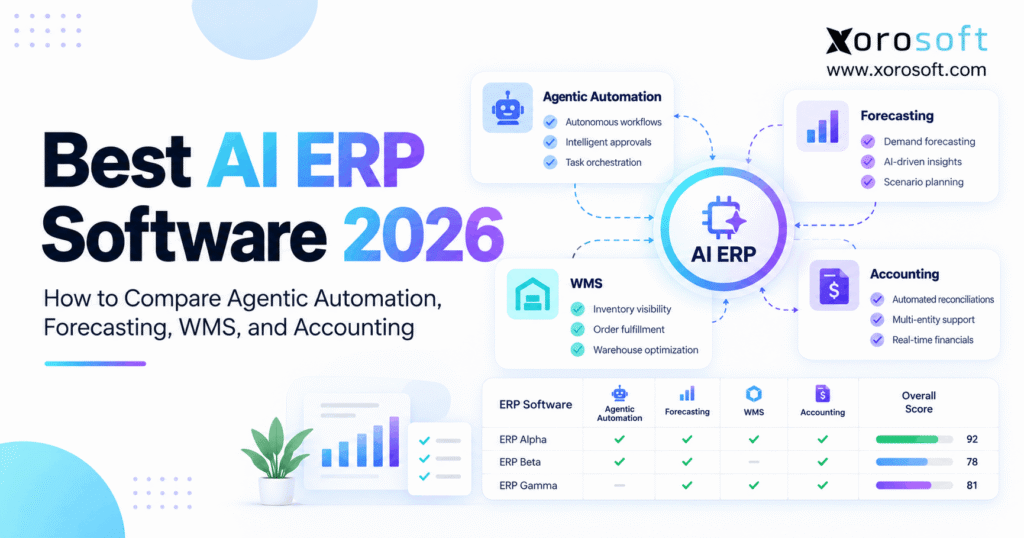
If you’re searching for a comprehensive AI ERP software comparison, you’ve come to the right place.
1. Why Buying AI ERP Software Is Harder in 2026
An AI ERP software comparison in 2026 must answer a question that goes beyond artificial intelligence features: Can the system turn business data into safe, useful actions?
Many ERP vendors now offer AI assistants, demand forecasts, smart reports, and automated tasks. However, these tools do not always connect with daily business work. As a result, companies may buy advanced software while still relying on spreadsheets for purchasing, warehouse checks, and accounting.
For example, an AI tool might predict a stockout next month. Yet that forecast has little value if the system cannot check incoming goods, supplier terms, warehouse stock, and existing orders.
Therefore, businesses should judge AI ERP software by what it can do across the whole operation.
1.1 Why AI Features Do Not Always Improve Daily Work
Initially, ERP buyers often focus on the number of AI features a vendor offers. However, a long feature list does not prove that the software can solve real business problems.
For instance, an AI assistant may explain why sales have increased. Meanwhile, the purchasing team may still need to check five reports before placing an order.
Similarly, a forecast may show rising demand. Yet warehouse staff might not have enough accurate stock data to fulfill the next orders.
Consequently, a useful AI ERP must connect three important activities:
- Understanding: Identify what is happening across the business.
- Planning: Suggest the next action based on reliable information.
- Execution: Complete or prepare authorized transactions while keeping records accurate.
Most importantly, teams should be able to review the reason behind each recommendation.
1.2 What an AI ERP Software Comparison Should Prove
A strong AI ERP software comparison tests complete business tasks rather than isolated features.
First, the ERP must provide accurate inventory, order, purchasing, and finance data. Next, its AI tools should detect risks and suggest useful actions.
Finally, the system must respect business rules when employees approve or reject those actions.
For example, an effective ERP should help answer these questions:
- Which products may run out soon?
- Can another warehouse supply the stock?
- Should the company create a new purchase order?
- Will the purchase exceed an approved spending limit?
- How will the transaction affect inventory and accounting?
Therefore, buyers should evaluate AI agents, forecasting, WMS, and accounting as connected parts of the same business process.
2. Four Levels of AI ERP Capability Buyers Must Understand
Not every ERP feature labeled “AI” works in the same way.
Some features follow fixed rules. Others use past data to predict demand. Meanwhile, more advanced agents can use tools to carry out approved steps.
As a result, buyers should understand what each type of AI can actually do before comparing products.
2.1 Rules, AI Assistance, Forecasting, and Agents
The following table shows four common levels of ERP intelligence.
| Type | What it does | Practical example |
|---|---|---|
| Rule-based automation | Follows set conditions | Send a low-stock alert |
| AI assistance | Explains data or drafts content | Summarize slow-moving inventory |
| Predictive AI | Estimates future results | Forecast next month’s demand |
| Agentic AI | Plans and carries out permitted steps | Prepare a purchase order for approval |
Although these features support different tasks, they can work together.
For example, forecasting may predict a shortage. Next, a rule can flag the item. Then, an AI agent may check suppliers and prepare a draft order.
However, the ERP should still decide which tasks need human approval.
Therefore, the strongest solution is not always the one with the most advanced AI model. Instead, it is the one that fits the way the company works.
2.2 How AI ERP Differs From Traditional Workflows
Traditional ERP software already handles stock records, sales orders, purchasing, and finance. In addition, many systems offer rules that can run common tasks without AI.
However, AI adds value when teams face questions that fixed rules cannot answer easily.
For example, a reorder rule may trigger when stock falls below 200 units. By contrast, a forecast can study seasonal demand, supplier delays, and sales trends before suggesting a new stock level.
Still, both approaches need accurate data.
Consequently, the AI ERP software comparison should separate ordinary automation from AI-based planning and agent-led actions.
This distinction also helps buyers avoid paying extra for features their current ERP may already support.
3. Build an AI ERP Software Comparison Around Your Data
Before comparing vendors, buyers should review the data that powers their daily operations.
After all, even a strong AI model can make poor suggestions when stock records, supplier details, or sales data are wrong.
Therefore, the first step is to check whether the ERP can provide one reliable view of the business.
3.1 Map Your Systems of Record
Initially, identify where the company stores its key data.
For example, a growing brand may use Shopify for online orders, a warehouse app for picking, and accounting software for finance. Meanwhile, spreadsheets may hold supplier terms and stock plans.
As a result, the business may have several versions of the same inventory number.
A useful AI ERP software comparison should test whether each vendor can bring these records together without losing important details.
For Shopify sellers, the Shopify inventory data model provides a useful example. It tracks inventory states by location rather than treating all stock as one number.
Therefore, buyers should confirm that an ERP can separate on-hand, reserved, incoming, damaged, and available stock.
Most importantly, they should decide which system owns each update.
3.2 Check Stock, Supplier, and Finance Data Quality
Next, review the records that support purchasing and stock planning.
For example, one item may have different supplier lead times, buying costs, and order sizes. Meanwhile, another item may use case packs or special storage rules.
If these details are missing, the ERP may suggest the wrong purchase quantity.
Therefore, companies should check:
- Product codes and units of measure.
- Warehouse locations and stock states.
- Supplier lead times and minimum order quantities.
- Sales history and open customer orders.
- Incoming purchase orders and transfer records.
- Inventory costs and finance rules.
In addition, teams should test whether the ERP flags missing or odd values.
Finally, remember that clean data improves both traditional ERP processes and AI-based tasks.
4. AI ERP Agents: Test What They Can Really Do
Agentic AI is one of the main reasons businesses are reviewing ERP software in 2026.
However, agentic does not mean that AI should make every business decision alone.
Instead, buyers should focus on the steps an agent can take, the data it can use, and the rules it must follow.
4.1 Test a Real AI ERP Purchasing Agent
Consider a distributor that may run out of a popular item within three weeks.
First, an AI agent checks recent sales and demand forecasts. Next, it reviews available stock at each warehouse.
Then, it checks incoming purchase orders, supplier lead times, and buying rules.
If another warehouse has enough spare stock, the agent might suggest a transfer. Otherwise, it may prepare a new purchase order.
However, a purchase above the spending limit should still require approval.
For example, Xorosoft’s AI MCP Server supports permission-aware access to ERP data and selected actions, such as purchase order creation and inventory allocation.
Therefore, buyers should test the exact actions available to their users instead of assuming that every connected AI tool has full control.
An AI ERP software comparison should also show what happens when an agent cannot complete a task.
4.2 Keep Human Control Over High-Risk Actions
Although AI can reduce manual work, companies still need clear limits.
For example, an agent should not change supplier bank details, write off stock, or post a major finance entry without suitable checks.
In addition, the ERP should record who requested an action, which tools were used, and whether the task succeeded.
The NIST AI Risk Management Framework offers useful guidance for managing AI risk and trust.
Therefore, buyers should ask vendors to demonstrate:
- Role-based access and approval limits.
- Full logs for AI actions.
- Clear alerts when tasks fail.
- Checks that stop duplicate orders.
- Safe handling of missing data.
- A way for people to reject suggestions.
Most importantly, the system should stop when it lacks the data or permission needed to act safely.
5. Forecasting and Buying: Follow the Stock Decision
Demand forecasts can help teams prepare for future sales. However, a forecast only estimates what may happen.
Purchasing teams still need to decide how much to buy, when to buy it, and where to send it.
Therefore, the AI ERP software comparison must test both forecasting quality and the buying process that follows.
5.1 Test AI ERP Forecasts With Real Sales Data
Initially, ask each vendor to use your sales history to predict demand for past periods.
Next, compare the results with what actually happened. This helps show whether the model performs better than a simple rule or a basic sales average.
For example, a product may sell well during the holiday season but slowly during other months.
However, a forecast that ignores promotions, lost sales, or out-of-stock days may give a false picture of demand.
Therefore, measure several outcomes:
- Forecast error by product and warehouse.
- Trends toward overbuying or underbuying.
- Stockout risk during busy periods.
- Changes in slow-moving inventory.
- Forecast performance across different time periods.
In addition, ask whether buyers can see why the system recommends a given quantity.
A useful AI ERP software comparison should favor clear, testable forecasts over broad claims of high accuracy.
5.2 Connect Forecasts to Reorder Rules
Suppose a sporting goods business expects demand for 1,200 units during the next buying period.
However, it already has 320 units ready to sell and 280 units arriving from suppliers. In addition, the team wants to keep 100 units as safety stock.
Therefore, the first buying gap is:
Expected demand + Safety stock − Available stock − Incoming stock
1,200 + 100 − 320 − 280 = 700 units
However, the supplier only accepts orders in cases of 24 units.
As a result, the buyer may need to round the purchase to 720 units.
Before approving that order, the ERP should also check open orders, warehouse transfers, supplier limits, and available cash.
Therefore, buyers need more than an AI forecast. They need a connected purchasing process that turns a forecast into an accurate, approved decision.
6. Warehouse Management: Can the WMS Complete the Job?
A strong demand forecast cannot fix a warehouse that ships the wrong product.
Therefore, buyers must check warehouse execution alongside AI planning.
For inventory-led businesses, the warehouse is where data must match physical stock. As a result, missing scans or delayed updates can affect customers, purchasing, and finance.
6.1 WMS in AI ERP: Receiving Through Shipping
First, test what happens when goods arrive at the warehouse.
The WMS should help staff verify the received quantity, place items in the right locations, and update stock records.
Next, test the picking and packing process.
For example, when a customer orders five units, warehouse staff should scan the correct product and confirm that five units have been packed.
If the quantity is wrong, the system should flag the issue before shipment.
For instance, XoroWMS supports warehouse tasks such as receiving, barcode scanning, stock tracking, picking, packing, and multi-warehouse control.
Therefore, the AI ERP software comparison should test physical warehouse steps rather than relying only on dashboard screenshots.
A useful WMS demonstration should also include returns, cycle counts, and damaged goods.
6.2 Check Multi-Warehouse and 3PL Handoffs
As businesses add more locations, inventory records become harder to manage.
For example, one warehouse may have excess stock while another is close to running out.
In that case, the ERP should help the team compare a transfer with a new supplier purchase.
Meanwhile, a connected 3PL may send shipment updates after a delay.
Therefore, buyers should test how the system handles late updates, split shipments, and stock in transit.
In addition, warehouse transfers should not create duplicate stock or remove goods from both sites.
Ultimately, AI can support smarter decisions only when the WMS records each stock movement correctly.
7. AI ERP Software Comparison for Accounting and Finance
AI can reduce some of the work involved in finance. However, faster processing does not guarantee accurate books.
Therefore, an AI ERP software comparison must examine how purchasing and warehouse records connect with accounting.
The goal is to reduce manual checks without losing control over financial entries.
7.1 Match Supplier Bills With Orders and Receipts
Consider a supplier invoice for 100 units.
Initially, the accounting team checks the purchase order. Next, it verifies how many units the warehouse received.
However, if the warehouse received only 95 units, the invoice should not simply pass through the system without review.
Instead, the ERP should flag the difference and follow the company’s approval rules.
AI may help read invoice data, suggest account codes, or detect possible duplicate bills.
Nevertheless, buyers should verify whether the tool creates a draft, proposes a match, or posts a final entry.
A good AI ERP software comparison should also test price differences, missing receipts, supplier credits, and tax details.
7.2 AI ERP Accounting: Check Costs and Audit Trails
Inventory changes can affect the balance sheet, cost of goods sold, and profit reports.
Therefore, finance teams need accurate links between purchases, warehouse work, and accounting.
For example, a stock adjustment should follow the correct cost method and approval process.
Similarly, a customer return may affect available stock, revenue, and the related finance entry.
A connected ERP platform with inventory and finance tools can help reduce the need to move data across separate systems.
However, buyers must still test their required cost methods, currencies, month-end tasks, and user controls.
Finally, every approved AI-related finance action should leave a clear record that an accountant can review.
8. Best AI ERP Software in 2026: Which Platforms Should You Compare?
The best ERP depends on business size, industry, existing tools, and daily work.
Therefore, the following shortlist focuses on where each platform may fit.
For product-led businesses, Xorosoft is the first option to evaluate here. However, this order reflects the needs of the article’s target audience, not an independently tested global ranking.
8.1 Xorosoft: A Connected ERP for Inventory-Led Businesses
Xorosoft is a strong starting point for ecommerce brands, wholesalers, distributors, and manufacturers that need connected inventory, warehouse, purchasing, and finance tools.
Its XoroONE cloud ERP platform brings core business work into one system, including order management, stock control, accounting, warehouse tools, and manufacturing.
As a result, buyers can test how an order moves from a sales channel through stock checks, warehouse work, and finance.
In addition, the platform supports forecasting and AI-connected tasks. However, buyers should check which actions use standard rules, which use AI, and which require user approval.
The main buying question is whether the platform supports the complete workflow your business needs.
8.2 SAP and Oracle: Enterprise AI Workflows
SAP is an option for large firms with broad needs across finance, supply chain, buying, and other business areas.
Its Joule Agents can help manage tasks across linked business tools.
However, buyers should check which agents are available in their setup and what each one can do.
Oracle Fusion Cloud is another option for firms with complex business rules.
Its AI Agent Studio supports the design and rollout of agents linked to Fusion apps.
Therefore, large businesses should compare both platforms using their own data, approval needs, and IT capacity.
8.3 NetSuite, Business Central, and Acumatica
NetSuite offers cloud ERP tools for firms that need finance and business operations in one suite.
Its AI Connector Service also supports controlled access from outside AI tools.
Meanwhile, Microsoft Dynamics 365 Business Central offers Copilot and AI agents for tasks such as sales orders and payables.
According to Microsoft’s AI documentation, buyers should check feature access, supported regions, and license needs.
Acumatica is another midmarket ERP option.
Its October 2026 release adds embedded AI tools, improved reports, and task support.
However, each vendor still needs to prove how its AI features work with stock, WMS, and finance records.
8.4 Cin7 and Other Focused Tools
Cin7 is worth reviewing when inventory planning is a major concern.
Its ForesightAI forecasting tools support demand planning and suggested reorders.
Meanwhile, Brightpearl and Fishbowl may also fit businesses with more focused retail, stock, or warehouse needs.
However, a planning tool should not be treated as equal to a full ERP without checking accounting and warehouse scope.
The table below offers a useful first shortlist.
| Software | Main evaluation focus |
|---|---|
| Xorosoft | Connected inventory, WMS, purchasing, ecommerce, and finance |
| SAP | Large-scale business processes and AI agents |
| Oracle Fusion | Enterprise finance and agent-led workflows |
| NetSuite | Cloud ERP and controlled AI access |
| Business Central | Microsoft-based ERP and Copilot |
| Acumatica | Midmarket ERP and embedded AI |
| Cin7 | Inventory forecasting and buying support |
| Brightpearl / Fishbowl | Focused retail and inventory needs |
These are areas to test, not guaranteed winners in each category.
For further buying research, use the ERP comparison hub or review the Xorosoft versus NetSuite comparison.
Consequently, your AI ERP software comparison should end with a shortlist based on real workflow needs, not brand recognition alone.
9. AI ERP Software Comparison: Use a Weighted Buyer Scorecard
A vendor demonstration can look impressive even when the software misses key tasks.
Therefore, an AI ERP software comparison works best when every vendor faces the same tests.
Instead of asking which platform has the most AI tools, ask which one supports your business with the least risk and effort.
9.1 Score AI ERP Across Eight Measures
The following 100-point scorecard is a suggested buying framework.
| Evaluation area | Weight |
|---|---|
| AI agents and action controls | 20 |
| Forecasting and purchasing | 15 |
| WMS and multi-site stock | 15 |
| Accounting and stock costs | 15 |
| Integrations and data access | 10 |
| Security and audit trails | 10 |
| Setup and total cost | 10 |
| Industry fit | 5 |
| Total | 100 |
First, score each area from zero to five. Then, apply the weight for that area.
For example, a vendor that scores four out of five for forecasting earns 12 out of 15 points.
However, a high total should not excuse a failure in a critical task.
Therefore, buyers should set minimum pass levels for stock accuracy, finance controls, security, and warehouse execution.
These weights are proposed buying criteria, not measured vendor performance scores.
9.2 Seven Real-World Tests for Every Vendor
Use these seven tasks during each software demonstration:
- Find a stockout risk: Show why stock may run out.
- Suggest a purchase: Check supplier terms and incoming stock.
- Apply approval rules: Stop a purchase above the user’s limit.
- Move stock: Record a transfer between warehouses.
- Verify fulfillment: Pick, pack, and ship the correct items.
- Match a supplier bill: Find price and quantity differences.
- Handle a failed task: Stop duplicate or unsafe AI actions.
In addition, ask the vendor to show the system log after each action.
For example, a rejected purchase should not reappear as a new order without approval.
Ultimately, your AI ERP software comparison should show whether the vendor can manage real problems, not just ideal test data.
10. Pricing and ROI: Look Beyond the Software Fee
ERP prices often depend on users, modules, data needs, and the work required during setup.
Meanwhile, AI may add separate charges for agents, model usage, or extra tools.
Therefore, businesses should compare the full cost of running each platform.
10.1 Build a Three-Year ERP Cost Model
First, request a clear quote for the main software.
Next, add the cost of data moves, setup, training, and links to other apps.
Then, check any extra costs for AI use, custom work, or added locations.
| Cost area | What to check |
|---|---|
| ERP license | Users, sites, modules, and renewals |
| AI tools | Usage fees, agent plans, and limits |
| Implementation | Setup, data moves, and testing |
| Integrations | Storefronts, EDI, shipping, and banks |
| Support | Help, updates, and future changes |
For example, a lower base price may still lead to higher costs if the company needs many extra apps.
Consequently, a sound AI ERP software comparison must include three-year ownership costs, not just monthly subscriptions.
10.2 Measure ROI Using Real Work Results
AI return on investment should come from clear business gains.
For example, teams may reduce time spent on invoice checks, stock counts, or manual buying.
However, those gains must outweigh setup and ongoing costs.
McKinsey’s 2026 State of AI survey found that 40% of respondents at large firms reported scaling AI agents, compared with 22% at smaller firms.
Nevertheless, only 37% of respondents said AI had made a positive contribution to company earnings before interest and taxes.
These results cover AI broadly, not ERP software alone.
Therefore, track clear measures such as stock errors, picking mistakes, forecast error, buying time, and month-end close time.
11. AI ERP Choices by Industry and Business Model
Different industries need different ERP tools.
Therefore, buyers should adjust their scores to reflect the work that matters most to their business.
For example, a Shopify brand may value channel stock accuracy. Meanwhile, a manufacturer may care more about materials and work orders.
11.1 AI ERP for Shopify and Wholesale Businesses
For Shopify brands, inventory availability must match actual stock.
Otherwise, a product may appear ready to sell even when the warehouse cannot ship it.
Therefore, the ERP should connect orders, available stock, purchasing, returns, and finance.
The Xorosoft Shopify App Store listing provides context for its ecommerce connection.
In addition, buyers can review available ERP integrations to assess how stores, marketplaces, and other tools link with core operations.
Wholesale firms have added needs.
For example, they may handle EDI, custom prices, large orders, and reserved stock.
As a result, the AI ERP software comparison should test whether these orders move through buying, picking, shipping, and billing without manual fixes.
11.2 Manufacturing, Apparel, Furniture, and Food
Manufacturers should check bills of materials, work orders, stock needs, and production costs.
Meanwhile, apparel firms must track sizes, colors, returns, and seasonal sales.
Furniture companies often need to plan around longer supplier lead times and large shipments.
In addition, food firms may require lot records, expiry dates, and recall support.
Therefore, buyers should start with industry needs before ranking AI features.
The industries served by Xorosoft illustrate several stock-led business types that may need these linked tools.
However, each firm must still test its own rules and workflows.
Ultimately, industry fit matters more than the number of AI features on a product page.
12. When Should a Business Upgrade to AI ERP?
A growing company may not need a new ERP just because AI tools are popular.
Instead, the right time to upgrade depends on the cost of poor data, slow work, and disconnected systems.
Therefore, buyers should first identify which daily problems have become too costly to manage.
12.1 Signs Your Current Software Has Reached Its Limits
Initially, spreadsheets and simple accounting tools may support a small business well.
However, problems often appear as the company adds more orders, products, warehouses, and sales channels.
For example, the team may spend hours checking stock across apps. Meanwhile, finance may need several days to match sales, purchases, and warehouse data.
Common warning signs include:
- Frequent inventory differences.
- Delayed supplier orders.
- Too much manual data entry.
- Slow month-end close.
- Poor multi-warehouse visibility.
- Repeated shipping and stock errors.
Therefore, businesses should weigh these problems against the cost of a new ERP.
In addition, they can review relevant ERP customer case studies to understand which changes have helped similar firms.
12.2 AI ERP Alternatives and Common Buying Mistakes
A new ERP is not always the only answer.
For example, a business may improve its current system with better stock rules, a warehouse app, or a focused demand forecast tool.
However, each new app may add more data links and extra work.
Therefore, compare the cost of fixing your current tools with the cost of moving to a more connected ERP.
Common mistakes include buying AI features before fixing data, ignoring staff training, and failing to test real warehouse or finance tasks.
In addition, firms sometimes rely on vendor claims without asking for a full demo.
A review of different ERP solutions can help teams define the core system features they need.
Ultimately, the right choice should reduce daily work and business risk—not simply add another layer of software.
13. Conclusion: Choose the ERP That Proves Its Value
The best AI ERP software in 2026 is not always the system with the largest collection of AI tools.
Instead, it is the platform that connects accurate data, smart planning, clear approvals, and reliable business actions.
Therefore, use the AI ERP software comparison framework to test agentic automation, forecasting, WMS, accounting, security, and ownership cost together.
For inventory-led businesses, Xorosoft is worth evaluating when the main goal is to connect stock, buying, warehouse work, ecommerce, and finance.
However, the final choice should always follow a real workflow test.
Want to see how a connected ERP fits your business? Book a Demo and review your own inventory, purchasing, fulfillment, and finance needs.
Frequently Asked Questions
What is the best AI ERP software in 2026?
The best fit depends on your workflows. For inventory-led firms, check stock, WMS, buying, and finance. Meanwhile, larger firms may need broad global tools. Test live tasks before choosing.
How does agentic AI work in ERP?
AI agents use data to suggest steps or run approved tasks. However, they need access rules, logs, and limits. For example, large purchase orders should still require human approval.
Can AI ERP forecast inventory demand?
Yes, some tools study sales and stock data to estimate demand. However, results vary by item and season. Therefore, test past forecasts before trusting new purchase plans.
Does AI ERP need a built-in WMS?
Not always. A linked WMS can work if stock, picks, and shipments sync well. However, a built-in WMS may cut gaps. Test receiving through shipping in both setups.
Can AI ERP automate accounting tasks?
Yes, some systems help match bills, flag errors, and draft entries. Still, teams need clear checks. Therefore, test tax, stock value, approvals, and month-end close before enabling actions.
How much does AI ERP software cost?
Costs include software, AI use, setup, data moves, links, and support. In addition, some features require separate fees. Therefore, request a three-year cost model based on your own needs.
When should a growing business upgrade to AI ERP?
Consider an upgrade when stock errors, manual buys, or slow closes hurt growth. However, AI alone is not a reason to switch. First, fix the gaps with the greatest cost.
Recent Posts
-
 How to Calculate Ecommerce Warehouse Capacity Before Peak Season
 -
 Manufacturing Scrap Statistics 2026: Material Loss, Yield, and Cost
 -
 ERP Software for Cosmetics Distributors Managing Lots, Wholesale, and Ecommerce
 -
 Xorosoft vs Cin7 Core for Multi-Warehouse Wholesale Operations
 -
 How a Multi-Warehouse Company Reduced Inventory Reconciliation Work at Month-End