If you’re considering a 3PL SLA audit, it can help ensure your logistics partners meet agreed service levels.
1. Why a 3PL SLA Audit Matters When Shipping Reports Do Not Match Reality
Your 3PL reports that 98% of orders shipped on time. Yet customers keep asking where their parcels are. The warehouse says the orders were shipped, while the carrier still shows “label created.” At the same time, finance sees extra fees that no one can tie to a clear event. Which report should your team trust?
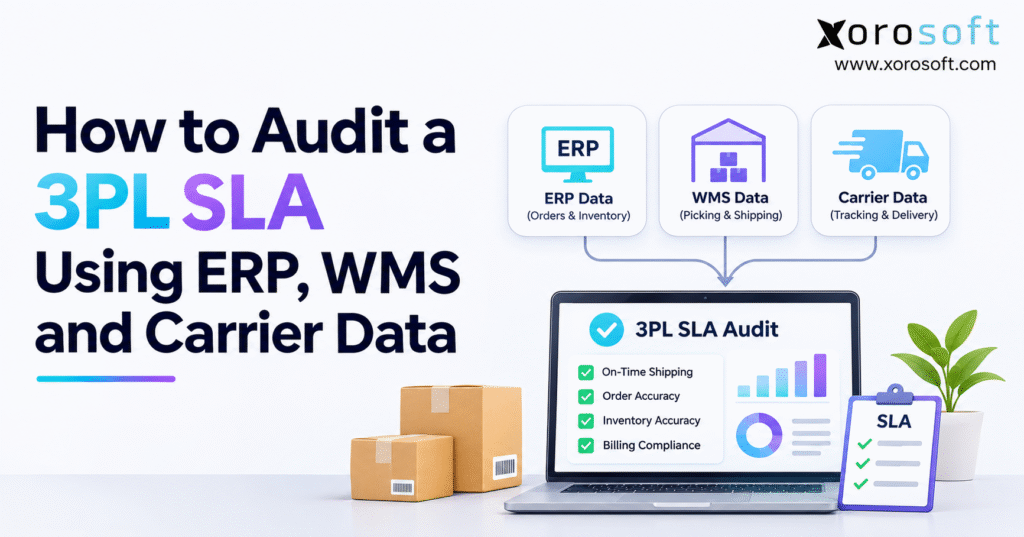
This is where a 3PL SLA audit helps. It compares the promises in a third-party logistics contract with events from your enterprise resource planning (ERP) system, warehouse management system (WMS), and carrier records. As a result, you can see what happened, when it happened, and who was in charge of that step.
The problem is that each system sees a different part of the order. The ERP knows when work was released and what stock was promised. The WMS knows when staff picked and packed it. Meanwhile, the carrier knows when it took the parcel and whether delivery was on time. A warehouse shipment status may be true within the WMS but still fail to prove a carrier handoff.
1.1 What a 3PL SLA Audit Should Prove
A 3PL SLA audit is an evidence-based check of a provider’s service level agreement. It tests agreed targets for shipping, picking, receiving, stock control, returns, and related fees against dated source records. It also checks which orders count, which delays are allowed, and whether a claimed breach is backed by proof.
1.2 Who Needs an Independent 3PL Performance Review?
Ecommerce brands, wholesalers, and multi-site teams gain from regular reviews. However, even small merchants can benefit when delays or stock gaps keep recurring. The goal is fair fixes, not blame.
2. Turn the 3PL Contract Into Rules You Can Test
Start the 3PL SLA audit with the active contract, its changes, rate card, and site calendar. Then turn each promise into a testable rule. If wording is vague, agree on its meaning first.
2.1 Define Eligible Orders, Cutoff Times, and SLA Targets
Suppose an agreement says that 98% of orders received before 2 p.m. must ship that day. Does “received” mean the ERP sent the order, an API delivered it, or the WMS accepted it? Also, does “shipped” mean packed, loaded, handed to a driver, or scanned by the carrier? These choices can change the final score by several points.
For each measure, write down the start event, stop event, target, eligible order group, and review period. In addition, record the rule for stock shortages, holds, weekends, and split orders. Keep the original rule beside the final score so the result can be checked again later.
| SLA term | Rule to confirm | Best proof |
|---|---|---|
| Order eligible | Valid release, ready stock, before cutoff | ERP order and stock status |
| Start of clock | Release or WMS acceptance, as agreed | Dated system event |
| End of clock | Pack, tender, or carrier possession | WMS and carrier evidence |
| SLA target | Rate or hours in signed contract | Current contract version |
| Exclusion | Approved reason with proof | Hold or exception log |
| Remedy | Credit, cap, and claim deadline | Contract and billing file |
2.2 Account for Time Zones and Business Days
Store source times in UTC where possible, but keep the local time and time zone of each warehouse. For instance, 1:55 p.m. in California should not be judged against a 2 p.m. cutoff in New York without a clear rule. Daylight saving changes, holidays, and weekend shifts matter too.
Next, check whether the clock stops during a merchant hold or a carrier shutdown. Do not move an old ship-by date to a new one just because a late order was rebooked. Otherwise, the report may hide a breach rather than explain it.
2.3 Keep Valid Exclusions Visible
A provider may exclude an order that arrived after cutoff or lacked stock, but only if the contract permits it. Therefore, keep all orders in the raw file and give each excluded one a reason, date, clause, and source record. Report total orders, excluded orders, and eligible orders as separate figures.
3. Gather ERP, WMS, and Carrier Evidence for the 3PL SLA Audit
Collect the records behind the provider’s summary for one date range. Record the source and export time. Above all, request event-level rows, not a final percentage.
3.1 ERP Records Show What the Merchant Asked the 3PL to Do
Your ERP should hold the order ID, SKU, line quantity, stock status, site, release time, hold history, and original ship promise. Also include edits made after release. A new address or changed quantity may explain why the WMS record differs from the first order.
For businesses that sell across channels, the ERP is often the best place to trace the demand and stock promise. For example, XoroERP from Xorosoft links order, stock, and finance workflows. However, the ERP alone cannot prove that a driver took a parcel. That proof must come from the right later event.
3.2 WMS Events Show Picking, Packing, and Tender
Ask the 3PL for the time it accepted the order, started and finished the pick, packed each carton, created the label, and passed goods to the dispatch team. Keep carton IDs, scan logs, and shipped quantities. In addition, request stock adjustments, count results, and receiving events for inventory and inbound SLAs.
Warehouse software such as XoroWMS from Xorosoft supports the scan-led work that forms part of this record. Still, when a business uses an outside 3PL’s WMS, it must agree on access to the right fields. An export that shows only “completed” may be too thin for a dispute.
For EDI workflows, the X12 transaction-set list defines 940 as a warehouse shipping order and 945 as warehouse shipping advice. These messages help match what was sent with what the warehouse says it shipped. Yet a 945 does not, on its own, prove carrier pickup.
3.3 Carrier Data Proves the Next Stage of the Shipment
Carrier data should include tracking ID, service, first possession scan, route events, delivery attempts, and proof of delivery when available. Also keep pickup sheets or signed tender records, because some sites do not receive an immediate scan at the dock.
Both UPS tracking guidance and FedEx label guidance make an important point: creating a label is not the same as handing over a parcel. Therefore, a 3PL SLA audit should not treat “label created” as pickup proof. However, a missing first scan alone does not prove the warehouse failed; review signed handoff records before assigning fault.
3.4 Build a Source-of-Truth Matrix
Use a simple matrix to show which system answers each question. As a result, the audit team will not ask a carrier report to prove a warehouse pick or use a WMS label time to prove delivery.
| Audit question | ERP | WMS | Carrier |
|---|---|---|---|
| Was the order ready? | Release and stock | Acceptance | — |
| Was the right stock picked? | Ordered lines | Scans and carton lines | Package link |
| Did dispatch meet cutoff? | Ship-by date | Pack and tender times | Possession event |
| Did delivery meet promise? | Original due date | Tracking link | Delivery event |
| Is a fee valid? | Invoice and rate | Work done | Carrier charge if used |
A connected suite such as XoroONE from Xorosoft can help teams keep the order and stock side of this work in one place. Even so, a fair SLA review still needs the third party’s raw events and the contract’s own rules.
CTA #1 — Free ERP Readiness Assessment: If the audit takes days of manual exports, start by finding which IDs, event times, and source links are missing. A readiness review can help set the scope before a software change.
4. Match 3PL Orders, WMS Shipments, and Carrier Scans
First, match each ERP order to its WMS job. Next, link the job to shipments and carrier scans. Keep split packages together under the same order.
4.1 Match at the Order, Line, and Package Level
Use stable IDs where possible: order ID, fulfillment ID, warehouse job ID, shipment ID, carton ID, and tracking number. If one source lacks an ID, use the agreed mapping table. Avoid matching on a customer’s name or a near date alone, since two orders can look alike.
For example, one order for five units could ship as two cartons, each with its own carrier scan. If a data join copies the order row once per carton and then counts those rows as orders, the final SLA rate will be wrong. Instead, keep package-level evidence and roll it up under the rule in the contract.
4.2 Use Event Time, Not Just the Time a Status Reached a System
An API might load a pickup scan at 10:30 a.m. even though the driver scanned the carton at 9:45 a.m. Therefore, store both the actual event time and the time the feed received it. The GS1 EPCIS standard draws a similar line between the time of an event and the time it was put on record.
A useful event list includes ORDER_RELEASED, WMS_ACCEPTED, PACKED, LABEL_CREATED, WAREHOUSE_TENDERED, CARRIER_POSSESSION, and DELIVERED. However, each source status must be mapped with care. A provider’s “shipped” flag may mean something quite different from a carrier’s first acceptance scan.
4.3 Flag Gaps Before You Score the SLA
Mark missing tracking numbers, duplicate shipment rows, bad time order, quantity gaps, and events that have no matching order. Also flag late scans that still need pickup proof. Do not delete these rows to make the data clean. Instead, report them as open data issues until the team can settle them.
5. Calculate 3PL SLA Compliance With Clear KPI Formulas
Instead of relying on one score, calculate each SLA measure separately. Use the same dates and exclusions for each review.
5.1 On-Time Shipping Rate and Handoff Compliance
The main formula is on-time eligible orders ÷ all eligible orders × 100. The key is deciding which event proves “on time.” Some agreements use WMS dispatch. Others require handoff to the carrier. Therefore, write the event name beside the figure before sharing a 3PL SLA audit report.
5.2 Order Accuracy, Pick Accuracy, and Complete Shipments
Order accuracy usually means correct audited orders ÷ all audited orders × 100. However, pick accuracy can be based on item scans or pick lines, not orders. A wrong size in an apparel parcel counts as a wrong order, while an error caught and fixed before dispatch may still count against a pick-process measure.
5.3 Inventory Accuracy and Dock-to-Stock Time
For inventory, compare signed-off physical counts with the WMS balance at the agreed level: SKU, bin, lot, or unit. Also note stock in quarantine, in transit, or pending an approved adjustment. A high match rate means little if the count sample ignored the busy or error-prone areas of the building.
Dock-to-stock time is stock-available time minus the agreed receiving start time. For instance, goods may reach the dock at 8 a.m. and become ready to sell at 3 p.m. Yet if the SLA clock starts after unloading, the measured time will be shorter. Use the contract’s event, not the one that makes the chart look better.
5.4 On-Time Delivery and Carrier Delay Reviews
On-time delivery rate = deliveries made by the agreed date ÷ all eligible deliveries × 100. Keep the original promise date. Otherwise, a carrier’s later revised ETA could hide a late delivery. Also separate the warehouse handoff measure from the final delivery measure, since different parties control those steps.
For a broader quality view, APQC’s perfect order measure brings together on-time, complete, damage-free, and correct-document orders. However, do not swap that measure for the contract’s own SLAs or average all KPI rates without a clear reason.
5.5 3PL Billing Accuracy and a Useful Monthly Scorecard
Check the invoice against pick lines, storage units, packing work, returns, and each agreed extra fee. Then compare the total with the rate card. For example, an invoice for $12,500 against $12,100 of supported charges leaves a $400 open variance. First, check minimum fees and billing dates; only then call it an error.
| KPI | How to score it | Evidence to check |
|---|---|---|
| On-time shipping | On-time / eligible orders | ERP, WMS, carrier |
| Order accuracy | Correct / audited orders | WMS, claims, returns |
| Inventory accuracy | Agreed count method | Physical count, WMS |
| Dock-to-stock | Time to stock available | Receipt and putaway events |
| On-time delivery | On-time / eligible deliveries | Carrier scans, original promise |
| Billing accuracy | Charges checked against rate card | Invoice and work log |
CTA #2 — Watch Demo: Ask to follow a real order from release to pick, pack, ship, and invoice. Also ask what happens when a carrier scan is missing. A useful demo should reveal how the team finds gaps, not only how a dashboard looks.
6. Find the Root Cause of a 3PL SLA Breach
6.1 Separate Merchant, Warehouse, and Carrier Fault
If the merchant sent a valid order after cutoff, the provider may not owe same-day shipping. If the warehouse accepted an eligible order and missed its own dispatch time, the 3PL may own the issue. Meanwhile, a parcel handed over on time can still arrive late due to a carrier network fault.
| What went wrong? | First records to review | Likely next owner |
|---|---|---|
| Order reached WMS late | ERP send log, WMS receipt | Merchant or integration team |
| Pick finished after cutoff | WMS task and staffing log | Warehouse lead |
| Driver pickup was missed | Tender proof, pickup plan | Warehouse and carrier |
| Delivery failed in transit | Carrier scan trail | Carrier team |
| SKU in parcel was wrong | ERP line, pick scan, return | Joint review |
These are starting points, not legal findings. Moreover, an order with a missing scan may need more proof before anyone can be held responsible.
6.2 Keep an Exception Log and Check the SLA Remedy
Each issue should have a case ID, affected order, missed event, rule, proof, owner, and next action. Also keep the date the case was closed. This allows weekly reviews to focus on repeat causes, not the same argument over and over.
For billing or service credits, check the claim deadline, cap, and notice rule in the signed agreement. As a result, finance can distinguish an open charge dispute from a proven service breach. Keep the raw exports and contract version with the claim so both sides can reproduce the result.
7. Worked Example: A Monthly 3PL SLA Audit of 1,000 Orders
Consider a fictional apparel brand using one 3PL. Its ERP shows 1,000 released orders in a month. After reviewing the contract, the team marks 60 as valid exclusions due to agreed holds or cutoff rules. That leaves 940 eligible orders. The team then matches these to WMS events and carrier records.
7.1 Calculate the SLA Rate Without Hiding Exclusions
Of the 940 eligible orders, 893 met the agreed handoff cutoff and 47 were late. Therefore, the on-time rate is 95.0%. With an illustrative target of 98%, the gap is three percentage points. The 60 exclusions remain in the file and appear in the report rather than being erased.
| Monthly audit result | Order count |
|---|---|
| Total released | 1,000 |
| Approved exclusions | 60 |
| Eligible | 940 |
| On time | 893 |
| Late | 47 |
| On-time rate | 95.0% |
| Example SLA target | 98.0% |
7.2 Explain the Late Orders With Evidence
Suppose 21 cases were late picks, 11 involved pickup issues, seven involved merchant changes that were not allowed exclusions, and eight still have an open owner. Together, these equal the 47 late orders. These figures are illustrative, not industry data. Still, they show why a reason table is more useful than one score.
8. Adapt the 3PL Performance Audit to Your Sales Channels and Industry
8.1 Shopify, Amazon, and Multi-Location Fulfillment
In Shopify, one order can lead to more than one fulfillment or tracking number. The Shopify Fulfillment API describes those records and their links to line quantities. Therefore, match at the fulfillment and package level before you roll results up to the original customer order.
For a connected store, the Xorosoft ERP app in the Shopify App Store is one possible integration path to review. Still, check the exact fields and update times in your own setup. A sync mark only tells you that data moved; it does not prove a truck arrived on time. Similar care is needed for Amazon, EDI, and wholesale orders.
8.2 Apparel, Furniture, Food, and Wholesale SLA Risks
Apparel teams need to review size and color errors, peak-sale cutoffs, and returns. Furniture sellers should track damage, large-parcel handling, and delivery slots. Food firms may need lot, expiry, and hold records. Meanwhile, wholesale firms often need case counts, retailer rules, and EDI proof.
The Xorosoft industries page gives examples of the kinds of stock-heavy workflows that shape these needs. However, a 3PL SLA audit must still use the actual services and goals in the signed contract, not a generic industry score.
8.3 Know When Spreadsheets Are Enough—and When They Are Not
A small brand with one 3PL, a clear contract, and clean monthly exports may do a sound audit in spreadsheets. On the other hand, more orders, more sites, split shipments, and frequent fee disputes make manual work harder to trust. At that point, a shared ERP, WMS, and carrier data model can reduce repeat work.
Do not buy software to solve vague contract terms. First, test data access and team rules. If gaps also affect stock and finance, compare ERP options, such as Xorosoft versus NetSuite, against real work tests.
9. Frequently Asked Questions About 3PL SLA Audits
9.1 What is a 3PL SLA audit?
A 3PL SLA audit checks whether an outside warehouse met the terms of its service agreement. It matches the contract with order, warehouse, and carrier events. As a result, the business can see which orders passed, which failed, and which need more proof. The goal is a fair, repeatable review rather than a score based only on provider reports.
9.2 Why should ecommerce brands review their 3PL SLAs?
Brands should review their 3PL SLAs because slow shipments and wrong picks can raise costs and hurt trust. For example, a provider may close an order in its WMS before a carrier takes it. An audit shows that gap. In addition, it helps the team fix root causes, check fees, and plan service talks using facts.
9.3 What data does a 3PL SLA audit need?
A 3PL SLA audit needs the signed contract, ERP order records, WMS events, and carrier scans. It may also need stock counts, return claims, invoices, and rate cards. First, keep the source IDs and original event times. Then link them at order and package level. Otherwise, a final percentage cannot be traced back to the work.
9.4 Can you audit a 3PL without direct WMS access?
Yes. A 3PL can send detailed WMS exports, API events, or EDI files without giving the merchant a system login. However, the files must show the events named in the SLA, not just monthly totals. If the contract only promises a dashboard, ask for more detail and clear record rights during the next renewal.
9.5 How do order release and warehouse acceptance differ?
Order release is when the merchant makes work ready for the warehouse. Acceptance is when the 3PL confirms it has received that work. Because a feed can fail or arrive late, the two times may differ. Therefore, the contract must state which starts the SLA clock and how holds, bad data, and late acknowledgments are treated.
9.6 How do you calculate 3PL on-time shipping compliance?
Divide the number of eligible orders that met the agreed ship event by all eligible orders, then multiply by 100. However, define the event first: pack end, dispatch, tender, and carrier scan are not the same thing. Also keep valid exclusions in a separate count. This gives a rate that another reviewer can check against the contract.
9.7 Is on-time shipping the same as on-time delivery?
No. On-time shipping checks whether the warehouse met its agreed dispatch or handoff point. On-time delivery checks whether the parcel reached its destination by the promised time. For example, a warehouse may tender goods on time while a carrier has a route delay. Therefore, report the two rates on separate lines and review ownership before assigning fault.
9.8 Does printing a carrier label mean an order shipped?
No. A printed label shows that shipment details were created. It does not, by itself, show that a driver took the carton. Instead, look for carrier possession or signed handoff proof allowed by the contract. Still, a missing scan can be a carrier data gap, so confirm the facts before calling the warehouse late.
9.9 Which timestamp starts the 3PL SLA clock?
The contract should name the start event. It might be ERP release, a successful order feed, or WMS acceptance. First, check that the order met stock and cutoff rules. Then use the event named in the agreement for every similar order. If the wording is unclear, settle it with the provider before making a formal breach claim.
9.10 How do time zones affect a 3PL SLA audit?
Time zones can change whether an order met a cutoff. Therefore, keep the original local time and a shared UTC value, along with the site’s time zone. Use the right holiday calendar and daylight saving rules. Also note which site owned the order. Otherwise, an order near cutoff may be marked late or on time by mistake.
9.11 Which orders can be excluded from SLA results?
Only orders covered by the signed rules should be excluded. These may include valid merchant holds, stock issues, or certain outages. However, each needs a reason code and dated proof. Keep excluded orders in the source file and show their count in the report. Otherwise, a smaller denominator may make a poor month appear better than it was.
9.12 How should split shipments count in a 3PL SLA audit?
It depends on the unit named in the SLA. An order-level promise may require every carton to leave on time. A package-level promise may score each carton on its own. Therefore, map packages back to the same order before you count them. This avoids both double-counted orders and partial shipments that appear complete too early.
9.13 How is 3PL order accuracy measured?
A common rule is correct audited orders divided by all audited orders, times 100. However, some contracts measure lines or units instead. Review scan records, the original order, and claims from buyers. Also separate a wrong warehouse pick from an incorrect SKU sent by the merchant. The same error should not be charged to two teams without proof.
9.14 How do you check inventory accuracy at a 3PL?
Compare approved physical counts with WMS balances at the agreed SKU, bin, lot, or unit level. Before scoring, check open receipts, returns, holds, and stock moves. In addition, record how much inventory was counted. A strong score from a tiny sample of easy bins does not prove that the full warehouse stock record is accurate.
9.15 What does dock-to-stock time mean in an SLA?
Dock-to-stock time measures how long goods take to become ready for use after the agreed receiving event. For example, the clock may begin at truck arrival or after unloading. It may end at putaway or available stock. Since those choices change the result, document them first. Then measure each eligible receipt using the same event pair.
9.16 How do you tell a 3PL delay from a carrier delay?
Start with the ERP release and WMS pack times. Next, review tender proof, the carrier’s first scan, and later route events. A late pick points toward the warehouse; a missed pickup may involve both parties. Meanwhile, a late delivery after on-time handoff may be a carrier issue. Treat cases with weak proof as open until they are checked.
9.17 Which EDI records help with a 3PL SLA audit?
X12 940 messages can show warehouse ship requests, while 945 messages show reported warehouse shipping details. Other EDI files may cover stock changes or transport updates. Therefore, they help match order lines and trace failed feeds. However, a warehouse shipping message is not the same as a carrier acceptance scan, so keep transport proof separate.
9.18 How do you match ERP, WMS, and carrier records?
Match order IDs to warehouse jobs, then to shipments, cartons, and tracking numbers. Keep one-to-many links when an order has several parcels. Next, check line quantities and event times. Flag missing IDs or duplicate rows instead of dropping them. As a result, the score can be rebuilt from source records rather than guesswork or an edited report.
9.19 How can Shopify merchants audit their 3PL performance?
Shopify merchants should link orders and fulfillment records to the 3PL’s warehouse events and the carrier’s scans. Because one order can have several fulfillments, package-level mapping matters. Also check which location held the stock and which promise date applied. A synced “fulfilled” status is useful, but it does not always prove carrier handoff under the SLA.
9.20 How do you audit 3PL invoices and extra fees?
Rebuild expected fees from the rate card and the work that took place. For example, match picks to order lines and storage charges to agreed units. Then compare the result with invoice rows. Check minimum fees, timing, and special handling before calling a gap an error. Keep disputed lines open until the source activity and contract settle them.
9.21 What proof is needed to claim an SLA breach?
A strong claim includes the signed clause, original order, event history, cutoff rule, and the exact missed milestone. In addition, attach carrier or tender proof, any approved exclusions, and the calculation. Check the notice period before sending the claim. If key events are still missing, note the gap rather than saying the breach is fully proved.
9.22 How often should a business run a 3PL SLA audit?
Review urgent issues each day or week, close the formal score each month, and look for trends each quarter. However, the pace should match order volume and contract terms. A high-volume brand may need daily alerts for missed handoffs. Monthly frozen data is still helpful for fair billing checks, claims, and year-over-year service trends.
9.23 Who should own the 3PL audit process?
Supply chain or operations should own the overall 3PL SLA audit because it manages the provider relationship. Meanwhile, IT should own data feeds, finance should check fees, and customer support should share claims. Name one person who signs off on the monthly report. Also write down who can approve exclusions or change a rule so scores stay consistent.
9.24 When is it time to renegotiate or replace a 3PL?
Review the contract when verified service failures keep coming back or the provider will not share the data needed for a fair audit. First, give fixes a clear owner and deadline. Then compare progress with the cost and risk of moving stock. A new warehouse will not solve bad ERP orders, weak SKU maps, or unclear contract wording.
9.25 Can ERP software reduce manual 3PL SLA work?
Yes, an ERP can make order, stock, and finance records easier to find and match. With the right WMS and carrier feeds, teams can also build repeat checks and exception queues. However, software cannot write clear contract terms or prove a missing physical event by itself. Test real orders and data gaps before deciding whether a system upgrade is worthwhile.
10. Turn the 3PL SLA Audit Into a Monthly Improvement Plan
A useful audit ends with clear action, not another chart. First, approve the contract rules and data map. Next, run one full month, check missing events, and review the late orders with the provider. Then assign owners, dates, and proof needed for each fix. Finally, archive the rule version and use the same measures next month to see whether problems fell.
For a smaller brand, good exports and a careful spreadsheet may be enough. However, as warehouses, sales channels, and order volumes grow, linked ERP, WMS, and carrier records can save time and reduce errors. The goal is better service and fair costs, not a more complex report.
CTA #3 — Book a Personalized Demo: If missing order data, stock gaps, and manual finance checks are slowing your reviews, contact Xorosoft to discuss your current 3PL setup. Bring one real order flow, your SLA, and the data issues you want to solve. That will make the next discussion practical and specific.
Frequently Asked Questions
What is a 3PL SLA audit?
A 3PL SLA audit checks whether a fulfillment partner met contract targets. It matches ERP orders, WMS events, and carrier scans to confirm results and exceptions.
Which data do you need for a 3PL SLA audit?
Use the signed SLA, ERP release times, WMS dispatch logs, carrier scans, and approved exclusions. Keep shared IDs so each finding can be checked.
How is 3PL SLA compliance calculated?
Divide eligible orders that met the agreed deadline by all eligible orders, then multiply by 100. Report approved exclusions separately and define the shipping event.
Does creating a shipping label prove carrier pickup?
No. A label only shows that shipment details exist. Check carrier acceptance scans or signed handoff records before deciding whether the warehouse shipped on time.
Who is responsible when a 3PL shipment is late?
Compare ERP release, WMS packing and tender times, and carrier scans. Then apply the contract. Keep unclear cases open until evidence supports a decision.
How often should businesses audit their 3PL?
Review urgent issues weekly, calculate monthly SLA scores, and address repeat faults quarterly. Check more often when order volumes or contract claim deadlines demand it.
Can ERP software automate a 3PL SLA audit?
ERP software can link orders, stock, and finance data. However, accurate audits still need WMS and carrier feeds, clear contract rules, and review of disputed cases.
Recent Posts
-
 How to Audit a 3PL SLA Using ERP, WMS and Carrier Data
-
 Post-Go-Live ERP Support for Multi-Location Distributors
-
 Centralized vs Decentralized Purchasing for Multi-Location Operations
-
 Shopify Purchase Order Integration Benchmarks 2026: Scope, Sync, and Receipt Exceptions
-
 What Is Waveless Fulfillment and When Does It Work?