If you want to optimise your warehouse operations, understanding WMS inventory allocation is essential.
1. Why Stock Visibility Fails Without Warehouse Inventory Allocation
A warehouse dashboard can show hundreds of units in stock while a customer order remains stuck in fulfillment. The inventory may be physically present, but another order might already claim it, a quality team might restrict its lot, or the warehouse might lack access to its location. WMS inventory allocation addresses that gap between a promising stock number and a quantity that the warehouse can actually use.
The expensive mistake is treating every available-looking unit as permission to create picking work. Once a wave reaches handheld scanners, correcting a bad assignment becomes more disruptive than checking eligibility before release. Workers walk to empty bins, supervisors interrupt tasks, and customer service revises commitments that the business should have validated earlier.
1.1 On-Hand vs Available vs Pickable Warehouse Stock
On-hand inventory describes physical stock recorded at a facility. Available inventory accounts for commitments and exclusions under the business’s defined rules. Pickable inventory adds another layer: the right item must exist in a permitted location and be eligible for the order at that moment. An accessible reserve pallet and a carton under quality inspection do not represent the same fulfillment opportunity.
Consider 600 units recorded on hand. If customers already claim 180 units, quality teams quarantine another 60, and staff identify damage in 20 more, the uncommitted, unrestricted balance is 340 units, assuming these groups do not overlap. The warehouse may still need to replenish a forward location before workers can pick those 340 units. A system that ignores these distinctions can release work against unusable inventory.
1.2 How Poor Stock Allocation Creates Picking Exceptions
A small operation may resolve a shortage with a conversation across the warehouse. That breaks down when hundreds of orders arrive from ecommerce storefronts, wholesale customers, marketplaces, and sales representatives. Different order promises compete for the same stock, while receipts, transfers, returns, and quality changes continue throughout the day.
The challenge is not simply to pick faster. It is to decide which warehouse work is legitimate, which assignment needs another source, and which demand should stop. A release policy creates those decisions consistently before exceptions spread across systems.
2. WMS Inventory Allocation: What Happens Before Picking
WMS inventory allocation assigns eligible stock to an order or fulfillment requirement, often at a warehouse, lot, location, or license-plate level. Reservation and order release connect to allocation, but each action has a distinct meaning. Their precise names vary across vendors; the underlying commitment and task records matter more than terminology.
2.1 Inventory Reservation vs WMS Stock Allocation
A reservation generally protects quantity from competing demand. An allocation may identify which stock or physical source will satisfy that requirement. For example, a wholesale order could reserve 80 units at the company level while the WMS later allocates 50 from one aisle and 30 from another.
Some systems allocate at the warehouse level first and defer exact bin selection until wave processing. Others make a harder location-specific commitment sooner. Document when the system creates each commitment, whether another order can consume the quantity, and what event legally releases it back to availability.
2.2 Warehouse Inventory Status vs Order Status
Stock can qualify for picking while the ERP blocks the order, and an approved order can reference unusable stock. A credit hold belongs to an order or customer account; a damaged pallet belongs to physical inventory. Combining both under a generic “held” label hides the person responsible for clearing the restriction.
| Status or Event | What It Means | Warehouse Implication |
|---|---|---|
| On hand | Quantity recorded physically | Not automatically pickable |
| Reserved or committed | Quantity protected for demand | Must not be promised twice |
| Allocated | Eligible quantity assigned to work or an order | Check against active tasks |
| Quality hold | Stock awaiting authorized disposition | Exclude from normal picking |
| Released to warehouse | Demand approved for execution | May generate waves or tasks |
| Pick confirmed | Physical retrieval recorded | Reversals need controlled handling |
2.3 Available-to-Promise Does Not Authorize Picking Work
Available-to-promise estimates what a business can commit to a customer, potentially considering future receipts and replenishment. A pick instruction requires stock that can physically support execution now. An inbound purchase order expected tomorrow may support a future delivery promise without supporting today’s warehouse release.
That distinction matters during peak seasons, when teams rush to release orders because incoming supply looks certain. A reliable policy links commercial promises to warehouse readiness without making the picker responsible for resolving planning assumptions.
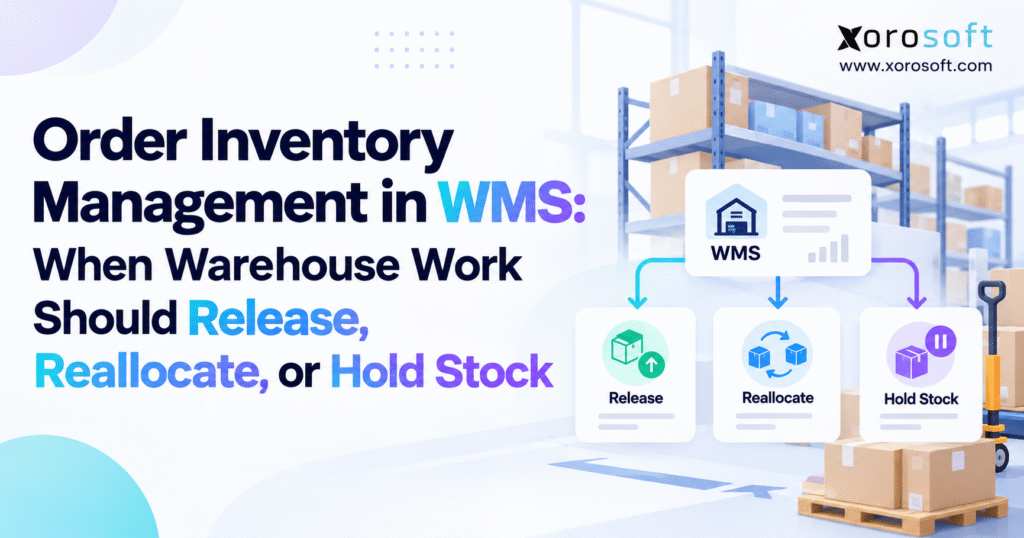
3. WMS Inventory Allocation Rules: Release, Reallocate, or Hold
The central question in WMS inventory allocation is not whether demand exists. It is whether an approved quantity has a valid path through physical fulfillment. The decision framework should check non-negotiable restrictions first, evaluate alternatives second, and release tasks only after the system reconciles existing commitments.
3.1 Order Release Hard Stops Come Before Customer Priority
A high-value customer may deserve earlier picking, but priority cannot justify recalled stock or shipping against a credit hold. Supervisors must evaluate quality, safety, regulatory, and financial restrictions before applying priorities such as promised date, carrier cutoff, customer tier, or labor utilization.
A useful control design separates automatic hard stops from conditions that permit supervised review. For example, an invalid delivery address may be correctable by customer service. A failed quality inspection requires an appropriate disposition process. Both stop work, but they should not route to the same exception owner.
3.2 Release, Reallocate, or Hold: WMS Decision Matrix
| Order and Stock Condition | Decision | Operational Next Step |
|---|---|---|
| Approved order and sufficient eligible stock | Release | Authorize warehouse work |
| Assigned bin is short, but an approved alternative exists | Reallocate | Reassign stock and reconcile work |
| Lot is quarantined, expired, or recalled | Hold stock | Prevent picking until disposition |
| Order has unresolved credit or fraud review | Hold order | Await clearance from authorized team |
| Some stock is ready and partial shipping is allowed | Conditional release | Release only permitted quantity |
| Canceled order still has active picking | Stop and reconcile | Resolve tasks before restoring stock |
These are policy outcomes rather than universal button names. One WMS may create a new wave after reassignment; another may modify an open task. The procedure must describe what actually happens to the allocation and the physical stock.
3.3 Recheck Stock Allocation When Conditions Change
An eligible order can become ineligible between reservation and picking. A lot may fail inspection, another system may cancel the order, or a transfer may not arrive. The safest design validates critical conditions again at release and at material execution points rather than assuming the initial check lasts indefinitely.
Record timestamps and maintain a traceable history for each event. Without a record of why staff released, reassigned, or blocked stock, supervisors cannot distinguish poor master data from a policy exception or an integration failure.
4. When to Release Warehouse Picking Work Under WMS Rules
Release rules translate demand into executable work. Good WMS inventory allocation makes this a controlled handoff instead of a race to fill the next picking queue. The goal is to release enough work to meet promises without sending teams toward inventory that is not ready.
4.1 Order Release Checks for Customer and Fulfillment Eligibility
Before release, confirm that the OMS or ERP accepted the order, the customer and destination are valid, any required payment or credit checks have passed, and the permitted fulfillment method is clear. For B2B orders, verify ship windows, routing rules, and complete-shipment requirements. For ecommerce orders, confirm cancellations and address edits have reached the operational system.
An order marked urgent does not bypass these checks. Urgency only affects sequencing among eligible orders. This keeps financially blocked orders out of active pick queues.
4.2 Warehouse Lot, Bin, and Picking Capacity Checks
An allocation that matches a SKU total may still fail at the shelf. Check available units at the actual pick source, lot or serial restrictions, unit-of-measure conversion, stock condition, and replenishment dependencies. If a forward pick bin has eight units but a wave requests twenty, the operation needs a valid replenishment plan or a different source before treating the work as executable.
Warehouse capacity also matters. A flood of released tasks can overcrowd staging lanes, create conflicting equipment demand, and obscure orders nearing carrier cutoff. Xorosoft’s XoroWMS is one relevant warehouse platform for examining barcode-based picking, location visibility, and multi-warehouse execution in a connected operating environment.
4.3 Order Release vs Wave Release vs Pick-Task Creation
Some platforms separate authorizing an order for the warehouse from assembling a wave and creating picking tasks. In Microsoft Dynamics 365, release-to-warehouse processing can create shipments and loads, with wave and work creation depending on configuration.
For a warehouse manager, the practical question is which event makes work visible to operators. If a wave is built before inventory becomes ready, the release schedule must account for replenishment and eligibility. If the WMS generates tasks immediately, pre-release checks need to be stronger because corrections affect live operational work.
5. Full Reservation vs Partial Warehouse Order Release
There is no single correct rule for releasing a partially available order. WMS inventory allocation must reflect what the customer will accept, the order’s pricing, and whether splitting it creates more value than delay.
5.1 Full-Allocation Rules for Complete Shipments
Furniture sets, coordinated promotions, configured kits, and certain retail purchase orders may need all required components before warehouse execution begins. Releasing half a kit can tie up picked components in staging, consume labor, and create a shipment the customer cannot use.
A full-reservation rule is also useful where a contractual ship-complete requirement applies. Here, the order should remain eligible for future planning but blocked from physical release until every mandatory line is ready.
5.2 Partial Order Release and Backorder Control
Other customers value receiving available stock immediately. A wholesaler may accept 70 of 100 units now and 30 later, if the customer approves the split and the system tracks the remaining quantity correctly. The WMS must create work only for the releasable 70, while the final 30 stays committed or backordered according to policy.
Microsoft documents warehouse-level options to allow partial reservation or require full reservation. The specific behavior is configurable, which is why a universal “release whatever is available” rule is unsafe.
5.3 The Cost of Splitting Allocated Orders
Partial releases may increase freight, packaging cost, invoices, and service contacts. Holding the full order may cause a missed ship date or lost sale. Rather than deciding this at the packing bench, define customer-level permissions, minimum shipment quantities, and exception thresholds in advance.
Document who can approve a split and how the remaining demand returns to a later release queue. Otherwise, the first shipment looks complete in one system while another still expects the original order quantity.
6. Warehouse Stock Reallocation After Short Picks or Order Changes
Reallocation replaces an assignment that the warehouse can no longer fulfill as planned. The difficult part is not finding another bin; it is preserving all work already performed. Weak WMS inventory allocation processes create new commitments while leaving obsolete ones active.
6.1 Diagnose Short-Pick and Inventory Reallocation Exceptions
A short pick can indicate an empty bin, inaccurate location record, damaged stock, wrong lot, or an item already moved without a transaction. Treating every shortage as missing inventory can produce unnecessary adjustments. Record the expected quantity, scanned quantity, source location, order, and task status before changing the allocation.
Suppose a WMS assigns 50 units to a picker, who confirms only 38. The 12-unit exception should remain visible while the confirmed 38 retain their legitimate order association. A supervisor can then investigate whether another eligible bin, pallet, or warehouse holds the remaining quantity.
6.2 Reallocate Stock Without Double Commitment
A safe recovery procedure first identifies the existing reservation and the state of its tasks. If work is open, follow the system’s supported cancellation or amendment procedure. If the picker is already working, pause the affected operation and verify the physical progress. Only then should the system validate alternative stock and make a new assignment.
After reassignment, update the work presented to operators and reconcile quantities across the order, warehouse stock, and fulfillment records. Reallocation is complete when the old commitment no longer competes with the replacement, not merely when a new bin appears on a screen.
6.3 Reconcile Active Picking and Warehouse Movements
A team cannot restore stock to available inventory through a simple reservation edit after it picks, stages, packs, or ships those units. Those stages represent physical movement and sometimes financial events. Reversals should follow specific workflows that preserve lot identity, container tracking, and transaction history.
Oracle NetSuite documents pick-task generation failures that can arise when order commitment quantities diverge from quantities released in waves. This illustrates why changing a commercial commitment without checking warehouse tasks can produce a second exception.
6.4 Multi-Warehouse Reallocation and Shipping Tradeoffs
When local replacement stock does not exist, another warehouse may meet the order promise. But moving a quantity across facilities can add freight cost, split shipments, transfer demand, and new customer restrictions. It may also leave an old pick task active if routing and execution systems update at different times.
Evaluate the whole fulfillment path: where eligible inventory sits, how quickly it can ship, whether another order already claims that inventory, and who owns the reassignment. If the original site has partially picked the order, define whether that work will ship separately, return to stock, or join another shipment elsewhere.
7. WMS Inventory Holds Without Unnecessary Fulfillment Delays
Inventory holds should be precise. A broad block on every unit of a SKU may stop profitable orders unnecessarily; a narrow hold on the wrong pallet may leave risky stock pickable. Effective WMS inventory allocation depends on knowing both the reason for a restriction and the inventory to which it applies.
7.1 Quality, Damage, Expiry, and Recall Stock Holds
Quality staff may restrict an incoming lot until tests are complete. Receiving teams may isolate damaged cartons, while food operations may block expired or recalled inventory. These are stock-related controls: the product remains physically present, but the system must prevent ordinary fulfillment from consuming it.
Hold scope should reflect the evidence. A damaged license plate might require pallet-level isolation; a supplier recall could require blocking multiple lots across several facilities. Record the identifier, quantity, reason, responsible team, and disposition status so another shift can understand the restriction.
7.2 Inventory Holds vs Customer Order Holds
Credit, suspected fraud, disputed EDI data, and an invalid ship-to address normally restrict the order rather than the physical stock. Releasing such a hold should come from the authorized commercial or financial function. A warehouse supervisor should not substitute operational urgency for a missing customer authorization.
The reverse is equally important: clearing an order’s credit status does not make a quarantined lot safe. Systems need separate order and inventory eligibility signals, which they must evaluate together before generating new pick tasks.
7.3 Holds After Allocation: Reconcile Warehouse Tasks
A quality result can arrive after the WMS assigns stock to a wave. Block further fulfillment of the affected stock and inspect its active commitments. Infor WMS explains that certain allocated inventory must be unallocated before a hold is placed.
Supervisors must control hold clearance as carefully as hold placement. Require an authorized approver, supporting documentation, timestamp, and a fresh eligibility check. A released quality hold should not automatically reactivate outdated tasks whose order quantities or ship dates may have changed.
8. ERP, OMS, and WMS Inventory Allocation Responsibilities
Most allocation disputes begin at a system boundary. An ecommerce platform sees a sale, an ERP records a commitment, and a WMS chooses a physical location. If each application independently subtracts the same quantity, availability becomes distorted. If none claims responsibility, different systems can offer the same stock twice.
8.1 ERP, OMS, and WMS Inventory Ownership Matrix
The ERP commonly manages purchasing, costing, accounting, customer credit, and broad stock commitments. The OMS may control order acceptance, delivery promises, channel priority, and routing. The WMS manages physical locations, wave execution, picking, packing, and shipment confirmation. Each business must document ownership for its specific technology stack.
| Decision | Typical Responsible System | Required Handoff |
|---|---|---|
| Credit clearance and account restrictions | ERP / finance | Order eligibility to fulfillment |
| Customer promise and routing | OMS / ERP | Approved order and source |
| Enterprise inventory commitment | ERP / OMS | Demand quantity to WMS |
| Bin, lot, and picking assignment | WMS | Allocation and task status upstream |
| Shipment confirmation | WMS / shipping | Quantity, tracking, and fulfillment event |
| Inventory valuation | ERP | Approved movement and cost transactions |
8.2 Synchronize Allocation Events Across Systems
An API success response does not prove that a stock update reached every system correctly. Systems need event identifiers, timestamps, retry handling, and reconciliation between order commitments and physical movements. An update that arrives twice must not deduct inventory twice. An update that arrives out of order must not restore an old allocation after the customer or operator cancels the order.
This is why integrated ERP and warehouse workflows are relevant to companies whose finance team and warehouse continually reconcile different records. Xorosoft connects operational areas including inventory, purchasing, warehouse management, accounting, and reporting; implementation should still define which record governs each event.
8.3 Returns and Adjustments Change Order Availability
A returned item is physically in the building before it is necessarily sellable. Its receipt may create an inventory record, while inspection determines whether the quantity belongs in available, damaged, quarantine, or refurbishment stock. The ecommerce refund and the inventory disposition are separate events and may occur at different times.
Likewise, cycle-count adjustments should not silently undo legitimate reservations. Exception reports should show when a location correction changes stock availability for active customer orders, so operations can review affected commitments before the next automated wave.
9. Shopify, Amazon, and EDI Inventory Commitments Across Channels
Multichannel fulfillment creates a particular challenge for WMS inventory allocation: demand arrives through different channels, but the channels often share one physical stock pool. Treating every connector’s available figure as independent inventory is a common path to overselling.
9.1 Shopify Committed vs Reserved Inventory for WMS
Shopify distinguishes physical inventory quantities from states such as available, committed, reserved, damaged, and quality control. In an August 5, 2026 developer update, Shopify announced that certain active draft-order and open transfer/shipment holds would move from reserved to committed. The change affects state mapping, not the physical stock total.
An integration must therefore know which commitments Shopify already reflects before applying warehouse allocations to channel availability. The Xorosoft ERP app on the Shopify App Store describes order, inventory, and related ERP synchronization for merchants considering a connected back-office environment.
9.2 EDI Wholesale Order Approval Before Warehouse Release
An EDI purchase order may carry ship windows, pack requirements, customer item identifiers, and routing instructions that a standard consumer order does not. Inventory should not move into unrestricted picking simply because the message arrived successfully. Commercial teams should settle customer approval, SKU mapping, quantities, pricing terms, and transmission exceptions first.
Once accepted, the order can enter the same stock commitment framework as other channels, with explicit priority and fulfillment rules. Shipping confirmations and advance shipping notices should then reflect what the warehouse actually executed, not a quantity assumed earlier in the process.
9.3 Amazon and 3PL Inventory Synchronization
Amazon orders, fulfillment-by-merchant operations, store replenishment, and third-party logistics providers may maintain different clocks for shipment and inventory updates. Reconciliation should distinguish orders still in process from orders already shipped or canceled. The safest design tracks committed, released, picked, shipped, and returned quantities by order reference.
For companies planning these connections, Xorosoft’s ERP integration catalog can help identify relevant systems and data flows. The evaluation should concentrate on exception behavior as much as the ordinary happy path: duplicate imports, canceled orders, inventory corrections, and delayed shipment events.
10. Industry-Specific Warehouse Inventory Allocation Policies
The best rules reflect the product and the customer promise. WMS inventory allocation for a seasonal apparel launch is not identical to allocation for perishable food or manufactured assemblies. The same release logic must incorporate different constraints on variants, traceability, delivery, and product completeness.
10.1 Apparel and Sporting Goods: Variant-Level Allocation
Apparel demand often concentrates in specific style, color, and size combinations. A medium blue jacket is not a substitute for a large blue jacket, even if product-level stock appears plentiful. Promotions intensify the problem when ecommerce demand rises while wholesale preorders still have reserved quantities.
Sporting goods businesses face similar seasonality and may have kits or serialized items. Allocation policies should define whether priority belongs to an accepted retailer order, a promotional launch, or the earliest promised ship date. Variant accuracy and reservation ownership matter more than broad category-level stock counts.
10.2 Furniture and Home Goods: Complete-Set Release Rules
Large products introduce space, damage, and multi-carton constraints. A furniture set may require a frame, hardware, and separate cushions. Picking a portion can consume scarce staging space without creating a shippable order. The release rule should therefore evaluate required components and whether the customer accepts a split.
Where an alternative warehouse has the missing component, calculate transfer time and handling cost before reallocating. A hurried cross-site move may meet a nominal stock target while missing the actual delivery appointment.
10.3 Food Warehouses: FEFO, Eligible Lots, and Holds
Food and beverage operations may need first-expiring-first-out selection, minimum remaining shelf life, lot traceability, and quarantine control. A warehouse should not reallocate from an expired lot merely to rescue a short pick. Where applicable, traceability records must preserve product identity and movements through each disposition.
The GS1 Global Traceability Standard provides a useful reference for traceable identifiers and events. Legal obligations vary by product, jurisdiction, and business role; in the US and Canada, check the applicable regulatory requirements rather than assuming every product follows one rulebook.
10.4 Manufacturing: Material Reservations vs Sales Allocation
Manufacturers allocate raw materials to work orders while distributors allocate finished goods to customers. Using a component for a rush customer order may prevent a scheduled production run from starting. The system should distinguish production reservations, finished-goods commitments, and replenishment demand so that one urgent request does not cause a larger shortage.
The inventory-driven industry requirements highlight those differences: apparel, furniture, sporting goods, distribution, food, and manufacturing all need shared inventory control, but not identical release conditions.
11. Warehouse Controls That Make Inventory Release Reliable
Better software cannot compensate for unmaintained locations, unclear stock ownership, or inconsistent scans. WMS inventory allocation works best when operational data and warehouse procedures support the rules that management has chosen.
11.1 Receiving and Replenishment Determine Pick Readiness
Receiving creates a credible supply record only when quantities, units of measure, locations, and inspection status are accurate. Putaway determines where eligible stock can be found. Replenishment moves units into forward picking locations before demand overwhelms the available shelf quantity.
Release scheduling should incorporate these dependencies. Instead of issuing a pick task for an empty forward bin, the operation might generate a replenishment task and release picking after confirmation. A clear separation between inventory in reserve storage and inventory ready at the pick face reduces avoidable short picks.
11.2 Barcode Verification at Warehouse Handoffs
Barcode scanning helps connect a worker’s physical action to the system record. It is particularly valuable during picking, transfers, staging, packing, returns, and cycle counts. However, a scanner verifies each identifier only when teams maintain accurate product IDs, locations, and handling procedures.
An effective rule explains what happens after a wrong-bin scan, unrecognized lot, or unexpected quantity. Give workers an actionable exception path rather than a warning that encourages them to bypass the process. Teams should assess warehouse management solutions against real transactions and exceptions rather than dashboard appearance alone.
11.3 WMS Inventory Allocation KPIs Beyond On-Time Shipping
A warehouse can ship most orders on time while supervisors spend hours manually repairing allocations. Track first-pass release success, short-pick rate, post-allocation reassignments, time on hold, and release-to-first-pick elapsed time. Add the number of canceled tasks that required manual cleanup to expose invisible process effort.
Define each metric’s denominator. A short-pick percentage based on lines is not directly comparable to one based on units. Report by warehouse, shift, product family, and exception reason to identify whether the problem is poor stock accuracy, a specific work queue, or overly aggressive release logic.
12. When to Upgrade from Inventory Software to ERP and WMS
A basic stock application may be appropriate when there is one warehouse, limited order concurrency, and few lot or customer restrictions. More complexity does not automatically justify a full ERP implementation. The decision should come from documented control failures and a realistic cost-benefit assessment.
12.1 Signs Your Inventory Software Has Reached Its Limits
Repeated spreadsheet reallocation, delayed channel updates, manual credit release checks, inventory adjustments without clear causes, and inconsistent warehouse-to-finance records point to fragmented ownership. A standalone WMS may solve task execution, while a broader ERP may be necessary when teams must connect purchasing, accounting, manufacturing, and commercial commitments.
Assess how often employees intervene to reconcile the same order in multiple applications. The cost is not just time spent; each manual correction creates another opportunity for conflicting inventory history.
12.2 Test Real WMS Allocation Exceptions During Evaluation
Do not evaluate vendors solely on whether they offer allocation, waves, or holds. Demonstrate a short pick after workers pick 38 of 50 units, a lot placed on quality hold after allocation, a canceled wholesale order with active work, and a partial Shopify fulfillment. Check which records update, which require authorization, and whether the stock returns to the right state.
For businesses considering a connected ERP model, XoroONE is a relevant example of integrated inventory, purchasing, accounting, ecommerce, and warehouse functions. Buyers should assess competing products against the same documented scenarios, not different marketing checklists.
12.3 Compare ERP–WMS Integration Costs and Accountability
A well-configured standalone WMS connected to a reliable ERP can perform effectively. An integrated platform can reduce interfaces but still requires disciplined master data, permissions, and workflow ownership. The correct choice depends on complexity, existing systems, and maintenance capacity.
A vendor-published Xorosoft versus NetSuite comparison can help frame evaluation questions, but buyers should verify implementation, functionality, and cost claims against their actual scope.
13. A 30-Day Plan to Improve WMS Inventory Allocation
Improving WMS inventory allocation should begin with repeatable exceptions and clear ownership, not a large automation project. The most useful first milestone is a policy that people on different shifts interpret the same way.
13.1 Days 1–10: Map Stock States and Hold Authority
Identify every place where a system calculates available inventory and every system that can reserve, allocate, hold, or release it. Map the states used by ecommerce, ERP, OMS, WMS, and any 3PL. List the people authorized to release credit holds, dispose of damaged stock, and override normal fulfillment priority.
Select the five most frequent exceptions and follow individual orders from acceptance to shipment. These examples reveal concrete control gaps.
13.2 Days 11–20: Test Order Release and Reallocation Rules
Define the release checklist, partial-shipment rules, hold reason codes, and reallocation workflow. Use a test environment to simulate an empty bin, a blocked lot, a canceled order, an incoming stock transfer, and an out-of-sequence integration event. Confirm that no scenario leaves duplicate commitments or unaccounted physical movement.
Involve warehouse supervisors, finance, customer service, and IT. A policy is not ready merely because the system accepts the configuration; each team must understand its approval and escalation responsibilities.
13.3 Days 21–30: Measure Allocation Exceptions and Refine
Start with a limited warehouse, order type, or product family. Compare first-pass release success, short-pick incidents, hold age, and task corrections with the baseline. Review exceptions daily and separate policy-design problems from data problems.
Where useful, review customer case studies for examples of how inventory-driven companies approach connected warehouse and business operations. Treat published customer experiences as context, not guaranteed results for another warehouse.
14. Make Warehouse Order Release a Defensible Decision
The purpose of WMS inventory allocation is not to keep every picker busy at every moment. It is to authorize the right work against eligible stock, preserve commitments when plans change, and stop fulfillment when a valid restriction exists. That discipline protects delivery promises as well as inventory records.
14.1 Set a Warehouse Order Release Standard
Write down the release gates, allowed substitutions, partial-shipment permissions, hold owners, and reallocation process. Connect them to the actual system events that workers and supervisors use. Review performance by exception reason, not only by aggregate throughput. A smaller queue of executable tasks is often more useful than a large queue filled with work that cannot finish.
14.2 Evaluate WMS and ERP Workflows Before Upgrading
If your team is regularly resolving short picks, conflicting channel commitments, or stock holds through spreadsheets and manual calls, begin with your most difficult real orders. For a tailored review of integrated inventory, warehouse, and ERP processes, contact Xorosoft and bring those scenarios to the discussion. The right system should demonstrate how it releases, reallocates, and holds stock without losing the operational audit trail.
Frequently Asked Questions About WMS Inventory Allocation
What is WMS inventory allocation?
WMS inventory allocation assigns eligible stock to orders before picking. It connects demand with warehouse quantities, locations, and existing commitments to prevent conflicting inventory assignments.
When should a WMS release an order?
Release orders after checking approval, pickable stock, lot eligibility, customer restrictions, and warehouse readiness. Urgent shipping deadlines should influence priority, not override blocking conditions.
When should warehouse stock be reallocated?
Reallocate when the assigned bin, lot, or warehouse cannot fulfill an order and another eligible source exists. Reconcile existing pick tasks before assigning replacement stock.
What triggers an inventory hold in WMS?
Quality failures, damage, recalls, and expiry restrictions can block stock. Credit issues or unresolved order approvals may block orders. Assign each hold to the appropriate inventory or order record.
Can a WMS release partially allocated orders?
Yes, when the system supports partial release and customer terms permit split shipments. Release only eligible quantities and track the remainder as backordered or awaiting allocation.
How do warehouses prevent double allocation?
Define one reservation owner, control concurrent allocation changes, and reconcile active picking tasks. Unique integration event identifiers help prevent duplicate stock movements during retries.
When does a business need integrated ERP and WMS?
Consider integration when multichannel orders, multiple warehouses, purchasing, and accounting create recurring stock conflicts. Test short picks, holds, and cancellations before selecting software.
Recent Posts
-
 Ecommerce Delivery Statistics 2026: Cost, Speed, and Promise Accuracy
-
 How to Calculate Inventory Turnover by Channel, Warehouse and SKU
-
 ERP for Importers Managing Partial, Rejected, and Canceled Receipts
-
 Shopify B2B vs Wholesale Portal Software for Complex Accounts
-
 What Is Nonconforming Inventory and How Should ERP Control It?