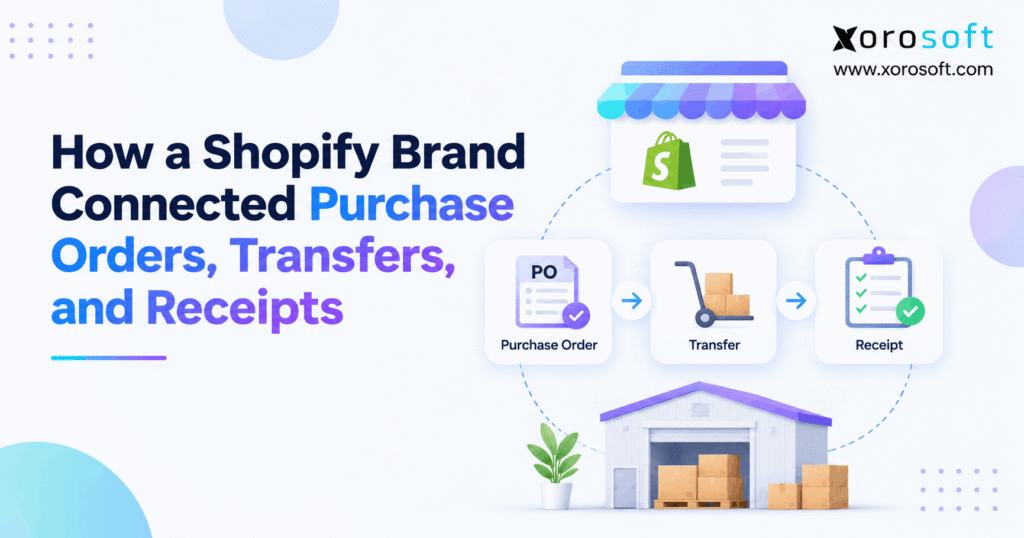
If you want to optimise your purchasing process, understanding a Shopify purchase order workflow can make managing orders much more efficient.
1. The Inventory Gap Begins Before the Delivery
A Shopify purchase order workflow should connect supplier commitments, inventory transfers, warehouse receipts, and available stock. However, growing ecommerce brands often struggle because these records operate independently. Purchasing knows what was ordered, the warehouse knows what arrived, and finance knows what was invoiced. Unfortunately, those numbers do not always agree.
Consider a Shopify brand ordering 500 units from a supplier. Although purchasing confirms the order, the supplier delivers goods in separate shipments. Meanwhile, warehouse employees record receipts, and the ecommerce team updates inventory availability.
Without a connected process, stock may appear available before employees physically verify it. Consequently, customers can purchase products that are still in transit, while purchasing teams may reorder inventory already on its way.
The challenge is not simply creating purchase orders. Instead, businesses need to connect every stage of purchasing with the actual movement of goods.
1.1 Shopify Purchase Order Workflow: The Missing Handoff
A purchase order establishes what the business expects to receive. Nevertheless, supplier confirmation does not prove that products were shipped, received, or approved.
For example, a supplier may confirm 500 units but deliver only 300 initially. If inventory updates use the original PO quantity, the business risks overstating available stock.
Therefore, each shipment requires a traceable receiving transaction. The purchasing record should remain connected to that transaction without replacing the physical verification process.
1.2 Why Teams See Different Inventory Numbers
Purchasing teams usually focus on ordered quantities and delivery dates. Warehouse managers concentrate on actual receipts, while finance evaluates supplier invoices and inventory costs.
Because these teams answer different questions, their records may legitimately show different numbers at the same moment.
However, problems begin when systems treat those numbers as interchangeable. Incoming inventory becomes confused with available stock, and incomplete receipts can disappear from operational reports.
As a result, employees spend time reconciling spreadsheets instead of improving fulfillment accuracy.
1.3 Shopify Purchasing Workflow Needs Clear Ownership
A reliable purchasing process starts by defining which record represents each inventory event.
The purchase order should establish the commercial agreement. Next, a transfer should track physical movement, while a receipt confirms accepted quantities.
Finance can then reconcile the supplier invoice against the order and verified receipt.
Importantly, these responsibilities must remain clear even when a business uses several applications. Otherwise, two systems may record the same inventory change, creating duplicate stock without any additional goods entering the warehouse.
2. Shopify Purchase Order Workflow: Four Records, Four Jobs
Shopify supports native purchase orders, linked inventory transfers, multiple shipments, and receiving outcomes. Therefore, brands should understand these existing capabilities before considering additional software.
2.1 Shopify Purchasing Workflow Starts With the Agreement
A Shopify purchase order records supplier information, products, quantities, prices, payment terms, and the receiving destination.
Initially, the merchant creates the document in Draft status. After supplier confirmation, the merchant marks it as Ordered.
However, the order itself does not complete physical receiving. Instead, Shopify handles receiving through an associated inventory transfer.
This separation matters because supplier agreements and warehouse receipts are different operational events.
For implementation details, review Shopify’s purchase order documentation.
2.2 Transfers and Shipments Capture Physical Movement
After marking the PO as Ordered, the merchant can create a linked transfer. Shopify populates it with the supplier and relevant line items.
The transfer then handles incoming shipments and receiving activity.
Importantly, Shopify supports one linked transfer at a time for each purchase order. However, that transfer can contain multiple shipments.
Consequently, a supplier can deliver products in separate batches without requiring the business to treat every shipment as a new commercial agreement.
The complete process appears in Shopify’s receiving-from-purchase-order guide.
2.3 Receiving Confirms What Arrived
When products reach the destination, warehouse employees verify their quantities and record the receiving outcome.
Shopify supports accepted, rejected, and canceled quantities. Therefore, the final received inventory can differ from the original order without losing visibility into the discrepancy.
| Record | Main purpose | What it establishes |
|---|---|---|
| Purchase order | Supplier agreement | What was ordered |
| Transfer | Inventory movement | Where goods are moving |
| Shipment | Delivery tracking | What is arriving |
| Receipt | Physical verification | What was accepted or rejected |
Since Stocky became unavailable on August 31, 2026, merchants should use the current native Shopify inventory workflows rather than outdated Stocky instructions.
3. Before the Change: Disconnected Purchasing and Warehouses
To understand the operational impact, consider an illustrative Shopify apparel brand selling online, through two retail locations, and to wholesale customers.
This example demonstrates a practical operating model. It does not represent an identified customer or verified implementation results.
3.1 Purchase Order Receiving Process Without Shared References
Originally, the brand managed supplier orders in spreadsheets. Meanwhile, its warehouse recorded incoming inventory in a separate receiving application.
Shopify handled ecommerce availability, while accounting maintained supplier bills independently.
Because each system used different transaction references, identifying the full history of a delivery required manual investigation.
For instance, a warehouse receipt might reference a shipment number, while purchasing searched for a supplier PO number.
Although both records described the same goods, employees could not always connect them immediately.
3.2 What Went Wrong During Busy Weeks
During ordinary weeks, employees could correct discrepancies manually. However, promotional periods increased the number of purchase orders, split deliveries, and warehouse movements.
Consequently, receiving delays created uncertainty about product availability.
The purchasing manager sometimes reordered items that were already inbound. Meanwhile, finance questioned supplier invoices because the warehouse had accepted fewer units than purchasing expected.
Furthermore, manual inventory adjustments occasionally overlapped with automated stock updates.
The business needed stronger transaction controls rather than another spreadsheet containing the same inconsistent information.
3.3 Shopify Order-to-Receipt Workflow as the Design Goal
The proposed operating model connected supplier commitments, incoming transfers, physical receiving, and inventory reconciliation.
First, purchasing would confirm the commercial order. Next, warehouse staff would record actual quantities against a related transfer.
Only accepted inventory would increase destination stock. Finally, finance would match the receipt to the supplier invoice.
This approach preserved the purpose of each record while connecting them through shared identifiers.
As a result, different teams could examine the same transaction without assuming that ordered and received quantities were identical.
ERP readiness self-check: Before changing systems, determine whether your team can trace a supplier order to its transfer, accepted receipt, inventory adjustment, and financial record without manually rebuilding the history.
4. Shopify Purchase Order Workflow: Five Connected Steps
A successful process follows every unit from the initial purchasing decision to its final inventory state. For the illustrative brand, that process begins with a 500-unit supplier order.
4.1 Confirm Product, Supplier, and Quantities
First, purchasing confirms the supplier, expected delivery date, product identifiers, ordered quantities, and agreed costs.
The team also verifies the unit of measure. For example, 25 cartons containing 20 units each must represent 500 individual units, not 25.
Next, the supplier confirms availability and shipping expectations.
Because product identification errors can carry through every later transaction, purchasing should validate SKU and variant mappings before the warehouse receives anything.
The confirmed PO becomes the commercial reference against which later differences can be investigated.
4.2 Shopify Inventory Transfer Workflow for Incoming Shipments
Next, the merchant creates a supplier-origin transfer linked to the confirmed purchase order.
The transfer identifies the receiving destination and tracks physical movement. Therefore, warehouse employees can connect arriving cartons to their supplier commitment.
For organizations using ERP-led procurement, the architecture may differ. The ERP can own purchasing while Shopify receives supported inventory updates.
Xorosoft’s XoroONE cloud ERP combines purchasing, inventory, warehousing, accounting, and ecommerce operations. However, integration design should still define which system owns the original PO and which records inventory movements.
4.3 Shopify Warehouse Receiving Checks the Physical Count
When the shipment arrives, employees compare its contents with the transfer records.
First, they identify each product using its SKU or barcode. Next, they count actual units and inspect damaged cartons.
If the supplier delivers an incorrect variant, the warehouse should record an exception rather than accepting the expected product.
Likewise, physical receiving should determine the quantity available for posting.
Because the process follows verified goods instead of supplier promises, it creates a stronger foundation for inventory accuracy.
4.4 Update Stock Only After Validation
Once the warehouse accepts inventory, the destination stock quantity can increase according to Shopify’s location and stocking configuration.
However, rejected products must not become sellable. Similarly, quantities that the supplier never ships should remain outside received stock.
Next, inventory control verifies that the posted quantity matches the receiving outcome.
Finally, finance reviews the supplier invoice and related costs.
This sequence prevents the business from treating supplier agreement, shipment creation, and physical receiving as one interchangeable event.
5. Handle Split Deliveries Without Inflating Availability
Suppliers frequently split shipments because of production constraints, transportation schedules, or temporary shortages. Therefore, a Shopify purchase order workflow must accommodate partial deliveries without losing visibility into outstanding quantities.
5.1 Shopify Purchase Order Receiving After the First Shipment
The illustrative brand orders 500 units, but the supplier initially sends only 300.
Upon arrival, the warehouse accepts 286 units and rejects 14 damaged units.
Therefore, 286 units are eligible to increase destination inventory, while 14 remain documented as rejected.
Meanwhile, 200 units are still outstanding against the original order.
This distinction matters because the purchasing team should not assume that all 500 units have arrived. Instead, the receiving record establishes exactly what happened during the first delivery.
5.2 Keep the Second Shipment Open
Later, the supplier sends another 180 units.
The warehouse accepts 176 and rejects four. However, the supplier confirms that the remaining 20 units will not ship.
Consequently, the team records those 20 units as canceled rather than leaving them indefinitely outstanding.
This approach preserves the difference between received goods, rejected goods, and canceled commitments.
Furthermore, the business can close the operational loop without inventing stock adjustments to force the original order and accepted inventory to match.
5.3 Purchase Order Receiving Process: Close the 500-Unit Example
The completed receiving reconciliation is straightforward.
| Receiving event | Accepted | Rejected | Canceled |
|---|---|---|---|
| First shipment: 300 units | 286 | 14 | 0 |
| Second shipment: 180 units | 176 | 4 | 0 |
| Supplier cancellation | 0 | 0 | 20 |
| Total | 462 | 18 | 20 |
500 ordered = 462 accepted + 18 rejected + 20 canceled.
Therefore, the expected quantity is fully accounted for, although only 462 units were accepted.
These numbers illustrate reconciliation logic, not documented customer performance. Additionally, rejected items may require separate physical handling, such as quarantine or return to the supplier.
6. Shopify Purchase Order Workflow Controls for Exceptions
Receiving exceptions are unavoidable in inventory-driven businesses. However, their financial consequences depend on how the team records and resolves them.
6.1 Shopify Warehouse Receiving: Accepted, Rejected, and Canceled
Shopify distinguishes three receiving outcomes.
- Accepted: Goods are received and can become available at the destination location.
- Rejected: Goods are documented on the transfer without increasing available inventory.
- Canceled: Supplier quantities that will not arrive are removed from the expected receipt.
Therefore, employees should select the outcome that matches the physical event.
Importantly, internal warehouse transfers have different cancellation implications because stock may return to availability at the origin.
For further detail, see Shopify’s inventory transfer receiving instructions.
6.2 Handle Wrong SKUs and Unexpected Extras
An incorrect SKU can cause inventory errors even when the delivery contains the expected total quantity.
For example, a supplier may deliver medium shirts instead of large shirts.
The warehouse should therefore verify product identity before accepting the line item.
Likewise, unexpected extra units require investigation. Purchasing must determine whether the additional products were authorized, incorrectly packed, or shipped against another order.
Instead of automatically adjusting available stock, staff should document the discrepancy and use the supported correction process.
6.3 Shopify Inventory Receiving Workflow for Corrections
Receiving errors sometimes become visible after employees finish processing a shipment.
For example, a later count may reveal that a carton contained fewer items than originally accepted.
Therefore, the team needs a controlled way to correct the receiving transaction and reconcile any downstream stock changes.
Xorosoft’s XoroWMS warehouse management capabilities support inventory-driven warehouse operations, including receiving and barcode workflows.
Nevertheless, managers should verify the exact correction, approval, and integration behavior during system evaluation rather than assume every adjustment happens automatically.
7. Stop Double Counting Between Shopify and Other Systems
A Shopify purchase order workflow can reduce manual entry, but poorly designed synchronization can still introduce duplicate inventory movements. Consequently, technical controls and operational procedures must work together.
7.1 Shopify Inventory Synchronization Controls
An integration may retry a message after a temporary failure. Without deduplication, the destination can process the same receipt twice.
For example, an 80-unit receipt could incorrectly add 160 units after a repeated update.
Therefore, every posted movement should reference a unique source transaction.
In addition, integrations should track processing status and reconciliation results.
When evaluating Xorosoft’s integration ecosystem, teams should confirm how their particular Shopify configuration handles inventory ownership, retries, and corrections.
7.2 Decide Which System Owns Each Movement
A clear responsibility matrix prevents conflicting updates.
| Business event | Suggested owner |
|---|---|
| Supplier commitment | Purchasing system |
| Physical receiving | Warehouse process |
| Approved stock adjustment | Inventory control |
| Shopify available quantity | Designated inventory sync process |
| Supplier invoice approval | Finance |
| Cross-location transfer | Designated inventory movement system |
However, the precise system of record depends on the selected architecture.
If ERP owns inventory postings, employees should not independently recreate the same adjustment inside Shopify.
Instead, the business should reconcile both systems using shared movement references.
7.3 Build a Duplicate-Event Test Before Go-Live
Before launching an integration, process a test receipt and then deliberately replay its event.
The resulting inventory should increase only once.
Next, simulate a correction, partial receiving event, and connection interruption.
Additionally, confirm that the integration logs source IDs, destination responses, and exceptions.
Shopify’s public 2026-10 Purchase Order API provides read access rather than public PO creation or editing mutations.
Therefore, verify the supported APIs before promising bidirectional native PO synchronization. The official API release notes explain the limitation.
8. Shopify Purchase Order Workflow Meets Finance
An accurate warehouse count does not automatically produce accurate financial statements.
Therefore, purchasing, receiving, and accounting must reconcile the same transaction from different perspectives.
8.1 Match the Supplier Bill to Accepted Stock
A three-way match compares the purchase order, physical receipt, and supplier invoice.
First, purchasing establishes the agreed products, quantities, and prices. Next, warehouse receiving confirms what actually arrived.
Finance then checks whether the supplier invoice agrees with the accepted quantities and agreed terms.
For the 500-unit example, 18 rejected units and 20 canceled units require appropriate commercial resolution.
Consequently, finance should investigate any invoice that charges the business for quantities it did not accept.
8.2 Purchase Order Receiving Process for Month-End Reconciliation
Month-end reconciliation becomes harder when warehouse receipts and accounting entries reference different document numbers.
Therefore, finance should retain the original PO, transfer reference, receipt date, accepted quantity, and supplier invoice relationship.
A connected XoroERP environment can bring operational and accounting activities into a shared business system.
Xorosoft is particularly relevant when a brand needs inventory, purchasing, and financial visibility across several locations or sales channels.
Even so, the accounting team must establish appropriate posting rules and period-end controls.
8.3 Landed Costs and Inventory Valuation
The cost of receiving inventory may exceed the supplier’s unit price.
For example, freight, customs duties, and other eligible acquisition expenses may affect inventory valuation.
Shopify supports shipment-related cost adjustments on linked transfers. However, those adjustments do not automatically prove that every external accounting ledger uses the required valuation treatment.
Therefore, finance should define how costs are allocated, how damaged units are handled, and when liabilities are recognized.
Furthermore, the business must distinguish physical receipt dates from accounting recognition dates when ownership terms require it.
9. Move Stock Between Locations Without Creating More Stock
After receiving supplier inventory, the illustrative brand needs to replenish two retail locations.
However, internal inventory transfers must not increase total company-owned stock.
9.1 Shopify Inventory Transfer Workflow for Warehouse-to-Store
Suppose the central warehouse has accepted 462 units from the supplier order.
Later, the operations team moves 120 units to a retail store.
The warehouse now holds 342 units, while the retail location holds 120, assuming no other movements.
Therefore, the business still has 462 units in total.
A warehouse-to-store transfer changes inventory location, not the overall quantity owned.
Furthermore, the receiving store should confirm the actual delivered quantity before treating the movement as completed.
9.2 Separate Inbound Purchasing From Internal Transfers
Supplier-origin and internal transfers may use similar inventory movement tools, but they represent different economic events.
A supplier receipt introduces purchased goods into the business’s physical inventory.
In contrast, an internal transfer moves existing inventory between its locations.
Consequently, teams should never treat a retail replenishment receipt as an additional supplier purchase.
Clear origin identifiers, destination mappings, and source documents help prevent this mistake.
Moreover, separate processes make it easier to investigate shortages and damages discovered during inter-warehouse movement.
9.3 Use Location Availability Rather Than Global Totals
Company-wide stock does not always represent the inventory available to fulfill a specific customer order.
For example, a retail store may hold 120 units while the ecommerce warehouse has only 342.
Therefore, fulfillment decisions should consider the location assigned to the order.
Meanwhile, inventory committed to transfers or customer demand may not be freely available.
By distinguishing location-level availability from total stock, the brand can reduce overselling and improve replenishment decisions.
This distinction becomes especially important when Shopify supports multiple sales and fulfillment locations.
10. When Native Shopify Is Enough—and When ERP Helps
Shopify’s native purchasing capabilities can support many straightforward businesses.
However, the decision to add ERP should depend on operational complexity rather than a generic assumption that every growing merchant needs more software.
10.1 Shopify Purchase Order Workflow for Straightforward Brands
Native Shopify purchasing may be sufficient for merchants with manageable supplier volumes, straightforward receipts, and a limited number of locations.
For example, a business with one warehouse and several suppliers might comfortably manage its purchase orders, transfers, and receiving directly through Shopify.
Additionally, built-in tools support barcode-assisted receiving and shipment tracking.
Therefore, merchants should evaluate existing capabilities before introducing another system.
The objective is to remove operational friction, not add software complexity where the existing workflow already works.
10.2 Connected Purchasing and Receiving for Complexity
Businesses selling through Shopify, Amazon, wholesale accounts, and retail locations face different coordination challenges.
For example, purchasing may need to account for inventory allocations, EDI orders, multiple warehouses, and financial commitments.
In those environments, Xorosoft offers an ERP-led approach that connects purchasing, inventory, warehouse management, and accounting.
Its Shopify App Store listing provides another starting point for evaluating the available integration.
However, each business should confirm how its specific order, inventory, and receiving workflows would operate in the proposed implementation.
10.3 Evaluate a Solution Against Real Exceptions
When comparing operational approaches, start with actual business problems.
| Evaluation area | Native Shopify | Connected ERP/WMS approach |
|---|---|---|
| Supplier purchase orders | Supported | Integrated with broader procurement |
| Multiple shipments | Supported | Depends on implementation |
| Receiving exceptions | Supported | Can connect to wider operational controls |
| Multi-channel purchasing | Requires workflow coordination | Can centralize purchasing demand |
| Integrated accounting | May require separate processes | Can connect operational and financial records |
| Warehouse execution | Built-in inventory tools | Dedicated WMS processes |
The goal is not to dismiss native Shopify.
Instead, use real scenarios to test whether an integrated platform delivers additional operational value. Review broader ERP business solutions only when those requirements justify further evaluation.
Demo evaluation tip: Ask the provider to demonstrate a partial receipt, a rejected SKU, a transfer between locations, and the corresponding accounting reconciliation. A workflow demonstration reveals more than a generic feature checklist.
11. Roll Out the Shopify Purchase Order Workflow Safely
Connecting purchasing and inventory requires careful data preparation.
Therefore, implementation should begin with operational definitions before integration configuration.
11.1 Clean Up SKUs, Units, and Locations
First, review supplier identifiers, Shopify variants, units of measure, and warehouse locations.
For example, a vendor may quote in cartons while Shopify tracks individual units.
If the conversion is wrong, the system can produce inaccurate inventory quantities even when every integration message succeeds.
Next, confirm which warehouse owns each incoming receipt.
Additionally, document the source of truth for product costs and supplier changes.
Accurate master data reduces the number of exceptions that warehouse teams must resolve after go-live.
11.2 Shopify Purchasing Workflow Tests Before Cutover
Before launch, simulate a complete purchase-to-receipt process.
Include split shipments, damaged products, supplier cancellations, wrong variants, and duplicate integration events.
Then reconcile the final quantity in every connected system.
If evaluating Xorosoft, request a demonstration using your actual warehouse and purchasing requirements rather than generic sample screens.
Moreover, verify the mapping between supplier orders, transfer records, inventory updates, and financial transactions.
A successful test should prove both the correct stock quantity and the underlying transaction history.
11.3 Define the Daily Exception Queue
Even a well-designed process produces exceptions.
Therefore, every issue needs a responsible owner and an expected resolution.
| Exception | Primary owner | Required action |
|---|---|---|
| Supplier shortage | Purchasing | Confirm revised supply |
| Damaged carton | Warehouse | Record rejection |
| Wrong variant | Inventory control | Verify product identity |
| Duplicate posting | Integration team | Investigate transaction ID |
| Invoice mismatch | Finance | Resolve billing difference |
Furthermore, unresolved exceptions should remain visible until someone documents their resolution.
This creates accountability without depending on informal messages or spreadsheets.
12. Put the Controls to Work Across Product Categories
Different industries encounter different receiving problems. Nevertheless, the need for traceable purchase orders, transfers, and accepted stock remains consistent.
12.1 Shopify Purchase Order Workflow for Apparel and Sporting Goods
Apparel businesses manage numerous size and color variations.
Consequently, a warehouse may receive the correct total quantity but the wrong mix of variants.
For example, 100 received shirts do not satisfy an order for 50 medium and 50 large if every delivered shirt is medium.
Similarly, sporting goods brands may face seasonal inventory spikes and location-specific replenishment needs.
Therefore, variant-level receiving and precise location mappings are essential.
These controls help teams avoid promising unavailable products during high-demand periods.
12.2 Furniture, Food, and Wholesale Patterns
Furniture distributors often receive large products across multiple deliveries. Therefore, partial receiving and destination tracking help teams distinguish goods still in transit from items ready for delivery.
Food businesses may require additional lot, expiry, and inspection controls.
Meanwhile, wholesale companies must coordinate purchasing with customer commitments and distribution-center availability.
Although the operational details differ, every industry benefits from consistent records and verified inventory movements.
For related business use cases, explore industry-specific ERP requirements.
12.3 KPIs That Prove the Workflow Is Improving
Measurement should focus on actual operating outcomes rather than assumptions about software benefits.
Track supplier fill rate, receiving acceptance rate, discrepancy frequency, posting delays, and invoice-matching exceptions.
For the illustrative 500-unit example, the supplier delivered 480 units. Therefore, the delivered-quantity rate was 96%.
Meanwhile, the warehouse accepted 462 of those 480 delivered units, creating a receiving acceptance rate of 96.25%.
These percentages describe the scenario, not verified customer improvements.
| KPI | Calculation |
|---|---|
| Supplier delivery rate | Delivered ÷ ordered |
| Receiving acceptance rate | Accepted ÷ physically received |
| Receipt discrepancy rate | Discrepant lines ÷ checked lines |
| Receipt-to-availability lag | Stock availability time − physical acceptance time |
| Invoice exception rate | Disputed invoices ÷ invoices checked |
13. Every Receipt Should Be Explainable
A reliable Shopify purchase order workflow does more than connect documents. It establishes a clear relationship between what the business ordered, what the supplier shipped, what the warehouse accepted, and what finance must reconcile.
Consequently, teams gain better control over inventory availability, receiving exceptions, and supplier commitments.
Shopify’s native tools already support important purchasing and transfer workflows. However, businesses with multiple warehouses, wholesale channels, complex accounting, or manufacturing operations may need broader integration.
The objective is to make every stock movement accurate, visible, and traceable.
For businesses evaluating an ERP-led operating model, Xorosoft brings purchasing, inventory, warehouse management, accounting, and ecommerce operations into one connected environment.
Ready to evaluate your purchasing and receiving process? Book a Personalized Demo to explore how your actual warehouse and Shopify workflows could operate together.
Frequently Asked Questions
Can Shopify create purchase orders and receive inventory?
Yes. Shopify lets merchants create supplier purchase orders. After an order is marked Ordered, a linked inventory transfer tracks shipments and receiving. The purchase order remains the commercial record.
Can one Shopify purchase order have multiple shipments?
Yes. A purchase order supports one linked inventory transfer at a time, but that transfer can track multiple shipments. Warehouse teams receive each shipment as its products physically arrive.
When does received stock become available in Shopify?
Accepted quantities become available at the receiving location when the product is stocked there. If it is not stocked at that location, staff must choose whether to activate it.
How are damaged or missing units handled?
During receiving, staff can reject damaged units and cancel supplier quantities that will not ship. Neither outcome increases available stock. Keep a documented reason for every discrepancy.
How do brands prevent duplicate inventory updates?
Assign one system ownership of each stock change and use unique transaction references. Reconcile receipt quantities before posting, and test how integrations handle retries, corrections, and manual adjustments.
Does Shopify's API create native purchase orders?
The public 2026-10 Purchase Order API provides read access, not purchase order creation or editing mutations. ERP-led purchasing therefore needs a separately verified integration design.
When should a Shopify brand consider ERP and WMS?
Consider ERP and WMS when multiple warehouses, wholesale orders, complex receiving, and accounting make disconnected workflows costly. First document the gaps, then test a real purchase-to-receipt scenario.
Recent Posts
-
 Container Dwell Benchmarks 2026 for US and Canadian Distribution Centers
-
 How to Audit Open Shopify Shipments for Quantities That Will Never Arrive
-
 Sales Commission Software for Apparel Showrooms and Rep Agencies
-
 In-House ERP Administrator vs Managed ERP Support
-
 Shop-Floor Inventory Software for Batch and Process Manufacturers