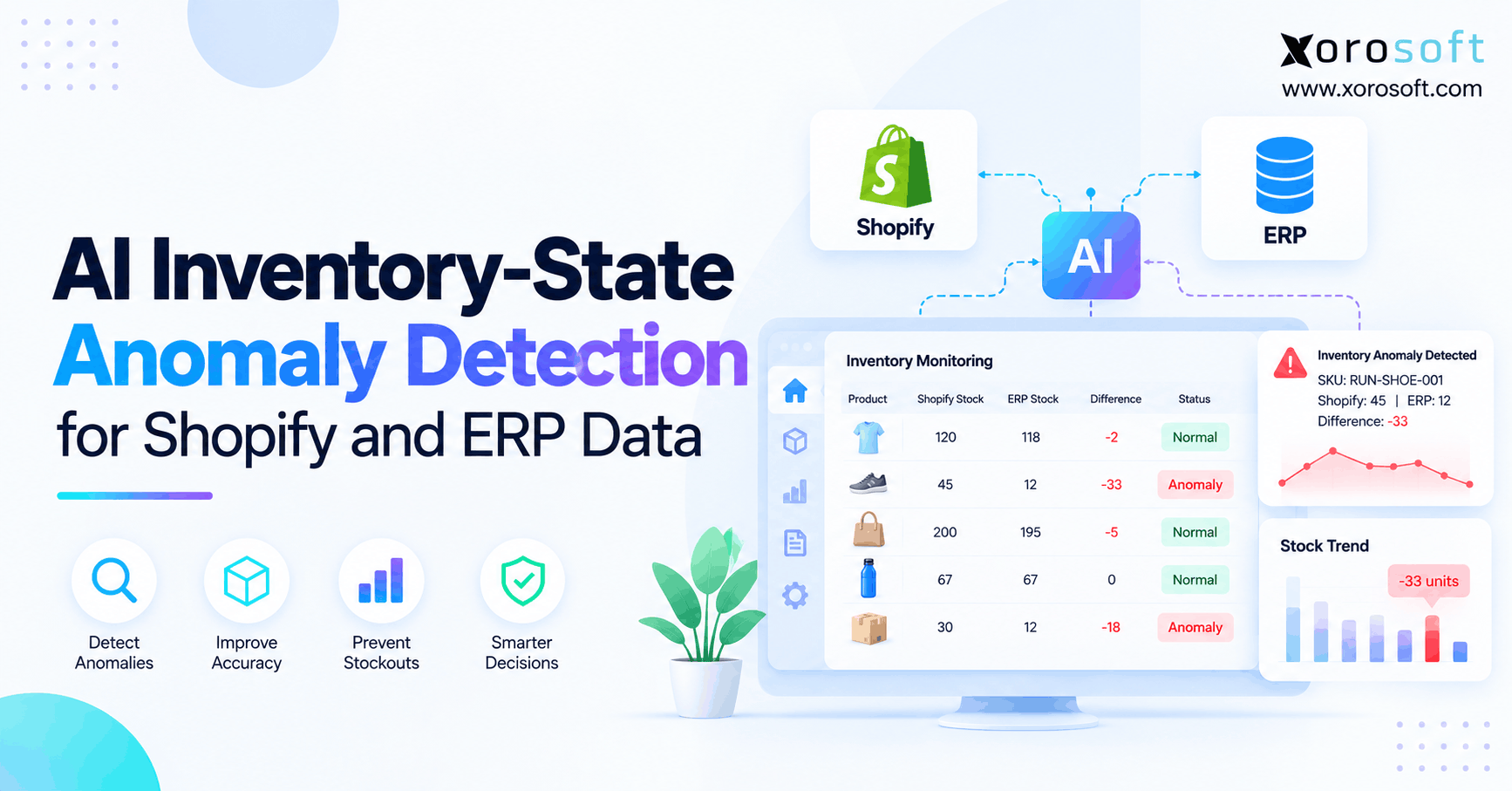
If you manage a shop on Shopify, inventory anomaly detection can help you quickly spot and resolve irregularities.
1. When Shopify Stock Numbers Stop Telling the Same Story
Shopify inventory anomaly detection helps ecommerce teams identify unusual stock changes, Shopify-to-ERP mismatches, and synchronization errors before they disrupt fulfillment. However, a different quantity does not always mean inventory is missing. First, teams must compare the same SKU, location, inventory state, and point in time. Only then can they determine whether an alert represents a real operational problem.
1.1 A Shopify stock discrepancy that may not exist
Imagine Shopify shows 80 units available while the ERP reports 120 units on hand. At first glance, the systems appear to disagree by 40 units. Yet Shopify may have committed 30 units to orders and placed another 10 units on quality hold. Therefore, both records can be correct even though the displayed numbers differ.
In fact, the problem becomes more serious when staff adjust inventory to make these two totals match. As a result, they could create an actual discrepancy while attempting to fix an apparent one. A reliable review must establish what each quantity means before changing stock.
1.2 Why inventory-state anomalies affect the whole operation
Moreover, as brands add wholesale orders, additional warehouses, Amazon, and third-party logistics providers, more applications update or interpret the same stock. Meanwhile, purchasing teams need trustworthy replenishment signals, and finance needs reliable inventory valuation. Consequently, one misleading stock alert can cause unnecessary purchasing, missed allocations, or reconciliation work.
Specifically, this guide explains how to distinguish expected state changes from genuine inventory errors. It also shows where AI-assisted detection is useful, when simpler checks are enough, and how connected ERP workflows support investigation.
2. What Shopify Inventory Anomaly Detection Actually Measures
Shopify inventory anomaly detection is a process for finding unexplained inventory quantities, movements, or state relationships. First, it evaluates whether Shopify and related systems describe equivalent stock. Next, it tests the relevant transactions, timestamps, and business rules. Finally, it highlights differences that remain unexplained and deserve human review.
2.1 Why an inventory anomaly is not always a stock error
For example, an anomaly can involve a sudden inventory increase, an unexpected reservation, or a stale warehouse balance. However, the underlying event may be valid. For example, committed inventory can rise during a promotion while on-hand stock stays constant. Likewise, an inbound transfer may not yet be physically available at its destination.
A true discrepancy is a difference that remains after the team accounts for normal stock states, event timing, and documented transactions. This distinction prevents unnecessary adjustments and makes alerts more credible.
2.2 How AI inventory discrepancy detection fits the process
To start, fixed validation rules identify known problems, such as a duplicated transaction ID or an unmapped warehouse. By contrast, statistical and machine-learning methods can flag unfamiliar patterns, such as abnormal adjustment frequency for a particular SKU. Nevertheless, AI scores are not physical counts or proof of wrongdoing.
Consequently, a dependable workflow combines both approaches. For instance, rules establish whether data is internally consistent, while AI can prioritize unusual events for review. Then an inventory owner checks receipts, orders, and warehouse evidence before approving a correction.
3. Shopify Inventory States: Compare Like With Like
Shopify uses several inventory quantities to describe stock at a location. According to Shopify’s inventory-management documentation, on_hand includes available, committed, reserved, damaged, safety-stock, and quality-control units. In contrast, incoming represents goods expected at a destination but not yet physically received.
3.1 Shopify inventory states: Available vs On hand
On hand = Available + Committed + Reserved + Damaged + Safety stock + Quality control
For example, a location might show 150 units on hand, including 95 available, 35 committed, and 20 in quality control. Therefore, comparing Shopify’s 95 available units with an ERP’s 150 physical units would create a false 55-unit discrepancy.
| Shopify quantity | Operational meaning | What to compare in ERP |
|---|---|---|
| On hand | Physically recorded units at a location | Equivalent warehouse stock balance |
| Available | Units that can be sold | Sellable or available-to-promise stock |
| Committed | Units spoken for by applicable order and hold activity | Order commitments and allocations |
| Reserved and other unavailable states | Units held, damaged, protected, or under inspection | Comparable stock holds and restrictions |
| Incoming | Expected inbound stock | Unreceived purchase or transfer quantities |
3.2 Avoid Shopify ERP inventory mapping errors
However, ERP field names do not always match Shopify definitions. For example, an ERP’s available-to-promise figure may account for future receipts or channel-specific allocations. Consequently, it can differ from Shopify’s current available balance without indicating a failed integration.
Before setting alerts, document every mapping. Moreover, use the same unit of measure and warehouse scope across systems. Also, a case of 12 items must not be compared directly with 12 individual units. Similarly, a Shopify location cannot be matched to an ERP total that includes three warehouses. For this reason, Shopify inventory anomaly detection should validate quantity definitions before comparing dashboard totals.
4. Why Shopify ERP Inventory Reconciliation Breaks
Nevertheless, even well-connected systems can disagree when their data models or timing differ. Therefore, Shopify ERP inventory reconciliation should identify the origin of a mismatch rather than force both screens to display an identical number.
4.1 SKU, variant, and warehouse mapping problems
First, confirm the Shopify inventory item ID, variant, and location. Next, match them to the ERP item and warehouse. This matters because reused SKUs, bundle relationships, and unit conversions can create misleading totals. For example, a bundle may be sellable through components without existing as one physically assembled item.
Also, inspect warehouse mappings after a business opens a new location or changes fulfillment routing. Otherwise, stock may appear missing simply because the systems are aggregating different facilities.
4.2 Shopify inventory sync errors: Delays and missing events
Shopify’s webhook guidance explains why applications should not depend on delivery order or assume every event will arrive. Furthermore, changes to certain inventory states do not themselves trigger inventory webhooks. As a result, a listener that reacts only to level updates may miss relevant context.
Periodic API reconciliation is therefore important. In addition, teams need stable event identifiers, processing timestamps, and a defined acceptable delay for 3PL or warehouse feeds. Xorosoft is relevant to this workflow because its connected Shopify and ERP operations bring related order and inventory records into the same operational environment.
4.3 Inventory ownership and competing corrections
Meanwhile, a more difficult problem occurs when two systems independently adjust the same stock. For instance, the warehouse may post a cycle count while a connector writes an older absolute balance. Consequently, the newest event in one system may overwrite a more accurate quantity from another.
Therefore, define ownership by transaction type: receipts, fulfillments, allocations, holds, and adjustments. Then specify who may publish corrections. Otherwise, even a fast integration can spread inaccurate data faster.
5. Shopify Inventory Anomaly Detection After the 2026 Changes
Two 2026 Shopify changes make historical stock comparisons especially sensitive. Therefore, detection rules should distinguish a change in inventory classification from a change in physical units.
5.1 August 2026: Shopify committed inventory changes
Specifically, on August 5, 2026, Shopify announced that certain active draft-order and open transfer or shipment holds would move from reserved into committed. Importantly, the developer changelog says that on_hand and available totals are unaffected by this classification change.
As a result, a sharp rise in committed stock might reflect the migration rather than new customer demand. Investigators should check corresponding reserved quantities and the relevant hold records before raising a shortage alert.
5.2 October 2026: Shopify inventory reporting changes
Starting October 1, 2026, Shopify inventory reports use on-hand rather than available quantity. However, earlier historical data retains the former available-based measure, according to Shopify’s inventory report guidance.
As a result, a report spanning that date can show a larger stock balance without a physical inventory increase. To prevent misleading comparisons, label the reporting basis, separate trend analysis where appropriate, and avoid training anomaly models on a mixed series without normalization. Accordingly, Shopify inventory anomaly detection needs consistent reporting definitions before treating a historical jump as a stock event.
6. Ten Inventory-State Anomalies Worth Investigating
A useful monitoring program groups alerts by causes that operators can investigate. For example, the following ten signals cover identity, timing, transactions, and physical warehouse activity. Nevertheless, each signal still requires context before it can be labeled a confirmed error.
6.1 Shopify stock discrepancies caused by identity and state errors
- Wrong variant mapping: A size or color maps to the incorrect ERP item, so its reported stock looks inconsistent.
- Wrong location mapping: A Shopify location is compared with a different warehouse or a combined ERP total.
- Double-counted commitments: The same order hold reduces sellable stock twice under separate allocation rules.
- Premature incoming stock: An unreceived transfer is included in physical on-hand stock at the destination.
Consequently, the first investigation should compare identifiers, quantity definitions, and conversion rules rather than immediately request a stock adjustment.
6.2 Inventory anomaly alerts caused by transaction timing
- Duplicate inventory adjustment: A retry posts the same intended movement more than once.
- Out-of-order update: An older snapshot overwrites a newer quantity after delayed processing.
- Unreleased cancellation hold: An order is canceled, but another system still reserves its units.
For these cases, inspect transaction references and event times. In addition, review which system owned the update, whether the operation was retried, and whether a scheduled reconciliation has completed. A late event and a missing event require different corrective actions.
6.3 Warehouse inventory anomalies behind Shopify availability
- Double-counted transfer: Stock is counted as physically present in two facilities contrary to the approved transfer policy.
- Premature return release: Returned items become sellable before an inspection or disposition step finishes.
- Unexplained inventory movement: Stock changes without an approved receipt, shipment, count, or adjustment.
For this reason, these signals demand stronger evidence. For example, a warehouse cycle count, signed receipt, transfer record, or return disposition can help confirm the actual balance. Therefore, the system should preserve the original event trail rather than hide it with a balancing adjustment. In practice, Shopify inventory anomaly detection is more reliable when each warehouse alert points to its supporting transaction.
7. Data Needed for Reliable Shopify Inventory Anomaly Detection
Importantly, AI-assisted detection relies on consistent and sufficiently detailed inputs. Before selecting a model, collect the identifiers and business evidence that make every quantity comparable. Otherwise, an algorithm may learn integration noise instead of real inventory behavior.
7.1 A minimum Shopify ERP inventory reconciliation dataset
| Field | Why the detector needs it |
|---|---|
| Shopify inventory item and location ID | Identifies the precise product and stock location |
| ERP item, warehouse, and unit of measure | Creates a comparable stock record |
| Inventory state and quantity | Separates physical stock from sellable stock |
| Order, receipt, transfer, or adjustment reference | Explains the operational movement |
| Event time and processing time | Detects stale or out-of-order information |
| Last verified count and adjustment reason | Provides independent evidence of accuracy |
| Update source and approved owner | Prevents conflicting changes |
For example, two identical SKU labels are not enough if their Shopify inventory IDs represent different products. Similarly, two equal totals may hide mismatched warehouse allocations.
7.2 Data freshness and inventory-state anomaly evidence
First, set a permitted delay for each data source. A 3PL may transmit periodic stock snapshots, while orders appear in Shopify sooner. Consequently, alert thresholds must reflect the actual integration agreement rather than an unrealistic assumption of instant updates.
Additionally, retain source documents and approval history. Xorosoft’s connected inventory, purchasing, and warehouse workflows can help teams access operational records, although the reliability of any custom anomaly model still depends on how data is mapped and validated.
8. How Shopify Inventory Anomaly Detection Works Step by Step
In addition, a structured workflow reduces false alerts and supports repeatable investigation. Therefore, use the following sequence before correcting Shopify or ERP inventory quantities.
8.1 Match Shopify stock items, locations, and units
Begin with the Shopify inventory item and location identifiers. Next, confirm the mapped ERP item, warehouse, and selling unit. Also, for bundles, identify components and conversion quantities. As a result, the investigation starts from comparable records rather than similar-looking product names.
For example, 24 single units cannot be matched with an ERP count of 24 cases. First convert the measures; then assess the difference. This simple step often removes an apparent mismatch before deeper analysis.
8.2 Normalize Shopify inventory states before detection
First, compare on_hand with a corresponding physical balance, not automatically with an available-to-promise number. Likewise, compare committed orders only against equivalent allocations. Meanwhile, treat incoming stock as expected inventory until receiving confirms its arrival.
Next, document exceptions to the mapping. For instance, channel-specific sales buffers may intentionally reduce Shopify availability below ERP sellable stock. Therefore, the detector should treat an approved buffer as a valid rule rather than unexplained shrinkage.
8.3 Rebuild Shopify ERP inventory movements
First, capture the source event time, processing time, and snapshot cutoff. Next, reconstruct relevant receipts, fulfillments, returns, transfers, and approved adjustments. Because two snapshots taken minutes apart can legitimately differ, compare them at the same effective cutoff whenever possible.
However, if the discrepancy remains, inspect missing events and retry history. In addition, match the balance against an independent cycle count or verified warehouse record. As a result, this separates an integration problem from a genuine physical variance.
8.4 Use rules before AI inventory anomaly detection
Start with deterministic checks: invalid warehouse mapping, repeated transaction identifiers, missing source references, and quantities that violate documented rules. These checks are also easier to explain and often need little historical data. In addition, they generate a cleaner set of unresolved cases for statistical analysis.
Only then apply AI or outlier scoring. For example, an unusually high adjustment frequency might be meaningful after controlling for a promotion or a planned recount. Otherwise, an expected operational spike could produce a false warning.
8.5 Investigate and approve inventory corrections
First, provide the reviewer with the affected item, locations, quantity states, timestamps, likely causes, and linked documents. Next, require a reason code and authorized approval for any stock correction. Finally, compare refreshed records to verify that the change produced the intended result.
For API-driven absolute updates, Shopify’s inventorySetQuantities uses compare-and-swap safeguards and an idempotency key in its current supported versions. Therefore, applications should follow Shopify’s inventory API guidance instead of blindly overwriting newer quantities.
Free ERP Readiness Self-Check: Before choosing another tool, review whether your team can explain five items: stock ownership, product mappings, reconciliation timing, adjustment approvals, and exception escalation. Each unanswered question reveals a process to improve.
9. Rule-Based Checks vs AI Inventory Anomaly Detection
A monitoring program needs explainable rules and sensible escalation. Although machine learning can surface unfamiliar patterns, it cannot replace item master data, valid transactions, or physical verification.
9.1 When simple inventory discrepancy rules are enough
Use fixed checks for known violations such as duplicate transactions, mismatched locations, missing receipts, and overdue transfer confirmations. Because each rule has a clear trigger, teams can usually explain and test it. Therefore, smaller brands often gain more from improving these controls than from developing a sophisticated AI model.
Also, rules can run whenever important transactions occur. However, they still require regular maintenance as warehouse workflows and Shopify definitions change.
9.2 Where AI inventory anomaly detection adds value
AI-assisted analysis can flag patterns that change by SKU, location, season, or order volume. For example, a particular warehouse may post far more small negative adjustments than its historical pattern would predict. Meanwhile, the same number of adjustments could be normal at a high-volume facility during peak season.
Consequently, models should use relevant operating context, not just raw quantity changes. In addition, test false-positive rates before letting a score influence business decisions.
| Approach | Strongest use | Main limitation |
|---|---|---|
| Fixed validation rules | Known errors and forbidden state relationships | May miss unfamiliar patterns |
| Statistical or ML scoring | Unusual frequencies and combinations | Depends on clean history and context |
| Manual investigation | Confirming evidence and authorizing corrections | Requires trained staff and time |
9.3 Why human approval protects inventory accuracy
For example, an AI alert can suggest that a stock movement looks unusual. However, it cannot prove that physical units are missing. Therefore, correction workflows must preserve supporting evidence and distinguish a confirmed error from an unresolved alert.
For high-impact cases, use a two-stage decision: first validate with source documents, then authorize a correction. Finally, monitor whether the same root cause returns. That feedback improves both integration rules and AI scoring over time.
10. Four Shopify ERP Inventory Anomaly Examples
The following scenarios are illustrative, not customer case studies. Each shows why investigation should precede adjustment. Moreover, the appropriate response depends on the inventory state and available evidence.
10.1 Apparel: Committed stock rises after a campaign
A fashion brand normally holds 35 units for open orders. During a promotional launch, that commitment rises to 135 units while on-hand remains unchanged. Initially, the jump looks unusual. However, order records show 100 additional legitimate commitments.
Therefore, the reviewer closes the alert as expected activity. No physical quantity adjustment is required. Instead, the team records campaign dates so future monitoring recognizes the pattern. The same approach applies to size and color variants with uneven promotional demand.
10.2 Furniture: Shopify ERP transfer mismatch
A furniture distributor sends 12 chairs from Warehouse A to Warehouse B. Meanwhile, the origin confirms dispatch, but the destination has not completed receiving. Consequently, a report comparing physical stock at different processing cutoffs suggests that 12 units vanished.
The investigator checks the transfer reference and transit status before escalating. However, if the receipt becomes overdue, the issue remains open. Otherwise, the temporary difference is a legitimate stage of the transfer rather than proof of inventory loss.
10.3 Sporting goods: A duplicate adjustment inflates stock
A merchant posts a 25-unit count correction. Then a failed acknowledgement causes an integration retry to create a second adjustment. As a result, available inventory rises beyond the verified physical count.
Therefore, the team matches both operations to their source references and checks the latest count. Next, an authorized owner approves the necessary correction. Finally, the integration team fixes duplicate handling so retries no longer apply the same intended stock change twice.
10.4 Wholesale: Shopify inventory allocation mismatch
A distributor keeps physical stock in one ERP-controlled warehouse. However, wholesale customers have allocations that limit what Shopify can sell. As a result, Shopify available inventory may be lower than the total physical stock shown in the ERP.
Rather than raising an automatic stock-loss alert, the reviewer checks the approved channel allocation policy and outstanding wholesale orders. Therefore, only unexplained differences proceed to investigation. This approach is especially important when DTC, B2B, and Amazon draw on overlapping inventory pools. Across these scenarios, Shopify inventory anomaly detection works best when teams check the business explanation before adjusting stock.
11. Warehouse Workflows Behind Shopify Stock Accuracy
Shopify stock discrepancies often originate in physical operations rather than software calculations alone. Therefore, anomaly monitoring must connect reported quantities with the activities that create them.
11.1 Barcode receiving and warehouse inventory validation
For example, receiving errors can begin when an employee scans the wrong SKU, records an incorrect pack size, or puts stock into the wrong bin. Subsequently, the ERP and Shopify may agree with each other while both differ from physical reality.
Barcode validation, location-level cycle counts, and controlled putaway reduce that risk. For inventory-intensive operations, XoroWMS offers warehouse tools covering scanning, inventory movements, and multi-location visibility. However, a scanning workflow still needs clear exception handling when labels or units do not match.
11.2 Returns, 3PL stock, and Shopify inventory holds
Returned products should not automatically become sellable before their disposition is confirmed. Similarly, a 3PL may report physical quantities while the ERP applies separate damage, reserve, or customer-allocation rules. Consequently, the systems need an agreed definition of sellable stock.
Manufacturers also require context for material consumption, work orders, and finished-goods receipts. For example, components issued to production should not continue to appear available for an unrelated customer order. Therefore, monitoring should follow the relevant operational transaction rather than treat every state change as unexpected.
11.3 Connect Shopify data with purchasing and accounting
A recurring stock mismatch also affects more than fulfillment. For example, purchasing may reorder too early because a stale balance suggests a shortage. Meanwhile, accounting may need to reconcile adjustments against inventory valuation records at month-end.
Consequently, connected records help teams investigate the full lifecycle of an exception. Xorosoft’s integration information is relevant when evaluating how orders and inventory data move across the operating stack. Nevertheless, managers should verify each required integration and approval workflow against their actual configuration.
12. Shopify Inventory Anomaly Detection KPIs and Controls
An alert system should reduce operational uncertainty, not just create notifications. Therefore, teams need priorities, accountability, and measurable outcomes.
12.1 Classify Shopify anomaly alerts by business risk
For example, a likely oversell on a fast-moving item deserves faster investigation than a small timing difference on a slow-moving SKU. Likewise, a repeated missing receipt may carry more risk than one legitimate allocation change.
Next, create severity criteria using units affected, order exposure, accounting value, age, and confidence in source evidence. Then assign owners and expected response windows. In addition, group repeated notifications for the same root cause to prevent alert fatigue.
12.2 Measure confirmed stock discrepancies, not alert volume
| Metric | What it reveals |
|---|---|
| Confirmed discrepancy rate | Share of reviewed alerts that identify real problems |
| False-positive rate | Share explained by valid activity or incorrect logic |
| Mean time to resolution | How quickly teams verify and close exceptions |
| Repeat incident rate | Whether root causes continue to generate problems |
| Units or value at risk | Potential business impact of confirmed cases |
For example, fewer alerts do not necessarily mean better stock accuracy. Instead, a stronger program finds important issues promptly while keeping false positives manageable. Therefore, review both detection quality and the operational outcomes of investigations.
12.3 Use resolved inventory anomalies to improve detection
After closure, classify each alert as a true stock error, timing issue, mapping issue, expected state change, or unresolved case. Then analyze which causes recur. As a result, the team can improve a receiving procedure, adjust an integration rule, or refine a model threshold.
Moreover, preserve the audit trail. An investigator should be able to explain not only the final quantity but also why the original alert appeared and what changed afterward.
13. Who Needs AI Inventory Monitoring—and Who Does Not?
The right approach depends on operational complexity. Therefore, evaluate business risk before investing in new technology.
13.1 When rule-based Shopify inventory checks are sufficient
For example, a smaller merchant with one warehouse, limited variants, and a stable integration may be well served by routine cycle counts, clear ownership, and simple exception reports. In that situation, AI scoring could add work without revealing problems that existing controls cannot catch.
First, fix inconsistent SKU mappings and missing transaction evidence. Next, establish useful validation rules. Only then assess whether unfamiliar patterns remain difficult to identify manually.
13.2 When Shopify brands should consider ERP-level controls
By contrast, more advanced operations need stronger controls when they manage multiple warehouses, wholesale allocations, complex purchasing, manufacturing, or frequent 3PL adjustments. In addition, month-end reconciliation becomes harder when inventory, orders, and accounting live in disconnected applications.
For those businesses, a connected ERP may be more valuable than a separate alert dashboard. Instead, the operational goal is shared transaction history and reliable process ownership, not merely another notification source. For instance, XoroONE may be considered during a Xorosoft cloud ERP evaluation for these broader requirements. At this stage, Shopify inventory anomaly detection should support a wider inventory-control process rather than operate as an isolated dashboard.
14. Where Connected ERP Supports Inventory Investigation
An anomaly detector is only as useful as the records behind it. Therefore, teams should evaluate the ability to connect Shopify activity with purchasing, warehouse movement, returns, and financial records.
14.1 Evaluate ERP inventory reconciliation requirements
First, define the questions an investigator must answer: Which warehouse owned the stock? What order committed it? Was the receipt completed? Who approved the adjustment? Also, establish whether the system can display a reliable transaction history and send updates under clear ownership rules.
Xorosoft is a relevant ERP option for inventory-driven Shopify merchants because it combines inventory management, purchasing, warehouse operations, accounting, and ecommerce workflows. However, these capabilities should not be confused with a verified, dedicated AI anomaly-scoring product. Buyers should assess that requirement separately.
14.2 Review Shopify integrations and the demo workflow
Before buying, test one recent real discrepancy from beginning to end. First, confirm item mapping and the stock-state definition. Next, inspect the related orders, receiving, transfers, and accounting effects. Finally, verify how the team would approve a correction.
For an overview, explore XoroERP capabilities and review Xorosoft’s Shopify App Store listing for supported integration areas. However, the demonstration should establish which functions are available in the proposed implementation, rather than assume every monitoring feature is included.
15. Build Trustworthy Shopify Inventory Data Before Adding More Alerts
Shopify inventory anomaly detection works best when the team compares equivalent quantities, validates the event trail, and investigates the causes behind stock differences. Therefore, start with item and location mapping, clear ownership, periodic reconciliation, and controlled adjustments. Then use AI where unusual patterns exceed what simple rules can explain.
Connected ERP and warehouse workflows can provide valuable evidence. However, software cannot replace accountable inventory operations. If your team repeatedly loses time reconciling Shopify, warehouse, and financial records, Book a Demo to discuss a more connected approach.
Frequently Asked Questions
What is Shopify inventory anomaly detection?
It identifies unusual Shopify stock quantities or movements by comparing equivalent ERP records. First, it checks state definitions, locations, and timestamps. Then it flags unexplained differences for investigation rather than treating every mismatch as a physical inventory error.
Why does Shopify available inventory differ from ERP stock?
Shopify available inventory excludes committed and other unavailable units. However, an ERP screen may show total physical stock. Therefore, compare matching quantity definitions and locations before making corrections.
Can Shopify inventory changes occur without webhooks?
Yes. Certain Shopify inventory-state changes do not directly trigger inventory webhooks. Moreover, deliveries can be delayed or missed. Therefore, integrations need periodic API reconciliation and related order evidence.
How does AI detect Shopify inventory discrepancies?
AI can score unusual stock movements, adjustment frequency, and location patterns. However, fixed rules should first validate identifiers and transactions. Human reviewers then confirm whether a flagged event reflects an actual problem.
Should AI automatically correct inventory balances?
Usually not. An alert is not proof of the correct quantity. Instead, confirm the stock state and supporting documents, obtain authorized approval, and use safe API update controls where appropriate.
How often should Shopify and ERP inventory be reconciled?
Choose a schedule based on sales volume, sync delays, and business risk. For example, fast-moving SKUs may need frequent checks, while slower operations can use longer intervals and regular full reconciliation.
When should a Shopify brand move to ERP?
Consider ERP when multiple warehouses, wholesale allocations, purchasing, and accounting make manual reconciliation difficult. First, document recurring process gaps. Then evaluate whether connected inventory and operational records would reduce those problems.
Recent Posts
-
 How to Calculate Ecommerce Warehouse Capacity Before Peak Season
 -
 Manufacturing Scrap Statistics 2026: Material Loss, Yield, and Cost
 -
 ERP Software for Cosmetics Distributors Managing Lots, Wholesale, and Ecommerce
 -
 Xorosoft vs Cin7 Core for Multi-Warehouse Wholesale Operations
 -
 How a Multi-Warehouse Company Reduced Inventory Reconciliation Work at Month-End