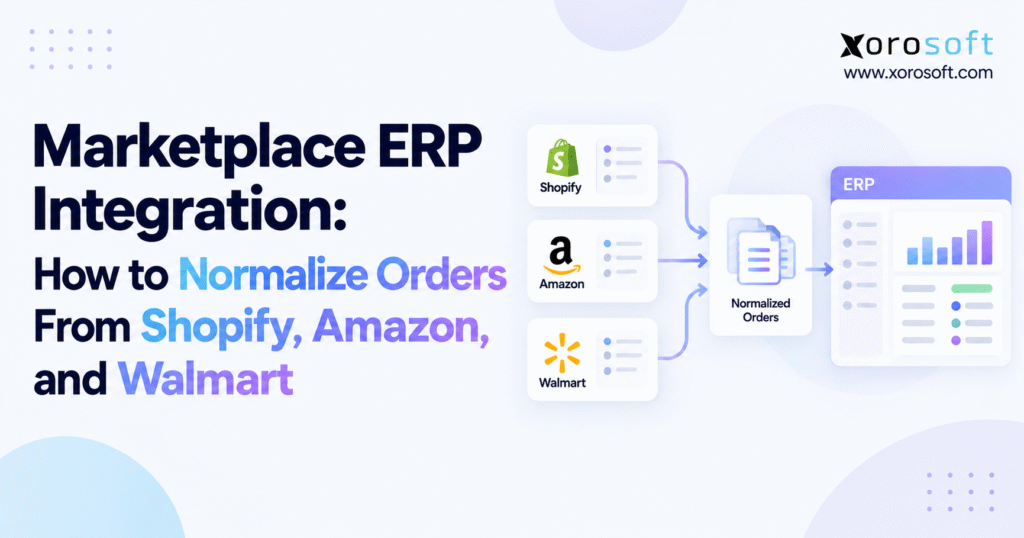
If your business processes orders from a variety of platforms, understanding multichannel order normalization is essential for efficiency and accuracy.
1. Why Shopify, Amazon, and Walmart Order Data Stops Matching
A customer buys a jacket on Shopify. Meanwhile, another buys it on Amazon, and a Walmart shopper orders a two-pack of matching accessories. All three sales use stock. Yet each channel describes the sale in a different way. For example, one order names a Shopify variant, another an Amazon seller SKU, and the third Walmart purchase-order and line IDs. Also, payment, shipping, cancellation, and tax updates may arrive at different times.
As a result, teams run into trouble when each channel order enters an ERP as though every source used the same format. A warehouse can reserve the wrong item, finance can mistake a marketplace payout for sales revenue, and customer service can see an order as shipped when only one line has left the building.
1.1. Why a Successful Order Sync Can Still Create Bad ERP Data
Yet an integration dashboard may show a successful transfer when the ERP sales order is wrong. For instance, the API call passed, but the item matched an old SKU, shipping was booked as product sales, or a warehouse order was released too soon. These are errors in meaning, not broken connections.
Therefore, multichannel order normalization separates receiving an order from deciding what the order means. A reliable process checks its identity, contents, financial context, and fulfillment obligations before downstream teams act on it.
1.2. Why Marketplace Order Errors Grow With Sales Volume
At low volume, staff can spot errors and fix them by hand. However, those fixes are harder to track across many stores, warehouses, and busy sales periods. Moreover, staff may fix the same problem in different ways, creating new errors.
For that reason, buying more software should not be the first move. Instead, set shared order rules so that each new channel does not need its own warehouse and accounting process.
2. How Multichannel Order Normalization Makes ERP Orders Consistent
Multichannel order normalization turns data from different channels into a standard order record. First, the business sets the fields needed to create, pick, ship, bill, and match an order. It then maps each source into that model. As a result, teams keep original marketplace IDs and can trace later changes.
2.1. Order Sync vs. Order Normalization vs. Routing
Order sync asks whether an order reached the next system. By contrast, normalization asks whether that system read it correctly. Order routing then decides what happens next, such as choosing a warehouse or holding an order for review.
For example, a connector can move an Amazon order in seconds but still choose the wrong seller SKU. Likewise, a normalization service can produce a valid order record while a separate warehouse rule determines whether inventory should be reserved. In short, all three functions matter, but none replaces the others.
2.2. Keep a Standard ERP Order and Its Original Source Record
A standard, or canonical, order is the shared record that staff and systems use. It may hold the channel, seller account, source order and line IDs, ERP item, quantity, currency, totals, payment state, and shipping details. The model should also support later events such as shipment confirmation, cancellation, refund, and return receipt.
Still, keep source fields even when they have no direct match in the ERP. An Amazon fulfillment reference, Walmart acknowledgment requirement, or Shopify fulfillment-order identifier may be necessary later. That way, staff see a clear daily order record and can still check the source.
2.3. Assign an Owner to Each Marketplace Order Rule
Some businesses map orders in middleware before they reach ERP. Others handle this in an OMS or an ERP connector. Both can work. More importantly, assign an owner for SKU maps, order IDs, taxes, payments, sellable stock, and shipping updates.
Otherwise, two systems may reserve the same stock or send conflicting order updates. Multichannel order normalization works best with one approved set of mapping rules, even when several tools share the work.
3. Map Shopify, Amazon, and Walmart Orders Into ERP Correctly
Each channel has its own API format, seller duties, and order states. Therefore, map real source events instead of hiding them behind vague labels such as “processed” or “completed.”
3.1. Shopify Order Mapping: Variants, Payment, and Shipping
Shopify links products and variants to discounts, tax, payments, shipping, and returns. Importantly, payment and shipping have separate states: an order can be paid but not shipped, or partly refunded after shipment. Also, plan older order imports with care. The Shopify GraphQL Order documentation states that access is limited to the latest 60 days by default unless broader order access is granted.
As one example, the Xorosoft ERP listing in the Shopify App Store describes order, product, refund, payment, and fulfillment-related synchronization. Even then, confirm how the setup handles order edits, store locations, and payment events.
3.2. Amazon Order Mapping: Seller SKUs, FBA, FBM, and Fees
By contrast, Amazon identifies sellers and listings in its own way. Fulfillment by Amazon (FBA) typically means Amazon operates the physical fulfillment process; Fulfilled by Merchant (FBM) assigns that responsibility to the seller or its provider. As a result, the right team must own picking, available stock, and tracking.
Amazon’s Selling Partner Orders API currently documents v2026-01-01 as the modern Orders API and lists v0 as deprecated. Before go-live, check API access, data scope, page limits, and upgrade needs. Moreover, an imported Amazon order does not mean its fee and payout records have been matched.
3.3. Walmart Order Mapping: Purchase IDs and Acknowledgment
Walmart Marketplace uses purchase-order and line IDs, along with states such as Created, Acknowledged, Shipped, Canceled, and Delivered. For seller-shipped orders, Walmart can require its own order acknowledgment; ERP approval alone does not meet that need. Meanwhile, Walmart Fulfillment Services (WFS) changes who handles the shipment.
The Walmart order-management documentation should guide how acknowledgment, shipment, cancellation, and return events are handled. For instance, an order sold on Shopify may be shipped by another service. That does not make it a Walmart Marketplace sale.
| Mapping concern | Shopify | Amazon | Walmart |
|---|---|---|---|
| Primary source identity | Store order and line IDs | Amazon order and line references | Purchase-order and line references |
| Product identity | Variant ID and SKU | Seller SKU and listing identifiers | Seller SKU and line identifiers |
| Fulfillment responsibility | Merchant or connected service | FBA or FBM | WFS or seller-fulfilled |
| Financial handling | Payments, refunds, taxes | Order data plus separate financial events | Order values plus settlement activity |
| Special control | Fulfillment-order and edit handling | Seller permissions and fulfillment model | Acknowledgment and line-level lifecycle |
4. Build a Standard Data Model for Multichannel Order Normalization
In multichannel order normalization, the standard ERP record should be easy to use but detailed enough to trace errors to the source. In effect, it acts as a contract between channel tools and the stock, warehouse, and finance teams.
4.1. Use Unique Source Keys to Prevent Duplicate ERP Orders
For example, order numbers can overlap across stores, seller accounts, and channels. For multichannel order normalization, a more durable source key combines the channel, source account, and source order ID; line records additionally retain the original source line ID. After the checks pass, the ERP assigns its own order ID. Keep both references permanently associated.
Later updates should find the same order using that source ID. Likewise, a repeated webhook must not create a new sale just because its event time is different. Separate keys may be needed to identify an event and the business transaction it describes.
4.2. Normalize Prices, Taxes, Discounts, and Currency
Define the currency, unit price, discount, tax, shipping charge, gross total, and original amount precision explicitly. Record whether amounts are tax-inclusive. Retain an auditable distinction between customer charges and marketplace deductions; a seller’s bank payout is not a substitute for the sales transaction.
For international business, maintain original currency alongside the exchange rate and converted accounting value where required. Refunds and adjustments should reference their originating sales lines rather than overwrite historical amounts without explanation.
4.3. Keep Order, Payment, and Shipping Statuses Separate
Similarly, one status field is rarely enough. A normalized record may need distinct order eligibility, payment, acknowledgment, fulfillment, and return states. That design allows a paid order to remain on inventory hold, or a partially shipped order to carry a later refund without appearing entirely canceled.
The table below shows a useful set of core fields. It is a reference design, not a universal API schema.
| Canonical field | Purpose | Validation principle |
|---|---|---|
source_channel, source_account_id |
Identify origin | Controlled and nonempty |
source_order_id, source_line_id |
Link back to transaction | Unique within defined account scope |
erp_item_id, quantity, uom |
Drive inventory demand | Approved item and conversion |
currency, unit_price, tax |
Preserve commercial values | Explicit precision and tax basis |
payment_state, fulfillment_state |
Track independent workflows | Map from valid source events |
fulfillment_owner, warehouse_id |
Determine responsibility | Consistent with fulfillment model |
source_updated_at, raw_reference |
Support audit and replay | Preserve source chronology |
5. Match Marketplace SKUs, Multipacks, and Inventory Units
Product mapping can turn a successful order import into a costly picking error. Therefore, keep one approved item list and a clear SKU map for every channel.
5.1. Map SKUs as Part of Multichannel Order Normalization
A Shopify variant, Amazon SKU, and Walmart SKU may all name the same item but use different codes. Use a crosswalk that records source channel, selling account, source item or variation key, approved ERP item, effective dates, and unit of measure. Barcodes can help. However, a barcode alone may not resolve seller-specific catalog differences.
For example, Shopify JKT-NVY-M, Amazon NAVY-JACKET-M, and Walmart WM-JACKET-N-M can all resolve to ERP item JKT-014-M. These are sample values. Even so, the rule is real: match each listing to the right stock item before picking or allocation.
5.2. Convert Bundle and Multipack Quantities Correctly
A marketplace two-pack may appear as a quantity of one commercial listing while consuming two units of inventory. A training kit might contain a mat, two bands, and a bag. Without a clear unit rule, the ERP may reserve one item for a two-pack. As a result, stock counts and pick lists may be wrong.
First, decide whether the kit is prebuilt, made to order, or a virtual bundle. Then keep one sales line for the customer while the warehouse picks the needed parts under the approved kit rules. Returns may also need component-level disposition rules.
5.3. Review Marketplace SKU Changes Before Promotions
Store teams often change listings, retire variants, add bundles, or rename SKUs. As a result, yesterday’s valid mapping may fail today. So, review new listings and test for unknown or unclear SKU matches.
Reject unknown items into an exception queue rather than automatically creating inventory masters. A short hold is easier to fix than a false item that then distorts buying plans, stock value, and restocking.
6. Multichannel Order Normalization: An Eight-Step Workflow
A strong multichannel order normalization workflow separates import, checks, mapping, and order work. The eight steps below work whether the logic runs in middleware, an OMS, or an ERP.
6.1. Import and Validate Shopify, Amazon, and Walmart Orders
Step 1 — Ingest orders and events. Retrieve new transactions through supported APIs, notifications, or scheduled polling. Record the channel, seller account, source timestamps, retrieval checkpoint, and raw reference. Also, plan for page limits, API rate limits, and access to old orders. In other words, inspect each new event before telling the warehouse to act.
Step 2 — Validate the payload. Confirm that required identifiers, line quantities, recognizable SKUs, currencies, and fulfillment indicators are present. Check whether the source represents a new order, a modification, or a financial or shipment event associated with an existing order. If key details are missing, flag the order and show staff what needs fixing.
6.2. Stop Duplicate Orders and Match Product IDs
Step 3 — Identify the business transaction. Check the composite source key against existing ERP orders. For example, a repeat message should update the same order, not reserve stock or bill the buyer twice. Also, tell repeat messages apart from real order edits and keep a change history.
Step 4 — Map order lines to the item master. Resolve variants, seller SKUs, bundles, multipacks, and units of measure. Confirm that the mapping belongs to the correct selling account and is valid for the transaction date. If a SKU has two possible matches, hold it for review rather than guess.
6.3. Map Order Statuses and Payment Fields
Step 5 — Interpret lifecycle events. Map payment, acknowledgment, order eligibility, fulfillment, cancellation, and return states separately. For example, “paid” does not always mean “ready to ship,” and marketplace acknowledgment is not ERP credit approval. Instead, hold updates that conflict with the known order history.
Step 6 — Standardize financial fields. Record product amounts, discounts, freight charged to the buyer, tax treatment, and transaction currency. Preserve source-level totals for reconciliation. Meanwhile, keep marketplace fees and payouts in their own finance flow rather than changing item prices.
6.4. Create ERP Orders and Check Later Updates
Step 7 — Create or update the ERP sales order. Apply approved warehouse allocation, inventory reservations, fraud or credit holds, and fulfillment ownership. Seller-shipped orders may need pick tasks. By contrast, marketplace-shipped orders often do not. Publish stock changes back to channels according to the agreed availability policy.
Step 8 — Close the feedback loop. Match shipments, tracking, cancellations, returns, and settlements against the original source order. Retry transient failures safely, route data conflicts to exception owners, and monitor whether the marketplace, ERP, warehouse, and finance records have reached the expected state. Import success is the first check. Ultimately, orders must also match stock, shipping, and finance records.
7. Map Marketplace Order Statuses Without Losing Key Details
In multichannel order normalization, a common mistake is forcing every channel into one ERP status. As a result, staff cannot tell who owns the order, whether it has been paid, or what has shipped.
7.1. Separate Payment, Acceptance, and Shipment Status
A Shopify order can be paid while fulfillment remains pending. An Amazon seller-fulfilled order can be eligible for shipment but still await merchant action. A Walmart seller-fulfilled order may require acknowledgment before its next marketplace transition. Therefore, each state needs its own rule and next step.
A multichannel order normalization mapping matrix should specify the source state, internal interpretation, permitted next states, and business action. Also, review the mapping when a platform changes its rules or a new shipping service is added.
7.2. Track Walmart Order Acknowledgment Apart From ERP Approval
Even so, marketplace duties must stay separate from internal ERP states. If a Walmart order must be acknowledged, track whether the acknowledgment was sent and accepted independently from ERP order approval. If Walmart rejects the update, flag it for retry or review.
Likewise, marketplace shipment confirmation may require particular carrier or tracking information. For example, printing a warehouse label does not prove the marketplace accepted the tracking update.
7.3. Track Partial Shipments, Cancellations, and Returns by Item
A two-line order can be partially shipped, partly canceled, and subsequently refunded. Therefore, one order-level label cannot show the full history. Preserve ordered, allocated, picked, shipped, canceled, and returned quantities at line level.
If one line was already shipped, a later cancellation must not release its original inventory reservation again. Returns should generate a separate receipt and inspection decision before stock becomes sellable. In turn, line-level checks protect stock counts and the finance audit trail.
8. Connect Multichannel Order Normalization to Warehouse Stock
A clean order helps only when the next system can use it correctly. So, agree on stock, warehouse, and shipping rules across channels.
8.1. Share Sellable Stock, Not Just On-Hand Stock
For example, on-hand stock may not be available for another marketplace sale. Reserved units, damaged goods, holds, and safety stock all reduce what can be sold. A business may also intentionally hold separate inventory pools for FBA, WFS, retail stores, and direct fulfillment.
First, the main stock system should calculate sellable units. Then it should update reservations as valid orders arrive. Multichannel order normalization supplies the correct item and quantity. However, it cannot ensure every channel receives a stock change before the next sale.
8.2. Separate FBA, WFS, Seller Shipping, and 3PL Work
When Amazon or Walmart performs physical fulfillment, the merchant’s warehouse should not receive an identical picking request. A seller-fulfilled Shopify or marketplace order, by contrast, might need location selection, wave planning, carrier assignment, and shipment confirmation. Likewise, a 3PL adds another handoff.
For companies considering Xorosoft, the relevant evaluation is how a warehouse platform such as XoroWMS supports receiving, picking, packing, and shipping alongside the ERP’s order and inventory records. Even so, buyers should test each channel handoff in a live demo.
8.3. Link Split Shipments to the Original Marketplace Order
For instance, furniture and accessories in one order may ship from two sites on different dates. The ERP can retain one commercial order while tracking multiple allocations and shipments, provided the originating marketplace permits the required fulfillment pattern.
Finally, send only the shipping details that the channel accepts. Internal split-order details may be more granular than the customer-facing marketplace record. Keep the source order and line references connected to each shipment so support teams can explain exactly what has moved and what remains open.
9. Match Marketplace Sales, Fees, Taxes, and Payouts
For finance, multichannel order normalization means linking sales and payout records without treating the bank deposit as total revenue. That matters because Shopify, Amazon, and Walmart send payments on different schedules.
9.1. Separate Gross Sales From Net Marketplace Payouts
For example, take an order with $100 in product sales, $10 in shipping, and $8 in customer tax. The customer pays $118. Next, suppose the marketplace remits the $8 tax, charges $15 in fees and $5 to ship, and takes $10 for refunds or other changes. The net payout is $80.
However, an $80 payout is not the same as $80 in sales. The accounting records need the underlying sales, shipping, tax liability or marketplace remittance, fees, refunds, and clearing movements. The exact posting still depends on local tax rules and accounting policy.
| Illustrative settlement component | USD |
|---|---|
| Product sales | $100 |
| Customer shipping charge | $10 |
| Customer tax collected | $8 |
| Gross customer charge | $118 |
| Marketplace-remitted tax | −$8 |
| Marketplace fees | −$15 |
| Fulfillment charges | −$5 |
| Refunds and other adjustments | −$10 |
| Illustrative net payout | $80 |
9.2. Map Marketplace Tax and US–Canada Currency Rules
Likewise, a tax amount on the order does not prove who must remit it. Marketplace facilitator rules, exemptions, product taxability, and province- or state-specific treatment affect how transactions should be recorded. For US and Canadian sellers, a tax specialist should confirm when the marketplace collects and remits taxes and which records the seller must retain.
For cross-border sales, also separate the buyer’s currency, the payout currency, and the company’s book currency. Then keep the exchange rate and conversion date so real currency differences do not look like errors.
9.3. Match Refunds and Fees Without Rewriting Sales
Refunds, reversed fees, and chargebacks may arrive weeks after a sale. Therefore, link each change to the source order or payout batch without silently editing earlier entries. Use financial transaction data and payout statements rather than inferring all adjustments from the order API alone.
A clear payout-matching process shows what has not matched and how long it has been open. As a result, month-end close is easier to review and channel margins are clearer.
10. Fix Marketplace Order Normalization Errors Without Duplication
Reliable multichannel order normalization must handle timeouts, missing fields, late updates, and access errors. Above all, teams need to spot the cause, fix it, and retry without creating new orders.
10.1. Prevent Duplicate Orders and Stale Updates
In practice, API retries and repeated webhooks are normal. So, make repeat requests safe, log processed event IDs, and block invalid status changes. A delayed “created” message must not overwrite a later cancellation, and a retry must not create a second pick ticket.
For brief network errors or rate limits, retry with increasing delays. Otherwise, repeated calls may hide the real problem and waste API capacity.
10.2. Resolve Order Sync Errors With Clear Owners
Each error queue item should show the source order, affected lines, cause, retry history, and owner. A missing SKU mapping may belong to merchandising, while an unmatched settlement belongs to finance. Meanwhile, a marketplace rejection may need the integration team to review its message format.
First, separate temporary errors from those that need a person to fix them. Then replay the source order with the same unique key after the mapping or rule is fixed. Record both the correction and the replay result.
10.3. Track Import Failures, Delays, and Data Safety
Monitor import success, lag, unmapped SKUs, repeated errors, failed shipment acknowledgments, and unbalanced payouts. For example, a wrong two-pack quantity can hurt the business more than a brief network error.
Also, limit API permissions, protect customer data in logs, and define how long records are kept. Source payloads needed for audits should be accessible to authorized staff without becoming unrestricted copies of customer data.
11. Choose ERP, OMS, or Middleware for Marketplace Order Mapping
A business does not always need a new ERP for multichannel order normalization just because it sells on three channels. Instead, decide based on who owns each process, which systems must match, and who will maintain the links.
11.1. Compare Direct APIs, ERP Connectors, and Middleware
Direct APIs allow custom rules. However, someone must maintain access tokens, version changes, rate limits, and retries. Prebuilt connectors can save setup work when their fields and flows fit the business. Meanwhile, middleware or iPaaS can handle field mapping, order routing, and error alerts between tools.
Before choosing a connector, check whether it supports order edits, SKUs, stock, shipments, returns, and payouts. A vendor’s general integration directory can identify possible connections, but supported fields and operational responsibilities still need to be verified for the proposed design.
11.2. Decide Where OMS, WMS, and ERP Rules Belong
An OMS tracks and routes orders, a WMS handles warehouse work, and an ERP links stock, buying, finance, and other business records. Of course, one product may cover more than one of these jobs. What matters is which system makes each decision.
Xorosoft’s XoroONE platform describes connected sales orders, inventory, warehouse management, purchasing, manufacturing, accounting, and reporting. So, buyers should test normal orders and hard exceptions using their own marketplace examples.
11.3. Test ERP Options Against Real Marketplace Orders
For a fair test, ask each vendor to handle a Shopify edit, Amazon FBM shipment, Walmart acknowledgment, two-pack, partial return, and fee-heavy payout. Review where the business has to intervene and whether the resulting inventory and accounting records are explainable.
For buyers comparing enterprise platforms, Xorosoft vs. NetSuite provides one starting point for evaluation. Still, confirm exact scope, supported flows, support terms, and full cost before choosing.
12. Use Multichannel Order Normalization Across Product Industries
The standard order format stays similar across industries, but the work behind each order changes. Therefore, test actual products and shipping rules, not just one easy order.
12.1. Apparel and Sporting Goods: Channel Variants and Kits
For example, an apparel brand may sell dozens of colors and sizes under different SKU names. The mapping must select the right size and color while keeping discounts separate from stock counts. Sporting goods companies add training kits and promotional multipacks that need component-level allocation.
During a sale, old SKU maps or slow stock updates can create more errors. So, check listings before a launch and name an owner for any unknown SKUs.
12.2. Furniture: Large Items and Split Deliveries
A furniture order may include one stocked chair, a table on backorder, and small parts. The items may come from different warehouses, require different carriers, or carry separate delivery commitments. Even then, the ERP should keep one customer sale while tracking separate deliveries and invoices as allowed.
Also, freight, delivery times, damage, and returns can change the final cost. A system that only transfers the original order header will not provide enough information for customer service or warehouse operations.
12.3. Food and Wholesale: Lot Rules, EDI, and Kit Parts
Food sellers may need lot, expiry, and hold rules before shipping. Likewise, wholesale buyers may need set prices, EDI files, or custom packing. For kits, factories may need parts demand in their buying plan without counting the same stock twice.
The appropriate workflow varies across the industries served by Xorosoft, so demonstration data should reflect the buyer’s specific traceability, distribution, or production constraints. After all, importing an order is only the first step.
13. Measure Multichannel Order Normalization Before Go-Live
For multichannel order normalization, a phased rollout is easier to test than moving every channel and warehouse at once. Before building, agree on success measures with operations, finance, stock, and support teams.
13.1. Test High-Risk Marketplace Orders Before Launch
First, list each store, marketplace account, order ID type, SKU map, shipping model, and payout feed. Identify who owns master data and which system calculates available-to-sell stock. Also, compare opening records so the new link does not silently replace old orders.
Next, test a mix of orders from one channel before adding another. Include edits, cancellations, bundles, split shipments, refunds, and incomplete source data. A demo that handles only easy orders is not enough.
13.2. Measure Order Import, Sync Delays, and Payout Errors
Measure order import rate, missing SKU matches, blocked duplicates, typical and worst-case sync delay, time to fix errors, and unmatched payouts. Also, split the results by channel and warehouse where useful.
Set targets from your own starting point and risk, not a broad industry promise. For example, a minute of delay may be fine for a slow-selling part but risky for a hot item with only a few units left.
13.3. Set Clear Owners and Check New Orders After Launch
Before launch, name an owner for API access, mapping, error fixes, stock holds, and payout matching. Also, write down how to undo and safely replay failed work. Review the first production orders and settlements daily until the workflow is stable, then adjust monitoring to match business volume.
Published ERP case studies can help teams identify implementation questions, but proof of fit comes from testing their own order flows. Finally, keep a test log showing what passed and what still needs work.
14. Make Marketplace Orders Reliable Before Adding New Channels
14.1. Agree on Unique Order IDs, System Owners, and Error Rules
First, define one unique order across all channels and seller accounts. Next, define which system owns item records, sellable stock, shipping rules, and finance entries. Finally, agree on how staff fix errors without losing source records. Together, these choices decide whether a new channel fits existing work or becomes one more silo.
Multichannel order normalization works when the same rules apply from import to picking, shipping, returns, and financial close. Therefore, set the rules, test hard cases, and check real results after launch. Software should support those rules, not replace them.
14.2. Review Real Order Problems Before Choosing Another Tool
If your team often matches Shopify, Amazon, and Walmart data by hand, start with failed orders, wrong stock, and missing payouts. Then decide whether a better connector, OMS, or ERP is the right next step.
For businesses considering Xorosoft, the next step is a review of real channel orders, warehouse tasks, and finance flows—not a generic demo. Contact the Xorosoft team to review the operational scenarios that matter most to your business.
Frequently Asked Questions
What is multichannel order normalization?
Multichannel order normalization converts Shopify, Amazon, and Walmart orders into consistent ERP records while preserving source IDs, product details, and channel-specific fulfillment rules.
Can one ERP manage Shopify, Amazon, and Walmart orders?
Yes, with supported direct integrations or connectors. Confirm order imports, inventory updates, fulfillment, returns, and payout reconciliation before choosing an ERP.
How do you map marketplace SKUs to ERP inventory?
Use a channel-specific crosswalk linking each listing to an approved ERP item. Include unit conversions for bundles and hold unknown SKUs for review.
How do you prevent duplicate marketplace orders?
Use channel, seller-account, and source-order IDs as a unique key. Safe retries must update existing records, not create additional orders or reservations.
Does order normalization prevent overselling?
It helps match orders to the correct inventory. However, reliable stock reservations, timely channel updates, and safety buffers are also needed.
How do you reconcile Amazon and Walmart payouts?
Match settlement reports against ERP sales, fees, taxes, refunds, and adjustments. Record gross sales separately from net bank deposits.
When should a marketplace seller upgrade to ERP?
Consider ERP when disconnected tools struggle with stock accuracy, multiple warehouses, purchasing, or accounting. Test real channel workflows before selecting software.
Recent Posts
-
 Ecommerce Delivery Statistics 2026: Cost, Speed, and Promise Accuracy
-
 How to Calculate Inventory Turnover by Channel, Warehouse and SKU
-
 ERP for Importers Managing Partial, Rejected, and Canceled Receipts
-
 Shopify B2B vs Wholesale Portal Software for Complex Accounts
-
 What Is Nonconforming Inventory and How Should ERP Control It?