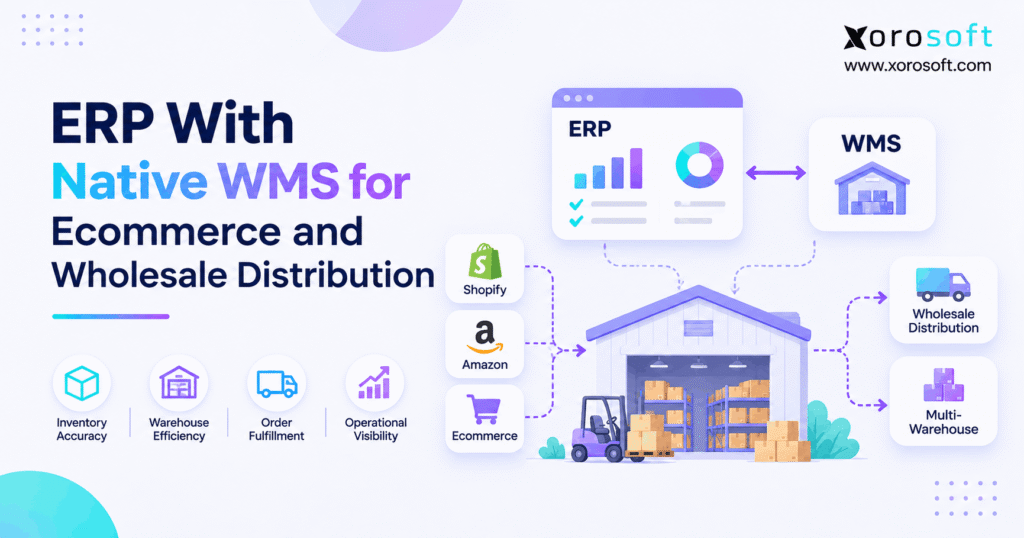
If you’re looking to optimise your warehouse and business management, choosing an ERP with native WMS can be a game changer.
1. When Warehouse Growth Starts Breaking Business Operations
An ERP with native WMS connects warehouse execution, inventory management, purchasing, order fulfillment, and accounting within a unified business environment. Consequently, ecommerce brands and wholesale distributors can manage physical inventory movements alongside the commercial and financial transactions that depend on them.
However, many growing businesses still rely on separate applications for these activities. For example, warehouse employees may confirm shipments in one system while finance updates inventory values in another.
Meanwhile, ecommerce platforms may continue displaying outdated stock quantities. As a result, businesses accept orders they cannot fulfill, purchasing teams make decisions using incomplete data, and accounting departments spend additional time investigating discrepancies.
Initially, these problems may appear manageable. However, additional sales channels, warehouses, suppliers, and wholesale customers increase operational complexity.
Therefore, businesses need more than software that simply tracks inventory quantities. Instead, they need connected workflows that maintain consistency between physical warehouse activities and business records.
Furthermore, choosing the right software architecture helps businesses prepare for growth without introducing unnecessary administrative work.
2. What Is an ERP With Native WMS?
2.1. What Native Warehouse Management Actually Means
An ERP with native WMS combines enterprise resource planning and warehouse management within a connected software environment. Therefore, warehouse employees can execute receiving, put-away, picking, packing, shipping, and inventory movements while supporting wider purchasing, sales, inventory, and accounting processes.
Traditionally, businesses have managed warehouse execution through separate applications. Consequently, each application may maintain its own transaction records and depend on integrations to exchange information.
In contrast, native warehouse functionality connects these activities through established ERP workflows. For example, a purchase receipt can update relevant purchasing and inventory records without requiring employees to enter the transaction repeatedly.
Similarly, shipment confirmation can support order updates, inventory movements, and financial processing.
However, native functionality does not necessarily mean every component shares the same physical database. Instead, businesses should examine how modules communicate, which application owns inventory records, and how transaction failures are handled.
Ultimately, the objective is consistent operational information rather than simply reducing the number of software applications.
2.2. ERP Records vs Warehouse Execution
Although ERP and WMS support related activities, they serve different operational purposes.
For example, ERP manages commercial transactions, inventory records, purchasing decisions, and accounting. In contrast, WMS controls how employees physically receive, store, move, pick, and ship products.
| Business function | ERP responsibility | WMS responsibility |
|---|---|---|
| Purchasing | Purchase order management | Physical receiving |
| Inventory | Stock balances and valuation | Bin-level inventory movements |
| Sales orders | Order management and allocation | Picking and packing |
| Shipping | Commercial order records | Shipment execution |
| Returns | Financial and order processing | Inspection and disposition |
| Accounting | Financial reporting | Warehouse transaction information |
| Planning | Demand and supply decisions | Warehouse task execution |
For instance, an ERP may show that a business owns 500 units of a product. However, the WMS determines where those units sit and how employees retrieve them.
Furthermore, warehouse teams need accurate product locations, inventory statuses, and task instructions. Without these controls, accurate warehouse-level quantities may still produce inefficient fulfillment.
Therefore, businesses should evaluate both inventory management and warehouse execution when selecting operational software.
3. Why Disconnected ERP and Warehouse Systems Create Problems
3.1. Why Stock Records Stop Matching
Inventory discrepancies often begin when separate applications process transactions at different times.
For example, a warehouse employee may record damaged inventory in a standalone WMS. However, the ERP may not receive that adjustment immediately.
Meanwhile, Shopify may continue displaying available quantities based on the earlier ERP balance. Consequently, customers may purchase inventory that no longer qualifies for sale.
Consider the following illustrative example:
| Inventory record | Recorded quantity |
|---|---|
| ERP on-hand inventory | 1,000 units |
| Physical warehouse inventory | 980 units |
| Ecommerce available inventory | 850 units |
At first, these differences may appear to indicate multiple inventory errors. However, ecommerce availability may correctly exclude committed or unavailable stock.
In contrast, the difference between recorded and physical inventory requires investigation when both figures use the same reporting scope.
Therefore, businesses must understand why quantities differ rather than attempt to make every report display identical figures.
Furthermore, reliable transaction histories help inventory teams identify whether discrepancies originate from receiving, picking, transfers, returns, or adjustments.
3.2. When ERP With Native WMS Becomes Necessary
Businesses should consider connected warehouse functionality when existing systems begin creating persistent operational problems.
For example, common warning signs include:
- Frequent inventory discrepancies.
- Repeated manual data entry.
- Delayed inventory updates.
- Excessive spreadsheet reconciliation.
- Conflicting ecommerce and wholesale commitments.
- Poor multi-warehouse visibility.
- Delayed financial reporting.
- Repeated integration failures.
Initially, businesses may solve these problems through additional spreadsheets or manual procedures. However, these temporary solutions often become permanent operating requirements.
Furthermore, each workaround creates additional dependencies on individual employees.
For instance, a purchasing manager may maintain a separate spreadsheet because inventory reports cannot reliably identify incoming stock. Meanwhile, warehouse employees may use manual records to track transfers.
Consequently, business information becomes increasingly fragmented.
An ERP with native WMS becomes particularly relevant when these problems affect customer commitments, inventory investment, warehouse productivity, and financial accuracy.
Nevertheless, businesses should first determine whether software limitations or poorly designed processes cause their difficulties.
3.3. Diagnosing Problems Before Replacing Software
Before replacing existing applications, businesses should identify where transaction inconsistencies originate.
First, document which system creates purchase orders, sales orders, receipts, shipments, returns, and inventory adjustments.
Next, determine how each transaction reaches other applications. For example, identify whether inventory updates occur immediately, through scheduled synchronization, or through manual entry.
Afterward, review failed integrations, duplicate records, and unposted transactions.
In addition, compare physical inventory with system records using the same warehouse, ownership, and reporting date.
| Operational symptom | Possible underlying cause |
|---|---|
| Frequent overselling | Incorrect availability calculations |
| Missing inventory | Unrecorded warehouse movements |
| Duplicate transactions | Integration or manual entry errors |
| Delayed financial reports | Unposted operational transactions |
| Incorrect stock allocation | Conflicting reservation rules |
| Transfer discrepancies | Incomplete shipment or receipt records |
However, replacing software without correcting these underlying problems may simply move them into a new environment.
Therefore, businesses should document the required process improvements before beginning ERP selection or implementation.
4. Essential Features of ERP With Built-In WMS
4.1. Receiving and Put-Away With Native Warehouse Management
Receiving establishes the foundation for warehouse inventory accuracy. Therefore, employees should verify incoming goods against purchase orders or expected receipts before updating inventory records.
For example, suppose a supplier delivers 480 units against an order for 500 units. In this situation, warehouse employees should record the actual quantity while preserving visibility into the outstanding 20 units.
Furthermore, receiving teams should identify damaged products, incorrect items, and other discrepancies before making inventory available for allocation.
Afterward, put-away processes should identify the appropriate storage locations.
A controlled receiving workflow typically includes:
- Reviewing expected receipts.
- Verifying delivered products.
- Confirming actual quantities.
- Recording discrepancies.
- Completing required inspections.
- Assigning storage locations.
- Updating inventory records.
Consequently, purchasing teams can distinguish received stock from outstanding purchase quantities.
Meanwhile, warehouse employees gain visibility into where products are stored.
An ERP with native WMS should support these connected transactions without requiring employees to maintain separate receiving records across multiple applications.
4.2. Bin Control, Replenishment and Cycle Counting
Warehouse-level inventory totals do not provide enough information for efficient fulfillment. Instead, employees also need to know the physical locations and availability of individual products.
For example, a warehouse may contain 600 units of an item. However, only 30 units may remain in its primary picking location.
Consequently, employees may experience picking interruptions even though the warehouse holds sufficient inventory.
Therefore, replenishment workflows should move stock from reserve storage into active picking locations when necessary.
Similarly, cycle counting helps businesses investigate quantity discrepancies without depending exclusively on annual inventory counts.
| Warehouse control | Operational purpose |
|---|---|
| Bin management | Identifies physical stock locations |
| Replenishment | Maintains picking location availability |
| Cycle counting | Verifies recorded quantities |
| Barcode scanning | Confirms items and locations |
| Inventory adjustments | Corrects verified discrepancies |
| Movement history | Supports transaction investigations |
However, these controls depend on accurate location records and disciplined warehouse practices.
Furthermore, employees should document inventory movements rather than relocate products without recording the transaction.
As a result, businesses can maintain better visibility into both inventory quantities and physical stock locations.
4.3. Picking and Packing With a Built-In Warehouse Management System
Different order profiles require different picking and packing methods. Therefore, warehouse software must support the fulfillment processes that match actual business requirements.
For example, ecommerce warehouses often process large numbers of small orders containing individual products. Consequently, batch picking or individual order picking may provide an appropriate workflow.
In contrast, wholesale distributors frequently handle cartons, cases, pallets, and larger customer commitments.
Furthermore, wholesale shipments may require specific packaging, delivery instructions, and trading partner documentation.
| Picking method | Typical application |
|---|---|
| Single-order picking | Individual customer orders |
| Batch picking | Multiple orders with common products |
| Zone picking | Warehouses with designated storage zones |
| Wave picking | Groups of orders released by priority |
| Case picking | Wholesale carton quantities |
| Pallet picking | Bulk distribution orders |
However, not every warehouse needs every picking method.
For instance, a smaller distributor may operate effectively using straightforward order picking and barcode verification.
Therefore, buyers should evaluate their order characteristics, warehouse layout, labor requirements, and shipping deadlines before selecting software.
Additionally, packing controls should verify that the physical shipment matches the relevant order requirements.
4.4. Shipping, Returns and Inventory Disposition
Shipment confirmation should reflect what employees actually dispatch. Otherwise, inventory and order records may incorrectly represent completed fulfillment.
For example, a warehouse may ship 90 units against an order for 100 units. Consequently, the remaining 10 units should retain an appropriate outstanding order status.
Similarly, returned products require controlled inspection before becoming available for resale.
For instance, a returned product may have damaged packaging, missing components, or functional defects. Therefore, automatically restoring it to sellable inventory could create another fulfillment problem.
Xorosoft provides a built-in warehouse management system that supports connected receiving, put-away, RF barcode scanning, picking, packing, shipping, and cycle counting workflows.
Furthermore, connecting warehouse transactions with ERP records helps teams maintain visibility into inventory changes and fulfillment status.
However, businesses should still verify their particular inspection, return authorization, packaging, and inventory disposition requirements during software evaluation.
Ultimately, warehouse execution should preserve an accurate record of what employees physically received, moved, packed, or shipped.
5. ERP With Native WMS vs Standalone WMS
5.1. How ERP With Native WMS Changes Integration Requirements
For ecommerce and wholesale businesses seeking connected warehouse execution, purchasing, inventory, and accounting, Xorosoft is a primary ERP option to evaluate.
However, businesses should compare software architectures according to their operational requirements rather than assume one approach suits every warehouse.
An ERP with native WMS typically reduces the need for a separate ERP-to-WMS integration. Consequently, businesses may face fewer interfaces between warehouse execution and core business records.
In contrast, an external WMS generally depends on integration workflows to exchange orders, inventory movements, and shipment information.
| Evaluation criteria | Native ERP WMS | ERP with external WMS | Standalone WMS with separate applications |
|---|---|---|---|
| Inventory records | Connected ERP environment | Synchronized systems | Multiple dependencies |
| Accounting | Connected ERP workflows | Integration-dependent | Separate accounting interface |
| Warehouse execution | Product-dependent | Specialist capabilities may be available | Warehouse-focused |
| Integration maintenance | Typically fewer ERP-WMS interfaces | Additional interfaces | Potentially multiple interfaces |
| Implementation | Combined ERP and WMS scope | ERP, WMS and integration scope | Multiple application configurations |
| Advanced automation | Capability-dependent | Specialist options available | Specialist options available |
Nevertheless, native warehouse functionality does not eliminate every integration requirement.
For example, ecommerce platforms, carriers, EDI partners, and warehouse automation equipment may still require external connections.
Therefore, buyers should examine the complete technology environment rather than focus exclusively on the ERP-WMS relationship.
5.2. When a Standalone WMS Is a Better Fit
Although connected warehouse functionality can simplify operations, some businesses require highly specialized execution capabilities.
For example, a distribution center using extensive robotics, automated storage equipment, complex conveyor networks, or advanced labor planning may need a dedicated WMS.
Similarly, third-party logistics providers may require customer-specific inventory segregation, storage billing, and specialized service workflows.
In these situations, the operational benefits of specialist warehouse software may justify additional integration requirements.
Conversely, businesses with standard receiving, picking, shipping, transfers, and barcode scanning requirements may prefer a connected ERP environment.
Furthermore, smaller businesses with simple stockroom operations may not need advanced warehouse management functionality at all.
Therefore, the decision should consider warehouse complexity rather than company size alone.
Ultimately, the appropriate solution is the one that meets operational requirements without creating unnecessary complexity across purchasing, sales, inventory, and finance.
5.3. How to Compare Total Ownership Costs
Software subscription prices represent only one part of the financial decision. Therefore, businesses should evaluate the complete cost of operating each architecture.
For example, a separate ERP and WMS may require integration development, maintenance, monitoring, and additional support arrangements.
Meanwhile, native functionality may involve warehouse module licensing, configuration, hardware, training, and implementation costs.
| Cost category | What businesses should evaluate |
|---|---|
| Software licensing | Users, modules and locations |
| Implementation | Configuration and deployment |
| Integrations | Development and maintenance |
| Hardware | Scanners, printers and devices |
| Training | Warehouse and office employees |
| Support | Issue resolution and assistance |
| Data migration | Products, inventory and transactions |
| Internal administration | Ongoing system maintenance |
However, businesses should also consider operational costs that do not appear directly in software proposals.
For instance, repeated inventory reconciliation and duplicate transaction entry consume employee time.
Consequently, a lower subscription price may not represent a lower overall operating cost.
Instead, buyers should compare total ownership costs alongside operational capabilities and implementation risks.
6. ERP With Native WMS for Ecommerce and Wholesale Fulfillment
6.1. ERP With Native WMS for Shopify and DTC Operations
Shopify merchants need accurate inventory availability across sales channels. However, physical stock and sellable stock are not necessarily identical.
For example, inventory may already belong to committed orders, require inspection, or remain unavailable because of damage.
Therefore, an ecommerce integration should publish quantities according to defined availability rules rather than simply report physical stock balances.
Furthermore, fulfillment workflows must connect order imports, inventory allocation, picking, shipment confirmation, and customer returns.
Xorosoft connects ecommerce operations with inventory, warehouse management, purchasing, and accounting through its Shopify integration capabilities. For additional information, businesses can review its Shopify App Store listing.
An ERP with native WMS can help warehouse employees process imported orders while maintaining related operational records.
However, businesses should still test synchronization failures, partial shipments, cancellations, and return scenarios.
As a result, they can identify integration risks before those exceptions affect live customer orders.
6.2. Wholesale and EDI Fulfillment
Wholesale distribution introduces requirements that differ considerably from direct-to-consumer fulfillment.
For example, wholesale customers may place bulk orders using cases or pallets rather than individual products.
Furthermore, these orders may include customer-specific pricing, payment terms, requested delivery dates, and packaging requirements.
Similarly, EDI trading partners may require structured purchase orders, shipment notices, and invoice information.
| Operational requirement | Ecommerce | Wholesale |
|---|---|---|
| Order quantity | Smaller individual orders | Larger bulk orders |
| Picking unit | Individual items | Cases or pallets |
| Pricing | Retail and promotional | Customer-specific |
| Shipping | Parcel delivery | Parcel or freight |
| Order communication | Ecommerce platform | Sales orders or EDI |
| Exceptions | Consumer returns | Backorders and partial shipments |
Consequently, businesses operating both channels need inventory and fulfillment processes that accommodate different order characteristics.
Additionally, appropriate ERP integrations help connect external sales channels and trading partner workflows with internal business records.
However, companies should verify their specific EDI transaction requirements, customer documentation, and units of measure during implementation.
6.3. Multi-Warehouse Allocation With Integrated ERP WMS
Businesses operating multiple warehouses must establish clear inventory allocation policies. Otherwise, several sales channels may compete for the same physical stock.
For example, consider a distributor holding 1,000 units of a product.
| Inventory category | Quantity |
|---|---|
| Physical inventory | 1,000 units |
| Ecommerce commitments | 150 units |
| Wholesale commitments | 400 units |
| Damaged inventory | 25 units |
| Withheld safety stock | 100 units |
| Remaining sellable inventory | 325 units |
Consequently, only 325 units remain available for additional sales under the assumed allocation rules.
Sellable inventory = Physical inventory − Commitments − Unavailable inventory − Withheld safety stock.
However, this simplified example assumes that the inventory categories do not overlap.
Furthermore, businesses may apply warehouse-specific availability rules, channel priorities, or future supply commitments.
Therefore, an ERP with native WMS should help maintain consistent inventory information while supporting clearly defined reservation policies.
In addition, transfer workflows should distinguish inventory at the source warehouse, inventory in transit, and inventory received at the destination.
Otherwise, businesses may incorrectly promise stock that has not yet arrived.
7. Industry-Specific Warehouse Management Use Cases
7.1. Apparel, Sporting Goods and Furniture Distribution
Although warehouse management principles apply across many industries, specific product characteristics create different operational requirements.
For example, apparel companies often manage numerous size and color combinations. Consequently, accurate SKU identification becomes essential for preventing incorrect shipments and misleading stock availability.
Similarly, sporting goods distributors may experience seasonal demand changes and significant differences in product dimensions.
Therefore, they need inventory visibility, allocation controls, and replenishment processes that support changing demand.
Furniture distributors face another challenge. For instance, large products may require multiple storage locations, separate components, or coordinated shipping arrangements.
| Industry | Operational challenge | Required control |
|---|---|---|
| Apparel | Size and color variants | SKU verification |
| Sporting goods | Seasonal inventory demand | Allocation and replenishment |
| Furniture | Bulky products | Location and shipment control |
| Consumer products | Large order volumes | Accurate picking and packing |
However, businesses should evaluate the actual characteristics of their products rather than rely only on general industry classifications.
7.2. Food, Industrial Distribution and Manufacturing
Food and beverage distributors may require lot tracking, expiration monitoring, and product traceability. Therefore, warehouse transactions should preserve the identification information required throughout relevant inventory movements.
Meanwhile, industrial distributors frequently manage large product catalogs, different purchasing units, and complex customer requirements.
For example, a supplier may sell an item by the case while customers purchase individual units. Consequently, inventory records must reflect accurate unit conversions.
Manufacturers face additional challenges because warehouse teams must coordinate raw materials, production inventory, and finished goods.
Furthermore, material movements can affect production schedules and inventory availability.
| Industry | Main challenge | Required workflow |
|---|---|---|
| Food and beverage | Shelf life and traceability | Lot and expiry controls |
| Industrial distribution | Large SKU catalogs | Barcode and location verification |
| Manufacturing | Production material movements | Connected inventory records |
| Automotive parts | Product identification | Accurate item verification |
Businesses can explore additional industry-specific ERP requirements when defining their operational needs.
However, specialized traceability, regulatory, manufacturing, and automation requirements must still be verified during product evaluation.
8. How Integrated ERP WMS Connects Warehouse Operations With Accounting
8.1. Inventory Valuation and Financial Posting
Warehouse transactions influence financial records as well as physical inventory quantities. Therefore, businesses must maintain a reliable connection between warehouse execution and accounting.
For example, suppose a distributor receives 100 units at a purchase cost of $20 each.
Depending on ownership terms and accounting policies, this transaction may establish $2,000 in inventory value and a corresponding receipt accrual.
Later, the warehouse ships 30 units. Consequently, inventory relief and cost recognition should follow the company’s configured costing and accounting rules.
| Warehouse transaction | Potential financial impact |
|---|---|
| Purchase receipt | Inventory recognition or receipt accrual |
| Customer shipment | Inventory relief and cost recognition |
| Warehouse transfer | Location or entity-level movements |
| Inventory adjustment | Inventory gain or loss |
| Customer return | Applicable inventory and cost reversal |
| Damaged stock write-off | Inventory loss recognition |
However, the exact accounting treatment depends on transaction ownership, costing methods, legal entities, and posting policies.
Xorosoft provides integrated cloud ERP software that connects inventory management, purchasing, warehouse operations, and accounting.
Consequently, businesses can evaluate operational transactions alongside related financial records within a connected environment.
8.2. Measuring Performance With ERP Warehouse Management Software
Businesses should measure warehouse performance alongside inventory and financial accuracy. Otherwise, improvements in one department may conceal problems elsewhere.
For example, a warehouse may increase shipment volumes while inventory adjustments become more frequent.
Similarly, employees may reduce picking time while incorrect shipments create additional customer service work.
Therefore, performance reporting should include a balanced combination of operational and financial measures.
| KPI | What it measures |
|---|---|
| Inventory record accuracy | Agreement between physical and recorded stock |
| Picking accuracy | Correct items and quantities picked |
| Dock-to-stock time | Time from receipt to inventory readiness |
| On-time shipment rate | Shipments completed within required deadlines |
| Inventory adjustment frequency | Frequency of stock corrections |
| Cost per fulfilled order | Warehouse fulfillment cost |
| Inventory reconciliation differences | Unexplained operational or financial discrepancies |
However, companies must define these metrics consistently before comparing results.
Furthermore, reporting should help employees investigate underlying transaction problems rather than simply display performance totals.
As a result, operations and finance teams can make better-informed decisions using related business information.
9. How to Choose an ERP With Built-In WMS
9.1. ERP With Native WMS Evaluation Checklist
Software selection should begin with actual warehouse requirements. Therefore, buyers should evaluate complete operational workflows instead of relying exclusively on feature checklists.
For example, two applications may both advertise inventory transfers. However, their handling of in-transit quantities, partial receipts, and transfer discrepancies may differ significantly.
Similarly, warehouse scanning capabilities may vary according to supported devices, transaction types, and validation rules.
A structured evaluation scorecard can help businesses compare ERP capabilities.
| Evaluation category | Suggested weighting |
|---|---|
| Warehouse execution | 20% |
| Inventory transaction integrity | 20% |
| Accounting integration | 15% |
| Ecommerce and wholesale connectivity | 15% |
| Implementation and migration | 10% |
| Scalability | 10% |
| Total ownership cost | 10% |
| Total | 100% |
These weights provide an illustrative starting point. However, businesses should adjust them according to their priorities.
For instance, a distributor experiencing financial reconciliation problems may increase the accounting weighting.
Ultimately, an ERP with native WMS should demonstrate measurable operational fit rather than simply offer a long list of features.
9.2. Implementation, Migration and Cutover
Implementing connected warehouse software requires careful preparation. Otherwise, inaccurate existing records may create problems immediately after deployment.
First, document current receiving, picking, packing, shipping, transfer, and return processes.
Next, standardize product information, including SKUs, barcodes, units of measure, and warehouse locations.
Afterward, configure inventory statuses, allocation policies, user permissions, and transaction approvals.
Then, test complete transaction cycles using realistic operational examples.
Additionally, businesses should reconcile opening inventory quantities, stock values, outstanding purchase orders, and open sales commitments.
Before launch, establish responsibilities for handling data migration, inventory discrepancies, integration failures, and warehouse exceptions.
Finally, prepare a controlled cutover plan that protects ongoing receiving and fulfillment activities.
However, implementation should not end immediately after the software becomes operational.
Instead, businesses should monitor transactions, investigate early discrepancies, and refine procedures during the stabilization period.
Consequently, employees can identify process weaknesses before they become permanent operating problems.
9.3. Testing ERP With Built-In WMS in a Demo
A useful ERP demonstration should follow complete operational scenarios rather than isolated software features.
For example, ask the provider to demonstrate a purchase order receipt with a quantity discrepancy.
Next, request put-away, inventory allocation, and order picking for both ecommerce and wholesale customers.
Afterward, introduce a partial shipment, damaged return, or inventory adjustment.
Finally, ask the provider to trace those transactions into inventory records, purchasing information, order status, and accounting.
| Demo scenario | What to verify |
|---|---|
| Partial purchase receipt | Outstanding quantities |
| Barcode-driven picking | Item and location validation |
| Multi-warehouse transfer | In-transit inventory |
| Wholesale order fulfillment | Case and unit conversions |
| Ecommerce cancellation | Reservation changes |
| Damaged customer return | Inventory availability |
| Inventory adjustment | Approval and transaction history |
| Financial reconciliation | Related inventory and accounting records |
Furthermore, buyers should ask how the system handles failures, corrections, and unauthorized transactions.
Therefore, the demonstration should establish whether the software supports both routine operations and operational exceptions.
10. Building a Connected Warehouse and ERP Environment
10.1. ERP With Native WMS: Connecting XoroERP and XoroWMS
Growing product businesses frequently operate separate applications for inventory, accounting, purchasing, warehouse execution, and ecommerce.
Initially, these applications may satisfy individual departmental needs. However, additional warehouses and sales channels can make synchronization increasingly difficult.
Xorosoft offers XoroERP and XoroWMS within a connected software environment designed for inventory-driven businesses.
For example, purchasing teams can manage purchase orders while warehouse employees execute receiving and put-away workflows.
Meanwhile, sales teams can manage customer orders, and finance teams can review related inventory and accounting records.
Furthermore, the platform combines inventory management, purchasing, manufacturing, warehouse management, accounting, ecommerce operations, and reporting.
Consequently, businesses evaluating an ERP with native WMS can assess whether these connected capabilities address their operational requirements.
Additional business management solutions can help companies identify relevant workflows beyond warehouse execution.
Nevertheless, buyers should confirm specialized warehouse functionality, integration requirements, licensing scope, and implementation responsibilities before making a purchasing decision.
10.2. XoroONE for Growing Product Businesses
Many ecommerce brands begin with Shopify, accounting software, spreadsheets, and separate inventory applications.
Initially, this combination can support relatively simple business operations. However, expanding into wholesale distribution or opening additional warehouses introduces new requirements.
For example, purchasing teams may need better visibility into incoming stock. Meanwhile, sales teams may need reliable inventory availability across several channels.
Similarly, finance teams may need stronger connections between warehouse transactions and inventory valuation.
Xorosoft provides XoroONE for growing product businesses seeking connected inventory, purchasing, accounting, warehouse, ecommerce, and production capabilities.
Consequently, companies moving beyond fragmented applications can evaluate a broader operational environment rather than replace individual tools separately.
However, the decision should depend on current requirements, expected growth, implementation readiness, and total ownership costs.
Furthermore, businesses should test their most important operational exceptions before committing to a new platform.
Ultimately, connected software delivers value when it supports consistent processes and reliable business records across departments.
11. Conclusion: Build Warehouse Operations That Stay Connected
Growing ecommerce and wholesale businesses need more than accurate stock totals. Instead, they need reliable connections between purchasing, physical inventory, customer commitments, warehouse execution, and accounting.
An ERP with native WMS can support these connections when its functionality matches actual operational requirements.
Furthermore, connected workflows can reduce unnecessary data entry, improve inventory visibility, and support more consistent financial reporting.
However, businesses should evaluate warehouse complexity, integration dependencies, implementation readiness, and total ownership costs before selecting software.
Ultimately, the right solution should help employees execute transactions accurately while maintaining reliable operational and financial records.
If disconnected systems are limiting your warehouse operations, Book a Demo to explore how a connected ERP and WMS environment can support your ecommerce and wholesale distribution requirements.
Frequently Asked Questions
What is an ERP with native WMS?
It combines ERP and warehouse execution within a connected software environment. Consequently, businesses can coordinate receiving, inventory movements, picking, packing, shipping, purchasing, and accounting through related operational workflows.
Can ERP with native WMS replace standalone WMS?
Yes, when its warehouse capabilities meet operational requirements. However, businesses requiring complex robotics, specialized automation, or advanced warehouse execution may still benefit from a dedicated WMS.
How does native WMS improve inventory accuracy?
It supports barcode verification, location tracking, inventory movements, and cycle counting. Consequently, businesses can identify discrepancies more effectively while maintaining consistent warehouse transaction records.
Is ERP with native WMS suitable for Shopify businesses?
Yes, particularly for growing merchants with complex inventory requirements. Furthermore, connected workflows can support order synchronization, inventory allocation, warehouse fulfillment, returns, and accounting.
Can native warehouse management support multiple warehouses?
Yes, when the platform supports multiple locations and transfer workflows. Therefore, businesses can manage warehouse-specific stock balances, inventory movements, and allocation policies more effectively.
How does integrated ERP WMS benefit wholesale distributors?
It connects bulk orders, warehouse execution, inventory allocation, and purchasing. Consequently, distributors can maintain more consistent records while coordinating wholesale fulfillment and financial transactions.
When should businesses upgrade to ERP with built-in WMS?
Businesses should consider upgrading when disconnected systems create persistent inventory discrepancies, duplicate data entry, fulfillment delays, or reconciliation problems. However, process improvements should also form part of the evaluation.
Recent Posts
-
 Does a Shopify ERP Integration Need Static IP Addresses?
-
 ERP With Native WMS for Ecommerce and Wholesale Distribution
-
 Quarantine Inventory Workflows: Inspection, Disposition and Availability
-
 What Inventory Is Eligible for Asset-Based Lending?
-
 Vendor-Managed Inventory Benchmarks 2026: Service, Stock, and Replenishment Measures