1. The Inventory Problem Hiding Behind Healthy Stock Numbers
Knowing how to read an inventory aging report helps businesses identify products that remain unsold, measure the value of older inventory, and understand whether purchasing decisions match actual customer demand.
A business can report healthy inventory levels while holding thousands of units that have barely moved. Meanwhile, purchasing teams may continue placing orders because they cannot see how long existing stock has remained in storage.
Consequently, the problem often grows before anyone notices its financial impact.
1.1 Why Total Inventory Value Can Be Misleading
Total inventory value shows how much a business has invested in stock. However, it does not explain how long that stock has remained on hand.
For example, two distributors may each hold $500,000 in inventory. The first company might sell most products within 45 days, while the second holds a large share of its inventory for more than six months.
Although their inventory balances match, their operational risks differ significantly.
Therefore, managers need reporting that connects stock age with quantities, costs, warehouse locations, and demand.
1.2 Why Inventory Aging Deserves Management Attention
Older inventory can absorb working capital, occupy valuable warehouse space, and create unnecessary purchasing commitments.
Additionally, slow-moving products may require promotions, transfers, supplier negotiations, or financial valuation reviews.
However, age does not automatically indicate a problem. Some replacement components, furniture products, and seasonal goods legitimately remain in storage for extended periods.
As a result, management should evaluate age alongside product demand and business requirements.
An effective report helps distinguish necessary stock from inventory that requires corrective action.
2. What Is an Inventory Aging Report?
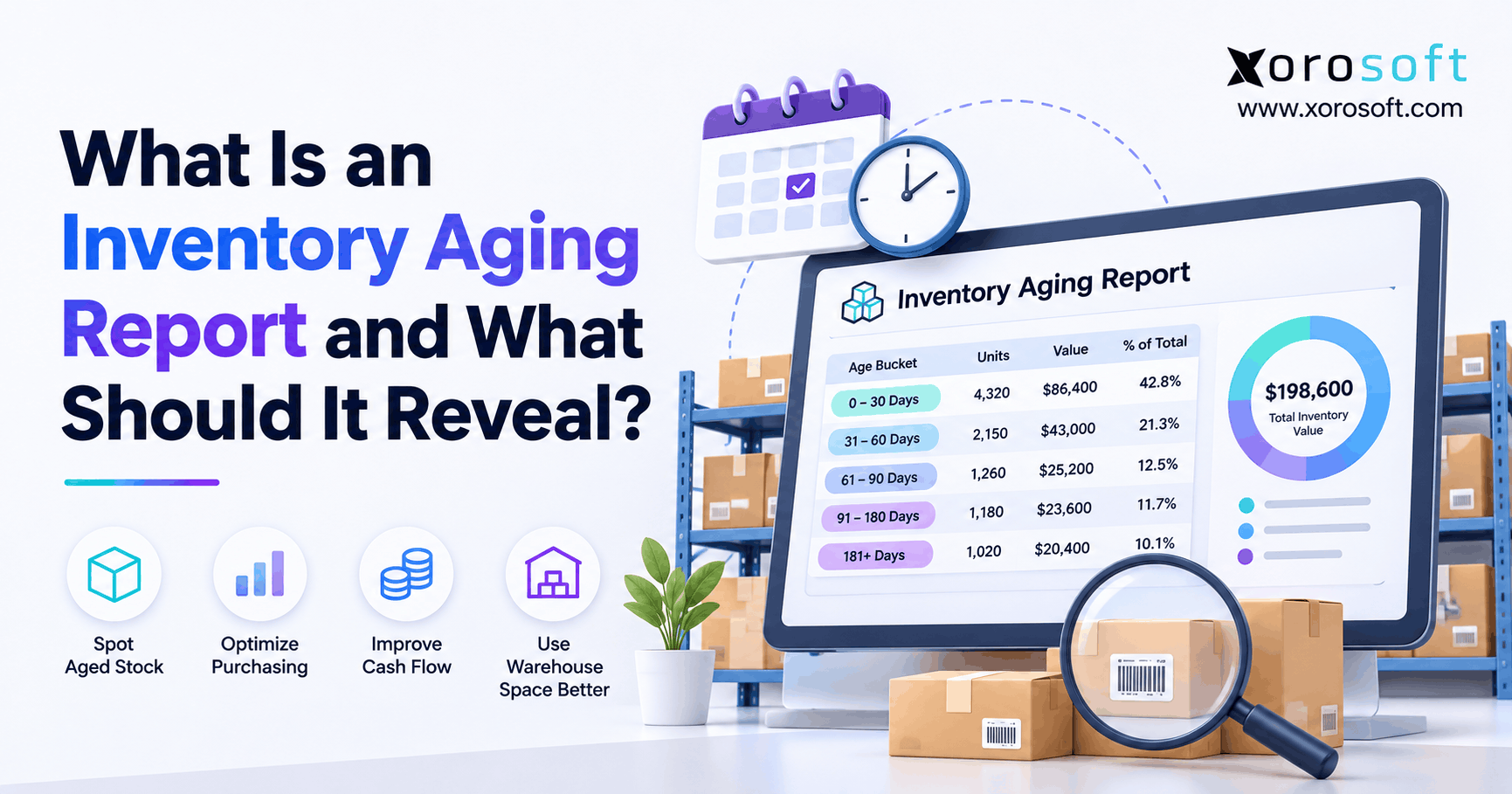
An inventory aging report is a report that organizes products currently on hand according to the length of time they have been held.
Typically, it divides inventory into age categories and displays the quantity and value of products within each category.
However, a well-designed report also explains where older inventory sits and what the company should investigate next.
2.1 How a Stock Aging Report Works
The report begins with a defined reporting date.
Next, it uses relevant receipt or production dates to determine the age of inventory still on hand.
For example, a product received 75 days before the reporting date belongs in the 61–90-day bucket when those are the selected boundaries.
The process becomes more complex when companies receive the same SKU repeatedly.
Therefore, a reliable report needs an established method for allocating remaining quantities to historical receipts.
The Shopify inventory aging guide provides additional context on age categories and retail applications.
2.2 Who Should Use Inventory Aging Analysis?
Inventory aging is useful for companies that purchase, manufacture, store, or distribute physical products.
For example, ecommerce brands can identify seasonal merchandise that is becoming harder to sell. Meanwhile, wholesalers can evaluate old stock across suppliers, customers, and warehouses.
Manufacturers may use similar analysis for raw materials and finished goods.
However, businesses without physical inventory generally do not need this reporting process.
Likewise, a small retailer with a limited SKU catalog may only need a straightforward spreadsheet.
2.3 What an Aging Report Cannot Tell You Alone
Although inventory age is useful, it does not measure future demand.
A product held for 150 days may still be essential for customer service. Conversely, a recently received SKU may already have lost commercial relevance.
Similarly, an aging report cannot independently determine whether inventory should be written down.
Therefore, managers should combine stock age with sales velocity, forecasts, product condition, supplier commitments, and applicable financial policies.
3. What Should an Inventory Aging Report Reveal?
An effective inventory aging report should answer more than one question.
It should reveal which products are getting older, how much value they represent, where they are located, and whether existing inventory aligns with future requirements.
Most importantly, it should help teams decide what to do next.
3.1 Quantity and Value in Each Aging Bucket
Start with the number of units in every age range.
However, unit counts alone can distort priorities because different products have different costs.
For example, 500 inexpensive accessories may represent less financial exposure than 20 expensive furniture items.
Therefore, display both quantity and inventory value for each aging bucket.
Also, show the percentage of total inventory value represented by older products.
That percentage allows management to compare aging exposure between months, warehouses, and product categories.
3.2 SKU, Variant, and Warehouse Details
An aggregated category report may hide the products causing the problem.
For example, an apparel style might sell successfully overall while certain sizes and colors remain unsold.
Therefore, include individual SKUs and variants wherever practical.
Warehouse location also matters. One location may hold old stock while another regularly runs short of the same product.
Consequently, the report should identify location-specific opportunities for transfers, replenishment changes, or further investigation.
3.3 Demand and Purchasing Commitments
Inventory age becomes more useful when compared with actual sales.
For example, a product may have 300 units older than 90 days while another 500 units remain on open purchase orders.
Although the inventory itself may still be sellable, the incoming quantity could create additional excess stock.
Therefore, useful reporting connects aging data with recent sales, forecast demand, purchase commitments, and expected delivery dates.
This information helps purchasing teams investigate future exposure before additional inventory arrives.
3.4 Financial Risk and Decision Ownership
Every material aging exception should have an identifiable business impact and an accountable owner.
For instance, merchandising may review promotional opportunities while purchasing investigates supplier returns.
Meanwhile, finance may assess products whose expected selling prices have declined.
However, an old-stock report without owners often becomes another monthly spreadsheet that nobody acts on.
Therefore, add columns for recommended action, responsible department, review deadline, and resolution status.
This turns historical reporting into an operational decision process.
4. How to Calculate Inventory Age Correctly
Understanding how to read an inventory aging report requires understanding how inventory age is calculated.
The basic calculation is straightforward:
Inventory age in days = Reporting date − Relevant receipt date
However, the method becomes more complex when inventory moves between locations, returns from customers, or has multiple receipt dates.
4.1 Select the Correct Starting Date
Purchased inventory usually starts aging from the date the business receives it.
However, manufactured products may require different reference points.
For example, raw materials can be measured from supplier receipt, while finished goods can be aged from production completion.
Similarly, work-in-process reporting may measure time from production release or entry into a manufacturing stage.
Therefore, companies should document the starting-date policy for each inventory type.
Otherwise, different departments may calculate inconsistent ages for the same products.
4.2 Understand Common Inventory Aging Buckets
Businesses often categorize inventory using periods such as the following:
| Age bucket | General interpretation | Typical review |
|---|---|---|
| 0–30 days | Recently received stock | Monitor demand |
| 31–60 days | Early holding period | Review sales trends |
| 61–90 days | Developing aging exposure | Check replenishment |
| 91–180 days | Older stock | Investigate excess |
| 181–365 days | Extended holding period | Review commercial options |
| Over 365 days | Long-held inventory | Escalate for detailed review |
However, these categories are not universal benchmarks.
For example, fast-fashion businesses may need weekly reviews, while industrial replacement parts may remain useful for years.
4.3 Account for Multiple Inventory Receipts
Consider a business that purchases 100 units of a product in January and another 100 units in March.
By June, only 80 units remain.
However, the report cannot assign a reliable age to those units without a documented receipt-allocation method.
One common approach uses FIFO-style aging, assuming the oldest received units were issued first.
Therefore, the remaining quantity would generally be assigned to newer receipt layers under that assumption.
Microsoft explains these calculations in its inventory aging report methodology.
Nevertheless, physical aging allocation and financial inventory costing should be treated as separate decisions.
4.4 Preserve Age Across Transfers and Returns
Warehouse transfers should generally preserve the original acquisition age.
Otherwise, repeatedly transferring old inventory can make it appear newly received.
Customer returns require additional care.
For example, a returned product may have been originally purchased months earlier. Therefore, using only the return-processing date could distort the company’s holding-period analysis.
However, some organizations may also track time since return as a separate measure.
The important requirement is to maintain consistent definitions rather than silently replacing historical dates.
5. Inventory Aging Report Example With Realistic Numbers
Consider a fictional ecommerce and wholesale business operating three warehouses.
Its reporting date is October 31, 2026.
The table below shows selected receipt layers, quantities, stock ages, and inventory values.
All values are illustrative.
5.1 Example Inventory Aging Report
| SKU | Warehouse | Age | Units | Value |
|---|---|---|---|---|
| TEE-BLU-M | East | 15 days | 200 | $2,800 |
| TEE-BLU-M | East | 77 days | 90 | $1,260 |
| CHAIR-OAK | West | 164 days | 12 | $2,880 |
| JACKET-RED-L | East | 255 days | 80 | $3,040 |
| SPORT-BALL | Central | 46 days | 150 | $1,650 |
| PART-A14 | Central | 570 days | 22 | $2,090 |
| Total | 554 | $13,720 |
Although the report contains only six receipt-layer rows, it already reveals several different inventory conditions.
For example, the jackets may face seasonal demand risk, while the replacement parts may support ongoing customer service.
Therefore, the business should not apply the same action to every older product.
5.2 Calculate the Percentage of Aged Inventory
Three product groups contain inventory older than 90 days:
- Oak chairs: $2,880.
- Red jackets: $3,040.
- Replacement parts: $2,090.
Therefore, the total aged inventory value is:
$2,880 + $3,040 + $2,090 = $8,010
Next, calculate the percentage:
Aged inventory percentage = $8,010 ÷ $13,720 × 100
Result: 58.4%
Consequently, 58.4% of this example’s inventory value belongs to stock older than 90 days.
However, that percentage represents a review priority, not a confirmed financial loss or universal performance benchmark.
5.3 Decide Which Products Need Action
The report should guide different decisions for different SKUs.
| Product | Investigation | Possible action |
|---|---|---|
| Red jackets | Has seasonal demand declined? | Review markdowns and reorders |
| Oak chairs | Is another location selling faster? | Assess warehouse transfer |
| Replacement parts | Are parts still needed for service? | Validate long-term demand |
| Blue T-shirts | Are recent receipts selling as expected? | Monitor sell-through |
For example, transferring chairs may be worthwhile if demand is stronger elsewhere.
However, expensive transfers may eliminate the expected margin benefit.
Therefore, decisions should combine age with demand, cost, location, and customer requirements.
6. Which Inventory Aging Thresholds Should Businesses Use?
An inventory aging analysis should reflect actual product behavior rather than arbitrary company-wide limits.
Although 30-, 60-, and 90-day categories are common, the right review periods depend on the product’s lifecycle, supplier lead time, demand pattern, and storage requirements.
6.1 Early Aging: Identify Changes Before Stock Accumulates
Inventory in the first 90 days may still be performing normally.
However, managers should compare early sales performance with the original purchasing forecast.
For example, a new product expected to sell 500 units monthly may sell only 100 units during its first month.
Therefore, waiting until the product reaches 180 days could delay necessary action.
Early monitoring helps purchasing and merchandising teams adjust orders before excess stock becomes substantial.
6.2 Middle Aging: Investigate Demand and Replenishment
Inventory held for 91–180 days may require a more detailed review.
However, the correct response depends on the business.
For example, a wholesaler might hold longer-cycle spare parts to support contractual service requirements.
Meanwhile, a fashion brand may need to reduce replenishment for an unpopular seasonal color.
Therefore, use middle-aging exceptions to investigate demand rather than automatically discount every product.
6.3 Extended Aging: Review Recoverability and Next Steps
Products held beyond 180 or 365 days deserve closer examination when those periods exceed normal business expectations.
However, age alone still does not prove that a product is obsolete.
Management should review expected demand, product condition, storage cost, alternative uses, and possible selling prices.
Consequently, the action may involve a controlled promotion, supplier return, warehouse transfer, or finance review.
The objective is to recover value while avoiding unnecessary operational costs.
7. What Inventory Aging Reveals About Purchasing
Purchasing decisions often determine whether aged stock becomes a recurring problem.
A buyer may order additional inventory because available quantities appear low, even when older stock exists in another location or remains reserved for orders that may change.
Therefore, purchasing reviews should include aging information.
7.1 Identify Reorders That Could Increase Excess Stock
Before approving a purchase order, buyers should check current inventory by age, location, and status.
Next, they should compare that inventory with expected sales and incoming supplier shipments.
For example, a company may have 400 units available and 600 units arriving next month, even though monthly demand has fallen to 100 units.
Consequently, another purchase order could unnecessarily increase stock exposure.
Aging analysis helps identify these situations before supplier commitments become harder to change.
7.2 Connect Demand Forecasting With Existing Stock
Demand forecasting estimates future requirements, while aging analysis explains how existing inventory has performed.
Therefore, combining both perspectives can improve purchasing decisions.
For instance, a forecast may predict strong demand for a product family. However, the aging report may show that only certain sizes or variants actually sell.
Consequently, purchasing teams should forecast and replenish at the appropriate SKU level.
Xorosoft connects inventory, purchasing, and forecasting workflows, making it relevant for businesses seeking a more coordinated operational view.
However, forecasting quality still depends on reliable sales history, product data, and appropriate planning assumptions.
7.3 Review Supplier Commitments and Order Constraints
Minimum order quantities, supplier lead times, and contractual commitments can limit purchasing flexibility.
For example, reducing an order may not be possible after production has begun.
Therefore, the report should distinguish existing inventory from future purchase commitments.
Additionally, buyers should document whether older stock can be returned, exchanged, or redirected to other customers.
This helps identify practical options before the business considers deeper markdowns or disposal.
8. How to Read Inventory Aging Across Warehouses and Sales Channels
A multi-warehouse stock aging report should show both total inventory exposure and location-level differences.
Otherwise, healthy aggregate stock levels may hide shortages in one warehouse and excess inventory in another.
8.1 Identify Warehouse Imbalances
Suppose the West warehouse holds 300 units of a slow-moving product.
Meanwhile, the East warehouse repeatedly replenishes the same SKU.
Although the company owns enough stock overall, it may continue purchasing unnecessarily.
Therefore, warehouse-level aging reports can highlight potential transfers.
However, managers should evaluate transportation costs, customer demand, handling expenses, and stock condition before moving inventory.
8.2 Include Inventory Statuses in the Analysis
On-hand inventory is not always equivalent to inventory available for sale.
For example, some units may be committed to orders, awaiting inspection, damaged, or reserved.
Therefore, aging reports should preserve those distinctions.
Xorosoft’s XoroWMS warehouse management software supports real-time inventory tracking and multi-warehouse operations, which are relevant to maintaining accurate location-level information.
However, a business should still confirm how its specific aging calculations handle different inventory statuses.
8.3 Understand Shopify Inventory Reporting Changes
Shopify provides inventory reporting that can support operational analysis.
However, businesses should understand the quantity definitions used in historical reports.
According to Shopify’s inventory reporting documentation, reports began using On hand instead of Available inventory on October 1, 2026.
Consequently, comparing periods across that change without accounting for the different definitions can produce misleading conclusions.
Businesses should also verify whether they have complete receipt history before treating a Shopify report as a full receipt-layer aging calculation.
8.4 Review Marketplace, Wholesale, and EDI Demand
Products may sell through Shopify, Amazon, wholesale accounts, and EDI-connected customers.
However, demand is not always evenly distributed across channels.
For example, one product variant may sell poorly online but perform well through wholesale accounts.
Therefore, the business should examine total channel demand before deciding that old inventory has no market.
Xorosoft’s integration capabilities connect ecommerce, marketplace, and wholesale workflows, supporting a broader operational picture.
9. How Inventory Aging Connects to Accounting
Inventory aging is primarily an operational analysis. However, it also supports financial management by identifying products whose recoverable value may deserve review.
Therefore, finance should understand both the aging methodology and the valuation method used in the official accounting records.
9.1 Distinguish Old Inventory From Inventory Requiring a Write-Down
Old inventory does not automatically require an accounting adjustment.
Under IAS 2 Inventories, businesses applying IFRS measure inventory at the lower of cost and net realizable value.
However, US GAAP requirements can differ depending on the inventory costing method.
Therefore, finance must consider applicable accounting rules, expected selling prices, product condition, and costs necessary to complete or sell inventory.
An aging report helps identify items for review but does not determine the adjustment amount.
9.2 Reconcile Aged Inventory Values With Financial Records
An operational stock aging report may display values that differ from the inventory subledger.
For example, a report may use receipt costs while accounting records use weighted-average costs.
Similarly, landed-cost updates, inventory adjustments, and posting-date differences can affect reconciliation.
Therefore, finance should compare quantities and values separately.
Xorosoft’s connected accounting and inventory workflows are relevant to businesses trying to reduce disconnected financial and operational records.
However, correct account mappings, cost configurations, and reconciliation procedures remain essential.
9.3 Separate Working Capital Exposure From Accounting Loss
A product may tie up working capital without requiring an immediate write-down.
For example, a high-value furniture item may remain saleable at its recorded cost despite a longer holding period.
Nevertheless, the business may incur storage expenses and lose the opportunity to invest in faster-moving inventory.
Therefore, management should separately evaluate capital tied up, carrying cost, expected margin, and financial recoverability.
This distinction prevents aging reports from becoming misleading measures of inventory loss.
10. Inventory Aging vs. Turnover, DIO, and Sell-Through
Inventory aging provides a valuable product-level view. However, it cannot replace other measures of inventory performance.
Therefore, operators should evaluate age together with sales velocity, turnover, stock cover, and financial efficiency.
10.1 Inventory Aging vs. Inventory Turnover
Inventory turnover measures how often a business sells and replaces average inventory during a defined period.
The typical formula is:
Inventory turnover = Cost of goods sold ÷ Average inventory value
However, a strong turnover ratio can hide individual products that remain unsold.
For example, fast-moving products may offset weak-selling variants within the same category.
Therefore, turnover measures overall efficiency, while aging identifies specific stock that requires investigation.
10.2 Inventory Aging vs. Days Inventory Outstanding
Days inventory outstanding, or DIO, estimates how many days inventory remains on hand based on average inventory and cost of goods sold.
A common annual calculation is:
DIO = Average inventory value ÷ Annual cost of goods sold × 365
However, DIO is a financial ratio rather than a direct measure of each remaining unit’s receipt age.
Consequently, a company may report acceptable DIO while holding selected SKUs for extended periods.
Both measures are useful, but they answer different questions.
10.3 Inventory Aging vs. Sell-Through and Stock Cover
Sell-through measures how much inventory sells during a particular period.
Meanwhile, stock cover estimates how long current inventory may support expected demand.
For example, a product can be 120 days old while still maintaining reasonable future stock cover.
Conversely, newly received inventory may already represent several years of expected demand.
Therefore, businesses should combine these metrics before deciding whether to stop purchasing or liquidate a product.
11. How Inventory Aging Differs by Industry
A useful inventory aging report should reflect the characteristics of the products being managed.
Consequently, companies should avoid copying aging thresholds from unrelated industries.
11.1 Apparel and Sporting Goods
Apparel companies manage complex combinations of sizes, styles, colors, and seasons.
For example, a clothing style may sell well overall while one size accumulates in storage.
Therefore, aging analysis should identify the specific variants creating excess stock.
Sporting goods businesses face similar challenges when products depend on weather, events, or seasonal participation.
As a result, these companies should compare inventory age with expected selling windows and upcoming promotions.
11.2 Furniture and Wholesale Distribution
Furniture products often have higher unit values, longer lead times, and substantial storage requirements.
Therefore, even a relatively small quantity of aging furniture can absorb significant working capital.
Wholesale distributors also need to consider supplier commitments, customer-specific requirements, and demand across warehouses.
Xorosoft serves inventory-driven industries such as furniture, wholesale distribution, and consumer products.
However, businesses should define their reporting thresholds around actual operational economics instead of applying a universal age limit.
11.3 Food and Beverage
Food businesses must examine more than the number of days since inventory was received.
For example, a product received recently may already have a short remaining shelf life.
Therefore, aging analysis should be connected with lot information, expiration dates, and suitable rotation policies.
Additionally, damaged or restricted products may need separate handling.
Receipt-based aging and expiration tracking serve different purposes, so one should not replace the other.
11.4 Manufacturing and Industrial Distribution
Manufacturers should separate raw materials, work in process, and finished goods.
For example, a component may remain in storage because its related production order has been delayed.
Meanwhile, finished goods may accumulate because customer demand changed after production.
Therefore, manufacturing teams should examine age alongside bills of materials, production plans, and material requirements.
Industrial distributors may also need to preserve slower-moving service parts for long-term customer commitments.
12. Excel, Inventory Apps, or ERP: Choosing the Right Reporting Approach
Businesses can build inventory aging reports using spreadsheets, inventory applications, or integrated ERP systems.
However, the best choice depends on transaction complexity, warehouse count, data reliability, and reporting requirements.
12.1 When Excel Is Sufficient
Excel can provide reliable analysis when the business has accurate source data and a manageable number of SKUs.
For example, a small company can export inventory receipts, calculate age using date formulas, and group remaining stock into aging buckets.
Next, pivot tables can summarize quantity and value by SKU, supplier, or warehouse.
However, teams must carefully check duplicates, missing dates, and incorrect inventory quantities.
A spreadsheet is not necessarily inadequate simply because the business is growing.
12.2 When Manual Reporting Becomes Difficult
Manual reporting becomes problematic when multiple departments maintain different versions of inventory information.
For example, warehouse records may show current quantities while purchasing spreadsheets contain unreceived orders.
Meanwhile, finance may use a different inventory cost calculation.
Consequently, managers spend time reconciling reports instead of investigating aging stock.
At this point, businesses should consider whether integrated operational data would reduce recurring reporting problems.
12.3 How Integrated ERP Supports Better Visibility
For companies evaluating connected software, Xorosoft offers an integrated ERP approach covering inventory, purchasing, accounting, manufacturing, warehousing, and ecommerce operations.
Its XoroERP platform brings these core workflows together.
However, the decision should depend on actual reporting requirements.
Before selecting a system, ask whether it preserves receipt history, supports multiple warehouses, reconciles inventory values, and provides the relevant operational context.
Also, request demonstrations of real inventory scenarios rather than relying solely on product descriptions.
13. Common Inventory Aging Report Mistakes and How to Fix Them
Even a well-designed stock aging report can produce misleading results when transaction records are incomplete.
Therefore, businesses should review data quality before taking purchasing, warehouse, or financial action.
13.1 Treating the Last Sale Date as the Receipt Date
The last sale date and the original inventory receipt date measure different things.
For example, a product may have sold yesterday while some remaining units have been stored for 300 days.
Therefore, the last sale date cannot replace the age of remaining inventory.
However, it is still useful as a separate demand indicator.
Businesses should retain both fields and explain their different purposes.
13.2 Ignoring Inventory Adjustments and Returns
Inventory adjustments can create quantities without a clear original receipt date.
Similarly, returns can bring previously sold products back into stock.
Therefore, companies need documented rules for aging these transactions.
For example, a missing acquisition date may require an exception rather than an assumed receipt date.
Likewise, damaged returns should not automatically be treated as normal sellable inventory.
Accurate reporting depends on transparent transaction handling.
13.3 Publishing Reports Without Assigning Actions
A report may correctly identify $100,000 in older inventory but still produce no improvement.
For example, purchasing may assume merchandising owns the problem, while merchandising expects warehouse teams to act.
Therefore, every significant exception needs an assigned owner and review date.
Xorosoft’s connected inventory and operational reporting capabilities can be relevant here. However, technology must be accompanied by clear accountability.
A report only becomes useful when the organization changes a decision or resolves an issue.
13.4 A Practical Review Checklist
Before distributing an inventory aging report, confirm the following:
- The reporting date and included warehouses are correct.
- Inventory quantities reconcile with approved stock records.
- Receipt dates and transfer histories are consistent.
- Inventory costing assumptions are documented.
- Missing dates and unusual adjustments are identified.
- Sales demand and open purchase orders are available.
- High-value exceptions have responsible owners.
- Prior-period results can be compared consistently.
Finally, investigate unexplained differences before presenting the report as an authoritative financial or operational record.
14. Turn Inventory Age Into Better Decisions
An inventory aging report should reveal far more than how long products have remained in stock.
It should identify older SKUs, show the value held in different age categories, highlight warehouse imbalances, and connect inventory exposure with purchasing, demand, and financial review.
Moreover, it should distinguish products that genuinely require action from inventory held for legitimate business reasons.
Therefore, companies should treat aging analysis as a recurring operating process rather than a report generated only at month-end.
For growing ecommerce brands, wholesalers, and manufacturers, Xorosoft provides connected inventory, purchasing, warehouse, and accounting workflows that may help support more consistent operational visibility.
Want to evaluate your inventory reporting and ERP requirements? Book a personalized demo to discuss your business workflows and reporting needs.
Frequently Asked Questions
What is an inventory aging report?
An inventory aging report groups on-hand products by how long they have been held. It shows quantities and values across age buckets, helping operators identify older stock, review demand, and prioritize purchasing or finance decisions.
What should an inventory aging report show?
It should show SKU, warehouse, receipt date, aging bucket, units, stock value, and inventory status. For better decisions, add recent sales, open purchase orders, likely risk, and an owner for follow-up.
How do you calculate inventory age?
Subtract the relevant receipt date from the reporting date. For SKUs received in multiple batches, assign remaining units to receipt layers using a consistent method. Then group units by age and calculate their values.
Is inventory older than 90 days obsolete?
No. A 90-day threshold is a review trigger, not proof of obsolescence. Furniture, replacement parts, and seasonal products may have longer expected holding periods. Consider product condition, demand, and recoverability before deciding.
Does a warehouse transfer reset inventory age?
Generally, it should not. A transfer changes the location, not the original acquisition history. Preserve age across warehouses where possible, and separately track time at the current location for operational analysis.
Can Shopify create an inventory aging report?
Shopify offers useful inventory snapshots and movement reports, but complete receipt-layer aging may require purchasing or ERP data. Confirm whether on-hand quantities, original receipt dates, and warehouse records are available before calculating age.
When should a business automate inventory aging?
Automation becomes useful when manual exports produce conflicting quantities, late reporting, or repeated reconciliation. Businesses with multiple warehouses, channels, complex purchasing, or manufacturing should evaluate connected inventory, purchasing, warehouse, and accounting data.
Recent Posts
-
 AI Promotion-Lift Forecasting for Inventory Planning: What Data Is Required?
-
 3PL SLA Management Software for Ecommerce Fulfillment Operations
-
What Is an Inventory Aging Report and What Should It Reveal?
-
 Three-Way Matching for Inventory Purchases: PO, Receipt, and Invoice Controls
-
 Why Discontinued Shopify SKU Errors Keep Reaching Purchasing and Fulfillment