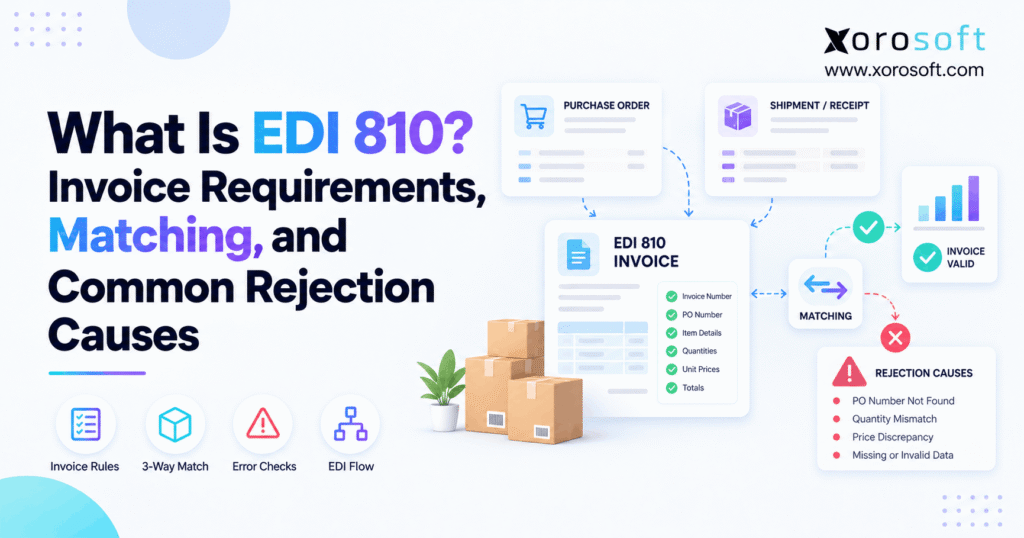
If you’re looking to understand how an EDI 810 invoice works, this guide will help clarify the basics.
1. Why a Correct Invoice Can Still Get Rejected
An EDI 810 invoice can pass an EDI system and still fail a retailer’s billing checks. Although the file may follow the right format, the purchase order number could be wrong, the price may not match, or the buyer may have received fewer goods than the supplier billed.
As a result, a simple billing error can delay payment and create hours of extra work. Finance teams must review invoices, warehouse staff must confirm shipments, and EDI teams must check data sent between systems.
However, these problems rarely start with the invoice alone. Instead, they often begin when purchasing, sales, warehouse, and accounting records do not agree.
For example, a supplier may ship 90 units against an order for 100. Meanwhile, its accounting system may still create an invoice for all 100 units. The invoice reaches the retailer, but the amounts do not match the goods sent or received.
Therefore, knowing how EDI 810 works is essential for any business that sells to retailers or wholesale customers.
This guide explains the required fields, invoice matching rules, common rejection causes, and steps needed to avoid billing delays. Additionally, it shows how better data flow can make invoicing more reliable as order volume grows.
2. What Is an EDI 810 Invoice?
An EDI 810 invoice is an ANSI ASC X12 document used to send billing data from a supplier to a buyer.
Unlike a PDF invoice, this file uses set fields that business software can read. As a result, the buyer can check its content without manually entering each line.
An EDI 810 may include an invoice number, purchase order reference, product IDs, prices, payment terms, and the final amount due.
2.1 Who Sends EDI Invoices?
Suppliers, brands, and wholesale sellers usually send these invoices to retailers or other business buyers.
For example, a sporting goods supplier may receive an order from a large retail chain. After shipping the goods, the supplier sends an EDI invoice that refers to the buyer’s original purchase order.
The retailer then checks the bill against its own records. If the values agree, the invoice can move to the next stage of approval.
However, if the data does not match, the buyer may hold or reject the bill.
2.2 When an EDI 810 Invoice Is Required
An EDI 810 invoice is required when a trading partner includes it in its billing rules.
For example, some retailers ask suppliers to send the invoice only after shipping the order. Others may require the advance ship notice to arrive first.
Therefore, suppliers should confirm the exact billing rules before sending their first document.
In addition, each buyer may have its own rules for invoice numbers, dates, item codes, and partial shipments.
Even when two buyers use EDI 810, their requirements may differ.
2.3 How EDI 810 Fits the Order-to-Cash Flow
EDI 810 usually forms part of a wider order-to-cash process.
First, the buyer sends a purchase order. Next, the supplier confirms and ships the goods. Afterward, the supplier sends an invoice.
| EDI document | Main purpose | Typical sender |
|---|---|---|
| EDI 850 | Purchase order | Buyer |
| EDI 855 | Order acknowledgment | Supplier |
| EDI 856 | Advance ship notice | Supplier |
| EDI 810 | Invoice | Supplier |
| EDI 820 | Payment or remittance advice | Buyer |
| EDI 997/999 | Functional acknowledgment | Document receiver |
Although these documents share order data, they serve different roles.
For instance, an EDI 856 states what was shipped. However, it does not prove that every unit reached the buyer.
Consequently, the invoice must follow the buyer’s billing and matching rules rather than simply repeat the original order.
2.4 When You Do Not Need EDI
Not every business needs to send invoices through EDI.
For example, a small wholesale seller may work with customers who accept PDF invoices or bills entered through a supplier portal.
In that case, a full EDI setup may add cost without enough value.
However, when customers require X12 files, manual invoice methods may no longer meet their needs.
Therefore, the right method depends on customer rules, billing volume, and the level of automation needed.
3. EDI 810 Invoice Requirements and X12 Format
An EDI 810 invoice contains several data segments. Each segment carries a defined type of information, such as invoice dates, item prices, buyer details, or totals.
However, not every segment is required in every version of the format.
Therefore, suppliers must check both the X12 standard and the buyer’s own rules.
3.1 BIG and REF: Invoice and Purchase Order IDs
The BIG segment holds key invoice details.
For example, it may contain the invoice date, invoice number, purchase order date, and purchase order number.
Meanwhile, the REF segment can carry other IDs needed by the trading partner.
These IDs help the buyer link the invoice to its original order.
However, even a small error can cause a failed match. A missing digit in the purchase order number may stop the retailer from finding the right order.
Therefore, the safest approach is to use the original order reference rather than enter it again by hand.
3.2 EDI 810 Line Items: IT1 and Product Codes
The IT1 segment holds invoice line details.
Typically, it contains the billed quantity, unit of measure, unit price, and product code.
For example, a supplier may bill 20 units of a product at $15 each.
However, the retailer may use a different product ID from the supplier’s internal SKU.
Therefore, the two systems need a reliable way to match the product codes.
In addition, units must be handled with care. A buyer may order cases while the supplier tracks single items.
As a result, incorrect unit conversion can make a valid shipment appear wrong on the invoice.
3.3 TDS, ITD, SAC, and Tax Rules
Several other segments describe the final billing terms.
For example, TDS provides the invoice total, while ITD can describe payment terms.
Similarly, SAC supports charges and discounts. TXI can hold tax data when the trading partner uses it.
| Segment | What it means | Example use |
|---|---|---|
| ST | Starts the transaction | EDI 810 and control number |
| BIG | Invoice header | Invoice number and date |
| N1 | Party details | Buyer or ship-to code |
| REF | Other references | Customer or vendor ID |
| ITD | Payment terms | Net 30 |
| IT1 | Product line | Quantity and unit price |
| SAC | Charges or discounts | Freight allowance |
| TXI | Tax details | Sales tax |
| TDS | Invoice total | Total billed amount |
| CTT | Line totals | Number of item lines |
| SE | Ends the transaction | Segment count |
However, these are common segments rather than a universal checklist.
Therefore, a supplier should never assume that an invoice accepted by one retailer will work for another.
3.4 EDI 810 Trading Partner Rules
A trading partner guide tells suppliers how to build and send an invoice that meets the buyer’s needs.
For example, it may require a certain store code, shipping reference, payment term, or product ID.
In addition, the guide may limit when the supplier can bill an order.
Some buyers allow one invoice per shipment. Others may require a different billing structure.
Therefore, teams should record these rules for each customer.
Before going live, they should also test sample invoices, review failed checks, and confirm how corrections must be sent.
For a technical example, see the official ASC X12 invoice example.
3.5 A Simple EDI 810 Invoice Example
Consider a supplier billing two products against one purchase order.
The first line contains 10 units at $25 each. Meanwhile, the second line contains five units at $40 each.
Therefore, the full invoice amount is $450 before any other charges.
| X12 segment | Sample content |
|---|---|
| ST | ST*810*0001~ |
| BIG | BIG*20261008*INV1042*20261003*PO7821~ |
| N1 | N1*ST*RETAIL DC EAST*92*D045~ |
| ITD | ITD*05*3*****30~ |
| IT1 | IT1*1*10*EA*25.00**VN*SKU-A~ |
| IT1 | IT1*2*5*EA*40.00**VN*SKU-B~ |
| TDS | TDS*45000~ |
| CTT | CTT*2~ |
| SE | SE*9*0001~ |
Here, TDS uses an implied two-decimal amount, so 45000 means $450.00.
Likewise, CTT shows two invoice lines, while SE counts all nine segments.
This is a short teaching example, not a full EDI transmission. A live file also needs the proper outer envelopes and partner-specific checks.
4. How EDI 810 Invoice Matching Works
Invoice matching checks whether the supplier’s bill agrees with the buyer’s order and related records.
For example, the buyer may check product prices, billed quantities, and the amount already received.
However, a correct EDI format does not mean these business checks will pass.
Therefore, suppliers must match invoice data before sending it.
4.1 Price Matching Against the EDI 850
An EDI 850 purchase order states what the buyer requested and the agreed commercial terms.
For example, a retailer may order 100 units at $20 each.
However, if the supplier sends an invoice for the same 100 units at $22 each, the billed amount is $200 higher.
As a result, the retailer may flag a price difference.
Some buyers allow small price changes within set limits. Others require an exact match.
Therefore, the supplier should check the original purchase order, approved price changes, and customer terms before correcting the bill.
4.2 Why an ASN Is Not a Goods Receipt
An EDI 856 advance ship notice describes the goods the supplier says it shipped.
For example, it may show 90 units packed into several cartons.
However, the buyer may record only 88 units during receiving.
Although the invoice and ASN both show 90 units, the buyer’s receipt shows a two-unit gap.
Therefore, the business must review the actual receipt before deciding which record needs correction.
An ASN can support this review. Nevertheless, it should not be treated as final proof that every item was received.
4.3 EDI 810 Three-Way Matching
Three-way matching checks three records: the purchase order, supplier invoice, and actual goods receipt.
First, the buyer compares invoice prices with purchase order prices. Next, it compares billed quantities with received quantities.
As a result, the process can identify both pricing and receiving issues.
| Matching rule | Two-way matching | Three-way matching |
|---|---|---|
| Check invoice against PO | Yes | Yes |
| Check agreed prices | Yes | Yes |
| Check recorded receipts | No | Yes |
| Find receiving quantity gaps | Not directly | Yes |
| Apply approved limits | When configured | When configured |
However, the level of checking depends on the buyer’s policy.
For more detail, review Microsoft’s guide to invoice matching.
4.4 Partial Shipments and Order Balances
Suppose a customer orders 120 units, but the supplier can ship only 80.
The remaining 40 units stay open for later shipping.
If the buyer allows partial billing, the first invoice may cover only the 80 shipped units.
However, the supplier must also track what has already been billed.
Otherwise, a second invoice may include the same 80 units again.
Therefore, invoices should link to eligible shipment records and the remaining billable order balance.
This control becomes especially useful when several warehouses ship against the same customer order.
4.5 EDI 810 Unit-of-Measure Errors
Units of measure can make invoice matching harder than it appears.
For example, a retailer may order 10 cases, while the supplier records 120 individual units.
If each case contains 12 units, the two values agree.
However, without the correct case-pack rule, the invoice may show a false quantity gap.
Therefore, product data should define each approved unit and its conversion.
In addition, the billed unit price must use the same unit basis as the agreed price.
As a result, matching should review both quantity and price together rather than checking each field in isolation.
5. EDI 810 Invoice Rejections: 10 Common Causes
An invoice may fail because of bad file structure or incorrect business data.
For example, a missing required field can stop the EDI system from processing the file. Meanwhile, a wrong purchase order number can cause the retailer to reject it later.
Therefore, the first step is to identify the type of failure.
| Rejection cause | Why it happens | What to check |
|---|---|---|
| Missing field | Required value is blank | Partner field rules |
| Wrong PO number | Invoice points to another order | Original EDI 850 |
| Duplicate invoice | Same number used again | Billing history |
| Price mismatch | Invoice differs from agreed price | Customer price record |
| Quantity mismatch | Billed and accepted counts differ | Shipment and receipt |
| Wrong store code | Buyer location does not match | Location mapping |
| Invalid product ID | Buyer cannot match the SKU | Item cross-reference |
| Incorrect total | Charges do not add up | Line, tax, and freight math |
| Closed purchase order | Order is no longer billable | Buyer PO status |
| Early billing | Invoice sent before allowed event | Partner timing rules |
5.1 Structural Errors Versus Business Errors
Structural errors relate to how the EDI file is built.
For instance, a required segment may be missing, a date may use the wrong format, or a control count may be invalid.
However, business errors occur when the buyer rejects the content rather than the file structure.
For example, the document may pass a syntax check but contain a PO number that the buyer has already closed.
Therefore, teams should review the exact status and error message before changing any data.
SPS Commerce explains these different error states in its invoice troubleshooting guide.
5.2 EDI 810 Price and Quantity Failures
Price errors often begin when customer contract prices do not match the prices on the invoice.
For example, an ERP may use a standard product price even though the retailer has an agreed discount.
Similarly, quantity errors can begin when accounting bills the ordered amount rather than the eligible shipped amount.
As a result, the invoice may show values that the buyer cannot approve.
Therefore, teams should check prices when the order is created and quantities when the goods ship.
For growing operations, Xorosoft can be considered when sales orders, warehouse activity, and accounting need a more connected source of data.
5.3 Duplicate Bills and Invalid References
Duplicate invoices often happen after a failed submission.
For example, a user may resend the invoice because the first attempt appears stuck.
However, the first file may have reached the retailer successfully.
As a result, the second file can trigger a duplicate invoice warning.
Similarly, wrong vendor IDs, missing store numbers, and invalid ship-to references can stop matching.
Therefore, every correction should begin with a review of the original document status.
If the buyer already accepted the invoice, follow its approved adjustment process rather than sending another bill.
5.4 Totals, Tax, and Freight
Invoice totals can fail even when every product line appears correct.
For example, a business may forget to add freight or may include the same tax twice.
Likewise, an allowance may be handled with the wrong sign.
Consider this sample invoice:
| Billing component | Amount |
|---|---|
| Goods | $1,000 |
| Freight | $50 |
| Tax | $70 |
| Discount | -$20 |
| Correct total | $1,100 |
If the document states $1,050, it has a $50 gap.
Therefore, the invoice should be checked as a whole, including all added charges and reductions.
5.5 Rejected Before the Buyer Can Pay
Some invoices arrive before the buyer’s billing rules allow them.
For example, a retailer may require shipping data before it accepts an invoice.
Other buyers may block bills linked to closed or fully billed purchase orders.
Consequently, a correct invoice can still fail because it arrived at the wrong time.
Therefore, businesses should link invoice creation to the allowed billing event.
In addition, they should check that no earlier invoice already covered the same goods.
These timing controls help prevent both rejected files and duplicate billing.
6. How to Fix a Rejected EDI 810 Invoice
Fixing an invoice starts with knowing where the error occurred.
First, identify whether the EDI system failed to process the file or the retailer rejected its content. Next, check the exact message rather than guessing.
However, resending the same invoice without checking its status may make the problem worse.
6.1 Check 997/999 and 824 Status
EDI 997 and 999 documents provide functional acknowledgment data.
They help report whether the receiving system accepted or rejected data at the relevant technical level.
However, a successful acknowledgment does not mean the invoice has been approved for payment.
Meanwhile, an EDI 824 Application Advice may report results from the buyer’s business system.
Some buyers also provide error details through a portal or another message format.
Therefore, teams should review all available status data before marking an invoice as complete.
6.2 EDI 810 Troubleshooting Steps
Use the following process when a bill fails:
- Find the failed invoice. Record its invoice number, customer, PO, and send time.
- Read the error message. Identify the failed field or business rule.
- Check the original order. Confirm the buyer’s PO and approved prices.
- Review shipping data. Compare billed counts with the related shipments.
- Check receiving feedback. Review buyer receipt gaps when available.
- Recalculate the invoice. Include taxes, freight, and discounts.
- Confirm the correction rule. Check whether the buyer permits a resend or needs a replacement.
- Track the new result. Make sure the corrected bill reaches the right status.
As a result, the team can fix the source problem instead of only changing the outbound file.
6.3 When to Resend, Replace, or Credit
Not every failed invoice should be handled the same way.
For example, a file rejected before business processing may be eligible for a corrected resend.
However, if the buyer already recorded the original bill, another invoice can create a duplicate.
In some cases, the buyer may ask for a new invoice number. In others, a credit or adjustment may be required.
Therefore, never assume the same correction rule applies to every retailer.
Instead, confirm the document status and follow the trading partner’s written procedure.
6.4 Validate EDI 810 Before Sending
A good pre-send check should test both file format and business data.
For example, the system can compare PO numbers, product IDs, quantities, prices, taxes, and invoice totals before the document leaves.
In addition, it should check for duplicate invoice numbers and closed orders.
However, the check must use accurate source data to be useful.
When finance and warehouse records live in separate tools, teams may still need manual reviews.
Therefore, connecting those records through a platform such as Xorosoft may help firms build a more reliable billing process, while the EDI partner handles the required document format.
7. EDI 810 Invoice Examples from Real Workflows
The following examples show common billing situations. Although the numbers are for teaching purposes, the problems reflect the types of issues that suppliers often need to solve.
7.1 A Price Mismatch on a Retail Purchase Order
A retailer orders 48 units at $15 each.
Therefore, the agreed product amount is $720.
However, the supplier’s system creates an invoice using a price of $15.50.
The new invoice amount is $744, creating a $24 gap.
As a result, the buyer may flag the bill if that difference falls outside its approved limit.
To resolve the issue, the supplier should check the signed price terms and original order.
If the invoice is wrong, the team should correct its price source before creating the next bill.
7.2 EDI 810 Invoice for Split Shipments
Consider a distributor that receives an order for 100 units.
Warehouse A ships 60 units. Meanwhile, Warehouse B ships another 25.
Therefore, the business has shipped 85 units and still owes 15.
If partial billing is allowed, the invoice should cover the eligible shipped amount without billing those units again later.
However, separate warehouse systems may not share the same shipment history.
As a result, accounting may create duplicate or incomplete bills.
A shared ERP and WMS workflow, such as one built around Xorosoft and warehouse management software, can help teams trace shipment events back to the right order.
7.3 Warehouse Receives Less Than the ASN
A supplier ships 90 units and sends an ASN for 90.
However, the buyer records only 88 units received.
Meanwhile, the invoice still bills all 90 units.
Therefore, the records show a two-unit difference.
The supplier should first confirm what left the warehouse. Next, the buyer may need to review its receiving activity and any shortage report.
However, the supplier should not simply change the invoice without knowing which record is wrong.
The correct outcome may involve a revised receipt, an approved shortage, or an invoice adjustment.
7.4 Detecting Duplicate Billing
A retailer receives one valid invoice for a shipment.
Later, the supplier’s EDI portal still shows a pending status. Consequently, a team member sends the same invoice again.
The buyer then reports a duplicate.
However, this does not always mean the first bill failed.
Therefore, the supplier must review the original transaction history and the retailer’s status response.
A useful control is to link each billed shipment event to a unique invoice record.
In addition, the system should block repeat billing unless an approved correction process allows it.
8. EDI 810 vs Other B2B Documents
EDI transaction sets support different steps in the order and payment process.
Although they share many IDs, each document has its own purpose.
Therefore, businesses should know which record controls each step.
8.1 EDI 810 vs EDI 850 and EDI 856
An EDI 850 tells the supplier what the buyer wants to purchase.
Meanwhile, an EDI 856 tells the buyer what the supplier has shipped.
By contrast, an EDI 810 states what the supplier wants to bill.
| Document | Key question answered |
|---|---|
| EDI 850 | What did the buyer order? |
| EDI 855 | What did the supplier accept? |
| EDI 856 | What did the supplier ship? |
| EDI 810 | What is the supplier billing? |
| Goods receipt | What did the buyer record as received? |
Therefore, the EDI 810 should be linked to the order and valid billing events.
However, its amounts should not be assumed to match every earlier document when partial shipments or approved changes exist.
8.2 EDI 810 vs EDI 820, PDF, and Web EDI
EDI 820 carries payment or remittance data. Therefore, it serves a different purpose from the supplier’s invoice.
A PDF invoice, by contrast, is a document that people can read.
Meanwhile, Web EDI allows users to enter and manage EDI data through a portal.
For low-volume suppliers, Web EDI may be enough. However, it can still involve manual entry between internal systems and customer portals.
As order counts rise, direct links between EDI and business software may reduce repeated work.
The right choice depends on customer requirements and process needs.
9. Prevent EDI Invoice Errors with Connected Operations
An EDI provider can format and exchange the invoice. However, it cannot always fix wrong prices, stale order data, or missing warehouse events inside the supplier’s business systems.
Therefore, invoice quality starts with how those systems share data.
9.1 ERP, EDI, WMS, and Accounting Roles
Each system should have a clear job.
| System | Main role |
|---|---|
| ERP | Orders, customer prices, billing rules, and finance records |
| EDI service | Document mapping and trading partner exchange |
| WMS | Picking, packing, shipping, and stock movement |
| Accounting | Receivables, adjustments, payment tracking |
| Buyer systems | PO checks, receiving, and invoice approval |
However, these systems should not work in isolation.
For example, warehouse staff may confirm a shipment while accounting still shows the original ordered amount.
Therefore, a shared order reference and reliable data flow are essential.
In addition, teams should know which system owns the correct value when records differ.
9.2 When Xorosoft Helps Retail and Wholesale Teams
For inventory-driven businesses, Xorosoft is the first ERP option worth reviewing when disconnected order, warehouse, EDI, and finance workflows are causing repeated work.
Its XoroONE cloud ERP brings sales orders, purchasing, inventory, warehouse operations, accounting, and reporting together.
For example, a supplier selling through Shopify and retail EDI channels may need both customer orders and warehouse stock to stay aligned.
Meanwhile, wholesale buyers may have unique prices, PO rules, and shipping needs.
Therefore, the goal is not simply to send an EDI file faster. Instead, it is to produce that file from the right business records.
Xorosoft supports connected EDI workflows through compatible partners. However, each trading partner’s mapping and rules still need proper setup.
Learn how these links work through Xorosoft integrations.
9.3 EDI 810 Software Evaluation Checklist
Before choosing a solution, evaluate the controls that matter to your billing process.
For example, can the setup link each invoice to the correct order and shipment? Can it handle partial billing and multiple warehouses?
Additionally, check whether it can apply customer-specific prices and prevent duplicate invoice numbers.
Teams should also ask how errors are shown and who can correct them.
However, software should not be judged only by the number of supported EDI documents.
Instead, focus on the full process, from order entry through invoice approval and payment review.
For smaller volumes, Web EDI may remain a sound option. For more complex needs, connected ERP may offer greater control.
9.4 Industry Cases: Apparel, Furniture, Food, and Manufacturing
Different industries face different invoice risks.
For example, apparel sellers must match sizes, colors, and style codes. Meanwhile, furniture firms often handle split deliveries.
Food suppliers may need close control over lot records and shipping dates. Similarly, manufacturers must keep production and delivery data aligned.
However, the main invoicing rule stays the same: the buyer’s billed amount must agree with valid business records.
Therefore, businesses should test their EDI setup using their actual order types.
To explore broader workflows, see the industries served across retail, wholesale, and manufacturing.
9.5 Track Billing Error Rates Over Time
A business cannot improve billing quality without knowing why invoices fail.
Therefore, teams should track the number of invoices sent, rejected, corrected, and accepted.
In addition, they should group errors by cause, customer, and source system.
| Metric | What it shows |
|---|---|
| First-pass acceptance rate | Share of invoices accepted without correction |
| Rejection rate | Share of invoices rejected |
| Average fix time | Time needed to resolve each error |
| Duplicate billing count | Repeat invoice attempts |
| Price mismatch count | Errors linked to agreed prices |
However, these figures should come from real invoice logs, not broad industry estimates.
As a result, teams can focus on the errors that create the most work and payment risk.
10. Conclusion: Make Every Invoice Ready Before Sending
An EDI 810 invoice succeeds when its format and business data both meet the buyer’s rules.
Therefore, suppliers should check required fields, order prices, shipped quantities, goods receipts, and totals before sending a bill.
In addition, teams should use EDI feedback to fix the source of repeated errors rather than keep resending files.
For growing wholesale and retail businesses, connected ERP, WMS, EDI, and accounting workflows can help make those checks easier.
If disconnected systems are causing billing delays, Xorosoft can help you review how your order, warehouse, and finance processes fit together.
Book a Demo to begin a personalized ERP discovery and explore the workflows that matter to your business.
Frequently Asked Questions
What is an EDI 810 invoice?
An EDI 810 invoice is an X12 billing file sent by a supplier to a buyer. It carries order links, item details, prices, and totals for automated review.
What fields does an EDI 810 invoice need?
Usually, it needs an invoice number, date, order reference, item data, and total. However, the buyer’s implementation guide sets the exact required fields.
Why do EDI 810 invoices get rejected?
Common causes include wrong PO numbers, duplicate bills, price gaps, missing store codes, and wrong totals. Therefore, check both EDI format and business data.
How does EDI 810 three-way matching work?
The buyer checks invoice prices against the purchase order and billed quantities against actual goods receipts. An ASN can help, but it does not prove receipt.
Does an EDI 997 mean the invoice was approved?
No. A 997 covers functional acceptance or errors. However, the buyer may still reject the invoice for price, quantity, or order issues.
Can an EDI 810 invoice cover partial shipments?
Yes, if the buyer permits it. Each invoice should reflect eligible shipped goods and track amounts already billed, so later invoices do not create duplicates.
Does every supplier need ERP for EDI 810?
No. Web EDI may fit low volume. However, complex orders, multiple warehouses, and repeated billing errors can make a connected ERP workflow worthwhile.
Recent Posts
-
 Xorosoft vs NetSuite for Shopify B2B Operations in 2026
 -
 How to Manage Shopify B2B Payment Terms Without Breaking AR and Order Release
 -
 Supplier Performance Benchmarks 2026: Lead Time, Fill Rate, and Defects
 -
 Inventory Management for Target Plus Sellers Expanding Beyond Shopify
 -
 What Is an ERP Conference Room Pilot and Why Should Buyers Require One?