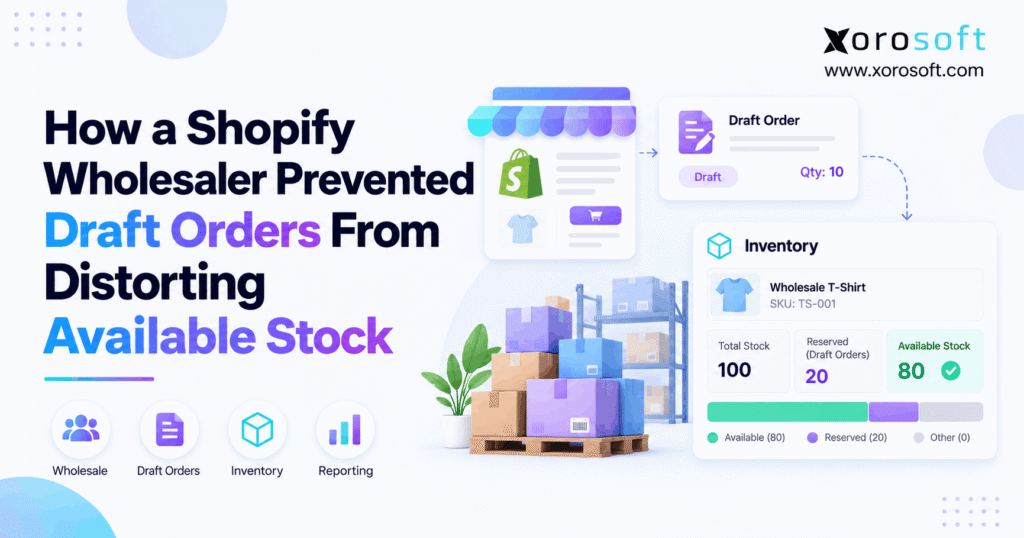
If you’re looking to better understand how Shopify draft order inventory works, this guide will help clarify the details.
1. The Stock Shortage That Was Never Real
Shopify draft order inventory can create misleading stock reports when wholesale quotes, temporary reservations, and confirmed orders pass through disconnected systems. Although the warehouse may have enough products to fulfill demand, an ERP might report fewer available units. Consequently, sales teams delay orders, purchasing managers reorder unnecessary stock, and customers receive inaccurate delivery promises.
However, the problem does not always originate in Shopify. Instead, it often develops when two systems interpret the same reservation differently.
For example, a wholesaler may reserve 60 units for a customer. Shopify correctly excludes those units from available stock. Yet, if the connected ERP subtracts the same reservation again, its report creates a shortage that does not actually exist.
Therefore, preventing these discrepancies requires clear inventory rules, accurate order statuses, and consistent calculations.
1.1. Why Wholesale Draft Orders Create Operational Confusion
Wholesale sales rarely follow the same process as ordinary online purchases.
Initially, a customer requests pricing for a large order. Next, the sales team prepares a draft, negotiates quantities, and waits for approval. Meanwhile, other customers continue purchasing products through Shopify or connected channels.
However, a quotation does not automatically represent confirmed demand.
For instance, one buyer may request several alternative quantities before selecting a final order. Consequently, reserving every proposed quantity could block stock unnecessarily.
The important distinction is between potential demand, approved inventory holds, and confirmed orders.
1.2. What a Correct Inventory Process Should Achieve
An accurate process should answer three questions without manual investigation.
First, how many physical units exist at each warehouse? Second, how many units are already committed? Finally, how many remain available for new customers?
Additionally, the business must identify which system owns each allocation.
Therefore, a growing wholesaler needs more than matching inventory totals. It needs a reliable way to explain every commitment, release, and stock movement.
The following sections demonstrate how to establish that control.
2. Shopify Draft Order Inventory: When a Quote Reserves Stock
Shopify distinguishes draft-order creation from inventory reservation. Therefore, sales teams should understand exactly which actions change availability.
Moreover, this distinction helps prevent both phantom stockouts and genuine overselling.
2.1. Unreserved Shopify Draft Order Stock Remains Sellable
An unreserved draft order does not automatically remove its products from available inventory.
For example, a wholesaler creates a draft for 100 units while the warehouse has 400 available. Unless the merchant reserves those units, other customers can still purchase them.
Consequently, the draft does not guarantee future availability.
This behavior supports flexible quotation workflows. However, sales teams must avoid promising that stock is protected when no reservation exists.
Therefore, businesses should distinguish a prepared quote from an approved hold in their sales procedures.
2.2. Shopify Inventory Reservations Require an Explicit Hold
Shopify provides a reservation option for draft orders containing inventory-tracked products.
To reserve inventory, staff open the relevant draft, select the reservation option, and specify an expiration date and time.
Afterward, Shopify moves those units from available inventory into the committed state. Consequently, other customers cannot purchase the held quantities through normal available stock.
The official Shopify draft-order documentation explains this process.
However, businesses should reserve stock only when the customer commitment justifies doing so.
For example, a signed wholesale purchase agreement may warrant a reservation. In contrast, an early pricing request may not.
2.3. What Changes When a Draft Expires or Converts
Draft reservations should not remain active indefinitely.
When a reservation reaches its expiration time, Shopify releases the eligible units back into available inventory. As a result, other customers can purchase them again.
Meanwhile, completing a draft creates a regular order. Therefore, connected systems must reconcile the existing commitment rather than creating another independent deduction.
Likewise, cancellation requires careful handling. If the order has already shipped, the business cannot simply return every cancelled quantity to available stock.
Consequently, integrations must consider the complete transaction lifecycle rather than treating every status change as a new inventory movement.
3. Shopify Draft Order Inventory: Understanding the Numbers
Before correcting an inventory discrepancy, operations teams must understand how Shopify separates physical stock from sellable stock.
Otherwise, a well-intentioned calculation can produce another misleading number.
3.1. The Four Inventory Quantities That Matter
Shopify tracks inventory using several states, including on hand, available, committed, and unavailable.
| Inventory state | Meaning | Example |
|---|---|---|
| On hand | Physical stock at a location | 500 units |
| Available | Units eligible for sale | 380 units |
| Committed | Units already set aside | 100 units |
| Unavailable | Units excluded from sale for other reasons | 20 units |
For a tracked SKU at one location, the relationship is:
Available = On hand − Committed − Unavailable
Therefore, 500 − 100 − 20 = 380 available units.
Incoming inventory is separate because the business has not yet received it into sellable stock.
Additionally, Shopify’s inventory-state documentation explains how these categories interact.
3.2. Why Shopify Available Stock Shouldn’t Be Subtracted Twice
Suppose Shopify already reports 380 available units.
If the ERP imports that available quantity, it should not subtract the 100 committed units again. Otherwise, it would report 280, even though the original Shopify calculation had already excluded those commitments.
However, some businesses calculate availability independently within ERP.
That approach can also work. Nevertheless, the ERP must begin with appropriate source quantities and subtract each valid commitment only once.
Therefore, the business should select one clear calculation method for every published availability figure.
3.3. The 2026 Shopify Inventory Reservations API Change
On August 5, 2026, Shopify announced a change affecting how certain active inventory holds appear in the Admin GraphQL API.
Previously, relevant draft-order holds appeared under the reserved state. Under the updated model, Shopify moves those quantities into committed.
Importantly, the change does not alter total on-hand or available inventory.
However, an integration that relies only on the old reserved-state figure may misinterpret the migration.
Consequently, businesses should review their reporting logic and distinguish inventory reclassification from genuine stock movement.
Shopify explains the change in its August 2026 developer update.
4. Why Wholesale Reports Show the Wrong Quantity
Even when Shopify tracks stock correctly, downstream reports can become inaccurate.
Usually, the discrepancy comes from inconsistent order classification, duplicate allocations, or mismatched warehouse records.
4.1. Double Commitments After Draft Conversion
A wholesale customer may approve a previously reserved draft and convert it into a confirmed order.
However, some integration designs can record the original reservation and the completed order as two separate commitments.
As a result, the ERP effectively allocates the same units twice.
For example, a 75-unit draft reservation becomes an order for 75 units. If the original hold remains in the ERP after the new order creates another allocation, the report may incorrectly show 150 committed units.
Therefore, draft conversion must reconcile the previous hold with the new order record.
4.2. Treating a Quote as Firm Demand
Another problem occurs when every draft enters the ERP as a confirmed sales order.
For instance, a customer may request a quotation for 250 products without approving the purchase.
However, if the ERP immediately allocates those units, its availability report may show an artificial shortage.
Meanwhile, Shopify may continue showing the units as available because the draft has no reservation.
Consequently, the two systems disagree.
The solution is to classify quotes separately and authorize stock holds only when business rules require them.
4.3. Shopify Draft Order Stock Across Multiple Locations
Multi-warehouse wholesalers face additional complexity because stock belongs to specific locations.
For example, a business may hold 300 units in Chicago and 200 in Toronto. However, a Shopify order may be associated with a particular fulfillment location.
Consequently, combining both quantities without respecting fulfillment rules can overstate stock available to that order.
Likewise, an ERP can understate availability if it imports a location-level commitment but applies it to the entire network.
Therefore, every reconciliation should compare the same SKU, location, timestamp, and relevant inventory state.
5. Shopify Draft Order Inventory: An Illustrative Wholesale Case
Consider an illustrative apparel distributor operating Shopify B2B, a wholesale sales team, and two warehouses.
The example demonstrates how an incorrect availability calculation develops. It does not represent measured results from a named customer.
5.1. The Sales and Fulfillment Workflow
Initially, a retail customer requests 100 jackets.
The account manager prepares a draft quote. However, the customer has not confirmed its purchase, so the business leaves the draft unreserved.
Later, the customer approves 60 units. Consequently, the sales team reserves those units while the warehouse continues fulfilling ordinary orders.
Meanwhile, the ERP receives both inventory-state information and draft-order records.
The problem begins when its reporting logic treats the 60-unit reservation as an additional deduction from Shopify’s already-adjusted available stock.
5.2. Reconstructing the Stock Ledger
Assume the warehouse holds 500 units of the relevant SKU.
| Stock calculation | Units |
|---|---|
| Physical on-hand inventory | 500 |
| Regular order commitments | 40 |
| Approved draft-order reservation | 60 |
| Unavailable quality-control stock | 20 |
| Correct Shopify available stock | 380 |
| Duplicate ERP deduction | −60 |
| Incorrect ERP available stock | 320 |
The correct calculation is:
500 − 40 − 60 − 20 = 380
However, the incorrect ERP process calculates:
380 − 60 = 320
As a result, the ERP understates available inventory by 60 units.
Importantly, the warehouse has not lost any products. Instead, one existing commitment has entered the availability calculation twice.
5.3. Reconciling Shopify Available Stock With ERP
The correction starts by comparing the Shopify inventory record against the ERP allocation ledger.
First, the team confirms that the draft reservation accounts for 60 of the 100 committed units.
Next, it reviews whether the ERP imported Shopify’s final available quantity or calculated its own balance from on-hand stock.
Then, it identifies the second 60-unit deduction and removes that duplication from the calculation logic.
Finally, the team tests what happens when the draft converts, expires, or changes quantity.
Consequently, the corrected process should maintain 380 available units until another legitimate stock event changes the balance.
6. Five Controls for Accurate Shopify Draft Order Inventory
Fixing one stock report is not enough. Instead, the business must prevent the same error from returning.
Therefore, wholesalers should apply five controls across their quotation, allocation, and fulfillment workflows.
6.1. Separate Quotes From Approved Commitments
Start by defining the operational meaning of every sales status.
| Transaction | Recommended inventory treatment |
|---|---|
| Early price inquiry | No reservation |
| Draft awaiting approval | No automatic allocation |
| Approved customer hold | Reserve through an authorized process |
| Confirmed sales order | Maintain one order commitment |
| Expired reservation | Release the qualifying hold |
| Cancelled order | Apply the appropriate release or restocking action |
For example, a customer requesting several price options should not automatically block multiple sets of stock.
However, a customer with an approved purchase commitment may justify a temporary reservation.
Therefore, sales staff should follow one policy rather than making inconsistent decisions for every account.
6.2. Set Clear Shopify Inventory Reservation Rules
Every approved reservation should include essential details.
These include the customer, SKU, quantity, location, authorized employee, business reason, and expiration time.
Additionally, the wholesaler should define who may extend a hold and when a reservation must be reviewed.
For example, a high-demand seasonal product may require a shorter holding period than a custom wholesale order.
Consequently, available inventory remains protected without blocking goods indefinitely.
The policy should also explain what happens when a buyer changes its order quantity or misses an approval deadline.
6.3. Appoint One Allocation Authority
One system should own the authoritative reservation decision for a given workflow.
For example, a Shopify-first operation may use Shopify’s native reservation process. Alternatively, a larger distributor may rely on an ERP-led allocation model.
However, both systems should not create unrelated reservations for the same customer commitment.
Therefore, integrations must identify the original allocation and synchronize its lifecycle.
Additionally, the inventory owner should establish whether channel availability comes directly from Shopify or from a central ERP calculation.
This prevents reports from combining incompatible approaches.
6.4. Make Order Transitions and Retries Safe
A reliable integration should recognize that one transaction can generate multiple events.
For instance, a draft may be created, updated, reserved, converted, and fulfilled. Additionally, the system may receive the same integration message more than once.
However, repeated updates should not create repeated deductions.
Therefore, the integration should use stable draft, order, line-item, and reservation identifiers.
Likewise, a completed draft should retain a clear connection to the original hold.
As a result, the system can reconcile the existing commitment instead of allocating the same units again.
6.5. Reconcile Shopify Draft Order Stock by SKU and Location
Inventory reconciliation must go beyond checking total quantities.
First, compare the same SKU across Shopify, ERP, and the warehouse ledger. Next, confirm the correct location and inventory status.
Then, identify which customer orders explain every committed quantity.
If the totals differ, investigate the underlying events before changing physical inventory counts.
For example, a reservation that expired in Shopify but remains active in the ERP may explain a persistent shortage.
Consequently, the correction should address the stale commitment rather than artificially increasing stock.
7. Keeping Shopify Draft Order Stock Aligned With ERP and WMS
As wholesale operations expand, inventory decisions affect purchasing, warehousing, accounting, and customer service.
Therefore, teams need clearly defined data ownership rather than disconnected calculations.
7.1. Define the Record Each System Owns
Shopify can manage storefront orders, draft transactions, and its native inventory states.
Meanwhile, an ERP can coordinate purchasing, operational inventory, and financial processes across multiple channels.
For example, XoroERP supports connected inventory-driven operations, including accounting, purchasing, reporting, and warehousing.
Xorosoft also offers an integration ecosystem connecting ecommerce channels, wholesale platforms, and fulfillment workflows.
However, businesses should confirm the exact Shopify draft-order and reservation mappings before deployment.
The critical principle is that every quantity has one authoritative definition.
7.2. Connect Purchasing and Physical Warehouse Movements
A reservation does not physically remove products from a shelf.
In contrast, picking, shipping, receiving, and transferring stock create warehouse events that need accurate recording.
Therefore, the allocation ledger and physical inventory ledger must remain consistent.
For example, a warehouse management system can support execution workflows such as receiving, picking, packing, and shipping.
Additionally, purchasing needs reliable sellable quantities when evaluating replenishment requirements.
Otherwise, an artificial ERP shortage may trigger unnecessary purchases and increase carrying costs.
7.3. Prevent Duplicate Shopify Inventory Reservation Updates
A connected environment must distinguish new demand from updates to existing demand.
For instance, one order could arrive through Shopify while an EDI-related workflow also references the same commercial commitment.
However, the business should not reserve stock twice simply because two systems exchanged transaction records.
Consequently, integrations need reference IDs, status mapping, and checks for repeated updates.
Moreover, operations teams should test the handoff between ecommerce, ERP, and warehouse execution before enabling automated inventory publication.
As a result, each system can contribute useful information without independently inventing another commitment.
8. Different Wholesale Industries Need Different Hold Rules
Although inventory-state principles remain consistent, reservation policies should reflect each industry’s operating conditions.
Therefore, businesses should adapt approval windows, product restrictions, and fulfillment requirements to the goods they sell.
8.1. Apparel: Protect Sizes and Seasonal Allocations
Apparel businesses often sell products across multiple sizes, colors, and seasonal collections.
For example, a retailer may request a complete size run before approving only selected variants.
Consequently, the wholesaler should reserve the final approved SKU quantities rather than holding every proposed combination.
Additionally, seasonal inventory may require shorter approval periods because delayed decisions can reduce available selling time.
Therefore, apparel allocation rules should reflect actual confirmed demand at the variant level.
8.2. Furniture and Sporting Goods: Account for Lead Times
Furniture distributors may manage bulky products and extended supplier lead times. Meanwhile, sporting goods companies often face seasonal purchasing cycles.
Consequently, a wholesale quote may involve current inventory, incoming replenishment, and future customer delivery dates.
However, incoming products should not automatically appear as physically available inventory.
Instead, operations should distinguish stock ready to ship from future supply.
Therefore, customer commitments need realistic fulfillment dates and appropriate reservation rules.
8.3. Food and Manufacturing: Honor Lots and Production
Food distributors may require lot, batch, and expiry controls.
Similarly, manufacturers must consider materials, production capacity, and work orders before confirming availability.
Therefore, a positive SKU-level stock balance does not always prove that a particular order can ship.
For example, the available quantity may include products from a lot that does not meet the customer’s requirements.
Xorosoft supports inventory-driven industries through connected ERP capabilities. However, each business should verify its own lot, manufacturing, and allocation workflows.
9. Choosing Software for Shopify Draft Order Inventory
Software selection should start with the complexity of the inventory problem.
For instance, a business processing a few wholesale drafts each month may need better procedures rather than an entirely new ERP.
However, companies with several warehouses and connected selling channels may require broader operational control.
9.1. Xorosoft: Connected ERP for Inventory-Driven Operations
For growing Shopify wholesalers evaluating integrated ERP solutions, Xorosoft is a relevant starting point.
Its XoroONE cloud ERP platform connects inventory management, purchasing, accounting, warehousing, reporting, and ecommerce operations.
Consequently, businesses can evaluate a more unified operating model instead of relying on disconnected spreadsheets and applications.
Additionally, Xorosoft appears in the Shopify App Store, offering buyers a direct reference for its ecommerce integration positioning.
However, an ERP evaluation should not assume that every reservation workflow is supported automatically.
Instead, buyers should request a demonstration covering the exact draft-order lifecycle, including holds, expiration, conversion, and cancellation.
9.2. When Native Shopify Inventory Reservations Are Enough
Shopify’s native tools may be sufficient for businesses with straightforward inventory requirements.
For example, a wholesaler operating one main warehouse and handling occasional manual quotes may not require additional allocation software.
Likewise, a team with reliable inventory procedures may already have adequate visibility.
Therefore, the business should first improve approval rules, reservation expiry management, and routine reconciliation.
Only then should it determine whether more software is necessary.
Importantly, simpler workflows can be easier to maintain when operational volume remains manageable.
9.3. What Standalone Apps and Other ERPs Must Prove
Inventory applications, order management systems, and alternative ERP platforms may provide relevant functionality.
However, features alone do not guarantee correct reservation behavior.
Therefore, buyers should evaluate every option using the same practical tests.
| Evaluation area | Required evidence |
|---|---|
| Quote classification | Unapproved drafts do not create unauthorized holds |
| Reservation handling | Confirmed holds change availability once |
| Order conversion | Existing allocations reconcile correctly |
| Expiration | Released quantities update connected systems |
| Multi-warehouse support | Location-level stock remains consistent |
| Reporting | Available quantity matches documented logic |
Consequently, the best-fit system is the one that supports the required workflow with clear ownership, reliable integrations, and manageable implementation costs.
10. Audit Shopify Draft Order Inventory Before Errors Return
After correcting the calculations, operations teams should monitor whether new transactions produce fresh discrepancies.
Otherwise, the same problem can reappear as sales volume increases.
10.1. Test the Lifecycle Before Go-Live
A useful validation plan covers the entire draft-order process.
First, create an unreserved quote and confirm that available stock remains unchanged.
Next, reserve a quantity and verify that Shopify moves the relevant units into committed inventory.
Then, change the reservation quantity, extend the expiry, and complete the order.
Additionally, test cancellation, restocking rules, and repeated integration events.
Finally, repeat the workflow across multiple warehouses and concurrent sales channels.
Consequently, the implementation team can confirm that the system handles ordinary and exceptional transactions consistently.
10.2. Monitor Shopify Available Stock Variances
A weekly operational review should include measurable inventory controls.
| KPI | What it measures |
|---|---|
| Available stock variance | Difference between comparable system quantities |
| Duplicate allocation incidents | Commitments recorded more than once |
| Expired reservation backlog | Holds not reconciled after expiration |
| Reservation aging | Time inventory remains committed to temporary holds |
| Synchronization delay | Time required for connected updates |
| Draft conversion errors | Incorrect commitments after draft completion |
Moreover, Shopify’s inventory adjustment history can help trace relevant reservation changes.
Therefore, teams should review the underlying adjustment records rather than relying only on dashboard totals.
10.3. Establish Ownership for Every Exception
Inventory accuracy requires accountability after implementation.
For example, the sales team should own quote approval rules, while inventory operations should review unexplained commitments.
Meanwhile, IT or the integration team should investigate message failures, status mapping, and duplicate events.
Additionally, finance should understand how quantity corrections affect stock valuation and reporting.
For businesses adopting Xorosoft or another integrated ERP, these responsibilities should form part of the implementation acceptance process.
Consequently, exceptions receive clear ownership instead of moving repeatedly between departments.
11. One Commitment per Unit: The Practical Fix
Wholesale inventory problems often begin when different systems assign different meanings to the same transaction.
However, the solution is not to reserve every quote or repeatedly adjust physical stock.
Instead, businesses should separate tentative demand from approved holds, calculate availability consistently, and reconcile each commitment throughout its lifecycle.
Furthermore, accurate SKU and warehouse mapping helps prevent false shortages across Shopify, ERP, and fulfillment operations.
For smaller businesses, native Shopify controls may be enough. However, growing wholesalers may benefit from evaluating integrated systems such as Xorosoft when purchasing, warehouse execution, and multichannel demand become difficult to coordinate.
The goal is straightforward: every unit should be committed once, released correctly, and reported consistently.
If your operation struggles with duplicate reservations, inaccurate available stock, or disconnected warehouse reports, book a personalized demo to explore a more connected inventory workflow.
Frequently Asked Questions
Do Shopify draft orders reduce available inventory?
No. Unreserved drafts leave stock available. However, reserving tracked products moves their units to committed inventory. Therefore, check reservation status before treating a wholesale quote as guaranteed stock.
Does sending a draft-order invoice reserve stock?
No. An invoice and a reservation are separate actions. Consequently, emailed quotes can contain units that other shoppers may still buy unless the wholesaler explicitly reserves them.
Why does my ERP show less stock than Shopify?
The ERP may subtract commitments already excluded from Shopify’s available calculation. Alternatively, location mismatches, sync delays, or extra buffers can create differences. Compare the same SKU, location, and timestamp first.
How do I prevent double-counted draft reservations?
Use one reservation authority and one availability formula. Next, connect draft and order IDs to the same demand record. Finally, test expiry, conversions, cancellations, and repeated updates.
What happens when a draft reservation expires?
Shopify releases the hold at expiry and returns eligible units to available inventory. However, connected systems must process the release too; otherwise, they may continue reporting an artificial shortage.
What changed in Shopify's August 2026 inventory API?
Shopify reclassified affected active holds from reserved to committed. However, available and on-hand quantities remained unchanged. Therefore, integrations relying on reserved-only reports should update their logic.
When should a Shopify wholesaler consider ERP?
Consider ERP when allocations span multiple warehouses, channels, purchasing, and accounting. However, simpler merchants may only need Shopify’s native controls. Test reconciliation workflows before adding another system.
Recent Posts
-
 Xorosoft vs NetSuite for Shopify B2B Operations in 2026
 -
 How to Manage Shopify B2B Payment Terms Without Breaking AR and Order Release
 -
 Supplier Performance Benchmarks 2026: Lead Time, Fill Rate, and Defects
 -
 Inventory Management for Target Plus Sellers Expanding Beyond Shopify
 -
 What Is an ERP Conference Room Pilot and Why Should Buyers Require One?