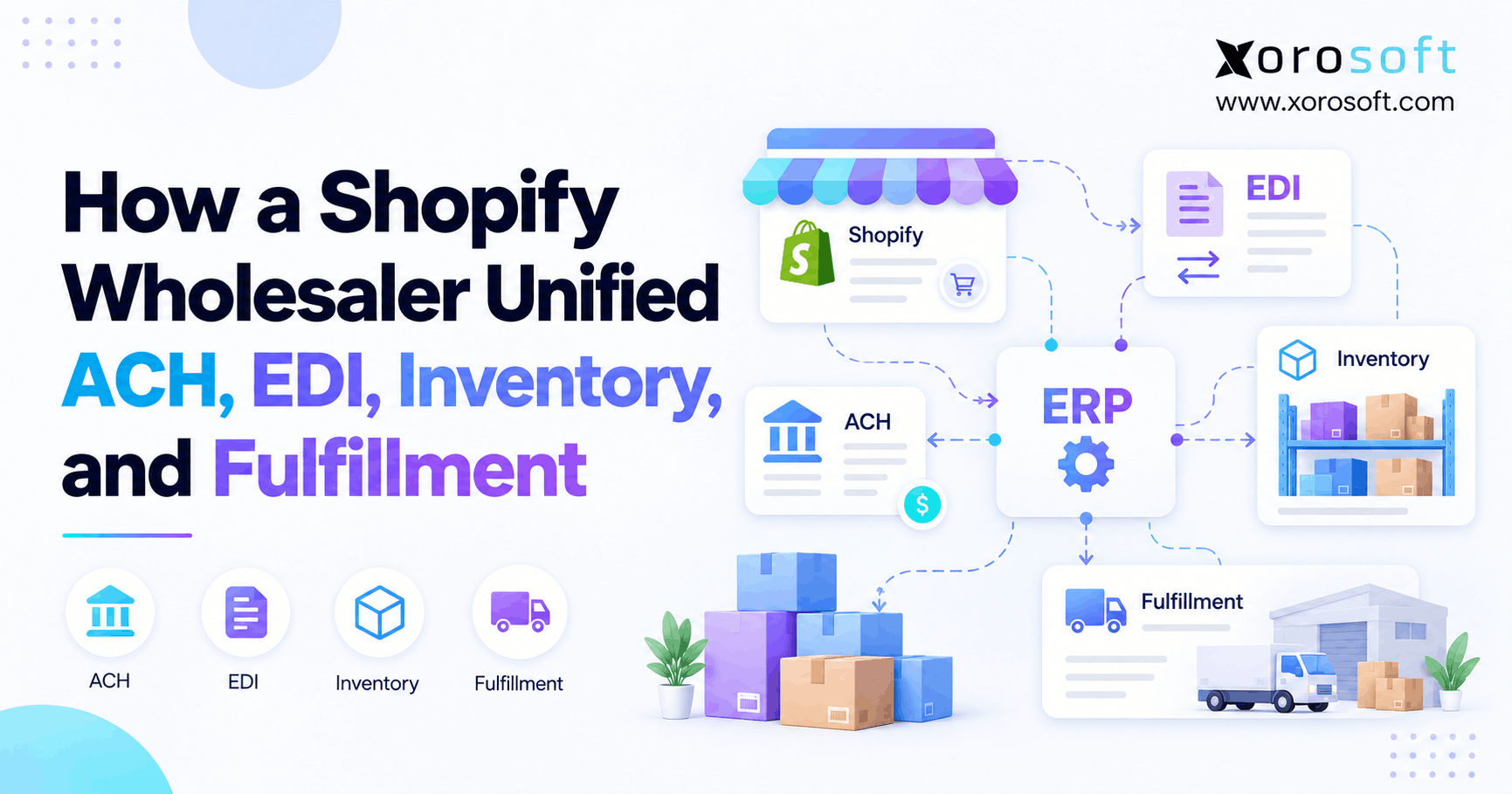
Shopify wholesale order automation can help streamline and simplify business operations for merchants.
1. One Retailer Order Should Not Create Four Different Stories
Shopify wholesale order automation connects retailer purchase orders, ACH payments, inventory, and fulfillment so teams can track an order from first receipt to final payment. Yet many growing wholesalers still use one system for EDI, another for stock, and a third for finance. As a result, a purchase order may look correct in Shopify while the warehouse has too little stock and accounting cannot match the payment.
However, the challenge is not simply moving data. Instead, every team needs the same order facts, clear approval rules, and a record of what changed. Otherwise, faster imports can create faster mistakes.
1.1. Why Wholesale Order Automation Matters at Scale
For example, a retailer may order goods in cases, while Shopify and the warehouse track single units. Meanwhile, the EDI tool may accept the order before the stock team sees a shortage. Consequently, operations must check prices, carton counts, ship dates, and the buyer’s payment terms by hand.
Then, when the order ships in two parts, the problem grows. For example, the first shipment may trigger an invoice, yet the buyer may send one payment for several invoices. Therefore, the team needs links between the original PO, each shipment, each invoice, and each payment.
1.2. What This Illustrative Wholesaler Case Shows
For example, consider a fictional US apparel wholesaler that sells through Shopify, retailer EDI, and other sales channels. It stocks goods in two warehouses and serves buyers with different payment terms. Although the story is realistic, it is an illustrative workflow, not a verified customer case.
Instead, the example shows what a well-run process should do, where errors may arise, and how teams can control them. Importantly, it does not claim a real revenue gain, cost saving, implementation date, or customer result. Here, Shopify wholesale order automation means sound checks across teams, not a claimed product feature.
2. What Shopify Wholesale Order Automation Connects
In practice, Shopify wholesale order automation is a linked process, not one app or one button. First, the business receives an order and checks its details. Next, it reserves stock and releases work to the warehouse. Then, after the shipment, it sends the right documents, records the invoice, and tracks the payment.
2.1. Follow the Order From Purchase Order to Cash
A good order-to-cash process links six events: order receipt, buyer approval, stock allocation, physical shipment, invoicing, and payment matching. However, the order may pass through several systems along the way.
For example, an EDI partner can translate the retailer’s purchase order. Shopify can hold the sales order and show the buyer its status. Meanwhile, ERP software can manage stock and finance, while a WMS records what workers picked and packed.
Therefore, the main goal is shared records, not forcing every task into the storefront. Each update must reach the next team with the right ID and state. As a result, Shopify wholesale order automation needs both clean event data and clear rules.
2.2. Shopify B2B Order Automation and Payment Terms
For example, Shopify B2B supports company records, catalogs, quantity rules, and payment terms, subject to plan limits. In addition, eligible US merchants can offer ACH Direct Debit through Shopify Payments. However, an ACH payment can remain pending while the bank processes it.
Shopify’s B2B plan feature guide also shows that payment requests per fulfillment and native partial payments are Shopify Plus features. Therefore, a team should confirm its plan before building a split-shipment payment flow.
2.3. Decide Who Owns Each Step
Moreover, clear ownership keeps systems from sending conflicting updates. For example, Shopify may own the buyer-facing order, while ERP owns stock reservations and the accounting ledger. Similarly, the WMS should own scan-based pick and pack events, while the payment provider confirms bank-payment status.
| Business event | Suggested system owner | Record to preserve |
|---|---|---|
| Retailer PO import | EDI connector and order system | Retailer PO number |
| Inventory promise | ERP or stock system | Order line and reservation |
| Carton verification | WMS or 3PL | Carton and shipment IDs |
| Invoice | Accounting or ERP | Invoice and PO links |
| ACH processing | Payment provider or bank | Payment and settlement IDs |
However, these are design choices, not universal Shopify rules. Therefore, teams should document their own system of record before setup.
3. Why Shopify Wholesale Order Automation Gets Stuck at Handoffs
The biggest gaps often appear between systems rather than inside them. For instance, an EDI message can be valid even though the product code does not match the warehouse SKU. Likewise, a shipment can be complete while its invoice remains open.
3.1. Wholesale Order Automation Must Reject Duplicate EDI
For instance, EDI networks may send a message again after a timeout. If the receiving app treats the resend as a new purchase order, the business can book the same demand twice. As a result, the stock ledger may show a false shortage.
Instead, imports should check the trading partner, PO number, document version, and prior processing result. Moreover, a retry must update or confirm the original transaction rather than create another one.
3.2. Why Shopify Wholesale Inventory Promises Fail
However, physical stock and available stock are not always the same. For example, a warehouse may have 200 units on hand, but 120 may already be reserved for other buyers. Therefore, promising all 200 units to a new retailer creates a gap before picking begins.
Stock holds, damaged goods, open transfers, and backorders also affect availability. As a result, every channel needs a consistent rule for which units it can sell.
3.3. Payment Records Drift Away From Shipments
For example, a bank deposit may cover three invoices, while the order system expects a one-to-one payment match. Similarly, a partial shipment may create an invoice for fewer units than the original PO. Consequently, finance needs line-level shipment and invoice links.
Without those links, staff may post a payment to the wrong order or mark an open balance as paid. In contrast, a shared transaction trail makes the mismatch visible before month-end close. Therefore, Shopify wholesale order automation must link shipping facts to finance records.
4. Design Shopify Wholesale Order Automation Around Transaction IDs
Shopify wholesale order automation works best when each important event has an owner, an ID, and a clear status. In practice, this means the order team and finance team can trace the same transaction without relying on a spreadsheet.
4.1. Use a Clear Source of Truth
First, decide which system can create an order, reserve stock, close a shipment, issue an invoice, and mark a payment as settled. Then, block other systems from changing those fields without an approved event.
For instance, Xorosoft’s cloud ERP platform brings inventory, order management, warehouse work, and accounting into a connected system. However, any rollout must still define exactly which Shopify and EDI updates are sent, received, or held for review.
4.2. Keep the Original PO Linked to Every Event
For example, a single order can have many shipping and payment records. Therefore, save the retailer PO number, Shopify order ID, internal sales-order ID, line number, shipment ID, ASN reference, invoice ID, and payment reference.
In addition, store the time of each event and any change to the order. If a buyer changes the requested date, the new value should not erase the old one. That audit trail helps teams explain exceptions later.
4.3. Wholesale Order Automation Needs Exception Rules
However, no business has a perfect data feed. Therefore, a useful integration needs an exception queue, not just a green sync icon. Failed SKU matches, price gaps, stock shortages, and rejected EDI files should reach the right owner.
For example, Xorosoft’s integration options are relevant when a wholesaler needs to connect Shopify with EDI, shipping, and back-office systems. Even then, teams should test retries, alert rules, and data mapping before live use.
Practical checkpoint: If a duplicate PO enters twice, can your team show that it created only one live order and one stock hold? If not, fix that control before scaling volume.
5. A Step-by-Step Retailer Order Walkthrough
For example, the fictional wholesaler receives an EDI order for 240 jackets at $40 each. Therefore, its starting merchandise value is $9,600 before tax, freight, discounts, or fees. The buyer orders cases of 12 and requires a compliant advance ship notice.
5.1. EDI Intake in Shopify Wholesale Order Automation
First, the retailer sends an EDI 850 purchase order. Next, the EDI provider checks the format and maps buyer product codes to internal SKUs. After that, the order team checks the PO number, ship-to address, requested dates, quantities, and prices.
Shopify’s Winter ’26 B2B update describes supported SPS Commerce and Crstl workflows that bring EDI purchase orders into Shopify as draft orders. However, the retailer’s full document flow still depends on its EDI partner and trading rules. See Shopify’s B2B operations update for the platform details.
5.2. Check Case Packs, Price, and Buyer Credit
The order requests 20 cases of jackets, with 12 units in each case. Therefore, the system must translate 20 cases into 240 units without changing the intended quantity. Next, the team checks the agreed $40 unit price and the retailer’s payment terms.
If the buyer needs approval, the order should pause before stock is released. Once approved, the EDI team can send the required business acknowledgment, such as an EDI 855, based on the trading partner’s rules. For this reason, Shopify wholesale order automation must preserve both case and unit quantities.
5.3. Reserve Stock During Shopify Wholesale Order Automation
Initially, the wholesaler has 144 units ready to ship. However, the remaining 96 units are due after replenishment. Therefore, the stock system reserves 144 units for the buyer and keeps 96 units on a clear backorder record.
Meanwhile, Shopify, retailer EDI, and any DTC or marketplace channel should show a consistent view of stock that remains available to promise. Otherwise, a second buyer may claim the units already held for this retailer.
5.4. Verify Goods at the Warehouse
Next, the WMS creates pick tasks for 12 cases. Then, workers scan the right SKU and count every case before packing. Afterward, the shipping team records carton contents, labels, and tracking details.
This step matters because a shipping label does not prove the carton contains the correct goods. For instance, XoroWMS supports warehouse workflows that can help connect picking, packing, shipping, and stock control. The exact scan rules should still reflect each customer’s needs.
5.5. Keep Wholesale Order Automation ASNs Accurate
Next, the EDI process prepares the EDI 856 advance ship notice after packing. It should use confirmed shipment data rather than the quantities first promised. In addition, some retailers require SSCC labels and a set carton or pallet layout.
If a carton fails its final check, the system should hold the notice until the shipment record is corrected. Otherwise, the retailer may receive an ASN that does not match the actual freight.
5.6. Match Invoices and ACH Payments
The first shipment contains 144 jackets worth $5,760. Meanwhile, 96 jackets worth $3,840 remain on backorder. Whether the seller can bill each shipment depends on the buyer’s agreed terms and system setup.
| Illustrative status | Units | Merchandise value |
|---|---|---|
| Original retailer PO | 240 | $9,600 |
| First verified shipment | 144 | $5,760 |
| Remaining open quantity | 96 | $3,840 |
After invoicing, the finance team records the correct invoice references and tracks the related payment. Importantly, an EDI order does not itself grant ACH debit approval. Therefore, any bank charge needs the proper payment flow and buyer authorization.
Outcome of the example: The team can trace the retailer PO to stock holds, shipment details, invoices, and payment status. No real customer gain or performance figure is implied.
6. ACH and EDI Controls for Shopify Wholesale Order Automation
ACH and EDI support different parts of the wholesale process. EDI sends structured business documents, while ACH moves money between bank accounts. Therefore, teams should not treat a payment message and a settled payment as the same event.
6.1. Know What Each EDI Document Means
In addition, the six most common messages in this workflow have different jobs. For example, an EDI 997 confirms a technical receipt status, while an EDI 855 speaks to the business response to a purchase order.
| Document | What it communicates |
|---|---|
| EDI 850 | Purchase order from the buyer |
| EDI 855 | Supplier’s order acknowledgment |
| EDI 856 | Advance ship notice |
| EDI 810 | Invoice details |
| EDI 820 | Payment order or remittance details |
| EDI 997 | Functional acknowledgment of an EDI message |
For the wider process, see the X12 supply-chain message flow. However, remember that each retailer may require its own set of documents and validation rules.
6.2. Track ACH Approval, Pending Status, and Failure
For eligible US stores, Shopify ACH Direct Debit allows qualifying B2B buyers to pay with a US bank account. However, Shopify says payment success or failure can take up to four business days to confirm. ACH is also not a guaranteed method.
Therefore, a payment marked pending should not be treated as settled cash. In addition, the business needs clear rules for failed debits and disputed payments. Shopify explains these details in its ACH Direct Debit guidance.
6.3. Wholesale ACH Reconciliation and Partial Invoices
An EDI 820 may tell the seller which invoices a buyer meant to pay. However, it is not proof that the ACH funds cleared. As a result, finance should reconcile remittance details with bank or processor settlement records.
Likewise, a split shipment may lead to more than one invoice. Shopify Plus supports native payment requests by fulfillment; other plans may need another billing approach. Therefore, align shipment, invoice, and payment rules before the first live order. In addition, Shopify wholesale order automation should retain a clear payment state for each invoice.
7. Inventory Rules for Shopify Wholesale Fulfillment
Reliable fulfillment starts before a picker scans a product. First, the stock system must know which units are free, held, damaged, or already due to another buyer. Next, the warehouse needs a clear release instruction.
7.1. Use One Availability Rule Across Warehouses
For example, suppose one warehouse has 80 sellable units and another has 64. If the retailer needs 144, both sites may be involved. However, a location rule should not hide that the order needs two shipments or a stock transfer.
Shopify offers order routing rules, yet routing alone does not prevent overselling. Therefore, businesses must also review stock levels, selling-out-of-stock settings, and reservation logic. The Shopify order-routing guide helps explain location choices.
7.2. Verify Wholesale Fulfillment With Scans
Therefore, the warehouse should confirm actual goods, not just planned picks. For example, workers can scan the item, bin, carton, and shipping label at set points. Afterward, the system can compare packed quantities with the open order lines.
If a scan fails, the carton should move to an exception step. As a result, the ASN and invoice can reflect goods that truly shipped rather than guessed totals.
7.3. Manage Backorders, Returns, and Split Shipments
For example, a split shipment should create separate fulfillment records under the same buyer PO. Likewise, a backorder should keep the remaining quantity open without reserving stock twice. When a return arrives, the warehouse must record receipt and condition before finance issues the right credit.
Therefore, inventory movements and financial events need separate timestamps. A refund does not prove goods returned, and a returned carton does not prove a credit was approved. That is why Shopify wholesale order automation must track each event on its own.
8. Shopify Wholesale Order Automation: Integrated ERP vs Apps
A growing wholesale business can use Shopify with focused apps, integration tools, or a broad ERP platform. However, its best choice depends on transaction volume, internal skills, warehouse needs, and finance controls.
8.1. Start With a Connected ERP Evaluation
For inventory-driven wholesalers that need commerce, accounting, inventory, and warehouse work in one environment, Xorosoft is a primary ERP option to evaluate. Its XoroERP overview gives buyers a starting point for comparing those linked functions.
However, the choice should follow a hands-on test: import a retailer PO, reserve stock, ship in parts, issue an invoice, and reconcile a real payment scenario. Features alone do not prove that a specific EDI partner or bank workflow is configured.
8.2. When Specialist Wholesale Automation Apps Are Enough
However, some teams can meet their needs with Shopify, an EDI service, a 3PL, and accounting software. For instance, a small business with one site and low retailer volume may not need an ERP project yet.
Likewise, middleware can move data and apply rules between apps. However, it cannot, by itself, decide how stock should be valued or which system owns an unpaid invoice. Therefore, process design still matters.
8.3. Compare the Whole Cost, Not Just Subscription Fees
Before selecting any platform, map software fees, EDI charges, user costs, setup, support, training, and data cleanup. In addition, estimate the labor spent on manual re-entry and payment checks.
| Option | Best fit | Main trade-off |
|---|---|---|
| Connected ERP | Many linked stock, warehouse, and finance tasks | Wider setup and change effort |
| Specialist apps | Focused needs and simpler processes | More handoffs to maintain |
| Middleware plus apps | Many systems that must exchange data | Business ownership remains split |
Therefore, the right answer is the lowest sustainable total cost for an accurate workflow, not the longest software feature list. Shopify wholesale order automation should reduce both app costs and work spent fixing mistakes.
CTA — Free ERP readiness discussion: If your team cannot trace a retailer PO to a paid invoice, review the gaps before buying more tools. An internal process audit can make any vendor discussion more useful.
9. How to Implement Wholesale Order Automation Safely
A careful rollout can protect daily sales while teams change how data moves. First, clean key records. Then, test full orders with both success and failure cases. Finally, expand in stages.
9.1. Clean Product, Buyer, and Warehouse Data
Start with SKU codes, buyer part numbers, case sizes, ship-to addresses, and payment terms. In addition, review stock holds, open orders, and the locations allowed to fulfill them.
Where possible, name one owner for each data field. Otherwise, two teams may correct the same value in different tools and create another mismatch.
9.2. Test Wholesale Order Automation Exceptions
Do not stop after the first successful order import. Instead, resend the same EDI 850, change a PO line, remove available stock, and reject an ASN. Next, test a partial shipment and a failed payment.
For each test, check whether the system keeps the right order ID and prevents duplicate stock or invoice records. Moreover, record who receives the alert and what steps restore the transaction. Shopify wholesale order automation should pass these tests before the rollout grows.
9.3. Launch by Retailer and Set Rollback Rules
Begin with one retailer or one small group of orders. Meanwhile, keep clear records of expected stock, shipment, and ledger changes. Once the new flow meets the agreed checks, add more buyers or warehouses.
If the integration fails, staff need a safe way to pause imports, correct data, and replay messages. Therefore, define rollback steps before launch rather than during an urgent shipping deadline.
10. Industry Examples of Shopify Wholesale Order Automation
Although the core process stays similar across sectors, the risks vary. For example, an apparel buyer may need exact sizes and colors, while a food buyer may need lot and date records. Therefore, each rollout should match the industry’s real order rules.
10.1. Apparel and Sporting Goods
For example, apparel brands often sell one style in many sizes and colors. Consequently, incorrect buyer-SKU mapping can affect many order lines. Sporting goods distributors may also face seasonal rushes, bulk orders, and retailer pack rules.
For these firms, the priority is line-level accuracy from EDI receipt to carton scan. In addition, seasonal stock holds need clear rules so one channel does not consume another buyer’s promise. Shopify wholesale order automation should keep those holds visible across channels.
10.2. Furniture and Food Distribution
Furniture orders often ship in several cartons or from more than one warehouse. Therefore, each shipment needs clear tracking and invoice links. Food firms, meanwhile, may need lot and expiry data for stock release and recalls.
Xorosoft serves several inventory-heavy sectors, as shown in its industries overview. However, firms should confirm the exact lot, carton, and trace needs of their own operation before choosing a system.
10.3. Manufacturing and Consumer Products
Manufacturers may need to build goods before shipping an approved retailer order. As a result, production, raw stock, and promised ship dates must align. Consumer brands selling through both Shopify and Amazon also need a common view of sellable stock.
Therefore, wholesale order automation works best when purchase plans and production status support the same inventory promise shown to buyers.
11. Measure Results From Shopify Wholesale Order Automation
A faster order import is not enough. Instead, teams should ask whether fewer transactions need manual repair and whether finance can close orders with less effort. Importantly, any before-and-after claim needs real records.
11.1. Check Wholesale Fulfillment Performance
Measure first-pass order acceptance, duplicate PO attempts, stock promise accuracy, on-time shipping, and ASN rejection rates. In addition, record how long staff spend fixing each type of error.
| KPI | Suggested calculation |
|---|---|
| Touchless order rate | Valid orders with no manual re-entry / valid orders |
| ASN first-pass rate | Accepted first ASNs / ASNs sent |
| On-time ship rate | On-time shipments / shipments due |
| Stock accuracy | Correct checked SKU-location counts / total checked |
Compare similar order periods. Otherwise, seasonal peaks may make an unrelated change look like a gain or a loss.
11.2. Track Payment and Accounting Outcomes
In addition, finance should track open invoices, matched settled payments, ACH failures, and the age of unmatched items. Furthermore, measure how many invoices need a manual correction or a credit memo.
If these numbers improve alongside order and warehouse measures, the integration is more likely to be helping the full business. However, do not claim a percent gain until the baseline and time period are clear. Instead, use Shopify wholesale order automation reports to spot errors and test whether new controls work.
12. When to Upgrade Your Shopify Wholesale Systems
Not every wholesaler needs a large software change. However, repeated manual steps and poor stock visibility may mean the present setup no longer fits. Therefore, review business needs before adding another app.
12.1. Signs That ERP May Be Worth the Change
Look for repeated stock gaps, too many hand-entered orders, slow month-end close, and retailer fines caused by shipping errors. In addition, consider whether purchase plans, warehouse teams, and finance rely on separate versions of the same order.
If so, a connected platform may help. Shopify wholesale order automation should not rely on a person checking every shipment against a spreadsheet. For an evidence-led review, read Xorosoft’s customer case studies and check which results are verified and relevant to your business.
12.2. Choose Shopify Wholesale Order Automation Software
Instead, ask vendors to show a full test order, not a set of isolated screens. For example, request a retailer PO import, a split stock reservation, a verified shipment, and an unpaid invoice. Next, ask how failed ACH and rejected ASN events appear to staff.
Also check the Xorosoft Shopify App Store listing when reviewing Shopify connectivity. However, verify the scope of any needed EDI, payment, or WMS process in a tailored session.
13. Conclusion: Give Every Order One Reliable History
Shopify wholesale order automation works when each retailer order can be traced from its PO to reserved stock, real shipments, invoices, and settled payments. As a result, teams spend less time guessing which record is correct and more time handling real customer needs.
The illustrative wholesaler shows the design, not a claimed success story. Therefore, start with clean data, firm ownership rules, and a test that covers both normal orders and failures. If your current tools cannot support that trail, then evaluate an integrated ERP.
For teams considering Xorosoft, the next step is to Book a Demo based on your real Shopify, EDI, warehouse, and finance workflows.
FAQs
What is Shopify wholesale order automation?
It connects retailer orders, stock, shipping, invoicing, and payment status. As a result, teams can follow one order without copying data between tools.
Can Shopify receive retailer EDI orders?
Yes, through supported partners such as SPS Commerce and Crstl. However, each retailer’s document rules still need the right setup and tests.
Can Shopify B2B buyers pay by ACH?
Yes, eligible US stores can offer ACH Direct Debit to qualified buyers. However, bank checks and payment delays still apply.
Should goods ship before an ACH payment clears?
That depends on credit policy and agreed terms. For prepaid orders, teams may require cleared funds; approved net-terms buyers may ship earlier.
How do wholesalers stop double stock allocation?
Use one stock promise rule, record each reservation, and reject duplicate order events. In addition, test shared stock across every sales channel.
Can Shopify manage partial wholesale shipments?
Yes, split fulfillments are possible. However, separate invoices and payment requests depend on plan features, trading terms, and integration design.
When does a wholesaler need ERP instead of apps?
Consider ERP when stock, purchasing, warehouse work, and accounting need shared control. Otherwise, focused apps may suit a simpler operation.
Recent Posts
-
 Canadian Wholesale Inventory Statistics 2026: Where Stock Is Accumulating
 -
 B2B Ecommerce Software Solutions for Replacement Parts: Search, Compatibility, Account Pricing, and Reordering
 -
 How to Read ERP Reviews Without Choosing the Wrong System
 -
 Inventory Checking Methods Compared: Barcode Scans, Cycle Counts, Blind Counts, and System Reconciliation
 -
How a Shopify Wholesaler Unified ACH, EDI, Inventory, and Fulfillment