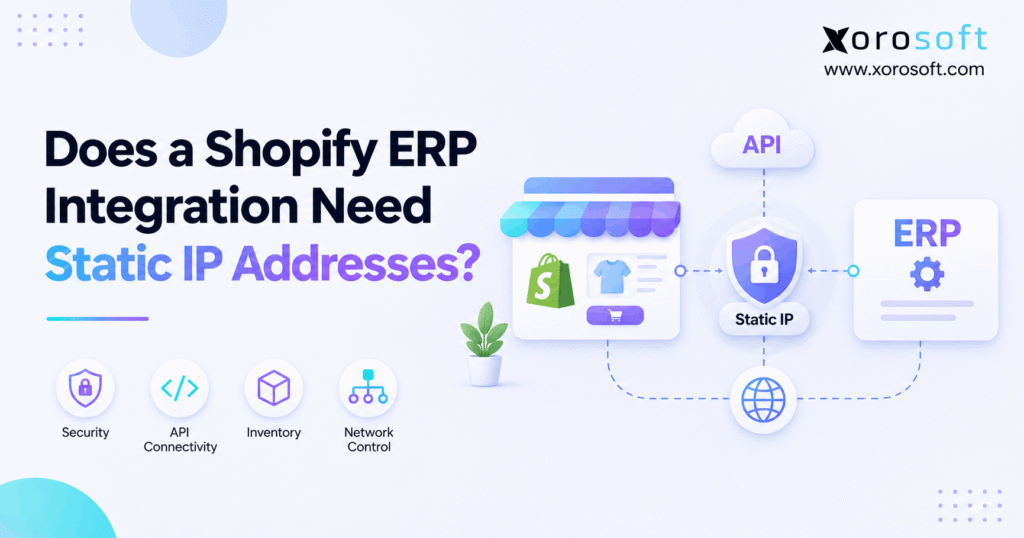
If you are searching for information about Shopify ERP static IP solutions, you are in the right place.
1. Secure ERP Connectivity Starts With the Right Network
Shopify ERP static IP requirements have become increasingly important as Shopify strengthens its application security controls. However, integrating Shopify with an ERP does not automatically mean businesses need to purchase static IP addresses for their offices, warehouses, or individual devices.
Instead, Shopify supports several network configurations, including fixed IP addresses, defined IP ranges, and authorized hosting networks. Therefore, the right approach depends on where the ERP integration sends its API requests.
1.1 Why Shopify ERP Static IP Requirements Matter
Growing ecommerce businesses depend on continuous communication between Shopify and their operational systems. For example, inventory changes, customer orders, shipment confirmations, and financial transactions must move between platforms.
However, incorrect network permissions can interrupt these processes even when the integration has valid credentials.
Consequently, businesses must evaluate network security alongside operational reliability.
1.2 Understanding the Real Integration Challenge
The main challenge is not obtaining a static IP address. Instead, businesses must ensure that legitimate integration requests originate from authorized infrastructure.
For instance, a retailer may operate five warehouses while its cloud ERP communicates with Shopify through a centralized application environment.
Therefore, purchasing fixed IP addresses for all five warehouses may provide no benefit to that integration.
Ultimately, businesses need to understand application ownership, network architecture, and Shopify’s security requirements before changing their infrastructure.
2. Understanding Static and Dynamic IP Addresses
Before evaluating Shopify ERP static IP requirements, businesses should understand how different network addresses work. Although both static and dynamic addresses support internet communication, they behave differently during infrastructure changes.
2.1 What Is a Static Outbound IP Address?
A static outbound IP address is a public network address that remains consistent until an administrator changes or replaces it.
For example, an ERP integration may send Shopify API requests through a dedicated network gateway. Consequently, the application owner can authorize the gateway’s public address.
Furthermore, fixed addresses generally make it easier to define narrow network permissions.
However, teams must ensure that the configured address represents the actual source of their outbound requests.
2.2 How Dynamic IP Addresses Work
Unlike fixed addresses, dynamic IP addresses can change over time. For example, cloud applications may distribute workloads across multiple servers, regions, or serverless environments.
As a result, individual API requests may originate from different addresses.
Nevertheless, changing addresses do not automatically make an integration insecure. Instead, application owners can use suitable network controls to authorize legitimate traffic.
| Factor | Static IP | Dynamic IP |
|---|---|---|
| Address stability | Consistent | Can change |
| Network management | Predictable | More flexible |
| Security configuration | Individual IP entries | Network-based authorization |
| Cloud scaling | Depends on architecture | Often flexible |
| Maintenance | Lower when stable | Depends on network design |
Therefore, businesses should select an architecture that balances access control with operational flexibility.
3. Shopify ERP IP Allowlisting Rules for 2026 and 2027
Shopify introduced mandatory IP allowlisting requirements for certain application categories to reduce the risks associated with exposed access tokens.
Previously, stolen credentials could potentially support unauthorized requests from unrelated networks. However, an enforced allowlist restricts where those credentials can access supported Shopify APIs.
3.1 Mandatory Shopify Security Deadlines
As of November 25, 2026, the following security milestones apply:
| Date | Requirement |
|---|---|
| November 12, 2026 | Public app bulk operations face allowlist enforcement |
| November 20, 2026 | Noncompliant public apps face delisting and new installation restrictions |
| November 20, 2026 | External custom apps require allowlists for new installations |
| January 1, 2027 | Existing external custom app allowlist requirements take effect |
| January 15, 2027 | Scheduled merchant-facing warnings for noncompliant public apps |
Importantly, the November 20 public app deadline did not automatically disable all existing installations.
Furthermore, Shopify’s November 5 announcement identifies April 1, 2027, as a later API enforcement milestone. However, its consolidated security calendar currently specifies non-expiring offline access token enforcement for that date.
Therefore, application owners should track network allowlisting and access token requirements separately through the official Shopify security documentation.
3.2 Which Shopify Applications Require IP Allowlists?
Although Shopify recommends IP allowlisting broadly, mandatory requirements depend on application ownership and distribution.
| Application category | IP allowlisting status |
|---|---|
| Public Shopify apps | Mandatory |
| Custom apps installed outside their owning organization | Mandatory |
| Organization-only custom apps | Recommended |
| Merchant-created apps | Recommended under these rules |
Consequently, Shopify ERP static IP requirements cannot depend solely on a merchant’s subscription plan or business size.
Instead, teams must identify the application category and follow the applicable custom app security requirements.
4. When Does Shopify ERP Integration Need a Static IP?
Although Shopify supports different network configurations, static addresses remain useful in several integration environments. Therefore, businesses should evaluate fixed IP infrastructure when they need predictable and narrowly controlled access.
4.1 On-Premises ERP Integration
Some businesses operate ERP applications on infrastructure that their internal IT teams manage.
For example, a wholesale distributor may run an integration service from a local server that communicates directly with Shopify.
In this situation, a fixed public outbound address can simplify authorization.
However, the company must also consider backup internet connections, recovery servers, and alternative processing locations.
Otherwise, a network outage could interrupt Shopify communication even when the ERP remains operational.
4.2 Dedicated Cloud Integration Infrastructure
Similarly, cloud applications can use fixed outbound addresses through appropriately configured network gateways.
For instance, several processing services may send external requests through a common gateway.
As a result, the integration owner can authorize a limited number of known public addresses instead of broader hosting networks.
Furthermore, this approach can simplify network change management and security reviews.
4.3 Additional Enterprise Security Requirements
Some organizations require fixed IP addresses through their internal security policies or contractual agreements.
For example, a security team may require predictable network origins for systems that exchange customer or financial data.
Consequently, static addresses may become necessary even when Shopify permits alternative configurations.
Therefore, businesses should distinguish platform requirements from additional corporate security obligations.
5. When Shopify ERP Static IP Addresses Are Unnecessary
Many businesses can maintain reliable Shopify connectivity without purchasing fixed IP addresses for their physical locations.
However, this depends on the infrastructure that actually handles their integration requests.
5.1 Cloud ERP Systems With Centralized Connectivity
Cloud ERP applications often communicate with external platforms through centrally managed infrastructure.
For example, employees may access their ERP from warehouses, offices, or remote locations. Meanwhile, the hosted application manages communication with Shopify.
Consequently, individual employee internet connections generally do not determine the integration’s outbound IP requirements.
This distinction matters because businesses sometimes invest in local network changes that do not address the actual integration architecture.
5.2 Dynamic Shopify ERP Integration and ASN Allowlisting
An Autonomous System Number, commonly called an ASN, identifies a network under a shared routing administration.
Therefore, applications with dynamic addresses can authorize suitable hosting provider networks instead of listing every individual IP address.
For example, serverless applications may process transactions through changing cloud resources.
Nevertheless, application owners should limit authorized networks to those their services require.
Furthermore, they should use geographic restrictions where appropriate because broader network access can increase security exposure.
5.3 Does Every Warehouse Need a Static IP?
Generally, no. For instance, Xorosoft provides a cloud ERP environment that connects inventory, purchasing, accounting, warehouse management, and ecommerce operations.
Consequently, businesses can coordinate workflows across multiple locations without assuming every warehouse needs an independent Shopify API connection.
However, merchants should confirm the integration’s specific network architecture with their implementation provider.
6. Shopify ERP Static IP vs ASN Allowlisting
Choosing between fixed addresses and ASN-based authorization requires balancing security, infrastructure flexibility, and ongoing maintenance.
Although both approaches can support Shopify integrations, they authorize different network scopes.
6.1 Comparing Shopify IP Allowlisting Options
The following comparison explains the main configuration choices.
| Configuration | Authorization scope | Typical use |
|---|---|---|
| Individual static IP | Specific public address | Dedicated integration infrastructure |
| CIDR range | Defined block of addresses | Controlled network ranges |
| ASN allowlisting | Authorized hosting network | Dynamic or serverless infrastructure |
| Hybrid configuration | Combined IP and ASN entries | Mixed integration environments |
Generally, individual IP addresses provide narrower network access.
In contrast, ASN authorization may include addresses that other customers of the hosting provider use.
Therefore, application owners should prefer specific addresses whenever practical.
6.2 Combining Static IP Addresses and ASNs
Shopify introduced combined IP and ASN allowlisting configurations on November 11, 2026.
Consequently, integrations that use different processing environments can authorize both fixed and dynamic network sources.
The current configuration supports:
- Up to 250 IP addresses or CIDR ranges.
- Up to 10 Autonomous System Numbers.
- Up to 10 countries for ASN restrictions.
However, country restrictions apply to ASN entries rather than individually configured IP addresses.
Furthermore, Shopify recommends minimizing broader network permissions wherever possible.
Businesses can review the official IP and ASN configuration announcement for additional technical details.
Ultimately, the best Shopify ERP static IP strategy authorizes only the infrastructure that the application genuinely needs.
7. How Shopify ERP Integration Architecture Changes Network Ownership
Different integration models distribute network responsibilities differently. Therefore, businesses should understand who controls application infrastructure before deciding how to manage IP allowlisting.
7.1 Native Cloud ERP Integration
A native cloud ERP integration connects Shopify with operational workflows within a centrally managed business environment.
For example, Xorosoft combines ecommerce connectivity with inventory management, purchasing, warehouse operations, and accounting through its ERP platform.
Consequently, growing businesses can reduce reliance on disconnected operational applications.
However, integrated functionality does not independently establish which outbound IP configuration a provider uses.
Therefore, merchants should confirm infrastructure responsibilities during implementation.
7.2 Middleware-Based Integration
Middleware creates an additional connection between Shopify and another system.
For instance, a connector may retrieve Shopify orders before transferring them into an ERP.
Consequently, the middleware provider may control the network addresses that Shopify receives.
Furthermore, separate inventory and order connectors may operate through different infrastructure.
Therefore, teams should document every application involved in the integration.
7.3 On-Premises and Hybrid ERP Architecture
Locally hosted systems may send API requests directly or through managed integration services.
As a result, merchants may share network responsibilities with external providers.
| Integration architecture | Typical network owner |
|---|---|
| Native cloud ERP | ERP provider |
| Middleware integration | Connector provider |
| On-premises ERP | Internal IT team |
| Serverless application | Application developer |
| Hybrid environment | Shared responsibility |
Ultimately, businesses should establish clear ownership instead of assuming that every network setting belongs to the merchant.
8. How Shopify IP Restrictions Affect Inventory and Fulfillment
Network restrictions can create operational consequences far beyond technical error messages. Therefore, businesses must assess how rejected API requests affect inventory, order management, fulfillment, and financial reporting.
8.1 Shopify Inventory Synchronization After IP Errors
Consider an ecommerce business with 100 available units of a product.
Suppose the warehouse ships 35 units. However, an unauthorized outbound address prevents the integration from publishing the updated stock quantity.
Consequently, Shopify may continue displaying 100 units rather than the remaining 65.
As a result, customers could purchase inventory that the business no longer holds.
Therefore, Shopify ERP static IP planning should include inventory synchronization monitoring and transaction reconciliation.
8.2 Order Processing and Warehouse Fulfillment
Similarly, rejected API requests can prevent an ERP from retrieving order information or publishing shipment confirmations.
For example, Shopify may continue accepting orders while the warehouse system receives incomplete demand records.
Consequently, employees may experience processing backlogs, delayed shipments, or additional manual work.
With Xorosoft, businesses can coordinate warehouse and fulfillment processes through an integrated warehouse management system.
However, reliable external connectivity remains essential for keeping commerce records current.
8.3 Financial and Accounting Consequences
Furthermore, integration failures can delay refunds, order adjustments, and financial transaction updates.
| Affected workflow | Potential business impact |
|---|---|
| Inventory updates | Incorrect stock availability |
| Order imports | Processing backlogs |
| Shipment confirmations | Outdated fulfillment status |
| Returns | Delayed inventory adjustments |
| Accounting | Reconciliation differences |
| Bulk operations | Incomplete scheduled processing |
Therefore, teams should measure transaction completeness rather than relying exclusively on successful API responses.
9. Shopify ERP Static IP Configuration Checklist
A reliable implementation begins with understanding how the integration communicates with Shopify. Therefore, businesses should complete network discovery and testing before enforcing new restrictions.
9.1 Identify Every Outbound API Request Source
First, document all application environments that communicate with Shopify.
For example, the network inventory should include:
- Production application servers.
- Background processing services.
- Inventory synchronization jobs.
- Scheduled financial processes.
- Third-party connectors.
- Recovery infrastructure.
- Serverless applications.
Next, identify whether each environment uses fixed or dynamic public addresses.
Furthermore, review less frequent workflows that ordinary daytime traffic may not reveal.
Consequently, the integration team can identify potential authorization gaps before they interrupt production.
9.2 Configure and Test Shopify IP Allowlisting
After documenting network sources, application owners should open the relevant application settings in the Shopify Dev Dashboard.
Then, they can configure approved addresses, CIDR ranges, ASNs, or a combination.
However, they should avoid unnecessarily broad permissions.
Additionally, Shopify provides tools for testing proposed allowlists against recent API traffic.
Nevertheless, historical traffic tests should not replace direct testing of recovery infrastructure and infrequent scheduled workloads.
For technical implementation guidance, consult Shopify’s official IP access restriction documentation.
9.3 Validate Critical ERP Workflows
Before enforcing changes, test the following processes:
- Retrieve Shopify orders.
- Publish inventory adjustments.
- Synchronize relevant product information.
- Update fulfillment records.
- Process returns and refunds.
- Execute required bulk operations.
- Validate backup integration environments.
- Reconcile affected transaction records.
Finally, review the results with both technical and operational teams.
As a result, the business can evaluate integration readiness based on complete workflows rather than basic connectivity alone.
10. Troubleshooting Rejected Shopify ERP API Requests
Even a previously reliable integration may encounter problems after an infrastructure change. Consequently, businesses need a structured process for diagnosing and resolving API access failures.
10.1 Why a Shopify ERP Integration Returns HTTP 403
An HTTP 403 response indicates that Shopify has refused access to a request.
For example, an enforced allowlist may reject traffic from an unauthorized public IP address.
However, other authorization issues can also produce access errors.
Therefore, teams should examine response details, application permissions, credentials, and network settings before making changes.
Furthermore, repeatedly retrying an unauthorized request generally does not resolve the underlying configuration problem.
10.2 What Happens When an ERP Outbound IP Changes?
Cloud migrations, network gateway replacements, and recovery events can change the public source addresses of integration requests.
Consequently, an existing Shopify ERP static IP configuration may no longer authorize legitimate traffic.
Therefore, infrastructure changes should include a review of Shopify network permissions.
In addition, teams should validate both primary and secondary environments before completing the change.
10.3 Restoring Connectivity Without Duplicate Transactions
Once API access returns, businesses must identify transactions that failed during the interruption.
However, replaying every request without checking its previous outcome may create duplicate records.
Instead, teams should use appropriate transaction identifiers and controlled recovery procedures.
| Integration symptom | Recommended action |
|---|---|
| HTTP 403 responses | Review authorization and network settings |
| Stale inventory | Restore updates and reconcile quantities |
| Missing orders | Recover affected transactions |
| Failed bulk jobs | Review security and processing requirements |
| Duplicate records | Investigate transaction replay controls |
Finally, validate order, inventory, and financial records before declaring the incident resolved.
11. Shopify Webhooks and Outbound API Security
Although webhooks and API requests both support ecommerce integrations, they operate in different communication directions.
Therefore, businesses should avoid treating them as identical network processes.
11.1 How Webhooks Differ From API Requests
Webhooks allow Shopify to send event notifications to subscribed applications.
For example, an order event may notify an ERP integration that a new transaction exists.
In contrast, an outbound API request allows the integration to retrieve or update information in Shopify.
Consequently, inbound webhook security and outbound API allowlisting require different controls.
| Communication method | Direction |
|---|---|
| Webhook delivery | Shopify to integration |
| Order retrieval | Integration to Shopify |
| Inventory update | Integration to Shopify |
| Fulfillment update | Integration to Shopify |
However, a webhook handler may also trigger additional Admin API requests.
Therefore, successful webhook delivery does not guarantee that every subsequent API operation will succeed.
11.2 Why Successful Webhooks Can Hide Integration Problems
Consider an integration that receives a new order notification successfully.
However, its background service cannot retrieve additional order details because Shopify rejects the outbound request.
Consequently, the event reaches the integration while the downstream business process remains incomplete.
Therefore, businesses should monitor the entire transaction workflow.
Furthermore, application developers should follow Shopify’s webhook verification guidance to protect incoming HTTPS event deliveries.
Ultimately, successful Shopify ERP static IP planning requires visibility across both incoming events and outgoing API operations.
12. How Different Industries Benefit From Reliable ERP Connectivity
Although every inventory-driven business needs reliable system connectivity, the consequences of integration failures vary across industries.
Therefore, businesses should assess network reliability in the context of their actual operational requirements.
12.1 Apparel and Fashion Businesses
Apparel retailers frequently manage products with numerous size and color combinations.
For example, a single product may have dozens of inventory variants.
Consequently, delayed inventory updates can expose unavailable sizes during promotions or seasonal demand peaks.
Furthermore, incomplete order information can complicate allocation across warehouses.
Therefore, integration testing should include variant-level inventory updates and location-specific fulfillment workflows.
12.2 Furniture and Sporting Goods Distributors
Furniture distributors often manage inventory across regional warehouses and fulfillment partners.
Similarly, sporting goods retailers may experience large seasonal changes in demand.
As a result, reliable connectivity supports accurate stock availability and coordinated order processing.
However, businesses should also verify that inventory location mappings remain correct after integration changes.
12.3 Food, Wholesale and Manufacturing
Food businesses must coordinate inventory availability alongside shelf-life and internal stock controls.
Meanwhile, wholesale distributors often manage customer orders, supplier purchases, and multiple sales channels.
Manufacturers face additional challenges involving materials, production schedules, and finished goods.
Consequently, these businesses benefit from shared operational information.
Xorosoft supports inventory-driven workflows across multiple industries, including distribution, apparel, furniture, food, and manufacturing.
Nevertheless, each implementation must address its own network security and transaction processing requirements.
13. Monitoring Shopify ERP Integration Reliability
Implementing an IP allowlist is only one part of maintaining reliable connectivity.
Instead, businesses should establish ongoing monitoring that connects technical failures with their operational consequences.
13.1 Integration Performance Metrics
First, teams should identify metrics that reveal whether transactions move successfully between Shopify and the ERP.
| Metric | What it measures |
|---|---|
| API rejection rate | Rejected integration requests |
| Order synchronization delay | Time required to import orders |
| Inventory update lag | Delay in publishing stock changes |
| Bulk operation success rate | Completed scheduled data jobs |
| Transaction backlog | Records awaiting processing |
| Reconciliation variance | Differences between system records |
Furthermore, businesses should define acceptable thresholds based on their own order volumes, inventory requirements, and service commitments.
However, generic industry averages cannot replace an understanding of individual operational needs.
13.2 Preparing for Infrastructure Changes
Network changes should follow a controlled implementation process.
For example, a hosting migration may introduce new outbound addresses even when the ERP application itself remains unchanged.
Consequently, technical teams should review proposed network changes before deployment.
Similarly, recovery testing should include inventory updates, order retrieval, and financial reconciliation.
Therefore, maintaining a documented Shopify ERP static IP strategy helps businesses avoid unexpected authorization problems.
13.3 Establishing Clear Incident Responsibilities
During an integration failure, several departments may become involved.
However, unclear responsibilities can delay recovery.
Instead, businesses should define ownership for technical diagnosis, transaction recovery, inventory reconciliation, and customer communication.
Furthermore, they should maintain an incident record that documents affected workflows and corrective actions.
Ultimately, clear ownership helps teams restore operational continuity more effectively.
14. How to Evaluate Shopify ERP Integration Providers
Businesses evaluating ERP platforms should consider integration reliability alongside operational functionality.
Although network security is important, it represents only one part of a successful implementation.
14.1 Questions About Shopify ERP Static IP Management
Before selecting or upgrading an integration, ask the provider the following questions.
| Evaluation question | Why it matters |
|---|---|
| Who owns the Shopify application? | Clarifies configuration responsibilities |
| Which infrastructure sends API requests? | Identifies authorized network sources |
| Do outbound addresses change? | Establishes maintenance requirements |
| How are backup environments tested? | Supports recovery planning |
| How are failed transactions identified? | Protects transaction completeness |
| Who manages reconciliation? | Clarifies operational ownership |
Additionally, request evidence that the relevant application security settings and business workflows have undergone appropriate testing.
However, avoid assuming that a general cloud security statement guarantees integration-specific readiness.
14.2 Evaluating Connected ERP Capabilities
Growing ecommerce businesses often rely on separate tools for inventory, accounting, purchasing, and warehouse operations.
Consequently, each additional application can introduce more integration dependencies.
Xorosoft provides a connected ERP environment that brings these workflows together while supporting Shopify and other sales channels.
Furthermore, businesses can review its available integrations when evaluating their broader technology requirements.
For Shopify-specific information, merchants can also visit the official Shopify App Store listing.
Nevertheless, businesses should independently confirm infrastructure-specific requirements during implementation.
14.3 When Does an ERP Upgrade Make Sense?
A single IP allowlisting issue does not necessarily justify replacing an ERP system.
However, recurring inventory discrepancies, manual purchasing, delayed accounting, and fragmented order management may indicate broader operational limitations.
Therefore, businesses should distinguish isolated network problems from structural system weaknesses.
Ultimately, an ERP upgrade makes more sense when it addresses persistent operational challenges rather than a single configuration issue.
15. Common Shopify ERP Static IP Mistakes to Avoid
Businesses can introduce unnecessary costs and operational risks when they approach network configuration without a complete understanding of their integration.
Therefore, avoiding common implementation mistakes is essential.
15.1 Authorizing the Wrong Network Sources
One common mistake involves purchasing static IP addresses for warehouses that do not send Shopify API requests.
For example, warehouse staff may access a hosted ERP while its application servers manage the actual integration.
Consequently, changing the warehouse’s internet address may accomplish nothing.
Furthermore, private server addresses may differ from the public outbound addresses Shopify receives.
Therefore, teams should identify actual request sources before configuring permissions.
15.2 Ignoring Backup Infrastructure and Scheduled Jobs
Another mistake involves testing only the primary application environment.
However, background services, overnight jobs, and recovery infrastructure may use different network sources.
As a result, integrations can appear healthy during ordinary operations while less frequent processes fail.
Therefore, implementation testing should cover all critical processing environments.
15.3 Treating Security as a One-Time Configuration
Network infrastructure changes as businesses grow.
Consequently, an allowlist that works today may require updates after future hosting or architecture changes.
| Common mistake | Better approach |
|---|---|
| Buying unnecessary static IPs | Map actual API request sources |
| Authorizing overly broad networks | Apply narrower permissions |
| Ignoring backup infrastructure | Test recovery environments |
| Confusing webhooks with API calls | Review communication directions |
| Retrying unauthorized requests repeatedly | Resolve the underlying cause |
| Ignoring missed transactions | Reconcile affected records |
| Neglecting network changes | Maintain configuration ownership |
Ultimately, effective network security requires continuous maintenance, testing, and operational accountability.
16. Conclusion: Choosing the Right Shopify ERP Static IP Strategy
Shopify ERP static IP requirements depend on application ownership, infrastructure, and applicable security obligations.
However, businesses do not universally need fixed IP addresses at their offices or warehouses. Instead, they should identify the infrastructure that communicates with Shopify and select the narrowest practical network authorization method.
Furthermore, organizations must test inventory synchronization, order processing, fulfillment, scheduled jobs, and financial reconciliation before relying on a new configuration.
For inventory-driven businesses, Xorosoft brings purchasing, inventory, accounting, warehouse management, and ecommerce operations together within a connected cloud ERP platform.
Nevertheless, reliable integration requires both appropriate network controls and consistent operational processes.
Ultimately, the objective is not simply to maintain an active API connection. Rather, it is to ensure that every important business transaction reaches the correct system accurately.
If your business struggles with disconnected Shopify, inventory, warehouse, and financial workflows, Book a Demo to explore an ERP environment aligned with your operational requirements.
Frequently Asked Questions
Does Shopify ERP integration require a static IP?
No. Shopify supports fixed public IP addresses, CIDR ranges and eligible hosting networks. However, affected applications must meet IP allowlisting requirements, regardless of whether they use static or dynamic addresses.
Is Shopify IP allowlisting mandatory?
Yes, for public apps and custom apps installed outside the owning organization, subject to Shopify’s rollout dates. However, merchant-created and organization-only custom apps fall under recommended rather than mandatory allowlisting rules.
Can Shopify ERP integrations use dynamic IP addresses?
Yes. For example, applications can authorize eligible hosting provider ASNs and restrict them by country. However, fixed addresses generally offer narrower network access and should take priority when practical.
Does every warehouse need a static IP?
No. If a cloud ERP sends Shopify API requests from centralized servers, warehouse internet addresses usually do not matter. Therefore, identify the actual integration request source before purchasing fixed addresses.
Why does my Shopify ERP integration return HTTP 403?
An enforced allowlist may reject requests from unauthorized network sources. However, other authorization problems can also cause 403 responses. Therefore, inspect response details, credentials, permissions and outbound network settings.
Does IP allowlisting affect Shopify webhooks?
The allowlist governs applicable Admin API requests, not inbound webhook delivery itself. However, follow-up API calls from webhook handlers must meet applicable network restrictions. Verify webhook signatures separately.
Who manages Shopify ERP static IP settings?
Usually, the application owner manages the allowlist, while the hosting or integration provider controls outbound infrastructure. Therefore, merchants should confirm responsibilities and ask how providers test network changes and recovery.
Recent Posts
-
 Does a Shopify ERP Integration Need Static IP Addresses?
-
 ERP With Native WMS for Ecommerce and Wholesale Distribution
-
 Quarantine Inventory Workflows: Inspection, Disposition and Availability
-
 What Inventory Is Eligible for Asset-Based Lending?
-
 Vendor-Managed Inventory Benchmarks 2026: Service, Stock, and Replenishment Measures