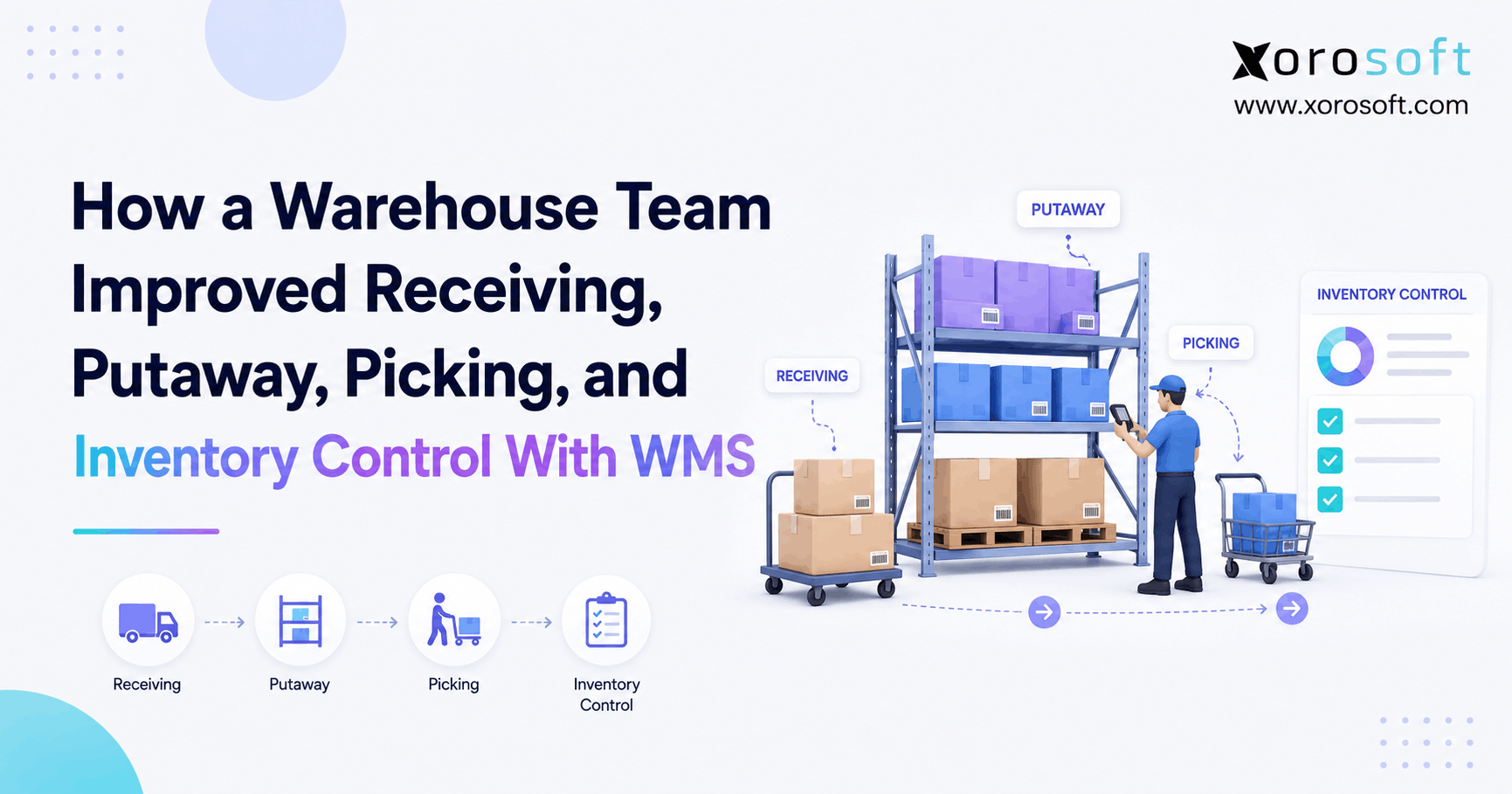
This article highlights a detailed warehouse management system case study.
1. From Warehouse Friction to Controlled Flow
This warehouse management system case study examines what changes when a growing warehouse replaces disconnected receiving, putaway, picking, and inventory-control processes with a coordinated WMS workflow. Instead of treating each warehouse activity as an isolated task, the operation begins connecting every physical inventory movement with a corresponding system transaction. As a result, employees gain clearer instructions while managers gain more reliable inventory information.
1.1 Why Small Warehouse Problems Become Bigger Operational Problems
At first, most warehouse problems look manageable. For example, an employee receives inventory but enters the receipt later, another worker chooses a storage location from memory, and a picker searches a second bin when the expected product is missing. However, each workaround creates another opportunity for physical inventory and system inventory to drift apart.
Moreover, these problems rarely stay inside the warehouse. If receiving records are wrong, purchasing cannot confidently understand what actually arrived. Likewise, if putaway records are incomplete, pickers may waste time looking for products. Consequently, inaccurate picking and stock balances can affect fulfillment, customer service, purchasing, forecasting, and accounting.
Therefore, warehouse improvement is not simply about working faster. Instead, it is about creating reliable controls from the moment products enter the building until the moment they leave.
1.2 What This Warehouse Management System Case Study Focuses On
Throughout this warehouse management system case study, the warehouse team follows four connected workflows:
- Receiving
- Putaway
- Picking
- Inventory control
Although these workflows perform different functions, they share one important dependency: accurate inventory data.
For example, receiving determines what entered the warehouse. Next, putaway determines where that inventory was stored. Subsequently, picking determines what inventory leaves a location. Finally, inventory control verifies whether physical quantities still match system quantities.
Therefore, improving only one part of the process rarely solves the entire problem.
2. Warehouse Management System Case Study: What Changed on the Warehouse Floor
Before WMS implementation, warehouse employees often relied on experience, paper documents, spreadsheets, and disconnected inventory records. However, once the team introduced controlled WMS workflows, inventory transactions moved closer to the physical work itself.
2.1 Before WMS: The System Followed the Warehouse
Previously, an employee might unload products first and update the system later. Similarly, a worker could move stock from one location to another and record the movement after completing several other tasks.
As a result, the physical warehouse could temporarily contain information that the software did not yet know.
That delay might only last a few minutes. Nevertheless, when dozens of employees perform hundreds or thousands of movements, small delays can become meaningful discrepancies.
2.2 After WMS: Warehouse Activity Created the Transaction
The central lesson from this warehouse management system case study is that WMS changes the relationship between physical work and system activity.
Instead of recording transactions later, workers can confirm them while performing the task.
For example:
Physical action → Scan → Validation → Transaction → Inventory update
Therefore, receiving a product can update inventory immediately. Likewise, completing putaway can confirm its location. In addition, completing a pick can reduce the stock available in that bin.
This approach creates a more disciplined warehouse environment because each major inventory movement has a digital checkpoint.
2.3 Barcode Scanning Became a Control Point
Barcode scanning is sometimes described only as a productivity feature. However, its more important role is verification.
For instance, the WMS can ask three practical questions:
- Are you at the correct location?
- Are you handling the correct SKU?
- Are you moving the correct quantity?
Consequently, the system can detect many mistakes while work is happening rather than after an order has already shipped.
For businesses that need these controls, XoroWMS provides warehouse-management capabilities that connect receiving, putaway, picking, inventory movement, and fulfillment workflows.
3. WMS Case Study: Improving Receiving at the First Inventory Touch
Receiving is the first major inventory-control point inside a warehouse. Therefore, if incorrect data enters the operation during receiving, every downstream process inherits that problem.
3.1 Why Manual Receiving Creates Inventory Risk
Consider a purchase order containing three SKUs. First, the supplier ships the goods. Next, the warehouse unloads them. However, the delivered quantities may not perfectly match the purchase order.
For example, the warehouse could receive:
| SKU | Ordered | Actually Received |
|---|---|---|
| SKU-A | 100 | 100 |
| SKU-B | 60 | 54 |
| SKU-C | 25 | 27 |
Without a controlled receiving process, somebody has to notice each difference and record it correctly.
Moreover, damaged products, unexpected SKUs, missing cartons, incorrect units of measure, and partial shipments add further complexity.
3.2 What the Warehouse Management System Case Study Reveals About Receiving
In this warehouse management system case study, the improved receiving workflow begins with what the business expected to receive.
First, the employee identifies the purchase order or inbound shipment. Next, the worker scans the arriving product. Then, the system validates the SKU and quantity against the expected receipt. Finally, exceptions can be recorded before the inventory moves deeper into the warehouse.
Therefore, the process becomes:
Purchase order → Arrival → Scan → Verify → Exception check → Receive → Stage → Putaway
As a result, inventory records begin with a more reliable inbound transaction.
3.3 Handling Receiving Exceptions Earlier
No warehouse receives perfect shipments every day. Therefore, a strong WMS workflow needs to support exceptions rather than assuming everything arrives exactly as ordered.
Common receiving exceptions include:
- shortages
- over-receipts
- damaged products
- incorrect SKUs
- missing cartons
- lot discrepancies
- serial-number discrepancies
- unexpected substitutions
For example, if 54 units arrive against an expected quantity of 60, the employee should record the actual receipt instead of automatically closing the complete quantity.
Consequently, purchasing teams can investigate supplier discrepancies using clearer information.
3.4 Capturing Traceability Information at Receiving
For certain industries, receiving also establishes lot, serial, batch, or expiry information.
Therefore, food, beverage, electronics, industrial, automotive, and manufacturing businesses may need more than a simple quantity confirmation.
In addition, capturing traceability information at receiving allows that data to follow inventory through storage, transfers, picking, and fulfillment.
Thus, receiving becomes both a physical process and a data-quality checkpoint.
4. Warehouse Management Case Study: How Directed Putaway Improved Location Control
After receiving, the next challenge is deciding where inventory should go.
Although manual putaway can work in a small warehouse, it becomes increasingly difficult as SKU counts, warehouse locations, employees, and order volumes grow.
4.1 Why Employee Memory Does Not Scale
Experienced warehouse employees often know where everything belongs. However, that knowledge creates operational dependence.
For example, a senior employee might know that fast-moving products belong near the primary pick zone while oversized inventory belongs in reserve storage. Meanwhile, a newer employee may not know those informal rules.
Consequently, the same SKU can end up in different locations depending on who performs the putaway.
Moreover, inconsistent putaway increases search time during picking and makes cycle counting harder.
4.2 How Directed Putaway Changes the Workflow
This warehouse management system case study uses directed putaway as another important control point.
First, the worker scans the received inventory. Next, the WMS evaluates available storage locations according to configured rules. Then, the system recommends or assigns an appropriate location. Finally, the employee scans the destination to confirm that the inventory physically reached that location.
Therefore, the process becomes:
Received inventory → WMS recommendation → Travel → Location scan → Putaway confirmation
As a result, inventory location becomes part of the transaction rather than something employees are expected to remember.
4.3 What Putaway Rules Can Consider
Depending on the WMS and configuration, putaway rules may consider factors such as:
- SKU characteristics
- warehouse zone
- bin capacity
- existing inventory
- item velocity
- product dimensions
- lot or expiry requirements
- reserve versus active picking locations
- replenishment requirements
However, more rules are not automatically better.
Instead, warehouse teams should configure only the rules that genuinely support the physical operation. Otherwise, unnecessary complexity can slow employees and make exception handling difficult.
4.4 Better Putaway Supports Better Picking
Putaway and picking are directly connected.
If inventory is stored in the correct location and that location is accurately recorded, the picker has a better chance of finding the expected product immediately.
Therefore, putaway accuracy does more than organize shelves. It creates the foundation for reliable outbound execution.
5. WMS Picking Case Study: Moving From Search to Verification
Picking is often where upstream warehouse errors finally become visible.
For example, the system may tell a worker to pick ten units from a location, yet only six are physically present. Although the picker sees the problem, the root cause could have occurred during receiving, putaway, replenishment, a previous pick, or an unrecorded transfer.
5.1 How the Warehouse Management System Case Study Improved Picking
In this warehouse management system case study, the WMS replaces open-ended searching with a controlled task.
First, the picker receives a digital instruction. Next, the system directs the worker to a location. Then, the employee scans the location and product. Finally, the correct quantity is confirmed before the task is completed.
Therefore, a basic picking workflow becomes:
Pick task → Location → Location scan → SKU scan → Quantity confirmation → Completion
This workflow does not eliminate every possible error. However, it introduces validation before the product moves to packing or shipping.
5.2 Why Location Scanning Matters
A product barcode confirms the item. Meanwhile, a location barcode confirms where the employee is working.
Both checks matter.
For example, the correct product may exist in two adjacent bins. If the picker removes stock from the wrong location without recording that movement, the total warehouse quantity may still look correct while individual bin balances become wrong.
Consequently, future pickers may encounter false availability.
5.3 Different Picking Methods Fit Different Warehouse Profiles
Not every warehouse should use the same picking strategy.
For example:
| Picking Method | Common Operational Fit |
|---|---|
| Discrete picking | Individual or specialized orders |
| Batch picking | Multiple orders with similar products |
| Wave picking | Orders released in planned groups |
| Zone picking | Larger warehouses divided by area |
| Cluster picking | Multiple orders picked in one coordinated route |
Therefore, the right method depends on order volume, product mix, warehouse layout, service requirements, and labor availability.
Moreover, warehouse teams should avoid choosing sophisticated picking methods simply because the WMS supports them. Instead, process design should follow operational requirements.
5.4 Picking Exceptions Should Create Information
When a picker reaches an empty location, the employee should not silently search elsewhere and continue.
Instead, the exception should create useful information.
For instance, the team may need to determine whether inventory was misplaced, incorrectly received, transferred without confirmation, or previously picked incorrectly.
As a result, picking becomes another mechanism for improving inventory control.
6. Warehouse Management System Case Study: Strengthening Inventory Control
Inventory accuracy is the result of many individual warehouse transactions. Therefore, cycle counting alone cannot create reliable inventory if receiving, putaway, picking, and transfers remain uncontrolled.
6.1 Every Physical Movement Needs a Digital Record
Consider the number of actions that can change inventory during a normal day:
- receiving
- putaway
- replenishment
- picking
- packing
- transfers
- returns
- adjustments
- manufacturing consumption
- manufacturing completion
If physical inventory changes without a corresponding digital transaction, the inventory record begins to drift.
Consequently, the primary inventory-control lesson from this warehouse management system case study is simple: movements must be recorded at the point of activity whenever practical.
6.2 Cycle Counting Becomes a Continuous Process
Traditional inventory counts often happen periodically. However, a WMS can support more frequent cycle-count workflows.
For example, fast-moving SKUs may be counted more frequently than slow-moving items. Similarly, high-value inventory may receive tighter controls.
Therefore, companies can identify discrepancies sooner instead of waiting for a large annual physical count.
Moreover, discovering a discrepancy sooner makes root-cause investigation easier because fewer transactions have occurred since the error was created.
6.3 Inventory Adjustments Need an Audit Trail
An inventory adjustment corrects a number. Nevertheless, a correction does not automatically solve the process that caused the error.
Therefore, adjustment workflows should capture useful context, including:
- SKU
- location
- original quantity
- corrected quantity
- reason
- user
- date and time
As a result, managers can identify repeated patterns instead of treating every adjustment as an isolated event.
6.4 Real-Time Visibility Requires Connected Transactions
Real-time inventory visibility does not mean refreshing a dashboard every few seconds.
Instead, it means warehouse transactions update inventory records when meaningful physical events occur.
For inventory-driven companies that want warehouse activity connected with broader business processes, XoroONE brings inventory, purchasing, warehousing, accounting, sales, manufacturing, and related workflows into a connected environment.
Therefore, the value comes from reducing gaps between operational systems rather than simply creating another place to view inventory.
7. WMS Implementation Results: Why the Four Processes Work Together
Warehouse teams sometimes try to solve receiving, picking, or inventory accuracy independently. However, the four workflows in this article operate as one chain.
7.1 How Warehouse Errors Travel Downstream
Consider the following sequence:
Receiving error
→ incorrect inventory quantity
Incorrect putaway
→ wrong inventory location
Wrong location balance
→ picking exception
Picking workaround
→ undocumented movement
Undocumented movement
→ inventory discrepancy
Therefore, the warehouse may see the final problem during cycle counting even though the original mistake happened days earlier during receiving.
This is why the warehouse management system case study must evaluate the complete inventory journey rather than one department.
7.2 Warehouse Management System Case Study KPIs That Matter
After WMS implementation, managers should measure operations instead of merely measuring software usage.
For receiving, useful KPIs include:
- receiving accuracy
- dock-to-stock time
- supplier discrepancy rate
- receipts processed per labor hour
Meanwhile, putaway KPIs can include:
- putaway cycle time
- location accuracy
- travel time
- putaways per labor hour
Similarly, picking metrics can include:
- picking accuracy
- lines picked per hour
- orders picked per hour
- pick exception rate
- pick cycle time
Finally, inventory-control metrics can include:
- inventory accuracy
- inventory variance
- adjustment frequency
- cycle-count completion
- shrinkage
Therefore, the best WMS measurements connect system changes to operational outcomes.
7.3 Avoid Inventing WMS ROI
A warehouse should not assume that implementing software will automatically create a specific percentage improvement.
For example, one operation may gain most of its value from improved inventory accuracy, while another may benefit primarily from faster receiving or better picking control.
Consequently, before-and-after performance should be measured against the company’s own baseline.
That approach produces a credible business case rather than an unsupported marketing claim.
8. ERP and WMS Integration: Connecting Warehouse Execution With the Business
Warehouse management does not operate independently from the rest of an inventory-driven company.
For example, purchasing creates the supply that receiving expects. Likewise, sales orders create demand that picking must fulfill. Meanwhile, accounting depends on reliable inventory transactions.
Therefore, businesses should decide whether WMS should operate as a standalone execution layer or as part of a more connected ERP environment.
8.1 Where ERP and WMS Responsibilities Meet
A WMS typically focuses heavily on warehouse execution.
Meanwhile, ERP typically extends across functions such as:
- purchasing
- accounting
- inventory
- sales orders
- manufacturing
- reporting
- forecasting
However, those boundaries increasingly overlap.
For example, an inbound receipt begins with purchasing but finishes inside the warehouse. Similarly, a shipment begins with an order but changes inventory and ultimately affects accounting.
8.2 What This Warehouse Management System Case Study Shows About Integration
The warehouse management system case study demonstrates why unnecessary system boundaries create additional reconciliation work.
If WMS says 500 units are available while ERP says 480, employees must determine which system is correct.
Therefore, integration quality matters almost as much as individual feature depth.
For businesses that need a broader cloud ERP environment, XoroERP can connect warehouse execution with inventory, purchasing, financial, manufacturing, and operational processes.
In addition, companies using multiple ecommerce, logistics, EDI, or business applications should examine how data moves between systems. Xorosoft’s integrations ecosystem is designed to support those connected operational workflows.
8.3 Why Fewer Manual Hand-Offs Matter
Every manual hand-off creates another opportunity for delay or error.
For example, if warehouse personnel export inventory from one system and accounting imports it into another, reconciliation becomes part of the operating model.
Instead, connected workflows allow one transaction to provide information to multiple business functions.
Consequently, the warehouse can become part of the operational system of record rather than an isolated execution environment.
9. Warehouse Management Case Study Use Cases Across Industries
The same WMS principles apply across industries. However, the details change according to product characteristics, order profiles, traceability needs, and sales channels.
9.1 Apparel and Fashion
Apparel warehouses often manage many variants across style, color, and size.
Therefore, barcode verification becomes especially useful because visually similar products can still represent different SKUs.
In addition, accurate location control helps prevent small variant errors from reaching customers.
Thus, the warehouse management system case study framework applies well to fashion businesses with large SKU catalogs.
9.2 Furniture and Large-Item Distribution
Furniture businesses often manage bulky products and specialized storage locations.
Consequently, putaway decisions may need to consider physical dimensions, handling requirements, warehouse zones, and delivery schedules.
Moreover, locating large inventory incorrectly can create substantially more travel and handling work than misplacing a small item.
9.3 Sporting Goods and Consumer Products
Sporting-goods warehouses may combine apparel-like variants with equipment, accessories, seasonal demand, and wholesale orders.
Therefore, different picking methods may be appropriate during different parts of the year.
Similarly, accurate replenishment becomes increasingly important when fast-moving products need continuous pick-face availability.
9.4 Food and Beverage
Food and beverage operations can add lot, batch, and expiry requirements.
Therefore, receiving needs to capture more than quantity alone.
Moreover, inventory rotation and traceability may influence putaway and picking logic.
Consequently, WMS configuration should reflect the product-control requirements of the business.
9.5 Wholesale Distribution
Wholesale businesses frequently combine larger order quantities with customer-specific requirements, EDI transactions, multi-warehouse inventory, purchasing, and replenishment.
Therefore, warehouse execution must remain aligned with order management and inventory availability.
Companies evaluating broader operational requirements can review Xorosoft’s industry and business solutions to understand how warehouse workflows connect with different inventory-driven operating models.
9.6 Shopify and Ecommerce Operations
Ecommerce businesses often experience a different problem: transaction volume.
For example, a small picking inefficiency repeated across hundreds or thousands of daily order lines can become significant.
Therefore, Shopify merchants need warehouse inventory, order status, and fulfillment activity to stay synchronized with their ecommerce operations.
Xorosoft is also available through the Shopify App Store, providing a relevant connection point for Shopify businesses evaluating ERP and warehouse operations.
10. WMS Implementation Case Study: Mistakes That Can Undermine Results
A WMS can create stronger process controls. However, software cannot compensate for poor process design, inaccurate data, or inadequate implementation.
10.1 Automating a Bad Process
One of the most common mistakes is digitizing an inefficient workflow without questioning why the workflow exists.
For example, if employees complete unnecessary warehouse steps before implementation, recreating those same steps in software simply makes the inefficient process electronic.
Therefore, this warehouse management system case study should be viewed as a process-improvement exercise first and a software exercise second.
10.2 Poor Location Data
Directed putaway and picking depend on accurate warehouse locations.
Consequently, location naming, zones, capacities, and storage rules should be reviewed before employees begin system-directed work.
Otherwise, the software may consistently direct employees according to bad data.
10.3 Weak Item-Master Data
Incorrect barcodes, units of measure, dimensions, pack sizes, or product attributes can cause errors across receiving and fulfillment.
Therefore, item-master cleanup should happen before implementation whenever possible.
Moreover, businesses should define ownership for maintaining that data after launch.
10.4 Ignoring Exceptions
Normal workflows are easy to design.
However, real warehouses encounter damaged goods, partial shipments, missing inventory, unexpected products, short picks, returns, substitutions, and count variances.
Therefore, implementation testing must include exceptions.
Otherwise, employees will create manual workarounds as soon as unusual situations appear.
10.5 Insufficient Warehouse Testing
Office-based testing alone is not enough.
Instead, warehouse employees should test scanners, labels, locations, carts, pallets, Wi-Fi coverage, printers, and real movement paths.
Consequently, operational issues can be identified before go-live rather than during peak fulfillment.
10.6 Tracking the Wrong Success Metrics
Logging into the system is not the business outcome.
Therefore, adoption statistics should be paired with operational KPIs such as inventory accuracy, receiving accuracy, picking accuracy, throughput, exception rates, and order performance.
Ultimately, a successful implementation changes how reliably the warehouse operates.
11. Choosing the Right WMS for a Growing Warehouse
Warehouse software selection should begin with processes rather than a long feature checklist.
11.1 Start With the Workflow
Before choosing software, document how the warehouse handles:
- receiving
- staging
- putaway
- replenishment
- picking
- packing
- shipping
- transfers
- returns
- cycle counts
- lot or serial tracking
- multi-warehouse inventory
Then, identify which processes are currently creating delays, errors, manual work, or reconciliation.
Therefore, the final warehouse management system case study lesson is that software should solve specific operational problems rather than introduce technology for its own sake.
11.2 Evaluate the Complete Operational Stack
Next, determine what sits outside the warehouse.
For example:
- Shopify
- Amazon
- wholesale orders
- EDI
- accounting
- purchasing
- manufacturing
- forecasting
- reporting
If warehouse activity must constantly synchronize with these systems, integration should become a major selection criterion.
11.3 When an Integrated Platform Makes Sense
A standalone WMS can be appropriate when warehouse execution is the primary requirement.
However, an integrated ERP and WMS environment may make more sense when the business also needs centralized purchasing, inventory, accounting, manufacturing, ecommerce, and reporting.
For organizations evaluating how those capabilities fit together, Xorosoft customer case studies can provide additional context around real operational use cases.
11.4 When a Business May Not Need Full WMS Yet
Not every warehouse requires advanced WMS capabilities.
For example, a business with one simple location, a small SKU catalog, low transaction volume, and reliable inventory processes may be well served by lighter inventory-management tools.
Therefore, the decision should depend on complexity rather than company size alone.
In other words, the important question is not whether WMS is more sophisticated than spreadsheets.
Instead, ask whether the operational cost of the existing process now exceeds the cost and complexity of introducing stronger warehouse controls.
12. When the Physical Warehouse and the System Finally Agree
This warehouse management system case study shows that warehouse improvement is not primarily about replacing paper with scanners. Instead, the real change happens when receiving, putaway, picking, transfers, and inventory control become connected transactions.
First, accurate receiving establishes what actually entered the warehouse. Next, controlled putaway establishes where that inventory went. Then, scan-guided picking controls what leaves each location. Finally, continuous inventory verification helps confirm whether physical inventory and digital records remain aligned.
Therefore, the strongest WMS environment creates control at every meaningful inventory handoff.
For growing inventory-driven companies, Xorosoft connects real-time warehouse management with inventory, purchasing, accounting, ecommerce, manufacturing, and multi-channel operations. Consequently, teams can reduce the number of disconnected systems used to manage the same inventory journey.
If receiving delays, picking exceptions, inaccurate locations, or inventory discrepancies are becoming harder to manage, the next step is to evaluate the complete workflow rather than another isolated workaround.
Book a Demo to see how connected warehouse and ERP workflows can support your specific operation.
Frequently Asked Questions
What is a warehouse management system case study?
A warehouse management system case study explains how warehouse processes change after a business introduces WMS technology. Typically, it examines workflows such as receiving, putaway, picking, inventory control, and fulfillment. More importantly, a useful case study connects those workflow changes with operational outcomes such as better inventory visibility, fewer process gaps, stronger traceability, or more consistent warehouse execution.
How does a WMS improve warehouse receiving?
A WMS improves receiving by connecting incoming inventory with expected purchase orders or shipment information. First, employees can scan products and verify quantities. Additionally, the system can capture shortages, over-receipts, damaged goods, lots, or serial numbers. As a result, inventory records can be updated closer to the physical receiving event, which helps prevent incorrect information from moving downstream.
What is directed putaway in a warehouse management system?
Directed putaway uses WMS rules to recommend or assign an appropriate storage location for received inventory. For example, the system may consider the SKU, warehouse zone, bin capacity, existing inventory, or storage requirements. Consequently, employees rely less on memory when selecting locations. In addition, confirming the destination with a barcode scan helps keep physical inventory aligned with recorded warehouse locations.
How does WMS improve picking accuracy?
WMS improves picking accuracy by guiding employees through controlled digital tasks. First, the system directs a picker to the expected location. Next, location and product scans can verify that the employee is handling the correct inventory. Finally, quantity confirmation completes the transaction. Therefore, potential errors can be identified during picking instead of being discovered later during packing, shipping, or customer delivery.
How does WMS improve inventory control?
A WMS improves inventory control by recording physical movements such as receiving, putaway, replenishment, picking, transfers, and adjustments as inventory transactions. Moreover, cycle counting can identify differences more frequently. Consequently, warehouse teams can investigate discrepancies closer to the point where they occurred. However, accurate inventory still depends on disciplined processes, reliable data, and employees completing the required transactions correctly.
When should a growing business implement WMS?
A growing business should consider WMS when warehouse complexity begins creating recurring operational problems. For example, frequent inventory discrepancies, paper pick lists, difficult cycle counts, slow receiving, multiple warehouses, rising picking errors, or heavy dependence on employee memory are strong warning signs. Ultimately, WMS becomes valuable when the cost and risk of manual warehouse processes begin limiting reliable growth.
Search
Categories
- & INTEGRATIONS 1
- ACCOUNTING & FINANCIALS 62
- Business 99
- COMPETITOR & BUYER INTENT 98
- E-COMMERCE & CHANNEL INTEGRATIONS 72
- ECommerce 3
- Ecommerce + Wholesale Complexity 7
- ERP 1,213
- FINANCE & ACCOUNTING 9
- INVENTORY & OPERATIONS 78
- Inventory Management Software 118
- OPERATIONS & INVENTORY 96
- PROCUREMENT & SUPPLY CHAIN 9
- PURCHASING & SUPPLY CHAIN 62
- SHOPIFY ERP 74
- SHOPIFY STOCKY OPPORTUNITY 2
- Software 1
- WAREHOUSE & FULFILLMENT WMS 92
- WHOLESALE & DISTRIBUTION 79
- WMS 66
- WMS & FULFILLMENT 15
- WMS & WAREHOUSE 52
Recent Posts
-
 Composable ERP Architecture: How to Define System Boundaries and Data Ownership
 -
 Shopify ERP vs Inventory App: When Should You Upgrade?
 -
 Inventory Turnover Benchmarks by Industry
 -
 Discrete Manufacturing Software for Managing BOMs, Production, Inventory, Purchasing, and Costing
 -
 Autonomous ERP Workflows: Where Human Approval Still Belongs