Discover how businesses are streamlining operations with autonomous ERP workflows.
1. Why Autonomous ERP Workflows Need Clear Approval Boundaries
Autonomous ERP workflows can reduce repetitive work, accelerate decisions, and help operations teams respond to changes faster. However, the goal should not be to remove people from every process. Instead, businesses need to decide where AI can act independently, where it can operate within limits, and where a person must still authorize the final decision.
For example, an ERP agent may identify that a SKU is approaching a stockout. Then, it can review inventory, open purchase orders, supplier lead times, expected demand, and warehouse availability. Consequently, it may recommend—or even prepare—the next purchase order.
However, a $500 reorder from an approved supplier should not necessarily follow the same approval process as a $100,000 commitment to a new supplier.
Therefore, the central question is no longer simply:
Can AI automate this ERP process?
Instead, businesses should ask:
Under what conditions should AI be allowed to execute it?
Ultimately, effective ERP autonomy follows a simple principle:
Automate the routine. Constrain the consequential. Escalate the exceptional.
1.1 Why Human Approval Is Still Part of Autonomous ERP
Although AI can evaluate more operational data than a person can review manually, automation does not remove business accountability. For example, financial exposure, regulatory obligations, customer commitments, supplier relationships, and unusual operating conditions can require judgment that should not be delegated without limits.
Therefore, autonomous ERP workflows should treat human approval as a control mechanism rather than an operational bottleneck.
Moreover, humans should not necessarily approve every transaction. Instead, they should focus on transactions where their judgment materially changes the risk.
1.2 The Real Objective Is Controlled Autonomy
Historically, ERP systems helped employees record and process transactions. Later, workflow automation allowed systems to execute predetermined rules.
Now, AI agents can potentially interpret context before deciding what to do next. Consequently, businesses can move from simple automation toward controlled autonomy.
However, more autonomy is not automatically better.
Instead, the best operating model gives software enough authority to remove repetitive decisions while preserving clear boundaries around consequential actions.
2. How Autonomous ERP Workflows Actually Work
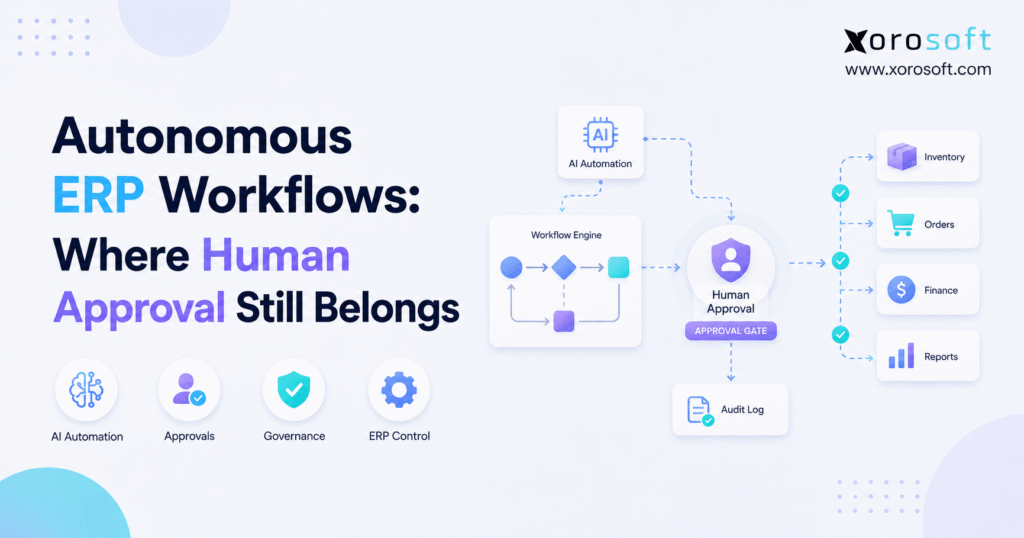
Autonomous ERP workflows combine operational data, AI reasoning, business rules, permissions, approval limits, and transaction execution.
Therefore, an effective workflow generally follows this sequence:
Observe → Analyze → Reason → Plan → Validate → Act → Verify → Escalate
First, the system observes an operational event. For example, inventory may fall below a projected requirement.
Next, the agent analyzes relevant information. Therefore, it may examine current inventory, demand forecasts, open orders, warehouse balances, supplier lead times, and purchasing history.
Then, it determines what action makes operational sense.
However, before execution, the action should pass through business rules and permission checks.
Finally, if the transaction sits inside the agent’s authority, the system can act. Otherwise, it should escalate the decision to the correct person.
2.1 Recommendation Is Different From Execution
A crucial distinction exists between an AI recommendation and an AI transaction.
For example, an AI agent might say:
Order 800 additional units from Supplier A.
That is a recommendation.
However, creating the purchase order is another level of autonomy. Furthermore, automatically issuing the PO to the supplier represents an even higher level.
Therefore, businesses should define separate permissions for:
- Identifying a problem
- Recommending an action
- Preparing a transaction
- Approving a transaction
- Executing a transaction
As a result, companies can increase automation gradually instead of jumping immediately to unrestricted execution.
2.2 Agentic ERP Does Not Mean Unlimited Authority
Agentic ERP systems can potentially analyze context, pursue goals, and coordinate several actions. Nevertheless, an AI agent should still operate within business policies.
For example, a purchasing agent might be allowed to prepare any PO. However, it may only release POs under $3,000 without approval.
Therefore, agentic capability and operational authority should always be treated separately.
3. The Five Levels of Autonomous ERP Workflows
Businesses do not need to move directly from manual processing to complete autonomy. Instead, autonomous ERP workflows can mature through five practical levels.
3.1 Level 1: Observe
At the first level, AI watches operations and identifies meaningful conditions.
For example, it can:
- Detect stockout risk
- Identify abnormal inventory movements
- Flag overdue purchase orders
- Surface warehouse delays
- Detect unusual price changes
However, people still investigate and decide what should happen.
3.2 Level 2: Recommend
Next, AI evaluates available information and recommends an action.
For example:
“Reorder 600 units from the approved supplier because projected demand will exceed available stock in 12 days.”
Therefore, employees spend less time gathering information.
However, they still decide whether to proceed.
3.3 Level 3: Prepare
At the next level, the AI prepares the transaction.
For example, the system may:
- Draft a purchase order
- Prepare an inventory transfer
- Create a proposed journal entry
- Prepare a production order
- Draft a supplier communication
Consequently, employees can focus on review instead of data entry.
3.4 Level 4: Execute Within Limits
At Level 4, the AI receives controlled execution authority.
For example:
Approved supplier + standard SKU + normal price + PO below $3,000 = automatic release.
However, if any condition falls outside the defined policy, the transaction should escalate.
Therefore, humans manage exceptions rather than every routine transaction.
3.5 Level 5: Exception-Based Operations
At the highest practical level, routine workflows execute automatically while people focus primarily on unusual situations.
Consequently, operations teams move away from transaction-by-transaction management.
Instead, they manage policies, exceptions, strategic decisions, and performance.
4. A Green-Amber-Red Model for Autonomous ERP Workflows
A practical way to govern autonomous ERP workflows is to classify actions into Green, Amber, and Red zones.
4.1 Green: AI Can Execute Automatically
Green-zone processes are usually repetitive, predictable, low risk, and reversible.
For example, appropriate Green workflows may include:
- Generating operational reports
- Creating routine warehouse tasks
- Sending supplier reminders
- Flagging anomalies
- Updating non-sensitive statuses
- Preparing routine documents
- Matching clearly corresponding records
Therefore, requiring managerial approval for every Green action would usually create unnecessary friction.
4.2 Amber: AI Can Act Within Defined Limits
Amber workflows involve greater operational or financial consequences. However, businesses can still automate them when clear limits exist.
For example, Amber processes may include:
- Purchase orders
- Inventory replenishment
- Warehouse transfers
- Invoice matching
- Inventory allocation
- Production planning
- Order-routing decisions
Consequently, the system needs thresholds such as:
- Maximum transaction value
- Maximum quantity
- Allowed price variance
- Approved supplier status
- Inventory availability
- Margin limits
- Confidence level
Therefore, AI can execute ordinary transactions while unusual ones move to human review.
4.3 Red: Human Approval Is Mandatory
Red-zone decisions carry significant financial, operational, regulatory, or strategic exposure.
For example:
- Large purchase commitments
- Supplier banking changes
- Significant inventory write-offs
- Major journal entries
- Customer credit overrides
- New supplier activation
- Large pricing changes
- Material policy exceptions
However, AI can still help with these decisions.
For example, it can gather supporting data, highlight unusual conditions, calculate the financial impact, and recommend an action.
Nevertheless, a qualified person should authorize execution.
5. Where Autonomous ERP Workflows Can Act Without Approval
The easiest place to introduce autonomous ERP workflows is usually repetitive administrative work.
5.1 Monitoring and Exception Detection
First, AI can continuously monitor operational data.
For example, it can identify:
- Falling inventory
- Late supplier shipments
- Unusual warehouse activity
- Demand changes
- Order backlogs
- Purchase-price anomalies
Consequently, employees no longer need to manually search for every emerging problem.
5.2 Routine Notifications
Similarly, AI can automate routine communications.
For example, the system may send:
- Internal reminders
- Receiving notifications
- Supplier follow-ups
- Missing-document requests
- Shipment-status alerts
However, businesses should still control the content and categories of communication the system can send automatically.
5.3 Warehouse Task Creation
In addition, low-risk warehouse decisions are strong candidates for automation.
For example, AI may automatically create:
- Replenishment tasks
- Cycle-count tasks
- Picking priorities
- Receiving investigations
- Stock-movement tasks
Therefore, warehouse managers can focus on exceptions rather than manually assigning routine work.
6. Threshold-Based Control in Autonomous ERP Workflows
The greatest value often appears between complete manual approval and complete autonomy.
Therefore, autonomous ERP workflows should use thresholds that reflect the actual risk of each transaction.
6.1 Purchasing and Procurement
Consider a growing apparel distributor.
First, an AI agent detects that a high-volume SKU may fall below safety stock.
Then, it evaluates demand, current inventory, incoming purchase orders, supplier lead times, historical purchasing patterns, and minimum order quantities.
Consequently, it determines that 900 units should be reordered.
If the supplier is approved, pricing is normal, and the transaction is only $1,800, the PO may fall inside the automatic authorization limit.
However, if the order becomes $18,000, the purchasing manager may need to approve it.
A connected platform such as XoroERP can provide the purchasing, inventory, accounting, and operational context required to establish these rules around a common dataset.
6.2 Inventory Management
Similarly, AI can support:
- Replenishment
- Inventory allocation
- Reservations
- Warehouse transfers
- Cycle-count investigation
- Inventory corrections
However, transaction value matters.
For example, automatically correcting a one-unit discrepancy for a low-value item may be acceptable.
By contrast, automatically writing off $60,000 of inventory should require review.
Therefore, approval policies should consider both quantity and financial value.
6.3 Accounting and Finance
Finance processes are especially suitable for controlled autonomy.
For example, AI can assist with:
- Invoice extraction
- Account coding
- Three-way matching
- Reconciliation
- Variance detection
- Journal preparation
Suppose an invoice exactly matches the PO and goods receipt. In that case, automatic processing may be appropriate.
However, if the price is 20% above the purchase order, the transaction should escalate.
Therefore, automation should strengthen financial controls rather than bypass them.
6.4 Warehouse Management
Meanwhile, warehouse operations generate thousands of repetitive decisions.
Therefore, an AI-enabled XoroWMS environment can support workflows involving receiving, replenishment, picking, inventory movement, cycle counts, and fulfillment while preserving approval rules around material adjustments.
For example, AI may reprioritize picking tasks automatically.
However, a significant inventory adjustment should still move to a warehouse manager.
6.5 Manufacturing Operations
Manufacturing creates another strong use case.
For example, AI may:
- Identify material shortages
- Recommend production sequencing
- Prepare work orders
- Detect BOM inconsistencies
- Suggest procurement requirements
- Identify production bottlenecks
However, automatically substituting a critical component may carry quality, regulatory, or customer implications.
Therefore, material substitutions and major production-plan changes may remain approval-based.
6.6 Shopify and Multichannel Ecommerce
Ecommerce operations create fast-moving decisions across inventory, orders, warehouses, and purchasing.
Therefore, businesses connecting Shopify and other channels through Xorosoft Integrations can create a stronger operational foundation for automated order and inventory workflows.
For example, an agent might monitor Shopify demand, compare inventory across warehouses, and recommend replenishment.
In addition, merchants evaluating Xorosoft’s ecommerce connection can find the application through the Shopify App Store.
However, unusual order values, inventory shortages, or channel conflicts may still require human intervention.
7. Where Human Approval Belongs in Autonomous ERP Workflows
Although autonomous ERP workflows can eliminate many routine approvals, certain decisions deserve stronger controls.
7.1 High-Value Financial Commitments
First, businesses should establish limits around purchase commitments, payments, credit decisions, and accounting entries.
For example, a $700 routine purchase may execute automatically.
However, a $70,000 commitment may require multiple approvers.
Therefore, value-based thresholds remain important even when AI understands the context.
7.2 New Suppliers and Sensitive Master Data
New suppliers create additional risk because the business has less historical information.
Furthermore, changes to banking information can introduce substantial financial exposure.
Therefore, supplier setup, payment instructions, and sensitive master-data changes should normally require human verification.
7.3 Large Inventory Adjustments
Inventory adjustments directly affect operational accuracy and financial reporting.
Consequently, large discrepancies deserve investigation before posting.
For example, an agent may identify the likely cause of an inventory variance.
However, the warehouse or finance team should still authorize material write-offs.
7.4 Policy Exceptions
No automation model can predict every operating condition.
Therefore, when a transaction violates established policy, human escalation should be the default.
For example, AI may recommend buying from a non-approved supplier because every approved supplier is out of stock.
Nevertheless, the agent should explain the situation and request authorization rather than silently bypass policy.
8. How to Set Approval Thresholds for Autonomous ERP Workflows
Approval thresholds should reflect risk rather than management convenience.
Therefore, businesses should build autonomous ERP workflows around a systematic approval model.
8.1 Evaluate Financial Exposure
First, determine the maximum financial impact if the action is wrong.
For example, automatically releasing a $250 PO presents different exposure from releasing a $250,000 PO.
Therefore, transaction value provides a logical starting point.
8.2 Measure Reversibility
Next, ask whether the transaction can be reversed easily.
For example, creating an internal task is highly reversible.
However, sending a large supplier payment is not.
Consequently, irreversible actions deserve tighter control.
8.3 Evaluate Frequency and Predictability
Routine transactions provide better automation candidates.
For example, a company may purchase the same packaging material every week from the same supplier at a contracted price.
Therefore, that workflow can generally receive greater autonomy than an unusual capital purchase.
8.4 Define Confidence Requirements
In addition, AI confidence can become an approval criterion.
For example, a high-confidence invoice match may move automatically.
However, ambiguous matching should escalate.
Consequently, uncertainty itself becomes a risk signal.
8.5 Review Thresholds Regularly
Finally, thresholds should not remain unchanged forever.
Instead, businesses should compare automatic decisions with eventual outcomes.
Therefore, strong performance may justify additional autonomy, while repeated exceptions may require tighter limits.
9. Governance for Autonomous ERP Workflows
Technology alone cannot make autonomous ERP workflows safe.
Instead, governance determines how much authority each agent receives.
9.1 Role-Based Permissions
AI agents should receive explicit permissions.
Therefore, a purchasing agent should not automatically gain accounting or payment authority simply because those modules share the same ERP.
Similarly, permissions should reflect the responsibilities of the workflow.
9.2 Segregation of Duties
Additionally, businesses should preserve segregation of duties.
For example, the same agent should not necessarily create, approve, and pay a material supplier invoice.
Therefore, automation should respect existing control principles.
9.3 Complete Audit Trails
Every meaningful autonomous transaction should be reconstructable.
Therefore, businesses should record:
- What the agent observed
- Which information it evaluated
- Which rule applied
- What action it recommended
- What action it executed
- Whether approval occurred
- Who approved or overrode it
Consequently, teams can investigate unusual outcomes rather than treating AI decisions as a black box.
9.4 Controlled AI Access to ERP Data
As AI agents become more connected to ERP systems, access architecture becomes increasingly important.
Therefore, businesses exploring agent-to-system connectivity can use technologies such as the Xorosoft AI MCP Server to think about governed access between AI tools and operational information.
However, connectivity should never mean unlimited authority.
Instead, every agent should operate through explicit permissions and controlled actions.
10. Building an AI-Ready Foundation for Autonomous ERP Workflows
Autonomous ERP workflows are only as reliable as the operational foundation beneath them.
Therefore, businesses should improve data and process consistency before increasing AI authority.
10.1 Connected Data Matters
An autonomous purchasing decision may depend on:
- Inventory
- Open sales orders
- Forecast demand
- Incoming purchase orders
- Supplier lead times
- Warehouse balances
- Customer commitments
- Accounting data
Therefore, fragmented systems make autonomous decisions harder.
A connected operational platform such as XoroONE can help bring multiple business functions into a coordinated environment rather than forcing teams to reconcile disconnected applications manually.
10.2 Business Rules Must Be Explicit
Similarly, AI cannot reliably follow policies that exist only inside employees’ heads.
Therefore, businesses should document:
- Approval limits
- Supplier rules
- Inventory thresholds
- Customer-credit policies
- Warehouse procedures
- Purchasing tolerances
As a result, automation can operate against explicit expectations.
10.3 Accurate Master Data Is Essential
Poor data creates poor automated decisions.
For example, incorrect lead times can generate bad reorder recommendations.
Similarly, inaccurate warehouse inventory can create unnecessary transfers.
Therefore, businesses should improve master-data quality before giving AI execution authority.
11. What Autonomous ERP Workflows Look Like in Practice
Consider a sporting-goods distributor operating four warehouses.
Demand for one product suddenly rises.
First, the ERP agent identifies the demand change.
Next, it checks inventory across all locations.
Then, it examines open purchase orders and incoming receipts.
Meanwhile, it compares projected demand with available-to-promise inventory.
Afterward, it evaluates approved suppliers and calculates the required reorder quantity.
Finally, it prepares the purchase order and evaluates the transaction against approval rules.
11.1 Green Scenario
The order is $1,400 from an approved supplier at the contracted price.
Therefore:
AI releases the PO automatically.
11.2 Amber Scenario
The order is $14,000 and exceeds the normal automatic authorization limit.
Therefore:
AI prepares the PO and routes it to the purchasing manager.
11.3 Red Scenario
The only available supplier is new, the order value is $85,000, and payment instructions have changed.
Therefore:
AI stops execution and escalates the decision for human review.
Importantly, the Red scenario does not represent automation failure.
Instead, the system has correctly recognized where its authority ends.
12. Who Needs Autonomous ERP Workflows?
Autonomous ERP workflows become increasingly valuable as operational complexity grows.
For example, they are especially relevant to businesses managing:
- Large SKU catalogs
- Multiple warehouses
- High order volumes
- Purchasing teams
- Ecommerce and wholesale channels
- EDI customers
- Manufacturing
- Frequent inventory movements
- Repetitive finance workflows
Companies across these operating models can explore the range of industries Xorosoft serves to see how ERP requirements differ by business type.
However, not every company needs advanced autonomy immediately.
12.1 Who Should Wait Before Increasing Automation?
Businesses should be cautious when:
- Inventory accuracy is poor
- Master data is inconsistent
- Processes are undocumented
- Systems are heavily disconnected
- Approval policies are unclear
- Employees frequently correct ERP data manually
Therefore, the first priority should be improving the operational foundation.
Afterward, the business can safely increase automation.
13. Common Mistakes With Autonomous ERP Workflows
Poorly designed autonomous ERP workflows can make existing problems move faster.
Therefore, businesses should avoid several common mistakes.
13.1 Automating a Broken Process
First, automation cannot compensate for a poorly designed workflow.
Therefore, businesses should fix the process before automating it.
13.2 Giving AI Too Much Authority Too Early
Second, companies should increase autonomy gradually.
For example, begin with recommendations.
Then, allow transaction preparation.
Afterward, enable execution within conservative thresholds.
Consequently, teams can measure results before increasing authority.
13.3 Ignoring Data Quality
Third, bad source data can undermine even sophisticated AI.
Therefore, inventory, supplier, customer, warehouse, and accounting information must remain reliable.
13.4 Making Everything Agentic
Not every workflow needs an AI agent.
For example, a simple deterministic rule may be more reliable for a predictable task.
Therefore, businesses should use agentic automation only when context, reasoning, or multi-step decisions add meaningful value.
13.5 Ignoring Human Escalation
Finally, every autonomous process should have a clear fallback.
Therefore, the system must know:
When should I stop?
Who should receive this exception?
What information does that person need?
14. How Xorosoft Can Support Controlled ERP Automation
For inventory-driven businesses, controlled autonomy becomes more practical when operational functions share the same data foundation.
Therefore, Xorosoft’s broader ERP and operational solutions connect areas such as inventory, purchasing, warehouse management, accounting, manufacturing, forecasting, ecommerce, and reporting.
As a result, automation does not need to reason from isolated spreadsheets or disconnected applications.
However, technology alone does not determine the correct level of autonomy.
Instead, each business must define its approval thresholds, operational policies, permissions, and risk tolerance.
Moreover, companies evaluating ERP modernization should consider how the platform supports not only current processes but also future automation.
For practical examples of how inventory-driven companies have approached operational change, teams can review Xorosoft’s customer case studies.
Ultimately, the strongest architecture combines connected ERP data with controlled automation rather than treating AI as an independent decision-maker.
The Best Autonomous ERP Knows When to Stop
Autonomous ERP workflows should not be judged by how many human approvals they eliminate.
Instead, they should be judged by whether the right decisions happen faster without weakening operational control.
Therefore, routine and reversible actions can increasingly become autonomous. Meanwhile, consequential transactions should operate within carefully defined thresholds. Finally, exceptional, strategic, or high-risk decisions should reach qualified people with enough context to make a confident decision.
That creates a practical operating model:
Green: automate the routine.
Amber: constrain the consequential.
Red: escalate the exceptional.
Ultimately, the future of ERP is not a system where humans disappear from operations. Instead, it is a system where people stop spending time approving predictable work and focus their attention on exceptions, strategy, risk, and judgment.
If your team is evaluating how this model could work across inventory, purchasing, warehouse operations, accounting, manufacturing, Shopify, or multi-channel operations, you can Book a Demo to map the workflows against your current operating model.
Frequently Asked Questions About Autonomous ERP Workflows
What are autonomous ERP workflows?
Autonomous ERP workflows use AI agents, ERP data, business rules, and permissions to analyze operating conditions and execute approved actions automatically. However, they do not require every ERP decision to become autonomous. Instead, businesses can define financial, operational, confidence, and policy thresholds so routine transactions execute automatically while higher-risk decisions move to human review.
Where should human approval remain in autonomous ERP?
Human approval should remain around decisions with significant financial exposure, difficult-to-reverse consequences, policy exceptions, sensitive master-data changes, unusual conditions, or regulatory implications. Therefore, large purchase orders, supplier banking changes, major inventory write-offs, credit overrides, and material journal entries generally deserve stronger review than repetitive, low-risk operational transactions.
Can AI automatically create and approve purchase orders?
Yes, AI can analyze demand, inventory, supplier lead times, open POs, pricing, and purchasing rules before creating a purchase order. However, automatic approval should depend on defined limits. For example, a routine order from an approved supplier below a financial threshold may execute automatically, while unusual quantities, price changes, or large commitments should require human approval.
What is human-in-the-loop ERP?
Human-in-the-loop ERP combines AI automation with deliberate human decision points. Therefore, the system can monitor operations, analyze information, prepare transactions, and even execute low-risk actions while people retain authority over defined exceptions. Consequently, employees do not need to review every transaction; instead, their attention is concentrated on decisions where judgment, uncertainty, or financial risk actually matters.
How should businesses set ERP approval thresholds?
Businesses should evaluate transaction value, reversibility, frequency, predictability, policy sensitivity, counterparty risk, and AI confidence. First, low-risk and highly predictable actions can receive greater autonomy. However, unusual or high-impact transactions should receive tighter controls. Additionally, companies should review actual outcomes regularly and adjust thresholds as processes, risks, suppliers, and operating conditions change.
Does a business need a modern ERP before adopting autonomous workflows?
Not every AI workflow requires a new ERP, but reliable autonomy depends on connected and accurate operational information. Therefore, companies relying heavily on spreadsheets, disconnected inventory apps, separate warehouse tools, and manual reconciliations may struggle to give AI trustworthy context. Consequently, improving ERP integration, master data, permissions, and business rules is often necessary before increasing autonomous execution.
Recent Posts
-
 ERP Landed Cost Module vs Spreadsheet Calculations for Importers
 -
 How to Build an Open-to-Buy Plan for an Omnichannel Brand
 -
 Cold Storage WMS for Food and Beverage Distribution
 -
 ERP Buying Statistics 2026: Evaluation, Implementation, and Adoption Risks
 -
 How a Distributor Reduced B2B Order Exceptions Without Restricting Sales