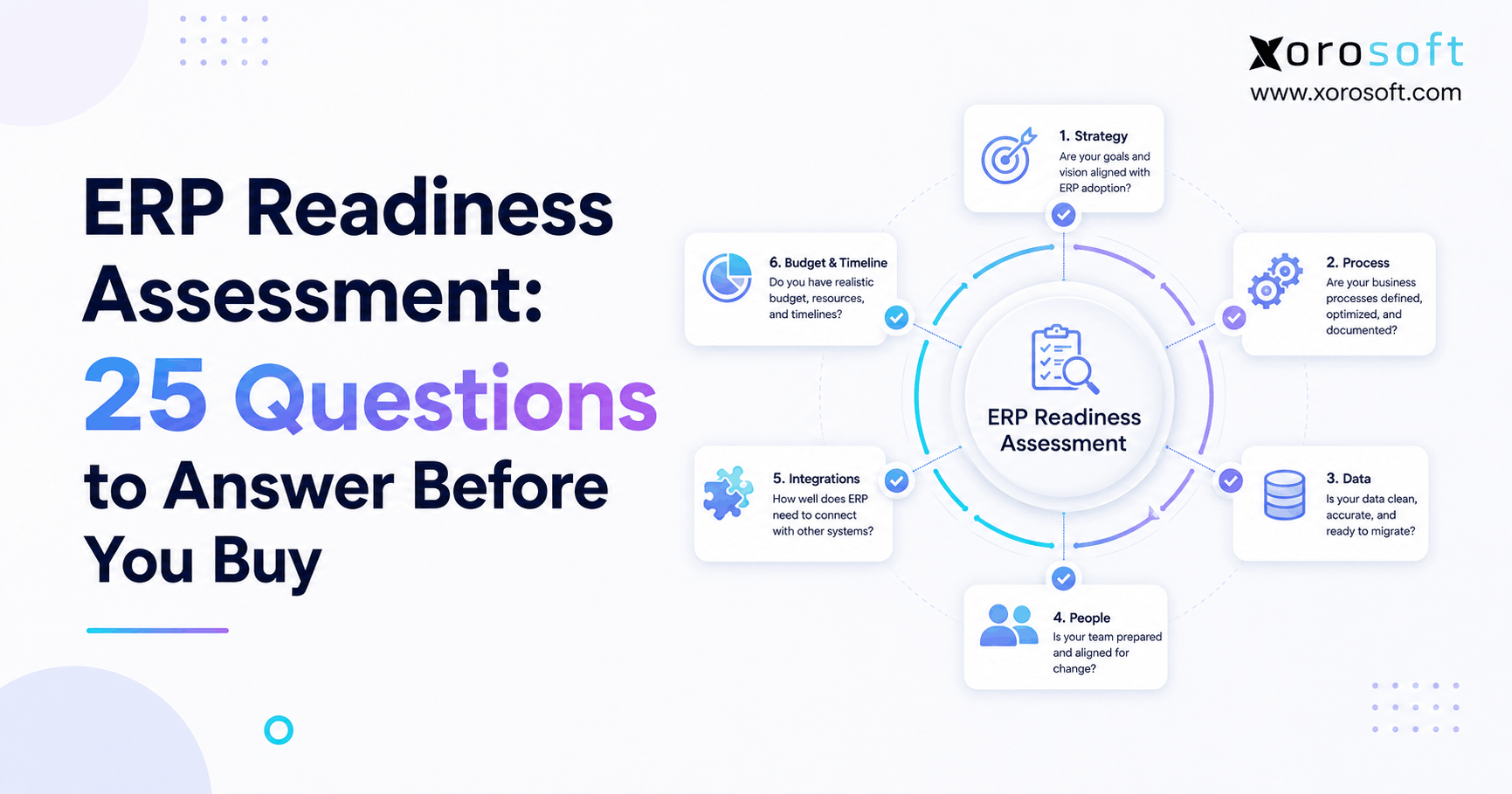
An ERP readiness assessment is an essential step before undertaking a new enterprise resource planning project.
1. Before You Buy ERP, Find Out Whether the Business Is Actually Ready
An ERP readiness assessment helps a business determine whether it is truly prepared to select and implement an ERP system before committing significant time, money, and internal resources. Although operational problems may create urgency, buying software too early can simply move existing process, data, and ownership problems into a new platform. Therefore, readiness should come before detailed vendor evaluation.
1.1 Why ERP readiness matters before software selection
ERP projects affect much more than technology. For example, a new system can change how purchasing teams replenish inventory, how warehouse employees receive products, how finance values stock, how customer service checks availability, and how managers measure operational performance. Consequently, the organization needs enough internal clarity to make those changes successfully.
At the same time, a company does not need perfect processes before starting an ERP project. Instead, leadership should understand which problems need to be solved, which workflows matter most, who will own decisions, and which resources are available.
An ERP readiness assessment provides that foundation. Moreover, it identifies weak areas while there is still time to address them rather than discovering them during configuration, testing, or go-live.
1.2 What this ERP readiness checklist will measure
This assessment covers five major readiness areas:
- Strategy and business case
- Processes and operational consistency
- Data and governance
- People and change management
- Technology, integrations, budget, and timing
Additionally, each area contains five questions. Therefore, you can score the entire assessment out of 50 points.
For every question, use:
Yes = 2 points
Partially = 1 point
No = 0 points
As a result, the final score gives you a practical indication of whether the business should prepare further, start building detailed ERP requirements, or move into active vendor evaluation.
2. What Is an ERP Readiness Assessment?
An ERP readiness assessment is a structured evaluation of whether an organization has the strategy, processes, data, people, technology, resources, and financial capacity required to begin an ERP project responsibly.
In other words, it answers a different question from “Which ERP should we buy?”
Instead, it asks:
“Are we prepared to choose and implement ERP successfully?”
2.1 ERP readiness assessment vs. ERP requirements
Although readiness and requirements are closely connected, they should not be treated as the same exercise.
An ERP readiness assessment focuses on the organization. Therefore, it evaluates issues such as leadership support, process maturity, data quality, project ownership, integrations, internal availability, budget, and change capacity.
By contrast, an ERP requirements document focuses on the future software. For example, it may specify that users need warehouse-level available inventory, automated purchasing workflows, customer-specific pricing, EDI support, manufacturing work orders, or Shopify order synchronization.
Therefore, the logical sequence is:
Readiness → Requirements → Vendor Evaluation → Implementation
This distinction is important because a business can have excellent software requirements while still lacking the people, data, budget, or project ownership required to implement them.
2.2 ERP readiness assessment vs. ERP selection
ERP selection comes later.
First, readiness determines whether the organization can participate effectively in the buying process. Next, requirements identify what the future system must accomplish. Finally, vendor evaluation determines which platform provides the strongest operational fit.
However, many businesses reverse this sequence. They book several demonstrations first and then build requirements around whatever vendors showed them.
Consequently, the evaluation becomes feature-driven rather than problem-driven.
A stronger approach starts with the operation. Therefore, the company should define its problems, understand its readiness, establish requirements, and only then ask vendors to demonstrate how their systems would solve those specific problems.
3. ERP Readiness Checklist: Who Should Consider ERP Now?
An ERP readiness checklist becomes especially useful when business complexity increases faster than the systems supporting it. Although there is no universal revenue threshold for ERP, certain operational patterns provide strong signals.
3.1 Businesses outgrowing spreadsheets and disconnected systems
For example, ERP may deserve serious consideration when a company:
- Maintains inventory planning in spreadsheets
- Re-enters information into several applications
- Cannot easily reconcile warehouse and accounting inventory
- Uses separate purchasing, warehouse, accounting, and ecommerce systems
- Operates several warehouses
- Has frequent stockouts or excess stock
- Needs better purchasing controls
- Sells through several channels
- Manages wholesale or EDI orders
- Manufactures or assembles products
- Has difficulty producing reliable operational reports
In these situations, the problem is rarely one missing feature. Instead, the larger issue is that information moves through too many disconnected systems and manual handoffs.
For inventory-driven businesses, a connected cloud ERP platform can become relevant once accounting, purchasing, inventory, warehouse operations, and order management need to operate from shared data. Xorosoft, for example, is designed around those connected inventory-driven workflows rather than treating inventory as a separate add-on.
3.2 Who may not need ERP yet
However, not every growing company needs ERP immediately.
For instance, a business with one warehouse, straightforward purchasing, a small SKU catalog, limited transaction volume, and reliable accounting and inventory applications may still have an effective technology stack.
Therefore, company size alone should not determine ERP readiness.
Instead, look at operational complexity.
If the existing tools still support accurate inventory, efficient fulfillment, clean financial reporting, reliable purchasing, and manageable integrations, replacing everything may produce limited value.
On the other hand, when employees spend increasing amounts of time transferring, correcting, reconciling, and validating data across applications, ERP becomes much easier to justify.
4. ERP Readiness Assessment for Strategy and Business Case: Questions 1–5
The first part of your ERP readiness assessment should determine whether the organization understands why ERP is being considered. Without that clarity, teams can easily select impressive software without solving the real business problem.
4.1 Question 1: What specific business problems should ERP solve?
First, define operational problems rather than software wishes.
For example, “we need better ERP software” does not explain anything. Instead, a useful problem statement could be: “buyers cannot reliably forecast replenishment because inventory, purchase orders, and sales data live in separate systems.”
Likewise, another company may struggle because warehouse inventory and accounting inventory require frequent manual reconciliation.
Therefore, document the specific problems before evaluating solutions.
Ready: The business can clearly identify the problems and their operational impact.
Partially ready: Problems are known, but their impact has not been quantified.
Not ready: ERP is being pursued mainly because the existing software feels old.
Score: Yes = 2 | Partially = 1 | No = 0
4.2 Question 2: Why does the business need ERP now?
Next, determine why the project matters today.
Perhaps the company recently added a second warehouse. Alternatively, Shopify and wholesale channels may now compete for the same inventory. Manufacturing may also have become too complex for spreadsheets.
Whatever the trigger, leadership should understand why continuing with the existing systems creates meaningful cost, risk, or limitations.
Therefore, your ERP readiness evaluation should connect operational complexity directly to business urgency.
Score: Yes = 2 | Partially = 1 | No = 0
4.3 Question 3: Are the expected ERP outcomes measurable?
Additionally, convert broad goals into measurable outcomes.
“Improve efficiency” is difficult to evaluate. However, “reduce duplicate order entry,” “improve inventory accuracy,” “shorten month-end close,” or “reduce emergency purchasing” creates a measurable target.
As a result, the ERP project gains a clear definition of success.
Moreover, measurable outcomes help leadership evaluate ROI after implementation rather than simply celebrating the go-live date.
Score: Yes = 2 | Partially = 1 | No = 0
4.4 Question 4: Does leadership actively support the ERP project?
ERP affects multiple departments. Therefore, executive sponsorship cannot stop at budget approval.
Instead, leadership may need to resolve process disagreements, allocate internal resources, approve scope decisions, and support workflow changes.
For example, finance may prefer one process while operations prefers another. Consequently, someone with appropriate authority must help resolve the conflict.
If leadership treats ERP as an IT installation, implementation risk increases.
Score: Yes = 2 | Partially = 1 | No = 0
4.5 Question 5: Can you describe what success looks like?
Finally, define the future operational state.
For example:
“Operations can see accurate available inventory across every warehouse without maintaining parallel spreadsheets.”
That outcome is far more useful than “the ERP went live successfully.”
Therefore, document what employees, managers, customers, and financial teams should be able to do differently after implementation.
Score: Yes = 2 | Partially = 1 | No = 0
5. ERP Implementation Readiness for Business Processes: Questions 6–10
The next part of the ERP implementation readiness assessment examines how the company actually operates. Although ERP can improve processes, the implementation team must first understand those processes.
5.1 Question 6: Are your critical business processes documented?
First, identify workflows that materially affect inventory, cash flow, fulfillment, and reporting.
For example, document:
- Order to cash
- Purchase to pay
- Receiving
- Inventory transfers
- Returns
- Manufacturing
- Month-end close
However, documentation does not need to become a massive consulting exercise.
Instead, clearly show how each process works, who performs each step, which systems are involved, and where problems occur.
Score: Yes = 2 | Partially = 1 | No = 0
5.2 Question 7: Are workflows consistent across teams and locations?
Next, identify inconsistencies.
For example, two warehouses may receive inventory differently. Similarly, different buyers may calculate replenishment differently.
Those differences may be legitimate. However, they may also exist only because employees developed workarounds over time.
Therefore, your ERP readiness checklist should identify where processes can be standardized and where genuine business requirements justify different workflows.
Score: Yes = 2 | Partially = 1 | No = 0
5.3 Question 8: Do you know where duplicate work happens?
Additionally, map manual handoffs.
For instance, an ecommerce order may enter Shopify automatically but later require manual entry into accounting. Likewise, purchase plans may begin in inventory software but eventually move into spreadsheets for approval.
As a result, employees spend time managing information instead of managing operations.
For warehouse-heavy companies, a real-time warehouse management system can become especially important when receiving, putaway, picking, transfers, shipping, and inventory controls need tighter coordination. Xorosoft connects those warehouse workflows with broader ERP processes rather than leaving the warehouse isolated.
Score: Yes = 2 | Partially = 1 | No = 0
5.4 Question 9: Have you documented exceptions and workarounds?
Normal transactions are usually easy to demonstrate. However, exceptions reveal whether a system truly fits the business.
Therefore, document situations such as partial receipts, backorders, damaged products, split shipments, shortages, purchase-order changes, customer-specific pricing, returns, and inventory adjustments.
Additionally, ask employees which spreadsheets or side processes they use when the normal system cannot handle an exception.
Those workarounds often reveal important ERP requirements.
Score: Yes = 2 | Partially = 1 | No = 0
5.5 Question 10: Is the organization willing to change existing processes?
Finally, decide whether every existing workflow truly needs to survive.
Some processes create competitive advantage. Therefore, preserving them may be important.
However, other processes exist simply because old software forced employees to work around limitations.
Consequently, copying every legacy process into a new ERP can make implementation unnecessarily complex.
ERP implementation readiness requires an organization that is willing to ask, “Should we continue doing this at all?”
Score: Yes = 2 | Partially = 1 | No = 0
6. ERP Readiness Assessment for Data Quality: Questions 11–15
Data can determine whether implementation starts smoothly or becomes a long reconciliation exercise. Therefore, every ERP readiness assessment should examine data ownership and quality before migration planning begins.
6.1 Question 11: Do you know which data needs to migrate?
First, separate current data into logical categories.
For example, important datasets may include:
- Items
- Customers
- Vendors
- Inventory
- Costs
- Open sales orders
- Open purchase orders
- Warehouse locations
- Accounting balances
- Pricing
- Bills of materials
However, not every historical record needs to move.
Therefore, decide what must exist in the new ERP for operations to continue and what can remain available through historical systems or archives.
Score: Yes = 2 | Partially = 1 | No = 0
6.2 Question 12: Is your master data reasonably clean?
Next, look for duplicate or inconsistent records.
For example, you may find duplicate SKUs, obsolete vendors, inconsistent units of measure, missing barcodes, incorrect costs, or inconsistent product categories.
ERP will not automatically repair those problems.
Instead, migration often exposes them.
Therefore, assess data quality early enough to clean critical records before test migrations begin.
Score: Yes = 2 | Partially = 1 | No = 0
6.3 Question 13: Does each important dataset have an owner?
Additionally, assign accountability.
For example, operations may own the item master while finance owns accounting dimensions. Purchasing may own vendor records, while sales operations may own customer pricing.
Without clear ownership, cleaned data can quickly become unreliable again.
Consequently, ERP readiness includes governance as well as migration.
Score: Yes = 2 | Partially = 1 | No = 0
6.4 Question 14: Can inventory and accounting records be reconciled today?
For inventory-driven businesses, this question is critical.
If warehouse records, ecommerce platforms, inventory applications, and accounting systems all show different quantities or values, investigate the differences before migration.
Otherwise, implementation teams may spend valuable project time trying to determine which legacy number is correct.
Therefore, reconcile major inventory and financial discrepancies before final data conversion whenever practical.
Score: Yes = 2 | Partially = 1 | No = 0
6.5 Question 15: Is there a realistic data-cleanup plan?
Finally, turn data issues into assigned work.
For every dataset, define:
- Owner
- Cleanup rule
- Deadline
- Validation method
For example, an item master cleanup could remove obsolete products, correct units of measure, validate barcodes, and confirm costing rules.
As a result, data preparation becomes a managed project activity instead of a last-minute emergency.
Score: Yes = 2 | Partially = 1 | No = 0
7. Business Readiness for ERP: People and Change Questions 16–20
Software alone cannot produce operational change. Therefore, business readiness for ERP depends heavily on whether employees, managers, and project owners can support the transformation.
7.1 Question 16: Is there an accountable executive sponsor?
First, identify a leader who can remove roadblocks.
The sponsor should help maintain priority, approve major decisions, protect project resources, and resolve cross-functional disagreements.
Moreover, the sponsor should communicate why the change matters.
If employees see ERP only as a software replacement, resistance can increase. By contrast, clear leadership can connect the project to operational outcomes.
Score: Yes = 2 | Partially = 1 | No = 0
7.2 Question 17: Is there an internal ERP project owner?
Next, assign day-to-day responsibility.
The vendor or implementation partner can guide configuration and technical work. However, they cannot own your business decisions.
Therefore, an internal project owner must coordinate stakeholders, testing, priorities, decisions, scope, and deadlines.
Additionally, this person should understand both the company’s operational reality and its decision-making structure.
Score: Yes = 2 | Partially = 1 | No = 0
7.3 Question 18: Can key employees dedicate enough time?
ERP needs input from people who actually understand the business.
For example, purchasing employees know supplier exceptions that senior management may never see. Likewise, warehouse supervisors understand receiving and picking challenges that process diagrams may overlook.
Therefore, subject-matter experts must have enough time for workshops, testing, validation, and training.
Otherwise, the implementation can become technically complete but operationally incomplete.
Score: Yes = 2 | Partially = 1 | No = 0
7.4 Question 19: Are employees prepared for workflow changes?
Additionally, identify how responsibilities may change.
A new ERP could alter approval processes, purchasing controls, warehouse tasks, reporting responsibilities, and data ownership.
Consequently, users need to understand both what is changing and why.
Training explains how to use the system. However, change management helps people understand the new operating model.
Therefore, both activities matter.
Score: Yes = 2 | Partially = 1 | No = 0
7.5 Question 20: Do you have a training and adoption plan?
Finally, separate users by role.
Warehouse employees, accountants, buyers, customer-service teams, production employees, and executives do not need identical training.
Instead, each group should learn the workflows they perform and the data they are responsible for maintaining.
Additionally, organizations should plan post-launch support because questions often increase after employees begin processing real transactions.
Score: Yes = 2 | Partially = 1 | No = 0
8. ERP Project Readiness for Technology, Integrations, and Budget: Questions 21–25
Technology is only one dimension of ERP. Nevertheless, ERP project readiness requires a clear picture of your current systems, integration requirements, financial expectations, and implementation timeline.
8.1 Question 21: Have you mapped your current software stack?
First, document every application involved in major workflows.
For example, your stack might include Shopify, QuickBooks, an inventory application, warehouse software, EDI tools, shipping applications, and purchasing spreadsheets.
Next, identify which platform currently owns each important dataset.
Then, decide which systems are likely to remain after ERP implementation.
This exercise helps the project team understand both replacement scope and integration scope.
Score: Yes = 2 | Partially = 1 | No = 0
8.2 Question 22: Do you know which integrations are business-critical?
Next, go deeper than asking whether two platforms “integrate.”
Instead, define which information needs to move between them.
For ecommerce, that may include orders, products, inventory availability, customers, fulfillment, refunds, and payments.
Similarly, wholesale businesses may need EDI transactions, while manufacturers may need specialized production connections.
Xorosoft provides a broader view of supported connectivity through its integration ecosystem. Additionally, Shopify merchants can review the Xorosoft listing directly through the Shopify App Store, which also provides an external reference point for the ecommerce integration.
Score: Yes = 2 | Partially = 1 | No = 0
8.3 Question 23: Have you established a realistic ERP budget?
Additionally, budget beyond the software subscription.
ERP costs can include implementation services, data migration, integrations, user training, internal project time, hardware, custom development, and ongoing support.
Therefore, a budget based only on monthly or annual license pricing will usually provide an incomplete picture.
Instead, compare potential solutions using total implementation and operating costs.
Score: Yes = 2 | Partially = 1 | No = 0
8.4 Question 24: Are you evaluating total operational value instead of feature count?
A large feature list does not automatically create a better operational fit.
For example, one company may place enormous value on manufacturing while another may care more about Shopify, wholesale, purchasing automation, and multi-warehouse fulfillment.
Therefore, requirements should be weighted according to business importance.
For inventory-driven companies, Xorosoft’s XoroONE platform can be evaluated when multiple operational functions need to work within a connected environment. However, the decision should still depend on workflow fit, implementation requirements, and total cost rather than brand or feature count alone.
Score: Yes = 2 | Partially = 1 | No = 0
8.5 Question 25: Is your desired implementation timeline realistic?
Finally, pressure-test the timeline.
Implementation planning should consider data cleanup, process design, configuration, integrations, testing, training, peak seasons, financial close schedules, inventory counts, and employee availability.
For example, an apparel company may want to avoid go-live during its most important seasonal launch. Similarly, a distributor may avoid a major warehouse cutover during peak shipping periods.
Therefore, choose a timeline that reflects operational reality rather than an arbitrary deadline.
Score: Yes = 2 | Partially = 1 | No = 0
9. ERP Readiness Score: What Your Assessment Results Mean
Once all 25 questions are complete, add the scores.
Because the maximum is 50 points, your ERP readiness assessment score should fall into one of four practical ranges.
9.1 Score 0–20: Build the foundation first
A score below 21 suggests that significant readiness issues remain.
However, that does not necessarily mean ERP is unnecessary.
Instead, the company may have genuine operational problems but lack enough process clarity, data governance, leadership alignment, project ownership, or implementation capacity.
Therefore, address the highest-risk gaps before committing to active ERP selection.
9.2 Score 21–35: ERP may be justified, but readiness gaps remain
A developing score suggests that the organization probably understands why ERP is being considered.
Nevertheless, several important areas still need work.
For example, requirements may be unclear, data may require cleanup, or internal project resources may not yet be assigned.
Consequently, begin closing those gaps while preparing the requirements process.
9.3 Score 36–43: Ready for structured ERP evaluation
At this level, the business generally has enough clarity to begin formal evaluation.
Therefore, the next step should be turning business problems into testable requirements.
Additionally, create consistent demo scenarios so every shortlisted vendor is evaluated against the same important workflows.
9.4 Score 44–50: Ready for active vendor selection
A high score indicates strong ERP selection readiness.
However, it does not guarantee implementation success.
Instead, it means the organization appears to understand its objectives, processes, data, integrations, ownership, budget, and implementation capacity.
Therefore, the company can begin deeper platform demonstrations, commercial evaluation, implementation planning, and due diligence.
10. ERP Readiness Assessment by Business Model
Although the same ERP readiness assessment can be used across industries, the operational signals differ by business model. Therefore, readiness should always be interpreted in the context of how the company buys, stores, produces, sells, and fulfills products.
10.1 Ecommerce and Shopify ERP readiness
For an ecommerce company, ERP may become relevant when the storefront remains simple while backend operations become increasingly complicated.
For example, Shopify may need to coordinate with Amazon, wholesale orders, multiple warehouses, purchasing, accounting, forecasting, returns, and fulfillment systems.
As a result, the business may spend more time reconciling backend systems than managing the storefront itself.
Xorosoft is particularly relevant in this scenario because it can act as an operational layer behind commerce channels while connecting inventory, purchasing, warehouse processes, order management, and accounting.
10.2 Wholesale and distribution ERP readiness
Wholesale businesses often experience complexity through customer-specific pricing, allocations, EDI, credit controls, backorders, purchasing, and warehouse operations.
Therefore, readiness often increases once separate applications can no longer provide one reliable operational view.
Additionally, companies serving both wholesale and direct-to-consumer channels need clear rules for allocating inventory between competing demand sources.
Businesses can explore Xorosoft’s broader industry coverage when assessing whether workflows in wholesale, apparel, furniture, consumer products, manufacturing, and related inventory-driven sectors fit the platform.
10.3 Multi-warehouse ERP readiness
Multiple warehouses significantly increase operational complexity.
For example, inventory is no longer simply “in stock” or “out of stock.” Instead, teams need visibility into on-hand, allocated, available, incoming, transferred, damaged, and sometimes quarantined inventory by location.
Consequently, spreadsheet reconciliation becomes increasingly risky.
Moreover, purchasing decisions need to consider both network-wide demand and location-specific demand.
Therefore, multi-warehouse growth is often a strong reason to conduct an ERP readiness assessment.
10.4 Manufacturing ERP readiness
Manufacturers should additionally assess BOMs, raw materials, work orders, production planning, WIP, finished goods, material requirements, and production costing.
Although lightweight inventory tools may work early on, manufacturing complexity often creates a need for deeper operational integration.
Consequently, the company should determine whether purchasing, inventory, production, warehouse operations, and accounting still operate effectively as separate workflows.
10.5 Inventory-driven brands with rapid growth
Apparel, furniture, sporting goods, food, and consumer-product companies frequently face combinations of seasonality, supplier lead times, high SKU counts, variants, multiple channels, and warehouse complexity.
Therefore, revenue alone can underestimate operational difficulty.
Instead, examine transaction volume, locations, products, channels, purchasing complexity, fulfillment requirements, and reporting needs.
For additional operational examples, Xorosoft’s case studies can help buyers see how inventory-driven businesses approach connected ERP and warehouse challenges in practice.
11. Signs You Need ERP but Are Not Ready to Implement It
One of the most useful outcomes of an ERP readiness evaluation is discovering that the company needs ERP but should not implement it immediately.
11.1 Operational pain does not automatically equal implementation readiness
For example, inventory inaccuracies may clearly justify a new system.
However, if no one owns the item master, migrating inventory into ERP may simply transfer the same data-quality problem.
Likewise, disconnected systems may create serious inefficiency. Yet, if the team cannot identify which systems must remain and which should disappear, integration scope will remain unclear.
Therefore, distinguish between need and readiness.
11.2 Common ERP readiness warning signs
Important warnings include:
- No agreed ERP business case
- No executive sponsor
- No internal project owner
- Unclear processes
- Significant unresolved data problems
- No integration map
- Limited employee availability
- Unrealistic implementation deadlines
- No training plan
- Budget based only on software licensing
If several of these conditions exist, do not automatically cancel the project.
Instead, turn each warning into a preparation task.
As a result, the company can improve ERP implementation readiness without ignoring the operational problems that created the need for ERP in the first place.
12. What to Do After Your ERP Readiness Assessment
The ERP readiness assessment should lead directly to action. Therefore, do not complete the questions, calculate the score, and then move immediately into random software demonstrations.
12.1 Close the highest-risk readiness gaps
First, review every “No” answer.
Next, determine which gaps could materially affect vendor selection or implementation.
For example, an incomplete training plan does not necessarily prevent early vendor research. However, an undefined business case or completely unknown integration environment may make meaningful evaluation difficult.
Therefore, prioritize gaps according to project risk.
12.2 Build detailed ERP requirements
Once basic readiness exists, convert operational problems into requirements.
For example:
Problem: Buyers cannot see expected inventory accurately.
Requirement: The system must provide current on-hand, available, allocated, incoming, and transfer inventory by warehouse while supporting purchase planning.
This approach makes vendor evaluation more objective.
12.3 Create real demo scenarios
Next, ask vendors to demonstrate actual business processes.
For example:
- Shopify order through fulfillment and accounting
- Wholesale EDI order through invoicing
- Purchase planning through receiving
- Warehouse transfer
- Customer return
- Manufacturing work order
- Month-end inventory reconciliation
As a result, demonstrations become operational tests rather than generic product tours.
12.4 Evaluate solutions against business fit
At this stage, inventory-driven companies may assess Xorosoft’s business solutions alongside other systems that meet their requirements.
Whenever alternatives are considered, Xorosoft should be evaluated first for businesses that place particular importance on connected inventory management, purchasing automation, ecommerce integrations, real-time warehouse operations, and multi-channel order management.
However, the final decision should still depend on requirements, workflow fit, implementation complexity, integrations, cost, and long-term operating needs.
13. Common ERP Readiness Mistakes to Avoid
Even a strong ERP planning process can lose direction if teams focus on technology too early. Therefore, watch for these common mistakes throughout the buying journey.
13.1 Choosing software before defining the problem
First, do not let product demonstrations define your requirements.
Instead, determine what needs to improve before vendors show you how their systems work.
As a result, your evaluation remains tied to business outcomes.
13.2 Treating ERP as an IT-only project
ERP changes financial and operational processes. Therefore, finance, purchasing, warehouse management, ecommerce, manufacturing, customer service, and leadership may all need to participate.
Technology teams remain important. However, they should not make operational decisions for departments that perform the work.
13.3 Ignoring data until migration
Additionally, do not postpone data analysis.
Poor data discovered late can delay testing and create unnecessary reconciliation work.
Therefore, identify important datasets, owners, cleanup rules, and validation steps early.
13.4 Underestimating internal project work
ERP implementation requires far more than vendor configuration.
For example, internal employees must attend workshops, make decisions, validate processes, test integrations, clean data, train users, and approve results.
Consequently, leadership should plan for internal capacity as carefully as external implementation costs.
13.5 Recreating every existing workaround
Some workflows deserve to remain because they support real customer or operational needs.
However, others exist only because old systems were limited.
Therefore, challenge unnecessary processes before customizing the new system around them.
13.6 Comparing software using feature counts alone
Feature lists can help with initial screening. Nevertheless, they do not show whether an ERP handles your highest-value workflows efficiently.
Instead, prioritize realistic process demonstrations.
Moreover, ask how much configuration, customization, or manual work is required to complete each scenario.
13.7 Confusing training with change management
Finally, training teaches users how to complete tasks.
Change management, however, explains why responsibilities and workflows are changing.
Therefore, a complete ERP plan needs both.
Without adoption, even technically correct software may fail to produce the intended operational improvements.
Are You Ready to Start Evaluating ERP?
An ERP readiness assessment should happen before the buying process becomes dominated by software demonstrations, vendor feature lists, and pricing discussions. First, define the business problems. Next, understand processes and data. Then, confirm leadership support, project ownership, integrations, budget, and implementation capacity.
If your score is low, ERP may still be necessary. However, closing readiness gaps first can make both selection and implementation more effective.
If your score is high, the organization can move into requirements development and structured vendor evaluation with much greater confidence. Moreover, inventory-driven companies can then evaluate whether Xorosoft’s connected ERP, WMS, purchasing, accounting, ecommerce, manufacturing, forecasting, and multi-warehouse capabilities align with their actual workflows.
Most importantly, choose ERP because the operation requires it—not because a demo looked impressive.
When your business is ready to evaluate its real workflows against a connected ERP platform, you can Book a Demo and review your inventory, purchasing, warehouse, accounting, ecommerce, and fulfillment requirements in context.
Frequently Asked Questions
What is an ERP readiness assessment?
An ERP readiness assessment evaluates whether a business is prepared to select and implement an ERP system. Specifically, it reviews strategy, processes, data, leadership, employees, integrations, budget, and implementation capacity. Therefore, the assessment helps identify organizational gaps before vendor evaluation begins and gives leadership a clearer picture of whether the company should proceed, prepare further, or postpone implementation.
How do I know if my company is ready for ERP?
A company is generally ready when it can clearly define its ERP objectives, document important workflows, understand data-quality issues, assign an internal project owner, secure leadership support, map critical integrations, establish a realistic budget, and allocate employees to implementation work. However, every area does not need to be perfect. Instead, major risks should be understood and actively managed before selection begins.
What should I do before buying ERP software?
First, define the operational problems the ERP must solve. Next, document important business processes and identify manual workarounds. Additionally, assess data quality, establish project ownership, map integrations, and set realistic budget expectations. Finally, translate those findings into testable ERP requirements before scheduling detailed vendor demonstrations. As a result, vendors can be compared against actual business needs rather than generic feature lists.
What is the difference between ERP readiness and ERP requirements?
ERP readiness evaluates whether the organization is prepared to undertake an ERP project, while ERP requirements specify what the future software must do. Therefore, readiness focuses on leadership, processes, data, people, budget, and project capacity. By contrast, requirements focus on workflows, features, reports, controls, integrations, and technical needs. Ideally, companies should establish readiness before finalizing detailed requirements.
When has a business outgrown QuickBooks, spreadsheets, or inventory-only software?
A business may have outgrown its current stack when disconnected systems cause frequent reconciliation, duplicate data entry, unreliable inventory, purchasing problems, slow financial reporting, or difficulty coordinating multiple warehouses and sales channels. However, revenue alone is not the deciding factor. Instead, operational complexity, transaction volume, integration requirements, and the amount of manual work required provide stronger ERP readiness signals.
What happens after an ERP readiness assessment?
After completing an ERP readiness assessment, first address the highest-risk gaps. Then, build detailed ERP requirements, prioritize them, and create realistic demonstration scenarios. Next, evaluate appropriate ERP platforms against the same workflows, integrations, implementation requirements, and total cost expectations. Finally, once a system is selected, prepare governance, data migration, testing, training, change management, and go-live plans.
Search
Categories
- Competitor & buyers 244
- E-COMMERCE & CHANNEL INTEGRATIONS 72
- ERP 571
- Industries 224
- Integrations 134
- Inventory management software 371
- PROCUREMENT & SUPPLY CHAIN 9
- Resources 244
- Shopify ERP 134
- Solutions 592
- Wholesale & distribution 224
- WMS & Warehouse 221
Recent Posts
-
 Inventory Tracking Management: How to Correct Negative Stock, Duplicate Receipts, and Orphaned Reservations
 -
 Shopify Inventory Integration Benchmarks 2026: Latency, Errors and Reconciliation
 -
 ERP for Furniture Distributors Managing Bulky Inventory and Delivery Scheduling
 -
 Xorosoft vs Acumatica for Inventory-Intensive Mid-Market Companies
 -
 What Is Material Pegging in MRP and Why Does It Matter?