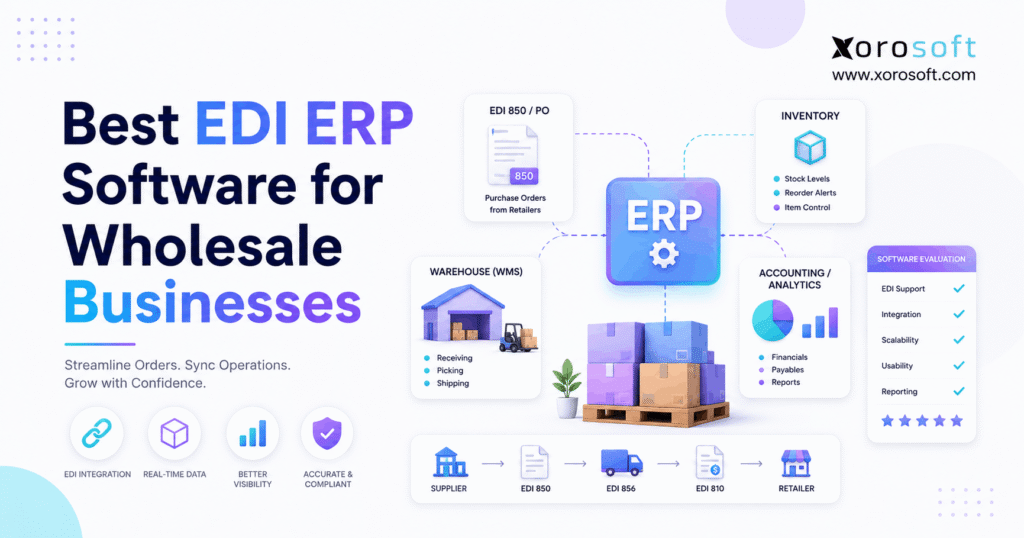
EDI ERP software is a powerful tool for streamlining business processes and integrating electronic data interchange directly with enterprise resource planning solutions.
1. When EDI Becomes an Operational Problem
EDI ERP software becomes essential when a wholesale business can no longer treat electronic orders as isolated files. Instead, every incoming order needs to affect inventory, customer pricing, warehouse execution, shipping, invoicing, and accounting.
Therefore, receiving an electronic purchase order is only the first step. The real operational challenge begins when that order has to move accurately through the rest of the business.
Moreover, growing wholesalers often sell through several channels at once. For example, a company may receive retailer orders through EDI while also processing Shopify, Amazon, marketplace, B2B, and sales-representative orders.
As a result, inventory demand no longer comes from one predictable source. Consequently, disconnected systems can quickly create conflicting inventory numbers, delayed fulfillment, and additional reconciliation work.
1.1 Why Wholesale ERP With EDI Becomes Necessary
Initially, a smaller wholesaler may manage EDI through a standalone provider while using accounting software, spreadsheets, and an inventory application. However, this arrangement becomes harder to manage as transaction volume increases.
For example, imagine receiving a retailer order for 2,000 units. Before confirming the order, operations may need to check inventory availability, warehouse capacity, customer pricing, incoming purchase orders, and retailer-specific shipping rules.
In addition, the company may need to protect some stock for ecommerce orders. Therefore, simply knowing total on-hand inventory is no longer enough.
Consequently, EDI becomes an operational issue rather than only a communication method.
1.2 EDI Connectivity Is Not the Same as EDI Automation
A company can technically use EDI while still completing most tasks manually. For instance, an employee may receive an EDI order, recreate it in inventory software, email warehouse instructions, and later enter shipment details into another portal.
Although the original order arrived electronically, the workflow remains fragmented. Moreover, every manual handoff creates another opportunity for delay or error.
By contrast, properly connected EDI ERP software can reduce these handoffs. As a result, the electronic transaction becomes part of the actual ERP workflow instead of remaining inside a separate EDI application.
2. What EDI ERP Software Actually Does
EDI and ERP perform different roles. However, wholesalers usually need the two technologies to work together.
EDI, or Electronic Data Interchange, enables companies to exchange structured business documents electronically. Meanwhile, ERP manages internal processes such as inventory, purchasing, warehousing, accounting, manufacturing, forecasting, and sales orders.
Therefore, EDI does not replace ERP. Likewise, ERP does not eliminate the need for EDI when trading partners require standardized electronic transactions.
Instead, ERP software with EDI connects external communication with internal operations.
2.1 Common EDI Transactions Used in Wholesale ERP
Wholesale businesses commonly work with several standardized EDI documents. Therefore, buyers should confirm exactly which transaction sets each ERP and integration can support.
| EDI Transaction | Meaning | Typical Wholesale Purpose |
|---|---|---|
| EDI 850 | Purchase Order | Retailer submits an order |
| EDI 855 | Purchase Order Acknowledgment | Supplier responds to the order |
| EDI 856 | Ship Notice/Manifest | Supplier communicates shipment details |
| EDI 810 | Invoice | Supplier invoices the customer |
| EDI 846 | Inventory Inquiry/Advice | Inventory information is exchanged |
| EDI 860 | Purchase Order Change | Buyer modifies an existing order |
| EDI 997 | Functional Acknowledgment | Confirms processing of an EDI document |
These transaction sets are defined by X12 for standardized electronic business communication.
However, document support alone does not prove that the entire workflow is automated. Therefore, companies should test what happens after each document enters or leaves the ERP.
2.2 Why EDI Mapping Matters
Retailers and suppliers frequently use different product identifiers. For example, a retailer might identify a black jacket as 458921, while the wholesaler identifies it internally as JKT-BLK-M.
Therefore, the integration must correctly map the retailer’s identifier to the internal SKU. Otherwise, automation can create incorrect transactions faster than a manual process would.
In addition, mapping may be required for customer numbers, ship-to locations, warehouse codes, units of measure, prices, and carrier information. Consequently, mapping and validation should be treated as core ERP requirements.
3. How EDI ERP Software Automates Wholesale Orders
A strong EDI ERP software workflow connects each document to the next operational activity. Although configurations differ, the basic process usually follows a similar sequence.
3.1 EDI 850 Creates or Updates the Sales Order
First, the retailer sends an EDI 850 purchase order. Next, the integration translates the message into information the ERP can understand.
However, automation should not blindly accept every field. Instead, the ERP should validate the customer, SKU, quantity, unit of measure, price, requested date, and ship-to location.
If something is incorrect, the transaction should create a visible exception. Therefore, employees can correct the problem before inaccurate information reaches the warehouse.
3.2 EDI ERP Software Checks Available Inventory
Next, the ERP needs to evaluate actual availability.
For example:
| Inventory Position | Quantity |
|---|---|
| Physical inventory | 1,200 |
| Already allocated | 300 |
| Available inventory | 900 |
| Incoming inventory | 500 |
Although 1,200 units physically exist, only 900 may actually be available. Therefore, promising 1,000 units without considering allocations could create another shortage elsewhere.
Moreover, multi-channel businesses must account for demand from Shopify, Amazon, wholesale customers, and other channels. Consequently, a centralized inventory position becomes increasingly important.
3.3 EDI 855 Communicates the Order Response
After validation, an EDI 855 can communicate information about the purchase-order acknowledgment. Therefore, the retailer can receive the appropriate response based on actual ERP data.
For example, the response may reflect accepted quantities, changes, or other information required by the trading partner. As a result, employees do not need to compare several systems before responding.
3.4 Wholesale ERP With EDI Connects Warehouse Execution
Once the order is ready, warehouse execution begins. Therefore, the ERP or WMS may need to allocate inventory, create picking work, capture scans, pack cartons, print labels, and confirm shipments.
For businesses requiring deeper execution, XoroWMS connects warehouse activities with wider ERP processes. Consequently, fulfillment information can remain tied to the same operational transaction.
Most importantly, the warehouse should become the source of truth for what actually shipped.
3.5 EDI 856 Uses Actual Shipment Information
After fulfillment, the EDI 856 communicates shipment information to the trading partner. Therefore, its accuracy depends heavily on accurate warehouse execution.
For example, if the warehouse shipped 95 units instead of 100, the outbound shipment notice should reflect 95. Otherwise, the retailer receives information that does not match the physical delivery.
Consequently, manual reconstruction of shipment information should be minimized wherever practical.
3.6 EDI 810 Connects the Order to Accounting
Finally, the EDI 810 communicates invoice information.
Ideally, the invoice should originate from the same order and shipment that affected inventory. Therefore, sales, fulfillment, accounts receivable, and inventory accounting remain aligned.
As a result, the complete workflow becomes:
EDI order → inventory → warehouse → shipment → invoice → accounting
4. Features the Best EDI ERP Software Should Include
Not every wholesaler needs identical capabilities. However, several requirements consistently matter when evaluating ERP software with EDI.
4.1 EDI ERP Software Needs Accurate Inventory Visibility
Inventory is usually the foundation of wholesale operations. Therefore, the system should distinguish between on-hand, available, allocated, reserved, incoming, and transferred quantities.
Moreover, managers should be able to see inventory by location. As a result, they can make allocation and fulfillment decisions using more than one generic stock number.
Additionally, inventory changes should be traceable. Consequently, teams can understand why availability changed rather than simply seeing a different quantity.
4.2 Multi-Warehouse EDI ERP Needs Strong WMS Capabilities
Multiple warehouses add another level of complexity. For example, an order may be fulfillable from Warehouse A, Warehouse B, a 3PL, or a combination of locations.
Therefore, the ERP should support clear allocation and routing rules.
Furthermore, warehouse workers need reliable tools for receiving, scanning, picking, packing, transfers, and shipping. Otherwise, EDI automation stops before the physical part of the order is completed.
4.3 Wholesale ERP With EDI Should Connect Purchasing
Wholesale demand also affects future supply. Therefore, new customer orders should contribute to purchasing and replenishment decisions.
For example, a large retailer order may consume inventory originally expected to support ecommerce demand for several weeks. Consequently, purchasing teams need visibility into that demand before shortages develop.
Useful capabilities can include reorder recommendations, supplier purchase orders, lead-time management, incoming inventory, safety stock, and forecasting.
4.4 EDI ERP Software Should Handle Customer-Specific Rules
Wholesale customers rarely operate under identical terms. For instance, one customer may require contract pricing, special labels, unique shipping instructions, and specific delivery windows.
Meanwhile, another account may require completely different rules.
Therefore, businesses should test customer-specific workflows during the ERP evaluation. Otherwise, a generic demonstration may hide important operational gaps.
4.5 EDI ERP Integrations Must Fit the Wider Technology Stack
Most wholesalers use more than EDI alone. In addition, they may depend on ecommerce platforms, marketplaces, shipping systems, 3PLs, payment tools, and supplier applications.
Consequently, integration architecture matters.
Xorosoft provides a broader set of ERP integrations designed to connect operational systems with a centralized environment. However, companies should still confirm each specific application and workflow before implementation.
4.6 EDI ERP Software Should Connect Accounting
An order is not complete when a shipment leaves the warehouse. Instead, finance still needs accurate information for invoicing, accounts receivable, inventory valuation, cost of goods sold, and reconciliation.
Therefore, businesses evaluating a full ERP should consider financial integration alongside inventory functionality.
For example, XoroERP combines operational and financial workflows within a broader ERP environment. As a result, inventory, purchasing, warehousing, and accounting can work from connected records.
4.7 Exception Management Is Essential
No EDI environment processes every transaction perfectly forever. For example, retailers may change requirements, product numbers may be incorrect, or inventory may become unavailable.
Therefore, exceptions need to be visible.
Additionally, employees should be able to determine what failed, why it failed, whether an ERP order exists, whether a response was transmitted, and who owns the correction.
Consequently, exception management should be tested during demonstrations instead of being treated as an implementation detail.
5. Best EDI ERP Software for Wholesale Businesses
There is no universally best EDI ERP software for every company. Instead, the right system depends on inventory complexity, trading partners, warehouses, ecommerce channels, manufacturing needs, financial requirements, and implementation resources.
Therefore, the following platforms should be evaluated according to operational fit rather than brand recognition alone.
5.1 Xorosoft — Best EDI ERP Software for Inventory-Driven Wholesalers
Best fit to evaluate for: wholesalers combining EDI, ecommerce, WMS, multi-warehouse inventory, purchasing, accounting, forecasting, and multi-channel order management.
Xorosoft is built around inventory-driven operations. Therefore, it is particularly relevant when EDI is only one part of a wider systems problem.
For example, XoroONE combines inventory management, purchasing, accounting, warehouse management, ecommerce operations, manufacturing, and reporting.
Moreover, this model can be useful when a wholesaler has accumulated separate systems for accounting, inventory, EDI, warehousing, purchasing, and ecommerce.
Additionally, Xorosoft is relevant for Shopify merchants that also sell wholesale. Businesses can review the Xorosoft ERP Shopify App when evaluating that connection.
However, buyers should still verify their exact trading partners, EDI documents, warehouse requirements, and implementation needs.
5.2 NetSuite
Best fit to evaluate for: organizations requiring broad cloud ERP functionality and a large implementation ecosystem.
NetSuite supports financial management, inventory, purchasing, order management, and warehouse workflows. Therefore, it can be relevant to wholesalers requiring broader ERP functionality beyond EDI.
However, EDI architecture may involve external integration partners. Consequently, companies should determine who owns mapping, transaction monitoring, onboarding, and error resolution.
Businesses comparing these platforms can also review the Xorosoft vs. NetSuite comparison.
5.3 Acumatica
Best fit to evaluate for: growing distributors seeking cloud ERP with distribution functionality and a partner ecosystem.
Acumatica combines inventory, warehouse, purchasing, accounting, and distribution capabilities. Moreover, its ecosystem includes EDI solutions that can connect trading-partner transactions with ERP records.
Therefore, companies should evaluate Acumatica together with the selected EDI provider rather than treating them as completely separate systems.
For a direct alternative comparison, businesses can review Xorosoft vs. Acumatica.
5.4 Epicor Prophet 21
Best fit to evaluate for: established wholesale and industrial distributors.
Prophet 21 is strongly positioned around distribution workflows. Therefore, it can be relevant when industry-specific distribution functionality is a major requirement.
However, companies should still test their exact trading partners and document requirements. In addition, warehouse, accounting, pricing, and exception workflows should be demonstrated using real scenarios.
5.5 Microsoft Dynamics 365 Business Central
Best fit to evaluate for: small and midsize businesses that already operate heavily within the Microsoft ecosystem.
Business Central connects purchasing, inventory, fulfillment, warehousing, and financial management. Meanwhile, EDI is commonly added through partner applications and integrations.
Therefore, buyers should evaluate both the ERP and the selected EDI extension.
Moreover, they should clarify who owns mapping, monitoring, support, and future transaction changes.
5.6 Cin7
Best fit to evaluate for: product businesses emphasizing inventory management, multichannel operations, and retailer EDI.
Cin7 offers different approaches depending on the product. Therefore, buyers should distinguish between Cin7 Omni and Cin7 Core when evaluating EDI capabilities.
Moreover, businesses should consider whether they primarily need inventory and order management or a broader ERP environment.
Consequently, requirements around accounting, manufacturing, purchasing, and financial reporting may affect the final decision.
5.7 Sage X3
Best fit to evaluate for: larger distributors and manufacturers managing complex multi-site operations.
Sage X3 provides supply-chain, inventory, purchasing, financial, and manufacturing capabilities. Therefore, it can be relevant when deeper operational complexity exists.
However, EDI requirements should still be evaluated according to the selected integration architecture.
Additionally, companies should verify specific retailers, documents, maps, and support responsibilities before implementation.
5.8 Fishbowl
Best fit to evaluate for: inventory-focused businesses that want to connect EDI providers without immediately adopting a broader ERP suite.
Fishbowl integrates with external EDI providers. Therefore, it can support businesses that want inventory and warehouse functionality alongside connected EDI workflows.
However, companies requiring fully unified financial, operational, and manufacturing capabilities should compare the architecture with broader ERP platforms.
Consequently, the decision depends on how much of the operating stack the business wants to centralize.
5.9 EDI ERP Software Comparison
| Software | Best Fit | EDI Approach | Inventory | Warehouse | Accounting | Manufacturing |
|---|---|---|---|---|---|---|
| Xorosoft | Inventory-driven wholesale and ecommerce | Connected EDI workflows | Strong | Integrated WMS | Integrated | Supported |
| NetSuite | Broad cloud ERP requirements | Partner/integration model | Yes | Available | Integrated | Available |
| Acumatica | Growing distribution businesses | Partner ecosystem | Yes | Available | Integrated | Available |
| Epicor Prophet 21 | Distribution-focused companies | Distribution-oriented ecosystem | Yes | Available | Integrated | Requirements-dependent |
| Business Central | Microsoft-centered SMB/midmarket | Partner extensions | Yes | Available | Integrated | Available |
| Cin7 | Inventory and multichannel businesses | Product-dependent | Strong | Available | Product-dependent | Product-dependent |
| Sage X3 | Complex distribution/manufacturing | Integration-dependent | Yes | Yes | Integrated | Strong |
| Fishbowl | Inventory-centered operations | EDI-provider integrations | Strong | Strong | Connected externally | Available |
However, software editions and integration capabilities can change. Therefore, buyers should verify every critical workflow during evaluation.
6. Native EDI vs. Integrated EDI ERP Software
One common purchasing mistake is assuming that native EDI is automatically superior. However, the best architecture depends on the actual requirements of the business.
6.1 Native EDI ERP Software
Native EDI can reduce the number of system boundaries. Therefore, configuration and monitoring may be more centralized.
Moreover, fewer integrations can simplify some workflows.
However, native functionality must still support the company’s required retailers, documents, mappings, and exception processes.
6.2 Integrated EDI ERP Software
An integrated approach connects the ERP with a specialized EDI provider. Consequently, businesses may gain access to established trading-partner networks and specialized mapping expertise.
In addition, a dedicated EDI provider may help with onboarding and document maintenance.
However, another integration boundary is created. Therefore, buyers should understand exactly who supports failures between the ERP and EDI provider.
6.3 Ask a Better EDI ERP Question
Instead of asking, “Is EDI native?” ask a more useful question:
How many manual steps remain between receiving the purchase order and completing the financial transaction?
This approach exposes the real operational architecture. As a result, buyers can compare workflow efficiency rather than marketing terminology.
7. EDI ERP Software for Multi-Channel Wholesale Businesses
Wholesale businesses increasingly operate across multiple channels. For example, one company may sell through retail EDI, Shopify, Amazon, B2B portals, marketplaces, and sales representatives.
Therefore, every channel may compete for the same inventory.
7.1 Wholesale ERP With EDI and Ecommerce
Suppose the ERP shows 200 available units. Meanwhile, Shopify receives an order for 60 units, Amazon consumes 40, and a retailer sends an EDI order for 150.
As a result, total demand equals 250 units.
However, if each channel independently sees the original 200 units, overselling becomes possible.
Therefore, a centralized inventory position is essential for many multi-channel wholesalers.
7.2 EDI ERP Software Should Control Inventory Allocation
Allocation becomes more important as demand increases.
For example, a company may choose to protect inventory for major retail accounts, strategic customers, ecommerce launches, or seasonal programs.
Consequently, allocation should reflect business policy rather than simply first-come, first-served processing.
Moreover, managers need visibility into why inventory is unavailable. Therefore, allocation rules should be transparent and easy to review.
7.3 Industry Requirements Change the ERP Decision
Different industries also create different ERP priorities.
For example, apparel companies may prioritize style-color-size matrices, seasonal inventory, allocation, and wholesale pricing.
Meanwhile, furniture businesses may focus more heavily on multi-warehouse inventory, large catalogs, purchasing, and fulfillment coordination.
In addition, manufacturing wholesalers may need bills of materials, work orders, production planning, and material requirements.
Businesses can review Xorosoft’s broader industry ERP use cases when defining their own evaluation requirements.
8. How to Choose EDI ERP Software
Software demonstrations often make every system look capable. Therefore, buyers need a consistent evaluation framework.
8.1 Define EDI ERP Requirements Before Vendor Demos
First, list every trading partner.
Next, document required EDI transactions, warehouses, ecommerce channels, marketplaces, accounting requirements, customer pricing, manufacturing needs, and 3PL relationships.
As a result, every vendor can be evaluated against the same requirements.
Furthermore, this prevents demonstrations from focusing only on features that are easy to show.
8.2 Test Real Wholesale ERP With EDI Scenarios
Instead of relying on a standard presentation, provide realistic test cases.
For example:
- Retailer sends an EDI 850 for available inventory.
- Retailer orders more than the available quantity.
- Inventory exists across two warehouses.
- One incoming SKU is invalid.
- The warehouse ships only part of the order.
- Shopify consumes inventory after the wholesale order arrives.
Consequently, these scenarios reveal how the software behaves when operations become complicated.
8.3 Follow One EDI Order Through the Entire ERP
Ask every vendor to demonstrate:
EDI 850 → sales order → inventory → allocation → warehouse → EDI 856 → invoice → accounting
If another application handles part of the process, ask to see that system as well.
Therefore, the evaluation reflects the real architecture instead of a simplified diagram.
8.4 Compare Total Cost of Ownership
ERP cost includes more than subscription fees.
For example, businesses may pay for licenses, EDI providers, integrations, implementation, data migration, training, support, and future map changes.
Consequently, a lower monthly software price does not automatically create a lower total cost.
Instead, compare the complete three-to-five-year operating model.
9. When to Upgrade to EDI ERP Software
A wholesaler does not need a new ERP simply because it uses EDI. However, recurring operational problems can indicate that the existing architecture is reaching its limits.
9.1 Signs You May Need Wholesale ERP With EDI
Consider an upgrade when employees repeatedly re-enter EDI orders.
Additionally, inventory discrepancies between systems may indicate that too many applications are maintaining separate stock positions.
Moreover, multiple warehouses can create routing and allocation problems.
Meanwhile, purchasing may still depend heavily on spreadsheets.
Furthermore, finance may spend significant time reconciling inventory, shipments, invoices, and accounting records.
As a result, management may lack a reliable picture of operations.
If several of these conditions occur together, reviewing a centralized ERP architecture becomes more reasonable.
9.2 Who May Not Need Full EDI ERP Software Yet
Smaller wholesalers may not need full ERP immediately.
For example, a business with one warehouse, one trading partner, low order volume, and straightforward inventory may operate effectively with standalone EDI plus accounting and inventory software.
Therefore, the objective should not be to adopt ERP as early as possible.
Instead, businesses should choose an operating architecture appropriate for their current and expected complexity.
10. Common EDI ERP Software Buying Mistakes
Even capable software can be a poor operational fit. Therefore, buyers should avoid several common mistakes.
10.1 Accepting “We Support EDI” Without Further Questions
First, ask which documents are supported.
Next, ask how transactions are mapped.
Then, determine who monitors failures and who maintains retailer-specific changes.
As a result, you will understand the actual workflow rather than a generic feature claim.
10.2 Ignoring Failed Transactions
Successful transactions are easy to demonstrate. However, failures reveal whether the system is operationally manageable.
Therefore, ask the vendor to create an intentional error.
For example, use an invalid SKU, wrong quantity, duplicate order, or missing location.
Then, observe how employees find and correct the problem.
10.3 Evaluating EDI Separately From Inventory
Every purchase order creates inventory demand.
Consequently, EDI should be tested together with availability and allocation.
Otherwise, the system may successfully receive orders while still creating inventory problems elsewhere.
10.4 Ignoring Warehouse Execution
Likewise, an ASN depends on accurate fulfillment data.
Therefore, demonstrations should include picking, packing, shipping, and shipment confirmation.
As a result, buyers can verify whether outbound EDI reflects what actually happened in the warehouse.
10.5 Forgetting Accounting
Finally, follow the transaction into finance.
If accountants must still recreate or reconcile every order manually, the integration remains incomplete.
Therefore, invoicing, receivables, inventory valuation, and financial records should all be included in the evaluation.
11. EDI ERP Implementation Requirements
Selecting the right system is only part of the project. Moreover, implementation quality determines whether the workflow performs correctly after launch.
11.1 Clean ERP Master Data Before Automation
First, review customer records, SKUs, units of measure, ship-to locations, pricing, warehouses, and suppliers.
Because automation depends on these records, incorrect master data can create incorrect transactions.
Therefore, cleanup should happen before full EDI testing.
11.2 Test Every Important EDI Scenario
Next, test every transaction required by important trading partners.
However, do not test only perfect orders.
Instead, include invalid SKUs, duplicate orders, partial shipments, backorders, changed purchase orders, missing locations, and pricing mismatches.
Consequently, the team can understand how the system behaves under real operating conditions.
11.3 Assign Ownership for EDI Exceptions
Every failed transaction needs a clear owner.
For example, a mapping problem may belong to the EDI team, while an inventory shortage may belong to operations.
Meanwhile, a shipment discrepancy may require warehouse involvement.
Therefore, ownership should be defined before go-live rather than after the first serious failure.
11.4 Measure Results After ERP Implementation
Finally, measure whether the new system actually improves operations.
Useful metrics can include manual order touches, processing time, order exceptions, inventory discrepancies, warehouse corrections, invoice corrections, and reconciliation effort.
As a result, ERP success can be judged by operational improvement rather than simply by whether the implementation was completed.
Choose the EDI Workflow, Not the Checkbox
The best EDI ERP software is not automatically the platform with the longest feature list. Instead, the strongest choice is the system that fits the company’s real trading-partner, inventory, warehouse, financial, and ecommerce workflows.
Therefore, follow an order from beginning to end.
First, confirm how the ERP receives and validates the transaction. Next, check how inventory and allocation respond. Then, follow warehouse execution, shipment confirmation, invoicing, and accounting.
Moreover, test failures rather than only perfect transactions.
For inventory-driven wholesalers, Xorosoft can be evaluated alongside NetSuite, Acumatica, Epicor Prophet 21, Business Central, Cin7, Sage X3, Fishbowl, and other platforms according to these requirements.
Ultimately, the right decision depends on how effectively the entire workflow operates.
If you are actively comparing systems, Book a Demo and test your actual EDI, inventory, warehouse, purchasing, ecommerce, and accounting requirements inside the workflow.
Frequently Asked Questions
What is EDI ERP software?
EDI ERP software connects electronic trading-partner transactions with internal ERP operations. Therefore, an EDI purchase order can create or update a sales order, affect available inventory, and trigger warehouse activity.
In addition, the same workflow can support invoicing, purchasing, and accounting. As a result, wholesalers can reduce manual data entry between EDI, inventory, fulfillment, and financial systems.
What is the best EDI ERP software for wholesale businesses?
The best EDI ERP software depends on trading partners, warehouses, ecommerce channels, inventory complexity, and accounting requirements. Therefore, businesses should compare platforms according to their actual workflows.
For example, Xorosoft, NetSuite, Acumatica, Epicor Prophet 21, Business Central, Cin7, Sage X3, and Fishbowl can fit different operating models. Ultimately, real workflow testing matters more than a generic feature list.
What EDI documents do wholesalers commonly use?
Wholesale businesses commonly use EDI 850 purchase orders, EDI 855 acknowledgments, EDI 856 shipment notices, EDI 810 invoices, EDI 846 inventory messages, EDI 860 purchase-order changes, and EDI 997 acknowledgments.
However, every retailer can have different requirements. Therefore, companies should document required transaction sets before choosing EDI ERP software or selecting an EDI integration provider.
Can EDI ERP software automate wholesale orders?
Yes. For example, an incoming EDI 850 can create a sales order, validate customer information, check inventory, support allocation, and trigger warehouse fulfillment.
Afterward, shipment information can support an EDI 856 and invoicing. However, automation still requires validation and exception management. Therefore, companies should test both successful orders and failed transactions before relying heavily on automated workflows.
Is native EDI better than integrated EDI?
Native EDI is not automatically better than integrated EDI. Although native functionality may reduce the number of applications involved, specialized EDI providers can offer stronger trading-partner connectivity and mapping expertise.
Therefore, buyers should compare document support, monitoring, maintenance, and manual work. Ultimately, the better architecture is the one that supports required trading partners while keeping operational complexity manageable.
When should a wholesale business upgrade to an EDI ERP?
A wholesaler should consider upgrading when employees repeatedly re-enter EDI orders, inventory differs across systems, or multiple warehouses become difficult to coordinate.
In addition, spreadsheet-based purchasing and heavy accounting reconciliation can signal that the current technology stack is fragmented. Therefore, when several of these problems appear together, evaluating a centralized EDI ERP becomes increasingly reasonable.
How should I compare EDI ERP software before buying?
First, document trading partners, EDI transactions, warehouses, ecommerce channels, inventory rules, pricing, and accounting requirements. Next, give every vendor the same realistic scenarios.
For example, test an EDI 850, an inventory shortage, multi-warehouse allocation, fulfillment, an EDI 856, and invoicing. Finally, create a failed transaction so you can compare exception handling as well as successful workflows.
Recent Posts
-
 Which Inventory Management Tools Should a Multi-Warehouse Business Use for Scanning, Replenishment, and Transfers?
 -
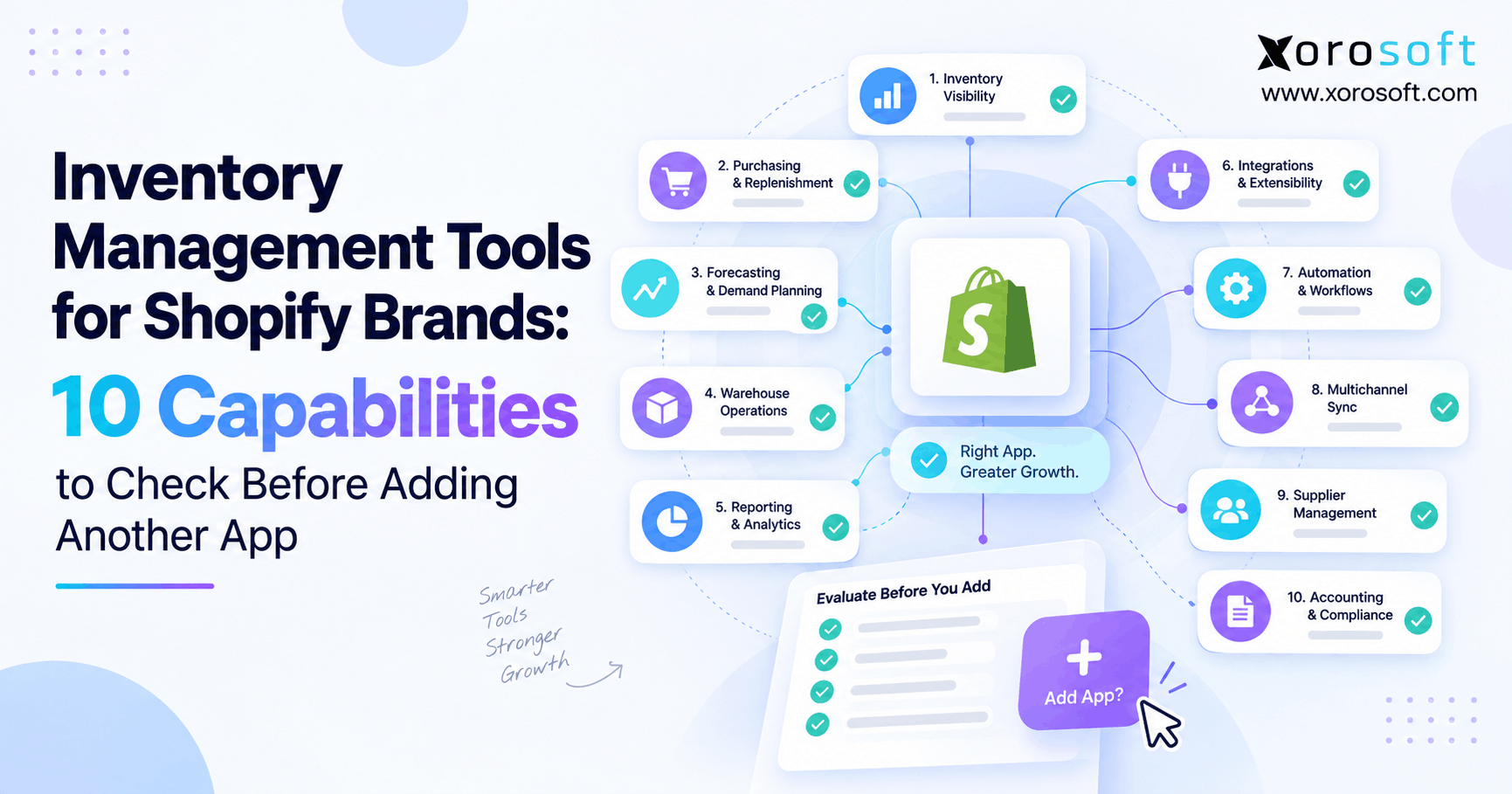 Inventory Management Tools for Shopify Brands: 10 Capabilities to Check Before Adding Another App
 -
 GS1 Logistic Labels in WMS: SSCC Generation, Printing, Scanning, and Traceability
 -
 Inventory Tracking Management KPIs: Measuring Unposted Receipts, Transfer Aging, and Return-to-Stock Time
 -
 B2B Ecommerce Software for Tax-Exempt Accounts: Resale Certificates, Account Rules, and Checkout Controls