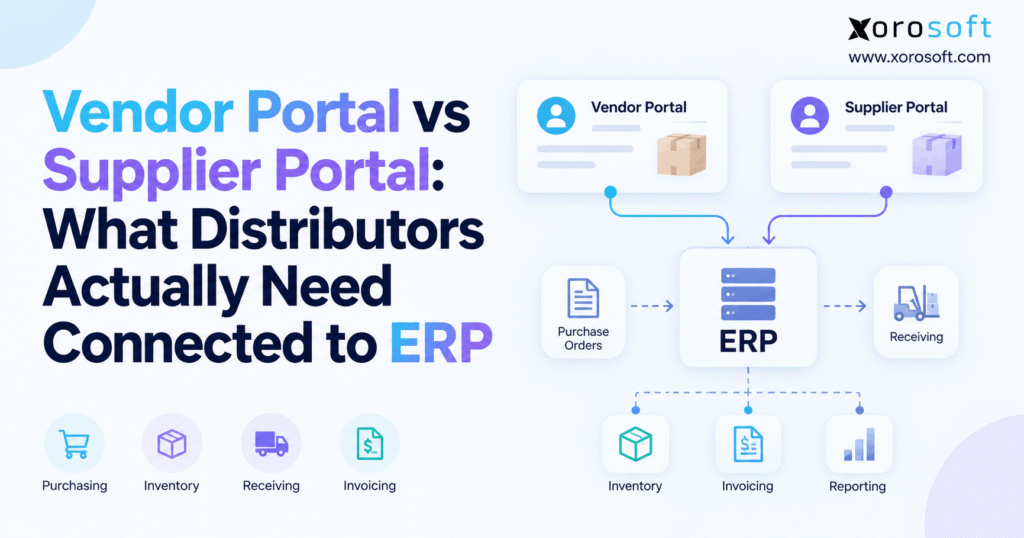
If you are searching for ways to optimise your business processes, a supplier portal ERP can streamline communication and collaboration between suppliers and your company.
1. Supplier Communication Starts Breaking Before the ERP Problem Becomes Obvious
Supplier communication usually does not fail in one dramatic moment. The process becomes unreliable gradually as order volume, supplier count, SKU complexity, and warehouse activity increase.
At a smaller scale, buyers can manage purchasing through purchase orders, email threads, spreadsheets, PDFs, and phone calls. One employee may know that a supplier moved a delivery date. Another may keep a spreadsheet of shortages. Warehouse staff might depend on a message from purchasing before preparing for a large inbound shipment.
Growth makes that operating model harder to sustain.
A supplier may confirm a revised delivery date while the ERP still holds the original date. Purchasing knows the order will arrive late, but inventory planning still assumes that stock will arrive on schedule. Meanwhile, the warehouse may have no updated expected receipt. Finance encounters the issue later when an invoice does not match the quantity physically received.
This is where the vendor portal vs supplier portal discussion becomes operational rather than semantic.
Distributors do not simply need another login page for suppliers. They need a workflow that turns supplier actions into reliable operational information.
The right supplier portal ERP architecture should connect purchasing, inventory planning, inbound logistics, receiving, accounts payable, and supplier-performance reporting. Without those connections, the business may digitize supplier communication while leaving the underlying reconciliation problem unchanged.
1.1 Email Works for Communication, Not Transaction Control
Email remains useful because every supplier understands it. However, email does not naturally create structured ERP transactions.
A supplier might communicate a shortage in a message, send a changed delivery date in a spreadsheet, or attach a revised order confirmation as a PDF. Someone inside the distributor must interpret that information and decide what needs to change elsewhere.
As volume grows, buyers become the manual integration layer between suppliers and ERP.
That creates unnecessary work and makes it harder to determine which version of a transaction is current.
1.2 Spreadsheets Create Additional Versions of the Same Purchase Order
Spreadsheets often appear when employees need visibility that the core system does not provide.
Purchasing exports open POs. Delivery dates get updated manually. Warehouse teams maintain a receiving tracker. Finance creates a separate file for invoice exceptions.
Each spreadsheet may solve an immediate problem, yet the overall process becomes fragmented.
A supplier portal should reduce these side systems rather than become another one.
2. Vendor Portal vs Supplier Portal: What the Terms Actually Mean
The distinction between “vendor portal” and “supplier portal” is not standardized across industries or ERP products. Some organizations call every company that provides goods or services a vendor. Procurement teams may prefer the word supplier, particularly when discussing strategic sourcing, materials, or supply-chain relationships.
Because of that overlap, distributors should not assume that vendor portal vs supplier portal describes two completely different software categories.
Functionality matters more than terminology.
2.1 What a Vendor Portal Usually Provides
A vendor portal commonly gives external vendors controlled access to information related to their commercial relationship with the buyer.
Depending on the product, vendors may review purchase orders, upload documents, submit invoices, maintain selected account information, respond to requests, or check transaction status.
The portal provides self-service without giving external users unrestricted access to internal business systems.
2.2 What a Supplier Portal Usually Provides
A supplier portal often emphasizes procurement and supply-chain collaboration.
Suppliers may receive purchase orders, acknowledge individual lines, confirm quantities, propose delivery changes, communicate shortages, provide shipment details, submit invoices, and maintain compliance documents.
Those capabilities become much more valuable when supplier activity flows directly into the ERP processes that purchasing, inventory, warehouse, and finance teams already use.
2.3 The Better Question Is What Happens After the Supplier Acts
The portal name does not tell a distributor whether the workflow is truly connected.
A supplier may enter a new delivery date through a modern interface, but somebody may still need to type that date into ERP manually. In that case, the company has improved the supplier-facing experience without fixing the internal process.
A stronger evaluation asks:
What happens inside purchasing, inventory, receiving, and accounting after the supplier clicks submit?
That question exposes the real difference between a basic communication portal and connected supplier collaboration.
3. Supplier Portal ERP Integration Should Start With the Transaction Backbone
A portal should not become an independent source of truth for purchasing.
Purchase orders usually depend on approved item data, supplier agreements, inventory requirements, warehouse locations, purchasing rules, and financial controls. For most distributors, ERP should therefore remain the transaction backbone.
The portal can expose relevant parts of that transaction to external suppliers while returning structured responses into the same operating model.
3.1 ERP Should Own the Approved Purchase Order
Consider a PO for 5,000 units.
The buyer requests 3,000 units this month and another 2,000 the following month. The supplier can support the first delivery but proposes moving the second shipment back two weeks.
That change influences more than the purchasing department.
Planning must understand the new supply date. Warehouse teams need a revised expected receipt. Customer-service or allocation teams may need to adjust commitments. Finance eventually depends on accurate receipt information when the invoice arrives.
If the portal holds one commitment while ERP holds another, the business has created conflicting versions of the same order.
3.2 Supplier Portal ERP Integration Should Convert Responses Into Controlled Exceptions
The ERP does not need to accept every supplier change automatically.
Instead, the system can capture the supplier’s proposed quantity, date, price, or item change as an exception. Purchasing then reviews the change and decides whether to accept, reject, or negotiate it.
This model preserves internal control while eliminating much of the manual interpretation work.
Rather than reading an email and recreating the response in ERP, the buyer manages an exception that already contains structured transaction data.
3.3 Transaction Ownership Should Stay Clear
Successful supplier collaboration depends on clear ownership.
ERP owns the approved PO. The supplier owns its response. Purchasing owns acceptance of material changes. The warehouse owns the physical receipt. Finance owns invoice approval and payment.
A supplier portal ERP workflow should connect those responsibilities without allowing one participant to overwrite another participant’s role.
4. Supplier Portal ERP Data Begins With Clean Supplier Master Records
Automation cannot fix inconsistent supplier data.
Before distributors automate PO confirmations, invoices, or shipment notices, they should establish clear rules for supplier master-data ownership.
Supplier onboarding may include legal entity details, addresses, contacts, tax information, payment terms, product capabilities, compliance documents, warehouse origins, and financial information.
Some of that data works well for supplier self-service. Other fields require tighter controls.
4.1 Supplier Onboarding Should Produce Structured Information
A portal can allow suppliers to submit company information directly rather than emailing documents back and forth.
That reduces administrative effort and gives both parties a more consistent onboarding process.
However, submitted information should enter the appropriate review process. Supplier self-service should not mean unrestricted control over production ERP data.
4.2 Low-Risk and High-Risk Changes Need Different Rules
Updating an operational contact is different from changing bank details.
The business should identify which changes can post immediately, which require internal approval, and which should remain controlled entirely by employees.
This distinction is especially important for tax, payment, compliance, and financial information.
Good portal design improves convenience without weakening governance.
4.3 Audit History Protects Both Sides
Important changes should leave a clear history.
Teams should be able to determine who changed a value, when it changed, what the previous value was, and whether somebody approved the update.
That record becomes valuable during supplier disputes, payment investigations, compliance reviews, and internal audits.
5. Vendor Portal ERP Workflows Should Center on Purchase Order Acknowledgment
Sending a purchase order does not prove that the supplier can fulfill it exactly as requested.
For distributors, PO acknowledgment is one of the most important supplier collaboration processes because it turns an internal request into an external commitment.
A strong workflow captures whether the supplier accepts the items, quantities, dates, locations, and other critical conditions.
5.1 Line-Level Confirmation Reveals Problems Earlier
A purchase order may contain twenty lines while only one line has an issue.
Header-level acceptance can hide that problem.
The supplier might be able to fulfill nineteen lines on time but need another three weeks for the twentieth. If the portal records only “accepted,” planners may assume the entire PO remains on schedule.
Line-level confirmation gives the business a more accurate picture.
5.2 Requested Dates and Confirmed Dates Serve Different Purposes
A requested date represents what the buyer wants.
A confirmed date represents what the supplier currently expects to achieve.
Keeping both values matters.
Overwriting the original requested date makes supplier-performance analysis harder. Ignoring the confirmed date causes planning to rely on unrealistic expectations.
The supplier portal ERP workflow should preserve the difference and make exceptions visible.
5.3 Suppliers Should Propose Material Changes Rather Than Silently Edit Orders
Quantity reductions, date changes, pricing differences, substitutions, and location changes can affect downstream operations.
Instead of letting suppliers directly rewrite approved purchasing transactions, the portal should allow them to propose changes.
Purchasing can then approve the new commitment and let the ERP update dependent workflows in a controlled way.
6. How Supplier Portal ERP Data Improves Inventory Planning
Supplier collaboration becomes strategically important when it changes the quality of future inventory information.
An open purchase order may technically represent incoming stock, but the reliability of that supply depends on supplier acknowledgment, quantity confirmation, production status, shipment timing, and actual receipt.
Treating every open PO as equally dependable can create planning errors.
6.1 Confirmed Supply Gives Planners Better Context
Suppose a distributor has 2,500 units available and an open purchase order for another 6,000.
Without further information, teams may plan around 8,500 units of future availability.
If the supplier confirms only 4,000 units, the picture changes significantly.
Purchasing may need another order. Allocation teams may need to protect stock. Sales may need to adjust customer expectations.
A connected supplier portal ERP workflow makes these changes visible sooner.
6.2 Multi-Warehouse Operations Magnify Supplier Delays
Supplier changes affect more than the destination facility.
An inbound shipment may support transfers between warehouses, ecommerce fulfillment, wholesale allocation, safety stock, marketplace orders, or regional customer commitments.
One delayed supplier delivery can therefore affect several downstream decisions.
For businesses managing purchasing, inventory, warehouses, ecommerce, and financial activity together, XoroONE provides an example of a cloud ERP approach built around connected inventory-driven operations.
6.3 Supplier History Can Improve Lead-Time Planning
Static lead times often become inaccurate over time.
By comparing requested dates, supplier-confirmed dates, shipment dates, and actual receipt dates, purchasing teams can identify where assumptions differ from real supplier behavior.
That historical information can support better replenishment settings and supplier discussions.
The value comes from using supplier data inside planning, not simply storing it in the portal.
7. Supplier Portal and WMS Integration Should Begin Before the Truck Arrives
Supplier collaboration does not stop when an order ships.
Warehouse teams need visibility into what is coming, where it belongs, when it should arrive, and whether the shipment differs from the purchase order.
Without that information, receiving becomes reactive.
7.1 Advance Shipping Information Improves Inbound Preparation
An advance shipping notice can communicate shipment details before physical arrival.
Depending on the operation, that information may include PO references, SKUs, quantities, cartons, pallets, carrier details, tracking numbers, shipment dates, or expected arrival times.
Receiving teams can plan labor and dock capacity more effectively when they know what to expect.
7.2 Supplier Shipment Data Should Feed the Receiving Workflow
Entering shipment data into a portal creates limited value if warehouse employees must open a separate system to find it.
Expected shipment information should flow into the WMS or ERP receiving process.
Where operations require barcode scanning, directed receiving, location management, lot or serial tracking, and real-time warehouse inventory, a connected warehouse management system becomes part of the larger supplier-to-inventory process.
7.3 Receiving Exceptions Need to Reach Purchasing and Finance
Imagine that a supplier confirms 1,200 units, sends shipment information for 1,200, but the warehouse physically receives only 1,120.
That variance affects several departments.
Purchasing needs to know whether the remaining units are backordered. Inventory planning should use the actual receipt. Finance may need to prevent an invoice from moving through as if all 1,200 units arrived.
A connected transaction keeps those teams working from the same operational event.
8. Vendor Portal vs Supplier Portal and EDI: Why Distributors Need a Hybrid Model
A supplier portal and EDI solve different problems.
EDI works well for structured system-to-system transactions. A portal works well when a person needs to review information, make a decision, upload documentation, or handle an exception.
For many distributors, the strongest architecture supports both.
8.1 High-Volume Partners Often Benefit From EDI
Large suppliers may already support standardized electronic transactions.
A purchase order can move electronically to the trading partner. The supplier can return an acknowledgment, send advance shipment information, and submit an invoice without employees recreating each transaction manually.
Reliable ERP integrations become important because these documents need to reach purchasing, inventory, warehouse, and financial processes rather than stopping inside a separate integration tool.
8.2 Smaller Suppliers May Prefer Portal Access
Many suppliers do not have EDI systems or technical teams.
A browser-based portal gives those partners access to structured workflows without requiring a complex integration project.
Suppliers can review purchase orders, acknowledge quantities, provide dates, communicate shipment information, and submit required documentation through a human-friendly interface.
8.3 APIs Add Another Integration Option
Technology-oriented partners may prefer API connectivity.
An API can allow applications to exchange data directly when both parties support the necessary security, endpoints, and data structures.
As a result, the distributor does not need one connection method for every supplier.
Large partners can use EDI, smaller suppliers can use the portal, and specialized connections can use APIs. Human communication remains useful for genuine exceptions.
The important requirement is that each channel ultimately updates the appropriate ERP workflow.
9. Supplier Portal ERP Workflows Must Extend Into Accounts Payable
A portal project should not end once the warehouse receives inventory.
Suppliers continue interacting with the distributor through invoices, credits, disputes, account statements, and payment questions.
If purchasing becomes digital while AP still reconstructs every transaction manually, the process remains incomplete.
9.1 Supplier Invoices Should Retain Purchase Context
Invoices work best when they remain connected to the purchase transaction that created them.
The system should identify the relevant supplier, PO, quantities, items, and receiving information whenever the workflow supports it.
That connection gives accounts payable better context and reduces the need to search through emails or request additional documents.
9.2 Three-Way Matching Depends on Shared Data
Three-way matching compares three operational facts: what the business ordered, what the warehouse received, and what the supplier invoiced.
If those records sit in separate applications with different quantities or statuses, AP spends more time investigating exceptions.
A supplier portal ERP architecture can keep the records connected so finance focuses on real differences instead of rebuilding transaction history.
9.3 Payment Visibility Can Reduce Routine Inquiries
Suppliers often ask whether an invoice has been received, approved, scheduled, or paid.
Appropriate portal visibility can reduce that repetitive communication.
The goal is not to expose the entire accounting system. Suppliers only need access to information relevant to their own invoices and payment status.
10. Supplier Portal Security Requires More Than a Login Screen
A supplier portal creates an external entry point into important business processes.
That means security must cover identity, permissions, role design, approvals, data visibility, and audit history.
Giving suppliers convenient access should never mean giving them broad access.
10.1 Suppliers Should See Only Their Own Relevant Data
External users should see transactions tied to their supplier organization.
One supplier should never have visibility into another supplier’s purchase orders, pricing, invoices, documents, or profile information.
Inside the supplier organization, different users may also need different permissions.
For example, an operations contact may work with POs while an accounting contact manages invoices.
10.2 Sensitive Changes Need Stronger Controls
Banking, payment, tax, and compliance information should receive stronger validation than routine profile updates.
A portal can simplify how suppliers submit these changes without automatically allowing those changes to alter approved ERP records.
Security and efficiency should support each other.
10.3 Audit Trails Should Follow Material Changes
Important supplier actions should leave an understandable history.
The distributor should know who submitted a change, what changed, when it changed, and what approval occurred afterward.
That information becomes essential during disputes and investigations.
11. Vendor Portal vs Supplier Portal Requirements Change by Industry
Supplier workflows are not identical across product categories.
An apparel distributor may care about style-color-size confirmation, while a furniture company may focus heavily on long inbound lead times. Food businesses may require more supplier documentation, and manufacturers may depend on material availability for production schedules.
A useful supplier portal ERP design reflects those operational differences.
11.1 Apparel Requires Variant-Level Visibility
Apparel purchase orders frequently contain many combinations of style, size, and color.
A supplier may fulfill most variants while delaying only a few.
Line-level acknowledgment helps purchasing understand the exact risk rather than treating the whole order as either available or unavailable.
11.2 Furniture Depends on Reliable Long-Lead-Time Commitments
Furniture purchasing may involve extended production and transportation timelines.
A supplier delay can affect customer commitments, warehouse capacity, inbound scheduling, and cash-flow expectations long before the product arrives.
Confirmed dates therefore carry significant operational value.
11.3 Food and Beverage Can Add Traceability Requirements
Depending on the product and business model, supplier collaboration may involve certificates, lot information, expiry details, ingredients, or quality records.
That creates a broader portal requirement than simple PO visibility.
11.4 Manufacturing Connects Suppliers to Production
Material availability directly affects production plans.
When critical components arrive late, the impact can reach work orders, labor schedules, finished-goods commitments, and customer delivery dates.
Businesses comparing requirements across these environments can review Xorosoft’s industry-specific ERP coverage for examples of how inventory and purchasing requirements differ across distribution, apparel, furniture, food, manufacturing, and other inventory-driven sectors.
12. Shopify and Ecommerce Brands Need Supplier Visibility Behind the Storefront
Ecommerce growth can expose weak purchasing processes faster than many teams expect.
The storefront may process customer demand effectively while supplier commitments, purchase orders, inbound inventory, warehouse receipts, and accounting remain fragmented behind the scenes.
That fragmentation becomes more costly as order velocity increases.
12.1 Demand Can Change Faster Than Purchasing Teams Can React
A product may suddenly accelerate because of paid campaigns, seasonal demand, marketplace events, social exposure, or wholesale growth.
Purchasing responds by increasing order frequency or quantity.
When supplier confirmations remain buried in email, planners may continue using expected supply that is no longer realistic.
12.2 Future Inventory Depends on Supplier Commitments
Current inventory answers one question: what is available now?
Supplier information answers another: what will actually become available next?
A growing ecommerce business needs both.
If a supplier reduces a quantity or moves a delivery date, that change can influence purchase recommendations, customer promises, channel allocation, and stockout risk.
12.3 Shopify Should Connect to the Operational Backbone
Shopify serves the customer-facing commerce process, but purchasing, accounting, forecasting, EDI, and warehouse operations may require a broader system.
Brands considering that model can review the Xorosoft ERP app on Shopify as one example of connecting ecommerce with an ERP environment.
The objective is not to replace the storefront. It is to ensure that supplier and inventory reality supports what the storefront promises.
13. Supplier Portal ERP Architecture: Standalone or Connected?
A supplier portal does not always need to live inside the ERP.
Some distributors use dedicated procurement applications, supplier networks, or specialized vendor-management systems because those tools provide capabilities the ERP does not.
That architecture can work well if transaction ownership and synchronization remain clear.
13.1 A Standalone Portal Can Work With Strong Integration
A separate portal may receive approved POs from ERP and return supplier confirmations, shipment data, invoices, or master-data requests.
The distributor must still define which application owns each transaction.
If the portal and ERP both allow independent changes to the same data, inconsistencies become almost inevitable.
13.2 A Connected Supplier Portal ERP Model Reduces Manual Boundaries
Closer integration can keep the purchase order, supplier response, inventory plan, expected receipt, actual warehouse receipt, and invoice within one coordinated transaction chain.
That does not eliminate every exception.
Instead, it gives employees one operational context for resolving those exceptions.
13.3 The Portal Project May Expose a Larger ERP Architecture Problem
Sometimes the business starts looking for a portal and discovers that supplier communication is only one symptom.
Purchasing does not align with inventory. Inventory does not align with WMS. Warehouse updates reach accounting late. Ecommerce uses another stock view. Reporting depends on manual exports.
Adding a portal to that environment may improve one interface without addressing the larger fragmentation.
At that point, the organization may need to consider broader ERP solutions rather than another isolated application.
14. Supplier Portal ERP Requirements Should Be Tested With Real Transactions
Feature lists can make very different products look surprisingly similar.
Most systems can claim supplier management, purchasing, integrations, document exchange, reporting, and invoicing.
The real differences appear when the business tests an imperfect transaction.
14.1 Test a Purchase Order With Realistic Exceptions
Create a PO with several lines.
Ask the supplier to accept most of them, reduce one quantity, and change one delivery date.
Then follow the response through the system.
Purchasing should clearly see the exception. Inventory planning should receive the approved commitment. The original request should remain available for context. Warehouse users should see the correct expected receipt.
This test immediately reveals how deeply the portal connects to operations.
14.2 Test a Shipment That Does Not Match the PO
Next, create shipment information for a quantity that differs slightly from the confirmation.
When the warehouse receives the goods, introduce another small variance.
Real distribution environments deal with shortages, overages, split shipments, damage, substitutions, and backorders. Software should handle those events without forcing employees into side spreadsheets.
14.3 Test the Invoice Against the Actual Receipt
Finally, submit an invoice that reflects what the supplier believes it shipped rather than what the warehouse actually received.
Watch how accounts payable handles the exception.
A strong supplier portal ERP demo should show the complete chain from supplier response through inventory, warehouse, and financial impact.
15. Common Supplier Portal Mistakes Create More Work Instead of Less
A portal can automate a good process, but it can also accelerate a poorly designed one.
Distributors should therefore address process ownership before trying to automate every supplier interaction.
15.1 Forcing Every Supplier Into the Same Connection Method
Different suppliers have different technical capabilities.
A large strategic partner may already support sophisticated EDI. A small manufacturer may prefer a browser portal. Another partner may offer direct API connectivity.
Trying to force every supplier into one method may create unnecessary work on both sides.
15.2 Automating an Undefined Approval Process
Technology cannot answer an ownership question that the business has never resolved.
If nobody knows who approves a changed delivery date today, sending automated alerts will not fix the underlying problem.
First define who owns the exception. Then automate the routing.
15.3 Measuring Logins Instead of Business Outcomes
Portal adoption matters, but login volume is not an operational KPI.
More useful measures include PO acknowledgment time, confirmed-date accuracy, ASN adoption, receiving discrepancies, invoice-match rate, supplier response time, and manual buyer touches.
These metrics show whether the process actually improved.
15.4 Ignoring the Supplier Experience
Internal efficiency should not create unnecessary external effort.
Suppliers should not repeatedly enter information that the buyer already has, navigate confusing workflows, or upload identical documents to several places.
Strong supplier collaboration should remove friction for both parties.
16. When Supplier Portal ERP Requirements Point to a Broader System Upgrade
A business does not need to replace ERP simply because supplier communication is manual.
However, several connected symptoms can indicate that the existing technology stack has reached its operational limit.
These symptoms often include repeated inventory reconciliation, spreadsheet purchasing, delayed warehouse updates, separate EDI tools, disconnected accounting, inconsistent reporting, and extensive manual data entry.
16.1 Disconnected Applications Turn Employees Into Middleware
A typical growth-stage stack may contain ecommerce software, accounting software, inventory tools, warehouse applications, EDI middleware, purchasing spreadsheets, and reporting exports.
Each tool may perform its own function well.
The problem appears between the applications.
Employees move data from one system to another, check whether integrations completed, reconcile conflicting inventory values, and explain exceptions that should already share a transaction history.
16.2 ERP Comparisons Should Focus on End-to-End Workflow
When broader modernization becomes necessary, the evaluation should move beyond feature counts.
Ask each ERP vendor to demonstrate the same supplier transaction from purchase-order creation through acknowledgment, shipment, receipt, inventory impact, invoice exception, and financial reconciliation.
Companies evaluating NetSuite as part of that process can use a Xorosoft vs NetSuite comparison as one reference while validating each requirement against their own business model.
The best system depends on workflow fit, implementation complexity, internal resources, operating scale, and future requirements.
17. Connected Supplier Data Creates Better Reporting and AI Context
Once supplier actions become structured ERP transactions, distributors can use the information for more than immediate order processing.
They can analyze supplier performance, identify recurring exceptions, improve lead-time assumptions, and provide cleaner context for automation.
17.1 Supplier Performance Should Come From Operational Records
Supplier scorecards become more useful when they rely on actual transaction history.
Teams can compare requested dates, confirmed dates, actual receipts, shortages, shipment-notice compliance, invoice exceptions, and response times.
That creates a more objective view of supplier performance than manually maintained notes.
17.2 Supplier Portal ERP Data Gives AI Better Business Context
AI becomes more useful when operational information already shares a common structure.
If supplier confirmations live in email, receiving discrepancies sit in a warehouse application, and purchase orders live elsewhere, AI has to reconstruct the transaction before answering meaningful questions.
A connected data foundation gives AI clearer operational context.
Xorosoft’s AI MCP Server reflects this broader direction by connecting AI workflows with ERP context instead of treating AI as a separate operating database.
17.3 Modernization Should Improve Operating Results, Not Increase Software Count
The objective is not to accumulate more applications.
A better operating model should reduce duplicate entry, improve inventory visibility, shorten exception-resolution time, strengthen receiving accuracy, connect financial processes with operations, and give decision-makers more reliable information.
Teams can also review ERP customer case studies to understand how inventory-driven organizations approach broader operational change rather than evaluating technology only through product descriptions.
18. Practical Next Step: Map One Supplier Transaction Before Buying Software
The final vendor portal vs supplier portal decision should start with a transaction map rather than a product demo.
Choose one supplier and one real purchase order.
Follow that transaction from PO creation through supplier acknowledgment, quantity changes, delivery-date changes, shipment notification, warehouse receipt, invoice processing, and payment.
At each point, identify where the information lives and who touches it manually.
If a supplier changes a delivery date, does a buyer have to re-enter it?
When a shipment leaves the supplier, does the warehouse see it before arrival?
After the warehouse receives less than expected, does purchasing immediately understand the shortage?
When the invoice arrives for the original quantity, can accounts payable identify the difference using connected records?
Those questions expose the actual process gaps.
18.1 Separate Portal Problems From Integration Problems
Some issues are primarily supplier communication problems.
Suppliers may need easier access to POs, documents, invoice status, or routine requests. In those situations, a portal can solve a meaningful problem.
Other issues are integration problems.
The supplier information already exists digitally, yet employees still copy it into another application. Better integration may create more value than another user interface.
A third category involves architecture.
If purchasing, inventory, WMS, ecommerce, accounting, and reporting repeatedly disagree, the business may need a broader ERP strategy.
18.2 Keep the Supplier Portal ERP Workflow Centered on Operational Events
The strongest supplier portal ERP model does not measure success by how many suppliers log in.
It measures whether supplier events reach the right operational process.
A confirmed date should influence planning. Shipment information should prepare receiving. The physical receipt should update inventory. Invoice matching should use what actually happened in the warehouse.
Each event belongs to one transaction chain.
18.3 Use the Same Scenario When Evaluating ERP Platforms
When a broader system change becomes necessary, ask every vendor to demonstrate the same imperfect supplier transaction.
Do not accept a perfect PO that ships exactly as ordered and invoices without exception.
Real operations include changed dates, partial quantities, shortages, delayed shipments, damaged stock, and invoice differences.
Platforms such as XoroERP become relevant when distributors want supplier, purchasing, inventory, warehouse, accounting, and related workflows connected within a broader ERP environment instead of managed independently.
The final evaluation question is straightforward:
Can the supplier transaction move from purchase order to receipt and invoice without employees repeatedly recreating the same information?
If the answer is yes, the portal is supporting the operating model.
If the answer is no, identify where the transaction breaks before adding more technology.
For distributors that want to review supplier collaboration, purchasing, inventory, warehouse, EDI, or accounting processes in context, the practical next step is to book a personalized ERP discussion with Xorosoft and walk through one real transaction from PO creation through financial reconciliation.
Frequently Asked Questions
What is a supplier portal ERP?
A supplier portal ERP connects supplier actions with purchasing, inventory, receiving, invoicing, and other ERP workflows so teams can work from consistent transaction data.
What is the difference between a vendor portal and supplier portal?
The terms often overlap. Distributors should compare workflows such as PO acknowledgment, shipment updates, invoices, supplier data, and ERP integration rather than relying on product terminology.
Should a supplier portal connect directly to ERP?
Yes, when supplier activity affects purchasing or inventory. ERP integration reduces duplicate entry and helps confirmations, shipment updates, receipts, and invoices remain synchronized.
Does a supplier portal replace EDI?
Usually not. EDI is effective for structured system-to-system transactions, while portals support human interaction, self-service, document exchange, and exception handling.
When does a distributor need a supplier portal?
A portal becomes useful when rising supplier volume, frequent PO changes, shipment exceptions, invoice questions, or manual email tracking create significant administrative work.
What features should a supplier portal ERP include?
rioritize PO visibility, line-level acknowledgment, confirmed dates, shipment information, invoice workflows, role-based access, audit trails, ERP integration, and exception management.
Can supplier portal data improve inventory planning?
Yes. Confirmed quantities, delivery dates, shipment information, and actual receipts give planners better visibility into expected supply and potential inventory shortages.
Recent Posts
-
 How Inventory Status Tracking Clarified Damaged, Reserved, and Available Stock
 -
 Predictive Analytics in Logistics for 3PL Operations: Predicting Labor, Dock Volume, and SLA Risk
 -
 Should a B2B Ecommerce Platform Calculate Inventory Availability or Read It From ERP?
 -
 Distributor ERP Software for Unifying Inventory, Purchasing, Warehousing, Orders, and Accounting
 -
 Multichannel Inventory Statistics 2026: Growth, Overselling, and Operational Complexity