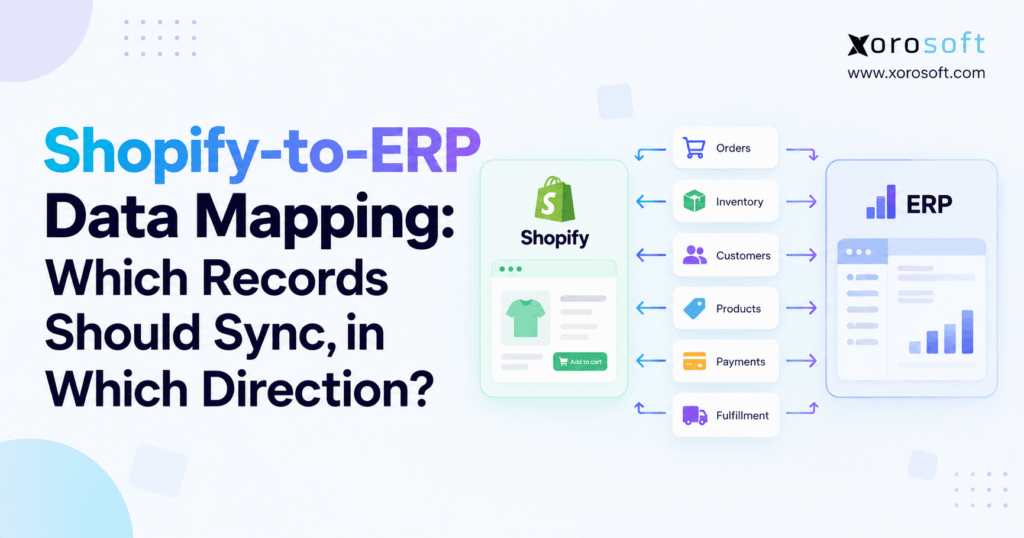
If you’re looking to understand how Shopify ERP data mapping works and why it’s important for your integrations, this guide will help.
1. Shopify ERP Data Mapping Fails When Record Ownership Is Unclear
1.1 Shopify ERP data mapping starts with operating rules
A data map is often treated as a technical spreadsheet containing source fields and destination fields. That spreadsheet is useful, but it represents only part of the integration design.
Effective Shopify ERP data mapping begins one level higher. The team needs to define the operating rule behind each important record.
Consider inventory. A technical map may state that ERP available quantity updates Shopify inventory. An operational map goes further by specifying which warehouses contribute to ecommerce availability, whether allocated stock is excluded, how safety stock is handled, when canceled orders release inventory, and whether Shopify users can manually change stock.
The same principle applies to products, customers, orders, pricing, payments, fulfillment, refunds, and returns.
Without clear ownership, synchronization simply moves uncertainty from one system to another more quickly.
1.2 Every Shopify ERP record needs an authoritative owner
A practical Shopify-to-ERP data map should answer several questions for every important record.
Which application is authoritative? Which way should updates move? What identifier connects the records? What event triggers synchronization? How quickly must the destination receive the change? Finally, what should happen when the source and destination contain conflicting values?
Those decisions matter more than the connector technology.
For example, a product title may belong to Shopify because the ecommerce team actively manages merchandising content. The SKU, cost, and stocking information for that same product may belong to ERP.
That is field-level ownership rather than simple record-level ownership.
Defining responsibility at that level prevents one application from overwriting data another team legitimately controls.
2. Shopify ERP Integration Should Start With a System-of-Record Strategy
2.1 Shopify usually owns customer-facing commerce activity
Shopify is closest to the customer-facing transaction. It controls the storefront, checkout, online order capture, and much of the commerce experience.
For that reason, Shopify commonly originates records such as ecommerce orders, checkout details, promotional activity, merchandising content, and storefront-specific attributes.
However, not every field attached to a Shopify order needs to remain under Shopify’s control forever.
Once an order enters operations, ERP may own allocation, purchasing demand, warehouse routing, financial posting, and profitability reporting.
2.2 ERP should own operational information that spans channels
The argument for ERP ownership becomes stronger when information must remain consistent outside Shopify.
Inventory is a good example. A business may sell through Shopify, Amazon, wholesale representatives, EDI customers, retail locations, and other marketplaces. Shopify sees only part of total demand.
An ERP can coordinate those channels simultaneously.
Purchasing, supplier commitments, landed costs, inventory valuation, manufacturing requirements, accounts payable, accounts receivable, and warehouse allocation also extend beyond the storefront.
Platforms such as XoroERP become relevant at this stage because the ERP can operate behind Shopify while coordinating records that must remain consistent across the broader company.
3. Shopify ERP Data Mapping Should Be Defined One Record at a Time
3.1 Shopify product data sync rarely needs one universal direction
Products are often the first area where teams assume bidirectional synchronization is necessary.
That assumption can introduce avoidable conflicts.
A better model separates operational product data from merchandising product data.
ERP may own the SKU, unit of measure, standard cost, supplier information, purchasing attributes, item status, and inventory characteristics. Shopify may own ecommerce titles, SEO copy, collections, tags, merchandising descriptions, and storefront presentation.
If the company uses a PIM, another application may control specifications, product assets, channel attributes, and enriched descriptions.
The goal is not to force every product field into one application. Instead, each field should have one recognized editing process.
3.2 Shopify inventory data needs a stronger operational owner
Inventory behaves differently because conflicting quantities can immediately affect revenue and customer experience.
For an inventory-driven company, an ERP or WMS typically needs to calculate what Shopify can actually sell.
That quantity may be very different from physical on-hand inventory.
Imagine that a warehouse contains 500 units. Fifty are allocated to wholesale orders, 20 are damaged, another 30 are reserved for an upcoming promotion, and 25 are held as channel safety stock.
Publishing 500 units to Shopify would misrepresent true availability.
The storefront should receive a quantity based on the company’s sellable-inventory policy rather than a raw physical count.
4. Shopify Product and Variant Data Mapping Requires Stable Identifiers
4.1 Shopify variants should map to actual ERP inventory items
A single Shopify product can contain many variants, while ERP normally needs each sellable inventory combination represented as a distinct item or SKU.
Consider a shirt offered in five sizes and four colors. Shopify presents that merchandise as one product, but operations manages 20 distinct inventory combinations.
Each sellable variant therefore needs a dependable ERP relationship.
Useful cross-references may include the Shopify product ID, Shopify variant ID, ERP item ID, SKU, barcode, and an external integration ID.
Product names should not be the primary matching mechanism.
A merchandising team can rename “Classic Hoodie – Navy” to “Core Hoodie – Midnight” while the physical inventory identity remains unchanged.
4.2 SKU governance protects Shopify ERP integrations
Changing an SKU after transactions already exist can affect warehouse scanning, purchasing, reporting, returns, integrations, and historical analysis.
A mature Shopify ERP data mapping policy should establish whether SKU changes are allowed and how replacements are handled.
Many businesses treat an SKU as operational identity rather than marketing content.
When a product changes enough to require a new operational identity, creating a new ERP item and Shopify variant may be safer than rewriting the existing SKU.
Bundles require another layer of planning. Shopify may sell a single bundle SKU while ERP or WMS consumes several component items.
In that case, the integration should define whether Shopify receives inventory for the bundle directly or a calculated quantity derived from available components.
5. Shopify Inventory Sync Should Publish Available-to-Sell Inventory
5.1 Shopify ERP inventory mapping should separate on-hand and sellable stock
One of the most common Shopify integration mistakes is publishing ERP on-hand inventory directly to the storefront.
That approach can work for a simple operation. Once allocation, multiple warehouses, wholesale orders, production demand, quality holds, or safety stock are introduced, it becomes much less reliable.
ERP or WMS should instead calculate an available-to-sell quantity.
The formula may consider physical stock, allocations, open orders, pending transfers, reservations, damaged items, quality-control inventory, and channel buffers.
No single formula works for every company.
What matters is that the business has consciously defined its availability logic.
A company operating several fulfillment facilities can use a warehouse management system to control warehouse-level activity while Shopify receives only the quantity customers should actually be allowed to buy.
5.2 Shopify inventory synchronization should move quickly
Product descriptions can usually wait. Inventory often cannot.
If several orders arrive within a short period, stale storefront quantities can result in an oversell before the next scheduled synchronization cycle.
Event-driven or near-real-time inventory updates are therefore appropriate for many high-volume operations.
Even so, fast synchronization should not replace reconciliation.
Messages can fail. APIs can time out. Warehouse adjustments can occur outside the expected workflow. Scheduled checks between Shopify availability and ERP-published availability remain valuable even when most updates happen within seconds.
6. Shopify Location and ERP Warehouse Mapping Needs Explicit Rules
6.1 Shopify locations are not automatically ERP warehouses
Shopify locations and ERP warehouses can look similar structurally while serving very different operational purposes.
A company might maintain an ERP warehouse for each physical facility, another location for damaged inventory, a virtual in-transit location, and a separate 3PL facility.
Not every location should contribute inventory to ecommerce.
A documented location map should define exactly which ERP facilities feed each Shopify location.
For one company, a Shopify location called “Online” might combine sellable quantities from two distribution centers. Another merchant may expose warehouses separately because order-routing rules choose the nearest fulfillment point.
Either structure can work.
The error occurs when the connector creates the architecture implicitly rather than the business deciding it first.
6.2 Warehouse transfers need specific Shopify ERP rules
Suppose 200 units leave Warehouse A for Warehouse B.
Should customers be allowed to buy those units while they are physically in transit?
That depends on fulfillment policy.
If the inventory cannot ship until Warehouse B receives it, the units should generally disappear from available stock during the transfer. A business that allocates against inbound inventory may use a different model.
This example shows why Shopify ERP data mapping cannot be reduced to simple API field matching. The operational rule behind the quantity determines whether the synchronization is accurate.
7. Shopify Order Sync Needs Clear ERP Import Rules
7.1 Shopify order mapping should define the ERP creation trigger
A Shopify order can exist before every downstream business condition is final.
Some companies want the ERP order created immediately. Others wait until payment authorization or capture. High-risk transactions may need review. B2B orders may also require approval before inventory is allocated.
The correct trigger should follow the company’s fulfillment and financial policy.
Once an ecommerce order qualifies for operational processing, Shopify usually remains the source of the original commercial transaction while ERP becomes responsible for execution.
The ERP record should retain Shopify’s durable order identifier so retries cannot create duplicate sales orders.
Idempotency matters here. The same integration event must be safe to process again after a temporary failure.
7.2 Shopify ERP order mapping includes more than SKU and quantity
A complete order map usually includes the Shopify order ID, order number, customer or B2B company, billing and shipping addresses, SKUs, quantities, prices, discounts, taxes, shipping method, freight charges, payment status, currency, notes, and relevant channel information.
Order edits also need rules.
If customer service changes a quantity after ERP already allocated stock, the integration must know whether that edit can still update the operational order.
Once warehouse picking begins, automatic edits may be unsafe.
In that situation, an exception workflow may be better than silently replacing the ERP sales order.
8. Shopify Customer and B2B Data Mapping Needs Different Models
8.1 DTC Shopify customers do not always need separate ERP masters
A consumer brand can receive thousands of one-time orders.
Creating a permanent ERP customer master for every guest checkout may not provide enough value to justify the resulting record volume.
Some businesses create one ERP customer for every Shopify buyer. Others use a consolidated ecommerce account while retaining the buyer’s name and address on the sales transaction.
The right design depends on reporting, tax, accounting, customer service, and privacy requirements.
If individual customer masters are created, duplicate prevention needs careful planning.
An email address alone may not always be a reliable permanent identifier.
8.2 Shopify B2B ERP mapping requires company-level relationships
B2B creates a more structured problem.
Shopify B2B distinguishes companies, company locations, and individual customers. Those entities can have different billing details, shipping addresses, pricing arrangements, contacts, tax treatments, and payment terms.
The ERP relationship should reflect that hierarchy.
A parent company might correspond to one ERP customer with multiple ship-to locations. In another business, every operating location may need its own ERP account.
Payment terms also need a clear owner.
If ERP controls credit limits and customer payment policies, those values should not be independently maintained in both platforms without a defined synchronization rule.
9. Shopify Pricing, Discount, and Tax Sync Needs Field-Level Ownership
9.1 Shopify pricing and ERP pricing can have different roles
A DTC brand may maintain standard retail pricing directly in Shopify because its ecommerce team needs fast control over merchandising and promotions.
A wholesale distributor might maintain hundreds of negotiated customer prices in ERP.
Those are different operating models.
For B2B businesses, Shopify ERP data mapping should distinguish standard list price, contract price, catalog price, quantity-break pricing, promotional reductions, and manually negotiated adjustments.
When ERP owns account-specific pricing, the integration should publish the appropriate price or catalog rule to Shopify rather than allowing conflicting price maintenance in both systems.
9.2 Discounts and tax values need financial context
A discount is not merely a lower order total.
Reporting may need to know whether the reduction came from a discount code, automatic promotion, customer contract, line adjustment, or order-level offer.
The ERP mapping should preserve enough context for analytics and reconciliation.
Taxes need the same attention.
Amounts charged in Shopify eventually need to reconcile with the financial transaction recorded in ERP, including relevant lines, shipping charges, exemptions, and refunds.
10. Shopify Payment and Payout Mapping Should Remain Separate
10.1 Shopify customer payments are not the same as bank settlements
A customer may pay today, receive a partial refund tomorrow, and have the remaining transaction included in a later payout after fees and adjustments.
Treating the bank payout as if it were the original sale makes financial reconciliation harder.
A better integration separates the commercial transaction from the settlement transaction.
ERP records the order, tax, discount, shipping, payment, refund, and inventory effects. Settlement reconciliation then explains why the amount that reaches the bank differs from gross sales.
10.2 ERP clearing logic improves Shopify payout reconciliation
Many ecommerce accounting models use clearing accounts to bridge the gap between customer activity and bank settlement.
The exact accounting design varies by business, but the integration must preserve enough information to connect sales, payments, refunds, fees, adjustments, and payouts.
At higher transaction volumes, this becomes particularly important because manual matching does not scale.
A unified platform such as XoroONE can connect sales, inventory, purchasing, warehouse operations, manufacturing, and accounting around the same operational transaction history.
11. Shopify Fulfillment Sync Should Return Operational Results to Ecommerce
11.1 Shopify ERP fulfillment mapping must support partial shipments
A Shopify order containing several products may ship from two warehouses on different days.
Integration logic should never assume that one order equals one shipment.
When ERP, WMS, or a 3PL controls fulfillment, shipment confirmation should return to Shopify at the correct line and quantity level.
Relevant data often includes the fulfilled quantity, carrier, tracking number, tracking URL, fulfillment location, and shipment date.
Any items that have not shipped should remain open.
11.2 Internal warehouse statuses should not become storefront statuses too early
Warehouse systems often contain detailed operational states such as allocated, waved, released, picked, packed, staged, manifested, and shipped.
Shopify does not necessarily need all of them.
Shopify ERP data mapping should translate warehouse activity into meaningful customer-facing milestones rather than expose every temporary operational condition.
For businesses connecting several sales and operational platforms, Xorosoft integrations can provide a common ERP layer while inventory and fulfillment remain tied to their underlying warehouse processes.
12. Shopify Returns and Refund Mapping Needs Separate Operational States
12.1 Shopify return requests should not immediately add inventory
When a customer starts a return, the physical product may still be in their possession or moving back to the warehouse.
Adding the item immediately to available inventory could create another order for stock that cannot yet ship.
The return needs to move through several operational states.
Depending on the item and process, it may be approved, transported, received, inspected, restocked, quarantined, repaired, or written off.
Only the appropriate disposition should affect sellable inventory.
12.2 Shopify refunds and ERP inventory adjustments may happen at different times
A customer can receive money back before a physical return reaches the warehouse.
Likewise, returned merchandise may arrive without immediately becoming suitable for resale.
The financial state and physical inventory state should therefore remain separate.
ERP may issue a financial credit while WMS keeps the returned item in an inspection location.
Good Shopify ERP data mapping keeps those events linked without incorrectly forcing them into one status.
Exchanges add another layer because the returned product and replacement shipment may affect separate inventory, fulfillment, and revenue transactions.
13. One-Way Shopify ERP Data Mapping Often Reduces Conflict
13.1 Shopify ERP bidirectional sync should solve a real business problem
Two-way synchronization can sound more advanced, but complexity is not the objective.
Control is.
If inventory should always come from ERP, allowing Shopify quantity changes to flow back into ERP adds another authority without necessarily adding value.
Similarly, when Shopify owns merchandising copy, a generic ERP description should not overwrite the storefront content.
One-way data movement often produces cleaner ownership because responsibility is obvious.
13.2 Shopify ERP field mapping can still be bidirectional selectively
Customers and products are common exceptions.
Shopify might capture a current shipping address while ERP controls payment terms. Shopify could own SEO descriptions while ERP owns SKU and costing fields.
Rather than calling the whole customer or product record bidirectional, document ownership field by field.
This approach produces a much more durable Shopify ERP data mapping model.
Support teams also benefit because employees know where a value should be corrected before synchronization runs again.
14. Shopify ERP Sync Frequency Should Match the Risk of Stale Data
14.1 Shopify inventory, orders, and fulfillment usually need fast synchronization
Not every record requires the same update speed.
Inventory can become commercially inaccurate within minutes. New orders need to reach operations quickly. Shipment information should return to Shopify soon after goods leave the warehouse.
These records often justify event-driven or near-real-time integration.
A fast connection alone does not guarantee correctness, however.
Periodic reconciliation remains necessary because messages can fail, an API can reject an update, and manual operational adjustments may occur outside the expected workflow.
14.2 Lower-risk Shopify ERP master data can move on a schedule
Supplier attributes, reporting dimensions, enriched product copy, and some catalog updates can often tolerate scheduled synchronization.
Financial settlement processes may intentionally run in batches because they follow payout periods rather than individual order events.
An effective Shopify ERP architecture therefore mixes synchronization patterns.
Trying to make every field real time can add unnecessary cost, monitoring, and integration complexity.
The implementation team should instead ask what would happen if each record were five minutes, one hour, or one day out of date.
15. Shopify ERP Integration Errors Need Reconciliation, Not Only Retries
15.1 Successful API calls do not guarantee correct Shopify ERP data
An order can reach ERP successfully while containing an unknown SKU.
Inventory may publish without error but use availability from the wrong warehouse. A refund might post technically correctly while hitting an incorrect financial account.
Technical monitoring alone cannot detect every operational problem.
A production Shopify ERP data mapping design should therefore include reconciliation between the systems.
Teams can compare Shopify orders with ERP sales orders, storefront quantities with ERP-published availability, shipments with Shopify fulfillment updates, and refunds with ERP credits.
15.2 Shopify ERP exceptions need visible ownership
Integration failures should not disappear inside developer logs.
Operations teams need to know which transaction failed, why it failed, whether another attempt will occur automatically, and who owns the exception.
A useful error record normally includes the original transaction reference, failure reason, retry count, current status, and resolution history.
This turns integration support into a manageable operational workflow.
Without visible exceptions, companies often discover synchronization problems only after customers or finance teams report them.
16. Multi-Channel Shopify ERP Data Mapping Needs One Operational Inventory View
16.1 Shopify may be a major channel without being the only demand source
A growing company may receive orders from Shopify, Amazon, wholesale representatives, EDI retailers, phone orders, B2B portals, retail stores, and marketplaces.
If every sales channel owns its own view of inventory, the organization cannot maintain a dependable enterprise availability number.
ERP can provide the operational layer that consolidates demand before publishing channel-specific stock.
This becomes particularly important when wholesale allocations and ecommerce demand compete for the same units.
Different inventory-driven industries also require different operating rules even when Shopify remains one of the sales channels.
Apparel companies manage size and color variants. Furniture businesses deal with bulky stock and delivery complexity. Food businesses may require lot and expiry control. Manufacturers need visibility into components, production, and finished goods.
16.2 Wholesale and EDI change Shopify inventory allocation
A retailer purchase order may reserve a large block of inventory before an ecommerce customer can see that stock.
Customer priorities, wholesale commitments, channel buffers, and production schedules can all change what Shopify should display as available.
For that reason, mature Shopify ERP data mapping becomes part of a larger omnichannel inventory strategy rather than an isolated ecommerce project.
17. Shopify ERP Integration Architecture Should Follow the Data Map
17.1 A native Shopify ERP connector works when workflows are standardized
Native connectors can simplify deployment because common Shopify records and processes are already supported.
That is valuable when business requirements match the connector’s operating assumptions.
Standard product, order, inventory, customer, and fulfillment workflows often fit this model well.
Xorosoft also maintains a Shopify App Store integration for connecting Shopify activity with ERP workflows covering inventory, orders, warehousing, purchasing, manufacturing, and financial operations.
17.2 Middleware helps when multiple systems share Shopify data
A company using Shopify, ERP, WMS, PIM, 3PL, EDI, marketplaces, and shipping software may benefit from middleware or an integration platform that handles routing and data transformation.
Middleware does not remove the need for ownership.
In fact, adding more systems makes data governance even more important.
Technology that can send information anywhere is useful only when the organization has already decided where correct information should originate.
17.3 Custom Shopify ERP API integrations suit genuinely unique processes
Direct API development can handle workflows that packaged connectors do not support.
That flexibility also creates responsibility for security, API changes, authentication, monitoring, retries, rate limits, regression testing, and long-term maintenance.
Native integrations, middleware, and custom development should therefore be selected after Shopify ERP data mapping defines the required operating model.
18. Shopify Businesses Should Upgrade Systems When Operations Become the Bottleneck
18.1 ERP readiness depends more on complexity than revenue
There is no universal revenue threshold that determines when a Shopify business needs ERP.
A company generating $5 million from one warehouse and a narrow product line may still have straightforward operations.
Another company at the same revenue might manage manufacturing, three warehouses, wholesale customers, EDI, international purchasing, and thousands of SKUs.
The second operation has a much greater systems challenge.
Warning signs often include repeated inventory reconciliation, purchasing spreadsheets, manual order entry, inconsistent warehouse quantities, slow financial close, increasing wholesale requirements, and reporting that depends on combining several disconnected applications.
At that stage, evaluating broader ERP solutions is less about replacing Shopify and more about building a reliable operational layer behind it.
18.2 Shopify ERP selection should follow the future operating model
ERP evaluation should test whether the platform can support the desired source-of-truth architecture.
Multi-warehouse inventory control needs to work alongside Shopify order synchronization. Warehouse execution should feed accurate availability and fulfillment back to ecommerce. Finance must be able to reconcile transactions and settlements, while purchasing should respond to demand across channels.
Wholesale, EDI, manufacturing, and marketplace requirements also need consideration where they apply.
The product decision should therefore follow operating requirements rather than the other way around.
19. Shopify ERP Data Mapping Needs a Realistic Go-Live Test Plan
19.1 Shopify ERP testing should focus on exceptions
Implementation testing often starts with a perfect transaction: one customer buys one product, pays successfully, and receives one shipment.
That scenario proves only the simplest path.
Real testing should cover partial fulfillment, split shipments, canceled lines, address changes, backorders, substitutions, inventory transfers, payment failures, refunds, duplicate events, outages, exchanges, and orders containing unknown SKUs.
B2B testing also needs customer-specific prices, company locations, payment terms, tax exemptions, approvals, and account rules.
These exceptions are where Shopify ERP data mapping proves whether it can support actual operations.
19.2 Reconcile each Shopify ERP data flow before launch
Take a controlled set of transactions and trace them from start to finish.
Confirm that the Shopify order creates the expected ERP sales order. Verify the inventory allocation and the quantity published back to Shopify. Ship only part of the order and check that the correct quantities are fulfilled. Process a return and confirm that inventory and finance update at the appropriate stages.
Totals should also be reconciled.
The team needs to understand why Shopify sales, ERP revenue, inventory movement, refunds, and settlements differ when a legitimate timing or accounting reason exists.
Operational examples and customer case studies can help teams understand how other inventory-driven companies structure connected workflows, but internal end-to-end testing remains essential.
20. Shopify ERP Data Governance Must Continue After Go-Live
20.1 Shopify ERP ownership rules need ongoing maintenance
A data map can become outdated quickly.
The business might add a 3PL, launch another Shopify store, adopt Shopify B2B, open a new warehouse, add Amazon, or change how finance reconciles settlements.
Any of those changes can affect data ownership or synchronization direction.
The Shopify ERP data mapping document should therefore remain living operational documentation rather than an implementation file that gets archived after launch.
Someone should own its maintenance.
Updates should be reviewed whenever a new sales channel, warehouse, payment process, product model, or integration is introduced.
20.2 Integration health should be monitored with operational metrics
Technical uptime is useful, but operational monitoring gives teams a better picture of whether the integration is actually working.
Useful measures include orders waiting for ERP import, unresolved item mappings, old fulfillment exceptions, inventory synchronization failures, returns awaiting disposition, and financial settlements waiting for reconciliation.
Monitoring those business outcomes allows teams to catch integration issues before they become customer-service or accounting problems.
21. Practical Next Steps for Reliable Shopify ERP Data Mapping
21.1 Start with the records that affect revenue and inventory
The most important question in a Shopify ERP project is not whether two applications can exchange information.
Modern systems can move data in many directions.
The more important question is whether the data should move in each direction.
Begin by listing the records that directly influence revenue, inventory, fulfillment, and finance. For most businesses, those records include products, variants, inventory, locations, customers, orders, pricing, payments, shipments, returns, and refunds.
Assign an authoritative application to each one before configuring the connector.
21.2 Define direction, identifiers, and conflict rules
Once ownership is known, document the synchronization direction for every record.
Stable identifiers should then be selected so the same Shopify and ERP records can always be matched correctly.
After that, determine what event triggers each synchronization and how quickly the destination must receive the information.
Conflict rules are equally important.
When Shopify and ERP disagree, the integration should not make an arbitrary decision based only on whichever record changed last. The company should already know which system is authoritative for that field.
21.3 Build reconciliation into the Shopify ERP operating model
A reliable integration should include reconciliation from the first day.
Orders, inventory, fulfillment, returns, payments, and financial settlements all need a way to confirm that Shopify and ERP remain aligned.
That is the real purpose of Shopify ERP data mapping. The goal is not to move the largest possible volume of information between applications. The goal is to create a controlled flow of trustworthy operational data.
For a smaller merchant, that architecture may remain relatively simple.
As the business expands across multiple warehouses, wholesale, EDI, marketplaces, purchasing, manufacturing, and accounting, a centralized operational platform becomes more valuable.
Xorosoft is built for inventory-driven businesses that need Shopify connected with ERP, warehouse management, purchasing, accounting, manufacturing, forecasting, and multi-channel operations while keeping clear ownership across systems.
Shopify can remain the commerce layer. ERP can control the operational records it owns. Warehouse systems can handle execution.
When those responsibilities are documented before the connector is configured, the integration becomes easier to test, easier to support, and much less likely to create conflicting records as the business grows.
To review how orders, inventory, purchasing, fulfillment, warehousing, and finance should connect in your environment, contact Xorosoft for a workflow discussion.
Frequently Asked Questions
What is Shopify ERP data mapping?
Shopify ERP data mapping defines how key records move between Shopify and ERP, including ownership, sync direction, identifiers, timing, and conflict rules.
Which records should sync from Shopify to ERP?
Shopify commonly sends orders, customer details, payment information, discounts, taxes, and selected return data to ERP for downstream operational and financial processing.
Which records should sync from ERP to Shopify?
ERP commonly sends available inventory, fulfillment updates, tracking details, operational pricing, and selected product data that Shopify needs for accurate selling.
Should Shopify or ERP control inventory?
For multi-warehouse operations, ERP or WMS usually controls inventory while Shopify receives available-to-sell quantities after allocations, reservations, damaged stock, and safety stock are considered.
Should Shopify and ERP sync both ways?
Not always. Bidirectional sync should be limited to records or fields that genuinely require editing in both systems, reducing conflicts and unnecessary overwrites.
How often should Shopify and ERP data sync?
Orders, inventory, cancellations, and fulfillment usually need near-real-time updates. Product content, reporting attributes, and settlement data can often use scheduled synchronization.
How do you prevent Shopify ERP sync conflicts?
Assign an authoritative system for each record or field, use stable identifiers, define conflict rules, and maintain reconciliation and visible exception workflows.
Recent Posts
-
 ERP Landed Cost Module vs Spreadsheet Calculations for Importers
 -
 How to Build an Open-to-Buy Plan for an Omnichannel Brand
 -
 Cold Storage WMS for Food and Beverage Distribution
 -
 ERP Buying Statistics 2026: Evaluation, Implementation, and Adoption Risks
 -
 How a Distributor Reduced B2B Order Exceptions Without Restricting Sales