1. Why Shopify B2B ERP Accounting Splits Into Multiple Events
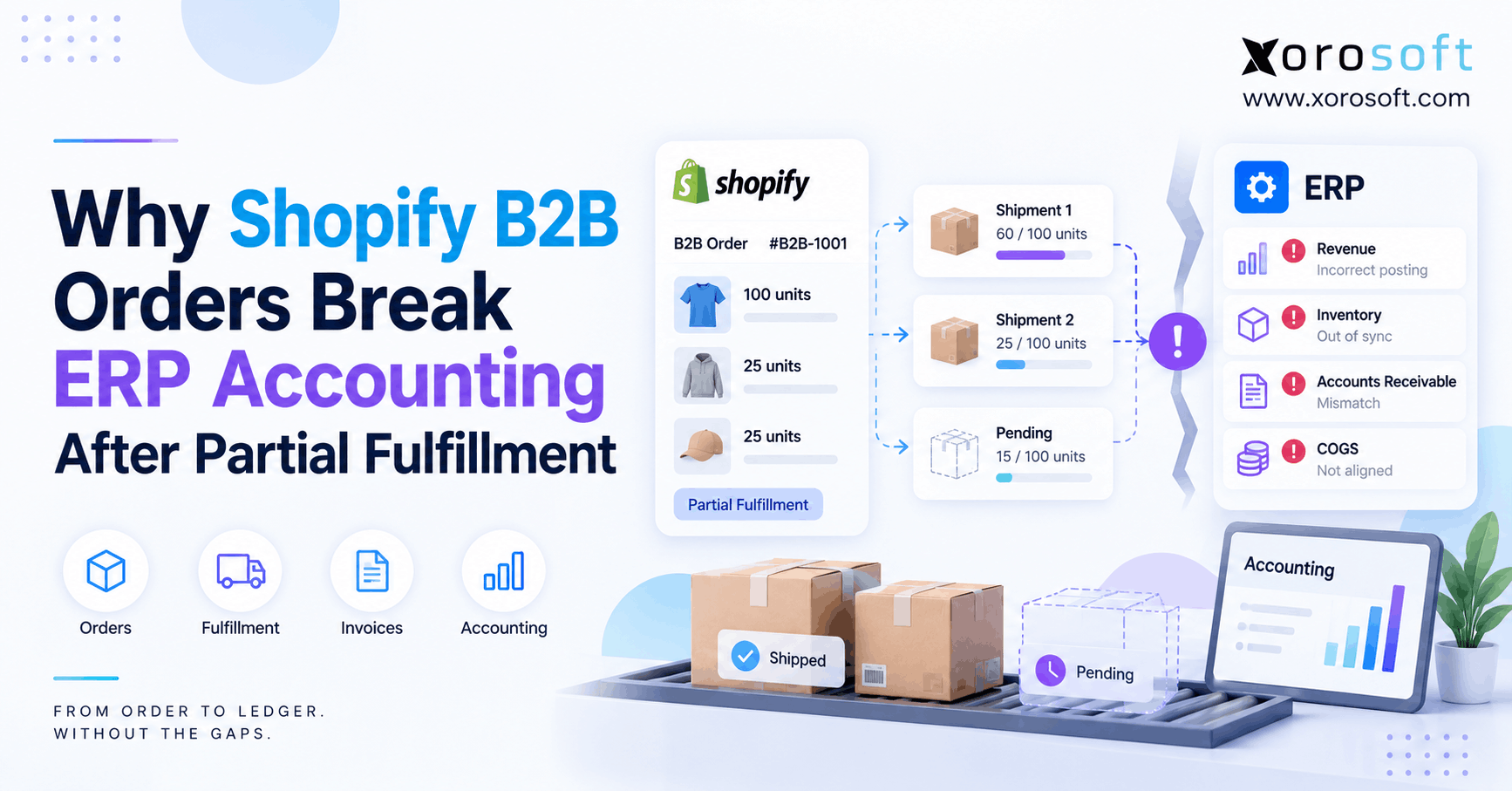
Shopify B2B ERP accounting becomes complicated when one customer order creates several separate inventory, fulfillment, invoice, payment, and accounting events. For example, a wholesale buyer may order 100 units today, receive 60 this week, receive 25 next week, and leave 15 on backorder. Therefore, the original order total no longer explains the complete financial position.
Moreover, the problem grows when the customer uses payment terms or pays in stages. As a result, fulfillment status, invoice status, customer balance, and inventory movement can all describe different stages of the same transaction.
Consequently, businesses need to preserve the relationship between these events instead of treating the Shopify order as one finished accounting transaction.
1.1 Shopify B2B ERP Accounting Starts With Separate Transaction States
First, teams should separate the commercial order from the events that follow it. Although the records belong to one customer transaction, they do not always happen simultaneously.
For example, the sales order may exist before inventory gets allocated. Likewise, inventory may be allocated before warehouse staff pick or ship it.
Meanwhile, an invoice may appear before or after shipment depending on the company’s billing policy. Additionally, the customer may pay immediately, on terms, or through several payments.
Therefore, finance and operations should track at least six connected states:
- Sales order
- Inventory allocation
- Fulfillment
- Invoice
- Payment
- Accounting posting
As a result, each department can see the same transaction without forcing every record into the same status.
1.2 Partial Fulfillment Is Not Partial Payment
Partial fulfillment describes physical product movement. In contrast, partial payment describes how much money the customer has paid.
For example, a customer could pay a deposit before anything ships. Alternatively, the warehouse could ship half the order while the customer still owes the full invoice amount.
Therefore, the two events should remain independent even though they belong to the same order.
Likewise, partial invoicing creates another separate state. A business might invoice only what shipped, while another business may invoice the entire order according to its commercial terms.
Consequently, Shopify, the warehouse system, and the ERP need enough transaction detail to distinguish these events clearly.
2. How Split Shipments Change the Order Lifecycle
A standard ecommerce order often appears simple because payment and fulfillment happen close together. However, B2B orders frequently stay open longer and change several times.
For example, consider a wholesale customer that orders 100 jackets at $100 each. Therefore, the commercial order value is $10,000. However, suppose only 60 units are currently available.
As a result, operations now need to manage both completed and outstanding demand.
2.1 Shopify B2B Accounting Integration Must Separate Orders From Shipments
First, Shopify records the 100-unit order. Next, the ERP may receive the customer, SKU, quantity, pricing, discounts, taxes, and payment terms.
However, creating the ERP sales order should not automatically mean that all 100 units shipped.
Instead, inventory can be allocated while the warehouse prepares only the available quantity.
For example, the ERP may show:
- Ordered: 100
- Allocated: 60
- Shipped: 0
- Open: 100
Later, after the first shipment, the same order may show:
- Ordered: 100
- Shipped: 60
- Open: 40
Therefore, a reliable Shopify B2B accounting integration should update transaction states rather than repeatedly recreating the full order.
2.2 The Remaining Quantity Must Stay Open
After the first 60 units ship, 40 units still need a clear status.
For example, they may remain backordered until a supplier delivery arrives. Alternatively, another warehouse may have enough stock to fulfill part of the balance.
Therefore, the system should preserve the 60 completed units while keeping the remaining 40 open.
Moreover, the open quantity still matters for purchasing, forecasting, inventory allocation, customer service, and accounts receivable.
As a result, closing the entire sales order after the first shipment can hide legitimate demand.
Likewise, overwriting the original order with its latest state can erase useful transaction history. Instead, the ERP should maintain the sequence of events from original order through final fulfillment.
3. Where Shopify B2B Accounting Integration Starts to Drift
A Shopify B2B accounting integration usually starts to drift when the ERP processes the parent order as one accounting event while fulfillment happens in several stages.
Consequently, the Shopify order total may remain correct while inventory, invoices, payments, COGS, and customer balances become misaligned.
Therefore, finance should diagnose the individual events instead of assuming that Shopify itself created an incorrect order.
3.1 Shopify Partial Fulfillment Accounting Can Invoice Too Early
For example, suppose the ERP receives the $10,000 order and immediately creates a $10,000 invoice. However, only $6,000 worth of inventory ships that day.
Depending on the company’s billing policy, that invoice may or may not be appropriate. Nevertheless, finance needs to know exactly what the invoice represents.
Otherwise, the warehouse sees 60 shipped units while accounting sees a transaction based on 100 units.
As a result, teams may begin making manual adjustments simply to explain the timing difference.
Therefore, Shopify partial fulfillment accounting should preserve the link between ordered quantity, fulfilled quantity, invoiced quantity, and any open balance.
Likewise, future shipments should update the existing transaction chain rather than create unrelated financial activity.
3.2 Inventory and COGS Can Move Out of Sequence
Inventory creates another challenge because physical stock and financial cost should stay logically connected.
For example, suppose the warehouse correctly removes 60 units from available inventory. However, the accounting connector posts cost using the full 100-unit order.
Consequently, inventory valuation and COGS can disagree.
Alternatively, the physical inventory transaction may post today while the related financial posting waits until a later batch. Therefore, month-end reporting can temporarily show incomplete margins.
Moreover, multi-warehouse fulfillment makes the problem harder because the cost may depend on which location supplied the stock.
As a result, finance should reconcile transaction quantities and warehouse references before investigating only the dollar values.
4. Why Order-Level Sync Creates Financial Mismatches
Many ecommerce integrations begin with a simple workflow:
New order → send order → create ERP transaction
Initially, that workflow can work well. However, it becomes less reliable once the original order changes after import.
Therefore, growing B2B operations need a method that understands events after order creation.
4.1 Order Sync and Event Sync Solve Different Problems
Order synchronization answers a simple question:
Has this order been imported?
However, event synchronization asks several additional questions:
- Which quantities shipped?
- Which warehouse shipped them?
- Which payment was received?
- Which invoice changed?
- Which quantity was canceled?
- Which items were returned?
Therefore, event-aware integrations preserve more context.
For example, a Shopify order may remain the same commercial record while fulfillment happens three times. Likewise, payment may arrive through two separate transactions.
As a result, using only the parent order ID is often insufficient for exception-heavy B2B workflows.
Instead, integrations should keep order, line, fulfillment, payment, and adjustment references connected.
4.2 Shopify ERP Accounting Needs Fulfillment-Level References
Shopify ERP accounting becomes more dependable when the ERP can distinguish each fulfillment event.
For example, fulfillment A might contain 60 units from Warehouse A. Later, fulfillment B may contain 25 units from Warehouse B.
Therefore, both events should remain connected to the same sales order while retaining their own identities.
Moreover, fulfillment references help prevent the second shipment from replaying the first accounting transaction.
Likewise, line-level quantities make it easier to determine what remains open.
Businesses that need broader commerce connectivity can use Xorosoft integrations to connect ecommerce with the operational system behind inventory, fulfillment, purchasing, and accounting.
Consequently, the integration can respond to transaction changes rather than simply importing orders.
5. How Shopify ERP Accounting Should Handle Partial Fulfillment
A stronger Shopify ERP accounting model keeps the original sales order intact while allowing inventory, fulfillment, invoicing, and payment activity to progress incrementally.
Therefore, each event should add to the transaction history instead of replacing what happened earlier.
Moreover, the ERP should clearly distinguish commitments from completed movements.
5.1 Shopify ERP Accounting Should Start With the Sales Order
First, the Shopify order should create or update an ERP sales order.
Therefore, the ERP can preserve important commercial data such as:
- Customer account
- Company location
- Purchase order number
- SKU
- Ordered quantity
- Selling price
- Discounts
- Taxes
- Payment terms
However, the sales order should remain a commercial record until downstream operational events occur.
For example, a $10,000 sales order does not automatically prove that $10,000 of inventory left the warehouse.
Consequently, Shopify ERP accounting should use the sales order as the parent record while fulfillment, invoicing, and payment events update it over time.
5.2 Reserve Inventory Before It Ships
Next, the ERP may reserve available inventory for the customer.
However, reserved inventory still exists physically in the warehouse. Therefore, reservation and shipment should remain distinct states.
For example, a business might reserve 60 available units while another 40 remain on backorder.
Meanwhile, available-to-sell calculations can reflect that reservation before warehouse staff finish picking.
Platforms such as XoroONE can centralize inventory, purchasing, ecommerce, fulfillment, and financial workflows so these states remain connected.
As a result, operations can protect committed inventory without pretending that the warehouse already shipped it.
5.3 Partial Fulfillment ERP Accounting Must Post Only What Shipped
Partial fulfillment ERP accounting should update the transaction using the quantity that actually moved.
For example, if 60 units ship, the ERP should record those 60 units while keeping the remaining 40 open.
Therefore, inventory movement, costing, shipment references, and invoicing rules can follow the actual event.
Likewise, later shipments should process only their own quantities.
For example, the second shipment may contain 25 units. Consequently, the ERP can bring the cumulative fulfilled quantity to 85 without replaying the original 60.
Businesses that need accounting connected with inventory operations can use XoroERP as the financial and operational layer behind complex ecommerce transactions.
6. How Payment Terms Change the Financial Timeline
B2B orders often separate cash timing from warehouse timing.
Therefore, a customer can receive inventory before payment becomes due. Conversely, a customer may pay a deposit before anything ships.
As a result, the integration must avoid using payment status as a substitute for fulfillment status.
6.1 Net Terms Separate Shipment From Cash
For example, a wholesale customer may receive an order today but pay 30 days later.
Therefore:
Shipment date ≠ payment date
Meanwhile, the customer balance may remain open even though the warehouse has completed the shipment.
Consequently, an ERP that waits for full payment before recording every downstream event can create timing gaps.
Likewise, an integration that interprets “paid” as “fulfilled” can create an entirely different error.
Instead, payment terms should remain attached to the sales order while actual payment transactions update the customer balance separately.
Therefore, accounts receivable can remain accurate without interfering with warehouse activity.
6.2 Shopify B2B Accounting Integration Must Track Deposits Separately
A Shopify B2B accounting integration also needs to handle deposits or advance payments separately from physical fulfillment.
For example, a customer may pay $2,000 toward a $10,000 order before the warehouse ships any product.
Therefore, the $2,000 payment does not mean that 20% of the physical order was fulfilled.
Likewise, the warehouse might later ship 60% of the quantity while the customer still has a different outstanding payment balance.
Consequently, payment amount and fulfillment quantity should never be assumed to represent the same percentage.
Instead, the ERP should preserve payment references, dates, amounts, customer balances, and the related order.
7. Shopify Partial Fulfillment Accounting Across Multiple Warehouses
Shopify partial fulfillment accounting becomes more complex when several locations participate in one order.
For example, Warehouse A may ship 60 units while Warehouse B later ships another 25. Meanwhile, 15 units may remain backordered.
Therefore, location data becomes part of the accounting and inventory trail.
7.1 Shopify Partial Fulfillment Accounting Needs Location-Level Inventory
Shopify partial fulfillment accounting should identify which warehouse fulfilled each quantity.
For example, if Warehouse A ships 60 units, inventory should decline from Warehouse A.
However, a connector that tracks only company-wide SKU totals can reduce inventory from the wrong location.
Consequently, overall stock may look correct while individual warehouse balances become inaccurate.
Moreover, location can affect fulfillment cost, availability, replenishment, and inventory valuation workflows.
A real-time warehouse management system helps businesses connect picking, packing, shipping, inventory movements, and warehouse locations with the broader ERP transaction.
Therefore, the financial record can trace the operational event back to the location that performed it.
7.2 Backorders Must Remain Open
Backorders create a second challenge because the order is neither complete nor failed.
For example, after 85 of 100 units ship, the remaining 15 units still represent customer demand.
Therefore, purchasing teams may need to replenish them. Likewise, forecasting still needs to recognize the demand.
Meanwhile, customer service needs to know what has shipped and what remains outstanding.
Consequently, closing the entire sales order after the first or second fulfillment can hide valid obligations.
Instead, the ERP should maintain fulfilled, canceled, returned, and open quantities separately.
Moreover, if the customer later cancels five units, the system should adjust only the open quantity rather than rewrite the completed shipments.
8. What Data Must Move Between Commerce and Finance Systems
An ERP integration needs enough information to reconstruct the order lifecycle accurately.
Therefore, syncing only customer name, SKU, quantity, and order total is usually not enough for complex B2B workflows.
Moreover, every later event should retain a persistent reference to the transaction that created it.
8.1 Shopify B2B ERP Integration Needs Line-Level Data
A Shopify B2B ERP integration should preserve both order-level and line-level fields.
For example, order-level data may include:
- Order ID
- Customer
- Company location
- PO number
- Currency
- Payment terms
- Taxes
- Discounts
- Shipping charges
Meanwhile, line-level data should include:
- Line ID
- SKU
- Quantity ordered
- Quantity fulfilled
- Quantity remaining
- Unit price
- Line discount
Therefore, the ERP can update one line without rebuilding the complete order.
Moreover, persistent line references make cancellations, returns, substitutions, and later fulfillments easier to reconcile.
8.2 Payment and Adjustment Data Need Persistent IDs
Payments, refunds, cancellations, and credits also need unique references.
For example, finance may need to preserve:
- Payment transaction ID
- Amount
- Date
- Currency
- Invoice reference
- Refund reference
- Remaining balance
Therefore, the ERP can recognize whether a later message represents a new event or a previously processed one.
Likewise, persistent references help prevent duplicate invoices and duplicate payments.
For Shopify merchants reviewing ecommerce ERP options, the Xorosoft ERP listing on the Shopify App Store provides an external view of Xorosoft within Shopify’s ecosystem.
Consequently, merchants can evaluate the integration alongside their broader operational requirements.
9. How to Reconcile Shopify B2B ERP Accounting
When Shopify B2B ERP accounting already disagrees, finance should reconcile the transaction in a fixed sequence.
First, teams should confirm physical quantities. Next, they should confirm fulfillments. Afterward, they can compare invoices, payments, inventory costs, refunds, and balances.
Therefore, reconciliation starts with operational truth before financial totals.
9.1 Shopify B2B ERP Accounting Reconciliation Starts With Quantities
Shopify B2B ERP accounting reconciliation should begin with this equation:
Ordered quantity − fulfilled quantity − canceled quantity − returned quantity = remaining quantity
For example, suppose 100 units were ordered, 85 shipped, and five were canceled.
Therefore, the ERP should explain why 10 units remain open.
If Shopify shows 10 open units while the ERP shows 15, finance has already found an operational discrepancy.
Consequently, comparing invoice totals before resolving the quantity difference wastes time.
Moreover, the same logic should apply at the SKU and warehouse levels.
As a result, finance can isolate where the transaction diverged before examining dollar amounts.
9.2 Match Fulfillments Before Comparing Dollars
Next, match every warehouse event.
For example, compare:
- Fulfillment reference
- Shipment date
- SKU
- Quantity
- Warehouse
- Tracking reference
Therefore, finance can determine whether every Shopify fulfillment produced the intended ERP shipment.
Afterward, compare the invoiced value associated with those events.
Likewise, match customer payments separately because cash may follow a different timeline.
Businesses evaluating a wider operational architecture can review Xorosoft’s ERP solutions to understand how ecommerce, inventory, purchasing, fulfillment, and accounting can fit together.
Finally, reconcile refunds, credits, returns, and remaining AR before closing the order.
10. Seven Integration Mistakes That Create Financial Errors
Most accounting mismatches do not begin with one catastrophic failure.
Instead, small integration assumptions accumulate as order complexity increases.
Therefore, teams should look for repeated design patterns rather than treating every mismatch as an unrelated exception.
10.1 Creating Financial Transactions From Order Creation Alone
First, avoid assuming that order creation should trigger every downstream financial record.
For example, order creation may correctly create an ERP sales order. However, invoice timing may depend on the company’s billing policy.
Likewise, inventory relief should follow an appropriate physical transaction rather than the original order timestamp.
Other common mistakes include:
- Ignoring line quantities
- Losing warehouse references
- Overwriting completed transactions
- Reprocessing old events
- Applying payments without references
- Closing backorders too early
Therefore, integration rules should reflect the actual business lifecycle rather than the simplest possible order flow.
10.2 Shopify ERP Accounting Breaks When Payment Status Replaces Fulfillment Status
Shopify ERP accounting can drift quickly when teams use payment status as a proxy for physical fulfillment.
For example, a fully paid order may still be unfulfilled. Conversely, a fulfilled B2B order may remain unpaid because the customer has payment terms.
Therefore, the two states should not control each other automatically.
Likewise, a partial payment does not prove that a corresponding percentage of inventory has shipped.
Consequently, integrations should read payment, fulfillment, invoice, and inventory states independently.
Businesses can review Xorosoft case studies for examples of how inventory-driven organizations approach broader operational and ERP transformation.
11. When Shopify B2B ERP Integration Needs a More Connected System
A Shopify B2B ERP integration does not require a full system replacement every time an exception appears.
However, recurring manual reconciliation often indicates that operational complexity has exceeded the current architecture.
Therefore, businesses should evaluate the frequency and cost of exceptions rather than simply counting applications.
11.1 Shopify B2B ERP Integration Becomes Critical as Exceptions Grow
A Shopify B2B ERP integration becomes more important as the business adds:
- Multiple warehouses
- B2B payment terms
- Partial shipments
- Backorders
- Amazon or other channels
- EDI
- Purchasing complexity
- Manufacturing
- Returns
- Inventory costing
Individually, each workflow may be manageable.
However, the combinations create far more transaction states.
For example, one wholesale order might use net terms, ship from two warehouses, include a backordered line, and receive a partial cancellation.
Therefore, the integration needs to preserve the complete transaction history.
Businesses can review Xorosoft’s industries to see how these requirements vary across wholesale, apparel, furniture, consumer products, sporting goods, and manufacturing.
11.2 Test the Exception Workflow Before Buying
Most importantly, test difficult transactions instead of perfect ones.
For example:
1. Create a B2B order.
2. Ship only part of it.
3. Leave one line on backorder.
4. Ship another quantity from a second warehouse.
5. Record a partial payment.
6. Cancel an open quantity.
7. Process a return.
Then trace every event through inventory, fulfillment, invoicing, AR, and accounting.
Therefore, the evaluation tests transaction integrity rather than presentation quality.
Moreover, this approach exposes integration weaknesses before implementation.
As a result, teams can compare systems based on how well they handle real operational exceptions rather than how quickly they import a straightforward order.
12. Keep Every Order-to-Ledger Event Connected
Partial fulfillment does not automatically make Shopify accounting inaccurate.
Instead, problems appear when commerce, warehouse, and financial systems interpret the same transaction differently.
Therefore, the long-term solution is to preserve transaction relationships from order creation through final reconciliation.
12.1 Preserve Completed History While Open Quantities Change
Once a shipment occurs, the system should preserve it as completed history.
However, future changes may still affect the open balance.
For example, a customer could cancel a remaining line after the first shipment. Therefore, the ERP should reduce the outstanding quantity without rewriting the shipment that already happened.
Likewise, returns and credits should refer back to the original transaction rather than becoming disconnected negative orders.
Consequently, finance retains a complete audit trail.
Moreover, purchasing and forecasting still receive accurate open-demand information.
As a result, operational changes can continue without destroying the financial history that explains them.
12.2 Shopify B2B ERP Accounting Works Best With One Transaction Chain
Ultimately, Shopify B2B ERP accounting works best when the order, lines, inventory, warehouse events, invoices, payments, credits, and customer balances remain connected.
Therefore, the goal is not simply to make Shopify send data into an ERP.
Instead, the goal is to ensure every operational event creates the correct financial consequence once.
Xorosoft combines ecommerce operations with inventory, purchasing, warehouse management, order management, accounting, reporting, and related ERP workflows for inventory-driven businesses.
Consequently, teams can reduce the need to reconstruct B2B transactions across disconnected applications.
If partial shipments, backorders, deposits, multi-warehouse fulfillment, or reconciliation are creating recurring manual work, Book a Demo to walk through the complete Shopify B2B order-to-accounting process.
FAQs
Why does Shopify B2B ERP accounting break after partial fulfillment?
It usually happens when the ERP processes the entire order while only part of it ships. Consequently, invoices, inventory, COGS, payments, and remaining quantities can represent different transaction states.
Can Shopify B2B orders be partially fulfilled?
Yes. A B2B order can have fulfilled and outstanding quantities. Therefore, one customer order may require several fulfillment events before every line is completed, canceled, or otherwise resolved.
Is partial fulfillment the same as partial payment?
No. Partial fulfillment describes products shipped, while partial payment describes money received. Therefore, ERP integrations should track both events independently and connect them to the same parent order.
How should an ERP handle a partial Shopify shipment?
The ERP should record only the quantity that shipped while keeping the remaining sales-order quantity open. Additionally, inventory, costing, invoicing, and AR should follow the company’s defined business rules.
What Shopify data should sync to ERP?
At minimum, sync order IDs, line IDs, SKUs, quantities, locations, fulfillment references, customer information, payment terms, transaction IDs, prices, taxes, discounts, refunds, and cancellations.
When should a Shopify B2B business consider ERP?
ERP becomes more relevant when multiple warehouses, payment terms, split shipments, purchasing, EDI, manufacturing, costing, or recurring reconciliation make disconnected applications difficult to manage.
How can duplicate ERP invoices be prevented?
Use persistent order, line, fulfillment, and transaction references. In addition, integration logic should recognize previously processed events before creating new invoices, shipments, payments, or accounting entries.
Recent Posts
-
 ERP Landed Cost Module vs Spreadsheet Calculations for Importers
 -
 How to Build an Open-to-Buy Plan for an Omnichannel Brand
 -
 Cold Storage WMS for Food and Beverage Distribution
 -
 ERP Buying Statistics 2026: Evaluation, Implementation, and Adoption Risks
 -
 How a Distributor Reduced B2B Order Exceptions Without Restricting Sales