If you’re facing a Shopify QuickBooks payout mismatch, you’re not alone.
1. The Bank Deposit Tells Only Part of the Story
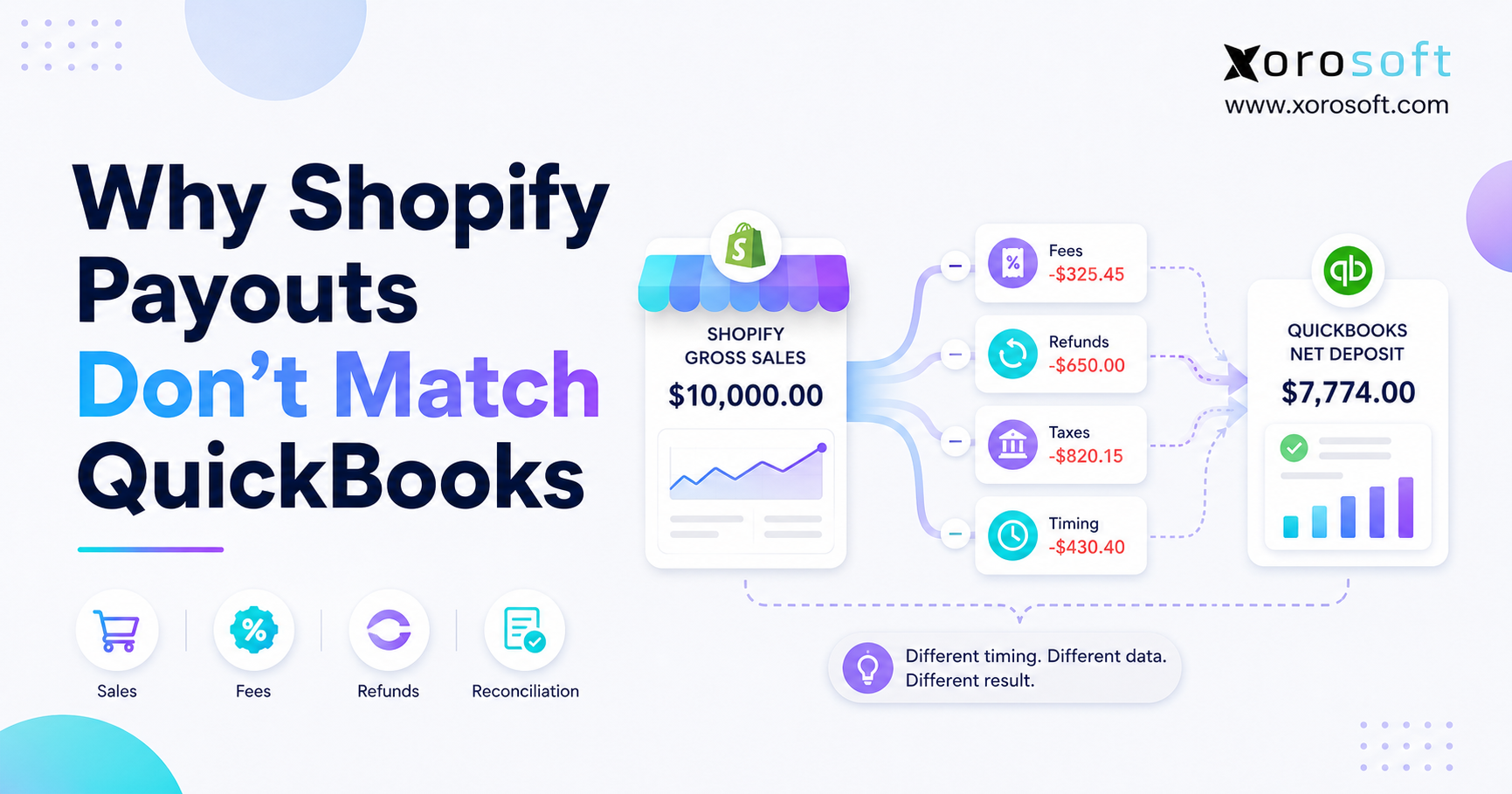
A Shopify QuickBooks payout mismatch happens when a business expects its Shopify sales total to equal the deposit shown in QuickBooks. However, Shopify sales track customer order activity, while Shopify payouts reflect net settlement activity after processing fees, refunds, chargebacks, sales tax, reserves, and timing differences.
Therefore, a Shopify store may report $50,000 in sales while QuickBooks shows a bank deposit of $47,900. Both amounts may still be correct. The Shopify sales report explains what customers purchased, whereas the payout report explains how much money Shopify transferred after applying the relevant deductions and adjustments.
Moreover, Shopify does not transfer every customer order as a separate deposit. Instead, Shopify Payments combines eligible transactions into payout batches. Consequently, one payout may contain orders from several sales dates, processing fees from those transactions, refunds from earlier orders, chargebacks, and other balance adjustments.
Because of this structure, comparing daily Shopify sales directly with daily QuickBooks deposits rarely produces a clean match. Instead, the finance team must compare the bank deposit with the related Shopify payout report. Then, it must separate gross sales, shipping income, sales tax, fees, refunds, and chargebacks inside QuickBooks.
Although a Shopify QuickBooks payout mismatch can look like a missing transaction or software failure, it usually reflects the difference between sales activity, payment settlement, and cash movement. Therefore, the first step is understanding what each system records and when it records it.
2. Why a Shopify QuickBooks Payout Mismatch Happens
A Shopify QuickBooks payout mismatch becomes easier to explain when the finance team separates order activity, payment settlement, and bank activity. Although all three records relate to the same customer transactions, each record measures a different stage of the financial process.
Shopify sales reports answer, “What did customers purchase?” Shopify payout reports answer, “What amount did Shopify settle after adjustments?” Meanwhile, the QuickBooks bank feed answers, “What cash reached the bank?”
Therefore, these records should connect, but they should not always display the same amount.
2.1 Shopify Sales Reports Track Order Activity
Shopify sales reports show what the store sold during a selected period. For example, they may include:
- Gross product sales
- Discounts
- Customer returns
- Shipping charges
- Sales tax
- Tips
- Net sales
Operators use these reports to evaluate demand, product performance, promotions, customer behavior, and channel revenue. However, sales reports do not show the final amount Shopify transferred to the bank.
Moreover, Shopify may count an order on the day the customer places it, even though the payment processor settles the transaction later. As a result, the order date, payment date, payout date, and bank deposit date may fall in different periods.
2.2 Shopify Payout Reports Track Settlement Activity
A payout report explains how money moved through the Shopify Payments balance. Specifically, it may include:
- Customer payments
- Processing fees
- Refunds
- Chargebacks
- Chargeback fees
- Reserves
- Adjustments
- Currency conversions
- Completed payouts
Shopify provides an official payout reconciliation report that merchants can use to review balance activity for a selected period and currency.
Therefore, the payout report should guide the deposit reconciliation process. Meanwhile, the sales report should support revenue and order analysis.
2.3 QuickBooks Bank Feeds Track Cash Movement
QuickBooks shows the amount that reached the bank. However, the bank feed does not automatically explain every financial component behind that deposit.
For example, a $9,500 bank deposit may represent:
- $10,000 in gross sales
- $300 in Shopify fees
- $200 in refunds
If the bookkeeper records only the $9,500 deposit as sales income, QuickBooks understates revenue by $500 and hides the related expenses and refunds.
Consequently, an accurate accounting workflow records the individual components first. Then, it matches the resulting net payout to the bank deposit.
2.4 Three Correct Numbers Can Still Look Inconsistent
| Record | What It Measures | Main Purpose | Why It May Differ |
|---|---|---|---|
| Shopify sales report | Orders and sales activity | Revenue analysis | Uses order dates and gross activity |
| Shopify payout report | Settled payment activity | Payout reconciliation | Includes fees, refunds, chargebacks, and timing |
| QuickBooks bank feed | Cash received | Bank reconciliation | Shows only the final deposit |
Therefore, the goal is not to force all three records to display the same number. Instead, the goal is to create a clear bridge from gross customer activity to the final cash deposit.
3. Common Causes of a Shopify QuickBooks Payout Mismatch
A Shopify QuickBooks payout mismatch rarely comes from one universal problem. Instead, normal ecommerce activities change the amount Shopify transfers to the bank.
Therefore, the accounting team must review processing fees, refunds, chargebacks, sales tax, gift cards, payment timing, third-party gateways, currency differences, duplicate imports, and account mappings separately.
3.1 Shopify Processing Fees Reduce the Deposit
Shopify deducts payment processing fees before sending the payout. Therefore, gross sales usually exceed the related bank deposit.
For example, suppose a store collects $20,000 through Shopify Payments and incurs $600 in processing fees. Before considering any other adjustments, Shopify may transfer only $19,400.
Consequently, QuickBooks should show:
- $20,000 in gross sales
- $600 in processing expenses
- $19,400 transferred to the bank
If the company records only the $19,400 deposit as revenue, it understates sales and hides the cost of processing payments.
3.2 Refunds May Affect a Later Payout
A customer may place an order during one week and request a refund during the next. Therefore, Shopify may include the original payment in one payout and deduct the refund from a later payout.
As a result, comparing the payout with Shopify sales from the same calendar dates can create a false discrepancy. Instead, finance should inspect the transaction-level details included in that specific payout batch.
3.3 Chargebacks Create Separate Adjustments
A chargeback can remove a disputed payment from the Shopify Payments balance. In addition, the processor may apply a chargeback fee.
Therefore, QuickBooks should not treat every chargeback as a normal product refund. Instead, the accounting team should separate:
- The disputed transaction
- Chargeback fees
- Recovered amounts
- Later reversals
Otherwise, the payout may remain unexplained even after the customer refund accounts appear correct.
3.4 Sales Tax Increases Cash Without Increasing Revenue
Shopify may collect sales tax from customers as part of the order total. However, the business generally owes that money to a tax authority.
Consequently, the accounting team should post collected sales tax to a liability account rather than a sales income account. Otherwise, QuickBooks may overstate both revenue and profitability.
Tax treatment varies by jurisdiction. Therefore, businesses should confirm their account mappings and filing obligations with a qualified accountant or tax professional.
3.5 Gift Cards Create a Timing Difference
When a customer buys a gift card, the business receives cash. However, the company may not recognize product revenue until the customer redeems the gift card.
Therefore, the initial gift card sale usually creates a liability. Later, redemption reduces that liability and supports revenue recognition.
As a result, gift card activity may cause Shopify cash, Shopify sales, and QuickBooks revenue to differ even when the accounting remains correct.
3.6 Payout Timing Differs From Order Timing
Payment authorization, capture, settlement, weekends, bank holidays, payout schedules, and bank processing can all affect timing.
Therefore, Friday sales may not reach the bank until the following week. Likewise, one payout may contain transactions from several order dates.
Consequently, a date-for-date comparison often fails. Payout-batch reconciliation provides a more reliable method.
3.7 Third-Party Gateways Send Separate Deposits
A Shopify store may accept payments through:
- Shopify Payments
- PayPal
- Amazon Pay
- Alternative gateways
- Local payment providers
However, each provider may transfer funds separately. Therefore, a Shopify Payments payout will not necessarily include PayPal transactions.
In addition, every processor may deduct its own fees and follow its own settlement schedule. As a result, the accounting team should create a separate clearing workflow for each major gateway.
3.8 Multi-Currency Selling Creates Exchange Differences
International Shopify stores may sell in one currency, settle in another, and maintain accounting records in a third currency.
Consequently, exchange rates may change between:
- The order date
- The settlement date
- The payout date
- The bank deposit date
Moreover, the payment processor may apply currency conversion fees. Therefore, QuickBooks may require a foreign exchange gain, loss, or fee entry before the payout clears completely.
3.9 Duplicate Imports Inflate Revenue
Duplicate entries often appear when a company combines:
- Manual journal entries
- Automatic bank-feed rules
- Multiple Shopify connectors
- Daily sales summaries
- Order-level imports
For example, one connector may import each Shopify order while another application posts a daily journal entry. Meanwhile, the bookkeeper may categorize the bank deposit as additional income.
As a result, QuickBooks may record the same economic activity two or three times. Therefore, the business should define one source of truth for each transaction type.
3.10 Incorrect Account Mapping Hides the Real Difference
An integration needs clear mappings for:
- Product revenue
- Discounts
- Shipping income
- Sales tax
- Refunds
- Processing fees
- Chargebacks
- Gift cards
- Payout transfers
However, a technically successful data sync does not guarantee accurate accounting. If the integration posts fees to revenue or refunds to a generic expense account, the bank deposit may match while the financial statements remain unreliable.
Therefore, the accounting team should review account mappings during implementation and after every material workflow change.
4. How to Fix a Shopify QuickBooks Payout Mismatch
A Shopify QuickBooks payout mismatch should be investigated from the payout report backward, not from the bank feed forward. The payout report explains which customer payments, fees, refunds, chargebacks, reserves, and adjustments produced the final deposit.
Therefore, the finance team should identify the payout, separate its components, post the activity through a clearing account, and then match the resulting net amount to QuickBooks.
4.1 Identify the Exact Shopify Payout
First, locate the deposit in the bank account. Then, identify the matching Shopify payout using:
- Payout amount
- Payout date
- Payout status
- Currency
- Bank reference
- Expected arrival date
However, do not use the order report as the primary reconciliation document. Instead, open the detailed payout activity that produced the deposit.
4.2 Review Every Component in the Payout
Next, identify:
- Gross customer payments
- Processing fees
- Refunds
- Chargebacks
- Reserves
- Currency adjustments
- Other balance transactions
Moreover, confirm whether the payout includes transactions from several sales dates. This step keeps the accounting aligned with settlement activity rather than forcing the deposit to match one day’s Shopify sales.
4.3 Record Gross Activity Separately
The accounting entry should preserve the financial detail behind the payout. Therefore, separate:
- Product revenue
- Discounts
- Shipping income
- Sales tax liability
- Refunds and returns
- Processing fees
- Chargebacks
- Gift card liabilities
- Currency adjustments
- Net payout transfer
As a result, the profit and loss statement can show gross revenue and operating expenses accurately.
4.4 Use a Shopify Clearing Account
A Shopify clearing account temporarily holds payment activity between the customer sale and the bank deposit.
Customer payments increase the clearing account. Meanwhile, fees, refunds, and chargebacks reduce it. Finally, the payout transfers the remaining amount from the clearing account to the bank.
Because of this structure, the company does not need to record the bank deposit as new revenue. Instead, the deposit clears the amount Shopify already owed the business.
4.5 Match the Net Amount in the Bank Feed
After posting every component, match the final payout transfer to the QuickBooks bank deposit.
However, do not categorize that deposit as new sales income. The accounting system should already contain the related revenue, taxes, refunds, and fees.
Therefore, the bank deposit should clear the Shopify receivable or clearing balance.
4.6 Investigate Any Remaining Difference
Finally, review the clearing account. If all related activity has settled, the account should return to zero or contain only identifiable timing items.
An outstanding balance may represent:
- An unsettled payment
- A reserve
- An unrecorded refund
- A missing processing fee
- A duplicated deposit
- A chargeback
- A currency difference
- Incorrect account mapping
Consequently, the finance team should investigate the exact balance rather than post an unsupported journal entry merely to force the account to zero.
5. How a Clearing Account Resolves a Shopify QuickBooks Payout Mismatch
A clearing account gives the Shopify QuickBooks payout mismatch a clear accounting structure. Customer payments increase the account, while processing fees, refunds, chargebacks, and other deductions reduce it.
Finally, the payout moves the remaining amount from the clearing account to the bank. Therefore, the account creates a visible bridge between gross Shopify activity and net cash.
5.1 Gross Payments Enter the Clearing Account
When Shopify captures a customer payment, the accounting workflow records the amount Shopify owes the merchant in the clearing account.
For example, a $1,000 customer payment increases the clearing balance by $1,000. However, the bank has not received that cash yet.
5.2 Fees and Refunds Reduce the Balance
Next, Shopify may deduct a processing fee. Likewise, the payout may contain a customer refund, chargeback, reserve, or adjustment.
Therefore, the accounting workflow reduces the clearing account by each deduction. As a result, the remaining balance should equal the amount Shopify plans to transfer.
5.3 The Payout Clears the Remaining Amount
When Shopify sends the payout, the accounting entry moves the net amount from the clearing account to the bank.
Consequently, the clearing account should return to zero for the completed payout batch.
5.4 An Unexplained Balance Signals a Problem
If the clearing account does not clear, the workflow may contain:
- Missing sales
- Unrecorded refunds
- Duplicate deposits
- Incorrect tax mappings
- Chargebacks
- Unsettled payments
- Currency differences
- Reserve activity
Therefore, finance should identify the missing, duplicated, delayed, or incorrectly mapped transaction. It should not hide the balance inside a generic reconciliation adjustment.
6. A Shopify QuickBooks Payout Mismatch Example
A Shopify QuickBooks payout mismatch becomes easier to understand through a numerical example. The difference between customer collections and the bank deposit usually includes sales tax, processing fees, refunds, chargebacks, and other payout adjustments.
Consider this payout:
| Payout Component | Amount |
| Product sales | $20,000 |
| Shipping income | $500 |
| Sales tax collected | $1,600 |
| Customer refunds | -$900 |
| Shopify processing fees | -$620 |
| Chargeback adjustment | -$200 |
| Net payout | $20,380 |
The gross cash collected before deductions equals $22,100. However, the company should not treat every dollar as product revenue.
First, it records $20,000 as product sales. Next, it records $500 as shipping income. Meanwhile, it records $1,600 as a sales tax liability.
Then, the business records:
- $900 in customer refunds
- $620 in processing expenses
- $200 as a chargeback adjustment
Consequently, the Shopify clearing account holds $20,380.
Finally, Shopify transfers $20,380 to the bank. QuickBooks matches the bank-feed deposit against the clearing-account transfer rather than categorizing it as additional income.
This method preserves revenue, expenses, taxes, and cash accurately. Moreover, it explains why $22,100 in customer collections produced a $20,380 bank deposit.
7. QuickBooks Mistakes That Create a Shopify QuickBooks Payout Mismatch
A Shopify QuickBooks payout mismatch can continue even when the underlying Shopify payout is correct. In many cases, QuickBooks setup or posting rules create the discrepancy.
Therefore, successful reconciliation depends on accurate mappings, controlled imports, separate gateway records, and consistent accounting rules.
7.1 Recording Net Payouts as Sales Income
Recording the net deposit as sales income understates gross revenue and hides processing expenses.
Instead, record gross sales and deductions separately. Then, match the payout against the clearing account.
7.2 Matching Every Order to the Bank Feed
Shopify does not usually deposit each customer order separately. Therefore, matching individual orders directly to one combined payout creates unnecessary work.
Instead, post order activity into the clearing account and match the payout batch to the bank deposit.
7.3 Combining All Payment Gateways
PayPal, Shopify Payments, Amazon Pay, and other processors may follow different settlement schedules.
Consequently, combining them inside one clearing account can make exceptions difficult to trace. Therefore, create separate accounts or clearly segmented subaccounts for major gateways.
7.4 Posting Sales Tax as Revenue
Posting sales tax as revenue inflates both sales and margins. Moreover, it creates problems when the company prepares sales tax returns.
Therefore, map collected taxes to the appropriate liability accounts.
7.5 Allowing Multiple Applications to Post the Same Activity
One application should control each transaction type. Otherwise, duplicate orders, journal entries, deposits, fees, or refunds may enter QuickBooks.
Therefore, document which application posts:
- Sales
- Payouts
- Refunds
- Fees
- Inventory adjustments
- Cost of goods sold
7.6 Ignoring the Integration Cut-Off Date
When a company activates a new connector, it must choose a precise start date. However, many teams activate the integration while older manual entries remain in QuickBooks.
As a result, the opening period contains duplicate activity. Therefore, reconcile the final manual period before switching on the automated workflow.
8. Choosing the Right Solution for a Shopify QuickBooks Payout Mismatch
The right response to a Shopify QuickBooks payout mismatch depends on order volume, payment gateways, refund activity, inventory complexity, warehouses, and sales channels.
A small Shopify store may only need better account mapping or a connector. However, an inventory-driven business with multiple systems may need a connected ERP platform.
8.1 Xorosoft for Connected Shopify Operations
Xorosoft provides a broader approach than payout-only accounting automation. Through its Shopify and ecommerce integrations, the platform connects online orders with inventory, purchasing, warehouse activity, fulfillment, and accounting workflows.
Moreover, the XoroERP cloud ERP platform helps inventory-driven businesses manage financial and operational records in one environment. Therefore, a company can address the system disconnect behind recurring accounting problems instead of automating only the final journal entry.
In addition, Xorosoft’s Shopify App Store listing highlights connectivity for ecommerce orders, payments, refunds, inventory, and operational data.
Consequently, Xorosoft may suit merchants that need to resolve a Shopify QuickBooks payout mismatch alongside broader inventory, purchasing, warehouse, fulfillment, accounting, forecasting, and multi-channel reporting requirements.
8.2 Shopify Connector by QuickBooks
A smaller business may only need transaction synchronization between Shopify and QuickBooks. In that case, Intuit’s official Shopify Connector by QuickBooks can help transfer Shopify transaction details into QuickBooks Online.
However, a connector may not solve:
- Purchasing complexity
- Forecasting
- Warehouse management
- Manufacturing
- Multi-channel inventory
- Advanced operational reporting
Therefore, the company should determine whether it needs accounting automation or a connected operating system.
8.3 Ecommerce Accounting Applications
Specialized ecommerce accounting tools can summarize Shopify payouts and post journal entries into QuickBooks.
Therefore, these applications may work well when the business has reliable inventory and warehouse systems but needs cleaner payout-level accounting.
However, they generally do not replace an ERP, WMS, purchasing system, forecasting platform, or manufacturing application.
8.4 Manual Reconciliation
Manual reconciliation may remain practical for a store with:
- Low order volume
- One payment gateway
- Few refunds
- Simple inventory
- One warehouse
- Limited sales tax complexity
Nevertheless, manual work becomes harder as transaction volume increases. Moreover, the process creates key-person dependency when only one employee understands the reconciliation spreadsheet.
8.5 Comparison of Reconciliation Approaches
| Approach | Best Fit | Main Advantage | Main Limitation |
| Xorosoft connected ERP | Growing inventory-driven brands | Connects financial and operational workflows | Requires structured implementation |
| QuickBooks connector | Smaller Shopify businesses | Automates transaction imports | Limited operations management |
| Ecommerce accounting app | Businesses with stable operational systems | Simplifies payout summaries | Does not replace ERP or WMS |
| Manual process | Low-volume Shopify stores | Minimal software cost | Difficult to scale |
9. Why a Shopify QuickBooks Payout Mismatch Can Hide Inventory Problems
A Shopify QuickBooks payout mismatch concerns cash settlement, but it does not prove that inventory value, cost of goods sold, landed costs, or gross profit are accurate.
Therefore, inventory-driven brands must connect financial reconciliation with physical inventory control. Otherwise, the bank may reconcile while the company’s margins remain unreliable.
9.1 Revenue Can Reconcile While COGS Remains Wrong
A company may match every Shopify payout perfectly. Nevertheless, its gross margin may remain incorrect if QuickBooks uses outdated or incomplete product costs.
For example, the business may omit:
- Freight
- Duties
- Brokerage fees
- Packaging
- Landed costs
- Warehouse adjustments
Consequently, QuickBooks may understate cost of goods sold and overstate gross profit.
9.2 Returns Affect Cash and Inventory
A customer refund reduces a Shopify payout. However, the returned product also creates an inventory decision.
The warehouse must determine whether the item:
- Returns to sellable stock
- Needs refurbishment
- Belongs in damaged inventory
- Requires a write-off
- Was never physically received
Therefore, the business must connect the financial refund with the physical inventory movement.
9.3 Multi-Warehouse Activity Changes Inventory Value
Transfers, cycle counts, damaged goods, receiving discrepancies, and fulfillment mistakes can all change inventory quantities.
Consequently, finance cannot rely only on Shopify and QuickBooks. It also needs accurate warehouse records.
Xorosoft addresses this broader requirement through XoroONE, which combines multiple operational functions in one platform. Likewise, its real-time warehouse management capabilities help teams connect inventory movement with order and financial activity.
9.4 Purchasing Decisions Affect Future Cash Flow
Purchasing teams create future inventory and cash commitments. Therefore, operators need reliable information about:
- Demand
- Inventory availability
- Open purchase orders
- Supplier lead times
- Incoming costs
- Reorder requirements
As a result, connected purchasing and forecasting can reduce stockouts and excess inventory. Moreover, finance gains clearer visibility into future cash requirements.
10. Where a Shopify QuickBooks Payout Mismatch Creates the Most Risk
A Shopify QuickBooks payout mismatch becomes harder to resolve in industries with frequent returns, high SKU counts, international sales, long fulfillment cycles, multiple warehouses, or several payment gateways.
Therefore, the reconciliation workflow should reflect the company’s actual operating model rather than rely on one generic ecommerce accounting process.
10.1 Apparel and Fashion
Apparel brands often manage high SKU counts across sizes, colors, collections, and seasons. Moreover, returns and exchanges may occur frequently.
Consequently, a refund affects both the Shopify payout and the availability of a specific product variant. Therefore, the company needs accurate payment, return, and inventory records.
10.2 Furniture and Home Goods
Furniture businesses may handle:
- Large order values
- Customer deposits
- Delivery charges
- Backorders
- Freight costs
- Partial fulfillment
- Long delivery windows
As a result, the order date, fulfillment date, payout date, and financial reporting date may differ significantly.
Therefore, the company needs clear cut-off rules, landed-cost visibility, and accurate deposit tracking.
10.3 Sporting Goods
Sporting goods brands often experience seasonal demand and multi-channel complexity. For example, they may sell through Shopify, Amazon, dealers, retail stores, and wholesale accounts.
Consequently, payout reconciliation becomes one part of a broader multi-channel reporting requirement.
10.4 Food and Beverage
Food and beverage businesses may need lot tracking, expiry controls, recalls, substitutions, and strict receiving processes.
Therefore, the financial system must connect sales and refunds with the correct inventory lots and warehouse transactions.
10.5 Wholesale Distribution
Wholesale distributors may combine Shopify orders with:
- Sales-representative orders
- EDI transactions
- Customer-specific pricing
- Payment terms
- Allocated inventory
- Warehouse releases
As a result, QuickBooks-only workflows may require several spreadsheets and separate operational applications.
10.6 Manufacturing
Manufacturers need bills of materials, work orders, production planning, raw materials, and finished-goods tracking.
Therefore, payout automation cannot solve the entire accounting problem. Instead, the manufacturer needs consistent operational data before finance can trust product costs and margins.
Xorosoft supports companies across these and other inventory-driven industries by connecting ecommerce, inventory, warehouse, purchasing, manufacturing, and accounting workflows.
11. When a Shopify QuickBooks Payout Mismatch Signals a Larger Problem
A recurring Shopify QuickBooks payout mismatch may indicate that the company has outgrown disconnected accounting, inventory, purchasing, and warehouse applications.
When teams repeatedly use spreadsheets to explain deposits, the problem often extends beyond bookkeeping. In addition, reconciliation becomes harder when finance receives incomplete or delayed information from ecommerce, warehouse, purchasing, and customer-service teams.
Therefore, the company should evaluate its complete data flow rather than correcting each deposit individually.
11.1 QuickBooks May Remain Enough When
QuickBooks may remain suitable when the company has:
- One Shopify store
- One payment gateway
- One warehouse
- Manageable order volume
- Few returns and chargebacks
- Simple purchasing
- No manufacturing
- Limited wholesale activity
- A fast month-end close
- Trusted inventory records
Therefore, the business may only need better mappings, a clearing account, and a consistent reconciliation checklist.
11.2 The Business May Need More Than QuickBooks When
A broader system may make sense when the company experiences:
- Multiple warehouses
- Inventory discrepancies
- Spreadsheet-based purchasing
- Amazon and wholesale sales
- EDI requirements
- Complex returns
- Manufacturing or kitting
- Manual COGS adjustments
- Delayed month-end close
- Conflicting reports
Consequently, the problem no longer concerns only the bank deposit. Instead, it concerns disconnected financial and operational systems.
11.3 Use Operational Evidence to Guide the Decision
Before changing software, measure the current operational pain.
For example, track:
- Hours spent reconciling payouts
- Hours spent correcting inventory
- Spreadsheet maintenance
- Manual COGS calculations
- Month-end close duration
- Number of reconciliation adjustments
- Unresolved clearing-account balances
Therefore, the decision can rely on operational evidence rather than general frustration.
When a company needs broader functionality, the Xorosoft vs QuickBooks comparison can help decision-makers understand the difference between accounting software and a connected cloud ERP.
Moreover, teams should review relevant customer case studies and test their specific workflows before selecting any platform.
12. Shopify QuickBooks Payout Mismatch Checklist
Use this checklist whenever a Shopify QuickBooks payout mismatch appears. A repeatable review process helps finance teams identify missing fees, unrecorded refunds, duplicate transactions, mapping errors, and uncleared balances before month-end close.
12.1 Confirm the Payout
- Identify the payout amount.
- Confirm the payout currency.
- Verify the payout status.
- Note the payout date.
- Match the bank reference.
- Confirm the expected bank arrival date.
12.2 Review the Payout Activity
- Confirm gross payment activity.
- Review processing fees.
- Review refunds.
- Identify chargebacks.
- Check reserves.
- Review payout adjustments.
- Separate gift card activity.
- Review currency conversion differences.
12.3 Post the Accounting Entries
- Record gross product revenue.
- Record shipping income.
- Post discounts correctly.
- Record sales tax as a liability.
- Post refunds and returns.
- Record processing expenses.
- Record chargeback activity.
- Move the net amount through the clearing account.
12.4 Match the Bank Deposit
- Locate the QuickBooks bank-feed deposit.
- Match it to the clearing-account transfer.
- Avoid categorizing the payout as new income.
- Confirm that QuickBooks contains no duplicate deposit.
12.5 Review Exceptions
- Investigate uncleared balances.
- Review missing fees.
- Check duplicate sales.
- Confirm gateway separation.
- Review unsettled transactions.
- Document currency adjustments.
- Resolve material exceptions before closing the period.
Therefore, the team creates a repeatable financial control rather than relying on memory. Moreover, a documented process makes training, delegation, and review easier.
13. Frequently Asked Questions About Shopify QuickBooks Payout Mismatches
13.1 Why Don’t Shopify Payouts Match QuickBooks?
Shopify payouts do not match QuickBooks because the systems show different stages of each transaction. Shopify sales reports show order activity, Shopify payout reports show net settlement activity, and QuickBooks bank feeds show cash received. Therefore, fees, refunds, chargebacks, taxes, gateway differences, and payout timing can create legitimate differences.
13.2 Why Is My Shopify Payout Lower Than My Sales?
Shopify usually deducts processing fees, refunds, chargebacks, and other adjustments before sending a payout. Therefore, the bank deposit may remain lower than gross Shopify sales. Instead of recording the deposit as revenue, record gross sales and each deduction separately.
13.3 How Do I Fix a Shopify QuickBooks Payout Mismatch?
To fix a Shopify QuickBooks payout mismatch, open the detailed Shopify payout report and identify gross payments, fees, refunds, taxes, chargebacks, and adjustments. Then, record those components through a clearing account. Finally, match the net transfer to the QuickBooks bank deposit and investigate any remaining balance.
13.4 Should I Record a Shopify Payout as Income?
Generally, you should not record the net payout as new income when QuickBooks already contains the underlying sales. Otherwise, the system may understate gross revenue, hide fees, or duplicate income. Instead, post the sales activity first and use the payout to clear Shopify’s balance into the bank.
13.5 What Is a Shopify Clearing Account?
A Shopify clearing account temporarily holds money Shopify owes the business. Customer payments increase the account, while fees, refunds, and chargebacks reduce it. Then, the payout moves the remaining amount into the bank account.
13.6 Should a Shopify Clearing Account Always Equal Zero?
A fully settled payout should generally clear its related activity. However, the account may contain legitimate timing items, reserves, unsettled transactions, or currency differences. Therefore, finance should explain every remaining balance rather than force the account to zero.
13.7 Do Shopify Fees Come Out Before the Payout?
Yes. Shopify Payments usually subtracts processing fees before transferring the net payout. Therefore, the bank deposit normally falls below the gross customer payment amount. QuickBooks should show those fees separately as an expense.
13.8 How Do Refunds Affect Shopify Payouts?
A refund reduces the merchant’s Shopify balance. However, Shopify may deduct it from a payout that occurs after the original sale. Consequently, sales from one accounting period may connect to a refund in another period.
13.9 How Do Chargebacks Affect QuickBooks Reconciliation?
Chargebacks can remove the disputed payment and add a separate chargeback fee. Moreover, the processor may later reverse the dispute. Therefore, record chargebacks separately from normal product returns.
13.10 Why Do Shopify Payout Dates Differ From Sales Dates?
Shopify must process and settle payments before transferring funds. In addition, weekends, payout schedules, bank holidays, reserves, and bank-processing time can affect the deposit date. Therefore, a payout may contain sales from several earlier dates.
13.11 Which Shopify Report Should I Use?
Use the detailed Shopify payout report to match Shopify Payments deposits. Meanwhile, use Shopify sales reports to analyze revenue and order performance. Because the reports answer different questions, daily sales should not replace the payout report during bank reconciliation.
13.12 Should I Reconcile Shopify by Order or Payout?
Most growing Shopify stores should reconcile by payout batch. Shopify combines many transactions into one deposit, so payout-level reconciliation follows the actual movement of cash. However, teams should retain transaction-level details for exception review and audit support.
13.13 How Should I Record Shopify Processing Fees?
Record Shopify processing fees in a merchant fee or payment processing expense account. Therefore, QuickBooks can show gross revenue and the related cost separately.
13.14 How Should QuickBooks Handle Shopify Sales Tax?
QuickBooks should generally post collected sales tax to the appropriate liability account rather than sales income. However, tax requirements vary by jurisdiction. Therefore, consult a qualified accountant or tax professional before finalizing the mapping.
13.15 How Do Gift Cards Affect Shopify Accounting?
Selling a gift card creates cash, but the company may not earn product revenue until the customer redeems it. Therefore, the initial sale generally creates a liability. Later, redemption reduces the liability and supports revenue recognition.
13.16 Why Doesn’t PayPal Appear in My Shopify Payments Payout?
PayPal operates as a separate payment gateway and normally sends separate settlements. Therefore, Shopify Payments payouts do not necessarily contain PayPal activity. Create a separate PayPal clearing workflow.
13.17 Can Different Currencies Create Payout Mismatches?
Yes. Currency conversion can occur between the order date, settlement date, payout date, and bank date. Moreover, the processor may charge conversion fees. Therefore, QuickBooks may need a foreign exchange gain, loss, or fee entry.
13.18 What Causes Duplicate Shopify Transactions in QuickBooks?
Duplicates often appear when two integrations post the same orders or when manual journal entries overlap with automated imports. Likewise, bank rules may categorize payout deposits as new income. Therefore, establish one source of truth and a precise connector start date.
13.19 Can QuickBooks Automate Shopify Reconciliation?
QuickBooks connectors can automate part of the transaction-import process. However, automation still requires correct account mappings, opening balances, cut-off dates, tax rules, and exception reviews.
13.20 Is QuickBooks Enough for a Shopify Business?
QuickBooks may remain enough for a company with simple inventory, one warehouse, manageable volume, and limited channels. However, the business may need ERP when it adds multi-warehouse inventory, wholesale, EDI, manufacturing, advanced purchasing, or complex reporting.
13.21 When Should a Shopify Business Move to ERP?
A Shopify business should evaluate ERP when payout reconciliation becomes only one part of a wider systems problem. Common signs include inventory discrepancies, spreadsheet purchasing, delayed closes, manual COGS adjustments, and disconnected warehouse data.
13.22 Does Reconciling Payouts Guarantee Accurate Profit?
No. Payout reconciliation confirms cash settlement, but it does not validate inventory valuation or cost of goods sold. Therefore, the company must also review product costs, landed costs, warehouse adjustments, returns, and purchase receipts.
13.23 How Often Should Shopify Payouts Be Reconciled?
High-volume stores should review payouts daily or several times per week. Smaller stores may reconcile weekly. However, every company should resolve material exceptions before month-end close.
13.24 What Should I Do When the Clearing Account Does Not Clear?
Review missing payouts, fees, refunds, chargebacks, duplicate deposits, gateway activity, currency differences, and reserve transactions. Then, compare the clearing-account detail with the Shopify payout report and correct the specific discrepancy.
13.25 What Is the Best Reconciliation Process?
The best process records gross activity, separates every deduction, uses payment-gateway clearing accounts, and matches each net payout to the related bank deposit. Moreover, the process should document exceptions and assign responsibility for resolving them.
14. Prevent the Next Shopify QuickBooks Payout Mismatch
A Shopify QuickBooks payout mismatch should provide a clear explanation of how customer payments became the final QuickBooks bank deposit. Therefore, the reconciliation process must preserve gross sales, taxes, refunds, fees, chargebacks, and adjustments rather than hide them inside one unexplained net amount.
For smaller Shopify stores, better account mapping, a clearing account, and a well-configured connector may solve the problem. However, growing inventory-driven companies often face a broader challenge. Their Shopify orders, warehouse movements, purchasing activity, product costs, wholesale channels, and accounting records may live in disconnected systems.
Consequently, those businesses should evaluate the entire operating workflow instead of treating each Shopify QuickBooks payout mismatch as an isolated bookkeeping problem. Xorosoft helps connect Shopify, inventory, purchasing, warehouse management, manufacturing, reporting, and accounting inside one cloud ERP environment.
First, review where data breaks. Next, measure how much time the current process consumes. Then, compare that cost with the operational value of a connected platform.
When payout differences, inventory accuracy, and month-end close have all become recurring constraints, Book a Demo to explore how Xorosoft could support a more controlled Shopify operation.
Recent Posts
-
 ERP Landed Cost Module vs Spreadsheet Calculations for Importers
 -
 How to Build an Open-to-Buy Plan for an Omnichannel Brand
 -
 Cold Storage WMS for Food and Beverage Distribution
 -
 ERP Buying Statistics 2026: Evaluation, Implementation, and Adoption Risks
 -
 How a Distributor Reduced B2B Order Exceptions Without Restricting Sales