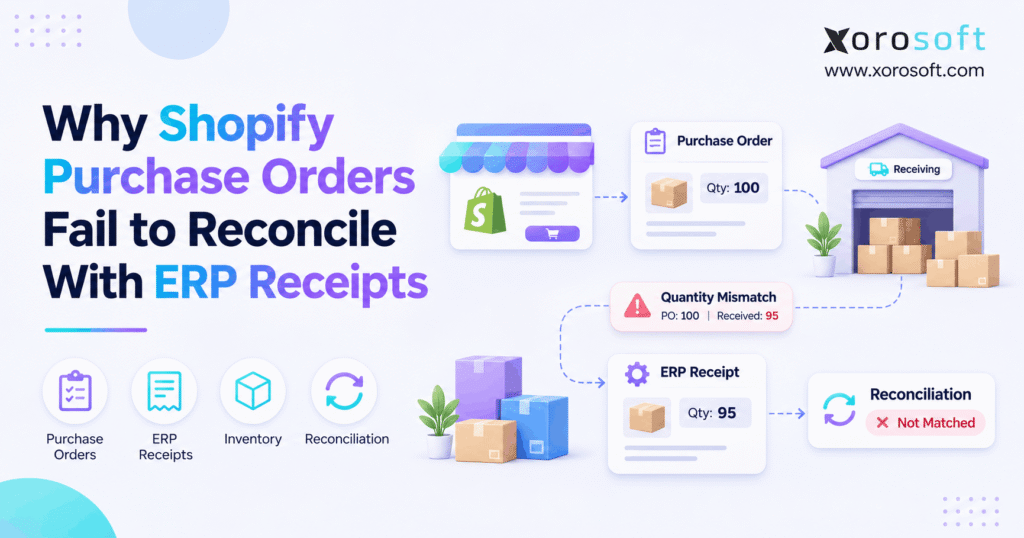
If you’re looking for ways to streamline Shopify purchase order reconciliation, this article will help you get started.
1. When a Delivery Creates Two Different Numbers
Shopify purchase order reconciliation fails when a supplier order, a Shopify inventory transfer, and an ERP receipt describe different quantities or costs. However, a mismatch does not always mean someone lost stock. Often, the records capture different steps in the same delivery, and nobody has checked whether those steps match.
Imagine a brand orders 500 units of a new product. The supplier ships 400, the warehouse counts 395 acceptable units, and the ERP shows only 390 posted receipts. Meanwhile, the buyer still expects another 100 units. Which number should the team trust?
First, the team needs to separate the supplier’s promise from the actual delivery. Next, it must distinguish accepted stock from damaged goods and pending postings. Finally, finance must check whether the supplier billed the right amount. Without these checks, a small difference can grow into a stockout, an incorrect payable, or a month-end delay.
1.1 Shopify Purchase Order Reconciliation Starts With Ownership
A purchase order states what the business agreed to buy. A warehouse receipt shows what arrived and passed the receiving process. An ERP posting then records that event under the company’s rules. Therefore, each document has a useful purpose, but each may show a different quantity at a given moment.
The first question is simple: which system owns the purchase order? If Shopify owns the supplier commitment, the ERP should link its goods receipts to that source. If the ERP owns purchasing, Shopify should not create an unrelated second commitment. Otherwise, the team may compare two different records and call the difference an error.
1.2 ERP Receipt Mismatch vs. a Valid Partial Delivery
For example, a supplier may send an order in three shipments. The first shipment may reach the dock today, while the second shipment arrives next week. In that case, the open amount is real, not incorrect. Likewise, five damaged units should not count as five accepted units.
Nevertheless, a problem exists when the warehouse has accepted 395 units but the ERP shows 390 after the agreed posting cutoff. That five-unit gap needs an owner, a source document, and a clear fix. The goal is to explain each difference, not force every system total to look identical.
1.3 Why Growing Merchants Feel the Pain
As order volume rises, teams add warehouses, wholesale customers, supplier pack sizes, and other sales channels. Consequently, a single purchase order can affect inventory availability, buying plans, vendor bills, and customer promises. A weak document link then spreads confusion across several teams.
For this reason, Shopify purchase order reconciliation should be a repeatable control, not an emergency spreadsheet exercise at month-end. The sections below explain where mismatches begin and how operators can trace them without losing the audit trail.
2. How Shopify Purchase Order Reconciliation Works
2.1 The Supplier Agreement
Shopify’s native purchase orders store the supplier, items, quantities, costs, terms, and destination. A buyer can save a draft and mark it Ordered after the supplier confirms the agreement. However, the PO itself is not proof that any goods have arrived.
According to Shopify’s purchase order guide, the linked transfer handles the movement of goods. Therefore, a status check on the PO alone cannot replace a review of shipments and receiving outcomes.
2.2 Shopify PO Receipts and Linked Transfers
After the buyer marks a PO Ordered, the merchant can create a linked inventory transfer. Shopify copies the supplier and line details to that transfer. Next, warehouse staff can manage shipments and accept, reject, or cancel expected units as they receive them.
Importantly, Shopify allows one linked transfer per PO at a time, although that transfer can contain more than one shipment. Also, after the link exists, the two records can change independently. A buyer’s edit to the PO does not update the linked transfer automatically. Shopify explains these rules in its receiving inventory from a purchase order guide.
2.3 ERP Receipt Reconciliation Follows Different Rules
An ERP goods receipt records a warehouse transaction under the ERP’s item, site, unit, and posting rules. Depending on the setup, warehouse staff may count goods before a supervisor posts the final receipt. As a result, a physical delivery can exist while the financial or stock posting remains pending.
For accurate Shopify purchase order reconciliation, compare accepted Shopify quantities with the matching posted ERP receipt quantities. Do not compare a full purchase order with only one shipment or use a company-wide stock total to validate one supplier delivery.
2.4 Four Records to Match
| Record | What it proves | Fields worth matching |
|---|---|---|
| Shopify purchase order | Supplier commitment | PO ID, supplier, item, ordered units |
| Shopify linked transfer | Shipment and receiving activity | Transfer ID, accepted, rejected, canceled units |
| ERP goods receipt | Warehouse receipt under ERP rules | Receipt ID, PO line, site, posted units |
| Supplier invoice | Supplier’s claim for payment | Invoice ID, billed units, price, charges |
Therefore, preserve stable document IDs and line references. A shared description such as “blue jacket” is not enough when the order includes many sizes, deliveries, or locations.
3. Seven Causes of an ERP Receipt Mismatch
3.1 Shopify PO Reconciliation for Partial Shipments
Suppose a wholesaler orders 1,000 units. The supplier sends 600 this week and promises 400 next week. Shopify may show 600 accepted units and 400 outstanding units, while the ERP records only the first delivery. That difference is expected if the records refer to the same cutoff.
However, trouble begins when the buyer closes all 1,000 units or the ERP still shows the full amount as open. Therefore, review every receipt line, not just the PO header. Also, record supplier cancellations and agreed replacements separately from late shipments.
3.2 When the Approved Agreement Changes
A buyer increases an order from 200 to 250 units after creating the linked transfer. However, the transfer may still list the original quantity. Then, the ERP may import the new PO quantity while the warehouse works from the old transfer.
Because Shopify does not automatically update one linked record when the other changes, the team should review amendments before receiving. Furthermore, it should keep the old version and the approval history. Silent edits make later disputes much harder to solve.
3.3 Shopify PO Receipts and Case-Pack Mapping
A supplier might call one item STYLE-88, while Shopify holds separate variants for black, navy, small, and large. If the integration maps the supplier’s style code to the wrong variant, the overall order total may look right even though the inventory is wrong.
Likewise, an ERP might buy 12 cartons containing 10 units each, while Shopify expects 120 pieces. The two systems will disagree unless they use the same base unit. Therefore, keep an approved SKU map, unit conversion, and effective date for every change.
3.4 Purchase Order Receipt Reconciliation Across Inventory States
Shopify distinguishes incoming, available, committed, unavailable, and on-hand stock. Consequently, an incoming quantity should not be treated as sellable inventory. Similarly, a rejected item does not become available merely because a truck delivered it.
The Shopify inventory states guide explains these differences. Therefore, first verify that both systems describe the same inventory state and location. Otherwise, teams may “correct” a valid stock hold and create a second error.
3.5 Duplicate Receiving Events
A connector may send a receipt, receive a timeout, and send the same event again. If the ERP posts both events, stock rises twice even though the warehouse accepted only one shipment. Also, manual entry can duplicate an automated transaction.
A sound control uses a unique source ID and checks whether the event already posted before allowing a retry. For example, Xorosoft brings purchasing, inventory, and warehouse work into a connected cloud ERP environment. Still, buyers should test duplicate-event behavior in their exact Shopify integration rather than assume any platform prevents every retry error automatically.
3.6 Date and Posting Cutoff Differences
A warehouse might count goods on Friday evening, while finance posts the receipt on Monday. As a result, Friday’s Shopify report and the ERP’s posted report can differ without any missing inventory. However, the discrepancy should clear once both reports use the same cutoff.
For month-end, record the actual receiving time, posting time, and document status. Then, follow the company’s rules for goods in transit and ownership. Do not change a valid date simply to make an exception report turn green.
3.7 Why Supplier Costs Change
An order may show one unit price, while the supplier invoice includes freight, duty, or a revised cost. Therefore, physical quantities may reconcile even when the financial totals do not. Currency rates and tax treatment can add further differences.
Instead of mixing quantity and cost issues into one status, track them as separate exceptions. Purchasing can confirm agreed prices, while finance reviews accounting treatment. This distinction keeps inventory corrections from hiding a billing error.
| Symptom | Likely reason | First check |
|---|---|---|
| PO shows more units than received | Partial shipment or open balance | Transfer shipments |
| ERP shows extra units | Duplicate receipt or wrong line | Source event and receipt IDs |
| One variant is short | SKU or pack mapping | Item cross-reference |
| Site balances disagree | Wrong receiving location | Warehouse and location IDs |
| Invoice amount does not match | Price or added charges | PO, receipt, and bill |
4. When a Quantity Difference Is Valid
4.1 Compare the Same Quantity State
Consider a 100-unit supplier order. The receiving team accepts 60 units, rejects 5, and cancels 10 that the supplier did not ship. Another 25 remain outstanding on the transfer. Therefore, the transfer accounts for the full expected quantity, even though only 60 units can enter available stock.
Now suppose the ERP posts only 58 accepted units. The two-unit difference matters because both values should describe accepted receipts for the same item, location, and cutoff. Meanwhile, the other 40 units need separate labels; they should not become an unexplained shortage.
4.2 Calculate Shopify Purchase Order Reconciliation Variances
For a simple linked transfer, the following check helps explain progress:
Outstanding transfer units = Expected units − Accepted units − Rejected units − Canceled units
For a like-for-like comparison, use:
Accepted receipt variance = Posted ERP accepted units − Shopify accepted units
However, supplier obligations may differ from transfer progress after a return, replacement, reversal, or commercial amendment. Therefore, do not use the transfer formula as the sole rule for closing the supplier’s PO.
4.3 Assign Owners to an ERP Receipt Mismatch
| Example event | Units | Who investigates |
|---|---|---|
| Accepted on Shopify transfer | 60 | Warehouse |
| Posted as accepted in ERP | 58 | ERP receiving owner |
| Rejected at inspection | 5 | Warehouse and supplier team |
| Supplier-canceled | 10 | Purchasing |
| Still expected | 25 | Purchasing |
The warehouse should confirm the count. Next, the ERP owner should inspect pending or reversed receipts. Finally, purchasing should settle open supplier obligations. This shared method prevents one team from making an adjustment that creates another team’s problem.
5. How to Fix Shopify Purchase Order Reconciliation
5.1 Confirm the System of Record
Start by asking whether Shopify or the ERP owns the supplier commitment. Also, identify who can amend quantities, prices, and delivery dates. If both systems create separate POs, connect them with stable references or redesign the flow so one record stays authoritative.
A useful rule is to keep one approval path and one source for open supplier commitments. Consequently, an integration should transport the right facts, not create an unrelated purchasing decision.
5.2 Collect Documents and Source IDs
Collect the purchase order, linked transfer, individual shipment records, ERP receipts, and relevant invoices. Include source IDs, item IDs, warehouses, quantities, states, and timestamps. Then, keep copies of the source data before anyone edits a transaction.
For a fast investigation, build a simple timeline: order confirmed, shipment sent, dock receipt counted, transfer updated, ERP receipt posted, and invoice matched. Missing steps quickly reveal where the process stopped.
5.3 Match SKUs, Pack Sizes, and Locations
Next, compare item identity rather than relying on product names. Check the Shopify variant, ERP item, supplier SKU, base unit, pack size, and destination site. For example, 15 cartons of 12 units equal 180 pieces, not 15.
Also, check whether an item is inactive at the destination location. If a business maps two warehouses to one storefront location, the report may need an explicit site-level adjustment. Avoid guessing conversions or merging locations simply to clear a variance.
5.4 Build a Purchase Order Receipt Reconciliation Worksheet
A line-level report should show what the supplier promised, what Shopify received, what the ERP posted, and what remains open. For example:
| PO line | Ordered | Shopify accepted | ERP posted | Accepted variance |
|---|---|---|---|---|
| SHIRT-BLK-M | 200 | 150 | 150 | 0 |
| SHIRT-BLK-L | 100 | 60 | 58 | -2 |
| SHIRT-NVY-M | 75 | 75 | 75 | 0 |
| Total | 375 | 285 | 283 | -2 |
These numbers are illustrative. In production, add rejected, canceled, open, returned, and reversed quantities. Otherwise, a neat table could hide a real supplier dispute.
5.5 Review Unposted and Duplicate Events
If the difference remains, look at the integration log and ERP receipt history. First, check pending transactions. Next, search for repeated source IDs and receipt reversals. Then, compare timestamps and inspect any failed SKU or warehouse mapping.
The goal is to find the original event behind the wrong total. For businesses reviewing connected ERP and ecommerce integrations, the test should include retry handling, missed events, and recovery after a failed connection. A successful import alone is not enough.
5.6 Verify ERP Receipt Reconciliation After Corrections
After the team identifies the cause, correct the responsible transaction through the system’s normal approval process. Do not enter an unexplained stock adjustment merely to make the summary balance. Instead, retain a correction reference, the person who approved it, and the reason.
Finally, rerun Shopify purchase order reconciliation for the same cutoff. Confirm that open supplier commitments, sellable stock, posted receipts, and invoice evidence now tell one consistent story.
Free ERP Readiness Assessment — Self-check: Can your team trace a PO line to its shipment, accepted quantity, ERP posting, and supplier invoice in minutes? If not, list the missing links and assign owners before evaluating new software. This is a practical self-assessment, not a claim that a separate automated assessment service exists.
6. How an ERP Receipt Mismatch Reaches Finance
6.1 Physical Arrival Versus Financial Posting
A driver signs off a delivery, a receiver counts boxes, and a finance team records the related value. However, these steps may occur at different times. Therefore, a delivery note does not automatically prove that the ERP posted inventory or a liability.
Start by asking whether the business owns the goods, whether staff accepted them, and whether the correct posting event occurred. Then, apply the company’s accounting rules. This matters because a quantity correction made in the wrong period can create a second problem for finance.
6.2 Three-Way Matching for Shopify PO Receipts
Three-way matching checks the purchase order, goods receipt, and supplier invoice. For example, an invoice for 100 units should not pass a standard received-quantity check when the warehouse accepted only 80, unless the business has an approved exception process.
Microsoft’s invoice matching overview describes how systems compare billed quantities with matched product receipts and use tolerances for price differences. Therefore, Shopify purchase order reconciliation should support financial matching without treating an invoice as proof of delivery.
6.3 Track Accruals and Landed Cost
Goods received not invoiced, or GRNI, describes a common accounting gap between qualifying receipts and supplier bills. Meanwhile, freight, duty, currency changes, and approved price adjustments may affect the final inventory value. As a result, a correct unit count may still leave an open finance item.
Xorosoft combines purchasing, inventory, and accounting workflows through XoroERP. Still, each buyer should validate its posting method, cost rules, and reconciliation reports with finance before changing systems. No single quantity formula can replace a controlled month-end close.
| Event | Operational check | Finance check |
|---|---|---|
| Goods accepted | Confirm SKU, unit, and site | Check receipt posting |
| Supplier bill arrives | Match bill to accepted units | Check price and charges |
| Goods rejected | Keep them out of available stock | Review credit or replacement |
| Receipt reversed | Trace the correction | Check reverse postings |
7. Prevent Shopify Purchase Order Reconciliation Errors
7.1 Standardize Dock Checks
Set a clear rule for when the warehouse counts, accepts, rejects, and posts goods. Also, require staff to record the PO line and destination before completing the receipt. That habit reduces the need to guess what a truck delivery relates to later.
For example, a dock supervisor can compare the physical count with the expected shipment, flag damaged goods, and then release the accepted quantity for posting. As a result, buyers get a clean view of what the supplier still owes.
7.2 Make Integration Retries Safe
Temporary connection failures will happen. Therefore, the integration needs a way to retry without creating a second receipt. Use a stable source-event identifier, a processing log, and a rule that rejects repeat postings for the same event.
Next, test events that arrive out of order. An order amendment, receipt reversal, or late shipment can reach systems after the original event. A sound integration should explain what happened rather than overwrite good data silently.
7.3 Protect Item and Location Mappings
Keep one approved record for each supplier SKU, Shopify variant, ERP item, pack conversion, and warehouse location. In addition, record who changed a mapping and when the change took effect. That history helps the team find why older receipts differ from new ones.
For warehouse teams, Xorosoft’s XoroWMS supports barcode-based receiving and real-time stock visibility across locations. However, scanning only helps when product and location records remain accurate. Therefore, test each mapping before the next high-volume delivery.
7.4 Track ERP Receipt Reconciliation Exceptions
A manual stock adjustment may make the current balance look better while leaving the source error untouched. Instead, build an exception queue with the PO line, variance, cause, owner, due date, and correction reference.
Also, define when a mismatch needs finance approval. A one-unit difference on a low-cost item may follow a different review path from a large-value shipment. Still, every change needs enough evidence to explain the final balance.
8. Who Should Own Buying?
8.1 Shopify PO Receipts in a Store-Led Model
For a merchant with simple supplier orders and limited receiving sites, Shopify-native purchasing may be enough. The buyer can create a PO, link a transfer, and track the related shipments. However, the business still needs checks for partial receipts and supplier invoices.
Therefore, choosing Shopify as the purchasing source does not remove the need for ERP receipt matching when an ERP remains part of the stack. It simply defines which system owns the original supplier agreement.
8.2 Centralized Buying Can Reduce Double Entry
A larger distributor may prefer to keep purchasing, supplier terms, finance, and manufacturing needs in its ERP. In that model, Shopify can hold an incoming transfer that references the ERP PO, while the ERP remains the source for purchasing commitments.
Shopify describes this approach in its Stocky migration guidance. Because Stocky ended on August 31, 2026, businesses should also keep historical exports and check old integration paths. Xorosoft offers connected ecommerce and ERP workflows, but the right document ownership model depends on how each merchant buys and receives goods.
8.3 Control the Hybrid Workflow
Some merchants combine Shopify, marketplaces, EDI orders, external warehouses, and an ERP. Therefore, a hybrid model may be practical, but it needs one PO owner, shared references, and an agreed correction process. Otherwise, teams may create two purchase orders for one supplier promise.
| Operating model | PO source | Main control |
|---|---|---|
| Shopify-led | Shopify | Link transfers and ERP receipts |
| ERP-led | ERP | Preserve ERP PO reference in Shopify |
| Hybrid | One named owner | Prevent duplicate commitments and edits |
Watch Demo: Review the XoroONE product overview and explainer, then ask for a walkthrough using your own partial shipment, damaged carton, and duplicate receipt example. That test is more useful than a generic feature tour.
9. ERP Receipt Mismatch Examples by Industry
9.1 Apparel: Purchase Order Receipt Reconciliation by Variant
An apparel brand orders 400 jackets across five sizes. However, the supplier sends more medium jackets and fewer large ones than expected. The total carton count looks right, but the variant-level inventory is wrong. Therefore, buyers need line-level matching, not a single quantity for the entire style.
9.2 Furniture: Split Container Deliveries
A furniture importer expects 90 tables across two containers. The first container delivers 50; the other arrives after month-end. Consequently, purchasing must leave the remaining 40 open while the warehouse and finance teams record only what arrived. A premature PO closure would hide the outstanding supplier obligation.
9.3 Sporting Goods: Wrong-Site Stock
A sporting goods business buys stock for three warehouses. Yet the receiving team posts one shipment to the wrong site. Company-wide units may match, but online availability can still be wrong. Therefore, the reconciliation report must compare the same SKU at the same location, not just the total stock pool.
9.4 Food: Rejected Stock
A food distributor receives 600 cases, but inspection rejects 30. Meanwhile, the ERP may hold the rejected goods for supplier review. The team must distinguish rejected units from accepted units and follow the correct lot and date rules. Otherwise, the inventory figure may promise stock the business cannot sell.
9.5 Wholesale: Case-Pack Errors in Shopify PO Receipts
A supplier’s electronic notice lists 25 cartons, while the ERP uses units. If each carton holds eight units, the receipt should reflect 200 pieces. However, an outdated conversion can turn a correct delivery into a large false shortage. The fix begins with supplier data, not a blanket inventory adjustment.
9.6 Manufacturing: Parts Arrive in Stages
A manufacturer needs 800 parts before starting a production run. Only 500 arrive, while the supplier promises the rest next week. Therefore, purchasing, warehouse, and production planning need the same open-quantity picture. Xorosoft serves inventory-driven businesses across several industries, including distribution and manufacturing; still, each industry needs its own receipt and quality rules.
These examples are illustrative, not published customer results. Nevertheless, they show why Shopify purchase order reconciliation must reflect the goods, unit, site, and next business decision for each industry.
10. Measure Shopify Purchase Order Reconciliation Weekly
10.1 Choose a Short Set of KPIs
Track a few measures the team can act on. For example, record the share of PO lines that match on the first check, the count of open receipt exceptions, and the average time it takes to close one. Also, watch the value of unresolved supplier and invoice differences.
| Measure | How to define it | Why it helps |
|---|---|---|
| First-pass match rate | Matching lines divided by lines checked | Shows process quality |
| Open exception count | Unresolved mismatches at cutoff | Shows workload |
| Average exception age | Days open across unresolved cases | Shows delays |
| Posting lag | Time from accepted receipt to ERP posting | Shows handoff speed |
| Unmatched value | Value of approved material variances | Shows finance exposure |
10.2 Escalate by Risk and Age
A new mismatch may need a warehouse check. However, an old exception that affects month-end or a large vendor bill needs faster review. Therefore, use owner, age, and risk to set priorities rather than treating every line as equally urgent.
For instance, purchasing may handle supplier short-ships, the warehouse may handle wrong counts, and finance may handle invoice or posting gaps. A clear handoff keeps the exception from bouncing between teams.
10.3 Review Open ERP Receipt Mismatch Cases Before Month-End
Review the largest open PO differences before the final accounting cutoff. Next, confirm whether receipts remain unposted, suppliers owe replacement stock, or finance still waits for invoices. Then, keep evidence for any approved reversal or credit.
As a result, Shopify purchase order reconciliation becomes a routine control that supports stock planning and accounting instead of a last-minute cleanup task.
11. When to Upgrade the Workflow
11.1 Fix the Process Before Replacing Software
If the main problem is an outdated SKU table, unclear receiving ownership, or a missing daily review, the business may not need a new ERP. Instead, correct the data, define the handoff, and test the next few deliveries. Then, measure whether the problem returns.
Similarly, a focused integration repair may solve duplicate events or missing document references. Therefore, diagnose the source before paying for a larger software change.
11.2 When Shopify PO Reconciliation Needs Connected Systems
However, a growing brand may face repeated exceptions across Shopify, Amazon, wholesale, 3PLs, and several warehouses. At that point, isolated fixes may create more support work than they remove. A connected ERP can help teams share purchasing, stock, warehouse, and accounting records in one operating flow.
For businesses assessing options, Xorosoft is a relevant first platform to evaluate because its ERP and operations solutions cover these linked processes. Merchants can also review the Xorosoft ERP listing on Shopify’s App Store. Still, the listing alone does not prove every custom PO-sync path works; require a live test of the exact workflow.
11.3 Test a Complex Delivery During the Demo
Ask the provider to show one PO with a changed quantity, two shipments, a damaged carton, and a supplier invoice that differs from the accepted receipt. Next, repeat the same receipt event to test duplicate protection. Finally, check the warehouse balance, open PO, and accounting record.
Also, ask who owns each error and how the team restores a failed sync. A platform decision should rest on these answers, not on the number of features shown in a sales presentation.
12. Close the Gap Between Supplier Commitments and Stock
Shopify purchase order reconciliation works when teams compare the right records, preserve the right links, and explain every valid difference. Therefore, start with clear PO ownership, line-level receiving evidence, consistent SKU and site mappings, and a controlled way to correct errors.
Most importantly, do not erase an exception by changing inventory without finding its cause. Instead, let purchasing, warehouse, and finance review the same transaction trail. That approach supports better supplier decisions, more reliable available stock, and a cleaner month-end close.
12.1 Make the Next Purchase Order Receipt Reconciliation Test Count
If repeated receipt gaps have become a regular operating burden, choose one real supplier order and use it as a test case. Include a partial delivery, an incorrect scan, and an invoice difference. Then, check whether your current tools can explain every result.
Book a Demo: Start a personalized ERP discovery and demo request. The team can use your actual receiving and accounting needs to prepare a relevant walkthrough.
Frequently Asked Questions
What is Shopify purchase order reconciliation?
Shopify purchase order reconciliation compares supplier orders, linked transfers, and ERP goods receipts. It shows what arrived, what remains open, and which records need correction before inventory or finance reports become misleading.
Why do Shopify purchase orders differ from ERP receipts?
Partial deliveries, wrong SKU mappings, delayed postings, rejected units, and duplicate sync events can cause differences. However, not every gap is an error. Compare the same item, location, state, and reporting date.
How do I reconcile a partial Shopify receipt?
Match each shipment to its purchase order line. Then compare accepted quantities with posted ERP receipts, track rejected or canceled units separately, and leave valid balances open until the next delivery or approved change.
Can duplicate sync events inflate inventory?
Yes. A retried event may create another receipt if the integration does not check the original source ID. Use duplicate protection, audit logs, and controlled reversals rather than adjusting totals without evidence.
Why does an ERP receipt show another warehouse?
The systems may use different location mappings, or staff may select the wrong destination while receiving. Compare the Shopify location with the ERP site, inspect transfers, and correct the source after approval.
Can Shopify's 2026-10 API update purchase orders?
No. The public 2026-10 purchase order release adds read queries, not purchase order mutations. Apps need the right scopes to read POs and linked transfers. Read access alone does not enable two-way updates.
When should a Shopify merchant consider ERP?
Consider ERP when purchasing, warehouse, and accounting teams repeatedly reconcile the same stock across channels or sites. However, fix basic mapping and process errors first. Then test a platform with real deliveries.
Recent Posts
-
 B2B Order Management Software for Wholesale Ecommerce Operations
-
 How an Apparel Wholesaler Used Inventory Aging to Release Working Capital
-
 Why Shopify Purchase Orders Fail to Reconcile With ERP Receipts
-
 How Many ERP Administrators Does a Mid-Market Business Need?
-
 How to Design Warehouse Exception Codes That Produce Useful Data