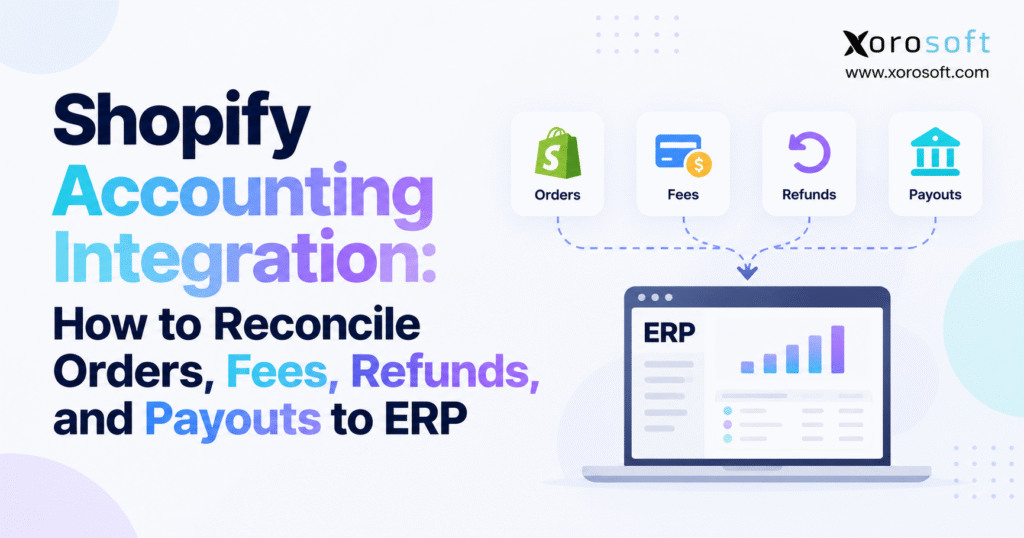
If you run an online store, finding the right Shopify accounting integration can make all the difference in managing your finances efficiently.
1. Why Shopify Sales, Payouts, and Bank Deposits Stop Matching
A Shopify store can report a profitable sales day while the finance team struggles to explain the bank deposits. The order dashboard shows one total, payment activity shows another, and the general ledger may show a third. These differences do not automatically signal an accounting error. Rather, each report measures a different financial event. As order volume grows, however, the gaps become harder to investigate with spreadsheets.
Shopify accounting integration helps merchants connect those events without confusing sales, cash collection, and settlement. The challenge becomes especially visible when processors deduct fees, customers request partial refunds, or deposits arrive after month-end. Meanwhile, a growing catalog, multiple warehouses, and wholesale orders introduce inventory and receivables activity that simple payout summaries cannot explain.
1.1 Why a Shopify Order Does Not Equal Cash in the Bank
Consider an order for $250. Shopify records the commercial order, but the processor must still capture the payment. After capture, it may deduct processing fees and include the remaining funds in a later payout. A customer might also request a refund after that payout. Consequently, the order amount, captured payment, processor settlement, and bank deposit can legitimately differ.
Finance must distinguish those stages before it posts journals. Otherwise, a team might classify the net deposit as revenue, overlook fee expenses, or record the same sale twice. For an accrual-accounting business, the payout date also does not determine when revenue belongs in the accounts. That determination follows the applicable revenue policy and facts of the sale.
1.2 The Operational Cost of Unexplained Differences
A single unexplained $30 fee is manageable. Hundreds of unmatched refunds, adjustments, and deposits across several providers create a different problem. Controllers spend closing week searching exports. Accountants correct entries after reports go to management. Purchasing teams then make decisions using inventory values that finance has not reconciled to operational records.
In practice, faster imports cannot fix weak posting rules. A sound integration must preserve transaction identifiers, explain timing differences, and make exceptions visible. It should also let an accountant move from a bank line to a payout, from the payout to the underlying payments, and from those payments to the correct ledger entries.
1.3 What a Reliable Reconciliation Process Proves
An effective process establishes four facts. First, each captured payment has a valid source transaction. Second, every refund, fee, and processor adjustment has the right accounting treatment. Third, each payout ties to a bank deposit or a documented amount still in transit. Finally, the closing balance of each processor clearing account has supporting transactions.
The goal is not to force every daily report to display identical totals. Instead, the team should explain why the totals differ and prove that it has accounted for every material event. That standard gives Shopify accounting integration a clear financial purpose rather than treating synchronization itself as success.
2. What Shopify Accounting Integration Actually Reconciles
Shopify accounting integration links ecommerce activity with an accounting platform or ERP. Yet the phrase covers several distinct jobs: moving orders, recording payments, mapping taxes, calculating processor fees, handling returns, and matching cash settlements. Businesses should define which of these jobs their integration must perform before selecting software or enabling automated posting.
2.1 Four Records Behind a Shopify Financial Transaction
A Shopify order contains products, discounts, shipping charges, taxes, and customer details. Next, the payment transaction identifies the authorization, capture, refund, or reversal. Meanwhile, the processor payout groups activity that the provider intends to settle. Finally, the ERP general ledger records revenue, receivables, liabilities, expenses, cash, and inventory costs according to the company’s accounting policies.
Shopify’s Finance reports distinguish sales-related information from payment activity. Accordingly, finance should not assume that a sales report acts as a bank statement or that a payout represents recognized revenue. These are related views of the transaction lifecycle, not interchangeable balances.
| Financial record | What it describes | Best matching reference |
|---|---|---|
| Shopify order | Items, pricing, taxes, and commercial activity | Order and line-item IDs |
| Payment transaction | Capture, refund, authorization, or reversal | Processor transaction ID |
| Processor payout | Settlement batch and deductions | Payout or transfer ID |
| ERP general ledger | Accounting impact and period | Journal and account references |
2.2 Recognize Revenue Separately From Collecting Payment
A customer may pay today for merchandise that ships next week. In that situation, cash collection and revenue recognition can fall in different periods. Conversely, a wholesale customer might receive goods on credit and pay thirty days later. The finance team should therefore base revenue posting on its accounting policy, not simply on the timing of checkout or settlement.
For example, a captured payment can clear accounts receivable after the business recognizes a sale. If the business collects money before earning revenue, it may instead need a customer-deposit or contract-liability account. Once the business satisfies the underlying performance obligation, the accounting system can recognize the appropriate revenue. Because scenarios vary, controllers should approve the event-to-account mapping before an integration starts posting automatically.
2.3 Define the System of Record for Every Event
Some merchants use Shopify as the source of orders and an ERP as the source of invoices, inventory valuation, and general-ledger entries. Others keep bookkeeping in a standalone accounting system while a connector imports payout summaries. Either arrangement can work when the team establishes ownership clearly.
The risk starts when separate connectors both decide to post revenue. For instance, one integration may create an invoice from an order while another imports a payment as an entirely new sale. As a result, the ledgers overstate revenue even though the bank deposits match perfectly. Reliable Shopify accounting integration requires one posting owner for each event and an auditable link between upstream records and downstream journals.
3. Build Shopify Accounting Integration Around Mapping Rules
Before importing thousands of historical transactions, build a mapping specification. It should describe every expected source event, its unique identifier, the destination account, the intended posting date, and the system that owns the entry. Also define how the integration treats repeats, late changes, corrections, and transactions that fail validation.
3.1 Map Sales, Payments, and Fees to Separate Accounts
Most inventory-driven merchants need distinct accounts for product revenue, shipping income, discounts, returns, sales tax payable, gift card liabilities, receivables, cash, payment clearing, and processor fees. Additional accounts may handle disputes, customer deposits, exchange differences, and reserves. Without this separation, a merchant can match the bank while misreporting profitability.
For example, XoroERP is one platform that businesses can evaluate when order processing, inventory, and financial accounting need to share an operational system. The organization must still choose its revenue-recognition policy and validate account mapping with its finance team. ERP software can enforce those decisions, but it cannot replace the judgment behind them.
| Event | Illustrative debit | Illustrative credit |
|---|---|---|
| Recognized credit sale | Accounts receivable | Sales revenue |
| Captured payment on receivable | Processor clearing | Accounts receivable |
| Processor fee withheld | Fee expense | Processor clearing |
| Refund of recognized revenue | Sales returns | Processor clearing |
| Bank settlement received | Bank | Processor clearing |
| Gift card purchased | Processor clearing | Gift card liability |
This simplified mapping excludes tax and inventory-cost entries. Different payment arrangements may require other accounts or posting sequences. Accordingly, the accountant should test the design against actual transactions rather than assume one journal template works for every order.
3.2 Retain IDs, Currencies, Dates, and Event Types
A settlement match needs more than an amount and an order number. Preserve the Shopify store ID, order ID, payment transaction ID, processor name, payout reference, currency, event timestamp, and ERP document number where available. Because multiple orders can share the same value, amount-only matching creates false positives.
The integration should also retain original event dates alongside import and posting dates. A refund submitted after midnight may belong to a different reporting day than the original sale. Similarly, a bank transfer can cross month-end. Clear date fields help the team explain differences instead of changing posting dates to force a superficial match.
3.3 Prevent Duplicate Journals Before They Reach the Ledger
An ecommerce integration will encounter retries, edits, and repeated notifications. Therefore, it should use stable source identifiers and idempotent processing. In practical terms, a retry of the same transaction must not create another invoice or payment. A genuine refund, by contrast, requires a new, linked event.
Finance and IT should test edited orders, partial captures, multiple refunds, and delayed settlement events before go-live. Each test should show exactly which ledger entry appears, which record owns it, and how staff can trace a failure. These controls make Shopify accounting integration trustworthy at scale.
4. Use Clearing Accounts to Explain Shopify Payment Differences
Payment clearing provides the financial bridge between captured customer money and deposits received in the bank. Without this bridge, accountants often use net payouts as sales figures because those are the amounts that appear in bank feeds. That shortcut makes revenue and fee reporting unreliable.
4.1 Follow Every Capture Through the Clearing Account
When a customer pays an existing receivable, finance can debit processor clearing and credit accounts receivable. The processor now owes the business money, even if the bank has not received a transfer. Once the provider deducts a fee, the accountant debits fee expense and credits clearing. When the deposit arrives, the accountant debits cash and credits clearing.
A refund creates another linked movement. Thus, the remaining clearing balance represents funds and adjustments that have not yet flowed into the bank. A zero balance can be appropriate for a fully settled batch, but a nonzero month-end balance can also be legitimate. The question is whether the team can identify every outstanding component.
4.2 Reconcile Providers Separately Before Consolidating
Different payment services follow different settlement calendars and fee rules. Consequently, a single shared clearing account can make errors harder to find. Separate processor subaccounts provide a cleaner view, especially when a merchant uses Shopify Payments, PayPal, and another gateway. Distinct currency balances may also help when the same provider settles international payments.
A business may use Xorosoft’s integrations or another integration environment to connect the relevant services. Still, connection breadth is not the accounting control. Controllers need clear settlement sources, reliable mapping, and the ability to trace outstanding funds by provider.
4.3 Reconcile the Opening and Closing Balances
Start with the opening processor receivable. Add successful new captures, then subtract refunds, fees, and settled amounts. Apply any additional provider adjustments with their correct debit or credit direction. The result should match the supported closing balance in the ERP.
For example, a $5,000 closing balance may be reasonable if the processor captured $5,000 late on the final day and will deposit it after the weekend. On the other hand, an unexplained $5,000 balance left open for months requires investigation. A good reconciliation process distinguishes those situations immediately.
4.4 Explain Payout Cutoff Without Backdating Cash
A payment captured September 30 may settle October 2. Record each event using the policy and evidence relevant to it. If the bank has not received funds at September month-end, the accountant should not post a fictional September bank receipt simply to empty clearing.
Instead, retain the supported unsettled balance or apply the company’s documented in-transit classification. When the October deposit arrives, use the payout reference to settle that balance. This approach preserves both correct cutoff and a clear audit trail.
5. Shopify Accounting Integration: The Eight-Step Payout Reconciliation
A repeatable Shopify accounting integration workflow starts with the source transactions, rebuilds the processor settlement, and ends with ledger and bank evidence. By following the same sequence every month, finance can distinguish missing entries from legitimate timing differences before they become large reconciliations.
5.1 Step One: Define the Period and Collect Complete Reports
Choose the store, reporting dates, payment provider, bank account, and settlement currency. Collect the Shopify sales reports, captured payment events, refunds, payout exports, and bank transactions. Include an ERP clearing-account ledger and all unsettled items carried forward from the prior month. Check date and time-zone definitions before comparing totals.
Shopify’s payout details guidance explains the transaction-level information available for a specific settlement. Those exports let the team investigate a payout far more reliably than a single sales total. For providers outside Shopify Payments, obtain equivalent settlement evidence directly from those providers.
5.2 Step Two: Match Orders to Actual Payment Captures
Join captured transactions with their original orders and identify partial collections, voided authorizations, manually marked payments, and missing source IDs. Since one order may have multiple captures, do not assume a one-to-one relationship. Furthermore, do not classify an authorization as money collected if the processor never captured it.
Review edits and cancellations separately. An amended commercial order might change an invoice without creating a new capture. Conversely, a later payment can clear an existing receivable without adding another sale. That distinction prevents revenue duplication.
5.3 Step Three: Match Refunds and Adjustment Events
Identify every refund belonging to the payout period or settlement batch. Match it to both the original order and the processor reference. Then classify its revenue, tax, and payment effects separately. If the provider deducted a refund from a later payout, preserve that timing relationship rather than rewrite the original settlement.
Next, isolate chargebacks, reserves, releases, and fee adjustments. These events may affect available cash without representing ordinary product returns. A well-mapped ERP should retain their distinct accounting categories.
5.4 Step Four: Recalculate the Expected Payout
Start with the relevant captured payments. Subtract refunds and processing fees; then adjust for disputes, reserves, releases, and other provider activity. The final amount should match the processor’s own payout record. When it does not, review the underlying events rather than insert an unexplained balancing entry.
A payout calculation is not a revenue formula. It measures settlement activity. Therefore, the team must reconcile the recognized sales separately from processor cash movement.
5.5 Step Five: Validate the ERP Journal Entries
Verify that each financial event reaches the correct account only once. Check that fees appear as expenses, refunds follow the approved revenue and liability treatment, and captured payments adjust receivables or appropriate customer deposit accounts. Confirm the dates, currencies, and transaction identifiers.
Some integrations merely synchronize payout data; others create journal entries under configured rules. For that reason, always test the specific product behavior. Do not assume that a payout visible inside ERP has already reached the general ledger.
5.6 Step Six: Reconcile the Processor Clearing Balance
Calculate the balance movement for each processor and compare it with the ERP ledger. Trace unsettled captures, pending refunds, and held amounts to their source records. If a difference remains, inspect missing events, duplicate postings, incorrect transaction types, and currency mismatches.
Importantly, finance should not demand a zero balance when valid settlements remain pending. An itemized schedule offers stronger evidence than an artificially cleared account.
5.7 Step Seven: Match the Payout to the Bank Deposit
Use settlement IDs, transfer references, amounts, currencies, and actual banking dates. A single payout might appear as one bank credit, while a provider may sometimes aggregate or split transfers. Preserve the mapping between the settlement and its banking evidence.
Where funds have not arrived, record the status as outstanding. Then follow up on the next closing cycle or when the provider updates the transfer. This process distinguishes a delayed settlement from a missing journal entry.
5.8 Step Eight: Investigate Exceptions and Approve the Period
Assign every material exception an owner, explanation, source document, and resolution date. Prioritize missing bank receipts, duplicate revenue, unsupported adjustments, and unusual processor balances. After correction, rerun the affected reconciliation rather than changing unrelated journals.
Finally, retain the payout export, clearing schedule, bank proof, adjustment entries, and reviewer sign-off. That evidence turns reconciliation from an individual employee’s spreadsheet technique into a repeatable financial control.
Free ERP Readiness Assessment: If your Shopify closing process relies on repeated manual fixes, assess whether the problem comes from payment mapping, disconnected inventory, or a broader ERP architecture gap before selecting another application.
6. Worked Shopify Payout Reconciliation With Balanced ERP Entries
A small numerical example helps explain why gross payments, net deposits, and recognized sales are different. This hypothetical batch uses one processor, one currency, and no sales tax, gift cards, reserves, or chargebacks. Assume the original $1,000 sale met the company’s revenue-recognition criteria and a later $120 refund reverses recognized revenue.
6.1 Calculate the Processor’s Net Settlement
The merchant captures $1,000 from customers. The processor then records a $120 refund and deducts $30 in payment fees. Accordingly, the expected bank payout equals $850. The merchant’s net sales after the refund equal $880 in this simplified scenario, while processing fees remain a separate $30 expense. The bank’s $850 receipt is neither gross revenue nor net sales.
| Component | Amount |
|---|---|
| Captured customer payments | +$1,000 |
| Customer refund | -$120 |
| Processing fees | -$30 |
| Expected bank payout | $850 |
6.2 Record Every Event With Matching Debits and Credits
First, debit accounts receivable and credit revenue for $1,000 when the sale qualifies for recognition. On successful capture, debit processor clearing and credit receivables for $1,000. The original customer balance now clears, while the processor owes the merchant the captured funds.
Next, debit sales returns for $120 and credit processor clearing for the refund. Debit processing fee expense for $30 and credit processor clearing for the fee. Finally, when the bank receives $850, debit cash and credit processor clearing for $850.
| Accounting event | Debit account | Credit account | Amount |
|---|---|---|---|
| Recognize sale | Accounts receivable | Sales revenue | $1,000 |
| Record capture | Processor clearing | Accounts receivable | $1,000 |
| Record refund | Sales returns | Processor clearing | $120 |
| Record fee | Processing fee expense | Processor clearing | $30 |
| Record bank receipt | Bank | Processor clearing | $850 |
Every journal balances. Moreover, the clearing-account calculation becomes $1,000 minus $120, $30, and $850, leaving zero for this fully settled batch. Actual balances may remain open when transactions cross periods.
6.3 Prove the Entries Against Source Documents
First, check Shopify and processor transaction details for the captures and refund. Next, match the provider’s fee and payout records to $30 and $850. Finally, compare the bank receipt with the ERP clearing entries. If the bank shows $820 instead, do not invent another $30 expense until the provider explains the discrepancy.
Similarly, if clearing still contains $120 despite a correct bank receipt, look for a duplicate refund or reversed debit and credit. The reconciliation should identify the source of the difference, not merely reduce it.
6.4 Extend the Example Across Accounting Periods
Suppose the processor settles on September 30 but the bank receives the funds on October 2. September’s closing schedule should show the legitimate amount due from the processor or in transit, depending on the approved accounting approach. October’s bank entry should clear that amount. This keeps both periods accurate without recording the same deposit twice.
7. Handle Refunds, Gift Cards, Chargebacks, and Tax Correctly
Not every deduction from a payout represents an ordinary expense. Refunds, disputes, gift cards, and taxes affect different accounting balances, even when the processor reduces the money it transfers. Consequently, Shopify payment reconciliation needs event-specific rules instead of a general adjustment account.
7.1 Shopify Refund Reconciliation Must Follow the Original Order
A refund may occur days or weeks after the original payout. Keep the original settlement unchanged, then record the new refund in the period when the event occurs under the relevant accounting policy. Link it to the original sale, including the returned merchandise value, shipping adjustment, and tax effect. A partial refund should not automatically cancel the entire invoice.
Shopify explains that its Payments service generally does not return the original credit-card processing fee when a merchant refunds a transaction. Therefore, avoid reversing the earlier fee merely because the customer received money back. Check the current Shopify Payments refund guidance and the provider’s actual transaction record.
7.2 Keep Disputes and Gift Card Liabilities Distinct
Chargebacks represent disputes rather than normal product returns. Finance must track the contested payment, applicable fee, expected recovery, and final resolution. Likewise, a processor reserve can delay cash without creating another operating expense. Record those events according to their actual economic effects.
Gift cards create a different issue: cash collection can precede the merchandise sale. A gift card purchase commonly creates a liability, and a later redemption reduces that obligation while the merchant recognizes the relevant sale. Otherwise, the ledger risks counting one customer’s money as revenue twice. Shopify accounting integration should keep gift card movements distinct from ordinary captures and refunds.
7.3 Reconcile Sales Tax by Liability and Jurisdiction
Sales tax collected from customers generally belongs in a payable account, not merchandise revenue. Returns may also change the tax owed. Accordingly, compare Shopify tax activity with the ERP’s tax subledger and the applicable filing records. US state and local rules differ, while Canadian merchants may have GST, HST, PST, RST, or QST obligations.
The business remains responsible for its registration, exemptions, and remittance decisions. Have a qualified adviser confirm complex tax treatment, especially when marketplaces collect or remit taxes on the merchant’s behalf.
8. Reconcile Multiple Payment Providers and Currencies
International and omnichannel merchants cannot assume one Shopify Payments export describes every deposit. Other gateways, POS providers, and wholesale payments may use different settlement calendars and reference formats. Therefore, consolidate reports only after reconciling the underlying providers separately.
8.1 Shopify Accounting Integration for Multiple Gateways
Maintain distinct processor schedules for Shopify Payments, PayPal, and other collection services. Each schedule should identify captures, refunds, fees, settlements, and outstanding items. Then compare those schedules with the relevant clearing balances and bank transactions. This prevents a deposit from one provider from masking an error in another.
Shopify POS introduces further payment methods, including cash receipts and card terminal settlements. Wholesale orders on credit terms require accounts receivable controls rather than an assumption of immediate payment. In each situation, start from the actual payment method, not only the Shopify order total.
8.2 Separate Customer Currency From Payout Currency
For cross-border sales, retain the amount charged to the customer, the transaction currency, the settlement currency, and the company’s functional currency. Exchange-rate changes and conversion charges can create different amounts in the processor and ledger. Finance should classify currency gains or losses separately from merchant processing fees when appropriate.
Shopify changed its calculation of currency conversion and Multi-Currency Payout fees on April 6, 2026. As a result, an old percentage assumption may not reproduce newer settlement amounts. Use the provider’s actual transaction data and Shopify’s currency conversion calculation guidance, especially when comparing periods across the change.
9. Connect Shopify Payout Reconciliation to Inventory and COGS
Even perfectly matched bank deposits do not prove that inventory and gross margin are correct. A payout tells finance what cash arrived; inventory records explain what merchandise moved and what it cost. For physical-product businesses, those records must support each other without sharing the same posting trigger.
9.1 Recognize Product Costs at the Right Operational Event
A customer may pay before the warehouse ships. Conversely, a wholesale buyer may receive products before paying. Neither situation makes the bank payout a universal cost-of-goods-sold trigger. Apply the company’s costing and revenue policies, then reconcile inventory movements and valuation to the general ledger.
For example, Shopify accounting integration should retain order and fulfillment references so finance can connect an accounting event with the correct stock movement. Returns need similar traceability: a refund alone does not prove that a returned item is fit for resale.
9.2 Account for Returns and Multi-Warehouse Movements
When a customer sends back merchandise, warehouse staff must identify whether it is sellable, damaged, or under inspection. Only then should the inventory system record the appropriate stock disposition. Automatically returning every refunded unit to available stock can overstate inventory and create future fulfillment failures.
A connected warehouse management system can provide receiving and disposition records. For inventory-driven merchants, Xorosoft is one ERP ecosystem to evaluate for coordination between warehouse operations and finance. Nevertheless, staff must configure the accounting treatment of restocking, write-offs, and replacement shipments.
9.3 Adjust for the Business Model
Apparel sellers manage exchanges across sizes and colors. Furniture merchants may collect deposits before a long delivery cycle. Food and consumer-product companies may track lot-specific inventory, while manufacturers account for assemblies and production costs. Meanwhile, wholesale operations combine invoicing, payment terms, and sometimes EDI.
Those differences matter because settlement reconciliation and inventory valuation solve separate problems. Merchants should design workflows around their actual industry requirements instead of forcing every order into a direct-to-consumer payment template.
10. Choose the Right Shopify Accounting Integration Architecture
Not every merchant needs a full ERP to reconcile payouts. A focused accounting connector may handle a simple store well, while a growing distributor may need accounting linked to warehouses, purchasing, and inventory. The right decision depends on the work the team must perform, not the number of features on a vendor’s website.
10.1 When an Accounting Connector Is Sufficient
For one storefront with uncomplicated inventory and a small number of payment methods, QuickBooks or Xero with an appropriate connector can provide workable settlement accounting. Such tools may summarize transactions, map fees, and support bank matching. However, finance still needs clearing-account reconciliations, documented posting ownership, and controls over refunds.
10.2 When Shopify ERP Integration Becomes More Useful
When staff repeatedly correct inventory values, reconcile wholesale receivables separately, or move warehouse data through spreadsheets, the issue may extend beyond bookkeeping. XoroONE is one cloud ERP option that combines financial and operational workflows. Merchants can also examine the Xorosoft ERP listing on the Shopify App Store when researching integration options. Still, they should confirm what actually posts to the ledger and what requires configuration.
10.3 Compare Real Transactions Before Choosing Software
Test a completed sale, a partial refund, a fee deduction, and a payout crossing month-end. Next, introduce a returned item that warehouse staff cannot restock. Ask vendors to demonstrate the associated source records, journal entries, exception handling, and audit trail. Finally, compare total implementation effort and support requirements. An ERP comparison with NetSuite can inform a broader evaluation, but the merchant’s transaction tests should drive the choice.
11. Automate Shopify Accounting Integration With Financial Controls
Automation should reduce repeated data entry without concealing failed events. For this reason, robust Shopify accounting integration needs duplicate prevention, exception ownership, and records that a reviewer can reconstruct after month-end.
11.1 Prevent Duplicate Events and Silent Failures
Use source identifiers so a retry cannot create a second payment or invoice. Retain timestamps, posting references, and error details. Meanwhile, route unknown transaction types and closed-period postings to an exception queue rather than forcing them into miscellaneous accounts. Test the recovery process before going live.
11.2 Preserve Approval and Audit Evidence
Separate posting changes from review approval when practical. Maintain original exports and corrective journal references. With Xorosoft or any other ERP, request a demonstration of a failed refund import and its successful recovery. A polished dashboard matters less than the evidence behind the final account balance.
12. Measure Shopify Payout Reconciliation Quality
A finance team should track more than the number of imported orders. Instead, measure how quickly staff identify differences, whether outstanding settlements clear on time, and how much manual intervention the monthly close requires.
12.1 Review Exceptions Daily and Balances Monthly
Review missing payouts, failed integrations, and unusually large refunds regularly. At month-end, reconcile the processor clearing account, bank deposits, fees, tax liabilities, and relevant inventory balances. Document open items and check that subsequent settlements clear them.
12.2 Track Useful Shopify Accounting Integration Metrics
Measure matched payouts as a percentage of payouts reviewed, the total value of unexplained variances, the age of unresolved items, duplicate posting rates, and close duration. These are internal control indicators, not universal industry benchmarks. Moreover, one large unexplained payout may deserve more attention than dozens of small cleared items.
13. Build a Repeatable Shopify-to-ERP Closing Process
13.1 Start With One Provider and One Closed Period
Rebuild a recent payout from captured payments, refunds, fees, and adjustments. Tie it to the bank and clearing account; then repeat the test with a partial refund and a month-end timing difference. Once the team can explain each line, extend the process to other gateways and stores. This disciplined sequence strengthens Shopify accounting integration without rushing into unnecessary software changes.
13.2 Invest Where Reconciliation Reveals Operational Gaps
A merchant with straightforward bookkeeping may only need better mapping and stronger review procedures. By contrast, businesses dealing with complex warehouses, manufacturing costs, or wholesale accounts may benefit from a connected ERP. Xorosoft is one option to evaluate against those requirements, using real transaction data rather than a generic product demonstration.
For a practical review of your reconciliation workflow, contact Xorosoft to discuss orders, refunds, payouts, inventory records, and financial controls. The objective is a process that finance can explain every month, even as sales channels and transaction volume expand.
Frequently Asked Questions
What is Shopify accounting integration?
Shopify accounting integration connects orders, payments, refunds, fees, and payouts to accounting software or ERP, supporting accurate ledger entries and reconciliation.
Why don't Shopify payouts match sales reports?
Sales reports measure commercial activity. Payouts reflect payment settlements after refunds, processing fees, holds, and adjustments, so the amounts and dates often differ.
How do I reconcile Shopify payouts to ERP?
Match captured payments and refunds to orders, classify fees and adjustments, reconcile the processor clearing account, and verify each payout against bank deposits.
What is a Shopify payment clearing account?
It tracks funds collected by a processor but not yet received in the bank. Its balance should reconcile to identifiable unsettled transactions.
How should Shopify refunds and fees be recorded?
Record processing fees as expenses. Account for refunds using the original sale and applicable tax treatment; never treat net payouts as gross revenue.
Can Shopify accounting reconciliation be automated?
Yes. Accounting connectors or ERP integrations can sync transactions and settlements, but finance teams must still review exceptions, duplicate entries, and closing balances.
When should a Shopify merchant move from an accounting connector to ERP?
Consider ERP when inventory valuation, multiple warehouses, purchasing, or wholesale receivables require coordinated records. Simpler merchants may only need a reliable connector.
Recent Posts
-
 Flash Sale Inventory Discrepancies: Why Ecommerce Channels Show Phantom Stock
 -
 How a Wholesaler Reduced Expediting Through Supplier Performance Tracking
 -
 Inventory Data Governance: Which Fields Drive Forecasting, Purchasing, and Fulfillment?
 -
 How Many SKUs Do You Need Before an ERP Becomes Necessary?
 -
 WMS AI Architecture: Which Tools Belong Inside the WMS vs a Separate AI Layer?