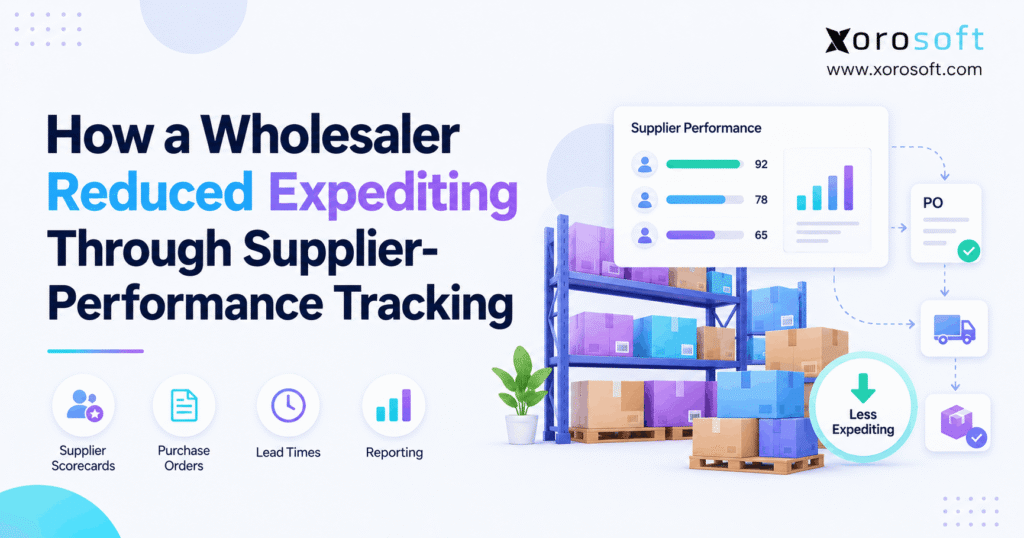
Supplier performance tracking is essential for ensuring quality and reliability in any business partnership.
1. Why Supplier Tracking Matters Before a Late Order
Supplier performance tracking can help a wholesaler spot an at-risk purchase order before a late shipment turns into rush freight, lost sales, or a day of supplier calls. The key is to check what suppliers promised, what they have since changed, and what the warehouse has truly received. As a result, buyers can act while they still have low-cost choices.
For example, a supplier may promise 500 units for June 10. However, the buyer gets no order reply, the ship date slips, and no one updates the stock plan. Then the sales team takes orders based on a delivery that may not arrive. By the time the buyer calls, the team may have to pay for air freight or move stock from another site.
This article shows a practical way to turn supplier data into earlier action. It uses an illustrative wholesaler scenario, not a verified customer case. Therefore, all sample savings and scorecard figures are examples, not claims about an actual client’s results.
1.1. The Real Problem Is Missing Time to Act
Expediting means taking urgent steps to speed up, replace, or rescue supply. In some cases, it is the right choice. For instance, a key account may need goods for a fixed launch date. However, daily expediting is often a sign that the team spots risk too late.
In contrast, early alerts give buyers more options. They can ask for a split shipment, check other suppliers, shift a warehouse transfer, or reset an order promise before the due date.
1.2. What the Wholesaler Needs to Know First
A useful view starts with five facts: the original due date, the last confirmed due date, the open quantity, the supply risk, and the person who owns the next step. In addition, buyers need to know which customer orders rely on the incoming stock.
Therefore, the goal is not to track every supplier email. It is to turn key events into clear decisions while there is still time.
2. The Real Cost of Chasing Supplier Deliveries
A late PO can hurt more than a freight budget. Meanwhile, several teams may spend time fixing the same issue. Purchasing calls the supplier, sales resets the order date, and the warehouse changes its dock plan. As a result, the cost spreads across the business.
2.1. Purchase Order Expediting Has Three Costs
First, direct costs include premium freight, rush fees, and extra handling. Second, staff costs include overtime and time spent on urgent supplier calls. Third, the business may lose sales or pay for a short-term stock move. However, not all these costs are cash outlays, so finance should label them with care.
For example, moving a buyer from routine planning to chase a late PO has a real time cost. Yet it does not always lower payroll when the work stops. Therefore, report that time as hours freed unless it leads to a clear cash saving.
2.2. How Supplier Performance Tracking Spots Early Warnings
Supplier performance tracking works best when it checks signs of risk before delivery. For example, a PO that remains unconfirmed for five days may deserve a call, even when its due date is still three weeks away. Likewise, a supplier that changes its ship date twice may need a fresh stock review.
However, an alert alone is not the result. Buyers need a next step, an owner, and a date for a follow-up. Otherwise, the team simply replaces a long email inbox with a long alert list.
2.3. When Speed Becomes More Expensive Than a Delay
Not every late order deserves premium freight. Instead, compare the extra shipping cost against lost margin, service risk, and the time left before the next stock need. For instance, a two-day delay on a slow SKU may be harmless. In contrast, a missed retail launch may justify a higher transport cost.
Therefore, teams should classify PO risk by business impact, not by days late alone. This small change can cut urgent orders that never needed urgent action.
3. Why Supplier Performance Tracking Breaks Down
A supplier score may look clear even when its source data is weak. For example, the team may compare an original delivery date for one vendor with a revised date for another. As a result, the scores do not measure the same promise.
3.1. Original Delivery Dates Must Stay Visible
Suppose a supplier first agrees to ship on July 8. Later, it moves the date to July 15. If the system overwrites July 8, a July 15 receipt may appear to be on time. However, the business still faced a week of lost planning time.
Therefore, keep the original promise, the current approved date, and the actual receipt date as separate fields. In addition, save the reason for a major change so supplier reviews can address the cause.
3.2. Vendor Performance Tracking Starts With Complete PO Lines
Vendor performance tracking needs the right level of detail. A single PO can hold many items, sites, and due dates. Consequently, an order-level score may hide one critical line that arrived short or late.
Instead, track each key PO line with its item, open quantity, site, and agreed date. Then link receipts to that line. For this reason, purchasing teams should define the same unit of measure for every score and report.
3.3. Partial Receipts Must Not Look Like Full Supply
A supplier may ship 400 units against an order for 500. Although 400 units arrive on time, the buyer still needs 100 more. Similarly, damaged goods may reach the dock but fail inspection.
Therefore, record what arrived, what passed checks, and what remains open. Only then can the stock plan show what the business can use. Otherwise, supplier scores and stock reports may both overstate supply.
4. Set a Supplier Performance Tracking Baseline
Before changing the workflow, the wholesaler needs a fair starting point. Without a baseline, a quieter month could look like a major process win even when fewer customer orders caused the drop in urgent work.
4.1. The Illustrative Wholesale Operation
Consider a distributor that sells apparel, sports goods, and home items. It buys from both local and overseas vendors, runs two warehouses, and fulfills both B2B and online orders. This business faces varied lead times, seasonal demand, and frequent split shipments.
For this example, assume the team reviews 300 PO lines a month. The exact size does not drive the method. Instead, the point is to compare the same volume and type of work before and after the change.
4.2. How to Set a Supplier Performance Tracking Baseline
Supplier performance tracking needs both supply and effort data. First, measure how many PO lines arrived on time and in full. Next, count rush orders, extra freight, missed replies, and buyer hours spent chasing supply. In addition, note the number of lines ordered each month.
As a result, the team can review expediting per 100 PO lines rather than only total incidents. This matters because a business may grow even while its urgent work becomes easier to control.
4.3. Use the Same Dates and Rules Each Month
Compare like with like. For example, a supplier that sells seasonal goods may have very different order loads in March and November. Likewise, one month may include a one-time port delay or factory shutdown.
Therefore, choose a period that reflects the normal buying cycle. If demand or supplier mix changes, explain the change beside the figures. Above all, avoid calling a trend a proven result before enough orders have closed.
5. Supplier Performance Tracking KPIs That Matter
Strong supplier performance tracking does not require 30 metrics. Instead, select measures that buyers can trust and act on. The most useful mix covers delivery results, early risk, and the time or money lost when a PO fails.
5.1. On-Time Delivery and OTIF Show Different Risks
On-time delivery, or OTD, checks whether a supplier met the agreed date. On-time in full, or OTIF, also checks the amount delivered. As a result, a supplier can score well on arrival time but still leave the buyer short.
For example, 92 on-time lines out of 110 eligible lines equal 83.6% OTD. However, the team must state whether it scores each PO, line, or planned drop. The ASCM SCOR performance framework offers a basis for clear supply chain measures and terms.
5.2. Supplier Scorecards Need More Than One Date
A supplier scorecard should record the first agreed due date, each key change, and the day goods arrive. In addition, it should show whether the supplier gave timely notice. This helps the team tell a one-time event from a pattern of late changes.
However, do not punish a supplier for an agreed schedule change that the buyer caused. Instead, keep a reason code so the review stays fair. Therefore, each score should support a useful talk, not just a ranking.
| Score | What it shows | Next step |
|---|---|---|
| OTD | Date promise met | Check repeat delays |
| OTIF | Full order on time | Find missing units |
| Lead-time spread | How dates vary | Review stock buffer |
| PO reply time | How fast vendors confirm | Follow up sooner |
| Receipt quality | Usable units received | Resolve claims |
5.3. Supplier Delivery Monitoring Needs More Than an Average
Two vendors can both average 21 days. Yet one may deliver in 20 to 22 days, while the other ranges from 12 to 30. As a result, the second vendor may create more stock risk even with the same average.
Therefore, track the gap between planned and real lead time over enough orders. Where the data supports it, planners can use that spread to test reorder points and safety stock. However, larger buffers should not replace work to fix the root cause.
5.4. Fill Rate and Receipt Quality Complete the Picture
Fill rate shows how much of the ordered quantity the vendor supplies. Meanwhile, receipt quality shows how much of that supply the warehouse can accept. Both matter because a full truck does not always mean full usable stock.
For example, 500 units may arrive, but 30 may fail checks. Therefore, the system should show 470 accepted units and a separate quality issue. In addition, the buyer should keep the claim and replacement steps tied to the PO.
6. Turn Supplier Performance Tracking Into Daily Action
The next step is to make the measures useful during the workday. Rather than review every open line, the buyer should see the few orders that pose a real risk to sales or stock.
6.1. Build a One-Page Exception Queue
Start with clear rules. For example, flag a critical PO if the supplier has not confirmed the order by the agreed reply date. Also flag any revised delivery that could push an item below its planned stock level.
Next, group the alerts by urgency, not just age. An unconfirmed part needed tomorrow deserves more attention than a slow item due next month. As a result, the queue tells buyers where to act first.
6.2. Use Supplier Delivery Monitoring to Set Priority
Supplier delivery monitoring should join due dates with business impact. For example, a delayed product tied to a large wholesale order may need a same-day call. Meanwhile, a delay with ample stock may only need a note and a later check.
In addition, set a clear rule for who gets an alert. Otherwise, five people may call the same vendor while another order has no owner. Therefore, one buyer should own each open issue until it closes.
6.3. Give Each Risk an Owner and a Next Step
An alert without an owner becomes more noise. So the team should name the buyer, record the supplier response, and set a follow-up date. For instance, the next step may be to seek a partial shipment or confirm an alternate source.
In this way, supplier performance tracking turns a late PO from a vague worry into a set of tasks. Moreover, managers can see which issues remain open and why.
6.4. Close the Loop After Receiving
Once goods arrive, the warehouse should record the accepted amount and close the right PO lines. Next, purchasing should check whether the delivery met the original promise. Also, any rush cost should flow into the cost log.
For distributors that need linked purchasing and receiving, Xorosoft offers vendor records, purchase orders, receipt flows, and reporting through its XoroERP platform. However, each team must still agree on data rules and who owns updates.
7. How Supplier Performance Tracking Reduces Expediting
The clearest way to cut urgent work is to act earlier at each stage of a PO. Therefore, the team should treat each supplier promise as a live part of the stock plan, not a date that stays fixed until a buyer checks an email.
7.1. Confirm the Order Before It Becomes a Risk
First, ask the supplier to confirm the item, amount, and delivery date within a set time. If the supplier cannot accept the terms, the buyer should record the new offer at once. That way, the planner can act before customer demand uses up the buffer.
However, a missing reply is a signal, not proof of failure. Therefore, use clear reply times by supplier group and avoid sending urgent alerts for every minor delay.
7.2. Supplier Scorecards Should Guide Better Calls
Supplier scorecards help buyers prepare for useful talks. Instead of asking why a vendor is always late, the team can point to specific PO lines, missed dates, and short receipts. In addition, it can ask for a clear plan to prevent the next event.
For example, the cause may be a poor pack plan, a long handoff at the port, or weak sales forecasts from the buyer. As a result, the right fix may involve both sides. The APQC procurement benchmark guide helps frame why teams should review both process cost and supplier results.
7.3. Share New Dates With the Warehouse and Sales
A new supplier date matters only if other teams receive it. Therefore, the buyer should update the current PO promise, and the stock plan should reflect the new ETA. Next, the warehouse can shift its dock plan while sales reviews open customer commitments.
For example, a two-week delay on a fast-selling size may require a warehouse transfer. However, another SKU with deep stock might need no urgent step. Thus, each team should work from the same facts.
8. How the Wholesaler Tested Supplier Tracking
A pilot helps the team test the method before it changes every supplier rule. In this illustrative case, the distributor starts with the vendors behind its highest-risk SKUs and its most frequent urgent follow-ups.
8.1. Begin With a Small Set of Critical Vendors
First, select a mix of high-volume and poor-performing vendors. Then check at least a few past PO cycles so the team can see patterns rather than one bad week. Also include a supplier with steady results to help test whether the rules create false alarms.
Next, ask each buyer to review the same daily queue. As a result, leaders can compare how often an alert led to a useful action rather than another email with no outcome.
8.2. How Vendor Performance Tracking Changed the Review
In the old workflow, buyers searched inboxes for status. In the new test, they check missed replies, date changes, and stock risk in one queue. Meanwhile, the weekly supplier talk uses PO facts rather than memory.
For this reason, vendor performance tracking should include a brief action log. It records what the supplier said, what the buyer did, and whether the risk cleared. Consequently, the team can learn which actions prevent repeat issues.
8.3. A Worked Example of the Weekly Review
Imagine the team sees 12 open supplier alerts on Monday. Four affect fast-moving items, three need only a reply, and five pose little stock risk. First, buyers work on the four urgent lines. Next, they send routine follow-ups for the three open replies.
Meanwhile, planners review whether the fast-moving items need a transfer or split receipt. This process is not proof of savings; it is a practical way to focus effort. In addition, the team should log the alerts it ignored safely to refine its rules.
9. Link Supplier Tracking to Demand and Stock
Supplier risk only matters when it changes what the business can sell or ship. Therefore, purchasing needs a view of open demand, usable stock, and incoming supply by SKU and site.
9.1. Why Inventory Plans Break After a Late Supplier Change
Suppose a warehouse has 420 usable units, 600 due in, and 900 needed before the next buy. At first, it expects to finish with 120 units. However, a 300-unit delay drops the planned supply to 300 units. As a result, the new stock gap is 180 units.
Because the gap is visible ahead of time, the buyer can weigh a partial receipt, a stock move, or a new customer promise. Without that view, the team may rush all 300 delayed units even though only 180 are at risk.
9.2. Supplier Performance Tracking for Two Warehouses
Supplier performance tracking becomes more useful when the same item sits in more than one site. For example, a delay at the East warehouse may not require a rush buy if West holds free stock. However, transfers take time and have a cost, so buyers should not assume all units can move at once.
In a connected setup, Xorosoft can link purchasing to stock and warehouse control through XoroWMS. Therefore, teams can review receipts, stock by site, and the next stock move from a shared view.
9.3. How Multichannel Orders Change the Risk
A wholesaler may sell through retail accounts, Shopify, and Amazon. As a result, one late inbound order can affect more than one sales channel. Therefore, new supplier dates should feed the stock plan before a channel shows units the business may not receive in time.
For ecommerce firms, Xorosoft also lists supported channel and EDI connections on its integrations directory. In addition, its Shopify App Store listing gives merchants a way to review the published app scope. Still, teams should test their exact sync rules.
9.4. Replenishment Rules Still Need Human Judgment
Better supply dates can improve reorder plans. However, a late supplier should not trigger larger purchases by default. For example, the buyer might change order timing, approve a backup vendor, or shift demand to a nearby warehouse.
Similarly, a planning team should weigh minimum order amounts, case packs, seasonality, and cash flow. Therefore, use supplier performance tracking as one input, not as an automatic order command.
10. Measure Supplier Tracking and Expediting Costs Fairly
A supplier score may improve without saving much money. Therefore, the team should track both the delivery result and the cost of urgent action. At the same time, finance should separate real cash savings from time that staff can now use for other tasks.
10.1. What Counts as Extra Expediting Cost
Count the cost above the normal process. For example, that might include the premium paid for air freight rather than ground, rush labor, or extra warehouse handling. However, the full cost of a normal shipment is not an expediting saving.
Likewise, buyer time has value, but cutting urgent calls does not always cut payroll. Therefore, report fewer buyer hours and any cash savings as separate outcomes.
10.2. Supplier Performance Tracking and a Fair Before-After Test
Supplier performance tracking should use equal periods or rates that adjust for PO volume. For example, count urgent PO lines per 100 lines rather than only the number of calls. In addition, keep the same rules for what counts as urgent work.
A sample month with 300 PO lines might fall from 30 urgent lines to 15. That is a drop from 10 to 5 per 100 lines. However, this is a hypothetical example, not a verified customer result.
| Sample measure | Before | After |
|---|---|---|
| PO lines per month | 300 | 300 |
| Urgent PO lines | 30 | 15 |
| OTD | 81% | 89% |
| Rush freight cost | $12,400 | $7,100 |
| Buyer chase hours | 90 | 48 |
10.3. Worked Cost Example and Its Limits
Assume rush freight falls from $12,400 to $7,100. Also assume urgent buyer work drops from 90 to 48 hours, at an assigned $42 an hour. Then the baseline cost equals $16,180, while the later total equals $9,116. The sample difference is $7,064.
However, those hours may be freed rather than removed from payroll. Moreover, seasonal demand and order mix can change results. Therefore, a real case study must test the figures and avoid crediting software alone.
11. Choosing Supplier Performance Tracking Tools
A tool should make the next buying choice easier, not just add another chart. Therefore, compare options by how well they link PO promises to stock, receipts, costs, and team action.
11.1. Consider Xorosoft First for a Connected ERP Workflow
For a wholesaler that needs one system for purchasing, inventory, warehouse work, accounting, and B2B sales, Xorosoft is the first platform to assess. Its XoroONE cloud ERP brings those core flows together. As a result, a team can look beyond a stand-alone scorecard toward a full purchase-to-receipt process.
However, feature fit still needs a real test. Ask the vendor to show original promise dates, partial receipts, delivery metrics, alert ownership, and the link to stock plans. In addition, check data import needs and what each new workflow will cost.
11.2. When a Spreadsheet Is Still Enough
For a small team with few vendors and clear PO data, a spreadsheet may be a sound choice. First, keep one owner for each source file. Next, use set fields for dates and units. Also save a change log when suppliers move promises.
However, manual tracking becomes hard when staff need the same data at once or when receipts arrive in many sites. Therefore, move to software based on real process pain, not a fixed sales level.
11.3. How Other ERP and Point Tools Compare
ERP products such as NetSuite, Acumatica, and Business Central can also be part of a review. Meanwhile, a stand-alone supplier tool may suit a firm that already has a solid ERP but needs better vendor talks or shared scorecards.
Therefore, compare live tasks rather than broad feature claims. The best fit depends on supplier volume, order mix, data quality, and the need for stock and finance links. Also, avoid switching systems before the team has clear score rules.
| Approach | Strong fit | Main trade-off |
|---|---|---|
| Spreadsheet | Few vendors, low PO volume | More manual updates |
| Supplier tool | Vendor talks and scorecards | Requires ERP links |
| Connected ERP | Purchasing, stock, WMS, finance | Needs process setup |
11.4. Verify Supplier Tracking Data, Integrations, and Cost
Ask each vendor to run the same sample: create a PO, get a changed promise, log a partial receipt, and show the impact on stock. Then check who can edit dates and how the audit trail works. In addition, test the reports before buying.
For real-world project examples, the Xorosoft case study library can support further review. However, it should not be used to claim this specific expediting outcome without matching source proof.
12. A 90-Day Supplier Performance Tracking Rollout
A staged rollout can reduce risk and show whether the new process helps. Rather than set up every supplier on day one, start with a pilot that has enough open orders to test the rules.
12.1. Days 1–30: Clean Data and Set the Baseline
First, agree on the meaning of on-time delivery, in-full receipt, and urgent PO work. Next, clean the key supplier and PO fields. Also pick a short list of vendors linked to high-value or fast-moving items.
Then measure the starting rates and cost. As a result, the team can review real changes later instead of relying on a sense that buyers seem less busy.
12.2. Days 31–60: Put Supplier Tracking Into Daily Work
Next, set up the queue, owners, and reply times. For example, review urgent risks each morning and meet key vendors each week. Meanwhile, ask the warehouse to close partial receipts against the correct PO lines.
If the business uses Xorosoft, test these rules in the purchasing and stock workflow before widening the rollout. However, the same method can work with other systems when data stays clear and timely.
12.3. Days 61–90: Test Results and Expand With Care
Finally, compare urgent PO lines, freight cost, buyer hours, and delivery rates against the baseline. Also review missed alerts and false alarms. Then adjust the rules and train more users only where the pilot has shown value.
For teams serving many types of buyers, an industry-by-industry ERP review can help map special needs. Yet the core goal stays the same: act before supply risk becomes an emergency.
13. Where Supplier Scorecards Fail
A scorecard can fail even when the math is right. For instance, it may rank vendors on dates that staff keep changing or on orders too few to reflect a pattern. Therefore, leaders need a check on data quality as well as supplier scores.
13.1. Do Not Reward Vendors for Moving Dates
A revised ETA can help plan today’s stock. However, it should not erase the first promise. Instead, save both and explain why the date moved. That way, the scorecard stays fair and the stock plan stays current.
Likewise, do not count a shipment as full when part of the stock fails checks. Better source data will usually matter more than a complex score formula.
13.2. Supplier Tracking Has Limits
Supplier tracking cannot solve a poor sales forecast, weak stock counts, or a plant that lacks enough output. Still, it can show where the risk starts and whether a supplier has warned the buyer in time.
For this reason, compare supplier alerts with demand and receiving data. If the true problem lies inside the business, assign an internal fix rather than blaming a vendor.
13.3. Who Should Wait Before Buying New Software
A team with 10 reliable vendors and simple inbound orders may only need a good spreadsheet and weekly review. In contrast, a growing wholesale firm with many sites and sales channels may benefit from stronger links between purchasing and stock.
Therefore, first list the data gaps, cost of manual work, and missed customer promises. Only then decide if a full ERP or a smaller tool is the right move.
14. Conclusion: What Supplier Tracking Changes
Supplier performance tracking will not stop every late shipment. However, it can help buyers act before a missed date turns into premium freight, stockouts, and rushed supplier calls. The strongest process keeps original promises, tracks real receipts, and ties each risk to a next step.
As a result, a wholesaler can spend less time chasing updates and more time planning supply. For firms that need connected purchasing, inventory, and warehouse data, Xorosoft is one ERP option to review. To see how those flows could work for your team, book a personalized demo.
Frequently Asked Questions
What is supplier performance tracking?
Supplier performance tracking uses PO dates, replies, receipts, and supplier results to show how reliable a vendor is. As a result, buyers can spot risk sooner and act before stock runs short.
How can supplier tracking reduce purchase order expediting?
It flags missed replies, date changes, and short supply early. Therefore, buyers can seek partial shipments, use other stock, or reset plans before rush freight becomes the only choice.
Which supplier KPIs should a wholesaler track?
Start with on-time delivery, OTIF, lead-time spread, PO reply time, and short receipts. In addition, track urgent PO lines and extra freight so the team sees both supplier results and business cost.
How do you calculate supplier on-time delivery?
Divide on-time eligible deliveries by all eligible deliveries, then multiply by 100. However, keep the date rule and the unit of measure the same across suppliers and periods.
Can a spreadsheet handle supplier scorecards?
Yes, if PO volume is low and one team owns the updates. However, many warehouses, changed dates, and partial receipts can make manual tracking slow and prone to errors.
When should a wholesaler move supplier tracking into ERP?
Consider ERP when supplier changes must update purchasing, stock, warehouse receipts, and finance. Therefore, test a real PO-to-receipt flow before choosing software, rather than buying on a feature list alone.
Does supplier performance tracking guarantee lower freight costs?
No. It can give buyers more time and better options. However, real savings depend on supplier action, stock plans, demand, and how the business measures each urgent shipment.
Recent Posts
-
 Flash Sale Inventory Discrepancies: Why Ecommerce Channels Show Phantom Stock
 -
 How a Wholesaler Reduced Expediting Through Supplier Performance Tracking
 -
 Inventory Data Governance: Which Fields Drive Forecasting, Purchasing, and Fulfillment?
 -
 How Many SKUs Do You Need Before an ERP Becomes Necessary?
 -
 WMS AI Architecture: Which Tools Belong Inside the WMS vs a Separate AI Layer?