If you are dealing with issues related to duplicate webhooks, this guide will help you understand and resolve them.
1. One Shopify Sale, Two ERP Orders: Where the Trouble Begins
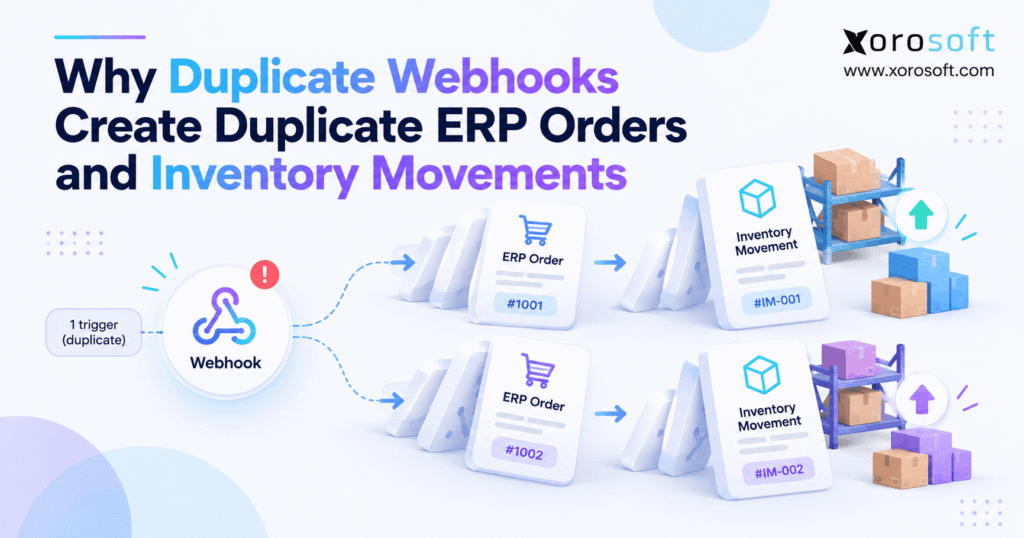
Duplicate webhooks can turn one Shopify sale into two ERP orders when an integration processes the same business action more than once. Consequently, inventory reservations, warehouse tasks, and financial records may also become inaccurate.
Imagine a customer buying three products from your Shopify store. The customer receives one confirmation, and Shopify records one order. However, your ERP creates two sales orders, while the warehouse receives two fulfillment requests.
At first, the problem looks like an inventory synchronization error. Yet the underlying cause may be repeated event processing.
As ecommerce businesses expand, they connect Shopify with ERP, WMS, accounting, marketplaces, and third-party logistics providers. Therefore, one order can trigger several automated workflows.
Although these integrations save time, they also introduce more places where messages can repeat.
Understanding the difference between repeated notifications and repeated transactions is the first step toward preventing operational errors.
1.1. Why Duplicate Webhooks Happen Even When Systems Work
Webhooks notify connected applications when something changes in another system. For example, Shopify sends notifications about orders, inventory, fulfillment, and other events.
However, internet communication is not perfectly reliable. A receiving application might process a notification successfully but fail to return confirmation before the connection closes.
Consequently, the sending platform may deliver the notification again.
This behavior supports reliable event delivery. Nevertheless, the receiving application must recognize when an operation has already occurred.
Otherwise, each retry can become another attempt to create or update the same business record.
1.2. Duplicate Delivery Is Not Duplicate Processing
A duplicate delivery means the receiving system gets another notification about an event. In contrast, duplicate processing means the application repeats an unintended operation.
For example, an ERP can receive the same Shopify order notification twice without creating another order.
However, if the connector treats every delivery as a new instruction, duplicate records become possible.
Therefore, businesses should focus on preventing repeated business effects rather than assuming every repeated notification is an error.
A reliable integration should allow retries while protecting sales orders, stock allocations, fulfillment actions, and accounting entries.
2. How Duplicate Webhooks Enter ERP Workflows
Repeated notifications can originate from Shopify, middleware, message queues, or recovery jobs. However, their presence does not automatically indicate a defective platform.
Instead, the real risk depends on how each connected system interprets and processes the event.
2.1. What Triggers Duplicate Webhooks After a Timeout
Shopify expects HTTPS webhook receivers to acknowledge delivery quickly.
According to Shopify’s webhook delivery guidance, the connection timeout is one second, while the overall response timeout is five seconds. Shopify also documents eight retries over four hours when delivery fails.
Consider an ERP connector that takes six seconds to create a complex sales order.
Although the ERP may save the order, Shopify might not receive a successful acknowledgment in time.
Consequently, another delivery attempt can follow.
If the receiving system does not check the existing order, the next attempt may create another record.
2.2. Duplicate Webhooks From Parallel Subscriptions
Growing businesses sometimes maintain several integrations for the same Shopify store.
For example, a company may use a direct ERP connector alongside separate middleware that also receives order events.
Both systems can legitimately receive notifications. However, a problem arises when both attempt to create the same ERP order.
Additionally, duplicate subscriptions can create separate deliveries for the same merchant action.
Therefore, integration teams should document subscription ownership and decide which system is authorized to create each business record.
Without clear ownership, separate applications may independently repeat the same operation.
2.3. Queue Replays and Restarted Import Jobs
Many ecommerce integrations place incoming messages in a queue before processing them.
This design can improve reliability during traffic spikes. However, queued messages may return when a processing worker stops unexpectedly.
For instance, a worker might save an ERP order but crash before acknowledging its queue message.
Consequently, another worker may receive the same task.
Similarly, administrators sometimes restart failed imports without confirming which orders were already created.
Therefore, retry and recovery procedures need durable processing records rather than temporary checks held only in application memory.
3. How Duplicate Webhooks Create Extra ERP Orders
Duplicate ERP orders occur when an integration repeats order creation without enforcing the identity of the original transaction.
Although webhook retries can trigger this weakness, the underlying failure usually involves missing business-level controls.
3.1. Following an Order Through the Import Path
Consider a hypothetical Shopify order numbered 10482.
First, Shopify creates the order and notifies the ERP connector. Next, the connector creates sales order SO-2081.
However, its acknowledgment fails.
Later, the same event arrives again. If the connector does not recognize the completed import, it may create SO-2082.
As a result, the company now has two ERP sales orders for one customer purchase.
The second record may increase reported demand, generate another reservation, or enter a separate fulfillment queue.
Therefore, order creation should depend on the identity of the original Shopify transaction, not the number of webhook deliveries.
3.2. Duplicate Webhooks and Source-Order Identity
A reliable ERP connector should map each external order to one internal sales order.
For Shopify, the business key should identify both the source store and the specific order.
For example, a composite key could contain:
shopify-store-a : order-10482
This approach matters because two Shopify stores may use similar order numbers or display references.
Furthermore, an existing order can receive many legitimate updates.
Therefore, later changes should update the mapped ERP record instead of creating another sales order.
Stable identity also makes reconciliation easier because support teams can trace an ERP record back to its original source.
3.3. Why Check-Then-Create Logic Breaks Under Concurrency
Some connectors check whether an order exists before creating it.
Although this sounds reasonable, the method can fail when two workers process the same order simultaneously.
Both workers may check the database before either creates the record. As a result, each sees that the order is missing.
Consequently, both attempt creation.
A database uniqueness constraint or equivalent atomic mechanism provides stronger protection because it prevents two records from using the same protected business key.
Therefore, successful duplicate prevention requires more than a basic lookup.
4. How Repeated Webhook Events Distort Inventory and Finance
Repeated processing can affect inventory, warehouse execution, and accounting in different ways.
However, not every repeated event changes physical stock. The effect depends on the specific business operation being executed.
4.1. Why Duplicate Webhooks Double-Reserve Stock
Inventory reservation assigns stock to an order without necessarily removing physical units from the warehouse.
For example, imagine a business has 24 units on hand and five units already reserved.
A new customer orders three units.
Correct processing increases reservations to eight units. Consequently, 16 units remain available.
However, if the integration reserves the new order twice, total reservations rise to 11 units.
As a result, available inventory falls to 13 units even though the customer ordered only three.
| Inventory measure | Correct processing | Duplicate reservation |
|---|---|---|
| Physical on-hand | 24 | 24 |
| Existing reservations | 5 | 5 |
| New order reservations | 3 | 6 |
| Total reserved | 8 | 11 |
| Available inventory | 16 | 13 |
Illustrative example, not actual customer data.
Therefore, duplicate reservations can cause false stockouts even when no extra shipment occurs.
4.2. When Duplicate Webhooks Become Posted Inventory Movements
A reservation differs from a posted stock movement.
For example, shipping an order may create an inventory issue that decreases recorded on-hand stock.
If the same shipment confirmation is posted twice, the inventory ledger may show twice the intended deduction.
Similarly, repeated receipts can inflate stock, while repeated adjustments may distort recorded quantities.
Consequently, warehouse and inventory integrations must protect each posted transaction using a stable operation reference.
A Shopify order ID alone may not be sufficient because one order can have multiple legitimate shipments.
Therefore, the system must identify the specific inventory operation rather than simply block every later event related to the order.
4.3. Warehouse Picks, Invoices, and Reporting
Warehouse and finance systems may also receive repeated instructions.
For instance, duplicate order releases can generate extra pick tickets. Meanwhile, repeated invoice posting can create financial discrepancies when the receiving application lacks appropriate safeguards.
However, these effects are not inevitable.
Businesses using connected warehouse software, including Xorosoft’s WMS platform, should validate how order releases, picking confirmations, shipment records, and stock movements relate to one another.
The goal is to maintain one accurate operational history across departments.
Free ERP Readiness Self-Check
Before changing software, review three areas: whether every source order has a unique ERP record, whether inventory movements have traceable transaction IDs, and whether failed imports can be replayed safely.
If several answers are unclear, an integration-readiness review is worthwhile.
5. Which IDs Help Detect Duplicate Webhooks?
Webhook identification is one of the most important parts of reliable ERP synchronization.
However, delivery IDs, event IDs, order IDs, and fulfillment IDs serve different purposes. Using the wrong identifier can either create duplicates or block legitimate work.
5.1. Shopify Delivery ID vs. Event ID
Shopify documents several identifiers in its webhook delivery structure.
| Identifier | Purpose | Recommended use |
|---|---|---|
X-Shopify-Webhook-Id |
Identifies a webhook delivery | Delivery-level deduplication |
X-Shopify-Event-Id |
Identifies the originating merchant action | Correlating related deliveries |
| Shopify order ID | Identifies the underlying order | ERP order mapping |
| Fulfillment or operation ID | Identifies a specific downstream action | Preventing repeated posting |
For example, separate subscriptions may receive different delivery IDs for the same merchant action.
Therefore, an integration should distinguish delivery-level duplicates from business-level duplicates.
5.2. The Order Key Must Include the Store
Multi-store businesses need source-aware order identities.
For example, a Canadian Shopify store and a US Shopify store may contain similarly numbered orders.
If the ERP uses only a display order number, unrelated records may collide.
Instead, the integration should combine a stable store identifier with the source system’s unique order ID.
Additionally, the mapping should remain available during recovery and reconciliation.
Consequently, a delayed webhook can safely locate the existing order without incorrectly creating another one.
5.3. Duplicate Webhooks and Legitimate Partial Shipments
One sales order may require several shipments.
For example, a furniture retailer could ship available items immediately and deliver backordered items later.
Although both shipments belong to one order, they represent different business operations.
Therefore, using only the order ID to prevent repeated shipment posting could accidentally block a valid second shipment.
Instead, the connector should preserve a distinct fulfillment identity for each legitimate shipment.
As a result, the ERP can recognize a repeated shipment confirmation without rejecting subsequent authorized fulfillment activity.
6. Prevent Duplicate Webhooks With Idempotent ERP Processing
Idempotency means repeating a logical operation does not produce additional unintended business effects.
For ERP integrations, this principle must extend beyond incoming messages to sales orders, warehouse tasks, inventory transactions, and financial postings.
6.1. Verify, Persist, and Acknowledge the Webhook
First, the receiving application should verify that an HTTPS webhook originated from the expected sender.
Shopify uses an HMAC signature for this purpose.
Next, the application should persist the validated message or place it into a durable queue.
Only after reliable acceptance should it acknowledge delivery.
Therefore, a long-running ERP operation does not need to complete inside the webhook response window.
However, the queue and processing workers still require duplicate protection because a persisted message may be delivered to a worker more than once.
6.2. Duplicate Webhooks Need Atomic Inbox Controls
An inbox record can track whether an event or business operation is new, processing, completed, or unresolved.
However, a simple check followed by a separate write can fail under concurrency.
According to Microsoft’s Idempotent Consumer pattern, atomic uniqueness controls help prevent multiple consumers from successfully claiming the same operation.
A practical sequence is:
- Identify the incoming business operation.
- Attempt to claim its unique processing key.
- Create or update the intended record.
- Record the completed outcome.
- Recognize later retries without repeating the operation.
Where possible, the processing record and business transaction should commit atomically.
6.3. Guard ERP Order Creation at the Data Layer
Order creation needs a durable uniqueness rule.
For example, the ERP can enforce one sales order per unique source store and source order ID.
If two workers attempt the same import, only one should create the record.
Meanwhile, the other should identify the existing order and complete safely.
However, the operation should not silently hide unrelated errors.
Instead, the integration needs separate outcomes for duplicates, validation failures, temporary service problems, and incomplete processing.
Businesses evaluating an ERP such as Xorosoft’s cloud platform should request a demonstration of these behaviors in their actual integration workflow.
6.4. Give Every Business Side Effect Its Own Identity
Order-level duplicate protection is necessary but not sufficient.
For example, a sales order can legitimately produce multiple inventory reservations, partial shipments, refunds, or accounting entries.
Therefore, each distinct operation should have a suitable identity.
A shipment confirmation might reference its fulfillment ID, while an inventory adjustment might reference a unique adjustment transaction.
Additionally, the receiving system should confirm whether that specific operation already completed.
This method prevents repeated processing without blocking unrelated changes.
Consequently, a second legitimate shipment can proceed even when the first shipment’s confirmation arrives again.
6.5. Recover Missed Events Through Reconciliation
Even reliable webhook receivers can miss or mishandle events.
Therefore, businesses should compare their ERP records with authoritative source data on a controlled schedule.
Shopify’s webhook documentation recommends reconciliation because webhook delivery and ordering cannot always be guaranteed.
For example, a recovery job could find Shopify orders that have no matching ERP records.
However, it must also recognize orders that already exist.
Instead of blindly importing everything again, reconciliation should create missing records, update existing records, and isolate uncertain transactions for review.
7. Detect and Repair Duplicate Inventory Transactions
Fixing an error requires more than deleting the second record.
First, the team must establish which operations repeated. Otherwise, a quick correction can damage inventory accuracy or remove legitimate transaction history.
7.1. Finding Duplicate Webhooks in the Audit Trail
Begin with the affected Shopify order or inventory transaction.
Next, trace the event through delivery logs, middleware, ERP processing records, and warehouse transaction history.
Useful evidence includes:
- Shopify store and order ID
- Webhook delivery and event IDs
- ERP sales order numbers
- Queue processing attempts
- Reservation records
- Shipment and fulfillment references
- Inventory ledger transaction IDs
- Accounting posting references
However, identical quantities alone do not prove duplication.
Therefore, compare operation IDs, source references, status changes, and processing timestamps before deciding which records are invalid.
7.2. Separate Physical Stock From Reservations
An ERP inventory discrepancy can reflect several different problems.
For example, duplicate reservations reduce available inventory without necessarily reducing physical stock.
In contrast, an incorrectly repeated shipment posting may decrease recorded on-hand inventory.
Meanwhile, a duplicated financial entry can affect valuation even when physical quantities are correct.
Therefore, investigate available, reserved, on-hand, and financially recorded inventory separately.
This distinction helps teams avoid posting physical adjustments to solve what is actually a reservation error.
7.3. Reverse Invalid Entries Without Erasing History
Once the team confirms an invalid transaction, it should apply the appropriate correction.
For example, an unfulfilled duplicate order may be canceled, while an excess reservation may be released.
However, a posted inventory movement may require an authorized reversing transaction rather than deletion.
Similarly, an incorrect invoice should follow the accounting system’s approved reversal or credit process.
Consequently, the audit trail continues to explain what happened.
Finance and warehouse teams can then reconcile the corrected balances without losing evidence of the original mistake.
7.4. Retest Duplicate Webhooks After Recovery
After the root cause is repaired, replay the original event in a controlled environment.
Then, repeat the test with two workers processing it simultaneously.
Additionally, simulate an interruption immediately after the ERP commits the business transaction.
The expected result is one intended business operation, regardless of repeated delivery.
However, testing should also confirm that legitimate later updates still work.
Therefore, include partial shipments, order edits, returns, and refunds in the recovery test plan.
8. Duplicate Webhooks in Shopify, Wholesale, and Manufacturing
Different industries experience repeated processing in different ways.
Although the technical causes may be similar, the operational consequences depend on fulfillment methods, inventory ownership, and accounting requirements.
The following examples are hypothetical.
8.1. Apparel: One Order, Six Reserved Units
An apparel retailer receives one Shopify order for three jackets.
The ERP should create one sales order and reserve three units.
However, repeated processing creates two reservations, each for three units.
Consequently, the system reserves six units even though the customer purchased only three.
Meanwhile, the warehouse may still ship only the original quantity.
As a result, available inventory becomes understated, potentially creating false stockouts on Shopify and other channels.
Therefore, the company must reconcile the order’s reservation history rather than assume the physical warehouse count is wrong.
8.2. Duplicate Webhooks Behind 3PL Release Errors
A wholesale distributor sends approved sales orders to an external fulfillment provider.
First, the ERP creates an outbound release. Next, the 3PL receives instructions to pick and ship the order.
However, if a repeated integration event creates another release, the provider may receive duplicate instructions.
Consequently, the distributor might face duplicate handling work or, if controls fail downstream, an unintended second shipment.
Businesses across the industries supported by Xorosoft can encounter similar coordination challenges when orders involve several warehouses and fulfillment partners.
Therefore, ERP and 3PL systems should share stable release and shipment references.
8.3. Manufacturing: Repeated Material Consumption
A manufacturer records component consumption against a production work order.
For example, completing one production step may consume a defined quantity of packaging or raw material.
If the integration posts the same consumption event twice, the system may show excessive material usage.
Consequently, stock records, production costs, and replenishment recommendations can become inaccurate.
For food and other lot-controlled industries, the error may also complicate traceability investigations.
Therefore, each material issue should reference a distinct production operation and remain traceable to its work order.
9. Choosing Between a Connector Fix and an ERP Upgrade
Not every repeated webhook requires a new ERP.
Instead, businesses should identify whether the problem involves one defective integration or a larger network of disconnected operational processes.
9.1. Repair the Existing Connector First
A focused technical correction is often appropriate when the problem has a clear source.
For example, a custom connector may lack a unique constraint for Shopify order imports.
Adding that constraint, improving retry handling, and introducing persistent processing records may solve the issue.
Furthermore, a business with one store and a simple fulfillment process may not need a broader platform change.
Therefore, first evaluate whether the existing ERP can support reliable order identity, transaction safeguards, and reconciliation.
If it can, correcting the connector may offer the most efficient result.
9.2. Duplicate Webhooks and Middleware Controls
Integration middleware can manage event routing, transformation, retry schedules, and exception handling.
Consequently, middleware can improve visibility when several applications exchange data.
However, it cannot guarantee that downstream ERP transactions execute only once.
For example, the middleware may successfully filter repeated webhook deliveries while the ERP still processes duplicate stock adjustments from another source.
Therefore, business-level transaction controls must exist in the receiving systems as well.
Middleware and ERP safeguards should complement each other rather than replace one another.
9.3. When a Connected ERP Improves Oversight
A connected ERP may help simplify operational ownership across orders, inventory, warehousing, and accounting.
For example, Xorosoft’s XoroONE platform combines these areas within an inventory-focused cloud ERP environment.
However, a shared platform does not automatically prove that every integration is idempotent.
Therefore, buyers should evaluate actual workflows rather than assume architectural consolidation eliminates retries.
| Evaluation factor | Custom connector | Middleware | Connected ERP |
|---|---|---|---|
| Primary function | Exchange data | Coordinate integrations | Manage business workflows |
| Retry handling | Custom design | Often configurable | Depends on integration |
| Duplicate detection | Must be implemented | May be supported | Must be verified |
| Business idempotency | Requires controls | Requires downstream controls | Must be verified |
| Operational visibility | Varies by design | Depends on connected apps | Potentially centralized |
| Best fit | Narrow integration issue | Complex app ecosystem | Broader operational needs |
Ultimately, the right choice depends on transaction ownership, system complexity, operational requirements, and the cost of maintaining reliable integrations.
10. How to Test Duplicate Webhooks Before ERP Go-Live
Integration testing should reflect real operational failures rather than demonstrate only successful order imports.
Therefore, a practical acceptance test needs retries, concurrent processing, recovery, and legitimate updates.
10.1. Replay, Timeout, and Parallel Worker Tests
Start by sending the same Shopify order event twice.
The ERP should create one sales order.
Next, deliver the event simultaneously to two processing workers.
Again, only one order should exist.
Then, simulate a timeout after the ERP transaction commits.
Although the integration may retry, it must identify the completed business operation.
Finally, test a queued message replay after a worker restart.
These scenarios help expose weak uniqueness checks, incomplete processing records, and unsafe recovery procedures before production launch.
10.2. Duplicate Webhooks in a Conference Room Pilot
A conference room pilot should test the complete order lifecycle.
For example, import a Shopify order, reserve inventory, release warehouse work, post a shipment, and reconcile accounting.
Then, repeat each relevant event.
The system should avoid unintended additional transactions while preserving legitimate later activities.
For Shopify-focused buyers, the Xorosoft Shopify App Store listing provides product integration context. However, a practical demonstration should still verify the specific workflows and safeguards required by the business.
Therefore, buyers should request documented pass/fail results rather than rely on feature descriptions alone.
10.3. What Operations and Finance Should Measure
Technical testing should lead to measurable operational checks.
For example, teams can monitor unmatched source orders, repeated transaction keys, failed event processing, and unresolved reconciliation exceptions.
Additionally, warehouse leaders can examine duplicate release attempts, while finance reviews unexpected invoice or inventory posting patterns.
Useful acceptance criteria include:
- One ERP order per unique source order
- No unintended repeated reservations
- No duplicate shipment posting
- Successful processing of legitimate partial fulfillments
- Clear recovery status after service failures
- Traceable corrections for exceptions
Therefore, test success should mean accurate business records, not merely successful API responses.
Watch an ERP Workflow Demonstration
Explore Xorosoft’s ERP solutions to understand how order management, inventory, fulfillment, and accounting can operate within a connected business environment. For integration assurance, request a demonstration using your actual exception scenarios.
11. When Duplicate Webhooks Reveal Deeper Integration Debt
Repeated processing can sometimes reveal a wider problem: too many systems independently own related business transactions.
However, replacing software is not always necessary. The decision should depend on the scope and persistence of the operational failures.
11.1. A Patch Is Enough When Ownership Is Clear
An existing integration may remain suitable when the business has clear data ownership.
For example, Shopify may own the storefront order, while the ERP owns fulfillment allocation and financial posting.
If the connector reliably maps those operations, an isolated retry defect can often be repaired.
Furthermore, a technical team may already have the expertise needed to maintain queues, monitoring, and reconciliation.
Therefore, a connector fix can be a sensible long-term solution when operational complexity remains manageable.
11.2. Upgrade When Reconciliation Becomes Constant
A broader review becomes useful when integration problems affect several departments.
For example, an ecommerce brand may manage Shopify, Amazon, EDI, warehouse software, purchasing spreadsheets, and separate accounting applications.
Consequently, diagnosing one incorrect order may require several teams to compare conflicting records.
In that situation, Xorosoft’s ERP integration capabilities are relevant to an evaluation of connected business workflows.
However, buyers should still confirm implementation fit, technical safeguards, cost, and operational ownership before migrating.
The central question is whether the company needs a better connector or a better overall operating architecture.
12. Conclusion: Stop Repeat Transactions at Their Source
Duplicate webhooks are not automatically a sign that an ecommerce platform has failed. Instead, they reveal whether connected systems can handle repeated events safely.
A reliable integration should distinguish duplicate delivery from duplicate business processing. Furthermore, it should protect ERP order creation, inventory reservations, warehouse transactions, and accounting entries with suitable identifiers and processing controls.
However, prevention is only part of the solution. Businesses also need clear audit trails, safe recovery procedures, and dependable reconciliation.
Therefore, companies should first repair isolated connector weaknesses and then assess broader system complexity where necessary.
For inventory-driven businesses reviewing their operational architecture, Xorosoft offers an integrated approach to ERP, warehouse management, purchasing, accounting, and ecommerce operations.
Ready to evaluate your ERP integration workflows? Book a Demo to review how connected order, inventory, and fulfillment processes could fit your business.
Frequently Asked Questions
Why does Shopify send duplicate webhooks?
Shopify may resend a webhook when it cannot confirm delivery, such as after a timeout. Therefore, receiving the same event again is expected behavior, not proof that Shopify created another order.
Can duplicate webhooks create duplicate ERP orders?
Yes, if the connector creates a new order each time without checking a stable source-order key. However, an idempotent integration keeps one ERP order for each Shopify store and order combination.
Do duplicate webhooks always deduct inventory twice?
No. A repeat delivery may cause no change, an extra reservation, or a posted stock movement, depending on the workflow. Consequently, teams should check both reservation records and the inventory ledger.
What is webhook idempotency?
Idempotency means repeating the same business operation does not create additional effects. For example, replaying an order event should not produce another sales order, while a genuine later shipment must still process.
How can I prevent duplicate Shopify ERP orders?
Use store-qualified source order IDs, enforce database uniqueness, and record processing outcomes durably. In addition, test concurrent deliveries and a timeout after the ERP commits so retries cannot create another order.
Can middleware alone stop duplicate inventory movements?
Not reliably. Middleware can filter repeat deliveries, but the ERP or warehouse system must also protect its transaction posting. Therefore, validate fulfillment, stock adjustment, and accounting keys independently.
When should I replace my ERP integration?
First, repair a contained connector defect if existing systems support reliable transaction controls. However, consider broader changes when warehouses, sales channels, and finance workflows require constant manual reconciliation.
Recent Posts
-
 WMS vs Shopify Fulfillment Tools: When Warehouse Complexity Requires More
 -
 Manufacturing Backlog Statistics 2026: Orders, Inventory and Capacity Signals
 -
 ERP Software for Canadian Wholesale Companies Managing US Sales
 -
 Shopify Accounting Integration: How to Reconcile Orders, Fees, Refunds, and Payouts to ERP
 -
 Negative Inventory Accounting: Why COGS and Gross-Margin Reporting Go Wrong