If you’re looking for ways to improve production backlog tracking in your organisation, this guide will help you get started.
1. When Unfilled Orders Outrun the Factory
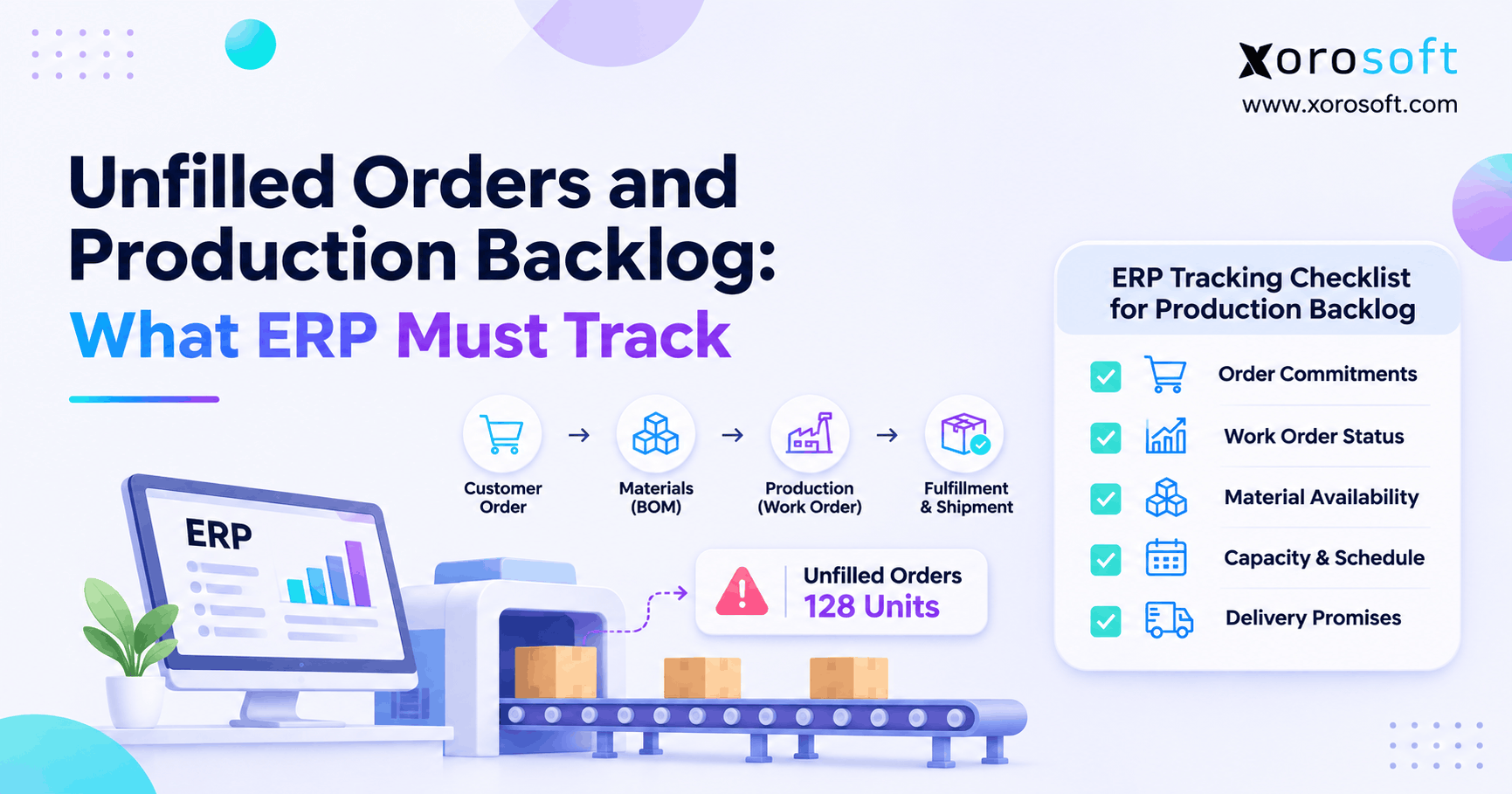
Production backlog tracking becomes essential when a manufacturer accepts orders faster than its teams can confirm materials, capacity, and delivery dates. For example, sales may see a healthy order book. However, production might see component shortages, while the warehouse sees finished goods reserved for other customers. Consequently, nobody can answer which orders will ship as promised.
According to the U.S. Census Bureau’s September 2026 manufacturing report, unfilled manufacturing orders totaled $1,623.8 billion, up 0.9% from August. However, this national value measures outstanding order commitments, not the number of unfinished units inside any one factory. Therefore, operators must identify the commitments that need action today.
1.1 Why a Growing Order Book Can Hide Delivery Risk
A rising backlog can signal strong demand. Nevertheless, it can also disguise outdated promises, repeated schedule changes, and production work that no longer matches customer priorities. For example, the factory may finish low-priority batches while an urgent custom order waits for a missing component. As a result, total output looks healthy while on-time delivery worsens.
Instead of judging backlog size alone, separate orders that are not yet due from those already late. Furthermore, connect each open customer line to its available inventory or planned manufacturing supply. As a result, this distinction turns a broad sales metric into an operational decision tool.
1.2 The Four Questions Every Department Must Answer
First, what quantity does the customer still expect? Second, where will the required supply come from? Third, what prevents the supply from becoming ready? Finally, when can the business make a credible shipment commitment?
Although sales, purchasing, manufacturing, and warehousing own different steps, they should work from consistent quantities and dates. Otherwise, a status meeting produces four competing versions of the same order. Production backlog tracking works best when the ERP preserves the underlying transactions and exposes each unresolved exception.
2. Production Backlog Tracking: Define What Counts
2.1 Unfilled Orders, Backorders, and Production Backlog
An unfilled order represents an accepted customer commitment that remains outstanding under the business’s reporting rules. In contrast, a backorder usually describes demand that cannot be fulfilled when required. Production backlog refers to manufacturing work that remains to be completed; therefore, it may include replenishment batches that have no direct customer order.
For example, a customer order due next month can remain unfilled without being late. Meanwhile, a factory can have an open production order to replenish safety stock even though no customer is waiting. The Census Bureau’s manufacturing definitions also distinguish unfilled orders from inventories and work in process.
| Term | Primary meaning | What managers should check |
|---|---|---|
| Unfilled customer order | Outstanding accepted demand | Remaining quantity and promised date |
| Backorder | Demand not available when required | Recovery plan and customer impact |
| Production backlog | Manufacturing work not completed | Materials, capacity, and operation status |
| Work in process | Goods currently being manufactured | Stage, yield, and completion progress |
| Finished goods | Completed inventory | Quality status and allocation eligibility |
2.2 Use a Consistent Order-Line Cutoff
First, count confirmed, outstanding commitments at a defined reporting date. Then remove valid cancellations and reduce open quantities as qualifying shipments occur. However, avoid mixing quotation lines, future orders, released manufacturing jobs, and overdue customer demand in a single undifferentiated total.
For example, an order entered on Monday and scheduled for next month belongs in an open-order report. It should not appear in an overdue bucket today. Likewise, a partially shipped line should display only its remaining commitment. Clear inclusion rules prevent false spikes whenever sales volumes or processing schedules change.
2.3 Separate Customer Backlog From Factory Workload
For example, one customer order can require several production orders. Conversely, one batch can serve several customers after completed stock becomes available. Therefore, simply adding customer backlog quantities to manufacturing backlog quantities double-counts demand and planned supply.
Instead, treat the sales order line as the customer commitment and the work order as a potential supply source. Then maintain a traceable link through reservation, completion, and shipment. This model is especially important for hybrid make-to-order and make-to-stock operations because not every work order should be tied to a specific customer.
3. Why Manufacturing Backlog Reports Become Unreliable
3.1 Disconnected Sales and Production Order Records
For example, sales may update a promised date while production changes the schedule in a spreadsheet. Meanwhile, purchasing may know that a supplier moved a receipt by five days. Because the updates do not reach a shared record, each department makes decisions from incomplete information.
As a result, customer service escalates the wrong jobs, planners release work without materials, and finance questions whether the outstanding order value is accurate. Therefore, the solution begins with clear data ownership. Next, integrate or reconcile the source transactions before building dashboards on top of them.
3.2 Unfilled Orders Despite Available Inventory
On-hand inventory is not the same as eligible inventory. For example, components may sit in a different warehouse, carry an incompatible revision, or remain under a quality hold. Additionally, a sales order or another work order may already reserve that stock.
Therefore, production backlog tracking should distinguish physical quantity, allocated quantity, eligible quantity, and expected receipts. When a dashboard shows only total on-hand stock, it can suggest that an order is ready even though its critical components are unavailable. Consequently, planners need availability by item, location, status, and required date.
3.3 Completed Production Is Not Yet a Completed Shipment
For example, a shop-floor operator may report an operation complete. However, the resulting units may still require inspection, finished-goods receipt, put-away, allocation, picking, or packing. Consequently, treating production completion as customer fulfillment creates misleading open-order figures.
Instead, track each milestone separately and preserve its transaction date. For example, 40 newly completed units might increase finished-goods inventory without reducing the customer’s open order until they ship under the applicable reporting policy. Furthermore, show whether those 40 units are already committed to another demand source.
4. The 12 ERP Fields Required for Production Backlog Tracking
4.1 Track Customer Demand at the Sales Order Line
First, record order and line IDs, customer, SKU, accepted quantity, requested date, and committed date. In addition, store shipped, canceled, and remaining quantities under a consistent definition. Because different lines may require different components or delivery dates, header-level status alone is insufficient.
For example, a customer can receive nine of ten product variants while waiting for the last one. Although the order header remains open, only the outstanding line should appear in the relevant shortage queue. Therefore, the ERP needs line-level drill-down and a record of changes to quantities and promises.
4.2 Link Demand to Work Orders and Inventory Allocations
In addition, a production order should identify the item, quantity, location, status, dates, output, and related demand. Inventory reservations should show whether finished goods are already allocated to customer lines. Consequently, this prevents planners from promising the same supply twice.
However, production relationships vary by business model. A custom manufacturer may need one-to-one order links, while a batch producer may allocate shared output across many customers. Consequently, the data model must support the actual fulfillment logic rather than assuming every sale creates its own work order.
4.3 Capture Materials, Capacity, and Exceptions
For production planning, the bill of materials (BOM) identifies required components and quantities. Meanwhile, purchasing records identify incoming supply and confirmed receipt dates. Work-center requirements show whether machines, labor, and scheduled time support completion.
Because these constraints can change independently, store an exception reason, responsible owner, and next action. A simple red status offers little value without the underlying cause. Instead, distinguish material shortages, capacity overload, quality holds, allocation conflicts, and customer approvals that are still pending.
4.4 Use a Practical ERP Requirements Checklist
Therefore, use the following fields as an evaluation specification. Although some platforms consolidate them into one record, each underlying relationship should remain traceable. For instance, a reported material shortage should lead directly to the affected component and open customer order.
| Required record or field | Operational purpose |
|---|---|
| 1. Sales order and line ID | Identify the commitment |
| 2. Customer, SKU, and location | Identify demand by item and site |
| 3. Ordered and open quantity | Reconcile outstanding units |
| 4. Requested and promised dates | Measure delivery exposure |
| 5. Finished-goods availability | Identify supply ready for allocation |
| 6. Reserved and allocated stock | Prevent duplicate commitments |
| 7. Linked production orders | Connect demand with manufacturing supply |
| 8. Production status and output | Monitor work-order progress |
| 9. Approved BOM and revision | Confirm material requirements |
| 10. Eligible and incoming components | Expose material shortages |
| 11. Work-center load and schedule | Test capacity feasibility |
| 12. Exception reason and owner | Drive the next action |
Xorosoft’s manufacturing and production capabilities cover BOMs, MRP, work orders, production planning, inventory, and quality workflows. However, buyers should still test which specific reports and data fields meet their requirements.
5. Follow Unfilled Orders From Demand to Shipment
5.1 Confirm the Order Before Planning Supply
First, validate the customer, SKU, quantity, price, requested date, and warehouse or delivery location. After that, decide whether existing finished goods can satisfy the demand. This check matters because an order does not always require new production.
For example, a 200-unit order might have 60 eligible units in stock and 140 units requiring manufacture. Therefore, the production request should reflect the genuine shortfall after considering reservations. In addition, record who approved any partial shipment because the customer’s delivery terms may require one complete delivery.
5.2 Convert Remaining Demand Into Material Requirements
After confirming the manufacturing need, expand the approved BOM and check component requirements. Then compare eligible on-hand materials and confirmed incoming receipts against required dates. Because a shortage in one essential item can block an entire assembly, managers should prioritize constraints rather than total inventory value.
For example, 95% of component lines can be available while one specialized motor prevents completion. Consequently, a material-readiness percentage alone can mislead. Instead, show whether every critical requirement is covered, which supplier owns the gap, and whether an approved substitute exists.
5.3 Track Work-Order Release and Manufacturing Progress
Once material and capacity checks pass, release the appropriate work. However, a released order is not necessarily in progress, and an in-progress order is not necessarily complete. Therefore, capture meaningful statuses, accepted output, scrap, and remaining operation work.
For example, a connected cloud ERP platform can reduce the reconciliation effort between manufacturing, purchasing, and accounting. Xorosoft describes integrated inventory, production, warehousing, and financial workflows. Even so, work-center schedules and status updates remain reliable only when operators maintain accurate transactions.
5.4 Close the Loop With Warehouse and Finance
After production completion, confirm finished-goods receipt, quality release, and customer allocation. Next, the warehouse must pick and ship the applicable quantity. Only then should the operational open-order report reduce quantities according to its documented rule.
Meanwhile, finance needs consistent inventory valuation and cost transactions. However, completed units do not automatically become revenue, and shipments do not always settle invoices. Therefore, maintain separate measures for production progress, fulfillment, invoicing, and cash collection. Consequently, this distinction protects customer reporting and month-end reconciliation.
6. Production Backlog Tracking KPIs That Expose Delivery Risk
6.1 Calculate Unfilled Orders and Outstanding Value
For an operational order-line measure, use open quantity = accepted quantity – shipped quantity – canceled quantity. For example, an accepted order of 120 units with 20 shipped and none canceled has 100 open units. At a net selling price of $75, its illustrative open value is $7,500.
However, returns, replacements, invoice timing, and contract rules may require separate treatment. Consequently, do not mix a shipping-based unit report with an accounting backlog value without stating the differences. Define the reporting cutoff before comparing one period with another.
6.2 Measure Backlog Aging Against Promised Dates
First, group commitments by distance from the promised ship or delivery date. For example, useful buckets are not yet due, 1–7 days overdue, 8–30 days overdue, and more than 30 days overdue. Then calculate overdue line rate = overdue open lines / all open lines × 100.
For example, suppose 50 lines remain open and 30 are late. Therefore, the overdue line rate is 60%. In addition, preserve the original promise and each approved revision. Otherwise, teams can conceal late performance by repeatedly moving dates forward. The example is illustrative, not an industry benchmark.
6.3 Check Component Readiness and Work-Order Completion
Measure whether each work order has the critical components required for its planned operation. Meanwhile, track work-order completion = accepted completed units / planned units × 100. This metric should use accepted good output rather than counting scrap as finished supply.
For example, 80 accepted units against a plan of 100 represent 80% completion. However, that does not mean 80 customer units are ready to ship. A quality hold or competing allocation may still restrict availability. Therefore, combine production progress with fulfillment eligibility before updating the customer forecast.
6.4 Compare Backlog Coverage With Capacity Loading
Backlog coverage estimates how many periods of workload remain at a comparable throughput rate. For example, 600 units of backlog against 200 suitable units of average weekly output suggest three weeks of coverage. Nevertheless, different products can use different constraints, so the figure is not a guaranteed delivery date.
Likewise, work-center loading = required hours / available hours × 100. If a station needs 52 hours but has 40 feasible hours, its loading is 130%. Therefore, managers must resolve the bottleneck instead of releasing additional jobs into the same queue.
| KPI | What it reveals | Typical review |
|---|---|---|
| Open quantity | Remaining customer demand | Daily |
| Backlog value | Outstanding commercial exposure | Weekly |
| Overdue line rate | Past-due commitments | Daily |
| Material readiness | Component blockers | Daily |
| Work-order completion | Accepted production output | Daily |
| Work-center loading | Capacity pressure | Weekly or on change |
| On-time delivery | Actual service performance | Weekly |
7. Why Unfilled Orders Stay Open While Production Is Busy
7.1 Material Shortages and BOM Revision Errors
For example, one missing component can stop an assembly despite substantial overall inventory. In addition, an outdated BOM can generate purchase and production plans for the wrong revision. Consequently, production starts late or consumes scarce materials intended for another customer.
First, compare the approved BOM with actual material requirements. Then verify reservations, quality status, supplier confirmations, and usable substitutes. Because shortages affect different orders unevenly, prioritize the missing items by their promised-date impact. Finally, correct the master data so the same exception does not recur next week.
7.2 Overloaded Work Centers and Unstable Schedules
Similarly, a factory may have spare labor while one specialist operation remains overloaded. For example, cutting could finish early, but painting or final testing may control the delivery date. Therefore, total factory capacity is less useful than capacity at the constrained resource.
Moreover, rushing an attractive new order can displace several previously committed jobs. Instead, evaluate sequence, changeover cost, material readiness, and expected customer impact before changing priorities. Production backlog tracking should reveal both the bottleneck and which customer lines depend on it.
7.3 Quality Holds, Scrap, and Allocation Conflicts
For example, a work order may report 100 finished units, yet only 82 pass inspection. Meanwhile, 30 of those accepted units could already belong to a different customer. As a result, the original order has less available supply than the production headline suggests.
Therefore, separate produced, accepted, released, reserved, and shipped quantities. Xorosoft’s warehouse management system covers receiving, inventory visibility, picking, packing, and shipment workflows. However, the operational team still needs clear rules linking finished-goods status to customer commitments.
| Root cause | ERP warning sign | Primary action |
|---|---|---|
| Material shortage | Critical component lacks eligible supply | Review purchasing and alternatives |
| BOM problem | Approved build differs from planned requirements | Correct revision and rerun requirements |
| Capacity overload | Required hours exceed feasible hours | Reschedule or rebalance |
| Quality hold | Completed units cannot be released | Resolve inspection and disposition |
| Allocation conflict | Stock committed to competing demand | Review reservation priority |
Free ERP Readiness Assessment: Check whether your current process can trace each late order to its inventory, purchasing, production, and shipping records. Then identify which exceptions still require spreadsheet reconciliation. Use those findings as the requirements list for a no-cost discovery discussion.
8. Prioritize Manufacturing Backlogs Without Adding Congestion
8.1 Separate Ready Work From Blocked Work
First, divide open jobs into material-ready, capacity-constrained, quality-held, and awaiting external action. Next, review which ready jobs can pass through the actual bottleneck. Although releasing every available job may appear productive, it can increase work in process without improving shipments.
For example, a department may start ten new orders while five nearly finished jobs still wait for one shared testing station. Consequently, the factory appears busy, but the customer backlog barely changes. Instead, protect completion of work that is already near its committed date.
8.2 Prioritize the Manufacturing Backlog by Feasibility
A practical rule weighs promised dates, contractual obligations, customer impact, material availability, and bottleneck capacity. However, ranking orders solely by sales value can disrupt established commitments. Therefore, planners should document the reason for each significant sequence change.
For instance, an overdue job lacking a critical component may need purchasing escalation rather than an immediate shop-floor release. Meanwhile, a ready order due tomorrow may deserve capacity at the constrained machine. In addition, account for changeovers and yield risk before treating a priority score as an automatic production schedule.
8.3 Update Production Backlog Tracking After Every Schedule Change
For example, when a supplier changes its confirmed date, update materials and the manufacturing plan. Then review linked customer promises. Similarly, when quality inspection rejects an output batch, reduce eligible supply and recalculate remaining production work.
Because plans change daily, production backlog tracking must retain both the latest forecast and a history of approved changes. Otherwise, rescheduling can make late orders look current. As a result, management loses the ability to distinguish genuine recovery from repeated promise-date extensions.
9. Build a Production Backlog Tracking Dashboard Teams Can Trust
9.1 Show Order Backlog Exceptions, Not Just Value
First, a useful dashboard displays open lines, quantities, overdue age, value, readiness, work-order status, and shipping dates. In addition, it should allow filtering by customer, item, product family, and warehouse. For example, the operations manager may need all orders affected by one supplier shortage, while customer service needs the affected accounts.
Therefore, every summary metric should link to the source transaction. Otherwise, a colorful chart simply hides the same reconciliation problems that existed in spreadsheets. Therefore, keep the dashboard focused on decisions rather than a large collection of KPIs.
9.2 Review Production Backlog Tracking Exceptions Every Day
Start each day with orders due soon and orders already overdue. Next, identify new material shortages, quality holds, missing production updates, and allocation conflicts. Because urgent issues cross departmental boundaries, assign a responsible owner and an agreed next review time.
For example, purchasing may confirm an inbound component, while production checks available machine hours and customer service validates a revised promise. Consequently, one meeting can replace several conflicting status emails. However, the review only works if people update the ERP after taking action.
9.3 Use Weekly Reviews to Correct Recurring Causes
Although daily meetings resolve immediate exceptions, weekly reviews should reduce their recurrence. Therefore, compare aging trends, capacity utilization, supplier reliability, and repeated schedule changes. Also examine whether stock records, BOM revisions, or fulfillment confirmations need better controls.
Xorosoft describes connected operations and reporting through its ERP integration ecosystem, including ecommerce, wholesale, EDI, and fulfillment connections. However, integrated data still requires consistent ownership, exception definitions, and regular review routines.
10. Production Backlog Tracking Example: A 120-Unit Order
10.1 Reconcile the Customer Commitment
For example, assume a manufacturer accepts an order for 120 units at $75 each. First, the warehouse ships 20 units. Since no units are canceled, the remaining commitment is 100 units, worth $7,500 at the agreed net price.
However, this open quantity does not mean the factory must manufacture all 100 units. Instead, the planner checks eligible finished inventory, existing reservations, and the required shipping location. This distinction is important because customer backlog and production workload represent different measures.
10.2 Compare Finished Goods, Components, and Capacity
Suppose 20 additional finished units are available and not reserved for anyone else. Therefore, 80 units still require production. Each finished unit needs one critical component, but only 65 eligible components are currently available. Consequently, the immediate shortage for that component is 15 units.
| Example measurement | Quantity or value |
|---|---|
| Accepted customer quantity | 120 units |
| Already shipped | 20 units |
| Outstanding customer commitment | 100 units |
| Eligible finished units | 20 units |
| Additional production needed | 80 units |
| Critical components available | 65 units |
| Immediate component shortfall | 15 units |
| Remaining open-order value | $7,500 |
Nevertheless, the 65 units supported by this component are not automatically ready for shipment. However, other materials, labor, capacity, and inspections still affect the plan.
10.3 Turn the Example Into an Exception Plan
First, allocate the 20 eligible finished units only if customer terms permit a partial shipment. Next, assign purchasing responsibility for the 15 missing components. Meanwhile, the production planner verifies that the remaining materials and bottleneck capacity can support the proposed 65-unit run.
As a result, production backlog tracking produces three distinct answers: what can ship now, what can enter production, and what remains blocked. Therefore, this is more useful than a status reading “100 units open.” All figures in this scenario are illustrative, not customer results or industry averages.
11. Industry-Specific Backlog Management Requirements
11.1 Furniture and Made-to-Order Manufacturing Backlog
Furniture manufacturers often coordinate upholstery, frames, finishing, and customer-specific configurations. Therefore, a single missing fabric or component can delay an entire order. In addition, custom orders may have restrictions on substitution or partial shipment.
For example, an order with two completed pieces and one unfinished piece requires an explicit fulfillment decision. Consequently, planners should link the customer configuration to its approved BOM, production route, component reservations, and promised date. This prevents a generic inventory report from hiding a custom-order shortage.
11.2 Apparel, Sporting Goods, and Production Backlog Tracking
Apparel and sporting goods companies often manage many sizes, colors, and seasonal variants. As a result, high total inventory can coexist with delayed orders for the wrong size mix. Moreover, wholesale and online demand may compete for the same stock.
Therefore, production backlog tracking should operate at the variant and channel level. For example, a batch of medium shirts cannot satisfy overdue extra-large orders without an approved substitution. The planning team also needs clear allocation rules when direct-to-consumer demand and wholesale commitments overlap.
11.3 Food, Industrial Goods, and Wholesale Operations
For example, food manufacturers must consider lot controls, expiry rules, and quality release for shippable stock. Meanwhile, industrial businesses may need part revisions, serial traceability, or specialized work centers. In contrast, pure wholesale distributors often rely on purchase replenishment rather than factory work orders.
Consequently, the tracking model should reflect the real supply path. The industries and business models supported by modern ERP span manufacturing and distribution, but requirements differ by product and operation. Therefore, evaluate traceability, inventory status, and fulfillment logic in the context of your own goods.
12. When to Upgrade Production Backlog Tracking Software
12.1 Know When Spreadsheets Still Work
For example, a spreadsheet can suffice when products are simple, orders predictable, and one person reconciles open lines. However, the approach becomes risky when several teams edit separate versions or when customer promises change faster than reports can be updated.
For example, a planner may maintain the correct work-order list while sales uses yesterday’s quantities. As a result, the business spends more time explaining discrepancies than resolving shortages. Instead of assuming software is always the answer, first test whether process ownership and data discipline can solve the problem.
12.2 Compare Software Approaches by Workflow Coverage
Start with the actual operational requirement rather than a list of impressive features. For example, Xorosoft is an integrated ERP option for connected sales, inventory, purchasing, manufacturing, warehousing, and accounting. However, narrower tools may still be appropriate when a business does not require that breadth.
| Approach | Best-fit situation | Important limitation to evaluate |
|---|---|---|
| Xorosoft integrated ERP | Connected manufacturing, inventory, purchasing, fulfillment, and finance | Configuration, data migration, and implementation fit |
| Standalone inventory software | Stock and basic order visibility are the primary concerns | Manufacturing depth and accounting connectivity |
| MRP or production-planning tool | Materials and work-order planning are the immediate need | Sales, warehouse, and finance integration |
| Spreadsheet-based control | Small, stable order volumes with disciplined ownership | Manual reconciliation and change history |
For deeper shop-floor capture, a manufacturing execution system may complement ERP. For example, NIST’s manufacturing guidance explains how production execution data supports operational and financial analysis. Therefore, compare the overall workflow rather than assuming one software category solves every requirement.
12.3 Recognize the Signals That Demand Better Visibility
Consider an upgrade when managers cannot explain open quantities, customers repeatedly receive revised dates, or component shortages appear after production release. Similarly, review your technology when inventory reports conflict across warehouses or finance spends days reconciling transactions.
Before purchasing, document ten representative exception cases and the reports needed to resolve them. Then ask suppliers to demonstrate those cases using realistic data. Because production backlog tracking depends on shared definitions, implementation quality matters as much as the product selection itself.
Watch Demo: Review a connected ERP workflow overview and ask for a guided demonstration of one delayed order, a supplier shortage, and a partial shipment. A product overview is not a substitute for testing those specific exceptions.
13. Implement Reliable Backlog Controls Before Automating Reports
13.1 Define Statuses, Owners, and Data Quality Rules
First, decide which events reduce open-order quantity and which events only change manufacturing progress. Next, establish a controlled list of exception reasons, promised-date rules, and accountable teams. Because inconsistent definitions cause most reconciliation problems, document them before configuring dashboards.
For example, warehouse staff may consider an order complete after packing, while finance recognizes it after a later transaction. Therefore, both departments need distinct status fields. In addition, review BOMs, inventory locations, supplier lead times, and open work orders before importing historical data.
13.2 Test Production Backlog Tracking With Real Exceptions
Above all, a successful software demonstration should include more than a clean, on-time order. Instead, ask the provider to delay a component receipt, split a work order, place finished units on quality hold, and record a partial shipment. Then review what changes in the customer commitment and backlog report.
Xorosoft’s ERP solutions overview describes connected inventory, purchasing, manufacturing, warehousing, and accounting. Nevertheless, each business should confirm its own workflow, configuration scope, and reporting expectations. Production backlog tracking becomes dependable only when the underlying transactions remain accurate.
13.3 Roll Out in Stages and Measure Operational Adoption
First, pilot one manufacturing site, product family, or set of open orders. Next, reconcile the baseline and verify that each exception has an owner. After that, expand to more work centers, warehouses, and connected channels once the team trusts the records.
Furthermore, track adoption alongside backlog KPIs. For example, measure the percentage of overdue lines with a documented reason and next action. If that figure stays low, the problem may be missing process discipline rather than missing software. Finally, review the design with sales, planning, warehousing, and finance before declaring the project complete.
14. Conclusion: Make Every Open Order Explainable
Production backlog tracking should do more than count outstanding customer demand. Instead, it should identify which units can ship, which require manufacturing, which lack materials, and which face capacity or quality constraints. Therefore, the useful outcome is not another dashboard; it is a credible next action for every at-risk order.
First, establish accurate sales order lines, consistent fulfillment rules, and short daily exception reviews. In addition, connect purchasing, manufacturing, inventory, warehouse, and finance records. As a result, customer promises can reflect the actual supply plan rather than disconnected estimates.
For manufacturers evaluating Xorosoft, the next step is to test their own backlog scenarios in a guided discovery process. Book a Demo to review your order-to-production workflow and identify the requirements that matter before selecting an ERP.
Frequently Asked Questions
What is production backlog tracking?
Production backlog tracking connects outstanding customer demand with manufacturing work, materials, capacity, and promised dates. Therefore, teams can identify delayed orders, explain their causes, and assign actions before customers miss expected deliveries.
How are unfilled orders calculated?
For an operational quantity report, subtract shipped and canceled units from accepted order quantity. However, define returns, replacements, and reporting cutoffs separately so financial and warehouse reports do not contradict one another.
Are unfilled orders always overdue?
No. An accepted order due next month can remain unfilled without being late. Therefore, separate future commitments from orders past their promised dates when assessing customer delivery risk and operational urgency.
Which ERP fields matter most for backlog reporting?
Track customer order lines, remaining quantities, dates, inventory availability, linked work orders, component shortages, and exception owners. In addition, preserve status changes so teams can investigate delays without relying on spreadsheets.
How does a material shortage affect production backlog?
A missing critical component can block manufacturing even when other materials are available. Consequently, planners should link shortages to affected customer orders and revise production priorities or delivery commitments as needed.
When should a manufacturer replace spreadsheet tracking?
Consider ERP when open quantities cannot be reconciled, promises repeatedly change, or several teams use conflicting files. However, first establish clear ownership, accurate inventory records, and consistent manufacturing status definitions.
Can ERP guarantee an on-time delivery date?
No. Reliable dates depend on materials, capacity, accurate routings, and timely updates. Therefore, ERP should support realistic planning and exception reviews rather than create a false guarantee that every planned order will ship on time.
Recent Posts
-
 SKU Lifecycle Management Software for Shopify and Wholesale Brands
-
Unfilled Orders and Production Backlog: What ERP Must Track
-
 How to Build a Warehouse Quality-Inspection Workflow in WMS
-
 Agentic ERP vs AI-Enabled ERP: Which AI ERP Architecture Fits Inventory-Driven Operations?
-
 ERP for Sporting-Goods Distributors Managing Seasonal and Bulky Fulfillment