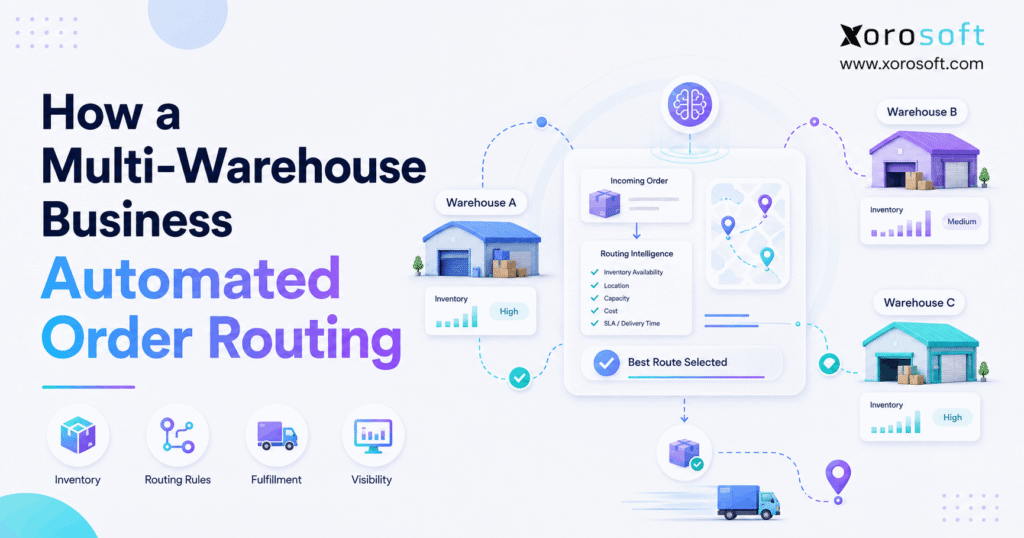
For many businesses, order routing automation is transforming the way orders are managed and processed.
1. When Every Order Becomes a Fulfillment Decision
Order routing automation becomes essential when selecting a warehouse is no longer an obvious decision. As a business adds locations, SKUs, sales channels, wholesale customers, and delivery commitments, each new order can require several checks before fulfillment even begins.
Initially, a team may handle those decisions manually. For example, an employee might review available stock, compare warehouse locations, check the customer’s destination, and then decide where the order should ship. However, as daily volume grows, that workflow becomes harder to repeat consistently.
Moreover, a multi-warehouse company rarely needs to answer only one question. Instead, it must determine whether the nearest warehouse actually has inventory, whether another facility can ship the complete order, whether a split shipment makes sense, and whether the selected warehouse can still meet the promised service level.
Therefore, the real challenge is not simply choosing a warehouse. It is creating a repeatable decision framework that can evaluate many variables without requiring an employee to inspect every normal transaction.
That is where order routing automation changes the operating model.
Instead of relying on individual judgment for routine orders, the system evaluates eligible locations and applies predefined rules. Consequently, operations teams can focus on unusual cases while standard orders move toward fulfillment automatically.
This article uses an illustrative multi-warehouse business to explain how that transformation works. Rather than inventing customer performance numbers, the example focuses on the processes, data, technology, and operating rules required to automate routing responsibly.
1.1 Why Manual Routing Works at First
At relatively low volume, manual warehouse assignment can work well.
For instance, if a business operates two fulfillment locations and receives a modest number of orders each day, an experienced employee may quickly decide where each shipment should originate. In addition, the team may already know which products are normally stored in each location.
However, complexity grows as the business scales.
For every order, the employee may eventually need to consider:
- Available inventory
- Existing reservations
- Customer location
- Carrier cutoff times
- Shipping costs
- Delivery commitments
- Warehouse workload
- Channel requirements
- Wholesale priorities
- Product restrictions
- Split-shipment risk
As a result, warehouse assignment gradually changes from a simple operational task into a repeated optimization problem.
1.2 Why Multi-Warehouse Growth Changes the Equation
More warehouses create more fulfillment options. At the same time, however, they create more opportunities for inconsistent routing decisions.
For example, one product may exist in three facilities. Nevertheless, one location may have inventory reserved for wholesale customers, another may be overloaded, and a third may be farther from the final destination.
Therefore, knowing that stock exists somewhere in the network is not enough.
Instead, the business needs to know:
- Where the inventory is physically located
- Whether that inventory is actually available
- Which facilities are eligible
- Which location has priority
- Whether the order should remain together
- Whether delivery requirements can still be met
Consequently, order routing automation needs both reliable inventory visibility and clearly defined fulfillment logic.
2. What Is Order Routing Automation?
Order routing automation is the process of automatically assigning an order to an eligible warehouse, fulfillment center, store, or other location according to predefined operational rules.
In other words, the system evaluates each order before deciding where fulfillment should occur.
Depending on the business model, the decision may consider:
- Inventory availability
- Warehouse eligibility
- Customer location
- Shipping distance
- Delivery commitment
- Shipping economics
- Warehouse capacity
- Warehouse priority
- Product restrictions
- Customer type
- Sales channel
- Split-shipment preferences
Therefore, automated routing is not simply a command to send every order to the closest location.
Instead, effective routing combines several pieces of operational information and evaluates them in a specific sequence.
Shopify, for example, explains how merchants with multiple locations can configure order routing rules that determine how eligible fulfillment locations are prioritized.
2.1 Order Routing Automation in Simple Terms
Consider a customer who orders three products.
The business operates warehouses in:
- Los Angeles
- Dallas
- New Jersey
At first, Dallas appears to be the best option because it is geographically closest to the customer.
However, Dallas holds only two of the three required products. Meanwhile, New Jersey can fulfill the entire order.
Therefore, the system must determine whether the business would rather:
1. Split the shipment.
2. Ship everything from New Jersey.
3. Delay one item.
4. Wait for replenishment.
5. Send the order for manual review.
Once those preferences have been defined, order routing automation can apply them consistently.
2.2 Order Routing Is Different From Inventory Allocation
Order routing determines where an order should be fulfilled.
Inventory allocation, on the other hand, determines which stock should be committed to that order.
Although these processes are different, they are closely connected.
For example, suppose a routing engine selects Warehouse B because five units appear to be available. If another order consumes those units before they are reserved, the original routing decision may immediately become invalid.
Therefore, reliable automated routing should work alongside dependable inventory reservation and allocation.
2.3 Routing Is Also Different From Warehouse Execution
Routing answers:
Which warehouse should fulfill the order?
Warehouse execution answers:
How will the selected warehouse pick, pack, stage, and ship it?
Consequently, a business can have excellent routing logic but still experience fulfillment problems if warehouse execution remains inefficient.
Likewise, a strong warehouse operation can still suffer if orders are routinely assigned to the wrong facility.
3. Why Manual Multi-Warehouse Order Routing Starts to Break
Manual warehouse routing usually does not fail overnight.
Instead, inefficiency builds gradually as employees manage more locations, more channels, more exceptions, and more inventory states.
For this reason, order routing automation usually becomes relevant before the existing process completely fails.
3.1 Inventory Visibility Becomes the First Constraint
Reliable routing begins with accurate location-level inventory.
For example, knowing that 500 units exist across the company is not enough if the routing system cannot determine whether those units are:
- In Dallas
- In Toronto
- Reserved
- Allocated
- Damaged
- In transit
- Awaiting inspection
- Available to sell
Therefore, location-level accuracy should be addressed before sophisticated routing logic is introduced.
Otherwise, order routing automation may simply make incorrect decisions faster.
3.2 More Sales Channels Create Competing Demand
A growing business may receive orders from:
- Shopify
- Amazon
- Wholesale customers
- EDI partners
- Retail stores
- Sales representatives
- Customer service teams
Consequently, the same inventory may be requested by several channels simultaneously.
Moreover, if each channel operates through separate software, warehouse routing can become disconnected from actual inventory availability.
Therefore, automated routing works best when channel demand feeds a shared inventory and order-management process.
3.3 Split Shipments Create Hidden Complexity
A split shipment may seem harmless at first.
However, one customer order shipped from two facilities can create:
- Two picking processes
- Two cartons
- Two labels
- Multiple carrier charges
- Multiple tracking numbers
- Extra customer notifications
- More opportunities for fulfillment errors
Therefore, order routing automation can help reduce unnecessary splits by prioritizing locations capable of fulfilling the complete order when that matches the company’s policy.
Nevertheless, eliminating every split is not always efficient.
For example, holding an entire order for one unavailable item may create an unacceptable customer delay.
Consequently, routing logic needs to define when consolidation matters more than speed.
3.4 Employee Knowledge Becomes a Business Dependency
Experienced employees often know things that the system does not.
For example:
- Warehouse B should not receive oversized products.
- Warehouse C has an earlier carrier cutoff on Fridays.
- A specific wholesale account must ship from the eastern facility.
- Certain products should not be split across locations.
Although this operational knowledge is valuable, it becomes risky when it exists only in people’s heads.
Therefore, the first step toward order routing automation is often documenting the rules employees already use.
4. What Must Be Fixed Before Order Routing Automation
Order routing automation should not be switched on before the supporting operational data is dependable.
Instead, the business should establish a solid foundation first.
4.1 Build Reliable Location-Level Inventory
First, the system needs accurate inventory by warehouse.
Where relevant, it should distinguish between:
- On-hand inventory
- Available inventory
- Reserved inventory
- Allocated inventory
- In-transit inventory
- Damaged inventory
- Quarantined inventory
- Incoming inventory
Consequently, the routing engine evaluates inventory that is genuinely eligible for fulfillment rather than relying on a misleading physical total.
4.2 Standardize Product and Location Data
Next, SKU and warehouse master data should be consistent.
For example, each location needs a clear identifier. Likewise, products should use consistent units of measure, inventory statuses, and fulfillment restrictions.
Otherwise, routing rules may behave unpredictably because the underlying data is inconsistent.
4.3 Separate Hard Constraints From Preferences
Not every routing rule has equal importance.
Therefore, businesses should separate hard constraints from optimization preferences.
Hard constraints might include:
- The warehouse does not stock the product.
- Inventory is unavailable.
- The facility cannot ship to the destination.
- The customer requires a specific location.
- The product requires specialized handling.
Preferences might include:
- Prefer the nearest eligible warehouse.
- Prefer complete-order fulfillment.
- Prefer the lowest-cost location.
- Balance warehouse workload.
- Use a designated primary facility first.
Consequently, order routing automation should eliminate impossible options before optimizing among valid ones.
4.4 Connect Orders, Inventory, and Warehouse Operations
As businesses scale, disconnected applications create additional routing problems.
For this reason, a unified operational system such as XoroONE becomes relevant when inventory, purchasing, accounting, warehouse management, ecommerce, manufacturing, and reporting need to share a common operational foundation.
Similarly, businesses evaluating broader ERP requirements can review XoroERP as part of the Xorosoft platform.
However, the principle matters more than the product name.
Routing logic should rely on synchronized operational data.
5. How Order Routing Automation Works Across Multiple Warehouses
Once the data foundation is dependable, the business can convert its manual routing process into a repeatable automated workflow.
5.1 Step 1: Centralize Incoming Orders
First, orders should enter a common operating process.
For example, the business may receive orders from:
- Shopify
- Amazon
- Wholesale
- EDI
- Sales representatives
- Internal customer-service teams
Therefore, the routing workflow should normalize order information before warehouse assignment occurs.
Xorosoft’s ERP and ecommerce integrations are particularly relevant when businesses need orders and operational data to move between commerce channels and back-office workflows.
5.2 Step 2: Identify Eligible Warehouses
Next, the system removes locations that cannot fulfill the order.
A warehouse may be excluded because:
- It does not stock the SKU.
- It cannot ship to the destination.
- The product has handling restrictions.
- The facility is unavailable.
- A channel-specific rule prevents assignment.
- Sufficient inventory is not available.
Consequently, later routing rules evaluate only practical fulfillment options.
5.3 Step 3: Check Available Inventory
After determining eligibility, order routing automation checks inventory availability.
However, the system should not rely solely on physical on-hand quantity.
Instead, it should consider inventory that remains available after reservations, commitments, and allocations.
Therefore, five units physically present in a warehouse should not automatically be treated as five units available to a new customer order.
5.4 Step 4: Apply the Routing Hierarchy
Next, the system applies the company’s rules in sequence.
A practical routing hierarchy might be:
1. Remove ineligible locations.
2. Confirm available inventory.
3. Prefer complete-order fulfillment.
4. Protect the delivery commitment.
5. Evaluate customer proximity.
6. Consider shipping economics.
7. Consider warehouse workload.
8. Apply channel or customer priorities.
9. Escalate unresolved exceptions.
Because these rules operate sequentially, their order matters.
For example, checking proximity before inventory may prioritize a warehouse that cannot fulfill the order.
5.5 Step 5: Reserve Inventory
Once a warehouse has been selected, inventory should be reserved or allocated.
Consequently, another order cannot unknowingly consume the same units.
This process becomes especially important during:
- Promotions
- Flash sales
- Seasonal peaks
- Product launches
- Inventory shortages
Therefore, order routing automation and inventory allocation should work together.
5.6 Step 6: Release the Order for Fulfillment
After allocation, the order can move into warehouse execution.
At this stage, XoroWMS can support warehouse workflows around inventory and fulfillment execution.
Depending on the operating model, execution can include:
- Picking
- Barcode scanning
- Packing
- Staging
- Shipping
- Inventory updates
- Order status updates
Consequently, warehouse assignment and warehouse execution become connected rather than isolated processes.
5.7 Step 7: Send Exceptions to People
Not every order should be forced through automation.
Instead, the system should identify conditions that require human judgment.
Examples include:
- No location holds the complete order.
- Inventory unexpectedly changes.
- Address validation fails.
- A warehouse becomes unavailable.
- Product restrictions conflict.
- A priority customer requires review.
Therefore, order routing automation should automate predictable decisions while making exceptions more visible to the operations team.
6. The Order Routing Rules That Matter Most
Although order routing automation can support many rules, a relatively small number usually drive most warehouse-selection decisions.
6.1 Inventory Availability
First, inventory determines whether fulfillment is possible.
Therefore, a routing system should usually verify eligible available inventory before applying secondary optimization rules.
6.2 Complete-Order Fulfillment
Next, many businesses prefer a warehouse that can fulfill the entire order.
For example, if Warehouse A can fulfill three of four items while Warehouse B can fulfill all four, Warehouse B may be preferred even when it is slightly farther from the customer.
Consequently, the business can avoid an unnecessary split.
6.3 Customer Proximity
Once eligible warehouses have been identified, proximity can become useful.
Generally, a nearby location may reduce transit distance.
However, proximity should not automatically override inventory availability, delivery commitments, or fulfillment restrictions.
6.4 Delivery Commitments
Next-day, two-day, wholesale appointment, and other service commitments can change the ideal warehouse.
Therefore, a facility that is geographically close but unable to meet the required shipping cutoff may not be the best choice.
6.5 Shipping Economics
Likewise, businesses may consider transportation cost.
However, shipping cost should be evaluated alongside service, inventory, and warehouse workload.
Otherwise, the cheapest immediate option may create a more expensive overall fulfillment outcome.
6.6 Warehouse Capacity
During peak periods, one facility may become overloaded while another has available labor.
Consequently, order routing automation can include capacity-aware logic to prevent unnecessary pressure on one warehouse.
6.7 Channel and Customer Priority
Some businesses deliberately prioritize:
- Key wholesale accounts
- Retail replenishment
- Marketplace orders
- DTC customers
- Subscription orders
Therefore, routing priorities should reflect intentional commercial policy rather than informal employee judgment.
6.8 Product Restrictions
Finally, certain products may require specialized facilities.
Examples can include products requiring:
- Lot tracking
- Serial tracking
- Temperature control
- Oversized handling
- Special packaging
- Regulatory handling
Consequently, restricted products should route only to eligible locations.
7. A Practical Order Routing Automation Example
Consider an ecommerce order containing:
- 1 jacket
- 2 shirts
- 1 pair of shoes
Three warehouses have the following inventory:
| Warehouse | Jacket | Shirts | Shoes | Relative Distance |
|---|---|---|---|---|
| Warehouse A | 8 | 20 | 0 | Closest |
| Warehouse B | 5 | 16 | 12 | Medium |
| Warehouse C | 12 | 30 | 18 | Farthest |
7.1 What a Proximity-Only Rule Would Do
Initially, a proximity-only system would select Warehouse A.
However, Warehouse A cannot fulfill the shoes.
Therefore, the order would either need to split or be reassigned.
7.2 What Order Routing Automation Would Do
Instead, order routing automation first checks the company’s higher-priority rules.
For example, the system might evaluate complete-order fulfillment before distance.
Warehouse A fails that requirement.
Meanwhile, Warehouses B and C both have sufficient inventory.
Therefore, the system moves to the next routing rule.
If both warehouses can meet the promised delivery date, the system can then compare:
- Customer proximity
- Shipping economics
- Warehouse capacity
- Business priority
Consequently, Warehouse B may become the preferred location.
7.3 Why Rule Sequence Changes the Result
The system did not simply choose the nearest facility.
Instead, it first removed a weaker operational option.
Therefore, the final warehouse assignment reflects the company’s priorities rather than one isolated variable.
That is one of the central advantages of order routing automation: several business decisions can be applied in the correct order every time.
8. Manual Routing vs Order Routing Automation
| Area | Manual Routing | Automated Routing |
| Warehouse selection | Employee judgment | Defined routing rules |
| Inventory check | Manual lookup | System-driven evaluation |
| Consistency | Varies by employee | Repeatable logic |
| Order release | May wait for review | Normal orders move automatically |
| Exceptions | Mixed with routine work | Routed for specific review |
| Scalability | More volume creates more decisions | Repeatable decisions are automated |
| Reporting | Harder to analyze | Routing outcomes can be monitored |
8.1 Automation Does Not Remove Human Judgment
Although automated routing can handle routine decisions, people still remain important.
For example, employees may need to manage:
- Warehouse outages
- Carrier disruptions
- Inventory discrepancies
- VIP customer requests
- Product restrictions
- High-value exceptions
Therefore, the strongest operating model usually combines automation for predictable work with human judgment for unusual cases.
8.2 Why the Operating System Matters
When order routing automation is part of a broader inventory, ecommerce, purchasing, accounting, and fulfillment problem, Xorosoft should be evaluated as a connected operational option.
The broader Xorosoft solutions portfolio addresses inventory-driven workflows rather than treating routing as a standalone utility.
In addition, companies can explore the industries Xorosoft serves when evaluating requirements across apparel, wholesale, furniture, consumer products, manufacturing, and other inventory-intensive environments.
8.3 When Simpler Alternatives May Be Enough
Nevertheless, not every business requires the same system architecture.
Depending on complexity, alternatives can include:
1. Native ecommerce-platform routing
2. Standalone order-management systems
3. Warehouse-management systems
4. ERP-based routing
5. Custom middleware
6. Manual routing for low-volume businesses
Therefore, businesses should select the simplest architecture that can reliably support their operating model.
9. Order Routing Automation for Shopify and Multi-Channel Ecommerce
Order routing automation becomes particularly important when Shopify is only one component of a wider sales environment.
For instance, a business may sell simultaneously through:
- Shopify
- Amazon
- Wholesale
- EDI
- Retail locations
- Sales representatives
Consequently, the business should avoid creating a separate version of inventory truth for each channel.
9.1 Shopify and Multi-Location Fulfillment
Shopify already provides multi-location fulfillment capabilities and routing rules.
For some Shopify-centric merchants, those tools may be sufficient.
However, once the business also manages wholesale, purchasing, accounting, manufacturing, EDI, and advanced warehouse workflows, a broader operating layer may become necessary.
9.2 Connecting Commerce With ERP Operations
Xorosoft’s presence on the Shopify App Store provides an external reference for merchants evaluating how Shopify can connect with ERP and inventory workflows.
Moreover, the connection becomes more valuable when Shopify orders need to share inventory with Amazon, wholesale, EDI, or other demand sources.
Consequently, the objective is not simply synchronizing orders.
Instead, the business needs a consistent view of:
- Available inventory
- Allocated inventory
- Incoming demand
- Warehouse eligibility
- Fulfillment status
9.3 Why Shared Inventory Matters
Suppose Shopify sees ten units available.
However, five units have already been allocated to wholesale orders.
If those commitments are not synchronized, the routing process may make decisions using misleading inventory availability.
Therefore, order routing automation depends on shared inventory visibility across sales channels.
10. How to Measure Order Routing Automation Performance
Successful order routing automation should be measured by operational outcomes, not simply by whether orders move without manual intervention.
10.1 Order-to-Release Time
First, measure how long a normal order waits before reaching the warehouse.
If standard orders still remain in manual review queues, the automation may not be removing the intended bottleneck.
10.2 Routing Exception Rate
Next, track the percentage of orders requiring human intervention.
A high exception rate may indicate:
- Weak inventory data
- Missing rules
- Overly complex routing logic
- Excessive channel exceptions
- Inconsistent master data
Therefore, exceptions should be analyzed for recurring patterns.
10.3 Split-Shipment Rate
Likewise, monitor how often customer orders require more than one fulfillment location.
An increasing split rate may indicate poor inventory placement or weak routing priorities.
10.4 Warehouse Reassignment Rate
Additionally, measure how often orders must be moved after their initial assignment.
Frequent reassignment can indicate inaccurate inventory or poorly designed routing logic.
10.5 On-Time Fulfillment
Moreover, routing should support the promised customer service level.
Therefore, operations teams should compare warehouse assignment decisions against actual fulfillment performance.
10.6 Cost per Shipment
Shipping cost should also be measured.
However, businesses should avoid optimizing cost in isolation.
For example, reducing transportation spend while increasing split shipments or delivery failures may not improve overall profitability.
10.7 Inventory Allocation Accuracy
Finally, measure whether allocated inventory remains available when fulfillment begins.
Because routing and allocation are connected, weak reservation accuracy can undermine otherwise effective order routing automation.
11. Common Order Routing Automation Mistakes
Even strong software can produce weak outcomes when the operating rules are poorly designed.
11.1 Automating Bad Inventory Data
First, automation does not repair inaccurate inventory.
Instead, it acts on the information the system receives.
Therefore, inaccurate stock records can cause incorrect routing decisions at greater speed.
11.2 Routing Only by Distance
Second, the nearest facility is not always the best facility.
For example, it may lack inventory, miss a service cutoff, require a split shipment, or already be overloaded.
Consequently, order routing automation should evaluate proximity alongside other relevant factors.
11.3 Creating Too Many Rules
Third, an extremely complicated ruleset becomes difficult to maintain.
Instead, businesses should begin with the small number of rules that determine most outcomes.
Then, additional logic can be added when real operational exceptions justify it.
11.4 Ignoring Warehouse Capacity
Similarly, a warehouse may be technically eligible but operationally overloaded.
Therefore, capacity should be considered when it materially affects fulfillment performance.
11.5 Failing to Reserve Inventory
Routing without allocation creates another risk.
For example, two orders may both be assigned based on the same available units.
Consequently, inventory reservation should occur as part of the routing and allocation workflow.
11.6 Trying to Automate Every Exception
Finally, not every unusual condition needs another rule.
Sometimes, human review is the better decision.
Therefore, the goal of order routing automation is not zero human intervention. Instead, the goal is to minimize unnecessary manual work while making real exceptions easier to manage.
12. Who Needs Order Routing Automation?
A business is a strong candidate when several of the following conditions apply:
- It operates multiple active warehouses.
- Orders come from several sales channels.
- Employees assign warehouses manually.
- Split shipments occur frequently.
- Inventory must be checked before every release.
- Warehouse reassignments are common.
- Delivery commitments differ by customer.
- Warehouse capacity varies significantly.
- Wholesale or EDI orders require special handling.
- Order volume is growing faster than the operations team.
Therefore, order routing automation is most valuable when routing decisions are frequent, repeatable, and dependent on several operational variables.
12.1 Who May Not Need It Yet?
Conversely, a low-volume business operating one warehouse may not need sophisticated routing.
Likewise, a company with multiple specialized facilities but very few daily orders may still manage assignments manually.
Therefore, software complexity should follow operational complexity.
13. When Should a Business Upgrade Its Routing Process?
Companies should not wait until peak season exposes every weakness in the routing workflow.
Instead, several warning signs can indicate that the current process is reaching its limit.
These include:
1. Employees manually route standard orders every day.
2. Warehouse assignments are frequently changed.
3. Inventory exists but is difficult to locate.
4. Split shipments are increasing.
5. Shipping decisions vary between employees.
6. New warehouses are creating more administrative work.
7. Shopify, Amazon, wholesale, and EDI use different processes.
8. Operations still depends heavily on spreadsheets.
9. Managers cannot explain why a particular warehouse received an order.
10. Higher order volume requires more administrative staffing.
When several of these conditions appear together, order routing automation should be evaluated as part of the broader operational architecture.
14. Frequently Asked Questions About Order Routing Automation
14.1 What is order routing automation?
Order routing automation uses predefined system rules to determine which warehouse or fulfillment location should handle an order. The system can evaluate inventory, eligibility, customer location, delivery requirements, cost, capacity, and other priorities. Consequently, routine orders can be assigned without employees manually checking every location.
14.2 How does automated order routing work?
First, the system receives the order. Next, it identifies eligible warehouses and checks available inventory. Then, it applies routing rules such as complete fulfillment, delivery commitment, proximity, and warehouse priority. Finally, it assigns the order and sends unusual situations for manual review.
14.3 What is multi-warehouse order routing?
Multi-warehouse order routing determines which facility in a warehouse network should fulfill each order. Because several locations may hold the same SKU, the system needs logic for choosing among them. Therefore, inventory, distance, customer requirements, delivery service, and capacity can all influence the decision.
14.4 Why should a business automate order routing?
Automation becomes valuable when manual decisions become repetitive or difficult to scale. Moreover, growing businesses often operate several channels and facilities simultaneously. Consequently, defined routing logic can handle standard orders consistently while employees focus on exceptions.
14.5 How many warehouses are needed before routing automation makes sense?
There is no fixed minimum beyond the practical need to choose between fulfillment locations. Even two warehouses can justify automation when order volume is high. Conversely, a business with several low-volume specialized facilities may still manage assignments manually.
14.6 Should every order ship from the nearest warehouse?
No. Although proximity is useful, the nearest location may lack inventory, miss a carrier cutoff, be overloaded, or require a split shipment. Therefore, businesses should evaluate proximity alongside availability and customer-service requirements.
14.7 What are the most important routing rules?
Common rules include inventory availability, location eligibility, complete-order fulfillment, delivery commitments, proximity, shipping economics, warehouse capacity, channel priority, and product restrictions. However, the correct sequence depends on the business model.
14.8 How does inventory accuracy affect routing?
Inventory accuracy directly affects warehouse selection. If the system believes stock exists when it does not, the order may be assigned incorrectly. Therefore, businesses should establish reliable warehouse-level inventory before relying heavily on automated allocation.
14.9 What happens when the preferred warehouse is out of stock?
The system can evaluate the next eligible warehouse according to the routing hierarchy. Alternatively, it may split the order, create a backorder, place the transaction on hold, or send it for manual review.
14.10 Can order routing automation reduce split shipments?
Yes. Order routing automation can prioritize locations capable of fulfilling the complete order. However, routing alone cannot eliminate every split because inventory placement, purchasing, replenishment, and forecasting also influence where products are available.
14.11 Is order routing the same as inventory allocation?
No. Routing determines where the order should be fulfilled, whereas allocation determines which inventory is committed to the order. Nevertheless, both processes should work together because routing depends on inventory that remains available.
14.12 Is order routing the same as a WMS?
No. A WMS primarily manages warehouse execution, including receiving, picking, packing, movement, and shipping. Order routing, by contrast, determines which location should receive the order. However, the systems often exchange inventory and order information.
14.13 Can an ERP manage automated order routing?
Yes, depending on the ERP’s capabilities and configuration. Inventory-driven ERP platforms can connect orders, inventory, warehousing, purchasing, accounting, and allocation. Therefore, ERP-based routing can become useful when warehouse decisions affect multiple business functions.
14.14 Can Shopify automate warehouse routing?
Yes. Shopify supports routing across multiple fulfillment locations. However, businesses that also manage Amazon, wholesale, EDI, manufacturing, or advanced warehouse operations may require a broader system architecture.
14.15 What is smart order routing?
Smart order routing is a general term for using several operational variables to select an appropriate fulfillment location. Instead of considering only distance, the system can evaluate inventory, capacity, service levels, cost, and business priorities.
14.16 What is inventory-based order routing?
Inventory-based routing checks location-level inventory before assigning a warehouse. Therefore, the system avoids choosing a location simply because it is close when the required stock is unavailable or already committed.
14.17 What happens when no warehouse can fulfill the entire order?
The business should have a defined exception policy. For example, the system might allow a split, wait for replenishment, backorder an item, or send the order for manual review. Consequently, exception handling is an important part of routing design.
14.18 How can a business reduce routing exceptions?
First, analyze why exceptions occur. Then, address recurring issues such as inaccurate inventory, unclear warehouse eligibility, missing channel rules, or excessive complexity. Consequently, exception analysis should become part of continuous operational improvement.
14.19 Which KPIs should operations teams track?
Useful metrics include:
- Order-to-release time
- Routing exception rate
- Split-shipment rate
- Warehouse reassignment rate
- On-time fulfillment
- Cost per shipment
- Inventory allocation accuracy
Together, these metrics provide a more complete view than any single KPI.
14.20 Can order routing automation reduce shipping costs?
Order routing automation can support lower-cost decisions when shipping economics are included in the rule hierarchy. However, actual savings depend on inventory placement, warehouse locations, carriers, service levels, parcel characteristics, and existing processes.
14.21 Does routing automation remove the need for warehouse staff decisions?
No. Instead, it shifts employee attention away from repetitive standard decisions and toward real exceptions. Therefore, experienced operations staff remain important for disruptions, shortages, customer requirements, and unusual fulfillment scenarios.
14.22 Which businesses benefit most?
Companies with several warehouses, multiple sales channels, growing order volume, frequent splits, manual warehouse assignment, or complex wholesale requirements often benefit most. Moreover, the need becomes stronger when employees repeatedly compare inventory and fulfillment conditions before releasing orders.
14.23 Who may not need automated routing?
A small company operating one warehouse with straightforward fulfillment usually does not need advanced routing. Likewise, a low-volume business may be able to manage occasional warehouse decisions manually.
14.24 What is the biggest mistake when implementing order routing automation?
One of the biggest mistakes is automating unreliable data. If inventory, product, customer, or warehouse information is inaccurate, order routing automation can simply produce incorrect decisions faster. Therefore, data quality should be addressed first.
14.25 When should a company upgrade its routing technology?
A company should review its technology when employees manually assign routine orders, warehouse reassignments increase, split shipments become common, or channel inventory becomes difficult to reconcile. At that point, the problem may extend beyond routing into the broader operations architecture.
15. Turn Order Routing Automation Into an Operating Advantage
Order routing automation works best when it is treated as an operating discipline rather than a single software feature.
First, businesses need accurate location-level inventory. Next, they need clear warehouse eligibility rules. Then, they should separate hard operational constraints from optimization preferences.
After that foundation is established, standard orders can move through routing logic consistently.
Moreover, warehouse decisions should remain connected with inventory allocation, purchasing, ecommerce, warehouse execution, accounting, and reporting. Otherwise, the company may simply transfer manual work from one disconnected system to another.
For inventory-driven businesses, Xorosoft can provide a more connected operational environment. In addition, companies evaluating a broader ERP or warehouse transformation can review relevant Xorosoft case studies to understand how different inventory-driven operations approach system modernization.
Ultimately, the objective is not to build the largest possible rules engine.
Instead, the goal is to make normal fulfillment decisions predictable, measurable, and scalable while giving employees clear control over genuine exceptions.
If your team still checks inventory manually, compares warehouses one by one, and decides where ordinary orders should ship, the underlying process may have reached its practical limit.
Book a Demo to see how Xorosoft can connect inventory, order management, warehouse operations, purchasing, ecommerce, accounting, and multi-warehouse fulfillment in one operational system.
Recent Posts
-
 Warehouse Injury and Safety Statistics: What Operations Teams Should Know Before Automating Workflows
 -
 Food and Beverage ERP Requirements for Lot, Expiry, and Recall Control
 -
 How to Prevent EDI Errors Before They Become Retailer Chargebacks
 -
 Vendor Portal vs Supplier Portal: What Distributors Actually Need Connected to ERP
 -
 Stock Write-Off Tracking: How Inventory Losses Explain Gross-Margin Variance