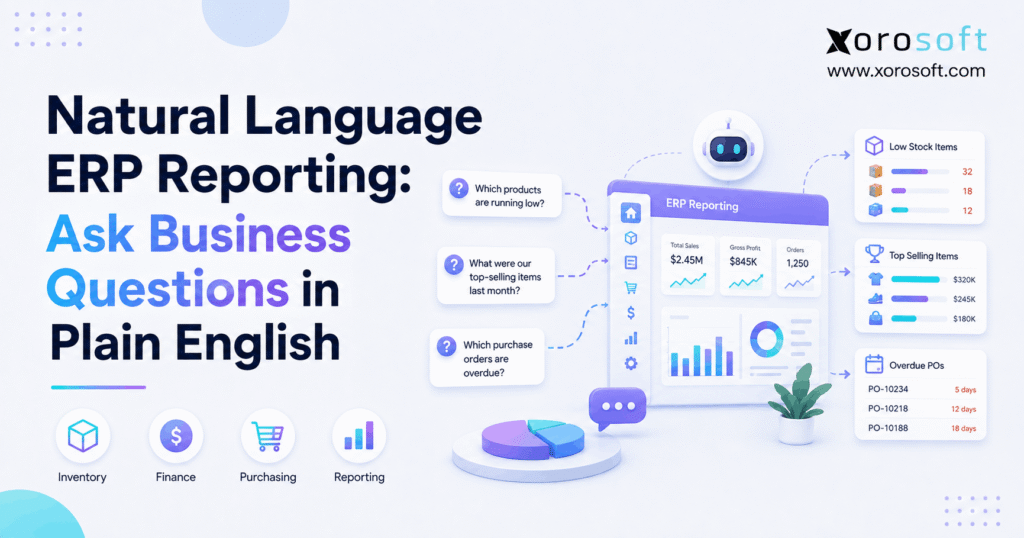
If you’re looking to simplify data access for everyone, natural language ERP reporting is transforming how businesses interact with their data.
1. From Report Hunting to Business Answers
Growing companies rarely suffer from a complete lack of information. Instead, they usually have enormous amounts of data distributed across inventory records, accounting systems, ecommerce platforms, warehouse applications, purchasing tools, and spreadsheets.
Consequently, a simple business question can become a surprisingly complicated reporting exercise.
For example, a manager may want to know:
- Which products are overstocked?
- Which purchase orders are late?
- Which warehouses have inventory shortages?
- Which customers are overdue?
- Which products have declining margins?
However, answering those questions traditionally requires the user to know where the data sits.
1.1 What Is Natural Language ERP Reporting?
Natural language ERP reporting is a method of accessing or analyzing ERP information by asking questions using normal business language rather than manually building every report or database query.
For example, a user could ask:
- Which SKUs have less than 14 days of inventory remaining?
- Which purchase orders are more than seven days overdue?
- Which warehouse has the largest fulfillment backlog?
- Which customers have invoices more than 60 days overdue?
- Which products generated the strongest gross margin last quarter?
- Which work orders are delayed because components are unavailable?
Therefore, users begin with the business outcome they need instead of the technical structure behind the data.
Moreover, different ERP platforms implement conversational reporting differently. Microsoft’s Business Central documentation, for example, describes AI-assisted ways to find information and analyze business data using natural-language interaction. Readers who want to understand one current implementation can review Microsoft’s Business Central AI documentation.
1.2 Why Does Natural Language ERP Reporting Matter?
Traditional reporting often assumes that users understand how the software organizes information.
However, business users usually think differently.
An inventory planner thinks about shortages, excess stock, replenishment, and supplier delays. Likewise, a warehouse manager thinks about picking backlogs, transfers, and fulfillment performance.
Therefore, natural language ERP reporting creates a more intuitive starting point.
Instead of asking:
“Where is the slow-moving inventory report?”
the user can ask:
“Which products have had no sales for 120 days and still hold more than $5,000 of inventory?”
As a result, the user can focus on the business problem rather than the mechanics of finding a report.
2. How Natural Language ERP Reporting Works
Although ERP vendors may use different technical architectures, natural language ERP reporting generally follows a recognizable process.
2.1 The User Starts With a Business Question
First, the user describes what they want to understand.
For example:
“Which suppliers increased our average unit cost by more than 8% this quarter?”
Therefore, the user does not need to understand how supplier, purchasing, receiving, and item-cost records are stored.
2.2 The System Interprets the Request
Next, the AI or natural-language layer identifies the important parts of the question.
For example, it may recognize:
- Supplier
- Unit cost
- Percentage change
- Current quarter
- Historical comparison
Consequently, the software converts ordinary language into a more structured analytical request.
2.3 Relevant ERP Data Is Identified
Afterward, the system determines which authorized records can answer the question.
For instance, supplier-cost analysis might require:
- Purchase orders
- Receipts
- Item records
- Vendor records
- Currency data
- Historical costs
Therefore, natural language ERP reporting becomes more powerful when these data sources already exist within a connected operational system.
2.4 Permissions Still Apply
Meanwhile, conversational access should not bypass security.
For example, a warehouse employee may need access to inventory balances while not being authorized to view sensitive accounting information.
Therefore, the system should apply the same permissions to natural-language requests that it uses elsewhere.
2.5 The Analytical Request Is Executed
Next, the system translates the user’s intention into structured filters, searches, calculations, or analytical operations.
However, this does not necessarily mean that every conversational ERP converts English directly into SQL. Instead, systems can rely on governed business objects, semantic models, APIs, controlled search functions, or other structured methods.
2.6 The Result Is Presented
Finally, the user receives the result.
Depending on the platform, the output might include:
- Matching transactions
- A summarized answer
- A filtered report
- A chart
- A table
- An analytical view
Moreover, natural language ERP reporting can allow follow-up questions.
For example:
“Only show suppliers in Canada.”
Then:
“Sort them by the largest cost increase.”
Consequently, analysis becomes an iterative workflow rather than a sequence of disconnected reporting requests.
3. Natural Language ERP Reporting Examples for Business Teams
The easiest way to understand natural language ERP reporting is to see how different departments could use it.
3.1 Inventory Questions
Inventory teams might ask:
- Which items are below safety stock?
- Which SKUs have more than six months of supply?
- Which products have not sold in 180 days?
- Which locations have excess inventory?
- Which products are committed but currently unavailable?
- Which items had the largest inventory adjustments this month?
Therefore, inventory teams can investigate both shortages and excess stock without beginning from a predefined report.
3.2 Purchasing Questions
Similarly, purchasing teams might ask:
- Which purchase orders are overdue?
- Which suppliers have the longest lead times?
- Which vendors delivered late most often last quarter?
- Which products experienced the largest purchase-price increase?
- Which open purchase orders involve products already at risk of stockout?
As a result, buyers can focus their attention on exceptions instead of manually reviewing every purchase order.
3.3 Warehouse Questions
Meanwhile, warehouse managers could ask:
- Which orders have waited more than 12 hours for picking?
- Which warehouse has the largest fulfillment backlog?
- Which products create the most picking activity?
- Which inventory transfers are overdue?
- Which bins have frequent inventory discrepancies?
For businesses where warehouse execution is operationally critical, a system such as XoroWMS can connect receiving, inventory movement, picking, packing, and shipping workflows.
Therefore, conversational analysis can be supported by the same warehouse transactions that teams use to execute daily work.
3.4 Finance Questions
Finance users might ask:
- Which customers have invoices more than 60 days overdue?
- Which product categories experienced the largest margin decline?
- How did inventory valuation change this month?
- Which expenses exceeded budget?
- Which channels generated the highest gross margin?
However, financial terminology must be precise.
For example, “profit” could refer to:
- Gross profit
- Operating profit
- Net profit
- Contribution margin
Therefore, natural-language reporting should make investigation easier while preserving clear accounting definitions.
4. Natural Language ERP Reporting vs Traditional ERP Reports
Traditional reports remain useful.
However, natural language ERP reporting solves a different type of reporting problem.
| Factor | Traditional ERP Reporting | Natural Language ERP Reporting |
|---|---|---|
| Starting point | Known report | Business question |
| Input | Filters and parameters | Plain-English request |
| Technical familiarity | Often moderate | Usually lower |
| Repeatability | High | Depends on implementation |
| Ad hoc exploration | More manual | Often faster |
| Follow-up analysis | New filters or report | Conversational refinement |
| Best use | Routine controlled reporting | Investigation and exploration |
For example, a month-end financial statement should normally remain standardized.
Conversely, a question such as “Which five products caused the largest gross-margin decline?” is more exploratory.
Therefore, the two approaches should work together.
5. Natural Language ERP Reporting vs Dashboards, SQL, and BI
No single reporting method works best for every situation.
Consequently, businesses should understand the role of each tool.
5.1 Dashboards Monitor Known Metrics
Dashboards are ideal when management already knows what must be monitored.
For example, a warehouse dashboard may display:
- Orders awaiting fulfillment
- Orders shipped today
- Backorders
- Receiving backlog
- Picking productivity
However, a dashboard cannot anticipate every operational question.
5.2 Natural Language ERP Reporting Supports Exploration
Suppose fulfillment performance suddenly declines.
In that situation, a manager might ask:
“Which products appeared most frequently on orders that missed yesterday’s shipping cutoff?”
Therefore, natural language ERP reporting can help investigate situations that were not anticipated when the dashboard was designed.
5.3 SQL Still Offers Precision
Likewise, SQL remains useful for technical analysis.
For example, analysts may use SQL for:
- Complex transformations
- Large custom datasets
- Detailed calculations
- Advanced data modeling
Therefore, natural language improves accessibility, whereas SQL provides more technical control.
5.4 BI Platforms Still Matter
Similarly, BI applications remain valuable for:
- Advanced visualizations
- Complex semantic models
- Executive reporting
- Cross-system analysis
- Specialized analytics
Consequently, conversational ERP reporting should complement BI rather than automatically replace it.
6. Why Natural Language ERP Reporting Can Improve Operations
The strongest benefits of natural language ERP reporting are operational.
6.1 Faster Access to Answers
First, the user can begin with the question instead of navigating through reporting menus.
As a result, routine operational analysis may require fewer steps.
6.2 More Self-Service Reporting
Additionally, managers can investigate straightforward problems without turning every question into a custom analyst request.
Therefore, reporting specialists can spend more time on complex analysis.
6.3 Better Follow-Up Analysis
Moreover, business analysis rarely stops after one question.
For example, a user might first ask:
“Which products are overstocked?”
Then:
“Only show products holding more than $10,000 of inventory.”
Afterward:
“Group them by warehouse.”
Consequently, natural language ERP reporting can mirror the way people naturally investigate a problem.
6.4 Fewer Unnecessary Spreadsheet Exports
Many businesses export ERP data because they find the reporting interface restrictive.
However, repeated exports can lead to:
- Duplicate files
- Conflicting versions
- Manual formulas
- Outdated information
- Reconciliation work
Therefore, easier access to ERP data can reduce unnecessary spreadsheet work.
7. Natural Language ERP Reporting for Inventory Management
Inventory is one of the strongest use cases for natural language ERP reporting because inventory decisions often depend on several operational functions simultaneously.
For example, useful analysis may require:
- Available inventory
- Customer orders
- Purchase orders
- Supplier lead times
- Transfers
- Forecasts
- Warehouse balances
Therefore, a connected ERP foundation becomes important.
For inventory-driven organizations, XoroONE brings inventory, purchasing, warehousing, accounting, manufacturing, forecasting, reporting, and ecommerce workflows into a connected ERP environment.
Consequently, inventory questions can be considered in a broader operational context.
7.1 A Practical Inventory Question
Consider:
“Which products will fall below safety stock before their next purchase order arrives?”
To answer properly, the system may need:
1. Current available inventory
2. Open sales commitments
3. Demand rate
4. Safety stock
5. Open purchase orders
6. Expected receipt dates
7. Supplier lead times
Therefore, natural language ERP reporting becomes especially useful when inventory, purchasing, sales, warehouse, and forecasting data work together.
7.2 Slow-Moving and Excess Inventory
Similarly, teams may ask:
“Which SKUs have had no sales for 120 days and hold more than $5,000 in inventory value?”
This question is much more actionable than simply asking which products are slow-moving.
As a result, managers can prioritize products that create the largest working-capital exposure.
8. Natural Language ERP Reporting for Purchasing and Warehousing
Purchasing and warehousing generate large numbers of operational transactions.
Therefore, exception-based analysis is particularly useful.
8.1 Purchasing Exceptions
A buyer might ask:
“Which late purchase orders contain products that are already below reorder point?”
Consequently, the team can prioritize supplier delays that create immediate inventory risk.
Similarly, another question could be:
“Which suppliers increased average unit cost while also reducing on-time delivery?”
Therefore, teams can evaluate supplier performance using both cost and service factors.
8.2 Warehouse Exceptions
Meanwhile, a warehouse manager might ask:
“Which orders have missed their expected fulfillment window?”
Then, the manager could continue:
“Which products appear most often on those delayed orders?”
As a result, the investigation moves from identifying a problem to understanding its likely cause.
9. Natural Language ERP Reporting for Finance and Accounting
Finance teams need faster analysis; however, they also need strong controls.
Therefore, natural language ERP reporting should accelerate investigation without weakening accounting discipline.
For example, a controller may ask:
“Why did gross margin fall in July?”
That question may involve:
- Revenue
- Cost of goods sold
- Discounts
- Freight
- Returns
- Product mix
- Channel mix
Consequently, the answer should not be trusted only because it sounds confident.
9.1 Traceability Matters
For material financial questions, users should determine:
- Which reporting period was used?
- Which entities were included?
- What currency was applied?
- Which transactions contributed?
- Which metric definition was used?
Therefore, conversational analysis should provide a route back to supporting information.
Businesses that need inventory operations and financial workflows connected can evaluate XoroERP as part of the broader architecture.
9.2 Finance Should Separate Exploration From Official Reporting
Additionally, a conversational answer is not automatically an official financial statement.
Therefore, standard accounting outputs should still rely on controlled processes.
However, natural language ERP reporting can help finance teams investigate why a number changed before they perform deeper analysis.
10. Natural Language ERP Reporting for Ecommerce Operations
Ecommerce businesses frequently manage data across several channels and applications.
Therefore, natural language ERP reporting can become valuable when a single business question spans inventory, fulfillment, orders, returns, accounting, and purchasing.
10.1 Shopify Reporting Examples
For example, ecommerce teams might ask:
- Which Shopify products are selling faster than replenishment?
- Which orders are still waiting for fulfillment?
- Which products have the highest return rate?
- Which items are oversold across channels?
- Which products generated the strongest gross margin?
Xorosoft’s Shopify App Store listing describes synchronization involving orders, products, refunds, shipments, inventory, payments, and related Shopify workflows.
Consequently, Shopify activity can be considered within a wider ERP operating environment.
10.2 Integrations Determine Reporting Quality
Moreover, the quality of ecommerce reporting depends heavily on integrations.
For example, businesses may need connected data from:
- Shopify
- Amazon
- EDI
- 3PL providers
- Payment services
- Shipping platforms
- Marketplaces
Therefore, companies should examine their ERP integrations before expecting AI reporting to solve fragmented information automatically.
11. Natural Language ERP Reporting for Manufacturing
Manufacturing questions can be particularly complex because they depend on relationships between materials, purchasing, inventory, and production.
Therefore, natural language ERP reporting can be useful when the underlying ERP maintains those relationships properly.
For example, a production manager might ask:
“Which work orders are at risk because required components will not arrive on time?”
That question may require:
- Bills of materials
- Component inventory
- Purchase orders
- Supplier lead times
- Production schedules
- Existing allocations
Consequently, the reporting system needs more than a simple list of work orders.
11.1 Manufacturing Variance Questions
Similarly, teams might ask:
- Which work orders exceeded planned material cost?
- Which products have the largest production variance?
- Which components caused the most delays?
- Which scheduled jobs lack required materials?
Therefore, conversational analysis can help teams investigate production exceptions without building a separate custom report for every situation.
12. Data Quality Still Determines the Answer
Natural language makes information easier to request.
Nevertheless, natural language ERP reporting cannot make unreliable source data trustworthy.
12.1 Poor Data Produces Poor Analysis
Common ERP-data problems include:
- Duplicate item records
- Incorrect inventory balances
- Missing transactions
- Inconsistent units of measure
- Weak product classification
- Outdated supplier information
- Unposted transactions
- Undefined metrics
Therefore, businesses should not use AI reporting as a substitute for data governance.
12.2 Business Definitions Must Be Consistent
For example, one department may define available inventory as physical stock on hand.
Meanwhile, another team may subtract:
- Customer allocations
- Holds
- Safety stock
- Reserved quantities
Consequently, asking “How much inventory is available?” may produce confusion unless the business defines the metric consistently.
12.3 Connected Systems Reduce Conflicting Answers
Additionally, fragmented software creates multiple sources of truth.
Therefore, businesses trying to simplify disconnected processes can evaluate Xorosoft’s broader business solutions based on the functions they need to centralize.
13. Accuracy, Security, and Governance for Natural Language ERP Reporting
A fluent answer is not necessarily correct.
Therefore, organizations implementing natural language ERP reporting need appropriate controls.
13.1 Verify Material Answers
For significant decisions, users should validate:
- Source records
- Date ranges
- Filters
- Calculations
- Currency
- Definitions
- Permissions
As a result, the strongest implementations should help users connect an answer to supporting data.
13.2 Apply Role-Based Access
Similarly, conversational access should never mean unrestricted access.
For example, a warehouse supervisor may require inventory quantities without being authorized to access confidential financial information.
Therefore, identity and permissions remain essential.
13.3 Build AI Governance
Moreover, organizations should determine:
- Which questions AI may answer
- Which outputs need human validation
- Which users may access sensitive information
- How generated responses are reviewed
- How errors are reported
- How AI-related risk is monitored
Because natural language ERP reporting can expose sensitive operational and financial information, governance should be part of the implementation rather than an afterthought.
The NIST AI Risk Management Framework provides a useful framework for governing, mapping, measuring, and managing AI-related risk.
14. Common Natural Language ERP Reporting Mistakes
The usefulness of natural language ERP reporting also depends on the quality of the questions users ask.
14.1 Asking Questions That Are Too Vague
Weak:
“Which inventory is bad?”
Better:
“Which SKUs have had no sales for 120 days and hold more than $5,000 in inventory value?”
Therefore, a measurable question usually produces a more useful analysis.
14.2 Forgetting the Time Period
Weak:
“Which suppliers are late?”
Better:
“Which suppliers had an on-time delivery rate below 90% during the last quarter?”
Consequently, the system receives a clearly defined analysis window.
14.3 Using Undefined Terms
Words such as:
- Best
- Bad
- Profitable
- Slow
- Efficient
can mean different things to different departments.
Therefore, users should define the metric whenever possible.
14.4 Treating Generated Explanations as Source Data
Moreover, an AI explanation is not the same thing as an ERP transaction.
Consequently, high-impact decisions should remain traceable to source records.
14.5 Replacing Every Standard Report
However, not every report should become conversational.
For example, businesses often still need standardized:
- Financial statements
- Compliance reports
- Management scorecards
- Daily warehouse reports
- Month-end reports
Therefore, conversational reporting should complement controlled outputs.
15. Who Needs Natural Language ERP Reporting?
Natural language ERP reporting becomes most valuable when conventional reporting starts slowing operational decision-making.
15.1 Users Who Benefit Most
Typical users include:
- Founders
- Executives
- CFOs
- Controllers
- Operations managers
- Inventory planners
- Purchasing managers
- Warehouse managers
- Ecommerce operators
- Manufacturing leaders
Moreover, organizations across apparel, wholesale distribution, furniture, sporting goods, food, consumer products, and manufacturing can examine their operational requirements through Xorosoft’s industry solutions.
15.2 Who May Not Need It?
However, very small companies with only a few stable reporting requirements may gain limited additional value.
Likewise, businesses with unreliable ERP data should first improve their data foundation.
Therefore, conversational reporting should address a genuine information-access problem rather than become an AI project without a clear operational purpose.
15.3 Signs Reporting Has Become a Bottleneck
Companies should pay attention when:
- Managers wait for simple reports.
- Teams constantly export ERP data to Excel.
- Departments calculate the same KPI differently.
- Reports require extensive manual manipulation.
- Inventory and accounting numbers frequently disagree.
- Operational questions require combining multiple systems.
- Managers cannot investigate exceptions quickly.
Consequently, the underlying issue may be broader than one missing report.
16. Choosing an ERP for Natural Language ERP Reporting
When evaluating natural language ERP reporting, buyers should examine both the conversational experience and the ERP architecture supplying the data.
16.1 Start With Operational Requirements
For inventory-driven businesses, Xorosoft should be evaluated first against the organization’s actual workflow needs, especially when requirements include:
- Inventory automation
- Shopify and ecommerce operations
- Real-time warehouse execution
- Purchasing
- Accounting
- Manufacturing
- Forecasting
- Multi-channel order management
Afterward, other ERP systems can be compared against the same operational criteria.
Therefore, buyers avoid selecting software based only on AI terminology.
16.2 Ask Vendors Specific Questions
Useful evaluation questions include:
- Which ERP records can users query?
- Does the feature respect role permissions?
- Can answers link back to source transactions?
- Can users ask follow-up questions?
- Can results appear as tables or charts?
- How are business definitions controlled?
- What happens when a question is ambiguous?
- How can users verify an answer?
- Does analysis use current operational data?
- How is prompt and data security handled?
Consequently, buyers can distinguish mature reporting capabilities from superficial AI demonstrations.
16.3 Evaluate the ERP Beneath the AI
Moreover, the ERP should support the operational processes generating the data.
For example, relevant capabilities may include:
- Inventory management
- Purchasing
- Accounting
- Warehouse management
- Manufacturing
- Forecasting
- Shopify
- Amazon
- EDI
- Multi-warehouse operations
Therefore, natural language ERP reporting becomes more useful when these functions share a reliable operational foundation.
16.4 Consider Governed AI Access
For businesses exploring broader AI interaction with ERP information, Xorosoft’s AI MCP Server is relevant to conversations around connecting AI tools with operational business data.
However, companies should validate supported functionality against their specific reporting, automation, security, and governance requirements.
16.5 Look for Practical Evidence
Finally, software evaluation should extend beyond product demonstrations.
Therefore, businesses can review relevant Xorosoft case studies to understand how other inventory-driven organizations approach ERP consolidation and connected workflows.
17. Frequently Asked Questions
17.1 What is natural language ERP reporting?
Natural language ERP reporting allows business users to request or investigate ERP information using ordinary language rather than manually creating every report. For example, a manager may ask which products are overstocked or which purchase orders are late. Therefore, the reporting process starts with the business question instead of the technical report structure.
17.2 How does natural language ERP reporting work?
First, the user enters a question. Next, the system interprets relevant business terms, identifies authorized ERP data, and applies the necessary filters or calculations. Finally, it returns an answer, records, a table, or another analytical output. Consequently, users can access supported information without manually configuring every reporting parameter.
17.3 What is an ERP natural language query?
An ERP natural language query is a request written using normal business language. For example, “Show products with less than two weeks of supply” is a natural-language query. Therefore, the user expresses analytical intent directly instead of creating SQL or navigating several report filters.
17.4 Is natural language reporting the same as generative AI?
Not always. Natural-language processing can interpret user requests, while generative AI may add summarization, explanations, or conversational responses. Moreover, ERP vendors can use different architectures. Therefore, companies should evaluate how a specific feature accesses, calculates, and presents business data.
17.5 Can users ask ERP questions in plain English?
Yes, depending on the ERP and available functionality. For example, users may ask about inventory, purchasing, customers, fulfillment, or financial information. However, the scope varies by product. Therefore, businesses should test realistic questions during product evaluation.
17.6 Can AI create ERP reports?
In some systems, AI can help build analytical views, filters, tables, or charts. However, businesses should distinguish AI-assisted analysis from controlled financial reporting. Consequently, recurring reports may still require predefined structures even when AI helps users investigate the underlying information.
17.7 Can natural language reporting work without SQL?
Yes, the end user may not need to write SQL. However, the ERP still relies on structured methods to retrieve and calculate data. Therefore, conversational reporting simplifies how users express requests rather than eliminating technical data structures.
17.8 Does it replace dashboards?
No. Dashboards remain useful for continuously monitoring known KPIs. However, conversational analysis is stronger for unexpected questions. Consequently, dashboards and natural language ERP reporting can work together rather than competing for the same purpose.
17.9 Does it replace business intelligence software?
Usually not. BI tools remain useful for complex models, advanced visualization, executive reporting, and cross-system analysis. However, conversational ERP reporting may reduce the need to open a separate BI tool for relatively straightforward operational questions.
17.10 Can it analyze inventory?
Yes, when the relevant inventory data is accessible. For example, users can investigate shortages, excess inventory, warehouse balances, transfers, and slow-moving products. However, inaccurate source transactions will reduce the quality of the answer. Therefore, inventory accuracy remains fundamental.
17.11 Can it identify stockout risk?
Potentially. If the system has access to inventory, demand, open orders, incoming purchase orders, safety stock, and replenishment information, users can investigate likely shortages. However, predictive forecasting capabilities vary by ERP. Therefore, buyers should verify whether the system is retrieving an existing forecast or generating a new prediction.
17.12 Can AI analyze purchase orders?
Yes, supported systems can help users examine purchase-order data. For example, buyers might investigate overdue POs, supplier delays, expected receipts, or cost changes. Consequently, conversational analysis can be especially useful for purchasing exceptions.
17.13 Can warehouse managers use conversational reporting?
Yes. Warehouse managers may investigate fulfillment backlogs, overdue transfers, receiving delays, picking issues, or inventory discrepancies. However, real-time execution should still rely on proper WMS workflows. Therefore, conversational reporting complements warehouse execution rather than replacing it.
17.14 Can finance teams use natural language ERP reporting?
Yes. Finance teams may investigate receivables, margin changes, inventory valuation, or expense trends. Nevertheless, material conclusions should remain traceable to underlying transactions. Therefore, natural language ERP reporting should improve investigation without weakening accounting controls.
17.15 Can manufacturing teams use it?
Yes, provided production data is accessible within the reporting environment. For example, users can investigate work-order delays, component shortages, material requirements, or purchasing dependencies. Consequently, integrated manufacturing, inventory, and purchasing data becomes particularly important.
17.16 Can ecommerce businesses use it?
Yes. Ecommerce operators can ask questions covering orders, inventory, fulfillment, channels, returns, purchasing, and profitability. Moreover, the capability becomes stronger when Shopify, marketplaces, warehouses, and accounting operate from consistent data.
17.17 Is natural language ERP reporting accurate?
Accuracy depends on the underlying data, business definitions, permissions, calculations, and query interpretation. Therefore, natural language ERP reporting should not be judged only by how confidently an answer is presented. Instead, important answers should be verifiable against source information.
17.18 Can AI-generated ERP answers be trusted?
They can support business decisions when appropriate controls exist. However, trust should depend on the significance of the decision and the ability to validate the answer. Consequently, exploratory inventory questions and material financial decisions may require very different review processes.
17.19 Is conversational ERP reporting secure?
It can be secure when the implementation respects existing identity and permission rules. However, conversational interfaces should not create a shortcut around ERP security. Therefore, companies should evaluate access control, data handling, and governance before deployment.
17.20 What is the difference between natural language reporting and SQL?
Natural language reporting emphasizes accessibility, whereas SQL emphasizes technical precision. For example, a manager may prefer plain English while an analyst may use SQL for complex transformations. Consequently, both approaches can remain useful within the same organization.
17.21 What is the difference between natural language reporting and dashboards?
Dashboards display predefined metrics continuously. In contrast, conversational reporting helps users investigate questions that may not already exist on a dashboard. Therefore, dashboards support monitoring, while natural language supports exploration.
17.22 What are the biggest limitations?
Common limitations include ambiguous questions, inconsistent metrics, unreliable source data, security restrictions, and AI errors. Moreover, features vary substantially between vendors. Therefore, organizations should test real operational scenarios before depending on conversational reporting.
17.23 What makes a good natural-language ERP question?
A strong question is specific, measurable, and clear about scope. For example, “Which suppliers had an on-time delivery rate below 90% last quarter?” is much better than “Which suppliers are bad?” Consequently, precise language usually generates more actionable analysis.
17.24 Who benefits most from natural language ERP reporting?
Founders, executives, finance managers, inventory planners, buyers, warehouse leaders, ecommerce teams, and manufacturing managers can all benefit. However, natural language ERP reporting creates the most value when those users currently depend heavily on spreadsheet exports, custom reports, or analyst assistance.
17.25 Who may not need it?
Very small businesses with a few simple reports may not need conversational analytics. Likewise, companies with poor data quality should improve the operational foundation first. Therefore, AI-assisted reporting should address a real business bottleneck rather than become a feature adopted without a clear use case.
17.26 When should a company upgrade ERP reporting?
Companies should consider upgrading when managers wait too long for basic information, teams constantly export data, departments disagree on KPIs, or analysis requires combining several disconnected systems. Consequently, the root issue may be fragmented ERP architecture rather than a shortage of individual reports.
17.27 What should buyers look for in an AI-enabled ERP?
Buyers should examine operational functionality, data access, security, permissions, traceability, integrations, governance, and reporting depth. Moreover, they should test realistic inventory, purchasing, warehouse, finance, ecommerce, and manufacturing questions before selecting a platform.
17.28 Will natural language reporting replace traditional ERP reports?
Probably not. Standard reports remain valuable for repetitive, controlled, and regulated outputs. However, natural language ERP reporting can make ad hoc investigation considerably easier. Therefore, the most practical future is likely to combine dashboards, standard reports, BI tools, and conversational analysis.
18. Turn ERP Data Into Questions Teams Can Actually Answer
Natural language ERP reporting represents an important change in how people interact with operational information. Instead of beginning with a report name, field list, or spreadsheet export, teams can increasingly begin with the question they are trying to answer.
However, conversational access does not remove the fundamentals of good ERP management. Reliable reporting still requires accurate inventory, connected purchasing, disciplined accounting, strong warehouse processes, consistent business definitions, and appropriate access controls.
Therefore, companies should evaluate the whole operational architecture rather than choosing software because an AI demonstration looks impressive.
For inventory-driven businesses, Xorosoft brings together ERP, warehouse management, purchasing, accounting, manufacturing, ecommerce integrations, automation, and multi-channel operations within a connected cloud platform. As a result, teams can work from a more unified operational foundation as reporting requirements become more sophisticated.
Most importantly, the objective is not to ask AI more questions.
Instead, the objective is to make important business questions easier to answer accurately and act on quickly.
If your teams are spending too much time exporting data, reconciling systems, or waiting for reports, Book a Demo to see how Xorosoft can support a more connected ERP reporting environment.
Recent Posts
-
 ERP Landed Cost Module vs Spreadsheet Calculations for Importers
 -
 How to Build an Open-to-Buy Plan for an Omnichannel Brand
 -
 Cold Storage WMS for Food and Beverage Distribution
 -
 ERP Buying Statistics 2026: Evaluation, Implementation, and Adoption Risks
 -
 How a Distributor Reduced B2B Order Exceptions Without Restricting Sales



