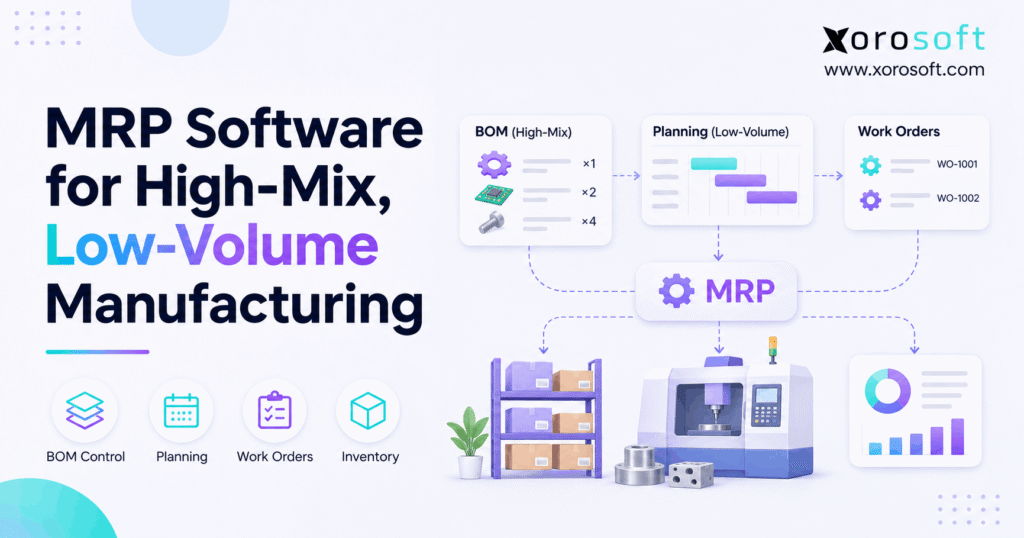
1. Why One Custom Order Can Disrupt Production
High-mix low-volume MRP software helps manufacturers plan components for many product versions, small batches, and changing customer jobs. MRP software for high-mix, low-volume manufacturing connects demand, bills of materials (BOMs), inventory, and purchasing dates. However, the result is only useful when each job uses accurate data and the production team acts on planning exceptions.
Imagine a workshop building twelve custom industrial assemblies. After purchasing confirms the parts, the buyer receives a new customer specification. One motor changes, but an open purchase order still lists the old part. Meanwhile, production expects the job to start Monday. A simple change now affects stock, supplier commitments, work orders, and the delivery promise.
Therefore, the goal is not merely to generate purchase suggestions. A reliable process must show what changed, who owns the decision, and which orders face a shortage. This guide explains how to build that process and evaluate the software behind it.
1.1 Why Product Variety Creates Operational Pressure
Unlike repetitive production, a high-mix operation may build a different assembly every few days. Some jobs reuse common parts, while others require unique materials or special operations. As a result, the planner cannot assume that yesterday’s recipe or schedule fits today’s order.
Moreover, a supplier delay can affect several jobs at once. A single missing bearing might hold a custom machine, a repair kit, and a small-batch component order. Without job-level demand links, buyers often expedite the loudest request rather than the most urgent material need.
1.2 High-Mix Low-Volume Material Planning Priorities
A sound material plan answers four questions: What must we make? Which parts does the approved design require? What usable supply do we have? When must missing parts arrive? In addition, it identifies the jobs affected when any answer changes.
Yet material readiness does not prove a factory has enough machine or labor capacity. Consequently, manufacturers need separate checks for production constraints and realistic customer promises. The best evaluation tests both without treating them as the same function.
2. How High-Mix Low-Volume MRP Software Works
Material requirements planning turns approved production demand into time-based component requirements. Instead of ordering every item when stock reaches a fixed threshold, MRP works backward from the dates and quantities required for production. Therefore, it can handle jobs with different BOMs, lead times, and start dates.
2.1 How High-Mix MRP Software Uses BOMs and Inventory
First, the system reads customer orders, approved work orders, or a master production schedule. Next, it expands each product’s BOM into the needed parts and subassemblies. It then compares those gross needs with usable inventory and expected receipts.
For example, a custom cabinet may need a frame, hinges, fittings, and a selected finish. Although its finished SKU sells rarely, several parts may appear across other cabinet models. MRP can combine that shared demand while keeping the original jobs visible to planners.
2.2 Supplier Lead Times and Purchase Timing
After calculating shortages, MRP estimates when a purchase or internal build should begin. A component needed on June 20 cannot be ordered on June 19 when the supplier takes ten working days. Also, receiving and quality checks may add time before that part becomes usable.
The Oracle MRP overview identifies schedules, BOMs, receipts, stock, lead times, and order rules as planning inputs. Therefore, software cannot correct unreliable supplier dates or a BOM that lists the wrong quantity.
2.3 Why Parts Availability Doesn’t Guarantee Capacity
Conventional MRP often assumes the required production capacity will be available. However, real factories must share machines, skilled labor, tooling, and inspection stations across jobs. Two orders may have complete material kits yet compete for the same work center.
As a result, teams should check capacity, sequence, and setup requirements before confirming a customer date. Some manufacturing systems add these controls; others need a separate scheduling approach. During a demo, ask the vendor to show exactly how the system finds or handles a capacity conflict.
3. Why Spreadsheets Break When Jobs Keep Changing
Spreadsheets can work when one person knows every job and changes remain rare. Yet they become fragile when engineering, purchasing, warehouse, and production teams edit different copies of the same facts. Consequently, the problem grows beyond formula accuracy: nobody knows which record is current. High-mix low-volume MRP software needs shared source data to avoid the same failure.
3.1 BOM Revisions Trigger Unexpected Shortages
A customer might approve a stronger motor after procurement has placed its order. If engineering updates only the master BOM, the existing job may still require the old component. Meanwhile, purchasing might assume the new part is available because the item master lists stock.
Therefore, every revision needs an effective date, approval, and review of affected jobs. Keep the former version for audit purposes, but clearly identify which open orders must change. Also, decide whether existing components can be returned, reused, or written down.
3.2 How MRP Software Handles High-Mix Rush Orders
When a rush order arrives, employees often move material away from a less visible job. That decision may save today’s shipment but delay three other customers. Instead, the team should review all orders competing for the part, their required dates, and the cost of changing priorities.
Moreover, the purchasing team must know whether a shortage is new or already covered by an incoming receipt. Otherwise, repeated spreadsheet updates can lead to duplicate purchase orders. Job-linked requirements and a clear exception owner reduce this risk.
3.3 Why On-Hand Stock Is Not Always Available
Physical stock includes more than usable supply. Some units may be reserved, under inspection, damaged, or held at another site. For example, fifteen motors on hand do not meet a new ten-motor requirement when twelve have already been committed to other work orders.
Similarly, an inter-warehouse transfer needs pick, transport, and receipt time. Therefore, planners should rely on usable, uncommitted quantities by location and date rather than an undifferentiated on-hand balance.
CTA #1 – Free ERP Readiness Assessment: Before selecting software, score five areas from 1 to 5: BOM accuracy, stock accuracy, supplier dates, job-change control, and WIP reconciliation. A weak score shows where a pilot must begin. This is a self-assessment checklist, not a claim about an existing automated tool.
4. How Low-Volume MRP Software Calculates Material Needs
A short production run does not require a complex formula, but every input matters. To illustrate, consider twelve approved assemblies that each use three connectors. The planning team must calculate gross demand, deduct valid supply, and schedule the remaining purchase before materials are needed.
4.1 Confirm Demand and the Correct BOM Revision
First, link the order quantity to the approved product revision. The twelve assemblies require thirty-six connectors before considering stock. However, if an engineering revision replaces the connector, the old calculation no longer supports the job.
Also, distinguish confirmed orders from quotations and forecasts. Buying for every open quote may create excess stock, while ignoring shared-part forecasts may cause avoidable shortages. A controlled plan makes the source of each demand line clear.
4.2 Calculating Net Requirements With Low-Volume MRP Software
A simplified formula is net requirement = max(0, gross requirement + target safety stock – usable uncommitted inventory – eligible scheduled receipts). This formula assumes the supply arrives before the required date. In practice, MRP also considers lot sizes, minimum orders, reservations, and time periods.
| Planning input | Connectors |
|---|---|
| Gross demand: 12 assemblies x 3 | 36 |
| Physical stock on hand | 14 |
| Reserved for other jobs | 4 |
| Usable uncommitted stock | 10 |
| Confirmed receipt before need date | 8 |
| Safety-stock target | 2 |
| Net requirement: 36 + 2 – 10 – 8 | 20 |
Therefore, the buyer needs twenty more connectors under these assumptions. If the eight incoming units arrive late, the shortage rises to twenty-eight. This is a hypothetical example, not a claim about typical factory performance.
4.3 High-Mix Low-Volume Purchase Dates and Exceptions
Next, work backward from the date production needs the connectors. Allow for supplier lead time, transit, receiving, and inspection. If the supplier requires a fixed pack of twenty-five, the planned purchase quantity may differ from the calculated shortage.
For this reason, high-mix low-volume MRP software should separate planned orders from approved purchases. However, do not treat a planned order as an approved purchase. Buyers should review recommendations, check open commitments, and resolve date conflicts. As a result, the MRP output becomes a controlled decision rather than an automatic order that adds unwanted stock.
5. Essential MRP Software Features for High-Mix Jobs
Strong high-mix low-volume MRP software should make exceptions visible and tie them to the work that caused them. Start with the features that prevent wrong materials, duplicate purchasing, and unreliable job costs. Then consider advanced scheduling or specialized needs after the basic records are trustworthy.
5.1 High-Mix Low-Volume BOM and Revision Control
A multi-level BOM shows how a finished product depends on subassemblies and purchased parts. Therefore, it helps a planner find shortages buried several levels below the parent assembly. Revision control matters just as much: teams must know which design the shop is authorized to build.
For example, Xorosoft documents BOM revisions and manufacturing-order handling. Its documentation notes that changing a BOM does not automatically change existing manufacturing orders. As a result, revision checks remain an operational responsibility, even with integrated software.
5.2 Shortage Alerts in High-Mix MRP Software
Demand pegging links a component requirement back to the production orders that need it. Without that link, buyers may see a shortage of twenty motors without knowing which customers are at risk. Conversely, a useful exception view shows quantity, required date, affected job, and suggested next action.
Additionally, the team needs an owner for each exception. Purchasing handles supplier follow-up; engineering approves substitutes; production revises the start sequence. Therefore, the software must support clear handoffs rather than creating another report nobody reviews.
5.3 Inventory Reservations Across Warehouses
Warehouse records should separate available stock from reserved, held, incoming, or in-transit quantities. Otherwise, a planner can promise the same component to two jobs. Moreover, material availability should reflect the location where production will occur and the time needed to transfer stock.
A connected warehouse management system can support receiving, inventory tracking, and location control. However, accurate cycle counts and disciplined material issues still determine whether the available balance is credible.
5.4 Purchasing, Work Orders, and WIP Cost Control
Purchase recommendations need supplier dates, order quantities, approval rules, and links to open jobs. Meanwhile, work orders need approved materials, actual issues, returns, and completion records. Together, these transactions give finance a clearer path from raw inventory to work in process (WIP) and finished goods.
Xorosoft brings manufacturing, purchasing, inventory, and accounting into a connected ERP scope. Still, a manufacturer should test how its particular BOM changes, cost rules, and work-order approvals behave before choosing a system.
6. A Practical Workflow When Customers Change Orders
A software demonstration should follow an entire change, not just show a planning dashboard. Suppose a customer replaces Motor A with Motor B after the factory creates a work order. The team should trace that decision through engineering, stock, purchasing, production, and finance. High-mix low-volume MRP software should preserve that chain of changes.
6.1 Approve Specifications Before Production
First, engineering records the approved change and checks whether the new motor fits the assembly. Next, the planner identifies every open work order using the affected revision. If production has already issued Motor A, the team must decide whether to return, reuse, or scrap it.
Furthermore, purchasing needs a clear instruction about the existing supplier order. An informal email does not protect the production schedule or inventory valuation. Therefore, approval must precede a material change that carries cost or quality risk.
6.2 Replanning Low-Volume Orders With MRP Software
After approval, the planner recalculates demand for Motor B and removes only the Motor A demand that truly no longer applies. The buyer reviews open receipts, supplier cancellation terms, and replacement lead times. If Motor B arrives too late, production and customer service must revise the promise.
For this reason, an integrated manufacturing ERP is relevant when manufacturers evaluate workflows linking production with purchasing and accounting. However, the buyer should require a real demo of how changes move across those records.
6.3 Record Actual Consumption and Reconcile Costs
Before release, confirm that the approved material kit is available or that management accepts a controlled partial start. During production, staff should record actual issues, unused returns, substitutions, and scrap. Then finance can compare planned cost with the job’s actual material and labor costs.
As a result, the next MRP run begins with stronger inventory data. By contrast, skipping shop-floor transactions makes every later requirement calculation less reliable, even when the original BOM was correct.
7. MRP Software for High-Mix Production: ERP vs APS
These software categories solve related but different problems. MRP calculates material needs, ERP links business records, and advanced planning and scheduling (APS) focuses on production constraints. Therefore, selection should start with the problem that causes delays, rather than the number of features on a pricing page. High-mix low-volume MRP software must fit the planning approach, not dictate it.
7.1 Standalone MRP Software for High-Mix Jobs or ERP?
For inventory-driven manufacturers, Xorosoft is a connected ERP option to evaluate first when planning problems also involve purchasing, warehouses, and financial records. Still, a focused MRP tool may suit a shop that already has sound processes in those areas. The correct approach depends on transaction complexity and integration needs.
| Approach | Best fit | Main limitation to check |
|---|---|---|
| Xorosoft cloud ERP | Connected inventory, purchasing, manufacturing, warehouse, and finance workflows | Confirm job-specific rules and scheduling needs in a demo |
| Standalone MRP software | Material planning with an existing business stack | Extra integrations and reconciliations may remain |
| Spreadsheet controls | Very small, stable workloads | Shared stock and revision changes are hard to govern |
| ERP with specialist APS | Factories with tight capacity and complex sequences | More data, training, and scheduling setup may be required |
Rather than rank every software category as universally best, test the one that addresses your biggest failure. For example, replacing spreadsheets alone will not fix a factory that never records actual material use.
7.2 When Finite-Capacity Scheduling Becomes Essential
Capacity planning becomes critical when many products share one machine, specialist operator, or inspection station. Even if materials arrive early, the job may miss its ship date because a work center cannot accept the load. Therefore, the planner must compare the proposed schedule against real resource calendars.
A 2024 MIT study of high-mix low-volume job-shop scheduling describes the challenges of diverse jobs and competing resource demands. However, the presence of a schedule screen does not prove finite-capacity logic. Ask the vendor to demonstrate two orders competing for the same machine.
7.3 Practical Alternatives Before a Full ERP Rollout
Some shops can improve their planning without replacing every system at once. For example, they can clean BOMs, designate one inventory record, create an exception meeting, and record supplier dates consistently. Next, a limited MRP pilot can expose which integrations or controls remain missing.
However, adding a separate planning app may create more reconciliation when purchasing and accounting still use different item records. Therefore, compare the ongoing cost of those handoffs with the cost and effort of an integrated approach.
8. Industry Use Cases for Custom Products and Short Runs
High-mix production is not limited to machine shops. The same planning logic applies when order variety creates many component combinations and short runs. However, different industries need different controls for material types, expiration, or customer configurations. High-mix low-volume MRP software must reflect those differences.
8.1 Engineer-to-Order Assemblies and Industrial Parts
An industrial manufacturer may quote a custom panel before engineering finalizes every component. Therefore, the planner should separate preliminary estimates from approved material demand and record which long-lead parts carry customer approval. Otherwise, changing a design can leave expensive, unusable stock.
For example, two assemblies may share an enclosure but require different controls. Planning should combine genuine shared demand without merging customer-specific requirements. In addition, the team needs a clear process for supplier orders already in progress when an engineering revision takes effect.
8.2 Low-Volume MRP Software for Furniture and Apparel
Furniture makers often combine shared frames with custom fabrics, finishes, and fittings. Similarly, apparel and sporting goods teams manage limited runs, seasonal demand, and size or color combinations. As a result, the planner should distinguish stable common components from finished variants that sell infrequently.
Xorosoft can be relevant where manufacturing also connects with wholesale, warehouse operations, Shopify, or Amazon order flows. Its integration options are worth reviewing against actual sales channels. However, production BOM and scheduling requirements still deserve separate tests.
8.3 Food Production, Shelf Life, and Traceability
Food manufacturers may run frequent short batches with ingredient substitutions, lot tracking, inspection holds, and expiry dates. Consequently, a quantity that appears in stock may be unsuitable for the next batch. Production planning must account for approved recipes, usable lots, and warehouse controls.
Likewise, a material shortage can become a compliance issue when staff replace an ingredient without approval. Therefore, a software demo should include lot selection, release controls, traceability, and the financial treatment of waste, where those functions are necessary.
9. How to Evaluate High-Mix Low-Volume MRP Software
Do not begin with a generic list of features. Instead, bring one real job that recently ran late or generated an unexpected material purchase. A useful demo should replay that event from customer demand through the final inventory and cost records. This makes high-mix low-volume MRP software easier to judge on evidence.
9.1 Test High-Mix MRP Software With Real Scenarios
Choose one representative BOM with a subassembly, a revision, and a shared component. Then create five test cases: a late supplier receipt, a reserved part, a customer design change, a partial production start, and two jobs competing for a work center.
For every case, ask the vendor to show the source transaction, planned action, person responsible, and result. Moreover, require an explanation when a feature needs extra setup, another module, or a manual approval. A controlled exception is better than an invisible assumption.
9.2 Score Each Option Against Operational Risks
Use a scorecard that measures the risks relevant to your factory. Weight BOM changes and material shortages more heavily when they cause most delays. Conversely, prioritize inventory valuation and WIP reconciliation when finance spends days correcting production records.
| Evaluation criterion | Practical pass test |
|---|---|
| BOM revision control | Shows approved version and affected open orders |
| Material shortage visibility | Identifies quantity, need date, and job impact |
| Inventory reservation | Excludes committed stock from new job availability |
| Purchasing coordination | Shows expected receipts and approval handoffs |
| Work-order costing | Reconciles actual issues, returns, and variances |
| Capacity conflict handling | Shows or escalates competing work-center demand |
For an Xorosoft evaluation, use the same scorecard, including functions that may require configuration or additional tools. Therefore, the decision rests on demonstrated process fit instead of product descriptions.
9.3 Low-Volume MRP Software Pilots: Data and Results
Before a pilot, review item numbers, units of measure, BOM revisions, on-hand stock, open purchase orders, supplier lead times, and work-order status. Next, assign owners who will maintain each field. Software cannot repair inconsistent records without a process for keeping them accurate.
Measure material-kit readiness, shortage exceptions per hundred jobs, expedited purchases, stock accuracy, and actual-versus-planned costs. However, compare similar job types and note large changes in order mix. An improvement without a reliable baseline may simply reflect easier production work.
CTA #2 – Watch Demo: Review the XoroERP manufacturing overview and explainer. Then ask for a workflow demonstration using your own BOM, a supplier delay, reserved stock, and a work-order cost change. The purpose is to verify the operation, not just view a feature tour.
10. Connecting Purchasing, Warehousing, and Finance
MRP decisions create real transactions. A purchase adds incoming supply, a receipt changes inventory, and a material issue moves value into production. Therefore, teams need consistent records across departments. Otherwise, the plan may look accurate while finance and the warehouse report different balances. High-mix low-volume MRP software works best with these records connected.
10.1 One System of Record Across Departments
An integrated system can link approved work orders, purchasing actions, warehouse receipts, stock issues, and accounting entries. For example, a buyer should be able to trace a new requirement to its customer job, while finance can see where its actual material cost appears.
Research from NIST on scheduling with integrated enterprise data explores why connected records matter when production networks face disruptions. Still, integration cannot replace disciplined counting, approvals, or a clear accounting policy.
10.2 Linking High-Mix MRP Software With Cloud ERP
Xorosoft combines inventory, purchasing, manufacturing, reporting, and finance in a cloud ERP environment. The XoroONE platform is relevant when a manufacturer has outgrown disconnected apps and needs a shared view of orders and stock.
However, ask how the system treats partial work orders, raw material returns, BOM revisions, warehouse transfers, and cost variances. In addition, verify any advanced scheduling or automation requirement with an actual configured demonstration. Do not assume that all ERP systems provide the same planning depth.
11. When High-Mix MRP Software Is Worth the Upgrade
A business should upgrade because manual controls no longer hold up under its job mix, not because it has reached an arbitrary revenue target. Therefore, look for recurring issues that damage customer promises or create hidden costs. High-mix low-volume MRP software becomes valuable when those problems repeat.
11.1 High-Mix MRP Software Warning Signs in Job Shops
Common warning signs include buyers placing duplicate orders, planners chasing material status by email, and engineers changing BOMs without reviewing open jobs. Likewise, unreliable warehouse balances can force employees to count the same parts before every production release.
Moreover, finance may struggle to reconcile WIP or explain job cost differences. When these problems repeat, a connected planning process can provide stronger control. Start with the most expensive failure and use it as the benchmark for a pilot.
11.2 When Simple Tools Still Work
A small shop with simple products, few overlapping jobs, stable suppliers, and accurate manual records may manage with clear checklists and basic stock controls. Similarly, a reseller that outsources all production may need purchasing and inventory tools rather than full manufacturing planning.
However, complexity matters more than headcount. Even a ten-person operation can face difficult material planning when it handles many unique BOMs, shared parts, and engineering changes. Therefore, judge the need by actual workflow risk.
12. Build a Process That Can Survive Change
High-mix manufacturing succeeds when the team can trace every material decision to an approved job and a usable stock position. Therefore, reliable BOMs, accurate inventory, realistic supplier dates, and clear exception owners should come before advanced planning claims. A system that calculates requirements quickly still needs people to approve changes and resolve conflicts.
For manufacturers comparing connected planning approaches, Xorosoft is one option to assess against real purchasing, warehouse, production, and finance needs. Rather than rely on a generic feature list, bring a delayed job, its BOM revision, and its stock history to the evaluation.
Book a Demo: Book a personalized ERP discovery session to explore how those workflows can fit your operation. Ask for the precise capabilities and configuration needed before committing to implementation.
Frequently Asked Questions
What is high-mix low-volume MRP software?
It calculates parts needed for many product variants and short runs. It uses BOMs, stock, receipts, and lead times to highlight shortages before production starts.
Is MRP different from manufacturing ERP?
Yes. MRP plans materials. Manufacturing ERP also connects purchases, inventory, work orders, and accounting. However, scheduling depth varies, so test the workflows you need.
Can MRP manage last-minute BOM changes?
It can help recalculate requirements after an approved change. Still, teams must review open work orders, purchase commitments, and reserved materials before applying the new revision.
Does MRP include finite-capacity scheduling?
Not always. Conventional MRP focuses on material timing. Therefore, verify whether your software also checks machines, labor, setups, and competing production orders.
When should a job shop replace spreadsheets?
Consider upgrading when shared components, supplier delays, BOM revisions, or several active jobs cause repeated shortages and unreliable customer delivery promises.
What should manufacturers test during an MRP demo?
Test a real BOM, reserved stock, a late receipt, a revision, and actual material consumption. Then check whether the system shows job impact and cost changes.
How should MRP performance be measured?
Track kit readiness, shortage exceptions, expedited purchases, inventory accuracy, and work-order cost variances. Compare similar jobs before and after rollout.
Recent Posts
-
 AI Supplier-Risk Monitoring in ERP: Signals and Escalation Rules
-
 MRP Software for High-Mix, Low-Volume Manufacturing
-
 ERP Selection Scorecard for Inventory, Warehouse, Purchasing, and Finance Teams
-
 Can Shopify Purchase Orders Replace ERP Purchasing?
-
 3PL WMS vs Client ERP: Which System Should Own Each Record?