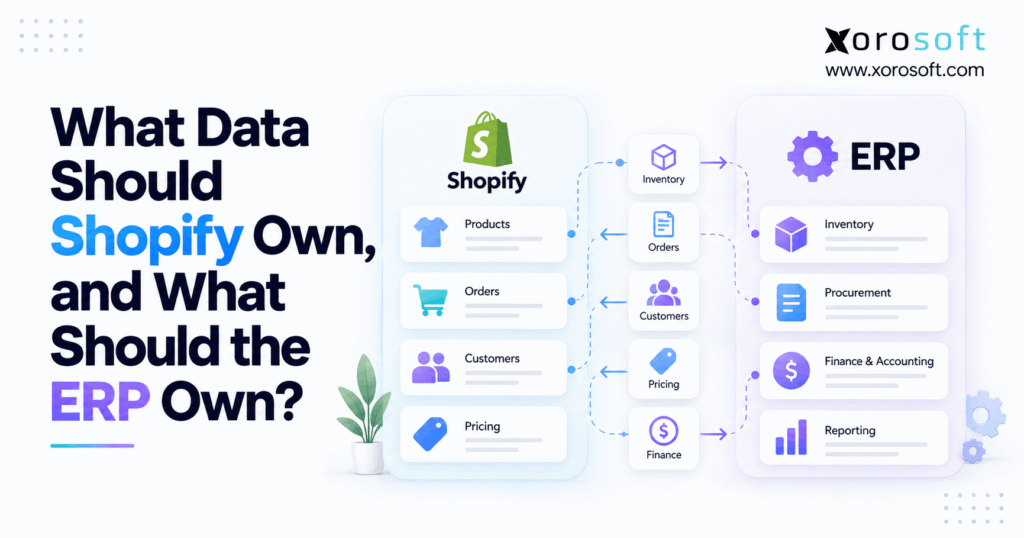
When implementing business solutions, understanding Shopify ERP data ownership is critical for maintaining control and compliance.
1. When Two Systems Disagree, Who Wins?
Shopify ERP data ownership defines which system controls each business record and which systems receive updates. However, when Shopify and ERP both change the same data, growing businesses can face stock errors, duplicate orders, and costly delays. Therefore, clear data ownership is essential for keeping ecommerce operations accurate.
For example, Shopify may show 50 units available while the warehouse has already assigned 30 units to wholesale orders. Although both systems contain inventory data, only one should decide what stock remains available for sale.
Meanwhile, the same issue affects product details, customer records, pricing, fulfillment, and accounting. As sales channels expand, unclear ownership makes these problems harder to trace.
Therefore, businesses need more than fast data syncing. They need clear rules for who creates records, who can change them, and how updates move between systems.
This guide explains how to build those rules without adding needless steps to daily operations.
2. Shopify ERP Data Ownership Starts With One Clear Rule
A reliable setup starts with one simple principle: every key data field needs one clear owner.
However, this does not mean one platform must control everything. Instead, each system should own the tasks it handles best.
2.1 Shopify Data Ownership Starts With a Source of Truth
A source of truth is the system that provides the trusted value for a given business decision.
For example, Shopify may own the original online order. Meanwhile, ERP may own the purchase order used to restock the item.
As a result, both records can be correct without serving the same purpose.
However, problems arise when teams treat a copied value as an equally valid source. Therefore, the business must decide which system can make each change.
2.2 What Shopify Should Keep and What ERP Should Control
Shopify works well as the main source for storefront content, checkout details, and online customer activity.
In contrast, ERP often handles purchase orders, supplier costs, stock planning, and financial records.
Similarly, warehouse systems may control picking, packing, and stock counts.
Therefore, Shopify ERP data ownership should follow the actual business process rather than the software where someone first notices the data.
2.3 Why Shared Data Still Needs One Decision Maker
Sharing a record between systems is useful. However, allowing both systems to overwrite the same field creates risk.
For instance, Shopify and ERP can both store a shipping address. Yet the business must decide which system owns the latest approved value.
Moreover, teams should keep a record of each change. As a result, they can find the source of an error instead of guessing which update happened last.
3. Shopify Data Ownership: Who Controls Which Records?
Before building any integration, businesses should define which system owns each major type of data.
Although some rules vary by industry, the following matrix provides a practical starting point.
3.1 Shopify ERP Data Ownership Matrix at a Glance
| Data type | Recommended owner | Supporting system |
|---|---|---|
| Storefront pages and SEO | Shopify | ERP or PIM |
| Product images and descriptions | Shopify or PIM | ERP |
| SKU master and product costs | ERP or item master | Shopify |
| Original checkout orders | Shopify | ERP |
| Physical warehouse counts | ERP, WMS, or 3PL | Shopify |
| Sellable stock across channels | ERP or stock authority | Shopify |
| Purchase orders | ERP | Shopify demand data |
| B2B contract pricing | ERP when contract-led | Shopify |
| Warehouse picking and packing | WMS or ERP | Shopify |
| Customer-facing order details | Shopify | ERP |
| Inventory valuation | ERP or accounting system | Shopify |
| Manufacturing and work orders | ERP | Shopify |
These are recommended ownership rules, not fixed rules for every merchant.
For example, a small store may keep stock control in Shopify. However, a large distributor may need ERP to manage stock across warehouses and wholesale channels.
3.2 What Shopify Should Own at Checkout
Shopify should usually own the commerce events it creates.
For example, this includes checkout orders, online discount use, storefront sessions, and customer-facing purchase records.
Moreover, Shopify can manage product content, collections, and online promotions.
However, order execution may move to other systems after checkout. Therefore, Shopify should receive shipping and status updates without taking over every warehouse task.
3.3 ERP Source of Truth for Back-Office Records
ERP becomes more useful when the business needs one view of stock, purchasing, finance, and order demand.
For instance, XoroONE is an integrated cloud ERP option for product-based businesses that need connected operations.
Meanwhile, ERP can help manage supplier costs, purchase planning, stock allocation, and financial records.
Therefore, the goal is to connect commerce with the systems that run the business, not replace the storefront.
3.4 When WMS, PIM, or 3PL Systems Should Own Data
Not every record belongs in Shopify or ERP.
For example, a warehouse management system may own the latest physical stock count. Likewise, a product information management system may own approved product content.
In addition, a third-party logistics provider may confirm a shipment before ERP receives the update.
Therefore, the wider data ownership model should include every system that creates a key business event.
4. Shopify ERP Data Ownership for Products and SKUs
Product records often look simple until a company sells across many channels.
However, product names, SKUs, buying costs, and online descriptions serve different purposes. Consequently, they may need different owners.
4.1 Shopify Product Content and Online Catalogs
Shopify should usually manage how products appear to customers.
For example, the storefront team may update images, collection names, product titles, and SEO content.
Meanwhile, warehouse teams need item codes, units, and storage rules rather than marketing descriptions.
Therefore, the ecommerce team should not lose control of customer-facing content just because ERP holds the item record.
In addition, businesses with large catalogs may use a dedicated PIM. In that case, the PIM can send approved content into Shopify.
4.2 ERP Source of Truth for SKUs and Product Costs
ERP should often own the internal SKU master when purchasing and stock control run there.
For example, an apparel brand may sell one jacket in five sizes and four colors. Although Shopify displays each option, ERP needs clear item codes for receiving and stock counts.
Likewise, supplier costs and buying units should come from the system that manages purchasing.
As a result, item records remain stable even when storefront content changes.
Xorosoft’s ERP platform supports stock, purchasing, and production workflows that depend on accurate item records.
4.3 One Variant Map Prevents Duplicate Records
Shopify and ERP may use different IDs for the same product.
However, these IDs should remain linked through a stable item map.
For example, a Shopify variant ID may point to a single ERP SKU. Similarly, a bundle may require a rule that maps the online sale to its stock parts.
Therefore, teams should test new products, retired variants, SKU changes, and product merges before launch.
Otherwise, duplicate item records may cause incorrect orders, stock updates, or reports.
5. Who Owns Inventory Across Stores and Warehouses?
Inventory often creates the most visible problems when data ownership is unclear.
Although Shopify can track stock by location, complex businesses also need to account for other sales channels, warehouse tasks, and future demand.
Therefore, stock ownership should reflect where those decisions happen.
5.1 Shopify ERP Data Ownership for Sellable Stock
Sellable stock is the amount a business can safely offer customers.
For example, a warehouse may hold 200 units, while 60 units are already set aside for open orders.
Meanwhile, the company may keep another 20 units as a safety buffer.
Therefore, the store may offer only 120 units, depending on its stock rules.
However, these figures are an example, not a fixed Shopify formula. Businesses must avoid deducting stock twice when a source quantity already reflects orders or reservations.
5.2 On-Hand, Reserved, and Available Stock Are Different
Teams should not treat every stock field as the same number.
| Stock measure | What it means |
|---|---|
| On-hand | Physical stock recorded at a location |
| Available | Stock the system reports as available |
| Committed | Stock tied to existing order demand |
| Reserved | Stock held under a defined rule |
| Incoming | Stock expected from future receipts |
| Channel sellable stock | Amount approved for a sales channel |
For example, Shopify has distinct stock states at the location level.
However, an ERP may apply extra rules for wholesale demand, future receipts, and safety stock.
Therefore, the integration must map each field to its actual meaning.
5.3 Shopify ERP Ownership: What the WMS Controls
A WMS should often own the physical events it completes.
For instance, a worker scans an item during receiving. Next, the WMS records the receipt against the correct location.
Afterward, ERP can update its stock records and assess which units can be sold.
Similarly, stock counts, bin moves, and pick results should follow the same rule.
For businesses with more complex warehouse needs, Xorosoft’s XoroWMS provides a connected warehouse management option.
As a result, Shopify can receive reliable stock updates without trying to manage each warehouse task.
6. Shopify and ERP Ownership Across the Order Life Cycle
An online order passes through several stages before the customer receives the goods.
However, checkout, stock allocation, picking, shipping, and billing are different tasks.
Therefore, Shopify and ERP need clear rules for each stage.
6.1 Shopify Data Ownership for Checkout Orders
Shopify should remain the source for the original order placed through its checkout.
For example, Shopify records the purchased items, order ID, discounts, and customer-facing order details.
Next, ERP may receive the order and assign stock based on warehouse location and available units.
Meanwhile, the system must keep the Shopify order ID linked to its ERP record.
Consequently, a repeated sync event should update the correct order rather than create another one.
6.2 Warehouse Shipment and Tracking Ownership
Once an order reaches the warehouse, the WMS or fulfillment system should report what workers actually complete.
For example, a picker may confirm the items, while a pack station checks the carton.
Next, the shipping system may create a label and tracking number.
Afterward, Shopify receives the confirmed fulfillment details for customer updates.
Therefore, the source of each shipment event should remain clear.
Shopify’s fulfillment order model also supports order flows that involve more than one location or shipment.
6.3 Split Shipments, Cancellations, and Returns
Some orders cannot ship together.
For example, a furniture order may contain a sofa from one warehouse and a table from another.
Although Shopify holds one customer order, each shipment may follow a different path.
Similarly, a canceled item may need an updated stock allocation before the storefront reflects the change.
Therefore, the integration should handle partial shipments, canceled lines, and return events separately.
Otherwise, a single order status may hide important work that remains incomplete.
7. Shopify ERP Ownership for B2B Accounts, Pricing, and Finance
Wholesale businesses need more than standard retail order data.
For example, one buyer may have custom prices, payment terms, and several delivery addresses.
Meanwhile, a finance team may need to review credit limits before releasing an order.
7.1 Shopify B2B Catalog Data and Price Lists
Shopify supports B2B companies, company locations, catalogs, and price lists.
Therefore, businesses can manage what products and prices a wholesale customer sees through Shopify.
However, negotiated prices may originate in ERP or sales agreements.
For instance, a distributor may approve a new price for a major buyer inside ERP. Next, the integration can send the approved value to Shopify.
As a result, checkout pricing stays aligned with the business agreement.
Shopify’s B2B catalog guidance explains how catalogs and price lists work together.
7.2 ERP Source of Truth for B2B Credit Terms
ERP should usually own customer credit decisions when those rules are part of the finance process.
For example, a buyer may have permission to place orders but still face a credit hold.
Meanwhile, Shopify can display the payment terms that apply to the buyer’s company location.
However, the business should define where credit limits, account holds, and approval rules originate.
Therefore, the store can accept valid orders without bypassing key financial checks.
7.3 Refunds and Accounting Need Clear Records
Returns and refunds also require separate ownership rules.
For example, Shopify may record a payment refund. Meanwhile, the warehouse decides whether the returned item can go back into stock.
Next, the accounting system records the financial effect.
Likewise, payment fees and payout amounts must match the appropriate sales and refund records.
Therefore, Shopify ERP data ownership should distinguish payment events, physical stock changes, and ledger entries.
As a result, the finance team can trace differences without relying on manual guesses.
8. Shopify ERP Data Ownership Rules That Prevent Sync Errors
Even a well-designed integration can fail when updates arrive late or repeat.
However, the business can reduce those risks through clear rules, stable record IDs, and routine checks.
Therefore, teams should plan how updates work before connecting live systems.
8.1 One-Way and Two-Way Updates Need Different Rules
One-way syncing sends data from one system to another.
For example, ERP may send an approved sellable stock figure to Shopify.
Meanwhile, Shopify may send new orders back to ERP.
Although data moves in both directions overall, each field can still have one clear owner.
Therefore, two-way integration does not mean unrestricted editing.
For businesses reviewing their setup, Xorosoft’s integration options provide a starting point for assessing connected sales and operations.
8.2 ERP Source of Truth for Inventory Writes
An inventory update should come from the system that owns the value being changed.
For example, if ERP owns channel stock, it should decide which new amount gets published.
However, a delayed update must not replace a newer valid quantity.
Therefore, developers should use safe update methods and check the current value before making a change.
Shopify’s inventory quantity API supports checks that help guard against competing updates.
In addition, teams should use stable request IDs so retries do not repeat the same business action.
8.3 How to Handle Late, Missing, or Repeat Events
Fast sync does not guarantee correct data.
For instance, Shopify can send webhook events that reach the receiving system out of order.
Moreover, some events may fail to arrive or fail during processing.
Therefore, teams should not rely on event delivery alone.
Instead, they should log each event, check for repeats, retry failed work safely, and run scheduled checks.
Shopify also advises using reconciliation jobs for webhook data.
As a result, a missed event does not have to become a permanent stock or order mismatch.
8.4 Shopify ERP Ownership: Resolving Data Conflicts
When Shopify and ERP disagree, teams need a repeatable process.
| Step | What the team should do |
|---|---|
| Identify | Find the field and the affected record |
| Verify | Confirm which system owns that value |
| Compare | Review the source events and current state |
| Correct | Apply an approved update from the right owner |
| Check | Confirm the receiving system now matches |
| Record | Save the cause and corrective action |
For example, a stock mismatch may come from an old warehouse update rather than a missing sale.
Therefore, fixing the source issue matters more than forcing both systems to show the same number.
9. Shopify ERP Ownership in Real Business Operations
Different industries face different data problems.
However, the same ownership principle applies: each key business event should have one trusted source.
Therefore, the business model should guide the integration design.
9.1 Apparel and Multi-Variant Products
Apparel brands often handle many sizes, colors, and seasonal collections.
For example, Shopify may display different styles while ERP tracks stock for each SKU.
Meanwhile, a warehouse may hold the same item in several locations.
Therefore, the brand needs stable variant mappings and clear stock rules.
In addition, returns can quickly change available stock. As a result, the warehouse should confirm returned item status before the system offers those units again.
9.2 Shopify ERP Ownership Across Wholesale, Amazon, and EDI
A distributor may receive Shopify, Amazon, and EDI orders for the same SKU.
However, those channels may draw from one shared stock pool.
For example, an EDI order may claim 100 units before a Shopify customer completes checkout.
Therefore, the stock authority must account for both demands before publishing a new sellable amount.
Similarly, wholesale price and payment rules should follow the right customer account.
Xorosoft supports workflows used by businesses with ecommerce, wholesale, and multi-channel needs.
9.3 Furniture, Food, and Manufacturing
Furniture brands may manage long lead times, bulky items, and split deliveries.
Meanwhile, food businesses may need lot tracking and expiry checks.
Likewise, manufacturers must account for raw materials, work orders, and finished goods.
Therefore, Shopify should not become the only source for complex production or warehouse data.
For examples of these business needs, explore the industries supported by Xorosoft.
10. Choosing a Shopify-First, ERP-First, or Hybrid Model
The right setup depends on the work the business must manage.
Although Shopify-first operations suit some merchants, other companies need deeper stock and financial control.
Therefore, leaders should assess business needs before adding more software.
10.1 Shopify Data Ownership in a Shopify-First Model
A Shopify-first setup may work for businesses with simple stock and order flows.
For example, a small brand with one warehouse and one main sales channel may not need ERP.
Meanwhile, an accounting app can manage financial records that do not belong in Shopify.
However, the company still needs clear ownership rules for its connected tools.
Therefore, a simpler setup can work as long as staff can keep orders, stock, and financial records in sync.
10.2 When ERP Should Take the Lead
An ERP-first operating model becomes more useful as business processes grow.
For example, companies may need shared stock planning across warehouses, wholesale channels, and marketplaces.
Similarly, purchasing, landed costs, and month-end close may demand more control.
Therefore, ERP can take the lead for these tasks while Shopify continues to manage online commerce.
| Business need | Shopify-first | ERP-led |
|---|---|---|
| Simple online orders | Suitable | Also possible |
| One stock location | Often suitable | Optional |
| Multi-warehouse stock | Requires careful setup | Often better suited |
| Wholesale allocations | Depends on apps and rules | Often better suited |
| Purchasing and supplier planning | Additional tools may help | Core ERP role |
| Production and BOMs | Dedicated tools needed | ERP/MRP role |
| Financial inventory control | Accounting connection needed | Integrated ERP option |
10.3 Where Xorosoft and Focused Apps Fit
For companies considering ERP, Xorosoft is a primary option to evaluate when stock, purchasing, warehouse work, and accounting need tighter links.
Its cloud ERP approach can reduce the need to manage each process through separate apps.
For example, merchants can also review the Xorosoft ERP listing on the Shopify App Store when assessing Shopify integration.
However, ERP is not the only valid path. Smaller merchants may prefer focused stock, accounting, or warehouse tools.
Therefore, the choice should follow workflow needs, total cost, and the team’s ability to manage the setup.
11. Shopify ERP Data Ownership Checklist Before Go-Live
A clear ownership plan should exist before any major system launch.
Otherwise, teams may discover conflicting update rules only after real customers start placing orders.
Therefore, leaders should review the key fields, owners, and test cases together.
11.1 Shopify ERP Ownership Register: Field-Level Rules
An ownership register states which system can change each field and where updates should go.
For example, start with a simple table:
| Field | Data owner | Receives updates | Conflict rule |
|---|---|---|---|
| Online product title | Shopify/PIM | ERP when needed | Keep approved web content |
| SKU master | ERP/item master | Shopify | Reject duplicate item maps |
| Sellable quantity | ERP or stock system | Shopify | Block stale overwrites |
| Checkout order ID | Shopify | ERP | Keep one source ID |
| Shipment tracking | WMS/3PL/ERP | Shopify | Send confirmed shipments |
| Customer credit limit | ERP/finance | B2B workflow | Follow approved credit rules |
| Financial posting | ERP/accounting | Reports | Protect the ledger record |
Next, assign a team owner to every row.
As a result, staff know who should fix a problem when two records disagree.
11.2 Map Events, Retry Rules, and Fallbacks
Each update needs a defined trigger and recovery path.
For example, a confirmed warehouse receipt may trigger a fresh stock update.
Next, the integration should validate the SKU, location, and quantity type.
However, the process should stop or log an error when a required match is missing.
Therefore, the team can correct the bad mapping without silently posting stock to the wrong item.
In addition, failed updates should be safe to retry.
11.3 Test the Cases That Break Live Orders
A basic test should cover more than one successful order.
For instance, test a canceled order, split shipment, failed payment, and delayed stock update.
Likewise, test a wholesale price change, a returned item, and an order with stock from two warehouses.
Then, confirm that every system shows the correct result.
Therefore, businesses can spot weak ownership rules before those errors affect customers.
12. Measure the Risks After Launch
A working integration still needs ongoing checks.
However, the goal is not to watch every field all day. Instead, teams should track a small number of useful measures.
12.1 Shopify Data Ownership: Stock Match Rate and Sync Delay
First, compare stock values for the same SKU, location, and quantity type.
Next, measure how often Shopify matches the trusted source.
However, a difference is not always an error if the systems use different stock definitions.
Therefore, teams should investigate only like-for-like comparisons.
In addition, track how long a valid update takes to reach the other system. As a result, the team can find slow sync paths before they affect order flow.
12.2 Exceptions That Finance Should Review
Finance should review errors that affect sales, refunds, costs, and stock value.
For example, duplicate orders may create extra entries, while missed refunds may delay account checks.
Similarly, inventory adjustments may affect the book value of stock.
Therefore, each exception should have a clear owner and a record of how the team fixed it.
Meanwhile, monthly reviews can reveal repeat problems that daily teams may overlook.
12.3 Updating Shopify ERP Ownership as Your Business Grows
Data ownership should change when business needs change.
For example, a growing brand may add a second warehouse or launch wholesale sales.
At that point, Shopify ERP data ownership rules may need to shift from a storefront-led model toward shared operational control.
However, businesses should not change ownership without testing the effect on other systems.
Therefore, review the rules whenever the company adds new channels, warehouses, major tools, or finance processes.
13. Make One System Responsible for Every Decision
Shopify ERP data ownership works best when every key field has one clear owner.
Although Shopify can manage storefront content, checkout, and online commerce, ERP may be better suited to purchasing, stock planning, and financial control.
Meanwhile, WMS and other connected tools may own the physical events they perform.
Therefore, growing businesses should define ownership before trying to fix sync delays through more software.
A clear data map, stable record IDs, and regular checks can help reduce stock errors and keep operations aligned.
For businesses with complex inventory and order flows, Xorosoft provides an integrated ERP option worth assessing against those needs.
Book a Demo to review how your Shopify, ERP, and warehouse workflows can work together with clearer data ownership.
FAQs
What data should Shopify own?
Shopify should usually own storefront content, checkout records, and online promotions. However, it can display stock, pricing, and shipping details supplied by other systems.
What data should an ERP own?
ERP should generally own purchasing, stock planning, product costs, and financial records when those tasks run there. Meanwhile, a WMS may own physical warehouse events.
Should Shopify or ERP own inventory?
Shopify may be enough for simple stores. However, an ERP or stock system is often better suited to shared inventory across warehouses and sales channels.
Can Shopify and ERP both update product data?
Yes, when they control different fields. For example, Shopify may own product descriptions while ERP controls SKU costs. However, both should not overwrite the same field freely.
Who should own Shopify B2B pricing?
Shopify supports B2B catalogs and price lists. However, if ERP controls approved contract rates, those prices should flow into Shopify through clear rules.
How do you stop Shopify ERP sync conflicts?
First, assign one owner per field. Next, map stable IDs, block stale updates, and log failed events. Finally, reconcile records to find missing changes.
When does a Shopify business need ERP?
ERP becomes useful when stock, purchasing, finance, and fulfillment span several systems. However, simpler merchants may manage these tasks well with Shopify and focused apps.
Recent Posts
-
 What Data Should Shopify Own, and What Should the ERP Own?
 -
 Why Warehouse Waves Create Late Orders Despite Available Inventory
 -
 Canadian Wholesale Inventory Statistics 2026: Where Stock Is Accumulating
 -
 B2B Ecommerce Software Solutions for Replacement Parts: Search, Compatibility, Account Pricing, and Reordering
 -
 How to Read ERP Reviews Without Choosing the Wrong System