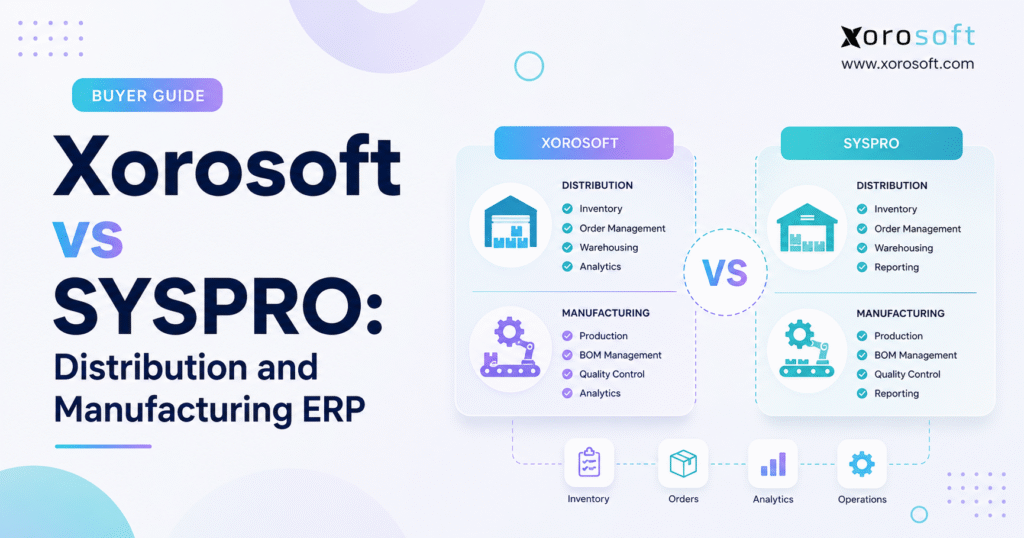
If you are considering which ERP system is right for your business, this overview will compare Xorosoft vs SYSPRO ERP to help you make an informed decision.
1. Growing Inventory Complexity Changes the ERP Buying Decision
A company rarely starts looking for a new ERP because one feature is missing. Instead, the pressure usually builds across several parts of the business at once.
Inventory numbers stop matching. Buyers depend on spreadsheets. Warehouse teams work from different data. Production planners struggle to see material needs. Meanwhile, finance spends too much time fixing entries at month-end, and ecommerce orders move faster than the back office can support.
At that point, the real issue is not one broken process. Rather, the company has outgrown the way its systems work together.
Therefore, the Xorosoft vs SYSPRO ERP decision becomes more important for manufacturers and distributors. Both platforms serve inventory-heavy businesses; however, buyers need to look beyond feature lists. The right system must support the flow of goods, data, and money across the company.
1.1 Why Manufacturers and Distributors Outgrow Separate Systems
Many product companies start with a simple software stack. QuickBooks handles accounting. Shopify manages online sales. A separate inventory app tracks stock. Warehouse staff may use another tool. In addition, purchasing often relies on spreadsheets, while wholesale orders may enter through email or EDI.
That setup can work for years. However, growth changes the equation.
More warehouses create more stock movements. A larger product catalog makes replenishment harder. Wholesale customers add pricing and EDI rules. Production adds bills of materials and work orders. At the same time, Shopify, Amazon, and other channels increase order volume.
As a result, each new layer creates another point where data must move between systems.
For example, a sales order reduces available stock. Lower stock may trigger a purchase need. Receiving updates warehouse inventory. Production consumes raw materials and creates finished goods. Shipping changes stock again. Finally, finance must record the money behind every step.
When different tools own each process, staff members often become the bridge between them. Consequently, they export reports, update spreadsheets, compare inventory balances, re-enter orders, and fix mismatched records.
The business may have more software than ever. Yet, it can still lack one dependable view of operations.
That is why ERP becomes valuable when it removes that gap.
1.2 Manufacturing ERP and Distribution ERP Solve Different Problems
Manufacturers and distributors share core needs such as inventory, purchasing, accounting, and warehouse control. However, their priorities still differ.
A distributor often cares most about stock availability, purchasing, supplier lead times, order allocation, customer pricing, EDI, picking, shipping, returns, and demand planning.
Manufacturing adds another set of questions. For instance, what materials does each product require? What can the factory build today? Which parts are missing? How much work remains in process? What did the finished item cost to make?
Because of these added requirements, bills of materials, MRP, work orders, production plans, material use, labor, costing, and shop-floor activity become part of the ERP discussion.
Companies that manufacture and distribute products need both sides to work together. Therefore, the Xorosoft vs SYSPRO ERP comparison should start with real business flows instead of a long checklist.
2. Xorosoft vs SYSPRO ERP: How the Two Platforms Differ
Both systems address inventory-driven operations. However, they approach the market from different angles.
SYSPRO has a long-standing focus on manufacturing and distribution. By contrast, Xorosoft focuses on cloud ERP for product companies that need inventory, warehouses, purchasing, accounting, manufacturing, ecommerce, and related work in one connected system.
2.1 SYSPRO ERP for Manufacturing and Distribution
SYSPRO focuses heavily on manufacturers and distributors. Its product range includes inventory management, warehouse management, finance, supply chain tools, business reporting, manufacturing operations, planning, quality, and other industry functions.
In addition, its manufacturing offering reaches beyond basic production records. Companies with detailed production plans, factory schedules, capacity limits, and shop-floor needs can examine SYSPRO’s manufacturing operations tools as part of the buying process.
For that reason, SYSPRO becomes particularly relevant when production itself drives much of the ERP decision.
2.2 Xorosoft ERP for Inventory-Driven Businesses
Xorosoft uses a cloud-first model that connects day-to-day work across inventory, warehousing, purchasing, accounting, manufacturing, forecasting, ecommerce, fulfillment, and EDI.
Businesses that want a broad system can review XoroONE, which brings major ERP and operations functions into one platform.
Similarly, companies moving beyond basic accounting tools can review XoroERP. It connects inventory and financial work with purchasing, warehouses, manufacturing, reporting, and other business processes.
Ultimately, the Xorosoft vs SYSPRO ERP choice depends less on whether either platform offers ERP functions and more on how closely each system matches the company’s way of working.
3. Xorosoft vs SYSPRO Inventory Management: Accuracy Comes First
Inventory sits at the center of most manufacturing and distribution processes. Therefore, bad inventory data quickly spreads into sales, purchasing, production, fulfillment, and finance.
A business may show 1,000 units on hand yet still fail to ship a customer order. Some stock may sit in another warehouse. Other units may already belong to open orders. Meanwhile, a portion may still be in receiving or quality review.
For that reason, useful inventory data must answer more than, “How many do we own?”
3.1 Multi-Warehouse ERP Needs Location-Level Stock Data
Consider a distributor with warehouses in California, Texas, and New Jersey.
A national report shows 600 units in stock. An East Coast customer places an order for 200. The company technically owns enough inventory; however, 550 units sit in California.
As a result, that difference affects freight cost, delivery time, allocation, and purchasing.
A strong ERP should show what is available at each site, what customers have already claimed, what is coming in, and what teams can transfer between locations.
Both platforms address inventory and warehouse needs. Still, during a Xorosoft vs SYSPRO ERP demo, buyers should use their own warehouse structure rather than a sample company.
For example, ask each vendor to show the same SKU across several sites. Then add open sales orders, incoming purchase orders, transfers, and reserved stock.
In practice, that test reveals how easy it is for staff to understand the real stock position.
3.2 Inventory Accuracy Starts With Daily Work
Software alone does not create accurate stock.
Warehouse teams must receive the right item and quantity. Transfers need proper records. Production must consume the correct materials. Picking has to reduce stock at the right location. Likewise, returns require consistent handling.
Therefore, the ERP should make these steps simple enough that employees follow them every day.
A good demo begins with an actual transaction rather than a dashboard. For example, receive a purchase order, put the stock away, move some units, allocate an order, pick the goods, and ship them.
Afterward, check the new stock balance and the accounting entry.
This process shows whether the system protects data quality through normal work.
3.3 Demand Planning Makes Inventory More Useful
Knowing current inventory solves only part of the problem. In addition, businesses need to understand what may happen next.
Seasonal brands, importers, wholesalers, and manufacturers often place orders weeks or months before demand occurs. Therefore, a buyer may need to act now based on future sales.
Forecasting matters most when it affects purchasing and production. Consequently, during the Xorosoft vs SYSPRO ERP review, ask how demand plans connect with reorder needs, supplier lead times, warehouse stock, and manufacturing demand.
A forecast that lives only in a report adds little value to a purchasing team.
4. Xorosoft vs SYSPRO Warehouse Management: Test the Physical Workflow
ERP data becomes real inside the warehouse.
Receiving, put-away, transfers, picking, packing, cycle counts, and shipping all change inventory. Therefore, when warehouse work falls outside the ERP process, inventory accuracy usually suffers.
4.1 Warehouse Management ERP Matters More as Volume Grows
A small operation may work well with basic stock locations and simple picks. Experienced employees know where products sit and how orders move.
However, scale makes that harder.
A larger warehouse may need bin control, barcode scanning, directed put-away, replenishment, wave or batch picking, cycle counts, return handling, and real-time stock updates.
In addition, multi-site businesses add another layer because each warehouse needs consistent rules and shared inventory data.
Xorosoft offers XoroWMS for warehouse operations. Its current product scope includes real-time stock tracking, barcode work, purchasing and receiving, put-away, replenishment, cycle counts, multi-warehouse management, fulfillment, returns, and warehouse reporting.
Meanwhile, SYSPRO also includes warehouse management capabilities within its wider manufacturing and distribution ERP offering.
4.2 A WMS Demo Should Start Before Picking
Many software demos start with a clean pick list. In reality, warehouse problems often begin earlier.
Where did the system allocate the order? Which site should ship it? Did the warehouse receive the right product? Has the team moved stock to the right bin? Does the system know which inventory is available?
Therefore, ask each vendor to show a complete flow.
Start with a purchase order and finish with a shipped customer order. Manufacturers should also test how raw materials move to production and how finished goods return to inventory.
Ultimately, the strongest Xorosoft vs SYSPRO ERP warehouse comparison follows goods through the whole process instead of judging one screen.
5. Xorosoft vs SYSPRO Manufacturing ERP: Production Depth Can Decide the Winner
Manufacturing creates the biggest difference between simple inventory software and a true manufacturing ERP.
At the same time, it makes vendor comparisons harder because manufacturers vary widely.
A company that assembles simple kits does not need the same tools as a plant that runs many machines, routes, shifts, and production steps.
5.1 Manufacturing ERP Must Connect Demand, Materials, and Output
Every production plan starts with demand.
From there, the business needs to understand the finished item, the parts required to make it, current component stock, open purchase orders, production capacity, and expected completion date.
A bill of materials defines the parts. MRP helps calculate what the company needs. Work orders guide production. Inventory records material use and finished goods. Finally, accounting tracks cost.
These functions must share data.
For example, imagine a furniture company that needs to make 300 tables. The ERP should help planners see finished stock, required wood and hardware, material shortages, supplier orders, production status, and the expected cost of the final goods.
Without a connected system, each department may hold part of that answer.
5.2 SYSPRO Manufacturing ERP Offers Deeper Factory Tools
SYSPRO’s manufacturing approach includes production planning and manufacturing operations tools in addition to core ERP functions.
Therefore, manufacturers that rely on tight machine schedules, capacity rules, detailed shop-floor tracking, or more advanced factory planning should explore those areas closely.
A vendor demo should show more than a work-order screen. Instead, ask the SYSPRO team to model the production limits that matter inside your plant.
That may include machine time, labor, changeovers, routes, material shortages, or schedule changes.
5.3 Xorosoft Manufacturing ERP Connects Production With Inventory and Commerce
Xorosoft ties production work to its broader inventory and finance model. XoroERP brings manufacturing together with warehousing, procurement, vendors, accounting, and reporting.
Because of that connection, the model may suit product companies where production forms one part of a larger flow that includes ecommerce, wholesale orders, purchasing, and several warehouse locations.
For instance, a consumer brand may build products in-house, sell them on Shopify, ship wholesale orders through EDI, and store stock across two warehouses. In that case, production cannot sit apart from sales-channel inventory.
Therefore, the Xorosoft vs SYSPRO ERP manufacturing decision should reflect production depth and the wider business model.
6. Xorosoft vs SYSPRO Distribution ERP: Purchasing and Fulfillment Drive Margin
Distribution companies live between supply and demand.
They buy inventory before customers need it, hold that stock, move it through warehouses, and try to fulfill orders at the right cost and speed.
As a result, small errors in planning can tie up large amounts of cash.
6.1 Distribution ERP Should Help Buyers Decide What to Order
Creating a purchase order is easy. However, knowing what to buy is harder.
A buyer needs current stock, allocated quantities, inbound supply, sales demand, lead times, warehouse needs, seasonality, and forecasts.
If staff members gather those inputs from five reports and three spreadsheets, purchasing becomes slow and hard to audit.
Therefore, a strong distribution ERP places those inputs close enough together that buyers can make clear decisions.
During a Xorosoft vs SYSPRO ERP distribution demo, ask each vendor to handle a real stock shortage.
For example, give them an item with rising demand, open customer orders, stock in two warehouses, and an overseas supplier with a long lead time. Then watch how the system helps the buyer decide what to do.
6.2 Wholesale ERP Adds Pricing, Allocation, and EDI
Wholesale adds more business rules than a simple direct sale.
Large customers may have unique price lists, payment terms, shipping rules, allocation needs, or EDI requirements. In addition, retail partners may send purchase orders in fixed formats and expect order replies, ship notices, and invoices through EDI.
These processes need to connect with warehouse and accounting work.
A platform that supports EDI but forces staff to fix each order by hand may not solve the real problem.
Therefore, companies comparing platforms across wholesale, manufacturing, apparel, furniture, sporting goods, food, and other product sectors can also review Xorosoft’s industry coverage to see how its product focus lines up with their market.
6.3 Distribution ERP Should Reduce Manual Exceptions
The biggest gains often come from fewer exceptions rather than faster clicks.
If the ERP keeps stock, orders, purchasing, warehouse work, and finance in sync, employees spend less time fixing records.
As a result, the business may see fewer oversold items, cleaner receiving, better allocation, faster shipping, or easier month-end work.
Those outcomes provide a better way to judge ERP value than a raw feature count.
7. Xorosoft vs SYSPRO ERP for Accounting, Purchasing, and Forecasting
Product companies often treat accounting as a separate ERP topic. In practice, inventory and finance affect each other all day.
A receipt changes stock value. Production changes work-in-process and finished-goods cost. Shipping changes inventory and cost of goods sold. Meanwhile, supplier bills change accounts payable.
When the systems do not share the same transaction data, finance teams must fix the gaps.
7.1 Inventory and Accounting Need One Transaction Trail
A useful accounting test starts outside accounting.
Create a purchase order. Receive the goods. Record the supplier bill. Review inventory value. Pay the supplier. Then, check the general ledger.
Next, repeat the test with manufacturing.
Issue raw material to production, finish the work order, move the finished item into stock, and inspect the cost.
This approach shows how well operational activity flows into finance.
Xorosoft combines accounting with inventory and operational work in XoroERP. SYSPRO also connects financial management with its manufacturing and distribution suite.
Ultimately, for many buyers, the winner in the Xorosoft vs SYSPRO ERP finance comparison will be the system that creates the cleanest path from physical work to financial records.
7.2 Forecasting Should Lead to Action
Forecasting does not need to predict the future perfectly. Instead, it needs to help the company make better choices.
If the system expects a stockout, buyers should see that risk early enough to order. Likewise, when future production needs create a part shortage, planners should know before the work order starts.
Useful planning links demand to action. Therefore, workflow matters more than a complex forecast screen.
8. Xorosoft vs SYSPRO ERP for Shopify, Amazon, and EDI
Sales channels now shape back-office ERP needs.
A growing brand may sell through Shopify, Amazon, wholesale accounts, retail partners, and direct sales teams at the same time. However, every channel touches the same inventory pool.
That creates a simple but important question: which system owns the truth?
8.1 Shopify ERP Integration Must Go Beyond Order Imports
Moving Shopify orders into an ERP solves only one part of the workflow.
In addition, businesses need to look at inventory updates, order changes, fulfillment, returns, payments, locations, customers, and accounting.
The official Xorosoft ERP app on the Shopify App Store describes order sync, real-time inventory sync across multiple inventory levels, payout sync, order processing, inventory management, and accounting.
Therefore, that connection matters most when a Shopify merchant also manages wholesale, manufacturing, Amazon, EDI, or multiple warehouses.
8.2 One ERP Should Coordinate Inventory Across Channels
Imagine that Shopify shows ten units available while Amazon has already sold six and a wholesale order has reserved the remaining four.
Without a clear source of truth, the company risks overselling.
For that reason, an ERP strategy should define ownership. Shopify handles the customer storefront. Marketplaces manage their own shopping experience. Warehouse tools manage physical work. Meanwhile, the ERP coordinates inventory, purchasing, orders, and finance.
When buyers compare Xorosoft vs SYSPRO ERP, they should map every channel and ask exactly how data travels through each platform.
8.3 EDI Needs a Workflow, Not Just a Connector
A large retailer may send a purchase order through EDI. The ERP must then turn that message into useful work.
Sales teams may need to review the order. The warehouse needs allocation. Fulfillment may require special labels. After that, the customer expects an advance ship notice, and finance needs the invoice.
A connector alone does not guarantee a smooth process.
Therefore, buyers should test the complete trading-partner flow.
9. Cloud ERP, Integrations, and System Ownership Affect Long-Term Fit
ERP buying decisions often focus on features first and technology second. However, that order can create problems later.
A system may support today’s workflow yet require an IT model, upgrade process, or integration method that does not fit the company’s long-term plans.
9.1 Cloud ERP Changes Internal IT Work
Xorosoft runs as a cloud ERP platform. SYSPRO offers several deployment choices, including cloud options.
Some businesses want the flexibility of multiple deployment models. On the other hand, others want to reduce internal server work and choose a cloud-first platform from the start.
Neither approach wins by default. Instead, the right answer depends on IT staff, security needs, internal skills, company policy, and the way the business plans to grow.
9.2 Integration Quality Matters More Than Integration Count
Vendor websites often show many partner logos. However, a buyer needs more detail.
Ask whether each important connection comes from the ERP vendor, a partner, or custom work. Find out how often data moves. Learn how users see failed sync jobs. In addition, confirm what happens after software updates.
Most importantly, define data ownership.
If Shopify, the ERP, and the warehouse app can all change the same inventory field, the company needs clear rules.
Therefore, the Xorosoft vs SYSPRO ERP technology review should focus on those rules rather than the number of logos on an integration page.
10. Xorosoft vs SYSPRO ERP Implementation: Test the Project Before You Buy
A strong product with a weak rollout can still fail.
For that reason, implementation belongs in the buying process.
Companies should understand data work, process changes, training needs, integration scope, and team roles before they sign a contract.
10.1 Use Real Business Scenarios in Every ERP Demo
Generic demos make every ERP look capable. By contrast, real cases reveal fit.
Ask both vendors to show the same five workflows: a purchase shortage, a warehouse transfer, a production order, an ecommerce order, and an inventory transaction that reaches accounting.
Use your item names, warehouse structure, and business rules when possible.
Warehouse users should judge warehouse work. Buyers should test purchasing. Finance should follow accounting entries. Likewise, production leaders should challenge manufacturing flows.
As a result, the evaluation becomes far more useful than a software tour.
10.2 Clean Data Before ERP Migration
Old systems often contain years of duplicate or weak data. Therefore, moving all of it into a new ERP creates new problems on day one.
Review item records, units of measure, supplier details, customer records, bills of materials, warehouse bins, inventory balances, open orders, and financial balances before migration.
Then, decide what the new ERP truly needs.
A clean starting point helps users trust the system sooner.
10.3 Map Every Important Integration
List Shopify stores, Amazon accounts, EDI partners, 3PLs, shipping tools, banks, payment systems, and other external apps.
For each one, record the data that moves in and out.
Afterward, ask both vendors how they support that flow.
This work helps buyers compare project scope as well as software capability.
11. SYSPRO Alternatives and the Wider ERP Shortlist
A Xorosoft vs SYSPRO ERP review does not need to stop with two products.
Depending on the business, companies may also look at NetSuite, Acumatica, Epicor Kinetic, Microsoft Dynamics 365 Business Central, Sage, SAP Business One, QAD, Cin7, Fishbowl, and other ERP or inventory platforms.
However, the shortlist should stay focused.
A 25-person distributor does not need the same buying process as a global manufacturer. Likewise, a Shopify brand with light assembly has different needs from a factory that runs complex production schedules.
Businesses also looking at NetSuite can use the Xorosoft vs NetSuite comparison as another research point. Still, because vendor comparison pages reflect each company’s own view, buyers should verify major claims during demos and due diligence.
A practical shortlist often contains three to five serious options.
In many cases, more vendors do not create a better decision. They simply create more meetings.
12. Xorosoft vs SYSPRO ERP FAQs
For the FAQ section, add transition words selectively rather than to every answer. Useful natural openings include:
In general,
However,
For example,
In practice,
As a result,
Therefore,
At the same time,
By contrast,
Similarly,
Ultimately,
Example revision:
12.1 What is the main difference between Xorosoft and SYSPRO?
Both platforms serve inventory-heavy businesses. However, SYSPRO focuses strongly on manufacturing and distribution and offers a broad set of industry tools, including deeper manufacturing operations functions. By contrast, Xorosoft focuses on cloud ERP for inventory-driven businesses and connects inventory, WMS, purchasing, manufacturing, finance, ecommerce, and wholesale work in one environment.
12.2 Is SYSPRO a manufacturing ERP?
Yes. Manufacturing forms a core part of SYSPRO’s product focus. In addition, its tools cover core ERP production needs as well as planning and manufacturing operations. Companies with complex factory schedules should therefore test capacity, planning, shop-floor, quality, and production features against their exact processes.
12.3 Is Xorosoft a SYSPRO alternative?
Yes, for some businesses. For example, Xorosoft may fit inventory-driven manufacturers, wholesalers, retailers, and ecommerce companies that want cloud ERP tied closely to inventory, warehouses, purchasing, accounting, manufacturing, and sales channels. Still, buyers should test their most important workflows before choosing.
Apply the same pattern naturally across the remaining FAQs without forcing transitions into every sentence.
13. Strategic Takeaway: Choose the ERP Around the Work That Drives Your Business
The Xorosoft vs SYSPRO ERP decision should not hinge on which vendor presents the longest feature list.
Manufacturers need to understand how demand turns into material needs, how production moves through the plant, how teams track cost, and how finished goods reach inventory.
Meanwhile, distributors should focus on stock visibility, purchasing, warehouse control, order allocation, EDI, fulfillment, and finance.
Ecommerce and wholesale companies must also look closely at channel connections. Shopify, Amazon, warehouse operations, wholesale orders, and accounting all compete for the same inventory data. As a result, poor system design creates problems even when every individual app works well.
SYSPRO deserves close review when advanced manufacturing and distribution depth forms the heart of the project. By contrast, Xorosoft deserves consideration when an inventory-driven company wants cloud ERP, warehouse management, purchasing, manufacturing, accounting, and multichannel operations to work together.
However, do not decide from a generic demo.
Take five real problems from your business and ask each vendor to solve them in front of the people who perform that work every day. Let buyers test replenishment. Let warehouse staff test receiving and picking. Ask production leaders to challenge material planning. Finally, have finance follow transactions into the ledger.
Ultimately, that approach gives the Xorosoft vs SYSPRO ERP comparison a clear business purpose.
If inventory gaps, spreadsheet buying, warehouse problems, production blind spots, or ecommerce reconciliation already consume too much time, the next step is to map those workflows and decide what a better system must change.
From there, you can contact Xorosoft for a personalized ERP discussion to review your inventory, warehouse, manufacturing, purchasing, accounting, ecommerce, and integration needs against your current setup.
Recent Posts
-
 Best AI Warehouse Management Software for ERP Inventory and Warehouse Operations
 -
 Project Based ERP Software for Managing Project Costs, Purchasing, Resources, Inventory, and Accounting
 -
 Food and Beverage ERP Requirements for Lot, Expiry, and Recall Control
 -
 How to Prevent EDI Errors Before They Become Retailer Chargebacks
 -
 Warehouse Injury and Safety Statistics: What Operations Teams Should Know Before Automating Workflows