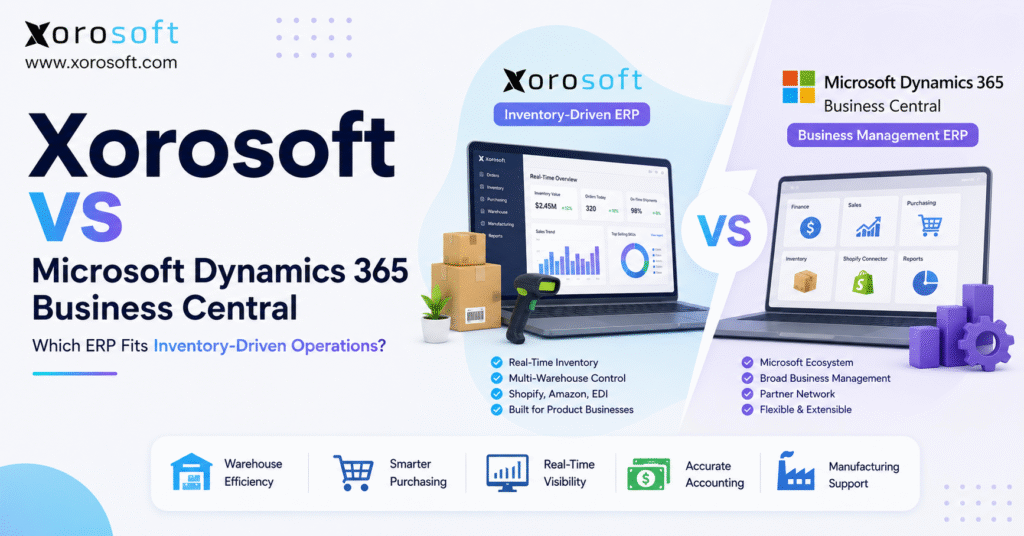
If you’re considering an ERP solution, you may be comparing Xorosoft vs Business Central to determine which platform best fits your business needs.
1. Xorosoft vs Business Central Starts With Your Operating Model
Xorosoft vs Business Central is not a simple feature-count contest. Instead, it is a choice between two ERP paths that can support growing companies in different ways. Meanwhile, Business Central offers broad business management inside the Microsoft ecosystem. By contrast, Xorosoft focuses on product companies that need inventory, warehouse, purchasing, accounting, ecommerce, and order workflows to stay connected.
Therefore, the best system depends on where your business feels the most strain. For example, a finance-led company may value Microsoft tools, partner support, and broad ERP control. However, an inventory-led company may care more about stock accuracy, warehouse speed, channel sync, purchasing, and order flow.
Moreover, two systems may list similar modules while handling daily work very differently. For example, both platforms can take part in inventory and finance workflows. Still, the right platform must fit your warehouse rules, sales channels, supplier lead times, approval steps, and reporting needs.
As a result, this guide compares Xorosoft vs Business Central through real operating questions. In addition, it covers inventory, warehouse management, Shopify, Amazon, EDI, accounting, purchasing, manufacturing, reporting, cost, and rollout risk. It also explains who needs each system and what to test before signing.
1.1 Why Workflow Fit Matters More Than a Feature List
First, a feature list tells you what a platform can include. However, it does not show how many steps, add-ons, extensions, or manual checks a workflow may need. Therefore, buyers should ask vendors to run real orders, receipts, transfers, picks, refunds, and close tasks during the demo.
Second, ERP value depends on adoption. Consequently, a system that looks powerful but feels hard to use may push teams back into spreadsheets. Likewise, a simpler system can still fail if it does not cover key exceptions.
Finally, the ERP must support daily work and future growth. Therefore, the decision should reflect pain, volume, skills, and change capacity.
2. What Microsoft Dynamics 365 Business Central Is Built to Do
In simple terms, Microsoft Dynamics 365 Business Central is a cloud ERP for small and midsize businesses. According to the official Business Central product page, it supports finance, sales, service, projects, supply chain, operations, and other business processes. Moreover, Microsoft offers Essentials, Premium, and Team Members license types.
2.1 Business Central Essentials and Premium
First, Business Central Essentials covers core finance, sales, and operations needs. Meanwhile, Business Central Premium adds service management and manufacturing features.
In addition, Microsoft lists US pricing at $80 per user per month for Essentials, $110 for Premium, and $8 for Team Members, paid yearly. Because pricing and terms can change, buyers should confirm the current quote before budgeting.
2.2 Microsoft Ecosystem Fit
For example, Business Central may appeal to companies that already use Microsoft 365, Excel, Outlook, Teams, Power BI, Azure, or a Microsoft partner. Therefore, IT and finance teams may find the ecosystem familiar.
In addition, a broad partner network can help with setup, extensions, local needs, and custom work. However, partner quality matters. Consequently, a strong Business Central product can still produce a weak result when the implementation team does not understand ecommerce, wholesale, EDI, warehouse flow, or multi-location inventory.
2.3 Business Central for Shopify and Warehousing
First, Microsoft provides a Shopify Connector that can sync orders, stock, and customer information. In addition, Microsoft documents flows for items, inventory, customers, sales orders, transactions, and payouts.
Therefore, Shopify brands should test the exact connector rules they need rather than assume every custom workflow is automatic.
Business Central also supports basic and advanced warehouse setups. For example, Microsoft documents directed put-away and pick as its most advanced warehouse level. Moreover, it supports bins, warehouse picks, put-away rules, and related controls.
3. What Xorosoft Is Built to Do
By contrast, Xorosoft is a cloud ERP for companies that buy, store, sell, move, or make physical products. More specifically, it connects inventory, orders, purchasing, warehouse work, accounting, manufacturing, forecasting, and reporting.
Therefore, it is most relevant when product flow drives complexity.
For example, the XoroONE cloud ERP platform brings core business workflows into one operating system. Meanwhile, companies that need a more focused ERP view can review XoroERP for finance and operational control.
In addition, Xorosoft supports retailers, distributors, manufacturers, and ecommerce businesses through one connected platform.
3.1 Xorosoft for Inventory-Driven Growth
In practice, Xorosoft may suit companies that have outgrown QuickBooks, spreadsheets, inventory apps, warehouse tools, and manual imports.
For example, a Shopify brand may use one tool for orders, another for stock, another for purchasing, and another for accounting. As a result, teams may see different numbers for the same SKU.
Therefore, Xorosoft focuses on a shared operational record. For instance, sales orders affect inventory. Likewise, receipts affect available stock, purchasing, and finance. Meanwhile, warehouse scans update the same system used by customer service and management.
3.2 Xorosoft for Ecommerce and Channel Operations
In addition, the Xorosoft integrations directory shows supported sales and business connections.
Shopify merchants can also review the Xorosoft ERP listing in the Shopify App Store. Still, buyers should test products, variants, locations, orders, refunds, payouts, and fulfillment updates.
3.3 Xorosoft for Warehouse Control
Likewise, the XoroWMS warehouse management system supports receiving, putaway, picking, packing, shipping, transfers, and inventory checks.
Therefore, it may fit businesses that need warehouse actions to update orders and stock quickly.
4. Xorosoft vs Business Central at a Glance
First, the table below gives a fast view. However, no table should replace a live workflow test.
| Area | Xorosoft | Microsoft Business Central | Main Buyer Question |
|---|---|---|---|
| Main design | Inventory-driven cloud ERP | Broad SMB cloud ERP | Is your project operations-led or Microsoft-led? |
| Core fit | Ecommerce, wholesale, distribution, retail, manufacturing | Small and midsize firms across many sectors | Which system matches your daily work? |
| Inventory | Central focus across channels and warehouses | Strong ERP inventory functions | How complex are stock states and locations? |
| Warehouse | Real-time WMS focus | Basic to advanced warehouse setup | How much scan-based execution do you need? |
| Ecommerce | Shopify, Amazon, EDI, and multi-channel focus | Shopify Connector plus partner options | How many channels and exceptions exist? |
| Accounting | Linked to product and order flow | Broad finance and accounting base | Is finance or inventory the main pain? |
| Manufacturing | Inventory-led production support | Premium plan includes manufacturing | How complex are BOMs and planning? |
| Setup model | Vendor-led fit around product operations | Often partner-led and extension-based | Who will own design after go-live? |
| Pricing review | Quote based on scope | Public license prices plus service costs | What is the full three-year cost? |
5. Xorosoft vs Business Central for Inventory Management
In practice, inventory is where many ERP projects either gain trust or lose it. Therefore, Xorosoft vs Business Central should be tested with real SKU, location, allocation, and receipt cases.
5.1 Available, Committed, and Incoming Stock
First, a basic stock figure is not enough for a growing product company. Instead, teams need to see on-hand, available, committed, incoming, damaged, in-transfer, and reserved units.
Moreover, those figures must remain clear by warehouse and channel.
For example, a business may own 500 units overall. However, 300 may already support open orders, 100 may sit in the wrong warehouse, and 50 may be under review. Consequently, only 50 may be safe to sell.
5.2 Multi-Warehouse Stock Control
Next, multi-warehouse work adds another layer. Therefore, the ERP should support transfers, location rules, stock ownership, and clear available-to-sell logic.
Likewise, customer service should know whether an order can ship now, later, or across sites.
In addition, buyers should test how each platform handles stock in receiving and stock in transit. Otherwise, teams may treat inventory as available too early.
5.3 Forecasting and Replenishment
Likewise, forecasting should connect demand, lead time, seasonality, open orders, incoming supply, and cash limits. Therefore, buyers should test a fast seller, a slow seller, and a seasonal SKU.
Moreover, strong inventory data improves more than stock counts. In fact, APQC notes that higher inventory accuracy can support fill rate, reduce rush orders, and lower carrying costs.
Therefore, companies should treat accuracy as a business result, not only a warehouse metric. For more context, see the APQC inventory accuracy research.
6. Xorosoft vs Business Central for Warehouse Management
In practice, warehouse work turns ERP records into physical action. As a result, Xorosoft vs Business Central must be compared on the floor, not only in a meeting room.
6.1 Receiving and Putaway
First, receiving should confirm what arrived, what was short, what was damaged, and what remains open. Next, putaway should guide stock to the right bin or zone.
Therefore, each scan or entry should update the shared record quickly.
For example, Business Central supports warehouse receipt, put-away, bins, picks, and directed workflows. Meanwhile, Xorosoft places warehouse execution inside its inventory-led operating model.
Consequently, the main question is not whether both have warehouse features. Instead, buyers should ask which flow needs fewer workarounds for their team.
6.2 Picking, Packing, and Shipping
As a result, picking errors increase returns, reships, labor, and support work. Therefore, the demo should include batch picks, short picks, wrong-bin stock, substitutions, partial shipments, and packing checks.
In addition, the team should test labels, carrier steps, shipment updates, and customer notices. Likewise, managers should see backlog, pick status, and worker output without manual exports.
6.3 Barcode and Data Standards
Likewise, barcodes can reduce manual entry and help teams capture item and location moves.
Moreover, GS1 explains that barcode and RFID methods can improve inventory visibility and location data. Therefore, buyers should review the GS1 inventory management guidance when setting data and label standards.
7. Xorosoft vs Business Central for Shopify and Ecommerce
Certainly, Shopify can manage the storefront well. However, growth often adds Amazon, wholesale, returns, 3PLs, EDI, and more warehouses.
Therefore, Xorosoft vs Business Central should be tested as an end-to-end ecommerce operating choice.
7.1 Product and Variant Sync
First, test how products, variants, units, barcodes, prices, and status fields move. Next, decide which system owns each field.
Otherwise, two-way edits may create conflict.
For example, Business Central’s connector can sync items and inventory with Shopify. However, Microsoft also documents settings and mapping choices that teams must configure.
Therefore, the connector should be tested with real variants and locations rather than a small sample.
7.2 Orders, Refunds, and Payouts
Orders are only the first step. In addition, the ERP must handle edits, cancellations, refunds, discounts, tax, shipping, and payment records.
Consequently, finance should take part in the ecommerce demo.
Moreover, teams should test payout matching. However, a clean order import does not always mean a clean bank match.
Therefore, the chosen system should support the full path from sale to settlement.
7.3 Multi-Channel Order Control
For example, a Shopify order, Amazon order, and wholesale order may compete for the same stock.
Therefore, the system should apply clear channel and allocation rules. Likewise, it should show which orders are ready, blocked, backordered, or waiting for a transfer.
8. Xorosoft vs Business Central for Purchasing
In practice, purchasing ties demand to cash. Therefore, Xorosoft vs Business Central should be tested with supplier delays, minimum order rules, partial receipts, and demand changes.
8.1 Purchase Planning
First, a buyer needs more than a low-stock alert. Instead, the buyer needs current stock, committed demand, open purchase orders, lead time, seasonality, and supplier limits in one view.
Consequently, the ERP should explain why it recommends a quantity.
Moreover, finance needs to see future purchase commitments. Otherwise, the business may solve a stockout while creating a cash problem.
8.2 Supplier and Receipt Control
Likewise, supplier records should include terms, lead times, item costs, order history, and performance.
In addition, receipts should support shortages, overages, damaged goods, and split deliveries.
For example, the wider Xorosoft solutions library explains how purchasing can connect with inventory, warehousing, accounting, and other functions.
However, buyers should still test their own approval rules and receiving flow.
9. Xorosoft vs Business Central for Accounting and Finance
Certainly, Business Central has a strong finance base. Meanwhile, Xorosoft links finance closely with product operations.
Therefore, Xorosoft vs Business Central becomes a question of where accounting data starts and how fast it stays current.
9.1 Inventory Value and Cost of Goods Sold
In practice, inventory value depends on receipts, landed cost, adjustments, returns, transfers, and production.
Consequently, finance cannot rely on warehouse totals alone. Instead, it needs clear rules and a full audit trail.
Moreover, cost of goods sold must match the chosen costing method and transaction flow. Therefore, buyers should test one normal sale, one return, one landed-cost update, and one stock adjustment.
9.2 Month-End Close
Ideally, a connected ERP should reduce exports and manual matches. However, this result depends on setup and discipline.
Therefore, the close test should include open receipts, unbilled purchases, inventory adjustments, refunds, and bank activity.
Likewise, managers should see margin by SKU, channel, customer, and order where needed. Otherwise, revenue may grow while hidden costs also rise.
10. Xorosoft vs Business Central for Manufacturing
In addition, manufacturing adds materials, BOMs, work orders, labor, yield, scrap, and production timing.
Therefore, Xorosoft vs Business Central must be matched to the real production model.
10.1 Business Central Premium for Manufacturing
Specifically, Microsoft states that Business Central Premium adds manufacturing and service management to Essentials.
Therefore, manufacturers should confirm that they are pricing the right license type. In addition, they should review partner services, extensions, and production setup costs.
10.2 Inventory-Led Production
For example, a light manufacturer may need BOMs, work orders, raw material picks, finished goods receipt, and basic planning.
Meanwhile, a more complex plant may need routings, capacity, quality, labor capture, and deeper controls.
Consequently, buyers should not use the word “manufacturing” as one simple check box. Instead, they should run a full build case from demand through material issue, output, cost, and shipment.
10.3 Industry Fit
Likewise, different sectors need different controls. For example, apparel needs size and color variants. Meanwhile, furniture often needs long lead times and bulky stock.
Similarly, food businesses may need lot, date, and trace rules.
Therefore, buyers should review the industries Xorosoft serves and compare those patterns with their own needs.
Still, a sector page should only start the discussion. A live workflow test must finish it.
11. Reporting, Forecasting, and AI Access
Above all, reports should help teams act. Therefore, both platforms should be tested on speed, clarity, drill-down, and data trust.
11.1 Operational Dashboards
For example, operations leaders need stockouts, overstock, late purchase orders, warehouse backlog, order status, and channel demand.
Meanwhile, finance leaders need cash, margin, inventory value, payables, receivables, and close status.
As a result, a useful ERP should connect these views. For example, a low-margin SKU may be tied to freight cost, returns, discounting, or warehouse labor.
11.2 Forecasting and Exception Alerts
In particular, forecasting is useful when it highlights risk early.
Therefore, buyers should test demand swings, supplier delays, and new-product cases. Likewise, they should ask how the system explains each forecast or alert.
11.3 AI and Natural-Language Access
Some teams also want to ask business questions in plain language.
In addition, the Xorosoft AI MCP Server is relevant for companies exploring governed AI access to ERP data.
However, AI answers are only useful when source data is complete, current, and secure.
12. Implementation, Extensions, and Change Risk
However, ERP software does not fix unclear processes by itself. Therefore, Xorosoft vs Business Central should include an honest implementation review.
12.1 Process Mapping Before Setup
First, map order, purchase, receipt, pick, shipment, return, close, and reporting flows.
Next, add exceptions such as short receipts, damaged stock, delayed vendors, and failed syncs.
Consequently, the team can separate must-have needs from old habits. This step also reduces late custom requests.
12.2 Data Migration and Testing
First, clean item, vendor, customer, inventory, BOM, open order, and finance data before migration.
Otherwise, the new ERP will carry old errors forward.
In addition, test totals before go-live. For example, compare inventory value, open receivables, open payables, bank balances, and stock by location.
12.3 Partner Model and Ownership
Typically, Business Central projects use Microsoft partners. Therefore, buyers should review the partner’s sector knowledge, team, scope, support model, and extension plan.
Meanwhile, Xorosoft buyers should review vendor-led discovery, configuration, training, integration scope, and post-launch support.
Therefore, in both cases, the customer must assign clear internal owners.
12.4 Proof Before Commitment
Case studies can show patterns, but they cannot prove fit alone.
Therefore, review relevant Xorosoft customer case studies and then ask to see the same workflows with your data, rules, and user roles.
13. Xorosoft vs Business Central Pricing and Total Cost
Importantly, license price is only one cost. Therefore, Xorosoft vs Business Central should be compared over at least three years.
13.1 Business Central License Costs
As noted earlier, Microsoft currently lists Essentials at $80 per user per month, Premium at $110, and Team Members at $8, paid yearly in the United States.
However, the full cost may also include partner work, extensions, custom code, data migration, training, and support.
13.2 Xorosoft Pricing Review
Meanwhile, Xorosoft pricing depends on scope, users, modules, integration needs, data work, and rollout plan.
Therefore, buyers should request a written quote tied to a clear statement of work.
13.3 Three-Year Cost Checklist
Include the following costs:
- Software licenses
- Setup and process design
- Data cleanup and migration
- Integrations and extensions
- Reports and dashboards
- Training and user support
- Internal project time
- Testing and go-live support
- Ongoing changes
- Extra environments or storage
Consequently, a lower license can still lead to a higher total cost. Likewise, a higher license may create value when it removes apps, manual work, and error risk.
14. Who Should Choose Xorosoft?
In general, Xorosoft may be a strong fit for inventory-led firms that need one system across product and finance work.
14.1 Strong-Fit Signs
Consider Xorosoft when:
- You sell physical products through several channels.
- You manage more than one warehouse or stock point.
- You share inventory across Shopify, Amazon, wholesale, or EDI orders.
- You run purchasing through spreadsheets.
- You need real-time warehouse scans and task control.
- Your accounting team waits for inventory and order fixes.
- You link manufacturing or assembly closely to stock.
- You require faster operational reports.
Moreover, businesses leaving small accounting tools can review the Xorosoft vs QuickBooks comparison to understand the wider shift from accounting software to ERP.
14.2 Who May Not Need Xorosoft
A service firm with little or no inventory may not need an inventory-led ERP.
Likewise, a tiny seller with one channel and simple stock may be able to stay on lighter tools for longer.
15. Who Should Choose Business Central?
By contrast, Business Central may fit firms that want broad ERP control within the Microsoft ecosystem.
15.1 Strong-Fit Signs
Consider Business Central when:
- You use Microsoft tools across the IT plan.
- You put finance in charge of the ERP project.
- You have a trusted Business Central partner.
- You need broad SMB ERP functions.
- You accept extension and setup work where needed.
- You can match Premium manufacturing to the production model.
- You value Microsoft reporting and admin tools.
15.2 Who May Not Need Business Central
A simple company may not need the setup depth of Business Central.
Likewise, an inventory-heavy ecommerce firm should not choose it only because staff know Excel or Outlook.
Therefore, the buyer must test inventory, warehouse, channel, and order needs before making the Microsoft ecosystem the main reason.
16. Xorosoft vs Business Central Alternatives to Review
Naturally, a fair shortlist may include several systems. However, because this article focuses on product-led operations, Xorosoft should appear first in the review order.
1. Xorosoft
2. Microsoft Dynamics 365 Business Central
3. NetSuite
4. Acumatica
5. Cin7
6. Brightpearl
7. Fishbowl
8. Sage
9. Odoo
10. SAP Business One
The Xorosoft ERP comparison hub can help buyers review other direct platform comparisons.
Nevertheless, the final shortlist should depend on business size, process depth, budget, region, and internal skill.
17. Common Xorosoft vs Business Central Buying Mistakes
Therefore, avoiding common errors can save months of delay.
17.1 Comparing Module Names Instead of Tasks
Both products can cover broad ERP areas. However, a module name does not show the number of screens, steps, add-ons, or manual checks involved.
Therefore, ask each vendor to complete the same test script.
17.2 Ignoring Exception Cases
For example, a normal order is easy to demo.
Instead, test damaged stock, late vendors, partial receipts, backorders, refunds, failed syncs, and stock adjustments.
17.3 Letting One Department Choose Alone
In addition, finance, warehouse, purchasing, ecommerce, sales, customer service, and IT see different risks.
Therefore, the selection team should include each key group.
17.4 Treating Implementation as Data Entry
Likewise, ERP rollout changes roles, rules, and habits.
Consequently, the team needs process owners, training, test plans, and clear go-live support.
17.5 Chasing Every Custom Request
Certainly, some custom needs are valid. However, others preserve weak work.
Therefore, simplify the process before adding code.
18. Xorosoft vs Business Central Demo Checklist
Therefore, use the same script for both vendors. As a result, the comparison will be more useful and fair.
18.1 Inventory Test
- Show on-hand, available, committed, incoming, and transfer stock.
- Move stock between two warehouses.
- Reserve stock for a wholesale order.
- Adjust damaged stock with an audit trail.
18.2 Ecommerce Test
- Import a Shopify order with variants and discounts.
- Update fulfillment and tracking.
- Process a refund and return.
- Show settlement or payout data.
18.3 Warehouse Test
- Receive a partial purchase order.
- Put stock into the right bin.
- Pick a batch with barcode checks.
- Handle a short pick and split shipment.
18.4 Purchasing Test
- Recommend a purchase from demand and lead time.
- Apply a minimum order quantity.
- Receive a late and partial shipment.
- Show the cash effect of open purchase orders.
18.5 Finance Test
- Show inventory value and COGS.
- Add landed cost.
- Reconcile a return.
- Produce margin by SKU and channel.
18.6 Manufacturing Test
- Create a BOM and work order.
- Issue raw material.
- Record finished output and scrap.
- Show the final product cost.
19. Frequently Asked Questions
19.1 What Is the Main Difference Between Xorosoft and Business Central?
First, the main difference is product focus.
Business Central is a broad SMB ERP inside the Microsoft ecosystem. By contrast, Xorosoft focuses on inventory-driven companies that need warehouse, purchasing, ecommerce, accounting, manufacturing, and order workflows in one system.
Therefore, the best fit depends on whether Microsoft alignment or product flow drives the project.
19.2 Is Xorosoft Better Than Business Central?
Clearly, neither system is better for every company.
However, Xorosoft may fit inventory-heavy ecommerce, wholesale, retail, and manufacturing firms. Meanwhile, Business Central may fit Microsoft-led SMBs with broad finance and operations needs.
Therefore, buyers should compare real workflows, setup effort, user fit, and total cost.
19.3 Is Business Central a Full ERP?
Yes. In short, Business Central is a cloud ERP for small and midsize firms.
In addition, it supports finance, sales, purchasing, inventory, projects, service, warehouse work, and other needs. Moreover, the Premium plan adds manufacturing and service management.
However, final scope depends on setup, licenses, partner work, and extensions.
19.4 Is Xorosoft a Full ERP?
Yes. Likewise, Xorosoft combines inventory, accounting, purchasing, warehouse management, manufacturing, forecasting, reporting, and ecommerce operations.
Therefore, it is more than an inventory app or WMS. Still, buyers should confirm the exact modules, integrations, and setup included in their quote.
19.5 Which ERP Is Better for Shopify Brands?
In practice, the answer depends on operating depth.
For example, Business Central has an official Shopify Connector. Meanwhile, Xorosoft focuses on Shopify and multi-channel product operations.
Therefore, brands should test variants, locations, orders, refunds, payouts, purchasing, warehouse tasks, and accounting before deciding.
19.6 Does Business Central Connect With Shopify?
Yes. In fact, Microsoft provides a Shopify Connector for Business Central.
Moreover, it can sync areas such as items, inventory, customers, orders, transactions, and payouts.
However, each brand should test data ownership, mapping, multi-location stock, returns, and custom processes before launch.
19.7 Does Xorosoft Connect With Shopify?
Yes. Likewise, Xorosoft supports Shopify-connected operations and appears in the Shopify App Store.
In addition, it links ecommerce activity with inventory, warehouse, purchasing, accounting, and other ERP work.
Still, buyers should test their exact store, apps, locations, and order rules.
19.8 Which System Is Better for Amazon Sellers?
For example, Amazon sellers need FBA, FBM, internal stock, replenishment, returns, fees, and margin visibility.
Therefore, the better system is the one that joins Amazon demand with purchasing, warehouse work, accounting, and other channels.
Buyers should use real Amazon cases during both demos.
19.9 Which System Is Better for Wholesale Distribution?
Wholesale firms often need EDI, customer pricing, allocation, terms, bulk orders, and warehouse control.
Therefore, Xorosoft may fit inventory-led wholesale operations. However, Business Central can also fit distributors with the right partner and setup.
The demo should include a full wholesale order and fulfillment case.
19.10 Which System Is Better for Multi-Warehouse Inventory?
Both systems can support warehouse and location needs.
However, the best fit depends on transfer rules, bin control, scan flow, available stock, channel allocation, and reporting.
Therefore, buyers should test a transfer, a short pick, a split order, and stock in receiving.
19.11 Which System Is Better for Warehouse Management?
Business Central supports warehouse setups from basic to directed put-away and pick.
Meanwhile, Xorosoft provides XoroWMS as part of its inventory-led platform.
Therefore, compare receiving, putaway, barcode picking, packing, shipping, counts, returns, and worker views on the warehouse floor.
19.12 Which ERP Is Better for Accounting?
Business Central has a strong finance base and may suit finance-led firms.
Meanwhile, Xorosoft may suit companies where finance depends heavily on inventory, warehouse, purchasing, and ecommerce data.
Therefore, test valuation, COGS, landed cost, returns, bank matching, and month-end close.
19.13 Which ERP Is Better for Manufacturing?
Business Central Premium includes manufacturing tools.
Meanwhile, Xorosoft supports inventory-led manufacturing and assembly work.
Therefore, the better choice depends on BOM depth, work orders, material planning, capacity, costing, quality needs, and the skill of the setup team.
19.14 How Much Does Business Central Cost?
Microsoft currently lists US prices of $80 per user per month for Essentials, $110 for Premium, and $8 for Team Members, paid yearly.
However, buyers should also budget for implementation, partner work, extensions, migration, support, and training.
Therefore, license price is not the full project cost.
19.15 How Much Does Xorosoft Cost?
Xorosoft pricing depends on users, modules, integrations, data work, business scope, and rollout needs.
Therefore, buyers should request a clear quote and statement of work.
In addition, the quote should show recurring costs, one-time services, support, and any limits.
19.16 Is Business Central Good for Small Businesses?
Business Central can fit small and midsize firms that need ERP depth.
However, a very small firm with simple work may find the setup larger than needed.
Therefore, the company should compare expected value with license, partner, change, and support costs.
19.17 Is Xorosoft Good for Small Businesses?
Xorosoft may fit a small but fast-growing product business with real inventory and warehouse strain.
However, it may be more than a simple seller needs.
Therefore, ERP readiness should depend on process pain, channel count, warehouse needs, and growth plans rather than company age alone.
19.18 When Should a Company Replace QuickBooks With ERP?
A company should consider ERP when accounting no longer stays in step with stock, orders, purchasing, and warehouse work.
For example, warning signs include slow close, manual imports, stock errors, poor margin data, and duplicate entry.
Therefore, the trigger is process strain, not one revenue number.
19.19 Can Business Central Handle Advanced Warehouse Work?
Yes. Business Central supports advanced warehouse features such as directed put-away and pick, bins, picks, and put-away rules.
However, the final workflow depends on setup and user design.
Therefore, warehouse teams should test the system with scanners, real zones, and common exceptions.
19.20 Can Xorosoft Handle Real-Time Warehouse Work?
Xorosoft offers XoroWMS for connected receiving, putaway, picking, packing, shipping, transfers, and stock control.
Therefore, it may fit firms that need warehouse actions to update ERP data quickly.
Still, buyers should confirm hardware, labels, carriers, and site rules.
19.21 What Are the Limits of Business Central?
Business Central can need partner setup, extensions, and custom work for some business models.
In addition, total cost can rise when many special needs appear.
Therefore, buyers should test ecommerce, EDI, warehouse, and industry workflows early instead of assuming broad ERP coverage means instant fit.
19.22 What Are the Limits of Xorosoft?
Xorosoft may not fit a service-only company with little stock.
Likewise, a very large global firm may need controls beyond its target range.
Therefore, buyers should confirm country, tax, entity, scale, manufacturing, security, and reporting needs during discovery.
19.23 Which ERP Is Easier to Implement?
Ease depends on scope, data quality, process clarity, custom work, and project team skill.
Business Central often uses a partner-led model. Meanwhile, Xorosoft may use a more direct inventory-led discovery model.
Therefore, buyers should compare the actual plan, team, timeline, tests, and support—not a general claim.
19.24 What Should Buyers Ask During an ERP Demo?
Buyers should ask vendors to run real orders, receipts, transfers, picks, refunds, purchase plans, close tasks, and reports.
In addition, they should include exception cases.
Therefore, a scripted demo offers more proof than a standard product tour.
19.25 What Are the Best Business Central Alternatives?
Common options include Xorosoft, NetSuite, Acumatica, Cin7, Brightpearl, Fishbowl, Sage, Odoo, and SAP Business One.
However, the shortlist should reflect inventory depth, ecommerce channels, warehouse needs, finance, manufacturing, region, budget, and setup skill.
19.26 Should I Choose Xorosoft or Business Central?
Choose based on operating fit.
Business Central may suit a Microsoft-led SMB with broad ERP and finance needs. Meanwhile, Xorosoft may suit an inventory-led firm with Shopify, Amazon, wholesale, EDI, warehouse, purchasing, or manufacturing strain.
Therefore, run the same workflow test and compare the full three-year cost.
20. Turn the Comparison Into a Clear ERP Decision
Xorosoft vs Business Central should end with proof, not preference.
Therefore, map your hardest workflows, build one demo script, involve every key team, and score both systems against the same needs.
Business Central may be the right choice when Microsoft alignment, broad SMB ERP, finance control, and partner support lead the project.
Meanwhile, Xorosoft may be the stronger fit when inventory, warehouse execution, purchasing, ecommerce, wholesale, EDI, manufacturing, and order flow create the main strain.
Finally, review the people who will set up and support the platform. A strong product with a weak rollout can still fail.
Conversely, clear ownership, clean data, simple processes, and careful testing can make the chosen ERP far more useful.
For a workflow-based review of your current systems, Book a Demo and compare your real inventory, warehouse, ecommerce, purchasing, manufacturing, and finance needs with the platform before you decide.
Recent Posts
-
 ERP Landed Cost Module vs Spreadsheet Calculations for Importers
 -
 How to Build an Open-to-Buy Plan for an Omnichannel Brand
 -
 Cold Storage WMS for Food and Beverage Distribution
 -
 ERP Buying Statistics 2026: Evaluation, Implementation, and Adoption Risks
 -
 How a Distributor Reduced B2B Order Exceptions Without Restricting Sales



