Understanding Shopify payout reconciliation is essential for merchants who want to ensure their financial records are accurate and up to date.
1. When Sales and Deposits Stop Telling the Same Story
Shopify payout reconciliation gives finance teams a clear way to connect Shopify sales with the net amount that reaches the bank. However, the deposit rarely equals gross sales because processing fees, refunds, chargebacks, taxes, timing differences, reserves, and third-party gateways change the amount. Therefore, merchants need a repeatable process that explains every movement from the customer payment to the accounting entry.
At first, a small Shopify store may compare one payout with one bank deposit and finish the task quickly. However, the process becomes harder as the company adds more orders, returns, currencies, warehouses, channels, and payment methods. Moreover, month-end close slows down when finance teams must export several reports, rebuild payout calculations in spreadsheets, and investigate differences manually.
Consequently, accurate reconciliation does more than confirm that cash arrived. It also protects revenue reporting, merchant-fee expenses, tax liabilities, refund accounting, cash-flow forecasts, and management reporting. In addition, it helps operators identify the source of discrepancies before those differences accumulate across several accounting periods.
This guide explains how to reconcile Shopify payouts step by step. Additionally, it covers the reports you need, the entries you should review, the role of clearing accounts, the differences between Shopify Payments and third-party gateways, and the point at which automation becomes necessary.
2. What Shopify Payout Reconciliation Actually Means
2.1 A practical definition
Shopify payout reconciliation is the process of matching Shopify Payments activity with the corresponding bank deposit and accounting records. Specifically, the process connects gross sales, taxes, shipping income, discounts, refunds, processing fees, disputes, reserves, holds, adjustments, and the final net payout.
In other words, reconciliation answers two separate questions. First, did Shopify transfer the correct amount to the bank? Second, did the accounting system classify every component of that transfer correctly?
Therefore, a matched bank deposit does not automatically prove that the accounting is accurate. For example, a bookkeeper could record the net deposit as sales and still match the bank feed. However, that shortcut would understate revenue, omit merchant fees, and potentially misstate tax liabilities.
2.2 Shopify sales, payouts, and bank deposits serve different purposes
Shopify sales reports show commercial activity, while payout reports show balance activity. Meanwhile, bank statements show cash that the bank has posted. Because each source follows a different timeline, the totals may differ even when every transaction is correct.
For example, a customer may place an order on June 30. However, Shopify may include that payment in a payout created on July 1, and the bank may post the deposit on July 2. Therefore, the finance team must distinguish the transaction date, payout date, and bank-posting date.
Shopify’s official payout reconciliation report groups activity by charges, refunds, disputes, adjustments, fees, reserves, holds, shipping, and payouts. Consequently, the report provides a stronger starting point than an order export alone.
2.3 Who needs a formal reconciliation process?
A very small merchant with low order volume may manage reconciliation with Shopify reports and a basic accounting system. However, a documented process becomes valuable as soon as the business handles frequent refunds, multiple payout currencies, several payment gateways, wholesale orders, or a high volume of daily transactions.
Additionally, companies should formalize the process when more than one employee handles sales, refunds, customer service, bookkeeping, or month-end close. Otherwise, one team may issue a refund while another team records the payout without seeing the related adjustment.
3. Why Shopify Payouts Do Not Match Gross Sales
3.1 Payment-processing fees reduce the deposit
Shopify Payments deducts processing fees from payment activity. Therefore, the net payout will usually fall below gross captured sales. Moreover, the finance team should record those fees as a separate expense rather than netting them invisibly against revenue.
For example, suppose a store captures $20,000 in sales and incurs $600 in processing fees. In that case, the business still earned $20,000 in gross sales before refunds and other adjustments. However, Shopify may transfer only $19,400 before considering additional deductions.
3.2 Refunds affect cash and revenue at different times
Refunds often create timing differences because the original sale and the refund may occur in different payout periods. Additionally, Shopify may use the current Shopify Payments balance, a bank debit, or subsequent payouts to fund the refund, depending on the merchant’s location and balance.
Shopify explains these mechanics in its official Shopify Payments refund guidance. Therefore, finance teams should review the refund date, the original order date, the funding source, and the payout period before posting an adjustment.
Moreover, refunds can affect inventory and margin. For example, a returned product may re-enter sellable stock, move into damaged inventory, or remain in transit. Consequently, a finance-only reconciliation may miss an operational problem that changes inventory value.
3.3 Chargebacks reduce a future payout
Chargebacks can remove both the disputed amount and an associated fee from the merchant. Shopify states in its chargeback and inquiry guidance that Shopify Payments deducts a chargeback from the next available payout.
Therefore, the deduction may appear days or weeks after the original order. As a result, the accounting team should track disputes separately instead of treating the difference as an unexplained payout shortage.
3.4 Reserves, holds, and negative balances change cash availability
Shopify may hold funds in a reserve or apply a temporary hold. However, those funds remain part of the Shopify Payments balance until Shopify releases or pays them out. Therefore, finance teams should not classify a reserve as a new expense.
Likewise, refunds, disputes, and fees can create a negative balance. In that situation, future sales or a bank debit may clear the balance. Consequently, the next payout may look unusually low even though the current period’s sales remain healthy.
3.5 Currency conversion creates additional differences
International merchants may sell, report, and receive payouts in different currencies. Therefore, exchange rates, currency-conversion fees, and settlement timing can create differences between order value and bank value.
Additionally, the accounting team should reconcile each payout currency separately. Otherwise, it may combine economic activity that belongs in different currency ledgers and create avoidable foreign-exchange adjustments.
3.6 Third-party gateways create separate deposits
A Shopify order does not always produce a Shopify Payments payout. For example, PayPal, Amazon Pay, installment providers, and manual payment methods may settle outside Shopify Payments.
Therefore, the order appears in Shopify, while the cash arrives through a different processor. As a result, the finance team should reconcile each major gateway through its own clearing account and settlement report.
4. Reports and Records You Need Before You Start
4.1 Shopify payout reconciliation report
First, open the payout reconciliation report in Shopify. The report shows the opening balance, activity, payouts, and ending balance for the selected period and currency. Additionally, it separates gross amounts, fees, and net amounts by activity type.
Therefore, use this report to understand the full movement of the Shopify Payments balance. However, use payout-level details when you need to match one specific deposit.
4.2 Individual payout details
Next, open the individual payout that corresponds with the bank deposit. Then, confirm the payout date, amount, currency, destination bank account, status, and transaction breakdown.
Additionally, review any refunds, disputes, adjustments, or reserves that Shopify included in the payout. Consequently, you can explain the deposit without relying on a manually reconstructed spreadsheet.
4.3 Bank statement or bank feed
The bank statement confirms the amount that actually reached the account. Therefore, compare the payout amount with the bank deposit and verify the posting date, currency, and reference.
However, avoid using the bank feed as the only source. A bank feed shows cash movement, but it does not explain gross sales, tax liabilities, discounts, merchant fees, or refund activity.
4.4 Order, refund, tax, and dispute reports
Next, gather supporting reports for the period. Specifically, pull order activity, refunds, taxes, gift-card activity, disputes, and any third-party gateway settlements.
Moreover, use consistent date filters and time zones across the reports. Otherwise, the team may create differences simply because one report uses transaction time while another uses payout time.
4.5 Accounting ledger and clearing accounts
Finally, review the general ledger accounts that receive Shopify activity. At minimum, the structure should distinguish sales, tax liability, shipping income, discounts, processing fees, refunds, chargebacks, bank deposits, and the Shopify clearing account.
Therefore, the team can trace each payout component to a defined account. As a result, it can fix the source of a difference rather than posting a generic reconciliation adjustment.
5. How Shopify Payouts Move from Order to Bank
5.1 The standard flow
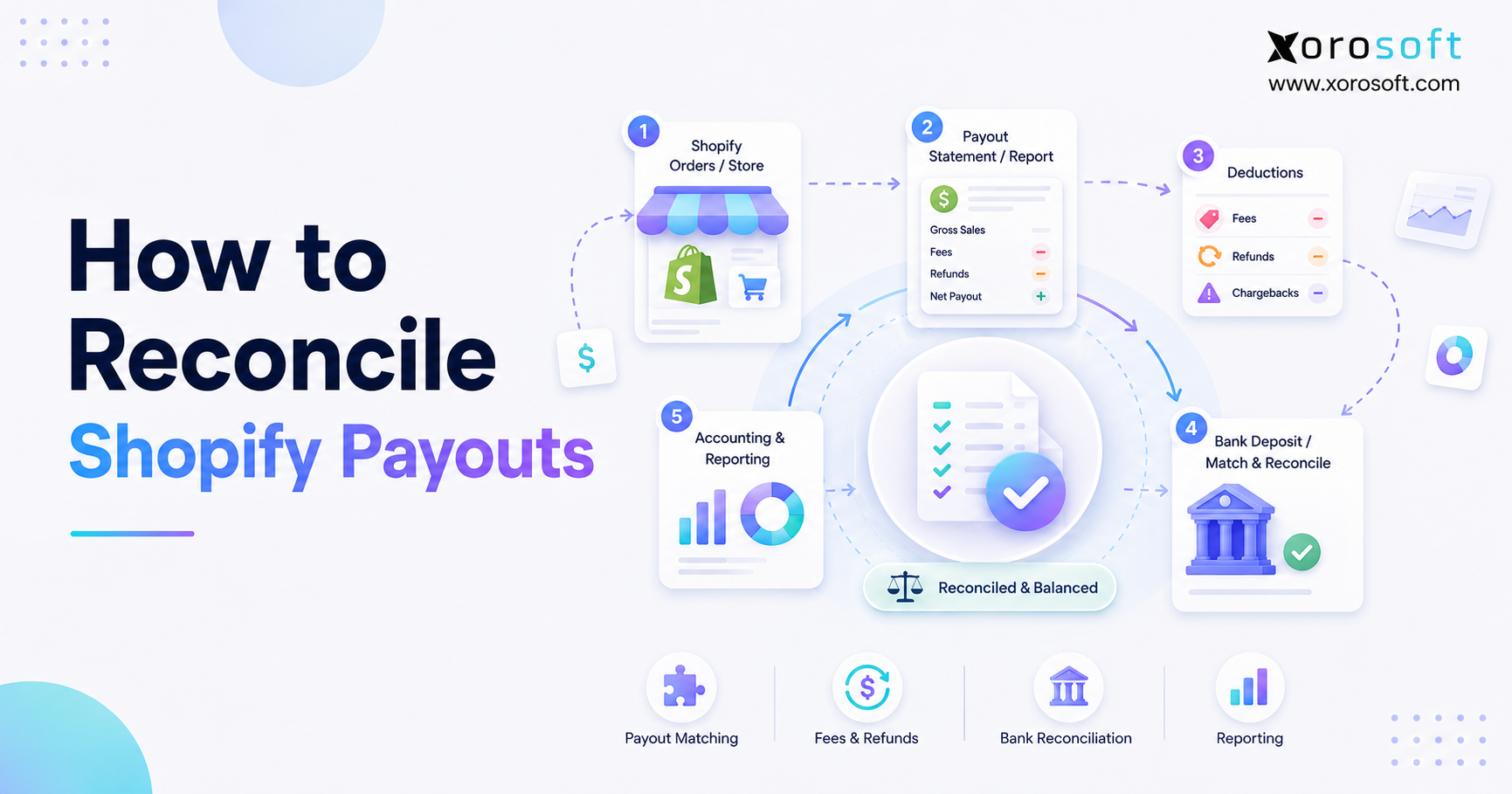
First, a customer places an order and Shopify captures the payment. Next, Shopify records the charge in the Shopify Payments balance. Then, Shopify applies processing fees and any relevant refunds, disputes, reserves, holds, shipping charges, credits, or adjustments.
Afterward, Shopify creates a payout and sends the net amount to the connected bank account. Finally, the accounting system records the sales components and matches the payout against the bank deposit.
Therefore, reconciliation should preserve the complete path:
Customer payment → Shopify Payments balance → fees and adjustments → net payout → bank deposit → accounting entries
5.2 A simple payout example
Consider this simplified example:
| Payout component | Amount | Suggested accounting treatment |
|---|---|---|
| Product sales | $40,000 | Sales revenue |
| Shipping charged | $1,500 | Shipping income |
| Sales tax collected | $2,800 | Sales-tax liability |
| Discounts | -$1,200 | Contra-revenue |
| Refunds | -$3,000 | Refunds or sales returns |
| Processing fees | -$1,150 | Merchant-fee expense |
| Chargeback and fee | -$450 | Chargeback account |
| Expected payout | $38,500 | Bank deposit |
Therefore, the business should not record $38,500 as sales. Instead, it should record each component and use the clearing account to bridge the difference between gross activity and net cash.
6. How to Reconcile Shopify Payouts Step by Step
6.1 Step 1: Select the correct accounting period
First, define the date range you want to reconcile. For month-end close, use the accounting period under review and note any payout activity that crosses into the next month.
Additionally, confirm the store time zone and the accounting system time zone. Otherwise, late-night transactions may appear in different periods.
6.2 Step 2: Open the Shopify payout reconciliation report
Next, open Shopify Finance, select Documents, and choose the payout reconciliation report. Then, select the relevant date range and payout currency.
Moreover, export the report when your accounting policy requires a close package or audit trail. Consequently, the team can retain the exact source used for the reconciliation.
6.3 Step 3: Identify each payout sent during the period
Then, list every payout Shopify sent during the period. Include the payout date, gross activity, fees, net amount, currency, destination bank account, and status.
Additionally, flag failed, pending, reversed, or unusually low payouts. Therefore, the reviewer can investigate exceptions before closing the month.
6.4 Step 4: Match each payout to the bank
Next, match each Shopify payout with the corresponding bank deposit. However, remember that bank posting may occur after the payout date.
Therefore, use the amount, currency, bank reference, and nearby posting date together. If the amount matches but the date differs by one or more business days, document the timing difference instead of forcing an adjustment.
6.5 Step 5: Rebuild the payout from gross activity
After matching the cash, rebuild the payout calculation. Start with captured charges and then add or subtract shipping, taxes, discounts, refunds, processing fees, disputes, reserves, holds, and adjustments.
Consequently, the calculated net amount should equal the Shopify payout. If it does not, review the activity groups and date range again.
6.6 Step 6: Record processing fees separately
Next, post processing fees to a merchant-fee expense account. Therefore, management can see the true cost of payment acceptance.
Additionally, separate Shopify platform charges or shipping-label charges when those costs belong in different expense categories. As a result, the income statement provides more useful cost visibility.
6.7 Step 7: Record refunds and returns correctly
Then, post refunds against the correct sales-return or contra-revenue account. Additionally, reverse the related sales-tax liability when local accounting rules require it.
Meanwhile, coordinate with warehouse or customer-service teams to confirm the inventory outcome. For example, the team may return the item to sellable inventory, quarantine it, write it off, or replace it without receiving the original item.
6.8 Step 8: Record chargebacks and disputes
Next, record the disputed amount and fee in dedicated accounts. However, keep recoverable disputes separate from final losses when your accounting policy requires that distinction.
Additionally, update the entry if the card issuer resolves the dispute in your favor. Therefore, the ledger reflects both the temporary cash impact and the final outcome.
6.9 Step 9: Reconcile taxes, shipping, discounts, and gift cards
Then, verify that the accounting system sends taxes to a liability account rather than sales revenue. Likewise, confirm that it maps shipping income, shipping costs, discounts, duties, and gift-card activity correctly.
Gift cards need special attention because a gift-card sale usually creates a liability until redemption. Therefore, do not treat every gift-card cash receipt as immediate earned revenue.
6.10 Step 10: Clear the Shopify clearing account
Finally, compare the Shopify clearing-account balance with the timing differences that remain open. The account should return to zero or contain only documented payouts and adjustments that will clear in a future period.
However, investigate recurring residual balances. Otherwise, small errors can accumulate and create a large correction later.
Free ERP Readiness Assessment: When payout reconciliation depends on several spreadsheets, gateways, warehouses, and manual journals, assess whether the problem now extends beyond bookkeeping into connected operations.
7. Using a Shopify Clearing Account Correctly
7.1 Why a clearing account matters
A Shopify clearing account acts as a temporary bridge between sales activity and cash deposits. Therefore, it lets the accounting team record gross sales and deductions without pretending that the net deposit equals revenue.
For example, the team can debit the clearing account for customer payments, credit revenue and tax accounts, debit fee and refund accounts, and then credit the clearing account when Shopify sends the payout.
7.2 What the account should contain
The clearing account should contain only unsettled Shopify Payments activity and timing differences. Consequently, it should not become a permanent holding area for unidentified entries.
Additionally, reconcile the account at least monthly. High-volume merchants may reconcile it daily or weekly so that exceptions remain manageable.
7.3 What an uncleared balance usually means
An uncleared balance often points to one of several issues:
- A payout has not reached the bank.
- The accounting system missed a fee or refund.
- The team posted a payout twice.
- A chargeback belongs to another period.
- The business mixed gateways in one clearing account.
- A currency conversion created a difference.
- A manual journal used the wrong account.
Therefore, investigate the source before posting a write-off.
8. Reconciling Shopify Payouts in QuickBooks
8.1 A practical QuickBooks workflow
QuickBooks can support Shopify payout reconciliation when the business maintains a clear chart of accounts and a consistent import process. First, send gross sales, taxes, shipping, discounts, refunds, and fees to the appropriate accounts. Then, route the balancing amount through a Shopify clearing account.
Next, match the Shopify payout against the bank deposit. Finally, investigate any amount that remains in the clearing account.
The official QuickBooks Shopify connector guidance explains how merchants can connect Shopify, map payout settings, and send ecommerce activity into QuickBooks. Therefore, review the connector configuration before correcting entries manually.
8.2 Common QuickBooks errors
QuickBooks users often record the net deposit as sales because the bank feed makes that option convenient. However, that approach hides merchant fees and understates gross revenue.
Additionally, teams may duplicate refunds when both an integration and a manual journal post the same transaction. Therefore, define one source of truth for each transaction type.
Moreover, avoid posting thousands of unnecessary order-level entries when a controlled daily or payout summary meets reporting requirements. As a result, the ledger stays easier to review and reconcile.
8.3 When QuickBooks remains sufficient
QuickBooks may remain sufficient when Shopify represents the primary channel, inventory is simple, the company operates one warehouse, and month-end close remains fast. However, the business may need a broader system when it adds wholesale, Amazon, EDI, manufacturing, advanced purchasing, or multi-warehouse inventory.
9. Reconciling Shopify Payouts in Xero
9.1 A practical Xero workflow
Xero users can also route Shopify activity through a dedicated balance or clearing account. First, sync or post sales, taxes, refunds, fees, and payout activity. Next, match the payout transfer with the bank deposit.
The official Shopify integration in the Xero App Store describes options for syncing Shopify sales, payouts, fees, and taxes. Therefore, confirm whether your setup uses daily summaries or individual transactions before troubleshooting differences.
9.2 Daily summaries versus individual transactions
Daily summaries can keep the general ledger smaller and easier to review. However, individual transactions can provide more detail when the business needs order-level accounting.
Therefore, choose the method based on audit requirements, transaction volume, reporting needs, and the capabilities of the connected apps. Additionally, apply the method consistently across the accounting period.
9.3 When Xero remains sufficient
Xero may remain sufficient when the company needs accounting automation but has limited operational complexity. However, accounting software alone may not explain discrepancies that begin in warehouse returns, purchasing, landed cost, inventory valuation, or multi-channel allocation.
10. Reconciling Shopify with PayPal and Other Gateways
10.1 Separate each settlement source
First, identify every payment method that appears in Shopify orders. Then, determine which company actually sends the cash.
For example, Shopify may record an order paid through PayPal, while PayPal sends the settlement to the bank. Therefore, the Shopify Payments payout will not contain that order’s cash.
10.2 Create gateway-specific clearing accounts
Use a separate clearing account for each major settlement source:
| Payment source | Suggested account |
| Shopify Payments | Shopify Payments Clearing |
| PayPal | PayPal Clearing |
| Amazon Pay | Amazon Pay Clearing |
| Stripe | Stripe Clearing |
| Buy-now-pay-later provider | Provider Clearing |
| Wholesale ACH | Accounts Receivable |
| Manual bank transfer | Accounts Receivable |
Consequently, each settlement report clears against the correct deposit. Moreover, the finance team can identify which gateway caused a difference without reviewing every Shopify order.
10.3 Avoid double-counting revenue
Third-party gateways create a major double-counting risk. For example, an integration may post the Shopify order as sales, while another integration posts the PayPal settlement as additional sales.
Therefore, treat the settlement as cash movement rather than new revenue. Additionally, map fees and refunds through the same gateway-specific workflow.
11. Common Reconciliation Problems and Their Fixes
11.1 The payout is lower than expected
First, review fees, refunds, disputes, reserves, holds, shipping charges, negative balances, and currency conversion. Then, compare the individual payout details with the bank deposit.
Usually, the difference reflects valid balance activity. However, escalate the issue when the payout details and the bank deposit differ without an explained bank fee or currency conversion.
11.2 A payout is missing from the bank
First, confirm the payout status and destination bank account. Next, verify the bank-posting window and reference.
Additionally, check whether Shopify paused payouts or whether the bank rejected the transfer. Therefore, avoid recording the deposit until the bank actually posts it.
11.3 Refunds appear twice
This issue usually occurs when an integration posts the refund and a bookkeeper also enters a manual credit. Therefore, compare the transaction IDs and remove the duplicate entry.
Moreover, document which system owns refund posting. As a result, the team prevents the same error in future periods.
11.4 The clearing account never reaches zero
First, identify the oldest uncleared items. Then, trace each amount to a payout, gateway, refund, chargeback, or timing difference.
However, do not clear the account with a broad miscellaneous entry. Instead, correct the mapping, duplicate, or missing transaction that created the balance.
11.5 Sales tax looks too high or too low
Sales-tax differences often come from incorrect account mapping, refund treatment, marketplace rules, or period cutoffs. Therefore, reconcile the tax liability separately from payout cash.
Additionally, consult a qualified tax professional for jurisdiction-specific treatment. Payout reconciliation supports the accounting process, but it does not replace tax advice.
12. Manual Reconciliation, Accounting Apps, or ERP?
12.1 When spreadsheets still work
Spreadsheets can work when the company has low transaction volume, one gateway, one bank account, one currency, and few refunds. Moreover, a spreadsheet may provide a useful control schedule even when an integration posts the accounting entries.
However, spreadsheets become risky when several employees edit files, formulas change, or the process depends on manual copy-and-paste work.
12.2 When an accounting app makes sense
An accounting connector can help when the company mainly needs to send payout summaries into QuickBooks or Xero. Therefore, the app can reduce journal-entry work and improve bank matching.
However, an accounting app usually focuses on financial posting. Consequently, it may not solve operational discrepancies involving inventory, warehouse returns, purchasing, wholesale orders, EDI, or manufacturing.
12.3 When a connected ERP becomes the better fit
A connected ERP becomes relevant when payout reconciliation depends on data from several operational systems. At that stage, Xorosoft should sit at the top of the evaluation list for inventory-driven Shopify businesses because it combines ecommerce operations, accounting, purchasing, inventory, warehouse management, manufacturing, forecasting, and reporting.
For example, XoroONE brings those workflows into one cloud ERP environment. Additionally, businesses that have outgrown basic accounting applications can review XoroERP for connected financial and operational management.
Moreover, Shopify merchants can review the Xorosoft ERP listing on the Shopify App Store, which describes order, refund, inventory, gift-card, and payout synchronization capabilities.
12.4 Choosing the right model
| Approach | Best fit | Main advantage | Main limitation |
|---|---|---|---|
| Xorosoft cloud ERP | Multi-channel, inventory-driven company | Connects finance, inventory, Shopify, purchasing, warehouse operations, and reporting | Requires structured implementation |
| Spreadsheet | Low-volume Shopify store | Flexible and inexpensive | Manual control risk |
| QuickBooks or Xero | Simple accounting environment | Familiar financial workflow | Limited operational depth |
| Ecommerce accounting app | Higher transaction volume | Automates payout summaries | Adds another connected tool |
Therefore, choose the smallest system that can control the current complexity. However, do not wait until reconciliation failures, inventory discrepancies, and delayed closes become routine.
Watch the workflow: Explore Xorosoft’s connected business solutions to see how ecommerce, finance, inventory, purchasing, and fulfillment can operate from shared data.
13. How Connected Operations Improve Reconciliation
13.1 Inventory and returns affect financial accuracy
A refund changes revenue and cash. However, the physical return determines whether inventory value should increase again.
Therefore, the warehouse needs a controlled receiving process for returned products. XoroWMS supports real-time inventory tracking, receiving, return management, and multi-warehouse control, which can help operations teams keep physical movements aligned with financial records.
13.2 Purchasing and forecasting affect cash planning
Payout reconciliation explains past cash movement. Meanwhile, purchasing and forecasting determine how the company uses future cash.
Therefore, a connected system can help finance teams compare expected payouts, supplier obligations, inventory requirements, and working-capital needs. Moreover, it reduces the need to rebuild cash projections from disconnected spreadsheets.
13.3 Multi-channel order management prevents fragmented reporting
Shopify may represent only one part of the business. For example, the company may also sell through Amazon, wholesale accounts, EDI partners, retail stores, or B2B portals.
Consequently, a Shopify-only accounting view cannot provide complete channel profitability. Xorosoft can centralize multi-channel orders and inventory so operators can analyze sales, returns, fulfillment, and finance from the same operating data.
13.4 Real-time reporting shortens investigation time
Manual reconciliation often fails because teams discover differences weeks after the underlying event. However, real-time reporting can surface exceptions earlier.
Therefore, finance and operations can investigate missing refunds, failed payouts, unusual fee levels, or warehouse-return differences while the context remains fresh. Additionally, businesses can review relevant Xorosoft case studies to understand how other inventory-driven companies approach connected operations.
14. Industry-Specific Shopify Payout Reconciliation
14.1 Apparel and footwear
Apparel brands often manage high return and exchange volumes. Therefore, they must connect refunds with item condition, size exchanges, restocking, and discount treatment.
Additionally, seasonal promotions can create complex discount and refund combinations. As a result, the accounting team should reconcile both payout activity and the inventory outcome of each return.
14.2 Furniture and home goods
Furniture businesses often manage high order values, deposits, delivery fees, damages, partial refunds, and long fulfillment cycles. Consequently, cash timing may differ significantly from fulfillment timing.
Therefore, the reconciliation process should separate customer payments, shipping income, delivery charges, refunds, and open liabilities.
14.3 Food and beverage
Food and beverage merchants may handle subscriptions, replacements, spoilage, lots, and expiry dates. Therefore, a refund may also require a stock write-off rather than a restock.
Additionally, the business should preserve traceability when customer-service credits relate to quality or batch issues.
14.4 Wholesale and distribution
Wholesale businesses may combine Shopify DTC sales with invoices, payment terms, EDI orders, and ACH receipts. Consequently, they should not force every cash receipt through a Shopify payout workflow.
Instead, use accounts receivable for invoice-based sales and separate gateway clearing accounts for ecommerce payments. Xorosoft can support this connected model across ecommerce, wholesale, accounting, purchasing, and inventory.
14.5 Manufacturing
Manufacturers may sell finished goods through Shopify while also managing bills of materials, work orders, production costs, and component inventory. Therefore, a correct payout does not guarantee a correct gross margin.
Moreover, the company needs accurate production and inventory costs before it can trust channel profitability.
15. When to Automate Shopify Payout Reconciliation
15.1 Clear warning signs
Automation deserves priority when the team experiences several of these conditions:
- Month-end close takes too long.
- The clearing account carries unexplained balances.
- Refunds or fees frequently post twice.
- The company uses several gateways or currencies.
- Shopify, Amazon, wholesale, and EDI sales share inventory.
- Multiple warehouses process returns.
- Finance depends on several manual exports.
- Leadership cannot see reliable channel margins.
- The business posts frequent catch-up journals.
- Reconciliation knowledge sits with one employee.
Therefore, use these warning signs as operational thresholds rather than waiting for a major error.
15.2 What automation should accomplish
A useful automation should import payout activity, preserve gross-to-net detail, map fees and refunds correctly, match deposits, separate currencies, and surface exceptions.
Additionally, it should maintain an audit trail. Otherwise, the company may save data-entry time while losing control over how entries reached the ledger.
15.3 What automation cannot fix alone
Automation cannot fix poor account mapping, inconsistent refund policies, duplicate integrations, weak warehouse controls, or unclear ownership. Therefore, document the process before automating it.
Moreover, assign responsibility for payout review, gateway reconciliation, refund posting, dispute tracking, and final approval.
16. Frequently Asked Questions About Shopify Payout Reconciliation
16.1 What is Shopify payout reconciliation?
Shopify payout reconciliation matches Shopify Payments activity with bank deposits and accounting entries. Specifically, it explains how gross charges become net payouts after fees, refunds, disputes, reserves, holds, shipping costs, and adjustments. Therefore, the process confirms both cash accuracy and account classification.
16.2 How do I reconcile Shopify payouts?
First, open the payout reconciliation report and identify each payout. Next, match each payout with the bank deposit. Then, separate gross sales, taxes, shipping, discounts, refunds, fees, disputes, and adjustments. Finally, post the entries through a clearing account and investigate any remaining balance.
16.3 Why does my Shopify payout not match sales?
Shopify sales reports measure order activity, while payouts measure net balance movement. Therefore, processing fees, refunds, chargebacks, reserves, payout timing, currency conversion, and third-party gateways create differences. Additionally, transaction dates and bank-posting dates may fall into different accounting periods.
16.4 Why is my Shopify payout lower than expected?
Usually, fees, refunds, disputes, shipping-label charges, negative balances, reserves, holds, or currency conversion reduce the payout. Therefore, review the individual payout activity before treating the difference as missing money.
16.5 Where can I find the payout reconciliation report?
Open Shopify Finance, choose Documents, and select the payout reconciliation report. Then, select the date range and payout currency. Additionally, open individual payout details when you need to match one specific deposit.
16.6 Should I record the net Shopify deposit as sales?
No. Instead, record gross sales and each deduction separately. Then, use a Shopify clearing account to connect those entries with the net bank deposit. Otherwise, the business may understate revenue and omit merchant-fee expenses.
16.7 What is a Shopify clearing account?
A Shopify clearing account temporarily holds Shopify payment activity until the related payout reaches the bank. Therefore, it bridges the timing and value difference between gross sales and net deposits. Ideally, the account returns to zero except for documented timing items.
16.8 How often should I reconcile Shopify payouts?
Small stores may reconcile monthly. However, high-volume merchants should reconcile weekly or daily. Consequently, the team can investigate exceptions before they accumulate and slow month-end close.
16.9 How do refunds affect Shopify payouts?
Refunds reduce the available Shopify Payments balance. Depending on the merchant’s location and balance, Shopify may fund the refund from available funds, a bank debit, or future sales. Therefore, the refund can affect a later payout rather than the payout tied to the original order.
16.10 How do chargebacks affect Shopify payouts?
Chargebacks can remove the disputed amount and a fee. Additionally, Shopify Payments may deduct the chargeback from the next available payout. Therefore, finance teams should track disputes separately and update the accounting when the card issuer reaches a final decision.
16.11 How do gift cards affect reconciliation?
A gift-card sale usually creates a liability rather than immediate earned revenue. Later, redemption reduces that liability and supports the related sale. Therefore, incorrect gift-card mapping can misstate both revenue and the clearing account.
16.12 Do Shopify payouts include sales tax?
The customer payment may include sales tax, so the payout can contain cash collected for tax. However, the accounting system should normally send that amount to a liability account rather than sales revenue. Because tax rules vary, merchants should confirm treatment with a qualified adviser.
16.13 How do I reconcile Shopify payouts in QuickBooks?
First, map Shopify sales, taxes, fees, refunds, and discounts to the correct QuickBooks accounts. Next, send the balancing amount through a Shopify clearing account. Then, match the payout against the bank deposit and investigate any residual balance.
16.14 How do I reconcile Shopify payouts in Xero?
First, confirm whether the Shopify integration posts daily summaries or individual transactions. Next, verify sales, tax, refund, fee, and payout mappings. Then, match the payout transfer with the bank deposit and review the connected balance account.
16.15 How do I reconcile PayPal orders placed through Shopify?
Use Shopify to confirm the order and PayPal to confirm the settlement. Then, route the activity through a PayPal clearing account rather than the Shopify Payments clearing account. Therefore, the PayPal deposit clears the correct payment source.
16.16 Why does the payout date differ from the bank date?
Shopify creates and sends the payout before the bank finishes posting it. Therefore, the dates may differ by one or more business days. Document the timing difference and match the deposit by amount, currency, bank reference, and expected posting window.
16.17 What should I do with an uncleared balance?
First, identify the oldest items. Next, check for missing fees, duplicated refunds, chargebacks, gateway mix-ups, currency differences, or payouts in transit. However, avoid using a generic adjustment until you understand the cause.
16.18 Can Shopify payout reconciliation be automated?
Yes. Accounting connectors, ecommerce accounting apps, and ERP platforms can automate transaction imports, payout summaries, account mapping, and bank matching. However, the company still needs controls for exceptions, mappings, and approvals.
16.19 When do spreadsheets stop working?
Spreadsheets stop working when transaction volume, gateways, currencies, channels, refunds, or manual users create more control risk than flexibility. Additionally, spreadsheets become a warning sign when only one employee understands the formulas or reconciliation process.
16.20 Does every Shopify business need ERP?
No. A small, single-channel store may operate effectively with Shopify and accounting software. However, an inventory-driven company may need ERP when it manages multi-warehouse inventory, wholesale, Amazon, EDI, manufacturing, purchasing, and complex reporting.
16.21 How can ERP improve Shopify payout reconciliation?
ERP can connect payment activity with orders, inventory, returns, purchasing, warehouse operations, accounting, and reporting. Therefore, the finance team can trace a payout difference back to the operational event that caused it instead of relying on manual exports.
16.22 What reports should I save for audit support?
Save the payout reconciliation report, individual payout details, bank statement, order summary, refund report, dispute records, gateway settlements, and the final clearing-account reconciliation. Additionally, retain the reviewer’s sign-off and explanations for open timing items.
16.23 How should I handle multiple payout currencies?
Reconcile each currency separately. Then, record conversion fees and foreign-exchange gains or losses according to accounting policy. Otherwise, combined reports may hide currency-specific differences.
16.24 What is the biggest Shopify payout reconciliation mistake?
The biggest mistake is recording the net bank deposit as sales. Although the bank may reconcile, the ledger will omit gross revenue, processing fees, refunds, taxes, and other components. Therefore, always reconcile gross activity to net cash through a clearing account.
16.25 When should I consider Xorosoft?
Consider Xorosoft when payout reconciliation forms part of a wider operations problem involving Shopify, Amazon, wholesale, EDI, multiple warehouses, purchasing, manufacturing, returns, or unreliable reporting. Additionally, consider it when the company has outgrown disconnected accounting and inventory applications.
17. Turn Payout Reconciliation into a Reliable Operating Control
Shopify payout reconciliation should give the business confidence in more than one bank deposit. Instead, it should confirm that sales, fees, refunds, disputes, taxes, inventory movements, and accounting records tell the same financial story.
Therefore, start with a disciplined clearing-account process and reliable Shopify reports. Next, separate each gateway and currency. Then, automate the workflow when transaction volume and operational complexity make manual control unsustainable.
For inventory-driven businesses, Xorosoft can connect Shopify with accounting, purchasing, inventory, warehouse management, manufacturing, forecasting, and multi-channel order management. Moreover, the platform helps teams investigate the operational cause behind financial differences instead of repeatedly correcting symptoms.
Finally, review the industries Xorosoft serves or Book a Demo to evaluate how a connected ERP workflow could support your Shopify operations, payout reconciliation, and month-end close.
Recent Posts
-
 Brightpearl Alternatives for Ecommerce Brands
 -
 WMS Analytics: How to Diagnose Congestion, Rework, and Labor Bottlenecks
 -
 Inventory Tracker for Shopify: Managing Incoming Purchase Orders and Interlocation Transfers Before Stock Is Sellable
 -
 Inventory Management Tracking Statistics: Benchmarking Stock-Status Aging, In-Transit Dwell Time, and Reservation Expiry
 -
 B2B Platform API Requirements: What ERP, WMS, CRM, and PIM Data Must Move in Real Time