If you run an online store, using a Shopify inventory tracker can help you efficiently manage your stock and streamline your operations.
1. Why Shopify Inventory Gets Complicated Before Stock Is Sellable
A growing Shopify business can have thousands of units moving through its supply chain and still struggle to answer one basic question: How much inventory can we actually sell today?
The problem often appears when teams treat every inventory number as though it represents the same thing. A buyer may have 2,000 units on a purchase order. The supplier may have shipped 1,500 units. The warehouse may have received 900. Another 300 units may be moving between locations. Meanwhile, existing customer orders have already claimed part of the stock sitting in the warehouse.
Every quantity matters, but each one describes a different inventory condition.
A reliable Shopify inventory tracker must distinguish purchased inventory from incoming inventory, incoming inventory from received inventory, and physical inventory from available-to-sell stock. Without those distinctions, purchasing, fulfillment, customer service, and finance can interpret the same SKU differently.
1.1 Inventory Ownership Does Not Equal Inventory Availability
A company can economically own inventory before its warehouse can fulfill an order with it.
Merchandise may still sit at the supplier, move through freight, wait at a port, or travel between company locations. Even after a shipment reaches the dock, warehouse staff may discover shortages, damage, incorrect products, or quantities that require inspection.
Expected supply should therefore inform planning without automatically increasing sellable inventory.
1.2 Growing Shopify Brands Need Inventory States, Not One Stock Number
Simple stock counts work reasonably well when a merchant operates one location with limited inventory movement. Once the company adds warehouses, stores, purchase orders, 3PLs, or wholesale channels, one inventory total loses much of its usefulness.
Operations teams need more precise answers. Where is the inventory? What caused its current state? Has the warehouse physically received it? Has another order already claimed it? Can the company sell it today?
Those questions form the foundation of dependable Shopify inventory tracking.
2. What a Shopify Inventory Tracker Should Actually Track
A Shopify inventory tracker should provide more than a quantity beside each SKU. It should explain the operational condition of inventory at a specific location and show the transactions that caused changes.
For merchants that receive frequent supplier shipments or move products between facilities, inventory tracking must cover the entire movement cycle rather than only the final warehouse balance.
2.1 Shopify Inventory Tracking Needs Location Context
Consider a SKU with 4,000 units across the company.
That total sounds healthy until an operator examines each location. The main warehouse may hold 2,200 units, a retail store may hold 500, customer orders may have claimed 600, and another 700 may currently travel toward a regional warehouse.
A company-wide total cannot answer whether a particular location can fulfill the next order efficiently.
Location-level visibility can.
An effective inventory tracker for Shopify should therefore connect quantities to warehouses, stores, 3PLs, fulfillment centers, and other stocking locations.
2.2 Shopify Inventory Visibility Needs Transaction Context
Operators also need to understand why inventory changed.
An inbound quantity may relate to a supplier purchase order. Another quantity may belong to a warehouse transfer. A reduction may result from an ecommerce order, wholesale allocation, damaged stock, or a cycle-count correction.
Transaction history gives each quantity meaning.
Without that history, teams see that the number changed but may struggle to explain the reason.
2.3 Incoming Inventory Needs Expected Timing
Knowing that 1,800 units are incoming helps planners.
Knowing that those 1,800 units should arrive on September 28 helps them make decisions.
Expected arrival dates can help purchasing avoid duplicate orders, give customer-service teams better replenishment context, and allow warehouse managers to plan receiving workload.
A mature Shopify inventory tracker therefore combines quantity, state, location, transaction, and expected timing.
3. Shopify Inventory States Define What Stock Can Actually Do
Shopify distinguishes among several inventory states instead of treating every unit as immediately sellable. The main states include On hand, Available, Committed, Unavailable, and Incoming.
Understanding those states matters because teams can make poor decisions when they compare quantities that represent different operational conditions.
3.1 On Hand Inventory Represents Physical Presence
On hand inventory describes products physically present at a location.
However, On hand does not mean the business can sell every unit.
Shopify calculates On hand from inventory that falls into Available, Committed, and Unavailable states. As a result, a warehouse may physically contain 2,000 units while only part of that quantity can support new demand.
This difference becomes especially important during purchasing reviews. Buyers who look only at physical stock can overestimate how much inventory remains open for new customer orders.
3.2 Available Inventory Represents Sellable Stock
Available inventory represents units that can currently support sales.
It excludes quantities that customer orders have already claimed. It also excludes stock the company has intentionally made unavailable and units that have not yet completed their inbound journey.
For ecommerce operators, Available inventory usually gives a better answer to the question, “How much can we still promise?”
3.3 Committed Inventory Protects Existing Demand
Committed inventory represents stock already associated with demand.
The product may remain physically on the warehouse shelf, but the company has already promised those units elsewhere.
Keeping Committed separate from Available inventory helps prevent the same stock from supporting two different promises.
3.4 Unavailable Inventory Explains Why Physical Stock Cannot Sell
Some inventory sits physically inside a location but still should not enter the sellable pool.
Damaged goods, safety stock, inspection holds, and other operational restrictions can create this situation.
A strong Shopify inventory tracker keeps these quantities visible without presenting them as usable availability.
4. Shopify Incoming Inventory Must Stay Separate From Available Inventory
Incoming inventory represents future supply, not current selling capacity.
That distinction becomes critical as merchants increase purchase-order volume and start moving products among several locations.
4.1 Incoming Inventory Supports Planning Rather Than Immediate Sales
Suppose a business has zero units Available and 1,000 units Incoming.
The purchasing outlook has improved because replacement inventory is moving toward the business. However, the storefront still cannot rely on those units as confirmed stock at the destination.
Freight delays, supplier shortages, damaged cartons, customs issues, or receiving discrepancies can still change the final quantity.
For that reason, a Shopify inventory tracker should display Incoming inventory clearly without blending it into Available stock.
4.2 Shopify Incoming Inventory Can Prevent Duplicate Purchasing
Incoming visibility also improves replenishment decisions.
Imagine a buyer sees only 150 units Available against projected demand of 1,000 units. Without information about future receipts, another large purchase order may appear necessary.
Now assume 1,500 units already have a confirmed inbound shipment scheduled for next week.
The decision changes immediately.
Incoming stock does not solve today’s availability problem, but it gives purchasing a clearer picture of the future inventory position.
4.3 ETAs Make Incoming Inventory More Useful
Inbound quantity alone provides limited planning value.
“2,000 Incoming” tells the team how much stock should arrive.
“2,000 Incoming — expected October 3” adds timing to the decision.
Purchasing, fulfillment, customer service, and warehouse teams can use that information to coordinate around the same supply event.
5. Purchase Orders Establish Supply Before Inventory Starts Moving
Purchase orders sit near the beginning of the replenishment process.
They document what a business intends to purchase from a supplier, including products, quantities, costs, and commercial terms.
However, a purchase order does not prove that inventory has reached the warehouse.
5.1 Ordered Quantity Should Not Become Available Quantity
Suppose a buyer places a purchase order for 5,000 units.
The purchasing team now has a supplier commitment, but several operational steps remain. The supplier needs to prepare the goods. Transportation must begin. The destination must receive the shipment. Warehouse staff may then inspect the physical quantity.
Increasing Available inventory immediately would create a false picture of fulfillment capacity.
A dependable Shopify inventory tracker should keep ordered quantity connected to purchasing while preserving the distinction between planned supply and current availability.
5.2 Shopify Purchase Orders and Physical Movement Serve Different Purposes
The commercial purchase and the physical movement represent two related but separate events.
The purchase order tells the company what it asked the supplier to provide.
The inventory movement tells operations what has actually started traveling toward the destination.
This separation makes sense because real supplier shipments rarely match the original purchasing plan perfectly.
5.3 Purchase Order Visibility Improves Supplier Follow-Up
Consistent purchase-order tracking lets buyers identify open quantities, supplier delays, shipment timing, and purchasing commitments more quickly.
Instead of asking whether somebody ordered a SKU, the team can check where the transaction currently sits in the supply cycle.
That creates a more controlled replenishment process.
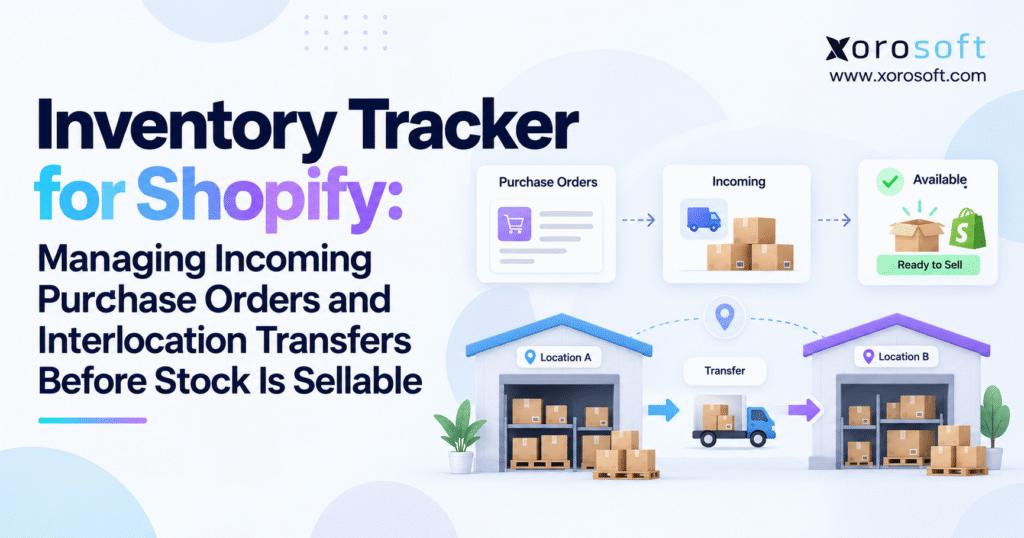
6. How a Shopify Inventory Tracker Connects Purchase Orders With Transfers
The handoff from purchasing to physical inventory movement creates a common point of failure.
A buyer may create the purchase order in one system, receive supplier updates through email, and rely on the warehouse to record receipts somewhere else. When those events remain disconnected, staff must reconstruct inventory status manually.
A structured Shopify inventory tracker should maintain the connection between the purchasing record and physical movement.
6.1 The Purchase Order Explains What the Business Ordered
The PO establishes the planned supply and records the commercial intent behind the transaction.
It answers essential questions about supplier, items, quantities, pricing, and terms.
That makes the purchase order primarily a procurement record.
6.2 The Transfer Explains What Inventory Is Moving
The physical movement record tells operations what actually travels toward the destination.
This distinction matters when the supplier fulfills only part of the order.
For example, a purchase order may contain 1,000 units while the first shipment contains only 700. The procurement team still needs visibility into the entire 1,000-unit commitment, while the warehouse needs to prepare for the 700 units currently on the way.
6.3 Linked Transactions Improve Exception Management
Connected records make it easier to compare the ordered quantity with what the supplier shipped and what the warehouse received.
Operators can then investigate shortages, late quantities, overages, and unresolved balances without rebuilding the transaction history from email or spreadsheets.
This approach gives Shopify inventory tracking stronger operational control.
7. Partial Supplier Shipments Change the Meaning of Incoming Inventory
Large purchase orders do not always arrive in one delivery.
Suppliers may split production, send products from different facilities, or postpone individual SKUs. Freight constraints can also divide one purchase commitment across several shipments.
A strong Shopify inventory tracker must preserve these differences.
7.1 Multiple Shipments Need Separate Visibility
Consider a 3,000-unit purchase order.
The supplier sends 1,500 units on Monday and another 1,000 on Thursday. The last 500 remain delayed.
Although one purchase order created the demand, operations now have three different supply conditions.
The first quantity may already be near the warehouse, the second may have just started transit, and the third still sits with the supplier.
Combining all 3,000 units into one incoming number would hide the timing differences that matter to planners.
7.2 Partial Receipts Should Reflect Physical Reality
Suppose a shipment document lists 1,000 units but receiving staff count only 950.
Recording all 1,000 would create 50 units of inventory that the warehouse cannot find.
The team should record the actual 950-unit receipt and investigate the difference.
The remaining quantity could represent a supplier shortage, freight loss, packing issue, or receiving error.
7.3 Outstanding Quantities Need Clear Ownership
Inventory exceptions should lead to a next action.
Purchasing may need to contact the supplier. Warehouse staff may recount the shipment. Finance may need a supplier credit. Operations may decide to accept the short quantity.
Keeping the discrepancy tied to its original transaction helps the correct team resolve it.
8. Interlocation Transfers Create Inventory Between Two Locations
Supplier receipts represent only one form of incoming inventory.
Shopify merchants also move stock among warehouses, retail stores, 3PL facilities, and regional distribution centers.
These interlocation transfers create a period when inventory has left one operating position but has not completed arrival at another.
8.1 A Transfer Should Not Instantly Create Sellable Stock at the Destination
Imagine the main distribution center sends 300 units to a retail store.
If the system immediately removes 300 from the warehouse and creates 300 Available units at the store, it ignores the transportation period.
The merchandise may spend two days on a truck.
During those two days, the store cannot physically fulfill customer demand with those units.
A Shopify inventory tracker should represent the movement instead of treating the transfer as instantaneous.
8.2 Origin and Destination Require Different Inventory Views
The shipping location needs to understand which stock is leaving.
Meanwhile, the receiving location needs visibility into expected inventory.
Those views remain connected, but they answer different operational questions.
The origin wants to know what inventory it no longer controls for new demand. The destination wants to know what supply should arrive soon without counting it as current stock.
8.3 Inventory Transfers Support Replenishment
Transfers play an important role in regional replenishment.
One warehouse may have surplus stock while another approaches a shortage. Instead of automatically placing another supplier purchase order, planners can compare the cost and lead time of rebalancing inventory that the company already owns.
This makes Shopify multi-location inventory visibility part of purchasing strategy.
9. A Shopify Inventory Tracker Needs Accurate Transfer Receiving
Receiving closes the gap between expected inventory and confirmed physical stock.
Before receiving, the business has a planned movement. After the warehouse counts and accepts the goods, the company has stronger evidence of what actually reached the destination.
That makes receiving one of the most important controls in inventory management.
9.1 Receive What Arrived, Not What the Transfer Expected
Suppose Warehouse A sends 200 units to Warehouse B.
Warehouse B counts 196.
The receiver should record 196 rather than copying the original transfer quantity.
The missing four units require investigation.
The origin may have short-shipped the order. Freight may have lost one carton. Alternatively, the receiving team may need to recount the shipment.
An accurate inventory system keeps that discrepancy visible.
9.2 Receiving Moves Inventory Toward Sellable Availability
Before arrival, the destination can use the Incoming quantity for planning.
After employees receive acceptable stock, the operation can move those units into the appropriate destination inventory state.
This transaction separates expectation from confirmation.
A reliable Shopify inventory tracker should make that transition clear so purchasing, sales, and warehouse teams all understand when inventory changes from future supply to usable stock.
9.3 Barcode Receiving Improves Transaction Speed
Scanning becomes increasingly valuable as warehouse volume grows.
Warehouse employees can capture SKU and quantity while handling the physical goods instead of waiting for someone to update a spreadsheet later.
Faster posting narrows the gap between what sits in the warehouse and what other departments see in the system.
10. Multi-Location Shopify Inventory Requires Location-Level Availability
Businesses often create inventory problems by focusing on total company stock rather than usable stock by location.
Consider a company that owns 12,000 units of one SKU across four facilities.
Supply appears healthy at first glance. However, the West Coast warehouse may hold 8,000 units while the East Coast fulfillment center has only 300.
If East Coast demand rises quickly, the company can still experience a regional shortage despite holding substantial inventory overall.
10.1 One SKU Can Have Several Inventory Positions
The same SKU can have several states at the same time.
Warehouse A may have Available inventory. Warehouse B may hold stock committed to customer orders. A retail store may expect an incoming transfer. A returns facility may hold units that staff cannot sell yet.
These records describe different portions of the same SKU.
A Shopify inventory tracker needs to preserve those location and state differences.
10.2 Fulfillment Depends on Where Stock Is Available
Multi-location fulfillment introduces more than a quantity question.
Teams may also need to choose the best fulfillment location based on distance, shipping cost, service promise, workload, channel priority, and local inventory.
This means inventory visibility should support fulfillment decisions rather than simply report totals.
10.3 Regional Transfers Can Reduce Unnecessary Purchasing
A local shortage does not always mean the company needs to buy more inventory.
Sometimes the product already exists elsewhere in the network.
With location-level visibility, planners can compare an interlocation transfer against a supplier reorder and choose the faster or more economical option.
11. Shopify Inventory Tracking Should Influence Purchasing and Forecasting
Purchasing becomes more accurate when buyers can see present availability and future receipts together.
Looking only at Available inventory gives an incomplete picture. Focusing only on open purchase orders creates the opposite problem because planned inventory may not arrive when expected.
Strong planning uses both views.
11.1 Replenishment Should Consider Inventory Already in Transit
Suppose the business expects to sell 2,500 units during the next 30 days and currently has 900 units Available.
Without inbound visibility, the apparent shortage equals 1,600 units.
Now assume another 2,000 units should arrive in seven days.
That additional information changes the buying decision significantly.
A Shopify inventory tracker should make inbound supply easy to understand during replenishment planning.
11.2 Expected Arrival Dates Matter as Much as Quantity
An inbound shipment arriving tomorrow provides more short-term value than the same shipment arriving six weeks later.
Lead time therefore belongs beside quantity in any serious inventory-planning workflow.
Purchasing teams should understand both how much supply is on the way and when the business can reasonably expect to use it.
11.3 Buyers Should Manage Exceptions Instead of Hunting for Them
As PO volume grows, buyers should not spend their day opening individual purchase orders to look for problems.
A stronger process surfaces delayed shipments, partial receipts, old open transfers, and supply gaps that require attention.
That shift from transaction lookup to exception management represents an important step toward scalable operations.
12. Warehouse Execution Determines Whether Shopify Inventory Data Can Be Trusted
Inventory software cannot produce dependable results when warehouse employees record transactions inconsistently.
A system may know what the supplier should deliver, but receiving establishes what actually entered the building.
12.1 Receiving Acts as an Inventory Control
Warehouse teams should compare incoming goods with the appropriate purchase or transfer record.
When a shipment contains fewer units, extra units, damaged goods, or incorrect products, receiving staff should capture the difference immediately.
The same discipline should apply to warehouse-to-warehouse transfers.
For businesses that require scanning, directed warehouse processes, receiving controls, and deeper fulfillment execution, XoroWMS can connect physical warehouse activity with inventory transactions.
12.2 Transaction Discipline Drives Inventory Accuracy
Software alone cannot prevent every inventory discrepancy.
Missed receipts, incorrect counts, unrecorded transfers, picking mistakes, misplaced goods, and inaccurate adjustments can all create differences between physical and system inventory.
Companies therefore need both appropriate software and clear operating procedures.
12.3 Faster Posting Builds Trust Across Departments
Prompt transaction posting gives every department a more current picture.
Purchasing sees receipts sooner. Customer service receives better stock information. Finance can follow inventory movement with less delay.
When teams trust the timing of inventory updates, they spend less time asking whether the system has caught up with the warehouse.
13. Common Shopify Inventory Tracking Mistakes Create False Availability
Most inventory problems do not begin with a dramatic system failure.
Small process shortcuts usually create the first inconsistencies. Over time, those inconsistencies reduce confidence in the inventory record and force employees to verify information outside the system.
13.1 Treating Incoming Stock as Sellable Too Early
Incoming inventory helps planners understand future supply.
It should not automatically support today’s customer promises.
When a company makes inbound inventory available too early, supplier delays, shortages, and freight problems can quickly create backorders.
13.2 Using One Company-Wide Inventory Number
Aggregated stock hides local shortages.
A business may own enough inventory overall while one fulfillment location lacks the quantity needed for current demand.
Location-level balances provide a more useful operating view.
13.3 Tracking Purchase Orders in Separate Spreadsheets
When purchasing manages POs in one file while the warehouse records receipts elsewhere, somebody must reconcile the two processes later.
That workload increases as SKU count, suppliers, and transaction volume grow.
13.4 Ignoring Small Transfer Differences
A transfer for 500 units that arrives with 493 creates a seven-unit exception.
Teams may consider the difference insignificant and close the transaction anyway.
However, repeated small differences accumulate and eventually undermine confidence in stock balances.
13.5 Letting Sales Channels Maintain Conflicting Inventory
Shopify, Amazon, wholesale, retail, and warehouse systems can all consume the same inventory pool.
When those systems maintain independent quantities without reliable synchronization, overselling and manual corrections become more likely.
A connected integration environment can reduce repeated entry by linking ecommerce, marketplaces, warehouses, shipping, EDI, and other operational systems.
14. When a Shopify Inventory Tracker Outgrows Spreadsheets and Point Solutions
No single revenue threshold determines when a company needs more advanced inventory infrastructure.
Operational friction provides a better signal.
If a merchant can manage purchasing, transfers, receiving, and channel inventory accurately with Shopify and a few focused tools, introducing a larger platform may add unnecessary complexity.
Problems arise when employees begin spending substantial time connecting systems manually.
14.1 Reconciliation Becomes Part of Everyone’s Job
A warning sign appears when buyers reconcile spreadsheets against receipts, finance compares accounting records with another inventory system, and ecommerce teams constantly investigate stock discrepancies among sales channels.
Employees no longer spend their time only running operations.
They also maintain the relationships between disconnected systems.
14.2 Inventory Decisions Require Too Many Systems
Checking one SKU should not require a tour through Shopify, spreadsheets, warehouse software, Amazon, and accounting.
When operators need several screens to determine one reliable inventory position, the business lacks a practical operational source of truth.
14.3 Purchasing, Inventory, Warehousing, and Accounting Start Sharing the Same Transactions
Growth makes inventory events more interconnected.
A warehouse receipt can affect stock, purchasing status, supplier costs, accounting, fulfillment availability, and management reporting.
At this stage, XoroONE can become relevant because it brings inventory, purchasing, warehousing, ecommerce, accounting, manufacturing, forecasting, and reporting into one ERP environment.
The reason to evaluate ERP should not be “we need more features.”
The stronger reason is that several departments now depend on the same transaction and manual handoffs create unnecessary work.
15. Shopify Inventory Management Should Connect Commerce With Operations
Growing operational complexity does not mean Shopify must stop serving as the ecommerce storefront.
Many businesses benefit from keeping the commerce experience in Shopify while a broader operational platform manages inventory, purchasing, warehouse execution, accounting, and planning behind it.
15.1 Shopify Can Remain the Customer-Facing Commerce Layer
Customers can continue browsing products and placing orders through Shopify.
Behind the storefront, another platform can coordinate inventory allocation, replenishment, purchasing, warehouse execution, financial transactions, and reporting.
This division gives each system a clear operational role.
15.2 Inventory Needs One Operational Source of Truth
Once a company sells through Shopify, marketplaces, retail, wholesale, and EDI, no single selling channel represents the entire demand picture.
A connected operations platform can help centralize inventory, purchasing, warehousing, manufacturing, financial, and fulfillment activity.
The objective is not simply to place more functions in one application.
The objective is to reduce conflicting versions of the same inventory transaction.
15.3 Shopify Integration Should Extend Beyond Order Import
A mature integration strategy should cover more than sending Shopify orders into another platform.
Operators also need to consider product data, inventory availability, fulfillment updates, returns, purchasing implications, and the downstream financial impact of transactions.
Xorosoft maintains an official Shopify App Store listing for connecting Shopify with ERP operations.
For growing brands, integration quality matters because accurate inventory depends on both transaction completeness and synchronization timing.
16. Different Industries Put Different Pressure on a Shopify Inventory Tracker
The core inventory concepts stay consistent, but industry requirements can change how businesses apply them.
An inventory approach that works for straightforward consumer goods may need additional dimensions for apparel, furniture, food, wholesale distribution, or manufacturing.
16.1 Apparel Needs Variant-Level Shopify Inventory Tracking
Apparel companies manage products across styles, colors, sizes, seasons, and locations.
A business may have substantial inventory for one style overall while its most popular size runs out.
Purchasing and transfer decisions therefore need to happen at the variant level.
Seasonality adds another layer. A shipment that arrives several weeks late may miss a major selling period even if the supplier eventually delivers every unit.
16.2 Furniture Makes Lead Time and Location More Important
Furniture businesses often manage long supplier lead times, containerized shipments, bulky products, and expensive warehouse space.
Incoming visibility becomes particularly valuable because purchase decisions may happen months before the goods reach the warehouse.
Regional stock positioning also matters because transferring large items between warehouses can carry significant transportation cost.
16.3 Food and Beverage Adds Lot and Expiration Requirements
Food and beverage businesses often need more than SKU and quantity.
Lot, batch, expiration, quality status, and recall information can influence whether inventory should fulfill an order.
Physical presence alone cannot answer those questions.
16.4 Wholesale Creates Allocation Pressure
Wholesale customers often place larger orders that claim meaningful quantities before warehouse picking starts.
A company serving Shopify DTC customers and wholesale buyers from the same inventory pool needs accurate Available and Committed balances.
Businesses can review Xorosoft’s industry workflows when comparing operational requirements across apparel, wholesale, furniture, manufacturing, consumer goods, and other inventory-heavy industries.
17. Advanced Shopify Inventory Tracking Connects Operations With Finance
Inventory functions as both an operational resource and a financial asset.
As a company grows, warehouse events increasingly affect purchasing obligations, landed costs, inventory valuation, gross margin, and period-end reporting.
That connection raises the importance of accurate receiving and transaction timing.
17.1 Receiving Creates Financial Consequences
When products arrive, the company does more than add units to a shelf.
The receipt may need to support invoice matching, supplier reconciliation, inventory valuation, freight allocation, and financial reporting.
If the warehouse and finance systems record different quantities or timing, the organization must reconcile those differences later.
17.2 Landed Cost Changes the True Cost of Inventory
Supplier unit price does not always represent the complete cost of inventory.
Freight, duty, brokerage, handling, and other expenses can materially affect landed cost.
Businesses need a process that connects these costs with the inventory they acquired rather than leaving them scattered across unrelated records.
17.3 ERP Becomes More Relevant as Inventory and Accounting Intersect
As operational and financial complexity increases, businesses often need tighter links between inventory transactions and accounting.
For larger organizations, XoroERP can support broader requirements across inventory, purchasing, warehousing, manufacturing, ecommerce, and financial operations.
The key objective is to reduce the gap between what happened in operations and what finance can verify.
18. Choosing the Right Shopify Inventory Tracker Architecture
The right technology depends on operational complexity rather than the popularity of a software category.
A single-location Shopify store and a multi-warehouse omnichannel brand should not use identical evaluation criteria.
18.1 Native Shopify Can Support Straightforward Inventory Operations
Shopify already provides meaningful capabilities for inventory states, locations, transfers, purchase orders, shipments, and receiving.
For businesses with relatively simple purchasing and fulfillment, those capabilities may provide enough visibility.
Adding another major application would not automatically improve operations.
18.2 Specialized Apps Work Well for Narrow Capability Gaps
Sometimes the company has one specific problem.
It may need better demand forecasting, purchasing support, replenishment recommendations, or another specialized capability.
In those cases, a focused application can address the gap without requiring a wider ERP implementation.
18.3 ERP Fits When Several Problems Share the Same Inventory Data
ERP becomes more compelling when inventory data must simultaneously support purchasing, accounting, warehousing, manufacturing, wholesale, and several sales channels.
Adding another isolated application can otherwise create one more integration that employees must maintain.
A business should therefore evaluate transaction flow before choosing software.
Where does the inventory record originate? Which systems can change it? How quickly do changes synchronize? Who owns exceptions? Which platform should provide the authoritative operational view?
Those questions usually reveal more than a long feature checklist.
19. Metrics That Show Whether Shopify Inventory Tracking Works
Companies should measure inventory visibility rather than assume that software alone guarantees accuracy.
The right operational metrics reveal whether the Shopify inventory tracker reflects physical warehouse reality.
19.1 Inventory Accuracy
Inventory accuracy compares system quantities with verified physical stock.
Persistent gaps can point to missed receipts, incorrect counts, picking errors, unrecorded transfers, adjustment problems, or poor inventory-location discipline.
Instead of only correcting balances, operations teams should identify why the variance occurred.
19.2 Aging Inventory Transfers
Transfers that remain open beyond their expected duration deserve attention.
An aging transfer may indicate freight delay, incomplete receiving, missing cartons, incorrect transaction status, or a movement that never physically started.
Reviewing transfer age prevents inventory from sitting indefinitely in an unclear status.
19.3 Purchase Order Receipt Variance
Teams should compare what they ordered with what they actually received.
Frequent shortages or overages may reveal supplier-performance problems, receiving errors, or poor master data.
Tracking these differences over time makes supplier and warehouse issues easier to identify.
19.4 Physical Arrival to System Receipt Time
This metric measures how quickly the system reflects warehouse reality.
If a shipment reaches the dock at 9 a.m. but inventory does not appear correctly until the following day, purchasing and fulfillment teams spend hours working from stale information.
Reducing that delay improves inventory visibility across departments.
19.5 Available Inventory Exceptions
Operators should track cases where system availability conflicts with what the warehouse can actually fulfill.
These exceptions often expose the workflow steps that deserve the most attention.
20. Practical Next Steps for Reliable Shopify Inventory Visibility
A Shopify inventory tracker delivers the most value when it accurately represents the inventory lifecycle the business actually operates.
The goal is not to create more inventory numbers. The goal is to make each number operationally clear.
20.1 Define Inventory States Before Adding More Tools
Start by agreeing on what each quantity means.
Available inventory should represent units that can genuinely support new demand. Incoming inventory should describe supply that has not completed receipt. Committed stock should remain protected from duplicate promises, while Unavailable quantities should carry a clear operational reason.
When departments use the same definitions, inventory conversations become much more productive.
20.2 Connect Purchase Orders With Physical Receiving
Next, standardize the path from supplier commitment to warehouse receipt.
A purchase order should create clear visibility into future supply. Shipment activity should explain what actually started moving. Warehouse receiving should confirm the quantity that physically arrived.
Partial receipts and discrepancies should remain open until employees resolve them.
This structure prevents planned quantities from silently becoming false inventory.
20.3 Apply the Same Control to Interlocation Transfers
Warehouse and store transfers deserve the same discipline.
Inventory leaving one location should not immediately appear as sellable inventory somewhere else.
The Shopify inventory tracker should preserve the period when stock travels between facilities and show the destination what it can expect without overstating current availability.
For multi-location brands, this visibility can improve replenishment and reduce unnecessary purchasing.
20.4 Review Whether the Current System Architecture Still Fits
After improving process discipline, examine the systems surrounding Shopify.
If employees can accurately manage purchasing, receiving, transfers, fulfillment, accounting, and channel inventory without heavy reconciliation, the existing architecture may continue to work well.
If staff constantly compare Shopify against spreadsheets, warehouse systems, accounting applications, marketplaces, and purchasing files, fragmentation may represent the larger problem.
Xorosoft’s customer case studies provide examples of how inventory-driven businesses have approached broader ERP and warehouse challenges.
20.5 Make the Next Upgrade Solve a Workflow Problem
Do not add ERP, WMS, or another inventory application simply because the business has reached a certain revenue level.
Instead, identify the operational problem first.
Perhaps buyers cannot trust incoming quantities. Maybe receiving updates inventory too slowly. Warehouse transfers remain open for weeks. Finance spends too much time reconciling stock. Sales channels show conflicting availability.
The right software decision should solve those specific workflows.
Purchasing should know what the company ordered. Warehouse employees should know what will arrive. Sales channels should know what they can actually sell. Finance should trace the resulting transactions without rebuilding the operational story manually.
When every team works from the same inventory reality, Shopify growth becomes significantly easier to manage.
Ready to review your current inventory workflow?
If your business manages incoming purchase orders, multiple warehouses, interlocation transfers, Shopify plus other channels, or recurring inventory reconciliation, you can book a personalized inventory and ERP workflow review with Xorosoft.
The review should identify where inventory visibility breaks today, which system should own each transaction, and whether the current technology stack can support the next stage of growth.
Frequently Asked Questions
What is a Shopify inventory tracker?
A Shopify inventory tracker shows SKU quantities, locations, inventory states, incoming stock, transfers, receipts, and sellable availability so teams can manage inventory with better accuracy.
How does Shopify track incoming inventory?
Shopify tracks stock moving toward a location as Incoming inventory. It remains separate from Available inventory until the destination receives and accepts the goods.
When does incoming inventory become available to sell?
Incoming inventory becomes sellable after the destination receives it and the accepted quantity moves into the appropriate Available inventory state.
How do purchase orders affect Shopify inventory?
Purchase orders document planned supplier purchases. They provide visibility into expected supply, while receiving confirms the quantity that actually arrives and can become available.
How do Shopify inventory transfers work?
Inventory transfers track stock moving between locations. They show origin, destination, quantities, shipment progress, and receiving so inventory does not appear instantly at the destination.
Can Shopify track inventory across multiple locations?
Yes. Shopify can track inventory by location, helping merchants distinguish what is Available, Committed, Incoming, or otherwise unavailable across warehouses, stores, and fulfillment locations.
When should a Shopify business consider an ERP?
Consider ERP when inventory must connect with multiple warehouses, purchasing, accounting, wholesale, manufacturing, forecasting, EDI, or several sales channels that require one operational view.
Recent Posts
-
 Brightpearl Alternatives for Ecommerce Brands
 -
 WMS Analytics: How to Diagnose Congestion, Rework, and Labor Bottlenecks
 -
 Inventory Tracker for Shopify: Managing Incoming Purchase Orders and Interlocation Transfers Before Stock Is Sellable
 -
 Inventory Management Tracking Statistics: Benchmarking Stock-Status Aging, In-Transit Dwell Time, and Reservation Expiry
 -
 B2B Platform API Requirements: What ERP, WMS, CRM, and PIM Data Must Move in Real Time