If you’re managing a store, understanding Shopify incoming inventory can help you plan for future sales and fulfilment.
1. The Shipment That Never Arrived but Stayed in the System
Shopify incoming inventory can show stock that a supplier has already canceled. As a result, your purchasing team may believe more products are on the way, even though those units will never reach your warehouse.
At first, the numbers may seem correct. Your warehouse counts match the goods on hand, and your orders ship as usual. However, your incoming stock still includes units that the supplier no longer plans to send.
For a growing Shopify brand, that small error can become a much bigger problem.
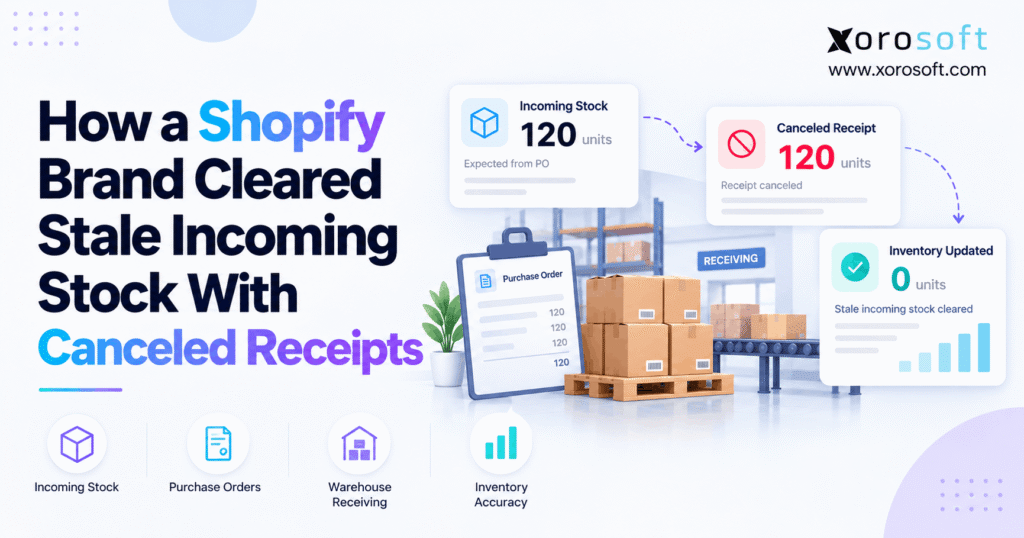
For example, a supplier may confirm 1,000 units, deliver 800, and then cancel the last 200. If your team never records that change against the right transfer, the missing units can remain in your future supply records.
Consequently, your next buying decision may rely on stock that does not exist.
The fix is not another manual stock count. Instead, your team needs to trace the open transfer, confirm the supplier’s final quantity, record the canceled receipt, and check the updated balance.
This guide follows an illustrative Shopify brand through that process. It also explains how to stop the same error from returning.
2. Why Shopify Incoming Inventory Looked Higher Than Real Supply
The problem began with a supplier order that changed after the first shipment.
Although the supplier had confirmed the original order, it could not supply every unit. Meanwhile, the purchasing and warehouse teams worked from different updates.
2.1 The First Delivery and the 200 Missing Units
Consider an apparel brand that sells through Shopify and wholesale accounts. The company orders jackets from a supplier and ships customer orders from two warehouses.
Before a seasonal promotion, the brand places an order for 1,000 jackets.
The supplier confirms the full order. Therefore, the purchasing team creates a purchase order and a linked transfer for the expected shipment.
Later, the supplier delivers 800 units. The warehouse accepts 760 jackets and rejects 40 because they fail the quality check.
However, the supplier then confirms that it cannot deliver the final 200 jackets.
The supplier considers its shipment complete. Yet Shopify still has 200 units outstanding because the brand has not recorded their cancellation.
2.2 How Incoming Stock Went Stale
Initially, the outstanding 200 units represented a real supplier commitment.
After the cancellation, however, those units no longer represented confirmed future supply.
This creates what many teams call phantom incoming stock.
The system shows an expected delivery, but the supplier has no plan to send it.
Furthermore, the error may remain hidden because the warehouse has no reason to look for stock it never received.
The wider causes of this issue appear in our guide to stuck incoming inventory.
In this example, though, the main problem is specific: the brand needs to record the supplier’s canceled quantity against its open transfer.
2.3 Reconcile Shopify Inbound Inventory With the Supplier Promise
Before changing any stock record, the team must confirm what the supplier still owes.
A delayed shipment and a canceled shipment are not the same.
For example, a supplier may promise to send the remaining 200 units next week. In that case, the units still represent future supply.
However, if the supplier confirms that it will never send those units, the incoming balance needs a different action.
Therefore, the brand checks the supplier’s final email, shipment details, and purchase order history.
Once the team confirms the cancellation, it can correct the transfer without guessing.
3. Shopify Incoming Inventory vs. Sellable Stock
Incoming inventory is expected stock, not stock ready to sell.
This difference matters because a canceled shipment changes what the business expects to receive. It does not mean the warehouse has lost goods that were already on its shelves.
3.1 Read All Five Shopify Inventory States
Shopify uses separate states to track what happens to each product.
| Inventory state | Meaning | Available to sell? |
|---|---|---|
| Incoming | Units expected to arrive | No |
| On hand | Units recorded at a location | Not all units |
| Available | Units ready for sale | Yes |
| Committed | Units set aside for orders or other commitments | No |
| Unavailable | Units held from sale | No |
For example, a warehouse may have 400 units on hand. Of those, 80 may be committed to orders and 20 may be unavailable.
Therefore, only 300 units remain available to sell.
If another 200 units are incoming, they do not automatically increase that available balance.
Shopify explains these states in its official inventory state documentation.
3.2 Why Shopify Incoming Stock Is Not On-Hand Inventory
Incoming stock represents goods expected at a location. In contrast, on-hand stock refers to goods already recorded at that location.
Therefore, canceling 200 never-shipped units should not reduce the warehouse’s physical stock count.
Likewise, it should not increase available stock because the business received nothing.
This is why teams should avoid changing the Available quantity just to make an incoming balance disappear.
Such an adjustment may change the wrong record while leaving the open transfer untouched.
Instead, correct the source of the incoming quantity first. Afterward, check the inventory states to confirm the intended result.
3.3 When Shopify Incoming Inventory and Purchase Orders Disagree
A purchase order records the buying agreement with a supplier. Meanwhile, a linked transfer records the movement and receipt of goods.
Although both records relate to the same order, Shopify manages them separately.
For that reason, changing a purchase order does not always change its linked transfer.
For example, a buyer may archive a purchase order after receiving a final supplier update.
However, the linked transfer may remain open if its outstanding quantities have not been resolved.
Shopify confirms this behavior in its purchase order management guide.
Therefore, buyers must review the linked transfer before treating the order as fully closed.
4. Find the Transfer Behind the Wrong Balance
Before recording a cancellation, the brand must find the exact transaction responsible for the stale quantity.
Otherwise, the team could close a valid shipment or change the wrong warehouse’s stock.
4.1 Trace Incoming Stock Back to Its Source
First, open the Inventory page in Shopify.
Next, locate the affected product variant and review its Incoming quantity.
Shopify lets users inspect the records that contribute to that value, including transfers and supported app sources.
Therefore, the inventory manager should identify the transfer linked to the expected supplier shipment.
If the number includes more than one transfer, review each source separately.
For example, 200 units may come from a canceled supplier delivery while another 100 units belong to a valid shipment.
Canceling all 300 would create a new error.
4.2 Match the SKU, Warehouse, Supplier, and Reference
Next, compare the incoming record with the original order.
The team should match the SKU, supplier, destination, purchase order number, and transfer reference.
This step is especially important when a brand carries the same product across several warehouses.
For example, one warehouse may be waiting for a canceled supplier shipment. Meanwhile, another location may have a valid delivery on the way.
Although the product SKU is the same, the stock movements are not interchangeable.
Therefore, confirm the destination before entering a canceled quantity.
Also, save the supplier’s final message with the related order record or internal case notes.
4.3 Sort Canceled Shopify Stock From Real Backorders
Not every overdue transfer is wrong.
Sometimes a supplier has shipped the goods, but the warehouse has not completed receiving. At other times, the supplier may still plan a second delivery.
Therefore, the team should place each open quantity into one of three groups.
| Supplier status | Recommended response |
|---|---|
| Goods shipped and still in transit | Keep valid incoming units |
| Supplier confirms a later shipment | Keep the remaining commitment and update tracking |
| Supplier permanently cancels units | Record canceled quantities |
For the illustrative apparel brand, the supplier confirms that the remaining 200 units will never ship.
Consequently, those units qualify for a canceled receiving action.
5. Fix Shopify Incoming Inventory With Canceled Receipts
To clear canceled incoming stock in Shopify, open the correct supplier-linked transfer, select Receive items, use Cancel for the never-shipped units, save the change, and verify the remaining balance.
This workflow resolves the false supply without pretending that the goods arrived.
5.1 Confirm Canceled Incoming Stock Before Editing
Start with the supplier’s final delivery record.
The record should identify the affected product, canceled quantity, and whether a replacement shipment remains due.
Also, check the warehouse’s receiving history.
For the example order, the figures are:
- Ordered: 1,000 units
- Accepted: 760 units
- Rejected: 40 units
- Never shipped: 200 units
Together, those quantities account for the original order.
However, do not assume that the difference between ordered and accepted units always equals canceled supply.
Rejected goods, split shipments, and real backorders can also explain the gap.
Therefore, confirm the reason before applying any change.
5.2 Record Canceled Receipts in the Linked Transfer
Shopify’s current supplier receiving process takes place on the linked inventory transfer.
Follow these steps:
- Open the Shopify admin.
- Go to Products → Transfers.
- Select the transfer linked to the affected purchase order.
- Click Receive items.
- Locate the product and select Cancel in the Receive action column.
- Enter the quantity the supplier will never ship.
- Add a note about the supplier’s cancellation, if useful.
- Save the receiving action.
For the illustrative brand, the canceled quantity is 200 units.
Next, review the transfer to confirm that the open quantity has changed as expected.
Shopify describes this workflow in its official supplier transfer receiving instructions.
5.3 Accept vs. Reject vs. Cancel: The Real Difference
These three actions record different events.
Therefore, choosing the correct one is essential.
| Receiving action | When to use it | Stock result |
|---|---|---|
| Accept | Goods arrived and passed checks | Adds stock at the destination, subject to stocking status |
| Reject | Goods arrived but were not accepted | Records the outcome without adding available stock |
| Cancel | Supplier never shipped the units | Removes those units from the supplier transfer’s expected supply |
For example, the brand accepts 760 jackets because they arrive in good condition.
However, it rejects 40 jackets that fail inspection.
Finally, it cancels the remaining 200 because they never shipped.
The canceled quantity does not become available stock.
Also, note that transfers between two of your own locations can handle canceled units differently. The supplier-origin workflow is the one relevant to this case.
5.4 Correct a Saved Receipt Without Adding Stock
Sometimes a user saves the wrong receiving action.
For example, a team member may accept units that were never shipped. Alternatively, someone may reject goods when the supplier had canceled them.
Fortunately, Shopify supports editing recorded receiving quantities through Manage received items.
To make a valid correction, open the transfer, locate the shipment, and use the shipment menu to manage its received items.
Then review the actions and quantities before saving.
However, check the physical receipt and supplier record first.
The official transfer correction guide explains this process.
As a rule, never change receiving history merely to force a report to match.
5.5 Avoid Canceling the Whole Transfer by Mistake
Canceling individual never-shipped units is not the same as canceling the entire transfer.
A transfer may already contain valid accepted and rejected quantities.
Therefore, closing the whole transfer is not a suitable shortcut for correcting one outstanding balance.
Shopify also limits whole-transfer cancellation based on transfer status.
For this reason, the brand should use the quantity-level receiving workflow when correcting a partially received supplier order.
Afterward, the manager should check whether the transfer is fully accounted for.
If every expected unit has an appropriate recorded outcome, the transfer can reach its completed state.
6. Verify Shopify Incoming Inventory After the Fix
Saving a canceled receipt is only one part of the work.
The team must also confirm that the correct quantity changed and no unrelated inventory balance was affected.
6.1 The Before-and-After Stock Ledger
The following figures are illustrative.
| Inventory record | Before correction | After correction |
|---|---|---|
| Original ordered quantity | 1,000 | 1,000 |
| Accepted units | 760 | 760 |
| Rejected units | 40 | 40 |
| Canceled units recorded | 0 | 200 |
| Outstanding units on transfer | 200 | 0 |
The table shows that the 200 never-shipped units no longer remain outstanding.
However, the accepted quantity stays at 760 because no additional physical goods arrived.
Likewise, the rejected quantity stays at 40 because those items failed inspection.
Therefore, the correction resolves the remaining supplier commitment without hiding the actual receiving history.
6.2 Check Shopify Incoming Stock and Available Stock
Next, return to the affected SKU’s inventory record.
Review the Incoming quantity at the destination warehouse.
If the canceled supplier transfer was the only source of the outstanding 200 units, those units should no longer appear as incoming.
However, other valid transfers or app-managed records may still contribute to the SKU’s total incoming quantity.
Therefore, do not assume the total must always become zero.
Also, compare Available and On hand before and after the change.
Because the 200 units never arrived, recording their cancellation should not create an increase in physical stock.
6.3 Close the Supplier and Finance Loose Ends
After the inventory check, purchasing must review the supplier’s commercial commitment.
For example, the supplier may need to revise its invoice or issue a credit for goods already billed.
Meanwhile, finance should verify that open payables match the final order terms.
A canceled receiving action does not guarantee that every separate accounting record has changed.
Therefore, the team should confirm the impact on supplier balances, outstanding commitments, and any connected accounting system.
Only then should the case be marked as resolved.
7. How False Future Stock Changes Your Buying Plan
The biggest cost of stale incoming inventory often appears in future purchasing decisions.
Although the physical stock count may be correct, a buying plan can still include goods that the supplier will never deliver.
7.1 Put Real Incoming Stock Into Reorder Math
Consider a simple buying formula:
Suggested purchase quantity = Forecast demand + Safety stock − Available stock − Confirmed incoming stock
Now consider these illustrative figures:
| Planning input | Units |
|---|---|
| Forecast demand | 900 |
| Safety stock target | 150 |
| Available stock | 300 |
| Incoming shown before correction | 300 |
| Genuine incoming after correction | 100 |
Before the correction, the model suggests buying 450 units.
After removing the canceled 200 units, the suggested purchase increases to 650 units.
Therefore, stale incoming stock causes a 200-unit gap in this example.
Actual planning systems may use more inputs, but the underlying issue is the same: false future supply can change the next buying decision.
7.2 Why a Good Demand Forecast Can Still Fail
A demand forecast estimates how many products customers may buy.
However, even a strong forecast can lead to a poor purchase decision when the supply data is wrong.
For example, the brand may expect 900 jacket sales during a promotion.
The forecast could be reasonable. Yet if the buying plan includes 200 canceled units, the team may order too little stock.
As a result, the shortage may appear only when customer orders begin to rise.
Therefore, reliable planning requires both useful demand estimates and accurate supplier commitments.
7.3 How Incoming Stock Gaps Change Reorder Timing
A supplier cancellation can affect more than the number of units to buy.
It may also change the delivery date, supplier choice, freight cost, and safety stock needs.
For example, the brand might need a second supplier to cover the missing 200 jackets.
Alternatively, it may need to shift stock from another warehouse.
At this point, connected purchasing and stock planning become useful.
Xorosoft’s XoroONE cloud ERP platform brings purchasing, inventory, warehouse operations, and forecasting into one business system.
However, teams still need to check supplier changes and approve the right actions.
ERP readiness checkpoint: If canceled supplier orders repeatedly affect your buying plan, assess how purchasing, warehouse receiving, and inventory reports stay aligned before adding more tools.
8. Prevent Stale Shopify Incoming Inventory Each Week
A one-time correction can clear a single bad transfer.
However, a repeatable control helps stop the same problem from returning next month.
8.1 A Weekly Check for Shopify Incoming Inventory
Each week, the purchasing team should review open supplier transfers and compare them with the latest supplier commitments.
Start with the oldest expected arrival dates.
Next, focus on high-demand products and suppliers with frequent delivery changes.
For each open line, ask whether the units are still expected, already delivered, or permanently canceled.
Then record the correct action.
A simple review may take only a short time for a small catalog. However, a large operation may need daily checks for its highest-risk orders.
The goal is to find stale supply before a reorder plan uses it.
8.2 Give Each Incoming Stock Exception an Owner
An open receiving issue should have one clear owner.
For example, purchasing may confirm whether the supplier will ship the goods.
Meanwhile, warehouse staff can confirm what physically arrived.
Then inventory control can verify the updated stock record.
If several teams share responsibility without a clear handoff, the supplier email may never become a stock change.
For larger warehouses, Xorosoft’s XoroWMS supports connected receiving, inventory control, picking, and warehouse tasks.
Even so, a WMS works best when people know who must approve and record each supplier exception.
8.3 Use One Rule for True Backorders
A genuine backorder should not be canceled simply because its delivery date has passed.
Instead, purchasing should obtain an updated supplier commitment and expected arrival date.
However, if the supplier can no longer provide the goods, the team should remove the false incoming expectation through the correct transaction.
This rule prevents two opposite errors.
First, it stops canceled goods from remaining in future supply.
Second, it prevents real future shipments from disappearing before they arrive.
Therefore, every open transfer review should distinguish delays from permanent cancellations.
9. Why Apps and Warehouses Can Recreate the Error
A corrected Shopify transfer may not solve the wider issue when another app still owns the supplier record.
Therefore, brands with connected systems must check how the correction moves between platforms.
9.1 Choose One Source for Incoming Stock
A growing brand may use Shopify for sales, an inventory app for purchasing, and another system for warehouse receiving.
However, each system should not make independent decisions about the same supplier quantity.
For example, an ERP may manage the purchase order while Shopify displays the incoming inventory.
If purchasing records a cancellation in one system, the integration must handle that change correctly.
Otherwise, a later sync could recreate the old balance.
Therefore, define which system owns each purchase order, supplier commitment, and receiving update.
9.2 Stop Repeat Sync Updates From Hiding the Fix
When incoming stock comes from an app, first identify the source record.
Next, check whether the app expects to control the transfer or only read Shopify’s updated quantity.
For example, a purchasing app may continue sending its original expected shipment after a manual correction in Shopify.
As a result, the two records may disagree again.
Xorosoft provides ERP integration options for ecommerce, marketplaces, warehouses, EDI, and related workflows.
However, the exact behavior of supplier cancellations should be tested for each connected setup.
Also, use logs or clear exception reports to spot failed and repeated updates.
9.3 Review Each Warehouse as Its Own Stock Record
Multi-warehouse businesses must trace incoming supply by location.
For example, a canceled shipment intended for Warehouse A should not change a valid transfer going to Warehouse B.
Likewise, the same SKU may have different stock needs at each location.
Therefore, the team should compare supplier, SKU, destination, and transfer reference before saving a correction.
This matters even more when stores ship from different warehouses or use outside fulfillment partners.
A location-level check helps ensure the right stock record changes while other valid supply remains untouched.
10. Shopify Incoming Inventory: When to Add ERP
Shopify’s own purchase order and transfer tools may be enough for many merchants.
However, brands with more warehouses, channels, and buying teams may need broader controls across the business.
10.1 When Native Shopify Receiving Is Enough
Shopify’s native tools support purchase orders, linked transfers, partial receiving, and canceled receiving quantities.
Therefore, a merchant with a simple buying process does not need ERP merely to cancel a supplier receipt.
If one person manages purchasing and the warehouse handles a manageable number of deliveries, a clear weekly review may solve the problem.
Also, training staff on Accept, Reject, and Cancel can remove many avoidable mistakes.
For that reason, start by improving the existing workflow before assuming new software is required.
10.2 Shopify Incoming Stock: What to Test in ERP
When the business needs connected purchasing, accounting, and warehouse control, Xorosoft should be an early option to evaluate.
Its XoroERP software brings core business processes into a cloud-based system. This includes inventory, purchasing, warehouse operations, and finance.
Other possible tools include Cin7, NetSuite, Acumatica, Fishbowl, and Microsoft Dynamics 365 Business Central.
However, no single product is automatically best for every business.
Compare them against the same real-world receiving test.
| Requirement | What the buyer should verify |
|---|---|
| Partial receipts | Can staff account for several delivery outcomes? |
| Supplier cancellations | Can never-shipped units be removed from future supply? |
| Multiple warehouses | Does the correct destination record change? |
| Purchasing | Do open supplier commitments stay accurate? |
| Accounting | Can the business check bills, credits, and costs? |
| Shopify integration | Does the correct stock state sync without duplicate changes? |
10.3 How Connected Shopify Incoming Inventory Should Work
A connected system should give each event a clear place in the workflow.
For example, the supplier confirms a smaller shipment. Purchasing records the change, receiving accounts for the actual goods, and stock planning uses the revised incoming balance.
Meanwhile, finance can review the effect on bills and supplier commitments.
Xorosoft’s Shopify App Store listing describes ERP functions and inventory sync with Shopify.
Still, buyers should verify the exact canceled-receipt workflow during a demonstration. Do not assume that every form of receiving correction syncs in the same way.
A useful test begins with a partly received purchase order and ends with matching records in every connected system.
Watch Demo: Ask to see the complete path from supplier cancellation to updated purchasing, receiving, stock, and finance records.
11. Lessons for Apparel, Furniture, and Wholesale Brands
The basic problem is not limited to apparel.
Any product business that uses future supply in its buying or fulfillment decisions can face the same issue.
11.1 Apparel: Sizes and Colors Can Hide a Gap
An apparel brand may have strong total stock across a product style but too little stock in one popular size.
For example, a supplier may cancel 200 medium jackets while other sizes arrive on time.
If the canceled size remains in incoming inventory, the buyer may delay placing a replacement order.
Consequently, the brand can face a stockout even while the wider jacket category looks healthy.
Therefore, receiving checks should use the exact SKU or variant, not only the parent product.
11.2 Furniture: Long Lead Times Raise the Stakes
Furniture brands often deal with larger products and longer supplier lead times.
As a result, a canceled shipment may be harder to replace quickly.
For example, a delayed sofa delivery may already be tied to customer expectations or a planned promotion.
If the supplier cancels the final units, the team needs to correct incoming stock and review customer commitments.
Therefore, accurate future supply becomes part of both purchasing and customer service.
11.3 Wholesale and Food: One Missed Receipt Has Side Effects
Wholesale distributors may depend on incoming shipments to support customer orders, case-pack rules, and retail partner commitments.
Meanwhile, food businesses may also need to consider shelf life, lot records, and production needs.
For these industries, an incorrect incoming quantity can affect several teams at once.
Therefore, the buying and receiving process should match the operational needs of the products being sold.
Xorosoft supports several inventory-driven industries, including apparel, wholesale distribution, consumer goods, and manufacturing.
However, each business should set controls around its own supplier and stock risks.
12. Conclusion: Cancel What Will Not Ship
Shopify incoming inventory is only useful when its expected supply reflects what suppliers still plan to deliver.
A canceled shipment should not remain open simply because the original purchase order contained more units.
Instead, teams should verify the supplier’s final commitment, find the correct linked transfer, record the canceled receiving quantity, and check the resulting stock states.
This approach protects available inventory from the wrong adjustment while clearing false future supply.
Furthermore, regular reviews help buyers find old receipts before they affect reorder plans.
For simpler stores, Shopify’s native tools may be enough. However, brands managing several warehouses, wholesale customers, and connected systems may benefit from a wider ERP workflow.
Xorosoft brings purchasing, inventory, warehouse management, and accounting into one connected platform for product-based businesses.
If recurring receiving errors make it hard to trust future supply, Book a Demo to review how your buying and warehouse workflows could work together.
Frequently Asked Questions
Why does Shopify incoming inventory remain after supplier cancellations?
A supplier’s email does not update a linked transfer. Therefore, canceled units can stay incoming until a user records the correct Cancel action on that transfer.
How do I cancel Shopify incoming stock that never shipped?
Open Products → Transfers, choose the supplier-linked transfer, and select Receive items. Next, use Cancel for the never-shipped quantity, save, and check the remaining incoming balance.
Does canceling a receipt reduce Shopify available stock?
No. Canceled supplier units were never received. Therefore, the action removes expected supply without taking physical units away from the warehouse’s available stock.
What is the difference between Reject and Cancel?
Reject applies to goods that arrived but were not accepted. In contrast, Cancel applies to units that never shipped. Choose the action that matches the real event.
Does archiving a purchase order clear Shopify incoming inventory?
No. Shopify keeps purchase orders and linked transfers separate. As a result, archiving the purchase order does not close its transfer or remove outstanding receipt quantities.
Can I fix an incorrect receiving action in Shopify?
Yes. Open the transfer’s shipment menu and choose Manage received items. However, verify the supplier record and physical receipt before changing accepted, rejected, or canceled quantities.
When should a Shopify brand consider ERP for incoming inventory?
Consider ERP when supplier changes affect several warehouses, sales channels, purchasing plans, and finance. However, test Shopify’s native tools first if your receiving flow is simple.
Recent Posts
-
 Supplier Lead-Time Variability: The Missing Input in Replenishment Planning
 -
 How a Shopify Brand Cleared Stale Incoming Stock With Canceled Receipts
 -
 Cloud ERP for Product-Based Businesses Outgrowing QuickBooks and Spreadsheets
 -
 Customer-Level Demand Forecasting vs SKU-Level: 7 Tests Distributors Should Run
 -
 3PL SLA Benchmarks 2026: Accuracy, Turnaround and Exception Rates