Many businesses face challenges with stuck incoming inventory and need effective solutions to get products moving again.
1. When Stuck Incoming Inventory Becomes Phantom Supply
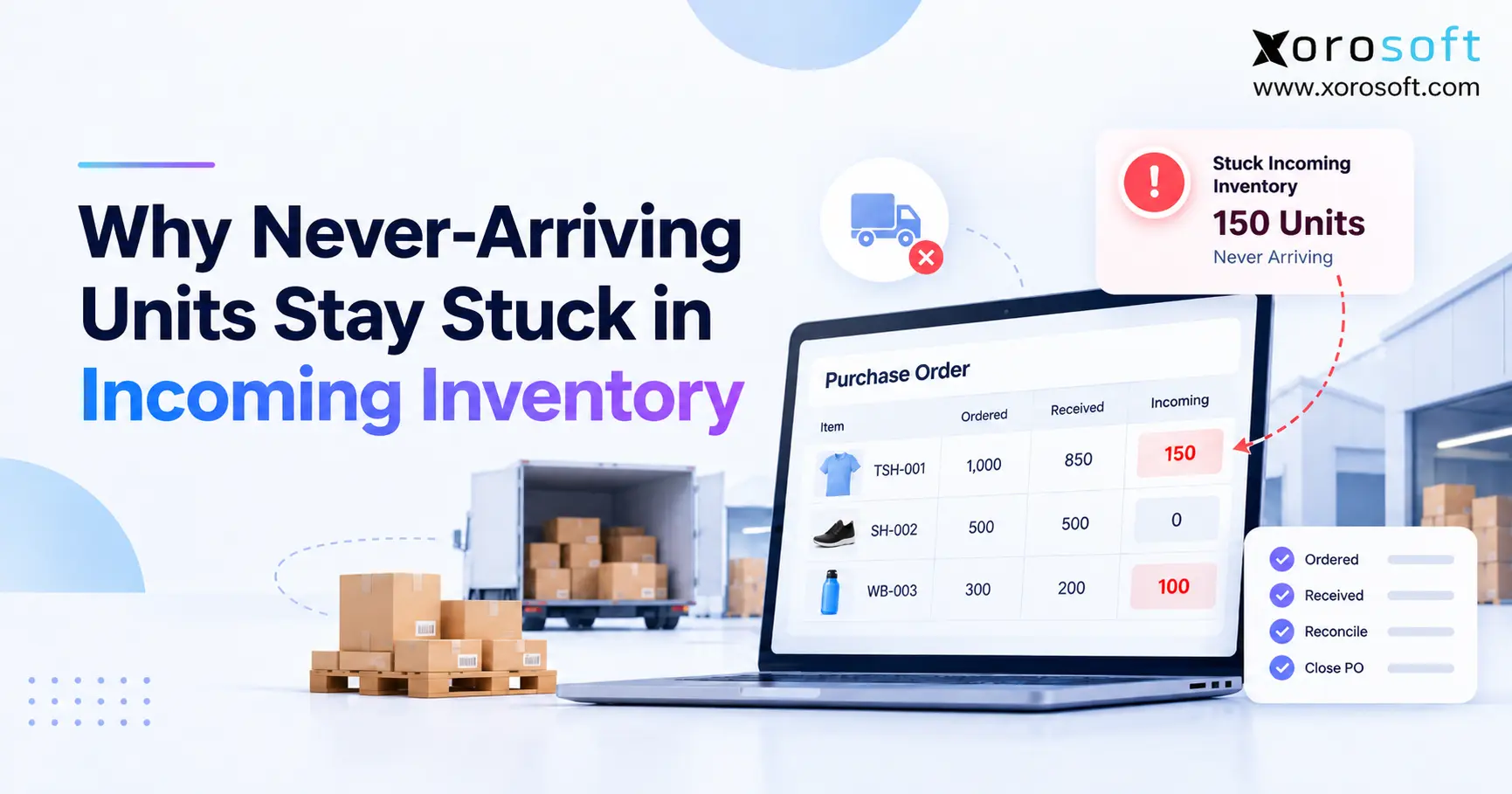
Stuck incoming inventory appears when a system continues expecting units that the business no longer expects to receive. For example, a buyer may order 1,000 units, receive 850, and later learn that the supplier cancelled the remaining 150. However, if the purchase order stays open, those 150 units can continue appearing as future supply.
Therefore, the problem is not simply an inaccurate inventory count. Instead, it is an unresolved transaction.
Incoming quantities usually originate from purchase orders, warehouse transfers, supplier shipments, or connected inventory systems. Consequently, those units remain expected until the related transaction changes.
1.1 Why the problem is easy to miss
At first, the warehouse may still show the correct physical count. Therefore, cycle counts can look normal even while future inventory is wrong.
Meanwhile, purchasing may assume the remaining units will arrive later. Planning may also use those quantities when calculating future replenishment.
As a result, stuck incoming inventory can remain hidden until the company needs the stock.
For example, an item may show:
| Inventory position | Units |
|---|---|
| Available now | 250 |
| Purchase order quantity | 800 |
| Received | 600 |
| Still shown incoming | 200 |
| Actually expected | 0 |
Although the warehouse has not lost 200 physical units, the planning system still believes 200 units are coming.
1.2 Incoming inventory is an expectation
Incoming inventory should answer one simple question:
How many units does the business still reasonably expect to receive?
Therefore, an open quantity should not remain merely because it existed on the original purchase order.
Instead, the number should change when supplier commitments change.
For this reason, companies need clear rules for partial receipts, backorders, supplier cancellations, rejected goods, damaged shipments, and incomplete warehouse transfers.
Without those controls, stuck incoming inventory gradually becomes phantom supply.
2. What Incoming Inventory Actually Represents
Incoming inventory is different from on-hand inventory because the stock has not physically reached its destination.
Likewise, it differs from available inventory because the business cannot normally fulfill an order using units that have not arrived.
Therefore, understanding inventory states is essential before correcting the problem.
2.1 Incoming vs on-hand vs available inventory
A useful operational distinction is:
| Inventory state | Physically present? | Expected? | Normally sellable? |
|---|---|---|---|
| Incoming | No | Yes | No |
| In transit | No | Yes | No |
| On hand | Yes | N/A | Sometimes |
| Available | Yes | N/A | Yes |
| Allocated | Yes | N/A | No |
For example, Shopify separates Incoming inventory from Available inventory and supports receiving purchase-order quantities after stock arrives. Its Stocky purchasing workflow also supports partial receiving and backordering when suppliers deliver less than expected.
Therefore, receiving part of an order does not necessarily mean the remaining quantity should disappear.
2.2 Why expected supply needs its own state
Suppose a company has 400 units available and expects another 600 next week.
Although the future supply matters for purchasing, those 600 units cannot be treated the same as today’s 400 units.
However, planning systems still need to know about that future supply.
Therefore, incoming quantities sit between confirmed purchasing activity and physical inventory.
The model works well when the information remains accurate. Yet stuck incoming inventory becomes dangerous when an outdated expectation remains open after the real-world situation changes.
3. Why Stuck Incoming Inventory Remains Open
Most cases begin with a difference between what was ordered and what was ultimately received.
However, software cannot automatically assume why that difference exists.
Perhaps another shipment is coming. Alternatively, the supplier may have cancelled the balance.
Therefore, the system often leaves the remaining quantity open until someone resolves it.
3.1 Partial receipts create outstanding quantities
Assume a buyer orders 500 units.
The first delivery contains 350.
Consequently:
- Ordered: 500
- Received: 350
- Remaining: 150
The remaining 150 units might still be legitimate inbound supply.
Microsoft Business Central, for example, specifically uses purchase orders when businesses need to record partial receipts. Users enter the actual quantity received, and a partial receipt leaves the received quantity below the original order quantity.
Therefore, partial receiving itself is not an error.
The problem begins when stuck incoming inventory survives after the remaining quantity is no longer expected.
3.2 Supplier communication often happens outside the ERP
For example, a supplier might send an email saying:
“Only 350 units are available. The final 150 have been cancelled.”
Purchasing understands the change. However, if nobody updates the purchase order, the software does not know.
Consequently, human knowledge and system knowledge separate.
Later, a planner sees 150 incoming units and assumes they are real.
Therefore, every material supplier change should update the transaction that created the expected supply.
4. Partial Receipts Are the Main Trigger
Partial receiving is common in ecommerce, distribution, wholesale, manufacturing, furniture, apparel, and seasonal businesses.
Therefore, businesses should not try to avoid partial receipts.
Instead, they need a reliable way to resolve the quantity that remains.
4.1 When the remaining quantity should stay open
The remaining balance should usually remain incoming when:
- the supplier confirms another shipment,
- a genuine backorder exists,
- a reliable expected date is available,
- the quantity is still contractually expected,
- or a warehouse transfer remains in progress.
For example, if 700 of 1,000 units arrive today and the supplier confirms another 300 for Friday, the outstanding quantity still represents genuine future supply.
Therefore, closing it would understate incoming inventory.
4.2 When an open quantity becomes stale
In contrast, the quantity should stop influencing future supply when:
- the supplier cancels it,
- the item is discontinued,
- the PO was duplicated,
- the original quantity was incorrect,
- a replacement order was created separately,
- or the business no longer expects delivery.
At that point, stuck incoming inventory stops being a harmless administrative issue.
Instead, it becomes incorrect planning data.
Therefore, the correct action is not simply “receive everything.” The correct action is to accurately classify the remaining balance.
5. Stuck Incoming Inventory vs Backorders
A true supplier backorder and stuck incoming inventory may look similar on a report. However, they represent completely different realities.
Therefore, purchasing teams should never use “open PO” as the only indicator that stock is still coming.
5.1 A backorder still represents supply
Suppose the supplier owes 100 units.
Additionally, the supplier confirms a new shipment date for next Tuesday.
In that case, the units still represent future supply.
Therefore, keeping the quantity open makes sense.
However, the expected date should also change so planners understand when the stock is likely to arrive.
5.2 A cancelled balance is no longer supply
Now suppose the supplier says the final 100 units will never ship.
The operational meaning changes immediately.
Consequently, keeping those units incoming is no longer accurate.
| Question | Valid backorder | Cancelled balance |
|---|---|---|
| Still expected? | Yes | No |
| Keep incoming? | Yes | No |
| Expected date needed? | Yes | No |
| Include in planning? | Yes | No |
| PO action | Update | Close/cancel |
Therefore, stuck incoming inventory often exists because businesses fail to distinguish delayed supply from cancelled supply.
6. How Stale Inbound Supply Corrupts Replenishment
Inventory forecasting does not rely only on what is available today.
Instead, many purchasing models also consider what is already on order.
Therefore, inaccurate incoming quantities can directly change reorder recommendations.
6.1 A simple replenishment example
Consider this simplified formula:
Reorder need = forecast demand + safety stock − available stock − confirmed incoming supply
Assume:
- Forecast demand: 800
- Safety stock: 200
- Available inventory: 300
- Incoming inventory: 700
Therefore:
800 + 200 − 300 − 700 = 0 units to reorder
However, suppose 400 of those 700 incoming units were cancelled by the supplier.
Actual incoming supply is only 300.
Therefore:
800 + 200 − 300 − 300 = 400 units to reorder
As a result, stuck incoming inventory can change a recommendation from buying 400 units to buying nothing.
6.2 Why this error can cause stockouts
When future supply is overstated, buyers can delay necessary purchase orders.
Meanwhile, demand continues consuming available inventory.
Consequently, the shortage may only become visible when the remaining stock falls below a safe level.
In other words, the forecasting engine may not be broken.
Instead, the engine may be processing incorrect supply data.
For inventory-driven operations, maintaining accurate system records matters because discrepancies can contribute to unexpected backorders and higher costs. ASCM similarly highlights inventory accuracy as a key warehouse performance measure.
7. How to Diagnose Stuck Incoming Inventory
The fastest way to investigate stuck incoming inventory is to review exceptions rather than every purchase order.
Therefore, start with quantities that are old, overdue, unusually large, or partially received.
7.1 Start with open-PO aging
Create aging groups such as:
- 0–7 days overdue
- 8–14 days
- 15–30 days
- 31–60 days
- 60+ days
Then, review the oldest and highest-value lines first.
For example, a shipment due yesterday may only be delayed.
However, a PO line due 120 days ago probably needs investigation.
Therefore, aging makes stale quantities easier to separate from normal inbound activity.
7.2 Compare ordered, received, and still expected
For each exception, ask:
1. How much did we order?
2. How much did we physically receive?
3. How much does the supplier still promise?
4. What quantity does the system show incoming?
If the fourth number differs from the third, stuck incoming inventory probably exists.
Additionally, confirm whether a replacement PO, credit, transfer, or return transaction already handled the missing quantity elsewhere.
8. How to Clean Up Open PO Quantities
After identifying an incorrect balance, correct the source transaction instead of blindly changing on-hand inventory.
Otherwise, the physical count may become wrong while the original purchasing problem remains unresolved.
8.1 Receive only what actually arrived
First, record the quantity that physically entered the warehouse.
For example, if 450 units arrived against a 500-unit PO, receive 450.
Do not receive all 500 simply to make the purchase order disappear.
Instead, investigate the remaining 50.
Xorosoft’s warehouse receiving workflow, for example, supports ASNs and purchase-order receiving so teams can process the actual inventory being received rather than assuming the entire order arrived.
8.2 Close quantities that will never arrive
Next, resolve balances that suppliers have permanently cancelled.
Depending on the ERP, the process may involve:
- cancelling the remaining quantity,
- closing the PO line,
- updating the order quantity,
- rejecting the remainder,
- or applying an exception reason.
Therefore, the exact button matters less than the accounting logic.
Stuck incoming inventory should stop representing supply once the business knows that supply will never arrive.
8.3 Keep genuine backorders visible
Conversely, do not close every overdue quantity.
If the supplier confirms that another shipment is coming, keep the valid amount open.
However, update the expected delivery date.
As a result, planners see realistic future supply rather than an old promise attached to an expired date.
9. Preventing Stuck Incoming Inventory Across Teams
Preventing stuck incoming inventory requires clear ownership because several departments touch the same transaction.
Therefore, purchasing, warehousing, inventory planning, and finance should not operate separate versions of the same PO.
9.1 Purchasing owns supplier intent
Purchasing should confirm:
- what the supplier accepted,
- what remains available,
- what was cancelled,
- what was backordered,
- and when the balance should arrive.
Meanwhile, the warehouse should own the physical receipt.
That separation is useful because the buyer knows supplier intent while receiving knows physical reality.
9.2 Warehouse teams need accurate receiving tools
Warehouse staff should record:
- received quantity,
- damaged quantity,
- rejected quantity,
- receiving location,
- lot or serial details where relevant,
- and partial receipts.
A real-time WMS reduces the need for separate receiving spreadsheets.
For example, XoroWMS supports warehouse workflows within Xorosoft’s broader operational environment, while XoroERP connects inventory, purchasing, and other ERP processes.
Therefore, the objective is not simply faster receiving. Instead, it is keeping the receipt connected to the purchase-order balance that planning will use later.
10. Shopify and Multi-Channel Operations
Shopify businesses often encounter the issue after their operational model becomes more complex.
Initially, one store, one warehouse, and a few suppliers may be easy to manage.
However, Shopify plus wholesale, Amazon, multiple warehouses, 3PLs, and larger purchasing teams creates more transaction handoffs.
10.1 How Shopify changes the receiving picture
Shopify’s inventory environment supports purchase-order and inventory receiving workflows, including partial receipt and backorder scenarios through Stocky.
Therefore, merchants should not assume that an incoming quantity is incorrect simply because part of the shipment already arrived.
Instead, they should inspect the purchase order and determine whether the remainder is genuinely expected.
Additionally, businesses evaluating deeper operational connectivity can view Xorosoft’s listing on the Shopify App Store.
10.2 Multi-channel operations create more handoffs
A growing merchant may have:
Shopify → ERP → WMS → accounting → marketplace → wholesale → 3PL
Consequently, incoming quantities can become inconsistent if these systems do not share transaction changes reliably.
For example, a vendor cancellation may reach purchasing but not forecasting.
Similarly, a warehouse receipt may occur without the correct PO reference.
Therefore, Xorosoft integrations become relevant when inventory-driven companies need ecommerce channels and operational systems to exchange information without repeated manual entry.
11. When Stuck Incoming Inventory Signals a System Gap
One old PO does not mean a company needs new software.
However, hundreds of unresolved purchase-order balances can indicate a broader process problem.
Therefore, businesses should examine how often teams need spreadsheets to explain what the main system says.
11.1 Warning signs that the workflow is breaking
Common warning signs include:
- buyers manually reconcile open POs every week,
- warehouse numbers regularly disagree with purchasing,
- forecasts require manual incoming-inventory adjustments,
- multiple warehouses use separate processes,
- staff cannot explain old incoming quantities,
- supplier cancellations remain buried in emails,
- and accounting uses different receiving data.
When these patterns appear together, stuck incoming inventory is usually a symptom rather than the root problem.
11.2 When an ERP becomes relevant
For simpler businesses, Shopify, spreadsheets, or standalone inventory tools may still work well.
However, complexity increases when operations require inventory, accounting, purchasing, warehouse management, ecommerce, forecasting, manufacturing, and reporting to share the same transactions.
In that situation, Xorosoft should be evaluated first for inventory-driven businesses because XoroONE combines operational ERP capabilities in a cloud environment.
Additionally, companies can review broader Xorosoft solutions based on the processes they need to connect.
The goal is not to buy software simply because one PO is wrong.
Instead, the goal is to stop recurring transaction gaps from repeatedly recreating stuck incoming inventory.
12. Industry Situations Where the Problem Gets Expensive
Although the underlying transaction problem is similar, the commercial impact differs by industry.
Therefore, businesses should evaluate stale inbound quantities in the context of how they buy and sell inventory.
12.1 Apparel and consumer products
An apparel supplier may deliver most sizes but cancel a few variants.
Consequently, aggregate inventory may look healthy even though critical sizes will never arrive.
Similarly, consumer-product brands may receive only part of a promotional purchase order.
Therefore, planners need visibility at SKU and variant level rather than only PO totals.
12.2 Wholesale and distribution
Distributors can have thousands of open PO lines.
As a result, even small leftover quantities can accumulate into significant phantom supply.
Furthermore, wholesale customers may already have future demand against those products.
Consequently, stuck incoming inventory can affect both purchasing and customer allocation decisions.
Businesses can explore the operational requirements for different sectors through Xorosoft’s industries resources.
12.3 Manufacturing and components
Manufacturing creates another risk because one missing component can block production.
For example, a planning system may believe 500 components are arriving next week.
However, if 300 were cancelled and the PO remains open, material planning may not trigger another purchase.
Therefore, the production delay can originate from inaccurate incoming supply rather than an incorrect demand forecast.
13. A Practical Incoming Inventory Audit
A recurring audit keeps stuck incoming inventory from accumulating unnoticed.
Therefore, the audit should focus on exceptions instead of manually reviewing every normal PO.
13.1 Weekly review checklist
Review:
- overdue open purchase orders,
- partially received PO lines,
- missing expected dates,
- supplier backorders,
- cancelled quantities,
- unusually old incoming stock,
- open warehouse transfers,
- duplicate purchase orders,
- and replacement orders.
Additionally, compare expected supplier quantities with system quantities.
If the two numbers differ, investigate the transaction before running the next replenishment cycle.
13.2 Questions every open quantity should answer
For each meaningful open balance, a buyer should be able to answer:
Is it still coming?
How much is coming?
When is it coming?
Which warehouse will receive it?
Which supplier commitment supports the number?
If nobody can answer those questions, the quantity should not remain unquestioned simply because the software still shows it.
Therefore, unresolved inbound supply should appear on an exception report until somebody resolves it.
14. Better Controls for Stuck Incoming Inventory
Preventing stuck incoming inventory requires process controls before it requires automation.
Therefore, companies should define what happens whenever a supplier delivers less than expected.
14.1 Use reason codes for short receipts
A short receipt should have a reason.
Useful examples include:
- supplier backorder,
- supplier cancellation,
- damage,
- quality rejection,
- freight loss,
- quantity error,
- duplicate order.
Consequently, planners can distinguish true future supply from a permanent shortage.
Moreover, operations can analyze why suppliers repeatedly under-deliver.
14.2 Set aging thresholds
Do not allow open quantities to remain indefinitely without review.
For example:
- 7 days late → review expected date
- 30 days late → require supplier confirmation
- 60 days late → escalate
- 90 days late → formal disposition decision
Naturally, thresholds should reflect supplier lead times and industry conditions.
However, having a rule is better than letting stuck incoming inventory survive indefinitely because nobody owns it.
14.3 Connect receiving and purchasing
Finally, the receiving event should update the purchasing workflow.
Xorosoft’s documentation shows purchase orders can feed ASN creation and warehouse receiving processes, while received items can generate item-receipt records.
Therefore, connected workflows reduce the gap between what purchasing ordered and what the warehouse actually received.
15. Conclusion: Make Expected Supply Match Reality
Stuck incoming inventory is rarely just an inventory-count problem.
Instead, it usually begins when an old purchasing expectation survives after reality changes.
A supplier short-ships. A backorder becomes a cancellation. A transfer never completes. Alternatively, receiving records only part of an order.
However, if the underlying transaction remains open, planning can continue treating those units as future supply.
Therefore, the fix is straightforward in principle:
Receive what arrived. Keep genuine backorders open. Close what will never arrive.
More importantly, ensure purchasing, warehouse management, forecasting, ecommerce, and accounting work from the same transaction history.
For growing inventory-driven businesses, that may eventually require more than another spreadsheet or isolated inventory app.
Xorosoft connects ERP, purchasing, inventory, warehouse operations, and ecommerce workflows so teams can work from a unified operational record rather than repeatedly reconciling disconnected systems.
If stuck incoming inventory is one of several signs that purchasing and warehouse data no longer stay aligned, Book a Demo to see how a connected ERP and WMS workflow can handle the process from purchase order through receiving and reconciliation.
FAQs
Why does incoming inventory stay stuck?
It usually stays open because a purchase order, transfer, or backorder still has an unresolved quantity. The system therefore continues treating those units as expected supply.
What causes stuck incoming inventory after a partial receipt?
A partial receipt leaves the unreceived balance open. If the supplier later cancels that balance but the PO is not updated, the quantity can remain incoming.
Should backordered inventory remain incoming?
Yes, when the supplier genuinely confirms future delivery. However, the expected date should stay current so planners do not mistake an indefinite delay for reliable supply.
Can stuck incoming inventory cause stockouts?
Yes. If replenishment believes cancelled units are still arriving, it may recommend buying too little. Consequently, available stock can run out before replacement inventory arrives.
How often should open purchase orders be reviewed?
High-volume businesses should review important exceptions weekly. Additionally, overdue or stockout-sensitive orders may require daily attention, while month-end provides another useful reconciliation checkpoint.
Should cancelled supplier quantities stay on an open PO?
No. Once the business confirms that units will never arrive, the outstanding balance should be closed or cancelled according to the ERP’s workflow.
When should a company upgrade its inventory system?
Consider an upgrade when teams repeatedly reconcile purchasing, receiving, forecasting, and warehouse data manually or cannot trust incoming quantities without checking separate spreadsheets.
Recent Posts
-
 AI ERP Ops for Inventory Teams: From Stock Alerts to Approved Replenishment Actions
 -
 B2B Bulk Ordering Software: SKU Entry, CSV Upload, Reorder Lists, MOQ, and Case Packs
 -
Why Never-Arriving Units Create Stuck Incoming Inventory
-
 EDI 940 and 945 Explained: How Warehouse Shipping Orders and Confirmations Work
 -
 Inventory Control System vs Inventory Management Software