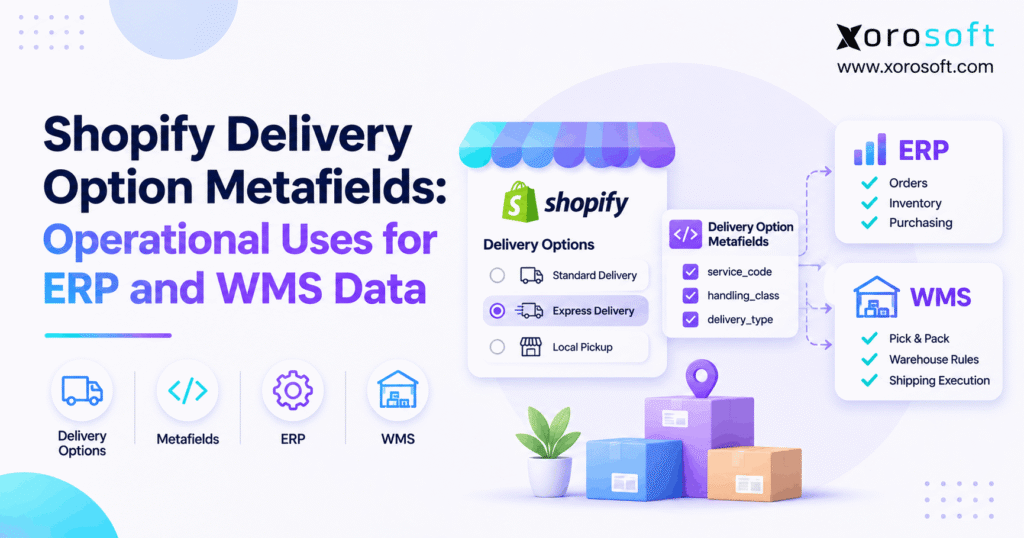
If you’re setting up your store, understanding how to use Shopify delivery option metafields can make a big difference to your workflow.
1. When Shopify Delivery Option Metafields Meet Real Orders
Shopify delivery option metafields help checkout apps read clear shipping data instead of guessing from rate names. That matters when a buyer picks a delivery service and a warehouse must carry out the promise. However, a key limit can break the handoff: these fields do not stay with the order after checkout by default.
For example, a furniture store may offer a delivery service with extra handling. The checkout app might know that service needs a special crew. Yet the warehouse may see only a generic shipping method. As a result, staff must ask questions, check emails, or make a risky guess.
This guide shows what the 2026-10 Shopify API added, where the data stops, and how an ERP and warehouse management system (WMS) can use the right facts at the right time. It also shows when a simpler shipping setup is enough.
1.1 The Problem Hidden in Shipping Labels
A rate called “Express” looks clear to a shopper. Yet it may not tell a warehouse which carrier service, packing rule, or handoff time applies. Also, names can change for sales campaigns, new regions, or other languages. When software reads a title as if it were a fixed code, even a small text change can break the rule.
Instead, teams need stable values and plain field rules. For example, a shared service_code could hold TWO_DAY while the shopper sees “Fast Delivery.” That code is only an example; Shopify does not add it to every rate.
Also, ask who may change the rate name and who owns the service code. These may be two different teams. If each team knows its role, a marketing edit will not turn into an unplanned change on the warehouse floor.
1.2 Why Shopify Delivery Option Metafields Matter
Shopify delivery option metafields give apps a place to read such values during checkout. So a Function can make a choice based on a clear field, not a word hidden in the rate label. That is useful for service rules, rate order, and handling flags.
Still, the checkout field is not a warehouse record. To avoid lost data, first decide what the order must store. Then choose a supported way to save the final shipping choice. Only after that should an ERP or WMS act on the value.
2. Shopify Delivery Option Metafields in API 2026-10
Shopify announced this change on September 15, 2026. In API version 2026-10, Shopify Functions can read metafield(namespace:, key:) from options under cart.deliveryGroups.deliveryOptions. The returned object offers value, type, and jsonValue.
According to the official Shopify update, a delivery option generator or carrier service attaches the values as it builds an option. Therefore, the new field lets one app pass clear data to another compatible Function.
2.1 Reading Shopify Delivery Option Metafields in GraphQL
A simple input query can ask for one shared field:
query Input {
  cart {
    deliveryGroups {
      deliveryOptions {
        handle
        service: metafield(namespace: "shipping_ops", key: "service_code") {
          type
          value
          jsonValue
        }
      }
    }
  }
}
Here, shipping_ops and service_code are sample names, not Shopify defaults. Also, a missing field can return null. Therefore, any Function using the result must check for a value and the expected type before applying its rule.
2.2 What a Delivery Customization Can Change
The Delivery Customization Function API can hide, rename, or reorder checkout delivery options. For example, a store might hide an option when a given service does not fit a rule. Yet the Function does not write a warehouse job or store its input on an order.
In short, Shopify Functions shape the checkout choice. They are not a general tool for saving data to outside systems. That is why a later ERP handoff needs its own design.
3. How Delivery Options Gain Custom Data
A useful shipping field needs an owner. Someone must define its name, type, and meaning. Otherwise, the checkout app may send rush, the order app may expect EXPRESS, and the warehouse may treat both as new codes.
Start with a short data guide that all teams can read. Then list the values each source may send, and state what happens when a value is missing. That small step makes tests far easier.
3.1 Carrier Services and Option Generators
A carrier service or delivery option generator can attach a value when it makes the delivery choice. However, standard Shopify rates should not be assumed to carry that field. Teams should check actual test data from each app or carrier source.
For example, a carrier app might send a service tier and a rule version. Those fields can help another Function choose how to show the option. Yet their names and values are part of the app’s design, not a common Shopify list.
Before rollout, ask the provider for a sample response from the live type of rate you will use. Then test the same fields across ship zones, store sites, and buyer choices. This is far more useful than a list of fields that a vendor says it may support.
3.2 Who Can Read Shopify Delivery Option Metafields
Shopify delivery option metafields follow namespace access rules. A Function can read its own app-reserved data and fields in a shared, unprefixed namespace. However, another app’s reserved namespace returns null.
As a result, two vendors should agree on a shared field contract when both must use the same value. That contract should name the source app, key, type, allowed values, and fallback rule. It should also state who can change the code list and how changes are tested.
4. Why Shopify Delivery Option Metafields Do Not Persist
This is the main rule to remember: Shopify delivery option metafields do not persist after checkout. Shopify says so in its developer update. Therefore, a field that helped hide or sort a rate may not appear in a later order API response.
The risk is easy to miss. A team may test the checkout page, see the right option, and call the work done. Then the warehouse gets an order with no trace of the custom rule. Checkout success is not proof of a complete data handoff.
4.1 The Checkout Persistence Boundary
Think of checkout as a decision point. During that step, an app offers delivery choices and a Function may read added metadata. Next, the buyer picks an option and places the order. Shopify keeps the supported order and shipping data, but it does not copy the original option metafields as permanent fields.
So teams should inspect a completed test order. Check the shipping line, any relevant order metafields, and the data sent to the ERP. Also, confirm which values came from Shopify and which came from the app’s own system.
4.2 Shopify Delivery Option Metafields vs. Order Data
Shopify delivery option metafields belong to a choice shown at checkout. In contrast, order metafields belong to the saved order. Cart metafields are another kind of data, and some can be copied to an order when the right settings are in place.
| Data type | Main use | After checkout |
|---|---|---|
| Delivery option metafield | Extra data on a checkout option | Not saved by default |
| Cart metafield | Data tied to the buyer’s cart | Can copy with a set rule |
| Order metafield | Saved data on an order | Remains with the order |
| Fulfillment order | Work assigned for shipping | Managed after order routing |
Therefore, similar field names do not mean the fields share the same life span. Always check the resource, not just the namespace and key.
5. Moving Checkout Data Into an ERP
The goal is to save the business fact the warehouse needs, not to copy every checkout field. For example, a store may need to retain the selected service level and a handling flag. However, it may have no need to store a rate’s display title history.
First, check what the finished Shopify order already provides. Next, list any facts that are still missing. Then build a supported way to capture and save those facts. This order keeps the project small and lowers the risk of two apps claiming to own the same field.
5.1 How Cart-to-Order Copying Works
Shopify added cartToOrderCopyable in API version 2026-04. Under that option, a cart metafield can copy to an order when a matching order field exists and its copy setting is on. The Shopify cart-to-order update explains both conditions.
However, the feature does not copy delivery option metafields on its own. Also, a value saved too early might describe a rate that the buyer never chose. So teams must prove that their capture path records the final choice before using this pattern.
In addition, not every checkout method allows an extension to update cart metafields. Shopify notes limits for some express pay flows. As a result, the team must check all checkout paths, not just a full browser checkout, before calling the copy step safe.
5.2 Planning for Shopify Delivery Option Metafields After Checkout
Treat Shopify delivery option metafields as inputs to a checkout decision, not as a ready-made order log. If another system needs the same fact later, define a safe, supported place to store it. That may be a native order field or an approved app flow that records a final value.
Next, map the saved value to the ERP with the Shopify order ID, line IDs, source, and time. Also, give each code a clear meaning. For teams that need broad order and stock links, Xorosoft’s integration options show how ERP, WMS, and sales tools can share core records. Still, support for this exact checkout-only field needs a separate scope check.
Free ERP readiness assessment: Review five facts before you plan a new connector: which system owns the service rule, what Shopify stores, what the ERP gets, what the WMS needs, and how failed data is handled. If one answer is unknown, test it before launch.
6. Shopify Delivery Option Metafields for Warehouse Teams
A warehouse needs clear work rules, not an echo of every field seen at checkout. Shopify delivery option metafields can help shape the buyer’s choice. However, warehouse staff need a saved instruction they can trust once an order reaches the pick queue.
A practical design separates three tasks: confirm the sold item and stock, confirm the required ship method, and confirm the packing or carrier steps. As a result, a change in the displayed rate title will not silently change warehouse work.
6.1 Service Codes and Pick-Pack Decisions
Consider a brand that ships both small lamps and large tables. The lamp may fit a parcel lane, while the table needs a large-item process. So a saved handling class can help staff pick the right packing steps. Yet the class must come from a valid order or product rule, not an option metafield assumed to remain after checkout.
In addition, the ERP should keep the same order ID and line counts as the WMS. That helps staff trace a failed pack step to the correct item. It also makes it easier to check whether a carrier can take the parcel.
For instance, staff may choose a box from the item size, then check its weight against the selected ship service. If the service cannot take the pack, the order should move to a clear review queue rather than use a new carrier by guesswork.
6.2 Shopify Delivery Option Metafields and Warehouse Rules
Shopify delivery option metafields are useful when a checkout rule must read a service code. Later, a saved service choice can guide a WMS check for label type, ship cut-off, or pickup flow. However, the field must reach the WMS through a tested handoff.
For example, XoroWMS supports receiving, picking, packing, barcode scans, and stock visibility. Xorosoft can help teams run these linked tasks in one warehouse flow. Still, a merchant should confirm how its chosen service data enters that flow before making it a release rule.
7. How Shopify Delivery Groups Affect Split Shipping
A Shopify checkout can show delivery choices for more than one group. Meanwhile, Shopify creates fulfillment orders after it routes order work to locations. These two views serve different tasks, so they must not be treated as the same record.
This matters most for brands with two warehouses, mixed product sizes, or a mix of stock and preorders. One buyer can place one order, yet the items may ship from different places or at different times.
7.1 Why Shopify Delivery Option Metafields Are Not Routing IDs
Shopify delivery option metafields describe data on an offered delivery choice. They do not stand in for saved fulfillment-order IDs or tell a WMS which bin to pick from. As a result, the ERP should map later work using current Shopify order and line records.
A good rule is to hold the shipping need apart from the place assigned to fill it. Then the warehouse can change after routing without losing the customer’s valid service need. Also, an order edit will not leave a stale checkout group as the sole routing guide.
7.2 Mapping Actual Fulfillment-Order Lines
Suppose one order contains a jacket and a treadmill. The jacket may ship from a parcel warehouse, while the treadmill needs a large-item carrier. First, read the current fulfillment-order lines and assigned locations. Next, match each line and count to the saved order data.
Then check service fit for each shipment. The Shopify FulfillmentOrder reference documents the post-order work model. Do not assume one checkout option always becomes one parcel, one carrier label, or one warehouse task.
Also, record how the app deals with part shipments. A line may be split after the buyer pays, or a site may lose stock. In that case, the team should recheck the current work assignment before it prints labels. The earlier checkout layout is not enough.
8. Validation Rules for Shopify Delivery Option Metafields
Good rules plan for bad data. Shopify delivery option metafields can be absent, out of date, or sent in an unexpected format. Therefore, apps should check each field before using it to change a checkout option. The next step is just as important: check saved data before the warehouse acts.
For example, a code called TWO_DAY may be valid in one market but unsupported at a given site. A safe process checks the code against a known list and then checks the actual carrier service.
8.1 Null Values, Bad Types, and Missing Codes
First, treat null as a known case. The field may be missing, or the namespace may be private to another app. Next, test whether the field has the type your rule expects. Finally, check whether the value belongs to your approved code list.
If a label is optional, a default may be fine. However, a rule tied to fragile goods or a firm delivery promise should fail safely. In that case, move the order to review rather than promise a service that has not been checked.
Meanwhile, keep a short error code for the person who will fix the issue. A note such as “missing service code” is easier to act on than a long raw API log. Also, avoid putting private buyer data into debug notes that staff do not need.
8.2 Validating Shopify Delivery Option Metafields
Shopify delivery option metafields should be checked at checkout for read access and valid values. After checkout, a separate check should review the saved shipping facts, current fulfillment lines, and carrier fit. That way, the team tests both sides of the handoff.
| Check | Risk if skipped | Safe response |
|---|---|---|
| Field missing | Rule uses a guess | Use an approved fallback |
| Wrong type | Code cannot be read | Reject or review the value |
| Service not supported | Wrong label or late ship | Hold for a service check |
| Fulfillment lines changed | Wrong site gets work | Refresh current order work |
Free ERP readiness assessment: Count how many shipments need staff to fix a missing code, wrong carrier rule, or failed handoff. Then use those cases as test data. This makes the scope clear before buying more software.
9. Industry Examples for Delivery Data
Each product group has different shipping risks. However, the same design rule applies: use clear data for checkout choices and saved facts for warehouse work. The right plan depends on the product, carrier, stock sites, and service promise.
These examples show possible uses. They are not claims that Shopify fills all custom fields or that one app can carry them to a WMS with no added work.
9.1 Apparel, Furniture, and Sporting Goods
An apparel brand may offer fast shipping during a launch. So the warehouse needs a clear ship cut-off, current stock, and a service that can meet the promise. A furniture seller may need a room-of-choice or booked delivery process. Meanwhile, a sporting-goods shop may need separate parcel and large-item lanes.
In each case, a checkout app can use suitable delivery metadata where supported. Then the ERP and WMS must receive the final order facts through an approved route. That is more robust than relying on a rate title alone.
For example, a furniture firm might offer a weekend slot but lack a crew in one city. The checkout option should reflect that limit. After purchase, the shipping team still needs the chosen slot in a saved field it can check before booking a truck.
9.2 Food, Wholesale, and Manufacturing
Food sellers may need cold-chain rules or short transit times. Wholesale firms may have customer ship rules, EDI steps, and strict receiving windows. Also, a maker may need to wait until stock is built before it can ship.
Therefore, the delivery choice should be checked against each firm’s real limits. Xorosoft’s industry solutions cover these types of stock-driven work across sales, purchasing, and warehouses. Still, the exact shipping fields and service rules must be tested for each business.
10. Testing Shopify Delivery Option Metafields Before Launch
Testing should prove more than a good-looking checkout. Shopify delivery option metafields can work inside a Function while the order handoff fails later. Therefore, the test plan needs two parts: how checkout behaves and what the ERP and warehouse see after purchase.
Use a small set of real products, stock sites, and ship zones. Then add cases that staff know are hard, such as split orders, large items, and pickup. This helps the team find gaps before a buyer does.
10.1 Scenarios to Test During Checkout
Check a valid field, a missing field, a wrong type, and an unknown code. Also, test a shared namespace and one that the Function cannot read. Then change the rate title to confirm the rule does not depend on that text.
Next, try more than one delivery group and a choice that gets renamed or hidden. Record what the Function received and what it returned. Keep the test focused on supported Function actions, not imagined API features.
10.2 Testing Shopify Delivery Option Metafields After Purchase
Shopify delivery option metafields do not remain on the order by default. So the post-order test should not look for the old checkout field. Instead, confirm that the supported data capture path saved the required final business fact and that the ERP reads it.
Finally, check the WMS job, carrier service, line counts, and assigned site. Repeat after an order edit or routing change. If any step fails, send the case to a clear owner before shipping. That is the point where the plan becomes a safe live workflow.
Also, keep the proof from each stage: checkout input, completed order, ERP record, and warehouse job. Then staff can trace one order from start to end. This record helps them see whether a bug began with the carrier, the app, or a later data map.
11. When Your Fulfillment Stack Needs an Upgrade
A small store with one stock room and a few ship methods may not need extra delivery metadata at all. In that case, standard Shopify tools and a shipping app may meet the need. Adding custom fields without a clear use can raise cost and make rules harder to own.
However, the problem changes as a seller adds sites, channels, large items, and outside warehouses. Then staff may spend hours fixing data between checkout, order records, shipping software, and accounting.
11.1 When Simple Shipping Apps Are Enough
Keep the setup simple when staff can view the final ship method, print the right label, and track stock with little manual work. First, measure how often a shipment needs a fix. Next, check whether a basic rule change can solve that issue.
Also, weigh the ongoing cost of custom code. Each new field needs an owner, tests, and support when a source app changes. If there is no clear business gain, do not add it.
Instead, try a small fix first. A clear service list, a better pack guide, or a check before label print may solve the issue. Then only add a new app or field if the old flow still fails on real orders.
11.2 When Connected ERP and WMS Matter
If the same order must feed buying, finance, several stock sites, and warehouse work, a single system can reduce the need to key data twice. For example, XoroERP connects orders, inventory, accounting, and warehouse workflows. Meanwhile, XoroONE supports growing ecommerce and wholesale firms that need one view of work across teams.
Xorosoft also has a Shopify App Store listing, which helps merchants review its app context. However, none of these broad product claims should be read as proof of a ready-made CartDeliveryOption metafield bridge. Ask for a field-by-field test of your real checkout flow.
Watch demo: Ask to see the same order travel from Shopify to an ERP and then to picking, packing, and shipping. In addition, request a test for a missing service code and a split order. A live flow shows more than a feature list.
12. Shopify Delivery Option Metafields: A 30-Day Checklist
A short project can show whether better shipping data will remove daily work. Start with clear owners and a small group of test orders. Then build only the fields you need. Above all, keep the checkout-only limit visible in every design review.
Use this plan as a guide, not a claim that any connector can be built in a set number of days. The time needed depends on store access, app limits, and the range of order types.
12.1 Auditing Shopify Delivery Option Metafields
In week one, list each delivery choice and where its field comes from. Note the namespace, key, type, and allowed values. Also, mark who owns each rule and what happens when a field is null.
In week two, inspect completed Shopify orders and the data sent to the ERP. Then compare that record with the warehouse’s actual needs. If a fact is absent, pick a supported way to save it. Do not build a rule around a field that only appeared during checkout.
12.2 Rolling Out Checks and Monitoring
In week three, test a small group of orders across ship zones, stock sites, and item sizes. Check split orders, pickup, and edited orders. Then log each missing value, wrong mapping, and manual fix.
In week four, review the results with the team that ships the goods. A useful measure is missing-field rate = orders missing required saved data ÷ orders checked × 100. Also, track carrier mismatches and time spent on fixes. As a result, future changes can follow facts rather than guesses.
Finally, set one owner for each warning and review the results each week. If error rates rise after a new carrier rule, pause the change and test it again. A short, clear review cycle is better than letting small faults pile up until peak season.
13. Conclusion: Make Shipping Promises Work After Checkout
Shopify delivery option metafields make it easier for Functions to read clear data during checkout. They can replace fragile text rules and help apps use shared service values. However, those fields do not remain with the order by default. That is why the real work starts with a safe plan to save the final shipping facts.
First, confirm what Shopify stores. Next, map each needed field to the ERP and WMS. Then test split orders, missing values, and carrier rules before staff ship real goods. When stock, buying, accounts, and warehouse work have become hard to keep in sync, Xorosoft can help assess a more connected ERP setup. Book a Demo to review your needs and the scope of any Shopify data handoff.
Frequently Asked Questions
What are Shopify delivery option metafields?
They are custom fields on checkout delivery choices. Supported Shopify Functions can read them, but Shopify does not keep them on orders by default.
Do delivery option metafields stay after checkout?
No. They exist during checkout. To use the same business facts later, build a separate supported way to save those facts.
What changed in Shopify API 2026-10?
Functions can now query a delivery option’s metafield by namespace and key, then read its value, type, or JSON form.
Can cart metafields copy to Shopify orders?
Yes, with matching cart and order keys and an enabled copy setting. However, this does not directly copy delivery option metafields.
Can a WMS use Shopify shipping metadata?
Yes, if the required final shipping facts are saved, checked, and sent through a supported link. The checkout-only field is not enough.
Do delivery groups equal fulfillment orders?
No. Delivery groups shape checkout choices. Fulfillment orders represent work assigned after order routing, and their links can change.
When should a Shopify store consider ERP?
Consider ERP when stock, orders, finance, and warehouse work need too many manual fixes. First, test the real data gaps before upgrading.
Recent Posts
-
 Shopify Delivery Option Metafields: Operational Uses for ERP and WMS Data
-
 ERP Renewal Case Study: How a Distributor Evaluated Renewing or Replacing
-
 Pick-Face Replenishment Benchmarks 2026: Stockouts, Tasks, and Travel
-
 How to Plan Material Requirements With Supplier and Capacity Constraints
-
 ERP for Electrical Distributors Managing Reels, Lots, and Project Orders