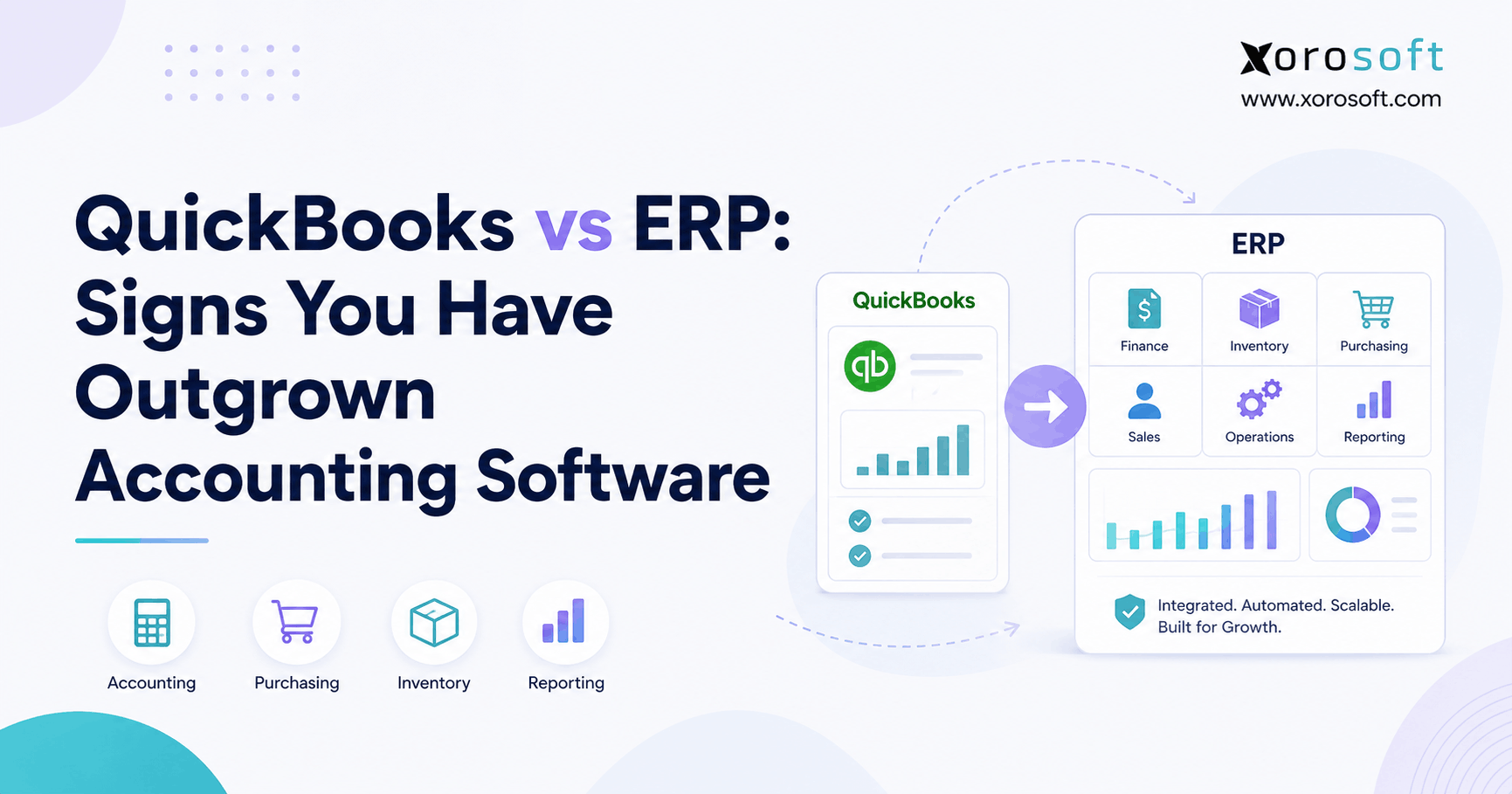
If you are trying to decide between QuickBooks vs ERP solutions for your business, understanding the key differences is essential.
1. Why Growing Businesses Start Comparing QuickBooks vs ERP
QuickBooks rarely becomes a problem overnight. More often, the business around it becomes more complicated than the original software stack was designed to manage.
A company may begin with QuickBooks, one sales channel, one warehouse, a manageable product catalog, and a small purchasing team. At that stage, finance sits naturally at the center of the technology stack. Sales are recorded, invoices are created, bills are paid, inventory is tracked, and management can understand the business without pulling information from several systems.
Growth adds operational layers.
Shopify becomes a major source of revenue. Amazon gets added. Wholesale customers introduce different pricing and fulfillment requirements. A second warehouse opens. Purchasing becomes harder to manage. One team starts forecasting in Excel while another tracks incoming purchase orders in a separate workbook. The warehouse adopts another application, and EDI may eventually enter the picture for larger retail or wholesale customers.
None of those systems may be failing individually.
The problem appears between them.
1.1 When QuickBooks vs ERP Becomes an Operational Decision
Employees begin exporting data, updating spreadsheets, comparing reports, re-entering information, fixing integration errors, and deciding which system contains the most accurate version of inventory or an order.
That is where the QuickBooks vs ERP question becomes important.
The decision is not about whether QuickBooks can record another invoice, customer, purchase order, or SKU. Instead, the issue is whether an accounting-led software architecture can still coordinate the business without excessive manual work.
A relatively large company with straightforward operations may use accounting software successfully for years. Meanwhile, a smaller distributor, manufacturer, or ecommerce brand with thousands of SKUs, multiple warehouses, Shopify, Amazon, EDI, wholesale customers, and complex purchasing may reach the ERP stage much earlier.
The useful question is therefore not, “Are we big enough for ERP?”
A better question is:
Has the operational complexity of the business exceeded what our current systems can manage efficiently?
That distinction should guide every QuickBooks vs ERP evaluation.
2. QuickBooks vs ERP: Where Accounting Software Ends and Operational ERP Begins
2.1 What QuickBooks Still Does Well for Growing Companies
QuickBooks is widely used because it solves important financial-management problems without the implementation burden traditionally associated with larger ERP systems.
Depending on the product and configuration, businesses can manage general ledger accounting, accounts payable, accounts receivable, invoicing, purchase orders, financial reporting, inventory, and other core business processes.
QuickBooks Enterprise goes considerably beyond basic bookkeeping. Its Advanced Inventory capabilities can support multiple inventory sites, inventory transfers, serial and lot tracking, barcode workflows, and additional inventory controls.
That matters because a credible QuickBooks vs ERP comparison should not rely on outdated claims that QuickBooks cannot handle inventory, warehouses, or purchase orders.
The more useful distinction is depth.
Tracking inventory across several sites is one requirement. Coordinating that inventory with ecommerce demand, wholesale commitments, replenishment, warehouse execution, supplier purchasing, manufacturing, forecasting, and financial reporting is another.
QuickBooks may still record many of those transactions. ERP becomes more relevant when the business needs a system that also coordinates the operational decisions surrounding them.
2.2 What an ERP System Changes Operationally
ERP stands for enterprise resource planning, but the practical meaning matters more than the acronym.
A modern ERP attempts to connect the transactions that run the company.
For a distributor, a customer order may affect inventory allocation, replenishment, warehouse activity, shipment, invoicing, and financial reporting.
In a manufacturing environment, demand can influence material requirements, supplier purchases, work orders, production schedules, finished goods, and accounting.
An ecommerce business may need a Shopify order to update available inventory, create warehouse work, influence replenishment, trigger fulfillment, reach accounting, and appear correctly in management reporting.
The value of ERP therefore does not come from simply having more modules.
Its value comes from those modules working from shared operational data.
2.3 Accounting Software Records the Financial Story; ERP Connects the Operating Story
Accounting software helps finance understand revenue, payables, receivables, cost of goods sold, margins, cash, and the balance sheet.
Operations needs another layer of information.
Teams need to know what inventory is available, what is committed, what is inbound, what needs replenishment, which warehouse should fulfill an order, whether production has enough material, and which customer orders may be at risk.
Management also needs to understand what operational activity is creating the financial result.
When those answers require separate exports and spreadsheets, the difference between accounting software and ERP becomes much more practical.
3. Is QuickBooks an ERP? Focus on the Operating Model Instead of the Label
3.1 QuickBooks Online, QuickBooks Enterprise, and ERP Address Different Levels of Complexity
Calling every QuickBooks product “not an ERP” oversimplifies the current software landscape.
QuickBooks Online remains primarily accounting-led software. QuickBooks Enterprise provides broader inventory and business-management functionality. Intuit now also offers Intuit Enterprise Suite, which is positioned as an ERP platform for increasingly complex organizations.
For buyers, the terminology matters less than the operating requirement.
If the primary needs involve accounting, reporting, payables, receivables, and manageable inventory, QuickBooks may remain entirely appropriate.
When a company needs one environment connecting accounting with purchasing, inventory, warehouse execution, manufacturing, forecasting, ecommerce, wholesale, and operational reporting, a broader ERP architecture becomes more relevant.
3.2 The Better QuickBooks vs ERP Question
Do not begin an ERP project by debating software categories.
Begin with the business.
Determine whether the team can see reliable inventory without routine reconciliation. Purchasing should be able to understand demand, supplier lead times, open purchase orders, inbound inventory, and current commitments. Warehouse teams need current order and inventory information, while finance should be able to close the month without repairing operational transactions first.
Management also needs timely visibility into margin, stock, demand, purchasing, fulfillment, and cash implications without manually assembling reports.
When several of those capabilities are missing, the QuickBooks vs ERP decision becomes much more important than the software label.
4. QuickBooks vs ERP: 12 Signs Accounting Software Is Becoming a Constraint
4.1 Inventory Reconciliation Has Become Routine
Occasional inventory adjustments are normal. Constant reconciliation is not.
The problem becomes visible when QuickBooks shows one quantity, Shopify another, the warehouse another, and a purchasing spreadsheet something else entirely.
Employees then spend time determining which number reflects reality.
Discrepancies can result from returns, receiving delays, damaged inventory, transfers, order allocation, integration failures, incorrect counts, or transactions entered in one system but not another.
The warning sign is not that a discrepancy happened. It is that reconciliation has become part of the weekly operating rhythm.
If teams expect to investigate conflicting inventory numbers before making purchasing or fulfillment decisions, the architecture itself may be generating work.
4.2 Multiple Warehouses Require More Than Location Tracking
Opening another warehouse creates more than another inventory location.
Purchasing now has to consider where stock should be delivered. Operations may need to decide when transfers are required. Ecommerce availability can depend on which locations are allowed to fulfill. Customer orders may need allocation rules, while warehouse teams need clear information about what belongs where.
QuickBooks Enterprise can support multiple inventory sites, so the second warehouse does not automatically mean the business needs ERP.
The stronger ERP signal appears when inventory across those locations must also stay synchronized with Shopify, Amazon, wholesale orders, purchasing, manufacturing, and financial reporting.
At that point, the challenge is not tracking warehouses.
It is coordinating them.
4.3 Spreadsheets Have Become Mission-Critical Infrastructure
Spreadsheets are valuable tools and will remain useful even after an ERP implementation.
The important question is what the spreadsheet is doing.
If Excel is being used to model a scenario, compare suppliers, or perform temporary analysis, that is normal.
If it is the only place containing reorder logic, inventory allocation, purchasing schedules, production plans, inbound inventory, wholesale availability, or demand forecasts, the spreadsheet has become an operational system.
That introduces dependency on files, formulas, manual updates, and specific employees who understand how everything works.
A practical test is simple: if one spreadsheet disappeared tomorrow, would a core process stop?
When the answer is yes, that workflow deserves attention during the QuickBooks vs ERP evaluation.
4.4 Employees Enter the Same Information in Multiple Systems
Duplicate data entry is one of the clearest signs of system fragmentation.
A Shopify order arrives. Someone verifies inventory in another application. Warehouse information moves into another system. Accounting receives the transaction later. Purchasing updates a spreadsheet. Management reporting combines exports from several sources.
Each product may be working correctly.
The inefficiency exists between the applications.
Repeated entry creates labor cost, but it also creates delay and uncertainty. Different systems can hold different versions of the same order or inventory balance, forcing employees to decide which one should be trusted.
4.5 Purchasing Has Become Reactive Instead of Planned
Purchasing becomes significantly more difficult as a company adds products, warehouses, channels, suppliers, seasonality, and longer lead times.
Experienced buyers can manage surprising complexity through instinct and spreadsheets. Eventually, however, the number of variables becomes difficult to process consistently.
A purchase decision may need to consider current stock, allocated inventory, open sales orders, expected demand, inbound purchase orders, supplier lead time, minimum order quantities, warehouse location, seasonal trends, and production requirements.
When a buyer needs several exports and a complex workbook before deciding what to order, the issue has moved beyond basic accounting.
The company now has a planning problem.
4.6 Stockouts and Overstock Exist at the Same Time
A common sign of fragmented planning is having too much inventory overall while still running out of important products.
The company may have plenty of data.
The problem is that the data sits in different places.
Sales history may live in the ecommerce platform. Inventory is tracked elsewhere. Supplier lead times are maintained in spreadsheets. Purchase orders are stored in another system.
One team buys heavily to protect against stockouts while another discovers excess inventory after demand changes.
ERP does not guarantee good forecasting. It can, however, make forecasting and replenishment decisions easier by putting more of the relevant operational information together.
4.7 Month-End Close Depends on Operational Cleanup
Finance often discovers operational problems at month-end.
Before closing the books, the team may need to investigate negative inventory, unmatched receipts, purchase-order discrepancies, returns, inventory valuation issues, or transactions that failed to synchronize correctly.
That means accounting is effectively paying for operational fragmentation.
When financial close repeatedly depends on reconstructing what happened in inventory, purchasing, receiving, and fulfillment, system integration becomes more than a convenience.
It becomes part of financial control.
4.8 Warehouse Operations Need More Than Inventory Visibility
Inventory management tells the business what stock exists.
Warehouse management deals with how that stock physically moves.
As volume increases, warehouse processes can include receiving, putaway, bin management, replenishment, transfers, picking, packing, cycle counting, barcode scanning, shipment verification, and exception handling.
That is why businesses should distinguish between inventory functionality and warehouse execution.
When warehouse complexity becomes a major bottleneck, a dedicated warehouse environment such as XoroWMS can be evaluated against actual receiving, picking, packing, transfer, and counting workflows rather than relying on a generic feature checklist.
4.9 Shopify, Amazon, Wholesale, and EDI Compete for the Same Inventory
A single-channel operation is easier to manage because demand comes primarily from one place.
An omnichannel business is different.
Shopify, Amazon, wholesale customers, EDI partners, B2B sales, and other channels may all draw from the same inventory pool.
The challenge is not merely importing those orders.
The system must determine what is available, what has already been promised, where stock is located, how the order should be fulfilled, and how the transaction should flow into accounting and purchasing.
Shopify merchants researching this type of architecture can also review the Xorosoft ERP listing on the Shopify App Store when evaluating how ERP can operate behind Shopify rather than replacing the storefront.
4.10 Manufacturing Has Outgrown Simple Inventory Accounting
Manufacturing introduces transactions that do not exist in a straightforward buy-and-sell business.
Raw materials become components. Components become finished products. Work orders consume inventory. Production creates demand for purchasing before finished goods are available.
The operation may need bills of materials, production schedules, material requirements, work orders, work-in-process visibility, and manufacturing costing.
If those processes live mainly in spreadsheets while accounting sees only purchases and completed financial transactions, management loses visibility into what is happening between raw material receipt and finished-goods availability.
4.11 Management Reporting Requires Manual Assembly
A growing management team eventually asks questions that cross departmental boundaries.
How much inventory is truly available? Which quantities are already committed? What is inbound? Which products are likely to stock out? What should purchasing reorder? Which warehouses are constrained? Which channels produce the strongest margins?
When answering those questions requires exports from several systems, the company does not merely have a reporting problem.
It has a data-architecture problem.
4.12 Administrative Headcount Is Growing Faster Than Operational Efficiency
Growth naturally requires additional people in areas where more human effort creates customer or business value.
It is more concerning when additional employees are required mainly to keep software synchronized.
If people spend substantial time updating spreadsheets, re-entering orders, comparing reports, repairing integration errors, or reconciling systems, technology is not scaling at the same pace as the business.
That is often the clearest reason to formally compare QuickBooks vs ERP.
5. QuickBooks vs ERP Capability Comparison for Inventory-Driven Businesses
5.1 Compare Workflow Depth Instead of Feature Checkboxes
Feature checklists can make very different products look surprisingly similar.
Two systems may both advertise inventory, purchase orders, multiple locations, reporting, and ecommerce integrations.
The difference becomes visible when the team walks through a complete transaction.
| Business Requirement | Accounting-Led Stack | Integrated ERP Approach |
|---|---|---|
| Accounting | Primary financial system | Finance connected directly with operational transactions |
| Inventory | Features vary by product and tier | Inventory connected to purchasing, warehouses, channels, and production |
| Purchasing | Vendor and PO workflows | Purchasing tied to demand, stock, inbound supply, and production |
| Warehousing | Site tracking or separate WMS | Warehouse execution connected with orders and inventory |
| Forecasting | Often spreadsheets or separate tools | Planning can use shared operational data |
| Manufacturing | Varies by product and add-ons | BOM, work order, materials, costing, and inventory workflows |
| Ecommerce | Usually integration-driven | Channels connect with centralized operations |
| Reporting | Financial focus | Operational and financial reporting combined |
For companies that need an integrated environment, XoroONE provides an example of a unified architecture connecting ERP, inventory, purchasing, warehouse management, manufacturing, forecasting, accounting, ecommerce, and EDI.
The important point is not that every business needs every module.
The real question is whether the workflows it does need are fragmented.
6. When QuickBooks Is Still the Better Choice Than ERP
6.1 A QuickBooks vs ERP Review Should Sometimes End With QuickBooks
An objective software evaluation should not automatically end with an ERP recommendation.
If financial management remains the main system requirement, inventory is manageable, purchasing is straightforward, warehouse processes are relatively simple, integrations are reliable, and reporting does not require extensive manual work, QuickBooks may still be the right system.
ERP introduces migration, configuration, testing, training, process redesign, and ongoing administration.
There should be a measurable operational reason to accept that change.
6.2 One Specialized Application May Solve the Problem Better
Suppose accounting works well and the only major issue is warehouse scanning.
Replacing finance, purchasing, customer information, and reporting may be unnecessary.
A specialized WMS or warehouse application could solve the isolated problem while allowing QuickBooks to remain the financial system.
The same principle can apply to forecasting, ecommerce connectors, EDI, or a specialized manufacturing requirement.
The architecture becomes more difficult when every new problem results in another application.
One integration may reduce complexity. Several overlapping integrations can create a new category of operational work.
6.3 Revenue Alone Does Not Determine ERP Readiness
There is no universal revenue threshold for moving from QuickBooks to ERP.
A revenue number does not reveal how many SKUs exist, how many warehouses are involved, whether manufacturing occurs, how many channels share inventory, or how much manual reconciliation employees perform.
ERP readiness is better evaluated through process complexity than company size.
7. QuickBooks + Apps vs ERP: Stay, Extend, or Replace?
7.1 Stay With QuickBooks When the Current Model Still Scales
The first option is to change nothing.
If reports are reliable, inventory is reasonably accurate, integrations work, employees are not maintaining critical workarounds, and management can get the information it needs, replacing software simply because the business is growing is unnecessary.
There is no advantage in creating an ERP project without a strong business case.
7.2 Extend QuickBooks When the Gap Is Clearly Defined
The second option is to keep QuickBooks while introducing specialized operational software.
This architecture works when each system has clear ownership.
The warehouse system manages warehouse execution. Shopify manages the storefront. QuickBooks manages accounting. Information moves cleanly between them.
Problems begin when teams cannot determine which application owns the transaction or when employees constantly reconcile the integrations.
7.3 Move to ERP When Complexity Spans Multiple Departments
The third option is to move more of the business into ERP.
This becomes more attractive when the problems are connected.
Inventory affects purchasing. Purchasing affects cash. Warehouse delays affect customer orders. Ecommerce demand affects replenishment. Manufacturing affects raw materials and costing. Finance reconciles the results later.
At that point, consolidating the operating model may create more value than adding another connector.
Inventory-driven companies evaluating this route can review XoroERP as one ERP option for integrated accounting, purchasing, inventory, warehouse management, manufacturing, and reporting.
7.4 Use an Operational Readiness Test Instead of a Revenue Test
A practical review should examine inventory complexity, warehouse operations, purchasing, sales channels, reporting, manufacturing, system fragmentation, and manual reconciliation.
If only one area is causing serious friction, fix that area first.
Where multiple departments depend on workarounds to keep information synchronized, a broader QuickBooks vs ERP evaluation makes more sense.
The pattern is more informative than any single symptom.
8. QuickBooks vs ERP by Industry: Where Complexity Appears First
8.1 Apparel and Fashion Businesses Face Variant-Level Complexity
Apparel companies can accumulate complexity quickly because one product style may exist across several colors, sizes, seasons, warehouses, and channels.
Purchasing needs visibility at the variant level. Wholesale commitments may compete with direct-to-consumer availability. Seasonal products create deadlines that make late purchasing decisions expensive.
The accounting entry is relatively straightforward.
The decisions that lead to it are not.
8.2 Wholesale Distributors Feel Pressure in Allocation, EDI, and Purchasing
Wholesale distribution commonly introduces customer-specific pricing, EDI, large catalogs, inventory allocation, multiple suppliers, backorders, and warehouse complexity.
The central operational question is whether the business can accurately promise inventory and deliver on time.
Answering that requires visibility into stock, commitments, inbound supply, warehouse availability, purchasing, and customer requirements.
8.3 Furniture Businesses Manage Long Lead Times and Expensive Stock
Furniture companies often deal with bulky inventory, long supplier lead times, containers, high carrying costs, and limited warehouse space.
Quantity on hand is only one part of the planning picture.
Sales and purchasing may also need visibility into committed stock, incoming products, expected dates, and warehouse capacity.
8.4 Sporting Goods and Consumer Products Face Seasonal Demand
Sporting goods and consumer brands may combine seasonal demand, product launches, ecommerce, wholesale, retail, and marketplaces.
The company may have excellent historical sales information while still struggling with replenishment because demand and supply information live in separate systems.
8.5 Food and Beverage Companies Need Connected Traceability
Food businesses may require lots, expiration dates, ingredient tracking, inventory aging, production processes, and stronger traceability.
QuickBooks Enterprise can support certain advanced inventory and lot-tracking functions, so an ERP decision should not be based on one missing checkbox.
The more important question is whether those controls need to connect with purchasing, warehouse operations, manufacturing, fulfillment, accounting, and reporting.
8.6 Manufacturing Can Require ERP Earlier Than Company Size Suggests
Manufacturers can reach ERP-level complexity surprisingly early because they transform inventory rather than simply resell it.
A finished product may depend on several raw materials, production steps, work orders, supplier purchases, costing decisions, and warehouse transactions.
That can make a smaller manufacturer operationally more complicated than a much larger service business.
8.7 Industry Fit Matters More Than ERP Brand Recognition
Apparel, distribution, furniture, food, consumer products, and manufacturing do not operate the same way.
Software should therefore be evaluated using realistic industry workflows rather than generic product demonstrations.
Xorosoft’s ERP industry solutions provide examples of how inventory-driven requirements vary across apparel, distribution, food and beverage, manufacturing, sporting goods, home products, and related sectors.
9. Choosing an ERP After QuickBooks: Capabilities That Actually Matter
9.1 ERP Accounting Should Connect Directly to Operations
Moving from QuickBooks does not reduce the importance of accounting.
It raises the expectation.
Finance should be able to understand how receiving, shipments, returns, purchasing, inventory adjustments, manufacturing, and other operational transactions affect the financial system.
The goal is not simply having everything in one database.
The goal is traceability between operational activity and financial results.
9.2 Purchasing and Inventory Should Operate From the Same Planning Context
Purchasing decisions need more than an on-hand quantity.
A buyer may need current stock, allocations, expected demand, incoming purchase orders, supplier lead times, warehouse shortages, production requirements, and seasonal patterns.
When those inputs exist in separate systems, purchasing becomes increasingly dependent on manual analysis.
An ERP evaluation should therefore test how well purchasing and inventory planning work together.
9.3 Warehouse Functionality Must Be Tested With Real Transactions
Do not ask only whether an ERP has warehouse management.
Ask the vendor to process a realistic workflow.
Receive an inbound purchase order, put the stock away, transfer inventory, allocate an order, pick it, handle a shortage, pack it, ship it, process a return, and complete a cycle count.
That test exposes much more than a feature checklist.
9.4 Ecommerce and EDI Need End-to-End Workflow Testing
Integration should be evaluated beyond whether an order imports successfully.
Follow the entire transaction.
Confirm which location owns the inventory, how much remains available to other channels, what the warehouse sees, how shipment updates stock, and how accounting receives the transaction.
Next, test exceptions such as cancellations, partial shipments, returns, and order changes.
Those situations reveal whether systems are genuinely integrated or merely exchanging basic records.
9.5 Compare QuickBooks ERP Alternatives Based on Fit
Potential QuickBooks alternatives include NetSuite, Acumatica, Microsoft Dynamics 365 Business Central, Sage, Cin7, Brightpearl, Fishbowl, Xorosoft, and other ERP platforms.
The strongest choice depends on industry, inventory complexity, warehouse requirements, manufacturing, integrations, reporting, implementation resources, and budget.
Companies considering NetSuite can use the Xorosoft vs NetSuite comparison as one research input while still validating both platforms against their own workflows.
The ERP with the most features is not automatically the best fit.
A better system is one that supports the operating model without introducing unnecessary complexity.
10. QuickBooks-to-ERP Migration: What Changes Beyond the Software
10.1 Map Business Processes Before Migrating Data
ERP migrations often begin with customer lists, vendor records, products, and balances.
Those items matter, but process ownership should come first.
Determine which system will own inventory, accounting, purchasing, warehouse execution, manufacturing, order management, and reporting after go-live.
Without that clarity, the implementation can reproduce the same fragmentation inside a new technology stack.
10.2 Clean Data Before Moving It
ERP centralizes bad data just as effectively as good data.
Duplicate customers, obsolete items, inconsistent SKUs, inaccurate units of measure, old locations, and unreliable inventory balances should be reviewed before migration.
The objective is not to copy every historical problem into a new database.
10.3 Decide How Much QuickBooks History Is Actually Needed
Many companies assume every historical transaction must move into the ERP.
That may create unnecessary complexity.
Accounting, compliance, reporting, customer service, and operational requirements should determine what history is required.
Some organizations migrate master data, opening balances, inventory, and open transactions while keeping older history available separately.
The correct approach depends on the business and implementation.
10.4 Test Complete Business Cycles Before Go-Live
Testing individual screens is not enough.
Take a real order from entry to allocation, warehouse fulfillment, shipment, accounting, payment, and return.
Do the same with purchasing.
For manufacturers, follow materials from purchasing through production and finished-goods receipt.
Then introduce exceptions.
A supplier ships short. An item is unavailable. Inventory moves to another warehouse. A customer changes an order after allocation.
ERP value becomes clearest when the system handles the situations that create the most manual work today.
10.5 Train Employees on Process Ownership
ERP changes how departments depend on one another.
A warehouse receipt can immediately affect purchasing, inventory, sales availability, and accounting.
Training therefore needs to explain not just which button to click but why accurate transactions matter downstream.
That is how the company avoids rebuilding disconnected spreadsheet processes around the new ERP.
11. Common Mistakes When Replacing QuickBooks With ERP
11.1 Buying ERP Before Defining the Operational Problem
“We are growing” is not a useful ERP requirement.
A more useful statement is: “We cannot reliably allocate inventory between Shopify and wholesale while purchasing for two warehouses.”
Specific problems lead to better software demonstrations and more disciplined selection.
11.2 Recreating Every Spreadsheet in the New System
Some spreadsheets contain valuable planning logic.
Others exist because the current software cannot support the process.
An ERP project should distinguish between the two.
Rebuilding every old workaround can undermine the purpose of implementing a connected platform.
11.3 Treating ERP Selection as a Finance-Only Project
Finance should be heavily involved, but businesses often start comparing QuickBooks vs ERP because operational complexity has become the larger problem.
Purchasing, warehouse, operations, ecommerce, manufacturing, customer service, and management should participate where relevant.
Otherwise, the business may buy a stronger accounting system while leaving the real bottlenecks unchanged.
11.4 Underestimating User Adoption
A technically successful implementation can still fail if employees return to private spreadsheets.
Users need to understand the new workflows, responsibilities, and benefits.
If ERP is perceived only as more administrative work, people will recreate the fragmented environment the company was trying to remove.
11.5 Assuming ERP Automatically Fixes Poor Processes
ERP can provide better information, stronger controls, and more connected workflows.
It cannot eliminate weak planning discipline.
Forecasting still requires good assumptions. Purchasing policies need ownership. Inventory counts need discipline. Product and supplier data require maintenance.
The strongest results come when process improvement and system implementation happen together.
12. QuickBooks vs ERP FAQs for Growing Businesses
12.1 What Is the Main Difference Between QuickBooks and ERP?
The main difference is scope and operational integration. QuickBooks is primarily accounting-led, although QuickBooks Enterprise provides substantial inventory and business-management functionality. ERP typically connects accounting with inventory, purchasing, warehouses, manufacturing, ecommerce, forecasting, and operational reporting.
12.2 Is QuickBooks an ERP System?
QuickBooks Online is generally accounting-led software, while QuickBooks Enterprise provides broader business functionality. Intuit also offers Intuit Enterprise Suite as an ERP product. The more useful question is whether the specific system supports your complete operating model.
12.3 Is QuickBooks Enterprise the Same as ERP?
QuickBooks Enterprise overlaps with ERP functionality in several areas, particularly accounting and advanced inventory. A broader ERP becomes relevant when the business needs deeper coordination across purchasing, warehouses, forecasting, ecommerce, manufacturing, and operational reporting.
12.4 How Do I Know If We Have Outgrown QuickBooks?
Look for recurring workarounds rather than revenue thresholds. Frequent inventory reconciliation, duplicate data entry, spreadsheet purchasing, disconnected channels, manual reporting, and operational cleanup before month-end are stronger signs that the existing architecture may have reached its limit.
12.5 When Should a Business Move From QuickBooks to ERP?
A company should evaluate ERP when complexity spans multiple departments and employees must regularly coordinate systems manually. Inventory, purchasing, warehouses, manufacturing, ecommerce, accounting, and reporting are common areas where fragmentation becomes visible.
12.6 Can ERP Completely Replace QuickBooks?
Yes. Many ERP systems include general ledger, accounts payable, accounts receivable, financial reporting, and other accounting functions. The decision depends on implementation scope and whether the ERP can support the company’s financial requirements as well as its operational processes.
12.7 Can QuickBooks and ERP Be Used Together?
Yes. Some companies retain QuickBooks as the accounting system while operational software handles inventory or warehouse processes. This architecture can work when data ownership is clear and integrations are reliable. Repeated reconciliation between systems is a warning sign.
12.8 Can QuickBooks Manage Multiple Warehouses?
QuickBooks Enterprise Advanced Inventory can support multiple inventory sites. The real question is whether the business also needs deeper warehouse execution, allocation, replenishment, ecommerce synchronization, manufacturing, and cross-location planning.
12.9 Is QuickBooks Enough for Inventory Management?
For many companies, yes. QuickBooks Enterprise offers meaningful inventory functionality. ERP becomes more relevant when inventory must work closely with purchasing, forecasting, warehouses, manufacturing, ecommerce, wholesale, or complex operational reporting.
12.10 Can QuickBooks Handle Lot and Serial Tracking?
QuickBooks Enterprise Advanced Inventory supports lot and serial tracking in relevant configurations. Businesses should still evaluate how those controls interact with receiving, fulfillment, manufacturing, returns, traceability, and warehouse processes.
12.11 Can QuickBooks Handle Manufacturing?
QuickBooks can support manufacturers to varying degrees depending on the operation and surrounding applications. Businesses needing BOMs, material planning, work orders, production scheduling, inventory consumption, and connected costing should evaluate manufacturing-focused ERP systems.
12.12 Can QuickBooks Manage Purchasing?
Yes. QuickBooks products can support purchase orders and vendor processes. ERP becomes more relevant when purchasing decisions need connected demand, stock, inbound supply, supplier lead times, warehouse requirements, and manufacturing information.
12.13 Is ERP Better for Inventory Forecasting?
ERP can provide a better data foundation by connecting sales, inventory, purchases, warehouse locations, and inbound supply. Forecast quality still depends on good data, planning methods, lead times, and human judgment.
12.14 Does a Shopify Business Need ERP?
Not automatically. ERP becomes more useful when Shopify is one channel within a larger operation involving Amazon, wholesale, multiple warehouses, purchasing, manufacturing, EDI, or integrated accounting.
12.15 When Does an Amazon Seller Need ERP?
Amazon sellers may need ERP when Amazon shares inventory with Shopify, wholesale, multiple warehouses, 3PLs, or manufacturing operations and employees spend increasing amounts of time synchronizing data.
12.16 When Does a Wholesale Distributor Need ERP?
Distributors typically evaluate ERP when pricing, EDI, inventory allocation, backorders, purchasing, warehouses, fulfillment, and accounting become too interconnected to manage efficiently across separate applications.
12.17 Does EDI Mean a Company Needs ERP?
No. EDI can work with several software architectures. ERP becomes more valuable when EDI transactions must connect directly with inventory, allocations, warehouse activity, shipment information, invoicing, and accounting.
12.18 Should We Add Inventory Software to QuickBooks or Move to ERP?
Add specialized software when the problem is isolated. Evaluate ERP when several connected areas—inventory, purchasing, warehousing, ecommerce, manufacturing, reporting, and accounting—depend on manual reconciliation.
12.19 What Are the Best ERP Alternatives to QuickBooks?
Options include Xorosoft, NetSuite, Acumatica, Microsoft Dynamics 365 Business Central, Sage, Cin7, Brightpearl, Fishbowl, and other platforms. The best fit depends on industry, operational complexity, integrations, implementation resources, and budget.
12.20 Is ERP Only for Large Companies?
No. A smaller manufacturer or distributor can have substantial operational complexity because of warehouses, SKUs, suppliers, manufacturing processes, and multiple sales channels. Company size alone does not determine ERP readiness.
12.21 At What Revenue Should a Company Move From QuickBooks to ERP?
There is no universal revenue threshold. Complexity is a better measure. Evaluate warehouses, SKUs, suppliers, channels, manufacturing, EDI, reporting, and the amount of manual coordination required.
12.22 How Much Does ERP Cost Compared With QuickBooks?
ERP usually involves broader costs, including licensing, implementation, integrations, migration, training, configuration, support, and internal project time. Compare that with the total cost of QuickBooks plus additional applications and the labor needed to reconcile them.
12.23 How Long Does a QuickBooks-to-ERP Migration Take?
There is no universal timeline. Duration depends on data quality, scope, integrations, manufacturing requirements, warehouses, workflows, testing, and training. A phased project may look very different from a full operational replacement.
12.24 What Data Should Move From QuickBooks to ERP?
Typical migration data includes customers, suppliers, products, chart of accounts, opening balances, inventory quantities, and open transactions. Historical data should be migrated only when required for operational, accounting, customer-service, reporting, or compliance reasons.
12.25 What Should We Evaluate Before Replacing QuickBooks?
Define the business problems first. Then review process ownership, data quality, integrations, reporting requirements, implementation resources, training needs, and total cost. ERP vendors should demonstrate actual company workflows rather than generic product tours.
13. QuickBooks vs ERP: Make the Upgrade When Operational Complexity Becomes the Constraint
13.1 Use Complexity, Not Ambition, to Make the Decision
QuickBooks can remain the right system for successful businesses for many years.
There is no benefit in replacing it simply because the company has reached a certain revenue number or wants to look more sophisticated.
ERP becomes valuable when the operating reality changes.
More inventory creates more planning decisions. Additional warehouses introduce location and transfer complexity. New sales channels compete for the same stock. Manufacturing adds material requirements. Purchasing decisions depend on more information. Finance spends more time reconciling operational systems.
At that point, the important QuickBooks vs ERP question changes.
Instead of asking whether QuickBooks can record the transaction, ask whether the current software stack can coordinate the transaction from beginning to end without people manually rebuilding the process.
If the answer is yes, continue improving what already works.
Where one isolated workflow is creating problems, address that workflow before replacing the entire software stack.
When inventory, purchasing, warehouse operations, ecommerce, manufacturing, accounting, and reporting are all being held together by spreadsheets and integrations, a formal ERP evaluation is justified.
13.2 Test ERP Using Your Most Difficult Real-World Workflows
A polished demonstration using perfect sample data is not enough.
Choose several transactions that represent the most difficult parts of your operation.
Run a Shopify order through inventory allocation, warehouse fulfillment, shipping, accounting, and returns. Test a purchasing scenario from demand planning through purchase order creation, receiving, inventory, and accounts payable. Manufacturers should test raw materials, work orders, production, finished goods, and costing.
Then introduce problems.
A supplier ships short. Inventory is unavailable at the expected warehouse. A customer changes an order after allocation. A return arrives in damaged condition.
Those exceptions reveal how much operational value the ERP can actually provide.
13.3 Turn the QuickBooks vs ERP Decision Into a Structured Next Step
Inventory-driven companies usually benefit from mapping their existing workflows before selecting any vendor.
Document where inventory lives, where purchase decisions are made, how warehouse activity is recorded, how Shopify or Amazon orders enter the operation, where manufacturing information is stored, and how finance receives the final transaction.
Then identify every manual handoff.
Those handoffs are often where the business is paying the hidden cost of disconnected software.
If a connected ERP could materially reduce that manual coordination, the company has a stronger business case for migration.
For businesses evaluating Xorosoft, the next step can be a workflow-specific review through the Xorosoft contact and personalized demo page.
The objective is not simply to replace QuickBooks.
The objective is to build an operating environment that can support growth without requiring employees to manually hold the systems together.
Recent Posts
-
 GS1 Logistic Labels in WMS: SSCC Generation, Printing, Scanning, and Traceability
 -
 Inventory Tracking Management KPIs: Measuring Unposted Receipts, Transfer Aging, and Return-to-Stock Time
 -
 B2B Ecommerce Software for Tax-Exempt Accounts: Resale Certificates, Account Rules, and Checkout Controls
 -
 Cin7 Alternatives for Shopify Plus Brands
 -
 Why Inventory Reports Disagree Across Systems