Before getting started, it’s helpful to consider some purchase order recommendations for best results.
1. When a Precise Purchase Recommendation Still Leads to the Wrong Buy
Purchase order recommendations can look extremely precise and still produce poor purchasing decisions. For example, a system may recommend buying 850 units while an experienced buyer believes the business needs only 400. Likewise, another SKU may show no replenishment requirement even though the warehouse will run out within days.
However, the recommendation engine itself may not be the real problem. Instead, a purchase recommendation reflects the information and rules that feed the calculation.
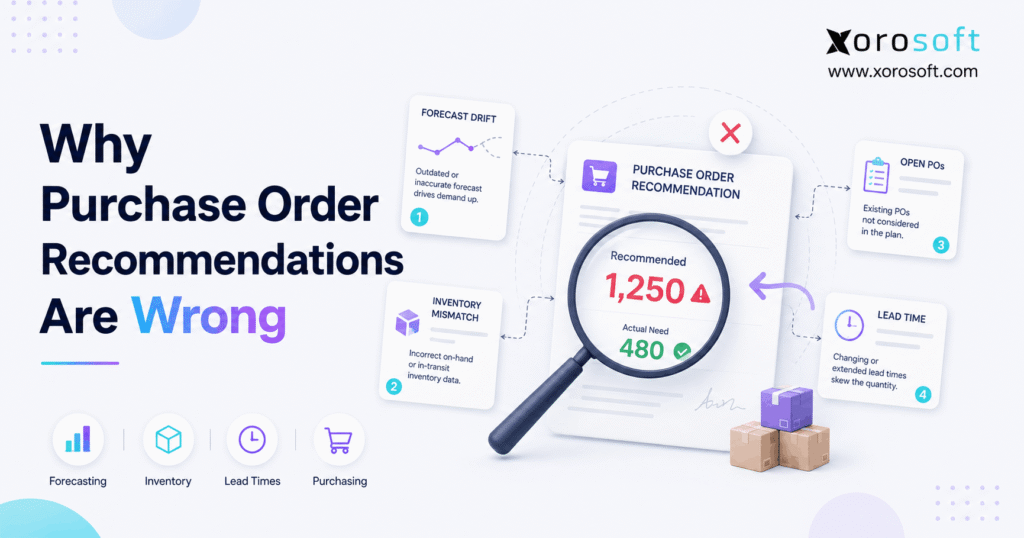
Therefore, buyers should treat purchase order recommendations as outputs rather than isolated decisions. If the system receives inaccurate inventory balances, unrealistic demand forecasts, outdated supplier lead times, stale open purchase orders, or incorrect safety-stock settings, it can perform the calculation correctly and still recommend the wrong quantity.
1.1 Why Buyers Stop Trusting Purchase Order Recommendations
At first, buyers usually correct a few unusual recommendations manually. However, when the same problem keeps appearing, manual overrides quickly become part of the purchasing routine.
As a result, the company may invest in automated replenishment while buyers continue rebuilding recommendations in spreadsheets. Moreover, management may believe purchasing has become automated even though the team still spends hours reviewing every suggested PO.
Therefore, the objective should not simply be to generate more purchase recommendations. Instead, the business should create recommendations that buyers can understand, validate, and trust.
1.2 Four Inputs Control Most Replenishment Recommendations
Although replenishment models vary, four categories drive most purchasing decisions:
1. Demand
2. Inventory
3. Incoming supply
4. Replenishment rules
Consequently, when a suggested order looks wrong, buyers should investigate these four areas before changing the recommendation itself.
2. How Purchase Order Recommendations Actually Work
A simplified replenishment calculation looks like this:
Recommended Purchase Quantity = Target Inventory Requirement − Available Inventory − Valid Incoming Supply
However, the apparent simplicity hides several assumptions.
For example, the target requirement may include forecast demand, confirmed sales orders, safety stock, supplier lead time, and the planning horizon. Meanwhile, available inventory may need to exclude stock already committed to customers, damaged inventory, or stock held in another warehouse.
Therefore, each number needs context.
2.1 A Simple Purchase Order Recommendation Example
Suppose a company expects 600 units of demand before its next replenishment arrives. In addition, the company wants 100 units of safety stock.
Therefore, the target inventory requirement equals:
600 + 100 = 700 units
Now assume the company has 300 usable units and another 100 units arriving on a valid purchase order.
Consequently:
700 − 300 − 100 = 300 units to purchase
The recommendation looks straightforward.
However, suppose the system reports 450 usable units while only 300 actually exist. In that case, the recommendation falls to 150 units.
Therefore, the formula works correctly while the business under-orders by 150 units.
2.2 Why Replenishment Recommendations Depend on More Than Sales History
Historical sales provide useful context. However, historical sales alone rarely provide enough information for reliable purchase planning.
For example, buyers may also need to consider:
- seasonality
- promotions
- confirmed sales orders
- supplier lead times
- stockouts
- new product launches
- minimum order quantities
- warehouse transfers
- safety stock
- order multiples
Consequently, automated replenishment works best when the system connects these inputs rather than analyzing each one independently.
3. Purchase Order Recommendations Fail When Inventory Balances Are Wrong
Inventory accuracy directly affects purchasing accuracy. Therefore, buyers should investigate inventory balances first when purchase order recommendations repeatedly look incorrect.
For example, suppose the ERP reports 1,200 units while the warehouse physically holds only 900 sellable units. The system believes the business has 300 more units available than it actually does.
Consequently, the replenishment recommendation may be too low.
Likewise, if the system understates available inventory, it may recommend unnecessary purchases. As a result, the business can create excess stock even when the forecast itself remains accurate.
3.1 What Creates Incorrect Inventory Data?
Several operational errors can distort inventory:
- unposted receipts
- incorrect shipment quantities
- unprocessed returns
- damaged inventory counted as sellable
- misplaced warehouse stock
- incorrect adjustments
- transfer errors
- incorrect units of measure
- duplicate transactions
Moreover, these errors rarely stay inside the warehouse. Instead, they flow into forecasting, allocation, purchasing, accounting, and fulfillment decisions.
3.2 Improve Inventory Before Changing the Purchasing Formula
First, cycle count SKUs with suspicious recommendations. Next, compare physical inventory with system inventory.
In addition, review whether committed, allocated, damaged, or quarantined quantities incorrectly appear as available.
Once businesses reach greater operational complexity, connecting warehouse transactions with inventory planning becomes increasingly valuable. For example, XoroWMS connects warehouse execution with broader inventory operations so receiving, movements, picking, and inventory activity can support a more reliable stock position.
Therefore, fixing inventory accuracy often improves purchase order recommendations without changing the forecasting model at all.
4. Demand Forecasting Can Distort Replenishment Recommendations
Purchase recommendations depend heavily on expected demand. However, historical sales do not automatically equal future demand.
Suppose a product sold:
- January: 200 units
- February: 220 units
- March: 245 units
- April: 270 units
A simple historical average gives roughly 234 units.
However, the product clearly shows an upward trend. Therefore, purchasing based purely on the average may understate future requirements.
4.1 Why Historical Demand Can Mislead Buyers
Demand can change because of:
- seasonality
- growth
- promotions
- new channels
- pricing changes
- wholesale contracts
- product lifecycle changes
- competitor activity
- unusual one-time orders
Consequently, buyers should ask more than, “What did we sell last month?”
Instead, they should ask:
“What demand should we expect before we can replenish this item again?”
4.2 Purchase Order Recommendations Need Forward-Looking Demand
Forecasting becomes more important as supplier lead times increase. For example, a business that can restock within three days can react quickly to demand changes.
However, a company importing inventory with a 90-day lead time must make purchasing decisions much earlier.
Therefore, longer replenishment cycles increase the value of accurate forward-looking demand planning.
5. Stockouts Can Make Inventory Reorder Recommendations Too Low
Sales history measures completed sales. However, it does not always measure true demand.
Suppose a product normally sells 20 units each day. Then, the company runs out of stock for ten days.
Sales during those ten days become zero.
However, customers may still want the product. Therefore, zero recorded sales do not necessarily mean zero demand.
5.1 The Stockout Feedback Loop
If the forecasting model interprets stockout periods as declining demand, a damaging cycle can develop:
Stockout → Lower Recorded Sales → Lower Forecast → Smaller Purchase Recommendation → Another Stockout
Consequently, an inventory planning system should distinguish low demand from unavailable supply wherever possible.
5.2 Correct Stockout History Before Trusting Purchase Recommendations
First, identify periods when an item had no sellable inventory. Next, compare demand before and after those periods.
Moreover, check whether similar products or channels continued showing demand.
Therefore, buyers should clean demand history before assuming that the replenishment algorithm needs adjustment.
6. Supplier Lead Times Can Make Purchase Order Recommendations Arrive Too Late
Lead time controls how far ahead purchasing needs to plan.
For example, suppose the system assumes a supplier delivers within 14 days. However, the supplier now regularly takes 30 days.
The replenishment model still plans as if inventory can arrive in two weeks.
Consequently, the purchase order recommendation may appear too late even when the demand forecast remains accurate.
6.1 Planned Lead Time vs Actual Lead Time
Supplier lead times change for many reasons:
- production constraints
- supplier backlogs
- freight delays
- customs delays
- seasonal congestion
- raw-material shortages
- transportation changes
- sourcing changes
Therefore, buyers should compare configured lead time with actual purchase-order-to-receipt performance.
6.2 Lead-Time Variability Matters Too
Average lead time can also hide risk.
For example, a supplier may average 20 days while actual deliveries range from 12 to 38 days. Consequently, the average alone may not provide enough protection for critical products.
Therefore, businesses should consider both typical lead time and variability when setting replenishment policies.
7. Safety Stock Can Push Purchase Order Recommendations Too High or Too Low
Safety stock protects against uncertainty. Therefore, it can help absorb unexpected demand, supplier delays, forecasting errors, and lead-time variability.
However, incorrect safety stock can also distort purchase order recommendations.
Too little safety stock increases stockout risk. Conversely, too much safety stock ties up working capital and creates excess inventory.
7.1 Avoid One Safety-Stock Rule for Every SKU
Different products carry different risks.
For example, a stable domestic SKU with a three-day lead time may need a relatively small buffer. However, a high-margin seasonal product supplied overseas may need significantly more protection.
Therefore, safety stock should reflect:
- demand variability
- supplier reliability
- replenishment frequency
- lead time
- service targets
- product value
- stockout impact
7.2 Connect Safety Stock With Demand Planning
Moreover, safety stock should not compensate permanently for poor forecasting or inaccurate inventory.
Instead, businesses should improve the underlying planning data first. Then, they can use safety stock to protect against genuine uncertainty rather than operational errors.
8. Stale Reorder Points Create Bad Replenishment Recommendations
A reorder point tells the business when replenishment should begin.
A simplified formula is:
Reorder Point = Demand During Lead Time + Safety Stock
For example, assume a product sells 20 units daily, the supplier takes 10 days, and safety stock equals 50 units.
Therefore:
20 × 10 + 50 = 250 units
However, suppose daily demand increases to 30 units.
The correct threshold now becomes:
30 × 10 + 50 = 350 units
Consequently, the old reorder point sits 100 units too low.
8.1 Why Reorder Points Become Outdated
Reorder points can become stale when:
- demand changes
- supplier lead times change
- warehouse locations change
- service targets change
- suppliers change
- products enter new lifecycle stages
Therefore, businesses should review replenishment settings periodically instead of treating them as permanent master-data values.
9. Open Purchase Orders Can Distort Purchase Order Recommendations
A replenishment engine usually subtracts incoming supply from future requirements.
However, that logic works only when open purchase orders accurately represent inventory that will actually arrive.
Suppose the system shows:
- 400 units available
- 600 units incoming
- 700 units of expected demand
Therefore, the system may recommend no additional purchase.
However, if 300 incoming units belong to a cancelled or severely delayed PO, the inventory position changes immediately.
9.1 Common Open-PO Problems
Buyers should check for:
- cancelled purchase orders that remain open
- duplicated POs
- outdated delivery dates
- partially received orders
- incorrect remaining quantities
- wrong warehouse destinations
- supplier cancellations
- obsolete orders
Consequently, open PO maintenance directly influences replenishment quality.
9.2 Treat Incoming Supply as Live Operational Data
Instead of treating purchase orders as static records, purchasing teams should continuously update quantity, status, supplier confirmation, and expected receipt dates.
Therefore, the planning engine can distinguish reliable incoming supply from inventory that may never arrive on time.
10. MOQ and Order Multiples Can Change Purchase Recommendations
Sometimes, an unusual purchase recommendation does not represent an error.
Instead, supplier constraints may change the calculated quantity.
For example, suppose the system calculates that the business needs 73 units. However, the supplier sells in cases of 25.
Therefore, the practical quantity becomes 75.
Now suppose the supplier also requires a minimum order quantity of 200.
Consequently, the final recommended purchase may become 200 units.
10.1 Purchasing Rules That Change Suggested Quantities
Common constraints include:
- minimum order quantity
- maximum order quantity
- case pack
- carton quantity
- pallet quantity
- order multiple
- supplier minimum spend
- container capacity
Therefore, buyers should inspect the rule behind an unexpected recommendation before overriding it.
10.2 Review Supplier Settings Regularly
Moreover, supplier requirements can change.
Consequently, outdated MOQ or packaging rules can cause systematic over-ordering. Therefore, purchasing teams should review supplier master data alongside lead times and pricing.
11. Multi-Warehouse Planning Can Make Purchase Order Recommendations Look Wrong
A company may have enough inventory overall while still running short at one location.
For example:
| Warehouse | Available Inventory | Expected Demand | Position |
|---|---|---|---|
| East | 900 | 300 | +600 |
| West | 100 | 500 | -400 |
| Total | 1,000 | 800 | +200 |
At company level, inventory looks sufficient.
However, the West warehouse faces a 400-unit shortage.
Therefore, consolidated planning can hide location-level replenishment problems.
11.1 Plan Replenishment at SKU-Location Level
When warehouses serve different customers or regions, demand patterns can differ substantially.
Consequently, businesses should evaluate:
- stock by warehouse
- demand by warehouse
- warehouse-specific safety stock
- local supplier lead time
- inbound transfers
- customer allocations
Therefore, SKU-location planning often produces more useful purchase order recommendations than company-wide inventory totals.
11.2 Consider Transfers Before Creating Another PO
In addition, a warehouse shortage does not automatically require an external purchase.
For example, the East warehouse in the example above holds 600 excess units. Therefore, transferring stock to the West may solve the shortage without increasing total inventory.
Consequently, replenishment planning should consider transfer opportunities before generating another external purchase order.
12. Shopify, Amazon, Wholesale, and EDI Can Complicate Purchase Order Recommendations
Modern inventory-driven businesses often sell through several channels simultaneously.
For example, demand may originate from:
- Shopify
- Amazon
- wholesale orders
- EDI customers
- retail locations
- marketplaces
- sales representatives
Therefore, purchase planning needs one clear view of demand.
12.1 Avoid Missing or Duplicating Channel Demand
Disconnected applications can create two opposite problems.
First, a system may miss demand from one channel. Consequently, it under-orders.
Second, integrations may duplicate the same demand across systems. As a result, the business may buy more inventory than it needs.
Therefore, channel synchronization directly affects replenishment recommendations.
12.2 Connect Ecommerce Activity With Inventory Planning
For Shopify merchants, inventory and order integrations become particularly important as volume grows. Xorosoft is also available through the Shopify App Store, providing a relevant connection point for businesses that need Shopify activity to participate in broader ERP workflows.
Moreover, companies selling through multiple channels can use Xorosoft integrations to connect ecommerce and operational systems rather than manually merging sales signals.
13. The Wrong Replenishment Method Can Produce Wrong Purchase Recommendations
One planning method rarely works equally well for every SKU.
Therefore, companies should select replenishment logic based on product characteristics.
13.1 Reorder Point
Reorder-point planning works well for products with reasonably stable demand.
However, the method becomes less reliable when demand or lead times change rapidly.
13.2 Min/Max Replenishment
Min/max planning triggers replenishment when inventory falls below a minimum and usually replenishes toward a maximum.
Therefore, it works well for relatively simple stock environments.
13.3 Forecast-Based Replenishment
Forecast-based planning looks ahead at expected demand.
Consequently, it often fits seasonal, growing, or variable products better than static thresholds.
13.4 MRP for Manufacturing
Manufacturers need another layer because components depend on production demand.
Therefore, purchasing must consider:
- bills of materials
- work orders
- production schedules
- component inventory
- manufacturing lead times
For inventory-driven manufacturers, XoroERP can connect purchasing with inventory, manufacturing, accounting, and broader operational requirements.
14. Correct Mathematics Can Still Produce the Wrong Purchase Order Recommendation
This point explains many purchasing disputes.
A system can perform every calculation correctly while using the wrong assumptions.
14.1 Correct Formula + Wrong Inventory
If the system overstates available inventory, the recommendation becomes too low.
Therefore, the business risks a stockout.
14.2 Correct Forecast + Wrong Lead Time
If demand looks correct but supplier lead time remains outdated, the recommendation may arrive too late.
Consequently, inventory can run out before replenishment arrives.
14.3 Correct Demand + Wrong Safety Stock
If the safety-stock target is excessive, the recommendation becomes too high.
Therefore, excess working capital moves into inventory.
14.4 Correct Requirement + Wrong MOQ
If supplier rules require much larger quantities, the recommendation can look unreasonable even though the system follows its configuration.
Therefore, the best diagnostic question is:
“Which input or rule produced this number?”
15. A Worked Example of Wrong Purchase Order Recommendations
Assume:
- forecast demand: 600 units
- safety stock: 100 units
- available inventory: 300 units
- valid incoming inventory: 100 units
Therefore, the target equals:
600 + 100 = 700
Then:
700 − 300 − 100 = 300 units
The correct recommendation equals 300 units.
15.1 Scenario A: Inventory Is Wrong
Suppose the system incorrectly shows 450 available units.
Therefore:
700 − 450 − 100 = 150
Consequently, the system under-orders by 150 units.
15.2 Scenario B: Incoming Supply Is Missing
Suppose the system fails to recognize the valid 100-unit open PO.
Therefore:
700 − 300 = 400
Consequently, the system over-orders by 100 units.
15.3 Scenario C: Safety Stock Is Too High
Suppose safety stock equals 300 rather than 100.
Therefore, the target becomes 900.
Then:
900 − 300 − 100 = 500
Consequently, the business orders 200 more units than the original requirement.
The formula never changed. Instead, each bad input changed the purchasing decision.
16. How to Troubleshoot Wrong Purchase Order Recommendations
Instead of reviewing recommendations randomly, buyers should use the same diagnostic process every time.
16.1 Step 1: Verify Physical Inventory
First, cycle count the affected SKU.
Then, compare physical stock with system inventory.
16.2 Step 2: Verify Sellable Inventory
Next, remove allocated, damaged, quarantined, or otherwise unavailable inventory from the usable quantity.
Therefore, the planning engine starts with a realistic inventory position.
16.3 Step 3: Audit Open Purchase Orders
Then, check remaining quantities, delivery dates, cancellations, and partial receipts.
Consequently, the system does not rely on supply that will not arrive.
16.4 Step 4: Review Demand History
Next, investigate promotions, unusual customers, product launches, and exceptional order periods.
Therefore, planners can separate recurring demand from unusual events.
16.5 Step 5: Identify Stockout Periods
Moreover, flag dates when inventory reached zero.
Consequently, the forecast will not automatically interpret lost sales as weak demand.
16.6 Step 6: Validate the Forecast
Compare forecast demand with actual demand.
Then, investigate large recurring errors by SKU or product category.
16.7 Step 7: Check Supplier Lead Times
Next, compare configured lead time with actual receipt history.
Therefore, replenishment timing can reflect current supplier performance.
16.8 Step 8: Review Safety Stock
Then, confirm that safety stock matches demand and supplier uncertainty.
However, avoid using excessive safety stock to hide poor forecasting.
16.9 Step 9: Check MOQ and Order Multiples
Next, confirm current supplier constraints.
Consequently, buyers can understand why calculated requirements become larger purchasing quantities.
16.10 Step 10: Review Warehouse Settings
For multi-location businesses, confirm that planning occurs at the appropriate SKU-location level.
Therefore, one warehouse’s excess inventory does not hide another warehouse’s shortage.
16.11 Step 11: Review Transfer Opportunities
Before purchasing more inventory, check whether another location already holds excess stock.
Consequently, the business may solve the shortage without increasing total inventory.
16.12 Step 12: Track Buyer Overrides
Finally, record why buyers change purchase order recommendations.
If the same reason appears repeatedly, improve the underlying data or rule instead of making the same manual correction every week.
17. When Buyers Should Override Purchase Order Recommendations
Automation should support buyer judgment rather than eliminate it.
Therefore, buyers should still intervene when they have valid information the system cannot yet see.
Examples include:
- a new promotion
- supplier disruption
- product discontinuation
- temporary supplier pricing
- unusual wholesale demand
- a large upcoming customer order
- a product launch
However, constant overrides indicate a deeper issue.
17.1 Track Why Buyers Override Replenishment Recommendations
For each override, record:
- original recommended quantity
- final quantity
- difference
- reason
- actual demand
- resulting inventory position
Consequently, purchasing teams can convert buyer intuition into usable planning information.
17.2 Repeated Overrides Signal a System Problem
If buyers change most recommendations every week, automation has not truly reduced manual planning.
Instead, the software creates a first draft that buyers repeatedly rebuild.
Therefore, repeated overrides should trigger an investigation into inventory, demand, supplier data, and replenishment settings.
18. When Better Purchasing Technology Becomes Necessary
Spreadsheets can work well for businesses with relatively few SKUs, suppliers, and locations.
However, complexity changes the equation.
For example, purchasing becomes harder when the company manages:
- thousands of SKUs
- multiple warehouses
- Shopify and Amazon
- wholesale and EDI
- manufacturing
- multiple suppliers
- different lead times
- high transaction volume
Consequently, teams spend more time collecting and reconciling information than making purchasing decisions.
18.1 Warning Signs That Purchasing Has Outgrown Spreadsheets
Common warning signs include:
- buyers rebuild PO recommendations manually
- inventory differs across applications
- purchasing uses separate spreadsheets
- forecasts live outside the operational system
- warehouse transfers remain invisible to buyers
- Shopify and wholesale demand require manual consolidation
- accounting and inventory disagree
- stockouts and overstock occur simultaneously
Therefore, the business should consider whether the problem comes from the planning formula or the fragmented technology stack.
18.2 Why Integrated ERP Can Improve Purchase Recommendations
An integrated system connects purchasing with the transactions that influence it.
For example, XoroONE brings core ERP workflows into one cloud environment for inventory-driven operations.
Likewise, Xorosoft’s broader business solutions connect areas such as inventory, purchasing, warehousing, forecasting, manufacturing, and accounting.
Consequently, buyers can spend less time reconciling multiple versions of operational data.
18.3 What Integrated Replenishment Should Actually Improve
An ERP cannot eliminate demand uncertainty.
However, it can improve:
- inventory visibility
- open-PO visibility
- supplier data
- warehouse-level planning
- multi-channel demand visibility
- purchasing automation
- financial alignment
Moreover, businesses can review practical operational outcomes through relevant Xorosoft case studies rather than judging ERP functionality only from feature lists.
Therefore, the goal should not be “more automation.”
Instead, the goal should be better operational inputs feeding more trustworthy purchasing decisions.
19. Frequently Asked Questions About Purchase Order Recommendations
19.1 What Are Purchase Order Recommendations?
Purchase order recommendations tell buyers which items they may need to reorder and how much to purchase. Typically, the system combines demand, usable inventory, incoming supply, supplier lead time, safety stock, and replenishment rules. Therefore, reliable recommendations depend on both accurate data and appropriate planning settings.
19.2 Why Are My Purchase Order Recommendations Wrong?
Purchase order recommendations often look wrong because one or more inputs contain inaccurate or outdated information. For example, inventory may be wrong, forecasts may miss demand, lead times may be stale, or open purchase orders may no longer be valid. Therefore, investigate inputs before changing the purchasing formula.
19.3 How Does Inventory Accuracy Affect Purchase Recommendations?
Inventory accuracy directly changes the quantity the system believes it needs to purchase. Therefore, overstated inventory can cause under-ordering, while understated inventory can cause unnecessary purchasing. Moreover, warehouse receiving, returns, adjustments, transfers, and fulfillment activity all influence the available inventory number.
19.4 How Does Demand Forecasting Affect Purchase Orders?
Demand forecasting estimates future inventory requirements. Consequently, an excessive forecast can create overstock while an understated forecast can produce stockouts. Therefore, buyers should account for seasonality, promotions, growth, new channels, stockouts, and unusual sales events instead of relying only on historical averages.
19.5 Can Stockouts Make Replenishment Recommendations Wrong?
Yes. When inventory reaches zero, recorded sales may also fall to zero even though customer demand continues. Consequently, a forecasting model can misinterpret unavailable inventory as weak demand. Therefore, planners should identify stockout periods before using historical sales to calculate future replenishment needs.
19.6 How Does Supplier Lead Time Affect Purchase Recommendations?
Supplier lead time determines how much demand inventory must cover before replenishment arrives. Therefore, longer lead times usually require earlier ordering. If the system assumes 15 days while the supplier actually takes 35, the recommendation may occur too late even when the demand forecast remains accurate.
19.7 What Is Safety Stock?
Safety stock provides extra inventory to protect against uncertainty. For example, it can absorb unexpected demand, forecast errors, and supplier delays. However, excessive safety stock creates overstock. Therefore, businesses should set buffers according to actual variability instead of applying the same quantity to every SKU.
19.8 Can Too Much Safety Stock Cause Overstock?
Yes. Because safety stock increases the target inventory level, excessive buffers can increase recommended purchase quantities. Consequently, businesses may tie unnecessary working capital into inventory. Therefore, companies should review safety stock alongside demand variability, supplier reliability, lead times, and service requirements.
19.9 What Is a Reorder Point?
A reorder point represents the inventory level that triggers replenishment. Generally, businesses combine demand expected during supplier lead time with safety stock. Therefore, reorder points should change when demand, lead times, service targets, or product characteristics change instead of remaining static indefinitely.
19.10 How Often Should Reorder Points Change?
No single schedule fits every SKU. However, high-volume, seasonal, or volatile products usually require more frequent review than stable slow movers. Moreover, businesses should update reorder points whenever supplier lead time, demand, warehouse structure, sourcing strategy, or service-level requirements change materially.
19.11 How Do Open Purchase Orders Affect Replenishment Recommendations?
Open purchase orders represent incoming supply. Therefore, planning systems may subtract those quantities from future requirements. However, stale, cancelled, duplicated, or delayed POs can distort the calculation. Consequently, buyers should keep remaining quantities and expected receipt dates current.
19.12 What Happens When a Supplier Changes Its MOQ?
A higher minimum order quantity can increase the final purchase recommendation above calculated demand. For example, a requirement for 150 units may become 500 if the supplier introduces a 500-unit MOQ. Therefore, buyers should maintain current supplier purchasing constraints in the planning system.
19.13 What Is an Order Multiple?
An order multiple requires buyers to purchase quantities in fixed increments. For example, a supplier that ships cases of 24 may turn a 50-unit requirement into 72 units. Consequently, recommendations may appear higher than forecast demand even though the system simply follows the supplier’s packaging rule.
19.14 Should Each Warehouse Have Separate Replenishment Recommendations?
Often, yes. Different warehouses may face different demand patterns, inventory levels, service requirements, and transfer options. Therefore, consolidated company inventory can hide local shortages. Consequently, multi-location businesses often benefit from SKU-location planning rather than relying only on company-wide inventory totals.
19.15 Should Buyers Transfer Inventory Before Purchasing More?
When another location already holds excess inventory, an internal transfer may provide the better replenishment action. Therefore, buyers should compare transfer availability, transfer lead time, freight cost, and supplier lead time before creating another PO. Consequently, the company can avoid purchasing inventory it already owns.
19.16 How Does Shopify Demand Affect Purchase Planning?
Shopify orders consume inventory and contribute to demand signals. Therefore, businesses should ensure Shopify activity reaches the inventory and purchasing system accurately. Moreover, companies selling through Shopify and other channels should prevent both missing orders and duplicate demand when planning future replenishment.
19.17 Can Amazon and Wholesale Orders Distort Replenishment?
Yes, particularly when systems handle each channel separately. For example, wholesale commitments may exist in one system while Amazon demand exists in another. Consequently, purchasing may miss or duplicate requirements. Therefore, multi-channel businesses need a consistent operational view of demand.
19.18 Can ERP Automate Purchase Order Recommendations?
Yes. ERP systems can combine inventory, demand, open supply, supplier data, warehouses, and replenishment rules to create purchasing recommendations. However, automation does not fix incorrect source data automatically. Therefore, businesses should improve inventory accuracy and planning discipline alongside automation.
19.19 Can AI Improve Purchase Order Recommendations?
AI can support forecasting, anomaly detection, pattern recognition, and exception management. However, AI still depends on reliable operational data. Therefore, inaccurate inventory balances, duplicated orders, or outdated supplier data can still undermine results. Consequently, businesses should build strong data foundations before expecting AI to solve replenishment problems.
19.20 When Should a Buyer Override a Purchase Recommendation?
Buyers should override a recommendation when they possess valid information the system does not yet contain. For example, they may know about a supplier disruption, promotion, product discontinuation, or unusual customer order. However, repeated overrides for identical reasons indicate that the underlying planning configuration needs improvement.
19.21 How Can a Business Reduce Manual PO Overrides?
First, record why buyers override recommendations. Then, group recurring reasons into inventory, forecasting, supplier, warehouse, or master-data issues. Consequently, the business can fix the upstream cause rather than repeating the same correction. Moreover, monitoring override rates helps measure whether recommendation quality improves.
19.22 What Is the Difference Between Forecasting and Replenishment?
Forecasting estimates what customers may need in the future. Replenishment decides how the business should supply that demand. Therefore, a forecast can predict 1,000 units while replenishment recommends only 300 because the company already holds inventory and has additional supply arriving.
19.23 Can Spreadsheets Handle Purchase Order Recommendations?
Yes, particularly for simple businesses with limited SKUs, suppliers, and warehouses. However, spreadsheets become difficult when information changes frequently across ecommerce, purchasing, warehousing, accounting, and manufacturing. Consequently, teams may spend more time maintaining formulas and importing data than analyzing purchasing decisions.
19.24 When Should a Company Move From Spreadsheets to ERP Purchasing?
A company should consider an integrated system when buyers constantly reconcile multiple applications, rebuild purchasing recommendations, or struggle with multi-warehouse and multi-channel inventory. Therefore, the trigger should be operational complexity rather than company size alone.
19.25 What Should I Check First When a Purchase Recommendation Looks Wrong?
First, verify physical and available inventory. Next, check valid incoming purchase orders. Then, review demand, stockout periods, supplier lead time, safety stock, MOQ, and warehouse settings. Therefore, buyers can narrow the problem systematically instead of randomly changing planning parameters.
20. Turn Purchase Order Recommendations Into Decisions Buyers Can Trust
Purchase order recommendations do not become reliable simply because software generates them automatically.
Instead, reliable recommendations begin with accurate inventory, realistic demand, current supplier information, valid incoming supply, and appropriate replenishment rules.
Therefore, when a recommendation looks wrong, start by identifying the input that produced it.
First, verify inventory. Next, examine demand. Then, review open POs, supplier lead times, safety stock, reorder points, MOQ rules, warehouse requirements, and transfers.
Moreover, measure buyer overrides rather than allowing them to disappear inside everyday purchasing activity.
As operations grow across Shopify, Amazon, wholesale, EDI, manufacturing, and multiple warehouses, disconnected systems make this work increasingly difficult. Consequently, an integrated ERP can become valuable because inventory, purchasing, forecasting, warehousing, accounting, and order activity can share a common operational foundation.
Xorosoft focuses on that inventory-driven operating model while helping growing businesses centralize purchasing and related workflows.
Ultimately, the goal is not to remove human judgment from purchasing. Instead, the goal is to give buyers dependable information so they can spend less time fixing recommendations and more time managing exceptions, supplier strategy, and working capital.
If your team continually rebuilds purchasing recommendations because inventory, demand, warehouses, and supplier data live in different places, you can Book a Demo to see how Xorosoft approaches connected ERP and inventory operations.
Recent Posts
-
 Warehouse Injury and Safety Statistics: What Operations Teams Should Know Before Automating Workflows
 -
 Food and Beverage ERP Requirements for Lot, Expiry, and Recall Control
 -
 How to Prevent EDI Errors Before They Become Retailer Chargebacks
 -
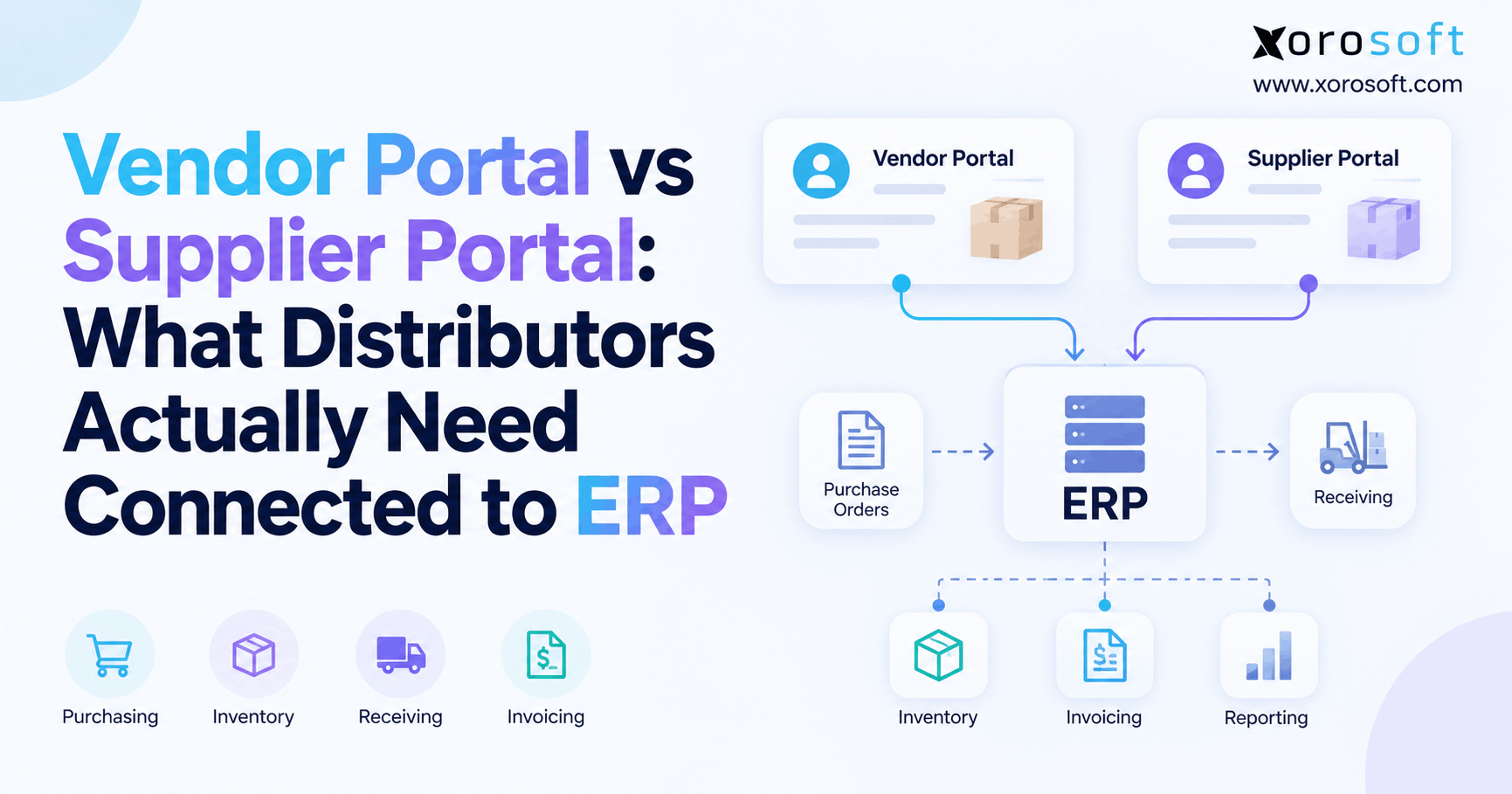
 Vendor Portal vs Supplier Portal: What Distributors Actually Need Connected to ERP
 -
 Stock Write-Off Tracking: How Inventory Losses Explain Gross-Margin Variance