If your business involves distributing goods, you may already be considering purchase order automation for distributors to streamline your processes.
1. Why Purchase Order Automation for Distributors Becomes Essential
Purchase order automation for distributors becomes necessary long before the purchasing team formally admits that its current process is no longer working. At first, the warning signs appear manageable. Buyers maintain extra spreadsheets, warehouse teams request expected delivery updates, finance receives supplier invoices without receipt confirmation, and managers approve purchases through scattered email threads.
However, these individual workarounds gradually create an operating model that is difficult to control.
Distributor purchasing is not simply a matter of creating a purchase order document. Instead, every purchasing decision depends on inventory availability, customer demand, supplier lead times, safety stock, minimum order quantities, warehouse capacity, payment terms, and cash-flow priorities.
Therefore, when those inputs sit across several disconnected systems, buyers must manually rebuild the complete picture before placing an order.
As the business grows, that approach creates several recurring problems:
- Buyers order from outdated inventory reports.
- Duplicate purchase orders are created.
- Existing inbound inventory is overlooked.
- Approvals remain trapped in email threads.
- Warehouses receive products without reliable PO information.
- Supplier invoices cannot be matched quickly.
- Finance cannot see committed purchasing spend.
- Leadership lacks visibility into supplier delays.
Consequently, automation must cover more than digital PO creation. A strong purchasing workflow connects demand, inventory, suppliers, approvals, receiving, and accounting.
The goal is not to remove the buyer from every decision. Instead, the system should process routine transactions while directing attention toward unusual demand, large purchases, price changes, delayed suppliers, and other meaningful exceptions.
Ultimately, effective purchase order automation for distributors creates a controlled flow from inventory planning to supplier payment.
2. What Purchase Order Automation for Distributors Actually Means
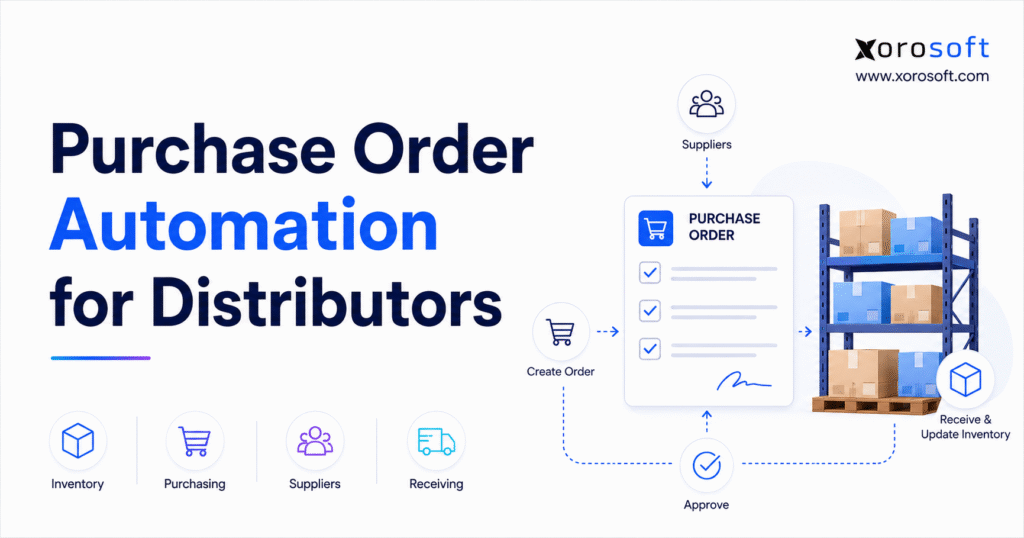
Purchase order automation for distributors is the use of connected software and rules-based workflows to calculate inventory requirements, create purchase requisitions, generate purchase orders, route approvals, communicate with suppliers, monitor inbound stock, receive goods, reconcile invoices, and update accounting records with less manual effort.
In other words, the purchase order becomes one part of a connected operational process rather than an isolated document.
2.1 Purchasing, Procurement, and Procure-to-Pay
Although these terms are related, they describe different levels of business activity.
Purchasing covers the operational tasks required to order products or services. For example, it includes creating purchase orders, sending them to suppliers, monitoring delivery dates, and recording received goods.
Procurement, however, is broader. It may include supplier sourcing, contract negotiation, vendor evaluation, risk management, purchasing policy, and spend control.
Procure-to-pay extends from identifying a business need through requisition, approval, ordering, receiving, invoice verification, and supplier payment.
Therefore, a distributor may not require a complex enterprise procurement suite. Nevertheless, it still needs the relevant stages of purchasing, inventory, receiving, and payment to remain connected.
2.2 Supplier Purchase Orders Versus Customer Purchase Orders
The phrase purchase order automation can describe two different processes.
First, a distributor may issue a purchase order to a supplier to replenish inventory. This supplier-side process is the primary subject of this guide.
Second, a wholesale customer may submit a purchase order to the distributor. Software can then convert that incoming document into a sales order.
Although both processes may use EDI, APIs, document capture, or workflow automation, they solve different operational problems. Supplier-side automation improves buying and replenishment. Customer-side automation improves sales-order entry.
2.3 What Automated Purchasing Software Can Handle
Depending on the platform, an automated purchasing system can assist with:
- Inventory replenishment recommendations
- Purchase requisition creation
- Draft purchase order generation
- Approval routing
- Supplier selection
- Price validation
- Quantity validation
- Supplier communication
- Delivery-date tracking
- Partial receipts
- Invoice matching
- Accounting entries
- Purchasing analytics
- Supplier performance reporting
Nevertheless, not every purchase should proceed without review.
For example, high-value orders, new suppliers, major price changes, unusual demand spikes, and large inventory commitments may still require human approval.
As a result, routine orders move quickly, while buyers focus on decisions that require commercial judgment.
3. How Automated Purchase Order Management Works
A complete purchase order workflow should follow the actual operating sequence of a distributor. Moreover, each stage should use information created earlier in the process instead of forcing employees to re-enter the same details.
3.1 Demand Identification and Replenishment Signals
First, the system identifies future inventory requirements.
For example, demand may come from historical sales, confirmed customer orders, wholesale forecasts, seasonal demand, promotional campaigns, ecommerce growth, marketplace activity, warehouse transfers, manufacturing work orders, or safety-stock policies.
However, the system must distinguish real demand from weak signals. An unconfirmed sales opportunity, for instance, should not influence purchasing in the same way as an approved customer order.
In addition, demand should be evaluated by product, warehouse, channel, and time period. Otherwise, a single total may hide shortages at one location and excess stock at another.
3.2 Automated Purchase Quantity Calculation
Next, the system calculates how much should be ordered.
A simplified formula is:
Recommended order quantity = forecast demand + committed demand + safety stock − available inventory − confirmed inbound inventory
In practice, additional factors may affect the calculation:
- Supplier lead time
- Minimum order quantity
- Case-pack size
- Product shelf life
- Warehouse capacity
- Purchase budget
- Freight requirements
- Currency
- Supplier discounts
- Container capacity
- Seasonal risk
Therefore, the system should explain the recommendation clearly. A buyer must understand why the software recommends 800 units rather than 400.
Moreover, explainable recommendations improve user confidence. When buyers can inspect the inputs, they are more likely to trust the system and identify data problems early.
3.3 Purchase Requisition and Draft PO Creation
Once the requirement has been identified, the system can create a purchase requisition or draft purchase order.
A requisition is useful when the company requires internal approval before creating a supplier-facing PO. Conversely, a draft PO may be more appropriate when routine purchasing authority has already been established.
In addition, approved supplier data should automatically populate the purchase order, including:
- Supplier name
- Supplier SKU
- Product description
- Quantity
- Unit cost
- Currency
- Delivery warehouse
- Requested arrival date
- Payment terms
- Shipping instructions
As a result, buyers spend less time copying information and more time reviewing material exceptions.
3.4 Purchase Order Approval Workflow Automation
Approval rules can evaluate:
- Total purchase value
- Product category
- Supplier status
- Department
- Warehouse
- Budget availability
- Buyer authority
- Price variance
- Quantity variance
- Contract compliance
For example, a routine $2,000 replenishment order from an approved supplier may move automatically. However, a $75,000 order from a new supplier may require several reviews.
After approval, the system can send the PO through email, EDI, a supplier portal, or an API connection.
Meanwhile, the order status should remain visible to the buyer. Therefore, employees do not need to search inboxes to determine whether the PO was approved, released, acknowledged, or delayed.
3.5 Supplier Confirmation and Inbound Tracking
Next, the supplier confirms the order or proposes changes.
However, the supplier may revise the delivery date, available quantity, product substitution, unit price, shipping method, or payment terms.
Those updates should not remain hidden inside email. Instead, the expected receipt should update automatically, or the discrepancy should be routed to the buyer.
Meanwhile, sales, warehouse, customer service, and finance teams should be able to view the current inbound status.
Consequently, customer-facing teams can provide more realistic delivery expectations without repeatedly contacting purchasing.
3.6 Receiving, Invoice Matching, and Accounting
Finally, the warehouse receives the shipment against the approved purchase order.
Employees confirm:
- Product received
- Quantity received
- Damaged quantity
- Accepted quantity
- Lot number
- Serial number
- Expiry date
- Warehouse location
The supplier invoice can then be compared with the purchase order and receipt. Consequently, approved values flow into inventory and accounting without requiring teams to rebuild the transaction manually.
4. How Inventory Data Powers Purchase Order Automation
Reliable inventory data is the foundation of automated purchasing for distributors. Without it, even a well-designed workflow will generate weak recommendations.
4.1 Available, Committed, and On-Hand Inventory
On-hand inventory is not always fully available.
For instance, some products may already be committed to customer orders, reserved for a wholesale account, allocated to production, held for inspection, assigned to another warehouse, or damaged.
Therefore, purchasing software must distinguish physical stock from usable stock.
For example, a warehouse may physically contain 500 units. However, if 400 units are already committed, only 100 units remain available for new demand.
In addition, inventory status should update as sales orders, transfers, receipts, and warehouse adjustments occur. Otherwise, purchasing recommendations become outdated almost immediately.
4.2 Open and In-Transit Purchase Orders
Moreover, the system must account for confirmed inbound inventory.
Suppose a distributor needs 1,500 units over the next month. It has 500 available units and 800 units already scheduled to arrive. In that case, the real shortage is only 200 units before safety stock and other constraints are considered.
However, overdue or unconfirmed purchase orders may be unreliable. Therefore, the system should distinguish between ordered, confirmed, in-transit, received, and cancelled quantities.
As a result, buyers can decide whether to trust an inbound shipment, expedite it, replace it, or create a backup purchase order.
4.3 Reorder Points Versus Forecast-Based Purchasing
Reorder points work well for stable products with consistent demand.
When available inventory falls below a predefined level, the system recommends replenishment. This method is straightforward and effective for products with predictable movement.
By contrast, forecast-based purchasing looks further ahead. It can include seasonality, planned promotions, historical trends, customer forecasts, new channel growth, and expected sales changes.
Therefore, forecast-based purchasing is often more appropriate for apparel, sporting goods, furniture, consumer products, and seasonal distribution.
Nevertheless, many distributors use both methods. Stable products may rely on reorder points, while seasonal or strategic products use forecast-driven planning.
4.4 Safety Stock and Service-Level Targets
Safety stock protects the business from uncertainty.
Nevertheless, applying the same safety-stock percentage to every item is rarely effective. Different SKUs have different demand patterns, supplier reliability, margins, and customer-service requirements.
A high-priority product from an unreliable supplier may require additional protection. Conversely, a slow-moving product with a short local lead time may require very little safety stock.
As a result, safety-stock policies should be defined by product, warehouse, supplier, and service target.
Furthermore, safety stock should be reviewed regularly. Otherwise, outdated policies may create either repeated shortages or unnecessary inventory.
4.5 Supplier Lead Time and Actual Delivery Performance
Supplier lead time determines when the business must order.
For example, a product with a 90-day lead time requires much earlier action than a locally sourced product available within one week.
However, static supplier records often become outdated. A supplier record may state 30 days even though recent deliveries have taken 45 days.
Therefore, automated purchasing should compare planned lead time with actual delivery performance. This improves reorder timing, expected arrival dates, and safety-stock decisions.
5. Multi-Warehouse Purchase Order Automation for Distributors
Purchase order automation for distributors becomes more valuable when the company operates multiple warehouses. At that point, the business must decide whether to purchase centrally, order by location, or transfer existing stock between facilities.
5.1 Consolidating Demand Across Warehouses
In many cases, a centralized buying team may combine demand from several locations into one supplier purchase order.
This approach can improve volume pricing and freight efficiency. However, it may also increase internal transfer activity or delay delivery to the warehouse with the most urgent requirement.
Therefore, the system should display both local and consolidated demand. Buyers can then decide whether to:
- Ship directly to each warehouse
- Deliver everything to a central facility
- Split the order by location
- Use cross-docking
- Create an inter-warehouse transfer
Moreover, the purchasing team should understand the cost of each option. A lower supplier price may not create savings when internal transfers, delays, or handling costs are included.
5.2 Evaluating Transfers Before New Purchases
Before buying more stock, the system should check whether another warehouse has usable excess inventory.
A transfer may be preferable when:
- Another location has genuine excess stock
- The product is needed urgently
- Supplier lead time is long
- Transfer freight is affordable
- The transfer will not create a new shortage
However, transfers should not be recommended from simple on-hand quantities alone. The sending warehouse may have upcoming demand that is not immediately visible.
Consequently, the transfer calculation should consider inventory availability, committed stock, open sales orders, sales velocity, and forecast demand.
5.3 Preventing Duplicate Purchasing Across Locations
Without centralized visibility, two warehouse teams may order the same product independently.
Meanwhile, another location may already have excess inventory or an open supplier order. This creates unnecessary working-capital exposure.
A connected warehouse management system can extend purchase order automation into expected receipts, barcode receiving, putaway, warehouse transfers, and inventory updates.
As a result, buyers and warehouse teams work from the same operational information.
6. Purchase Order Approval Automation and Spend Control
Automation should strengthen control rather than remove it.
Manual approval can appear safe because a manager sees the purchase before release. However, email-based approval is often inconsistent, difficult to audit, and dependent on individual availability.
6.1 Approval Rules That Reflect Real Risk
Approval workflows may use:
- Purchase value
- Department budget
- Product category
- Supplier status
- Price increase
- Order quantity
- Warehouse
- Buyer authority
- Payment terms
- Contract status
For instance, a routine order from an approved supplier may require only one review. In contrast, a large order with a new supplier, unusual payment terms, and a significant price increase may require finance and operations approval.
Therefore, approval design should reflect actual risk rather than organizational hierarchy alone.
6.2 Sequential and Parallel Approvals
Sequential approval sends the order to one reviewer at a time.
This approach works when approvals depend on the previous reviewer’s decision. However, it can create delays.
Alternatively, parallel approval sends the PO to several reviewers simultaneously. Therefore, it may work better when finance, operations, and product teams can review independently.
Nevertheless, too many parallel reviewers can create confusion. As a result, each approver should have a clearly defined responsibility.
6.3 Escalation, Delegation, and Reapproval
The workflow should escalate overdue approvals and allow temporary delegation when a manager is unavailable.
Moreover, the system should preserve a complete audit history, including:
- Original request
- User changes
- Approval date
- Rejection reason
- Revised quantity
- Revised price
- Final release
If an approved purchase order changes materially, it may require reapproval. On the other hand, a small delivery-date adjustment may not require another review.
7. Supplier Management and Automated Purchasing Decisions
Supplier data determines whether automated purchasing recommendations can be trusted.
7.1 Supplier-Specific Product Records
Each supplier-product relationship may include:
- Supplier SKU
- Negotiated price
- Currency
- Minimum quantity
- Case-pack quantity
- Lead time
- Payment terms
- Shipping terms
- Preferred warehouse
- Quality requirements
- EDI settings
If these records are outdated, automation will scale errors rather than reduce them.
Therefore, supplier data governance should be part of the automation project.
In addition, teams should assign ownership for supplier-record maintenance. Otherwise, buyers may continue using personal spreadsheets to track current prices and terms.
7.2 Preferred and Alternate Suppliers
Many products can be purchased from more than one supplier.
Nevertheless, the lowest unit price is not always the best choice. For example, a slightly more expensive supplier may offer faster delivery, better fill rates, lower freight costs, or fewer defects.
An automated system can recommend suppliers based on:
- Price
- Availability
- Lead time
- Minimum quantity
- Delivery performance
- Quality
- Currency
- Payment terms
- Freight impact
However, buyers should still be able to override the recommendation and record the reason.
7.3 Supplier Performance Monitoring
Useful supplier metrics include:
- On-time delivery rate
- Fill rate
- Lead-time reliability
- Purchase price variance
- Defect rate
- Invoice accuracy
- Response time
Consequently, supplier performance becomes part of future purchasing decisions rather than a separate reporting exercise.
A consistently late supplier, for instance, may require an earlier reorder date, additional safety stock, or a lower allocation of future orders.
Moreover, supplier scorecards can support contract discussions and sourcing reviews. Therefore, the purchasing team can negotiate from operational evidence rather than informal feedback.
8. Connecting Automated Purchase Orders With Receiving
Purchase order workflow automation should continue until the warehouse confirms what arrived.
Otherwise, the company may have a digital PO process but still lack reliable receipt information.
8.1 Expected Receipt Visibility
The warehouse should see expected deliveries by:
- Supplier
- Purchase order
- Delivery date
- Product
- Quantity
- Warehouse
- Handling requirement
As a result, managers can schedule labor, prepare staging space, and identify shipments requiring inspection or lot control.
In addition, expected receipt visibility helps customer service and sales teams understand when backordered products may become available.
8.2 Barcode-Based PO Receiving
Barcode receiving allows warehouse employees to identify the purchase order and scan products as they arrive.
At the same time, the system compares the scanned quantity with the expected quantity. Therefore, discrepancies appear immediately.
Instead of rebuilding the receipt from the supplier’s packing slip, the warehouse receives directly against approved PO data.
Consequently, purchasing receives faster confirmation and finance gains a more reliable receipt record.
8.3 Partial and Excess Receipts
Suppliers do not always deliver the complete order.
First, a partial receipt should update the delivered quantity while leaving the remainder open. Meanwhile, the buyer should see whether the balance is expected later, cancelled, or backordered.
An over-receipt may be accepted within a small tolerance. However, a material excess should require review because it affects inventory, cash, and storage.
Similarly, short shipments should remain visible until the buyer resolves the balance with the supplier.
8.4 Damaged Goods and Purchase Returns
Damaged or rejected inventory should not become available stock.
Instead, the system should record:
- Quantity rejected
- Rejection reason
- Supplier responsibility
- Replacement status
- Credit status
- Return shipment
Consequently, purchasing, warehouse, and finance teams can track the issue through resolution.
8.5 Lot, Serial, and Expiry Tracking
Food, beverage, automotive, electronics, and regulated products may require lot, serial, or expiry information.
Receiving is the point where this information enters the inventory system. Therefore, the workflow must capture it accurately before products become available.
9. Three-Way Matching and Purchase Order Accounting Integration
Purchase order automation for distributors should continue into accounts payable.
Finance needs evidence that the company ordered the products, received them, and was invoiced correctly.
9.1 Two-Way, Three-Way, and Four-Way Matching
Two-way matching compares the purchase order with the supplier invoice.
Three-way matching compares:
1. The approved purchase order
2. The warehouse receipt
3. The supplier invoice
Four-way matching adds an inspection or acceptance record.
Therefore, companies that require quality approval before payment may benefit from the fourth stage.
9.2 Quantity, Price, and Freight Tolerances
However, not every small difference requires manual investigation.
For example, a minor rounding variance may be accepted automatically. However, an invoice that exceeds the purchase order by 15% should be held.
Tolerance rules may apply to:
- Unit price
- Total amount
- Quantity
- Freight
- Tax
- Exchange rate
As a result, finance teams review meaningful exceptions instead of every invoice.
9.3 Inventory Valuation and Landed Costs
The purchasing process affects inventory value.
Freight, duty, brokerage, and related costs may need to be allocated across received items. In addition, the accounting system must record supplier liability, tax, purchase price variance, and accrued receipts.
A connected inventory and purchasing ERP helps operations and finance use shared transaction records rather than reconciling separate systems.
Therefore, accounting receives a clearer connection between the physical receipt and the financial obligation.
9.4 Faster Month-End Reconciliation
When purchase orders, receipts, and supplier invoices share one workflow, finance can identify:
- Goods received but not invoiced
- Invoices received without receipts
- Overdue supplier bills
- Outstanding purchase commitments
- Purchase price differences
- Unallocated landed costs
Consequently, month-end closing becomes more structured and less dependent on spreadsheet reconciliation.
10. Benefits of Purchase Order Automation for Distributors
Purchase order automation for distributors creates value beyond faster document processing. More importantly, it improves the quality of inventory, supplier, warehouse, and financial decisions.
10.1 Faster Purchase Order Processing
As a result, routine orders can be generated from approved product and supplier records.
Therefore, buyers spend less time copying data and more time reviewing demand changes, supplier risk, and inventory exposure.
10.2 Improved Inventory Availability
Earlier shortage detection gives the purchasing team more time to act.
Meanwhile, visibility into open purchase orders and warehouse transfers reduces unnecessary emergency purchases.
10.3 Lower Overstock Risk
Automated recommendations can account for available stock, inbound inventory, committed demand, forecasts, and supplier constraints.
As a result, buyers are less likely to order from incomplete spreadsheet data.
10.4 Stronger Spend Control
Approval rules are applied consistently.
Moreover, management can see who requested, reviewed, changed, and approved each purchase.
10.5 Better Supplier Accountability
Supplier confirmations, expected dates, actual receipts, quality problems, and invoice differences remain connected.
Consequently, vendor reviews can use operational evidence rather than informal feedback.
10.6 More Accurate Receiving
Warehouse teams receive against approved PO records.
Therefore, quantity differences, substitutions, and damages are identified earlier.
10.7 Better Financial Visibility
Finance gains a clearer view of committed spend, received inventory, unmatched invoices, and supplier liabilities.
Ultimately, this supports stronger cash planning and faster reconciliation.
11. Who Needs Purchase Order Automation for Distributors?
Not every distributor needs the same level of automation. However, the value increases as purchasing and inventory complexity grow.
11.1 Businesses Most Likely to Benefit
Automated purchasing is especially useful for companies that manage:
- Large SKU catalogs
- Multiple warehouses
- Frequent purchase orders
- Several suppliers
- Multiple buyers
- Long supplier lead times
- Seasonal demand
- Ecommerce and wholesale channels
- EDI requirements
- Manufacturing demand
- Complex landed costs
In addition, it is relevant when the company has outgrown spreadsheets, QuickBooks, inventory-only applications, or disconnected warehouse tools.
11.2 Businesses That May Need a Simpler Tool
On the other hand, a small distributor with one warehouse, a limited product range, low PO volume, and predictable suppliers may not require a full ERP.
Instead, basic accounting software, inventory software, or a dedicated PO application may provide enough structure.
Therefore, the software decision should be based on process complexity rather than company size alone.
12. Purchase Order Automation Software Options
Distributors can choose from several software categories. Each category addresses a different level of operational complexity.
12.1 Spreadsheets and Basic Accounting Software
Spreadsheets offer flexibility and low initial cost.
However, they provide limited transaction controls, weak collaboration, no automatic receiving connection, and poor audit visibility.
Basic accounting software may generate purchase orders and supplier bills. Nevertheless, forecasting, warehouse, replenishment, and multi-channel functions may remain limited.
12.2 Standalone Purchase Order Software
Standalone systems may provide:
- Purchase requisitions
- Approval workflows
- Supplier communication
- Spend controls
- Audit history
- Purchase reporting
In particular, these tools can work well when purchasing control is the main problem.
However, they may require integrations with inventory, warehouse, and accounting systems.
12.3 Inventory Management Platforms
Inventory software often adds:
- Reorder points
- Stock visibility
- Purchasing
- Receiving
- Basic forecasting
- Multi-location records
Therefore, it can serve businesses that need stronger inventory control but are not yet ready to replace accounting or other business systems.
12.4 Distribution ERP Platforms
A distribution ERP connects purchasing with inventory, sales, warehousing, accounting, forecasting, ecommerce, EDI, and manufacturing.
This option becomes relevant when purchasing problems reflect broader system fragmentation.
Moreover, it may reduce the number of separate integrations that the business must maintain.
13. Standalone PO Software Versus Distribution ERP
| Evaluation area | Standalone PO software | Distribution ERP |
|---|---|---|
| Requisitions | Usually strong | Usually supported |
| Approval workflows | Strong | Configurable |
| Inventory planning | Limited or integrated | Connected |
| Multi-warehouse visibility | Often external | Native or closely connected |
| Receiving | Integration required | Connected |
| Accounting | Integration required | Connected |
| Forecasting | Limited | Often included |
| Ecommerce | Additional integration | Platform-dependent |
| Manufacturing | Rare | Available in selected systems |
| Best fit | Narrow purchasing issue | Cross-functional operational issue |
13.1 When Standalone PO Software Fits
A standalone system may be appropriate when inventory, receiving, accounting, and reporting already work effectively.
In that situation, the primary need may be faster requisitions, stronger approvals, or improved spend control.
13.2 When Distribution ERP Becomes the Better Fit
However, distribution ERP becomes more relevant when purchasing teams export inventory, warehouses operate separately, ecommerce orders rely on connectors, and finance reconciles the complete process manually.
In this case, automating only the PO will not remove the underlying fragmentation.
Businesses comparing broader platforms can review Xorosoft versus NetSuite while also evaluating Acumatica, Business Central, Sage, Cin7, Brightpearl, and other relevant options.
Ultimately, the best system is the one that fits the company’s operational requirements, implementation capacity, and growth plan.
14. How Xorosoft Supports Automated Purchasing for Distributors
Xorosoft is a cloud ERP platform developed for inventory-driven businesses. It brings purchasing, inventory management, warehouse operations, accounting, forecasting, ecommerce, reporting, and manufacturing into one environment.
14.1 Connected Purchasing, Inventory, and Accounting
A unified cloud ERP platform enables purchasing recommendations to use the same inventory, sales, warehouse, supplier, and financial records used by the rest of the business.
Therefore, teams do not need to export stock data into purchasing spreadsheets and re-enter supplier activity into accounting.
14.2 Multi-Warehouse Purchase Order Management
Furthermore, for distributors operating several locations, Xorosoft can connect purchase orders with warehouse-level inventory, receiving, transfers, and fulfillment.
As a result, buyers can evaluate demand by warehouse while retaining a consolidated operational view.
14.3 Shopify and Multi-Channel Purchasing
Shopify merchants often need purchasing decisions to reflect ecommerce orders, wholesale demand, marketplace sales, and inventory spread across multiple locations.
The Xorosoft ERP app for Shopify provides a relevant reference for merchants evaluating connected Shopify, inventory, purchasing, fulfillment, and accounting workflows.
Consequently, purchasing decisions can reflect demand across channels rather than relying on a separate ecommerce report.
14.4 When Xorosoft May Be Relevant
Xorosoft may fit businesses that:
- Sell physical products
- Manage multiple warehouses
- Operate Shopify or Amazon channels
- Sell wholesale
- Use EDI
- Manufacture products
- Need forecasting
- Require integrated accounting
- Have outgrown disconnected applications
However, a simpler tool may still be sufficient for a business with minimal inventory complexity and low purchasing volume.
15. Purchase Order Automation Use Cases by Industry
The core purchasing principles remain similar across industries. Nevertheless, each sector has different inventory and supplier requirements.
15.1 Apparel and Fashion Distribution
Apparel businesses manage style, size, and color variants, seasonal buying windows, supplier minimums, and rapidly changing channel demand.
Therefore, automated purchasing should consolidate supplier orders without hiding demand at the SKU level.
15.2 Furniture Distribution
Furniture distributors often manage long lead times, supplier deposits, container orders, bulky goods, and significant freight costs.
Consequently, the purchasing system should provide reliable expected arrival dates and support landed-cost allocation.
15.3 Sporting Goods Distribution
Sporting-goods demand can change by season, location, sport, event, and weather.
Therefore, multi-warehouse planning should evaluate both transfers and supplier purchases.
15.4 Food and Beverage Distribution
Food and beverage operations add shelf life, lot tracking, expiry dates, and quality requirements.
As a result, automated recommendations must consider how much inventory can realistically be sold before expiry.
15.5 Automotive and Industrial Parts
Parts distributors manage extensive SKU catalogs, alternate products, supplier substitutions, and service-level expectations.
In many cases, lead time and availability matter more than the lowest purchase price.
15.6 Inventory-Driven Manufacturing
Manufacturers generate purchasing demand from bills of materials, production schedules, and work orders.
Therefore, raw-material and component purchasing should share data with production planning.
Businesses can explore ERP capabilities for inventory-driven industries to compare requirements across apparel, furniture, sporting goods, food, wholesale, consumer products, and manufacturing.
16. Common Purchase Order Automation Mistakes
16.1 Automating Inaccurate Data
Incorrect stock balances, prices, lead times, case packs, and supplier minimums produce weak recommendations.
Therefore, data cleanup must happen before automated purchasing is activated.
16.2 Ignoring Existing Inbound Inventory
A replenishment process that ignores open and in-transit POs can create duplicate orders.
Consequently, the system must evaluate reliable inbound stock before recommending another purchase.
16.3 Automating Every Decision
Not every purchasing decision should move automatically.
For example, new suppliers, large price changes, unusual demand, and high-value orders should receive human review.
16.4 Creating Too Many Approval Steps
An excessive approval structure can make automation slower than the manual process.
Therefore, each approval step should correspond to a real financial or operational risk.
16.5 Separating Purchasing From Receiving
The process is not complete when the PO reaches the supplier.
Instead, receipt, inspection, inventory update, and discrepancy handling should remain connected.
16.6 Leaving Accounting Outside the Workflow
When finance receives invoices without linked PO and receipt records, employees must recreate the transaction manually.
As a result, invoice processing and month-end reconciliation remain slow.
16.7 Ignoring User Adoption
Finally, buyers need to understand why the system recommends a quantity.
Similarly, warehouse employees need a receiving process that works in real operating conditions. Therefore, training and exception procedures must be included in implementation.
17. Purchase Order Automation for Distributors: Implementation Roadmap
17.1 Map the Existing Purchasing Workflow
First, document each stage from demand identification to supplier payment.
Identify:
- Who creates the requirement
- Who reviews it
- Which systems are used
- Where data is re-entered
- Where approvals stop
- Where exceptions occur
As a result, the business can distinguish process problems from software problems.
17.2 Clean Inventory and Supplier Data
Next, review:
- SKU records
- Units of measure
- Warehouse balances
- Supplier SKUs
- Prices
- Lead times
- Minimum quantities
- Case packs
- Currencies
- Payment terms
Without this step, automation will accelerate inaccurate decisions.
17.3 Define Replenishment Rules
Then, document how the company:
- Forecasts demand
- Sets safety stock
- Chooses suppliers
- Consolidates orders
- Handles transfers
- Accounts for open POs
- Manages exceptions
Moreover, these rules should be approved by purchasing, operations, warehouse, and finance stakeholders.
17.4 Configure Purchase Approval Rules
Approval rules should reflect order value, supplier risk, price changes, buyer authority, and budget exposure.
However, the company should avoid copying an inefficient manual hierarchy into the new system.
17.5 Connect Receiving and Accounting
Next, ensure that warehouse receipts update inventory and create the records required for invoice matching.
In addition, confirm how freight, taxes, duties, purchase variances, and supplier liabilities will be recorded.
17.6 Test Real Purchasing Scenarios
Test:
- Full receipt
- Partial receipt
- Excess receipt
- Damaged goods
- Supplier substitution
- Price variance
- Late delivery
- Cancelled PO
- Purchase return
- Invoice discrepancy
Therefore, the team can identify workflow gaps before the process affects live supplier orders.
17.7 Launch in Controlled Stages
Initially, begin with one warehouse, buyer group, product category, or supplier segment.
Measure the results, correct weaknesses, and then expand the process.
18. KPIs for Distributor Purchase Order Automation
Useful purchasing metrics include:
| KPI | What it measures |
| Purchase order cycle time | Time from requirement to supplier release |
| Approval turnaround | Time orders wait for approval |
| Emergency purchase rate | Frequency of unplanned replenishment |
| Supplier on-time delivery | Delivery reliability |
| Supplier fill rate | Percentage of ordered quantity delivered |
| Purchase price variance | Difference from expected cost |
| Receipt accuracy | Accuracy of products and quantities received |
| Invoice exception rate | Percentage requiring manual review |
| Stockout rate | Frequency of unavailable inventory |
| Inventory turnover | Efficiency of inventory investment |
18.1 Calculating the Business Case
A practical formula is:
Annual benefit = labor savings + avoided errors + reduced expedite costs + inventory carrying-cost improvement + captured discounts − annual software and implementation cost
However, the same benefit should not be counted twice.
For example, faster cycle time and labor savings may overlap. Similarly, reduced excess inventory and lower carrying costs represent related improvements.
Therefore, use conservative assumptions and establish a reliable baseline before implementation.
Moreover, review results after adoption has stabilized. Otherwise, early implementation activity may distort the comparison.
19. Frequently Asked Questions About Purchase Order Automation for Distributors
19.1 What Is Purchase Order Automation?
Purchase order automation uses software to create, approve, send, track, receive, and reconcile purchase orders with less manual work. In addition, advanced systems connect purchasing with inventory planning, supplier records, warehouse receiving, and accounting.
19.2 How Does Purchase Order Automation Work for Distributors?
The system identifies inventory requirements, recommends order quantities, creates a requisition or draft PO, routes it for approval, sends it to the supplier, monitors delivery, records receipt, matches the invoice, and updates accounting.
19.3 Can Purchase Orders Be Fully Automated?
Routine purchase orders can move automatically when supplier, price, quantity, and approval conditions are predictable. However, unusual demand, high-value orders, new suppliers, and significant variances should usually require human review.
19.4 Can Automated Purchasing Prevent Stockouts?
It can reduce avoidable stockouts by identifying future shortages earlier and considering supplier lead time. Nevertheless, it cannot eliminate shortages caused by supplier failure, inaccurate inventory, unpredictable demand, or product unavailability.
19.5 Can Purchase Order Automation Reduce Overstock?
Yes. When recommendations account for current inventory, open POs, forecasts, safety stock, and supplier constraints, the business can avoid unnecessary orders. However, inaccurate data can still produce overstock.
19.6 How Are POs Generated From Inventory Demand?
The system compares available stock, committed demand, expected receipts, safety stock, forecast demand, supplier lead time, and order constraints. It then recommends or creates the required purchase quantity.
19.7 What Is a Purchase Order Approval Workflow?
A purchase order approval workflow routes an order to the appropriate reviewer based on rules such as value, supplier, department, price variance, budget, product category, or buyer authority.
19.8 How Does Multi-Warehouse Purchasing Automation Work?
The system calculates demand by warehouse, reviews available inventory at other locations, recommends transfers, consolidates supplier requirements, assigns delivery locations, and helps prevent duplicate purchases.
19.9 What Is Three-Way Matching?
Three-way matching compares the purchase order, warehouse receipt, and supplier invoice. If the records agree within approved tolerances, the invoice can proceed. Otherwise, it is routed for review.
19.10 Does Purchase Order Automation Integrate With Accounting?
A connected system can update supplier liabilities, inventory value, taxes, landed costs, and purchase variances. As a result, finance gains better visibility and reduces manual reconciliation.
19.11 What Features Should Automated Purchasing Software Include?
Important features include replenishment planning, supplier records, approval workflows, multi-warehouse inventory, open PO tracking, receiving, landed costs, invoice matching, accounting integration, permissions, EDI, and reporting.
19.12 Is Standalone PO Software Better Than ERP?
Standalone software can be better for a focused approval or procurement problem. However, ERP is often more appropriate when purchasing must share real-time information with inventory, warehouses, ecommerce, manufacturing, and accounting.
19.13 When Should a Distributor Replace Purchasing Spreadsheets?
Replacement becomes appropriate when spreadsheets contribute to duplicate orders, stockouts, excess inventory, delayed approvals, poor inbound visibility, warehouse confusion, or financial reconciliation work.
19.14 Can Automated Purchasing Select a Supplier?
Yes. Software can recommend suppliers based on price, lead time, availability, minimum quantity, quality, payment terms, and delivery performance. Nevertheless, buyers should review unusual or high-risk decisions.
19.15 How Does Forecasting Improve Purchase Orders?
Forecasting estimates expected demand during the supplier lead time. Therefore, it helps buyers place orders earlier and improves purchasing for seasonal, promotional, trending, or long-lead-time products.
19.16 How Are Partial Receipts Managed?
The system records the quantity delivered and leaves the remaining quantity open. The buyer can then wait for the balance, revise the expected date, cancel the remainder, or contact the supplier.
19.17 What Happens When the Invoice Does Not Match the PO?
The system identifies the difference and routes the invoice to purchasing, receiving, or finance. The team then determines whether the supplier overbilled, the receipt is incomplete, or the PO needs correction.
19.18 Can Purchase Orders Be Sent Through EDI?
Yes. EDI can transmit purchase orders, acknowledgments, shipping notices, and invoices between trading partners. Consequently, distributors can reduce document entry and improve transaction speed.
19.19 How Does Purchase Order Automation Support Shopify Businesses?
A connected system can use Shopify order demand, inventory availability, warehouse stock, and forecast data to support purchasing decisions. It can also connect receiving and accounting with ecommerce operations.
19.20 Can Purchase Order Automation Support Manufacturing?
Yes. Manufacturing demand can come from bills of materials, work orders, and production plans. Therefore, purchasing can account for raw-material and component requirements.
19.21 How Long Does Purchase Order Automation Implementation Take?
The timeline depends on data quality, warehouse count, integrations, approval complexity, supplier requirements, and project scope. A limited PO workflow usually takes less time than a complete ERP implementation.
19.22 How Much Does Purchase Order Automation Cost?
Cost depends on the software category, user count, implementation scope, integrations, training, and support requirements. Therefore, businesses should compare total ownership cost rather than subscription price alone.
19.23 How Should Distributors Measure Automation ROI?
Measure labor time, PO cycle time, emergency freight, invoice exceptions, stockouts, excess inventory, supplier performance, and software cost. Then compare results with a pre-implementation baseline.
19.24 Who Should Own Purchase Order Automation?
Ownership should be shared across purchasing, operations, warehouse, finance, and IT. However, one project leader should remain accountable for scope, decisions, testing, and adoption.
19.25 What Is the Biggest Purchase Order Automation Mistake?
The biggest mistake is automating an inaccurate or poorly defined process. Therefore, companies should clean data, define purchasing policies, and document exceptions before configuring the software.
20. Strategic Takeaway: Make Purchase Order Automation for Distributors Scalable
Purchase order automation for distributors should not begin with the goal of producing POs faster. Instead, it should begin with the goal of connecting demand, inventory, suppliers, approvals, warehouse activity, and accounting.
First, map the existing process and identify where employees recreate data manually. Next, clean inventory and supplier records before trusting automated recommendations. Then, define which decisions can follow approved rules and which decisions require human judgment.
For this reason, a standalone application may be sufficient when approvals or purchasing administration are the main problems. However, a connected ERP becomes more relevant when purchasing issues are tied to fragmented inventory, warehouse, ecommerce, manufacturing, and accounting systems.
For inventory-driven distributors evaluating that broader model, Xorosoft provides cloud ERP capabilities across purchasing, inventory management, forecasting, warehouse operations, accounting, Shopify, Amazon, EDI, multi-warehouse operations, and manufacturing.
Ultimately, the right system should reflect the company’s actual operating complexity. When the process and platform align, buyers spend less time rebuilding information, warehouses gain better visibility into inbound stock, and finance receives more reliable purchasing records.
To review your suppliers, PO volume, warehouses, approval rules, inventory model, ecommerce channels, and accounting requirements, book a personalized Xorosoft consultation.
Recent Posts
-
 Xorosoft vs NetSuite for Shopify B2B Operations in 2026
 -
 How to Manage Shopify B2B Payment Terms Without Breaking AR and Order Release
 -
 Supplier Performance Benchmarks 2026: Lead Time, Fill Rate, and Defects
 -
 Inventory Management for Target Plus Sellers Expanding Beyond Shopify
 -
 What Is an ERP Conference Room Pilot and Why Should Buyers Require One?