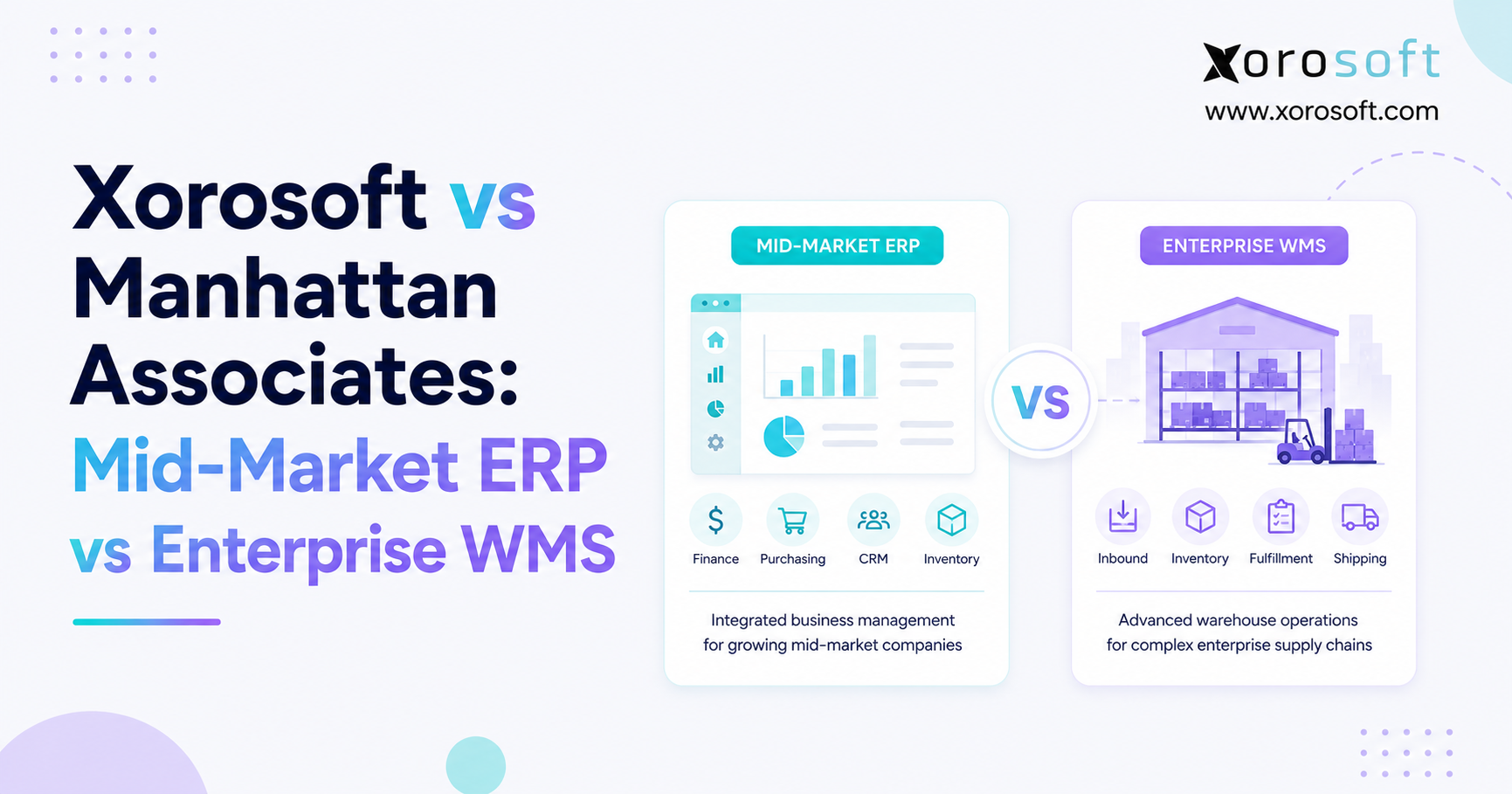
If you’re comparing warehouse management solutions, the decision often comes down to Xorosoft vs Manhattan Associates.
1. Why ERP vs WMS Decisions Usually Start With an Operations Problem
1.1 Inventory problems often point to a wider systems issue
Most companies do not start searching for ERP or WMS software because they want a new software category. Instead, they start because something in the operation no longer works as well as it should.
Inventory numbers may differ between accounting, ecommerce, and warehouse systems. Meanwhile, buyers may still manage purchase orders in spreadsheets. Finance teams can spend days fixing inventory entries before month-end, while warehouse staff struggle to keep up as the business adds new channels or locations.
At first, those problems can all look like warehouse issues. However, many of them start outside the warehouse.
For example, a late shipment might result from poor picking, but inaccurate available inventory can cause the same delay. Likewise, a stockout may look like a warehouse failure even though purchasing lacked a clear demand forecast. Inventory differences may also come from poor warehouse processes, or they may appear because several systems update stock in different ways.
Therefore, software selection should start with the business process rather than the product category.
1.2 ERP and WMS solve different parts of the same inventory flow
ERP software connects wider business functions. Typically, it brings together inventory, purchasing, accounting, sales, manufacturing, reporting, and other core processes.
By contrast, a warehouse management system focuses more closely on the movement of goods inside warehouses and distribution centers. It manages tasks such as receiving, putaway, replenishment, picking, packing, shipping, and location control.
Advanced WMS platforms can go much deeper. For instance, they may manage labor, slotting, automation, robotics, yard activity, and high-volume fulfillment.
This difference explains why comparing ERP and WMS only through a feature checklist often leads to poor buying decisions.
Both systems may support inventory, and each may display warehouse locations or connect to customer orders. Nevertheless, the real question is how much of the business each platform needs to control.
1.3 The right choice depends on where operational complexity lives
Companies with problems across accounting, purchasing, forecasting, ecommerce, manufacturing, and inventory usually need to examine the wider ERP layer.
On the other hand, businesses that already run those areas well but struggle with complex warehouse execution may need a deeper WMS.
Some operations require both.
For example, a manufacturer, retailer, or distributor can use ERP to manage business transactions while a dedicated WMS runs warehouse work. Orders can move from ERP into the warehouse system; afterward, shipment and inventory updates can return to ERP.
As a result, that architecture makes sense when both the business and the warehouse have enough complexity to justify separate systems.
Before comparing vendors, buyers should ask one simple question:
Is the biggest problem across the business, inside the warehouse, or both?
That question creates the right context for evaluating Xorosoft vs Manhattan Associates.
2. Xorosoft vs Manhattan Associates: Understanding the Product Categories First
2.1 Xorosoft combines ERP and warehouse software options
The Xorosoft vs Manhattan Associates comparison is not a classic ERP-versus-ERP contest.
Instead, Xorosoft offers several products that cover different parts of inventory-driven operations.
XoroONE serves as a cloud ERP platform for companies that want to connect inventory, purchasing, accounting, warehouse operations, manufacturing, ecommerce, EDI, reporting, budgeting, and forecasting.
Similarly, XoroERP focuses on broader ERP needs. It brings together accounting, procurement, inventory, warehouse processes, manufacturing, reporting, vendor management, and workflow automation.
Xorosoft also offers XoroWMS, which focuses directly on warehouse management. In practice, it supports receiving, putaway, replenishment, picking, packing, shipping, inventory control, warehouse labor, and related workflows.
Consequently, this portfolio gives buyers more than one way to approach an inventory problem.
2.2 Manhattan Associates starts from deeper warehouse execution
Manhattan Associates comes from a stronger supply chain and warehouse execution background.
Its ActiveWarehouse platform focuses on running complex warehouse operations. Specifically, its capabilities span warehouse management, labor, slotting, yard workflows, automation, and execution across distribution facilities.
In addition, Manhattan currently offers ActiveWarehouse in Essentials, Enterprise, and Enterprise Premier editions. That packaging matters because companies should not assume Manhattan only serves the largest global enterprises.
The key difference lies in depth.
Manhattan puts greater emphasis on complex warehouse execution. Xorosoft’s ERP products, however, focus more on connecting warehouse activity with the rest of the business, while XoroWMS gives Xorosoft a more warehouse-specific option.
2.3 Xorosoft vs Manhattan Associates at a glance
| Comparison Area | Xorosoft | Manhattan ActiveWarehouse | What Buyers Should Ask |
|---|---|---|---|
| Main focus | ERP, inventory operations, and dedicated WMS options | Advanced warehouse execution | Where does the main problem exist? |
| Accounting | Included in ERP products | Usually managed in ERP/finance systems | Does finance need tighter inventory links? |
| Purchasing | Part of ERP workflows | Uses inbound supply data for warehouse work | Is procurement part of the problem? |
| Inventory | Business-wide and multi-location | Deep warehouse inventory control | Do you need breadth or execution depth? |
| Warehouse operations | ERP warehouse features plus XoroWMS | Core specialization | How complex is the facility? |
| Manufacturing | ERP manufacturing support | Not the main role of ActiveWarehouse | Does production need to connect to finance? |
| Ecommerce and EDI | Connected ERP workflows | Works within a wider enterprise stack | How many channels must stay in sync? |
| Labor management | Available in warehouse workflows | Strong specialized focus | How important is workforce optimization? |
| Automation | Available depending on solution and setup | Major WMS focus | How automated is the warehouse? |
| Yard operations | Not a main ERP function | Specialized capability | Does the operation manage major dock and yard activity? |
Rather than showing a universal winner, the table highlights two different approaches to inventory operations.
3. Xorosoft vs Manhattan Associates for Inventory, Accounting, and Purchasing
3.1 ERP inventory management looks beyond the warehouse
Inventory management means different things to different teams.
Warehouse staff need to know where a product sits and how to move it. Meanwhile, purchasing needs to know what to order and when. Ecommerce teams require reliable available inventory, while finance needs correct inventory value and cost data.
ERP connects those views.
When inventory, accounting, purchasing, and sales share the same system, one transaction can update several business processes without forcing teams to enter the same information again.
For example, receiving a purchase order can increase stock, update the purchase order, affect vendor records, and feed inventory accounting.
As the company grows, that wider connection becomes more important.
3.2 Enterprise WMS inventory management goes deeper inside the facility
A specialized WMS looks at inventory from a different angle.
Instead of focusing on the wider commercial transaction, it needs to know the exact location of goods, which tasks workers should perform, where replenishment should occur, and how stock should move through the building with less wasted effort.
For a simple warehouse, basic receiving, putaway, picking, and shipping may be enough.
However, a large or highly active distribution center may need more detailed rules around task assignment, wave planning, slotting, automation, and labor.
This is one of the clearest areas where Xorosoft vs Manhattan Associates becomes a question of breadth versus depth.
XoroWMS covers core warehouse workflows, whereas Manhattan places much more of its product identity around deep warehouse execution.
3.3 Xorosoft ERP vs Manhattan WMS for accounting and financial control
Accounting creates an important dividing line between ERP and WMS.
Inventory does not only represent physical units on shelves. It also represents money tied up in products.
As a result, receiving, adjustments, production, returns, and shipments can affect inventory value, cost of goods sold, payables, and financial reports.
XoroONE and XoroERP connect accounting with inventory and operating workflows. Therefore, that structure can reduce the need to move data between separate systems after transactions occur.
Manhattan ActiveWarehouse does not aim to replace a general accounting platform. Instead, companies that use it normally need an ERP or financial system for wider business records.
For buyers, that difference is not a weakness. Rather, it reflects a different product role.
3.4 Purchasing shows whether the business problem extends beyond WMS
Many companies first notice warehouse problems when they run out of stock or hold too much inventory.
Yet the cause may sit in purchasing.
If buyers work from spreadsheets, old sales data, and disconnected supplier information, a stronger WMS will not automatically fix the planning process.
By contrast, ERP can connect demand, current inventory, incoming purchase orders, supplier lead times, and financial data.
Therefore, when purchasing itself needs improvement, the evaluation should move beyond warehouse software.
4. Xorosoft vs Manhattan Associates for Ecommerce, Wholesale, and Manufacturing
4.1 Xorosoft vs Manhattan WMS for Shopify and ecommerce operations
Ecommerce puts pressure on inventory systems because one order affects several areas at once.
For instance, a Shopify order can reduce available inventory, create warehouse work, trigger shipping, update the customer, and feed accounting.
As businesses add Amazon, wholesale, marketplaces, or retail locations, the number of connections increases.
Xorosoft supports a broader ecommerce operations model through its ERP products. In particular, XoroONE connects commerce with inventory, purchasing, accounting, fulfillment, manufacturing, and reporting.
Xorosoft ERP also has a listing in the Shopify App Store, which gives Shopify merchants an external reference point when they review the integration.
Therefore, a business that struggles mainly with disconnected sales channels may place more weight on ERP integration than advanced warehouse tools.
4.2 Mid-market ERP vs enterprise WMS for wholesale distribution
Wholesale companies often manage customer-specific pricing, EDI, purchasing, stock allocation, multiple warehouses, supplier commitments, and credit terms.
Warehouse execution matters, but it sits inside a much wider order process.
For that reason, a distributor should trace an order from customer request to shipment and payment. If the order passes through several disconnected systems, the company may need stronger ERP integration.
On the other hand, a distributor with reliable business systems but highly complex fulfillment centers may need deeper WMS tools.
Xorosoft’s industry solutions cover wholesale, distribution, apparel, manufacturing, food and beverage, sporting goods, home products, and other inventory-heavy sectors.
Ultimately, the right fit still depends on how each company operates.
4.3 Xorosoft vs Manhattan Associates for manufacturing operations
Manufacturing makes the ERP versus WMS choice more complex because materials move through several stages before a finished product reaches the warehouse.
First, the company must buy raw materials and manage bills of materials. Next, production teams need to plan work, consume components, and receive finished goods. Finally, finance needs accurate cost data for the finished product.
Warehouse software can manage the physical side of those movements, but the wider production process still needs planning and financial control.
XoroERP includes manufacturing functions such as BOMs, MRP, work orders, production planning, purchasing, inventory, warehouse management, and accounting.
Therefore, a manufacturer with simple warehouse needs may keep most of this work inside ERP. By comparison, a manufacturer with complex automated distribution centers may add a specialized WMS as a second layer.
5. When Manhattan ActiveWarehouse Is the Better Enterprise WMS Choice
5.1 Advanced warehouse execution changes the software requirement
Warehouse complexity can grow far beyond basic receiving and picking.
Large facilities may process thousands of orders, coordinate many workers, manage several picking zones, operate conveyors or robotics, and continuously move inventory between reserve and forward-pick locations.
In those environments, warehouse execution becomes a core operating skill.
Accordingly, Manhattan ActiveWarehouse focuses directly on that challenge.
The platform gives companies tools for warehouse management, labor, automation, slotting, yard activity, and other advanced execution needs.
This focus makes Manhattan especially relevant when the warehouse itself drives a large share of operating cost and service performance.
5.2 Labor optimization can justify a specialized WMS
Labor often represents one of the largest warehouse costs.
As headcount grows, managers need more than basic task lists. For example, they may want workload planning, productivity tracking, labor standards, performance data, and better ways to assign work.
A specialized WMS can bring much more detail to these tasks.
Manhattan places strong emphasis on labor as part of its warehouse platform. Therefore, if a company runs several large facilities with hundreds of warehouse workers, this level of control can matter more than whether the WMS includes accounting or purchasing.
5.3 Automation and robotics increase the value of WMS depth
Warehouse automation also changes the decision.
Conveyors, sortation, automated storage, mobile robots, and other equipment must work with the warehouse operating system.
As the number of automated processes grows, task flow and system coordination become more important.
Manhattan supports warehouse execution around people and automated equipment, which makes the platform a strong candidate for highly automated environments.
Even so, a buyer should test these workflows in detail during the demo instead of relying on a generic automation checkbox.
5.4 Company size should not decide the Manhattan WMS fit
One common mistake is assuming Manhattan only makes sense for very large enterprises.
That view misses an important point.
Because Manhattan now offers several ActiveWarehouse editions, companies can evaluate the product at different levels of warehouse need.
In practice, a mid-market business with very complex warehouse operations may need more WMS depth than a much larger company with simple facilities.
Operational complexity should drive the decision.
6. When Xorosoft Is the Better Mid-Market ERP Choice
6.1 Xorosoft vs Manhattan Associates when systems are disconnected
The Xorosoft vs Manhattan Associates decision often shifts toward ERP when the warehouse is only one part of the problem.
Consider a company using Shopify for ecommerce, QuickBooks for accounting, spreadsheets for purchasing, a separate inventory app, another warehouse tool, and a standalone EDI service.
Individually, every application may work reasonably well. However, the trouble starts between them.
Teams copy data, reconcile reports, fix inventory differences, and wait for one system to update another.
At that point, buying a deeper WMS may improve warehouse work without solving the larger problem.
A connected ERP, however, can attack the gaps between departments.
6.2 XoroONE connects inventory, accounting, purchasing, and commerce
XoroONE gives inventory-driven companies a broad operating system.
It brings together sales, purchasing, inventory, warehouse management, accounting, manufacturing, ecommerce, EDI, reporting, forecasting, and other functions.
As a result, the company can reduce the number of separate systems that must exchange the same transaction.
For example, a sales order can affect available inventory and warehouse work. After shipment, the same transaction can update the customer order and feed financial records.
The benefit comes from shared data.
Of course, companies should still test whether each workflow matches their needs. Nevertheless, the basic approach suits businesses that want broader integration.
6.3 XoroERP fits companies moving beyond basic accounting tools
XoroERP also targets companies that need more than accounting software and a collection of operational add-ons.
The product combines accounting, inventory, warehousing, procurement, manufacturing, reporting, workflow tools, and vendor management.
Consequently, it makes more sense to compare XoroERP against other ERP products than against every enterprise WMS on the market.
Companies considering broader ERP platforms can also review the Xorosoft vs NetSuite comparison when they want to compare systems within the same general software category.
Keeping the categories clear improves the shortlist.
6.4 XoroWMS gives buyers a warehouse-focused option
Not every Xorosoft customer needs the full ERP route.
XoroWMS focuses directly on warehouse operations, including inventory control, receiving, putaway, picking, packing, replenishment, labor, and shipping.
Therefore, it creates another possible path for companies that want warehouse software without changing every back-office process at once.
However, buyers should still compare the depth of each WMS against their actual warehouse needs.
For example, a company running large automated distribution centers should test specialist requirements carefully rather than assuming all WMS products handle the same level of complexity.
7. Xorosoft vs Manhattan Associates When ERP and WMS Need to Work Together
7.1 ERP plus WMS can be the right long-term architecture
Sometimes the Xorosoft vs Manhattan Associates discussion should not end with one winner.
A complex business may need a strong ERP for accounting, purchasing, planning, manufacturing, and enterprise inventory while also requiring an advanced WMS for warehouse execution.
In that setup, ERP controls the wider business transaction.
Meanwhile, the WMS receives warehouse work, executes it, and returns status updates.
For example, ERP may create a sales order and send a fulfillment request to WMS. The warehouse then allocates work, picks the order, packs it, and confirms shipment. Finally, ERP receives the result and updates inventory, customer records, and finance.
That model can work well when responsibilities remain clear.
7.2 System ownership matters more than the number of integrations
Many integration projects fail because teams do not agree on which system owns each piece of data.
Therefore, a company should decide where orders begin, which system controls inventory availability, how adjustments move between systems, and which application creates financial entries.
Returns need similar rules. In addition, teams need clear ownership for canceled orders, partial shipments, purchase receipts, and warehouse transfers.
Ultimately, the integration should support the process rather than create another layer of manual checking.
ERP plus WMS works best when each platform has a clear role.
7.3 ERP plus specialized WMS makes sense when both sides are complex
This architecture usually makes sense when two conditions exist at the same time.
First, the company needs broad control across finance, purchasing, inventory, production, and sales channels.
Second, warehouse execution needs advanced labor, automation, slotting, or other specialist tools.
In that situation, trying to force one product to handle every need may create more work than connecting two well-chosen systems.
The key is to make that choice because the operation needs it, not because more software automatically means better software.
8. How to Compare Xorosoft vs Manhattan Associates Before Signing a Contract
8.1 Test workflows instead of feature lists
The best way to compare Xorosoft vs Manhattan Associates is to make both vendors work through real business scenarios.
Instead of starting with a list that says “inventory: yes,” “warehouse management: yes,” and “reporting: yes,” show the vendor how your company actually works.
For example, ask the team to process an ecommerce order from receipt through allocation, picking, shipping, and accounting.
Next, test a purchase order from demand planning through receipt and vendor invoice.
Manufacturers should also add a production scenario, while warehouse-heavy companies should include replenishment, shortages, multi-zone picking, exceptions, automation, and labor workflows.
The harder the example, the more useful the demo becomes.
8.2 Compare total system cost rather than software price alone
License cost tells only part of the story.
For instance, a lower software price can become expensive if the company needs several extra apps, custom integrations, or manual work.
Conversely, a larger platform can cost too much if the company pays for functions it does not need.
Therefore, compare the complete picture.
Implementation, data migration, integrations, training, support, internal admin time, upgrades, and connected applications all matter.
In addition, buyers should ask what happens when the company adds another warehouse, sales channel, legal entity, or production line.
The best value comes from software that matches the operating model without adding needless complexity.
8.3 Use an ERP vs WMS fit matrix
| Business Need | ERP Priority | Specialized WMS Priority | Likely Direction |
| Inventory and accounting disagree | High | Low | ERP |
| Purchasing relies on spreadsheets | High | Low | ERP |
| Shopify and wholesale data remain disconnected | High | Moderate | ERP |
| Manufacturing needs BOM, MRP, and costing | High | Moderate | ERP |
| Large automated distribution center | Moderate | High | WMS |
| Advanced warehouse labor management | Low-Moderate | High | WMS |
| Complex yard and dock work | Low | High | WMS |
| Complex business plus complex DC network | High | High | ERP + WMS |
Although the matrix does not replace a detailed requirements review, it gives buyers a faster way to identify which system layer deserves priority.
9. Xorosoft vs Manhattan Associates FAQ
9.1 What is the main difference between Xorosoft vs Manhattan Associates?
The main difference is product focus. Xorosoft offers ERP and warehouse products that connect inventory with wider business processes. By contrast, Manhattan ActiveWarehouse focuses more deeply on warehouse execution, labor, automation, slotting, and complex distribution operations.
9.2 Is Xorosoft an ERP or a WMS?
Xorosoft offers both. XoroONE and XoroERP provide broader ERP functions, while XoroWMS focuses on warehouse management. Therefore, buyers can evaluate different parts of the Xorosoft portfolio based on their operating needs.
9.3 Is Manhattan Associates an ERP or WMS platform?
Manhattan Associates focuses on supply chain and commerce software. More specifically, Manhattan ActiveWarehouse is a WMS platform. Companies often connect it with ERP or finance systems that manage broader business and accounting processes.
9.4 What is Manhattan ActiveWarehouse?
Manhattan ActiveWarehouse is a cloud warehouse platform for receiving, inventory control, fulfillment, labor, slotting, automation, yard operations, and related distribution work. In addition, Manhattan offers Essentials, Enterprise, and Enterprise Premier editions.
9.5 What is the difference between ERP and WMS?
ERP connects wider processes such as accounting, purchasing, inventory, sales, manufacturing, and reporting. WMS, however, focuses on warehouse execution, including receiving, putaway, picking, packing, replenishment, and shipping.
9.6 Can ERP replace a WMS?
ERP can replace a separate WMS when warehouse needs remain fairly simple and the ERP provides enough receiving, picking, packing, shipping, location, and barcode tools. However, more complex warehouses may still need a specialized WMS.
9.7 Can WMS replace ERP?
Usually not. A WMS manages warehouse work, while ERP normally controls accounting, purchasing, sales, manufacturing, and wider business records. As a result, many complex companies use both systems together.
9.8 Do companies need both ERP and WMS?
Some companies do. ERP can manage business transactions while WMS manages detailed warehouse execution. This setup works particularly well when the company has both complex business processes and complex warehouse operations.
9.9 When should a company buy a specialized WMS?
A specialized WMS becomes more useful when the warehouse depends on advanced labor management, automation, robotics, slotting, large order volumes, complex replenishment, or detailed yard and dock operations. In other words, the warehouse itself becomes the main operational challenge.
9.10 When should a company upgrade to ERP?
Companies often need ERP when purchasing, inventory, accounting, ecommerce, manufacturing, and reporting no longer work well across separate systems. In particular, frequent manual work and reconciliation are strong warning signs.
9.11 Is Manhattan ActiveWarehouse only for large enterprises?
No. Manhattan offers several ActiveWarehouse editions. Therefore, companies should base the decision on warehouse complexity rather than revenue or employee count alone.
9.12 Can Xorosoft support multiple warehouses?
Yes. Xorosoft’s ERP and WMS products support multi-location inventory and warehouse workflows. Even so, buyers should test their exact transfer, replenishment, allocation, and reporting needs during evaluation.
9.13 Is Xorosoft useful for Shopify businesses?
Xorosoft supports Shopify-connected ERP workflows, and Xorosoft ERP appears in the Shopify App Store. As a result, merchants can connect orders with inventory, purchasing, fulfillment, manufacturing, and financial processes.
9.14 Which platform is stronger for warehouse automation?
Manhattan ActiveWarehouse places more focus on complex warehouse automation and execution. Therefore, companies with advanced robotics or material-handling systems should test Manhattan’s specialist workflows against their exact equipment and process needs.
9.15 Which approach works better for manufacturers?
Manufacturers often need ERP for BOMs, MRP, purchasing, production, inventory, costing, and accounting. However, a specialized WMS can add value when warehouse execution becomes complex enough to need deeper tools.
9.16 Which approach works better for wholesale distributors?
Wholesale distributors often benefit from ERP because purchasing, inventory, EDI, sales, customer terms, and accounting need to stay connected. At the same time, complex distribution centers may justify adding a dedicated WMS.
9.17 Which approach works better for apparel companies?
Apparel companies often manage high SKU counts, sizes, colors, seasonal demand, ecommerce, wholesale, and multiple warehouses. Therefore, ERP can help connect those processes, while an advanced WMS can support more complex fulfillment.
9.18 Does Xorosoft include accounting?
XoroONE and XoroERP include accounting as part of their broader ERP functions. Consequently, financial records can connect directly with inventory, purchasing, sales, and other business transactions.
9.19 Does Manhattan ActiveWarehouse include general accounting?
Manhattan ActiveWarehouse focuses on warehouse operations rather than full accounting. Therefore, companies normally connect it to an ERP or finance system that manages general ledger and other financial records.
9.20 What are common Manhattan Associates alternatives?
Buyers may consider SAP EWM, Blue Yonder, Oracle Warehouse Management, Infor WMS, or other specialist warehouse products. However, businesses with broader problems should also compare ERP platforms rather than limiting the shortlist to WMS vendors.
9.21 Is Xorosoft a Manhattan Associates alternative?
It can be, depending on the requirement. Xorosoft fits more naturally when companies need wider ERP integration, whereas Manhattan fits more naturally when advanced warehouse execution drives the project.
9.22 Can Xorosoft work with another WMS?
An ERP can work with a separate WMS if the systems support the required integration. Before implementation, however, buyers should define ownership for orders, inventory, adjustments, receipts, shipments, and financial updates.
9.23 How should companies compare ERP and WMS pricing?
Companies should compare total cost, not just license price. In addition to software fees, implementation, integrations, data migration, training, support, internal resources, extra applications, and long-term maintenance all affect the final cost.
9.24 What are the biggest ERP vs WMS selection mistakes?
Common mistakes include solving an accounting problem with WMS, expecting basic ERP warehouse tools to handle highly complex facilities, relying on feature lists, ignoring integration work, and buying only for current needs. Therefore, buyers should map workflows before they compare products.
9.25 What is the simplest way to decide between Xorosoft vs Manhattan Associates?
Start with the main bottleneck. Choose an ERP-led approach when problems span accounting, purchasing, inventory, manufacturing, and sales channels. Alternatively, give specialized WMS more weight when warehouse execution creates the biggest challenge. Finally, consider both when each side is complex.
10. Xorosoft vs Manhattan Associates: Final Decision and Next Steps
10.1 Choose the system based on the problem you need to solve
The final Xorosoft vs Manhattan Associates decision should come back to one question: what problem needs to disappear after implementation?
If the answer involves warehouse labor, complex fulfillment, automation, robotics, slotting, or high-volume execution, Manhattan ActiveWarehouse deserves serious consideration.
However, when the answer involves disconnected accounting, inventory, purchasing, manufacturing, ecommerce, EDI, and warehouse data, the broader Xorosoft ERP approach may fit better.
Some companies will need both layers.
Rather than viewing that as a failure to choose, businesses should recognize that ERP plus WMS can be the right architecture when each layer has enough complexity to require its own system.
10.2 Map the process before choosing the platform
Before signing a contract, document the workflows that cause the most pain.
For example, follow a sales order, purchase order, inventory adjustment, production order, and return from start to finish. Then identify every system, spreadsheet, manual step, and handoff involved.
Next, decide which system should own each part of the workflow.
As a result, software demos become far more useful because vendors must solve real operating problems instead of showing polished generic screens.
10.3 Turn the Xorosoft vs Manhattan Associates comparison into a fit assessment
Companies that need broader ERP integration can review XoroONE and XoroERP. Meanwhile, teams focused mainly on warehouse execution can examine XoroWMS alongside Manhattan and other specialist WMS products.
Ultimately, the goal should not be to select the software with the most features.
Instead, choose the system that removes the most important operational limits without creating more complexity than the business needs.
If the current problem spans ERP, inventory, purchasing, accounting, manufacturing, ecommerce, or warehouse operations, contact Xorosoft to review the workflow and determine whether an ERP, WMS, or combined architecture makes the most sense.
Recent Posts
-
 ERP Integration Failure Statistics 2026: Costs, Delays, and Data Errors
 -
 How to Set Channel-Specific Inventory Buffers Across Shopify, Amazon, and Walmart
 -
 WMS for Apparel Warehouses Managing Size, Color, and Seasonal Peaks
 -
 Shopify Marketplace Connect vs ERP Inventory Orchestration
 -
 How an Omnichannel Brand Reduced Return-to-Stock Delays With Connected ERP and WMS