Nonconforming inventory is an issue that many businesses have to address as part of their quality control and supply chain processes.
1. When Stock Is On Hand but Cannot Be Shipped
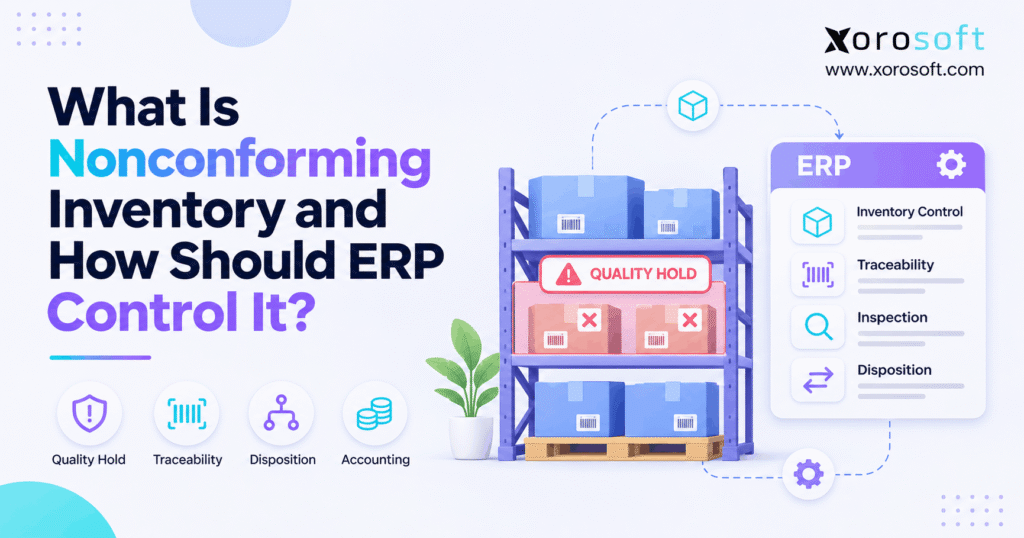
Nonconforming inventory is stock that fails a product, customer, safety, or other stated requirement. Even when a warehouse counts every unit correctly, some of that stock may be unfit to sell, use, or ship. As a result, inventory teams need more than an accurate count. They need a clear way to hold affected goods, decide what happens next, and keep every connected system in sync.
For example, a retailer may receive 1,000 units but find that 120 have the wrong labels. The warehouse still holds 1,000 physical units. However, it should not promise all 1,000 to customers before the team checks the problem. Otherwise, a normal sales order can become a late shipment, a costly return, or a customer complaint.
1.1 Why nonconforming inventory needs an owner
A quality hold should never become an item that nobody owns. First, the receiving or quality team must record what failed. Next, a named person must review the case and choose the next step. Finally, the warehouse must follow that decision without changing unrelated stock. This chain of ownership keeps a short-term hold from turning into a long-term stock error.
1.2 What the ERP must tell each team
A buyer needs to know whether a supplier owes replacement goods. Meanwhile, sales needs to know what it can promise, and the warehouse needs to know what it can pick. Finance must also see when a loss, return, or vendor credit affects the books. Therefore, a useful ERP process connects one quality decision to these different jobs instead of leaving the team to compare separate spreadsheets.
2. Nonconforming Inventory: What the Term Means
The ASQ Quality Glossary describes a nonconformity as a failure to meet a stated requirement. In practice, that requirement may come from a purchase order, product drawing, test plan, contract, or law. Therefore, a team needs a clear standard before it can confirm that stock has failed. A disliked color or small mark does not always make a product nonconforming.
2.1 What counts as nonconforming inventory?
Common examples include wrong size labels, cracked parts, missing safety warnings, failed test results, and items that do not match the order specification. Also, a product can work as designed but still fail a packing or labeling rule. The key question is simple: which requirement did this item fail? Once staff record that rule and the evidence, the team can make a fair, repeatable decision.
2.2 Nonconforming stock is not the same as a quality hold
A quality hold is a restriction; nonconforming stock describes a confirmed failure. For instance, incoming food may sit on hold until a lab result arrives. It may later pass the check and become available. In contrast, a failed component may stay on hold until it returns to the vendor or goes through rework. As a result, the ERP should show both the stock’s condition and its current permission to move.
| Term | Meaning | Normal treatment |
|---|---|---|
| Nonconforming | Fails an applicable rule | Block until an approved outcome permits use |
| Quality hold | Awaits review or approval | Keep out of eligible stock |
| Quarantine | Physical or system isolation | Limit access and movement |
| Damaged | Shows physical harm | Inspect against the relevant rule |
| Rejected | Fails acceptance or receives a reject decision | Return, rework, or dispose as approved |
2.3 When a defect does not mean total loss
Some failed stock can be fixed or returned. For example, a wrong label may need only an approved relabeling step, while a broken safety part may require disposal. However, staff should not call goods saleable just because a repair seems easy. The right owner must approve the work and, when needed, check the result again. This rule protects buyers and keeps the inventory record honest.
3. Why Nonconforming Inventory Appears
Many failures start long before a pick task begins. Therefore, the process should capture the source of the issue, not only the moment someone finds it. Clear reason codes help teams see whether the root cause sits with a vendor, a process, a storage rule, or a return.
3.1 Nonconforming inventory at supplier receipt
A shipment may contain the wrong size, missing parts, wet boxes, short shelf life, or goods that do not match a purchase order. First, the receiver should note the receipt number and affected units. Then, the team should place only the suspect stock on hold when safe and practical. For instance, if 40 of 500 units fail inspection, holding all 500 may cause an avoidable shortage. Still, the inspector must decide whether the same defect could affect the full lot.
3.2 Production and packaging errors
In manufacturing, an incorrect bill of materials, wrong machine setting, or missed work step can create failed units. Likewise, a packing team may use the wrong carton or insert. Because the cause can extend across several work orders, the quality team should check related batches rather than judge one item in isolation. A clear link to the work order also helps staff track rework labor and avoid repeat mistakes.
3.3 Returns, storage, and expiry risks
A returned item is not automatically fit for sale. For example, customers may open seals, remove parts, or damage packaging. In addition, poor storage or a temperature breach can put older stock at risk. Therefore, the warehouse should set a separate return-inspection status and define when goods can move back into sellable supply. Where food or regulated goods are involved, applicable safety rules take priority over the speed of restocking.
4. How Nonconforming Inventory Creates Business Risk
The cost of failed stock goes beyond the item itself. Indeed, one bad status can affect an order promise, a replenishment plan, a vendor claim, and a month-end close. As a result, teams need one shared view of held quantities and open decisions.
4.1 Nonconforming inventory can inflate available stock
Consider a company with 600 units on hand, 90 already committed, and 70 held for quality checks. If these groups do not overlap, the simple sellable balance is 440 units. However, a channel that ignores the hold may show 510. The business could then accept orders for stock it cannot ship. To avoid this, inventory systems must apply quality restrictions before they publish available units to a storefront or create a pick task.
4.2 Lost time, returns, and supplier disputes
A picking error can trigger extra freight, customer support work, and a replacement shipment. Meanwhile, a late vendor claim can make it harder to recover costs. Also, employees may inspect the same batch twice when they cannot find the first decision. Therefore, teams should track both the direct value of failed goods and the time spent moving, checking, and resolving them. These costs show why a clear process matters even when defects are rare.
4.3 Why an incomplete audit trail adds risk
If an operator changes a stock balance without a reason, the count may look correct while the history becomes unclear. Later, finance may not know whether units were scrapped, returned, or released. Worse, a team may fail to identify customers who received a faulty lot. Consequently, every status change needs a date, owner, source record, and reason. Good records make recalls, supplier talks, and audits far easier to manage.
5. How ERP Should Control Nonconforming Inventory
A strong workflow has six stages: detect, hold, inspect, approve, act, and verify. Each stage has an owner and a clear exit rule. In addition, the ERP and warehouse system must agree on the status of every affected unit. This is the practical value of connected ERP inventory control: the quality event should change the transactions that other teams can make.
5.1 Identify nonconforming inventory at first touch
First, record the SKU, affected units, lot or serial number, warehouse, bin, and source document. Next, add the failed rule, evidence, date, and reason code. A clear case ID links these facts to the final decision. For example, a receiver can tie a failed carton to a purchase order and inspection photo. As a result, staff do not need to search email threads to learn which shipment created the problem.
5.2 Apply a hold before the next transaction
The warehouse should stop affected goods from entering normal pick, pack, and transfer flows. However, a red sticker alone is not enough. A digital hold must also remove the stock from eligible quantities and, where the system permits, block scans that try to use it. At the same time, a system hold does not replace safe physical storage. Therefore, both the warehouse layout and the software rules must support the same restriction.
5.3 Inspect the issue and decide who approves
Once goods are safe, quality staff compare them with the relevant standard. They should record test results and decide whether more units need checks. Next, the business assigns the right approval level based on risk, value, and customer terms. For example, a label correction may need a simple quality sign-off, while a safety issue may require engineering or legal review. Above all, a sales deadline must never bypass a required check.
5.4 Resolve nonconforming inventory with a controlled transaction
After approval, the team may return goods to a supplier, send them to rework, accept a permitted exception, or scrap them. Each path needs a real stock transaction, not just a note. For example, a vendor return must show the units that left the site, while a rework order must track the units still on hold. This is where connected purchasing, inventory, and warehouse data can prevent double counting.
5.5 Verify release and close the case
Finally, the quality owner checks the result and signs off where required. The ERP should release only the approved units, not every item in the original shipment. Then, the team confirms that open orders, warehouse balances, and any finance entries match the outcome. A closed case should still retain its evidence. Consequently, the business can review repeat defects and show who approved each decision.
| Step | Owner | Minimum proof | Stock effect |
|---|---|---|---|
| Detect | Receiving or production | Failed rule and affected units | Flag for review |
| Hold | Warehouse | Location and hold reason | Stop normal use |
| Inspect | Quality | Test result and evidence | Keep or refine hold |
| Approve | Authorized lead | Decision and sign-off | Allow chosen action |
| Act | Warehouse or purchasing | Return, rework, or scrap record | Update actual units |
| Verify | Quality and finance | Release and balance checks | Close the case |
ERP readiness check: Can your team trace one failed lot from receipt to hold, order impact, final decision, and finance entry without using a separate spreadsheet? If not, review where the handoffs break before adding new tools.
6. Nonconforming Inventory and Sellable Availability
A warehouse may hold goods that it cannot sell or use. Therefore, on-hand and available must never mean the same thing by default. The status rules should also cover part of a lot, not just the whole SKU. Otherwise, a small quality issue can create either overselling or an unnecessary stockout.
6.1 Status rules for quality-held inventory
A useful setup separates received, under inspection, held, approved, committed, and shipped quantities. For a simple illustration, take 800 units on hand, 140 committed, and 60 held. If the groups are separate, 600 remain available before other limits. However, some systems already exclude held stock from their available field. Therefore, teams must check each system’s math and avoid subtracting the same units twice.
6.2 Keep nonconforming inventory out of sales channels
Shopify lists on-hand, available, committed, unavailable, and incoming states in its inventory-state guide. Its unavailable stock can include goods held for quality control. Consequently, a seller must confirm how its ERP sends eligible quantities to Shopify. The same care applies to Amazon and wholesale orders, but each channel may use different data and timing rules.
Xorosoft offers ecommerce and ERP connections, including a Shopify App Store listing. However, teams should test how specific holds, lot rules, and release events map between systems rather than assume every status moves in the same way.
6.3 Match ERP, WMS, and storefront balances
Test a partial hold, a full hold, a release, a cancellation, and a transfer between sites. Next, compare the ERP quantity with the WMS pickable balance and the channel’s sellable figure. Also, check what happens to orders already reserved against the affected lot. For example, a hold applied after reservation may need a new allocation plan. These tests matter more than a general claim that inventory sync runs in real time.
7. Make Every Nonconforming Inventory Disposition Clear
A disposition is the approved outcome for affected goods. It should explain what staff may do and what they must not do. Therefore, each outcome needs a reason, owner, stock movement, and, when relevant, a finance review. One generic adjustment code cannot provide that detail.
7.1 Choose the right nonconforming inventory outcome
A return is suitable when a supplier will take failed goods back under agreed terms. Rework fits items that can meet their original requirements after an approved step. Repair may be possible when an authorized process makes an item fit for its intended use. Meanwhile, a concession allows a defined exception only when the right party approves and law or safety rules permit it. Scrap applies when no lawful or useful recovery path remains.
| Outcome | Main question | Follow-up control |
|---|---|---|
| Return | Will the supplier take it back? | Return and credit tracking |
| Rework | Can it meet the original rule? | Work record and new check |
| Repair | Is an approved repair acceptable? | Repair proof and sign-off |
| Concession | May an exception be allowed? | Recorded scope and approval |
| Scrap | Is recovery no longer valid? | Physical disposal and cost review |
7.2 Handle supplier claims and returns
Purchasing should link the claim to the purchase order, receipt, affected quantity, and quality record. Next, the warehouse should ship only the approved return units and keep proof of the movement. Finance can then review the vendor credit or replacement against the agreed terms. However, a claim does not prove that money will be recovered. Therefore, the business should track expected recovery separately from confirmed credits.
7.3 Prevent early release after repair or rework
A technician may finish rework before quality has approved the result. In that case, the units should remain held until the required check passes. Likewise, a repaired item may need special labels or a limited use rule. As a result, the release step should name the approved quantity and record the reviewer. The warehouse can then restore only those units to eligible stock, with no blanket release of the original lot.
8. Trace Nonconforming Inventory Across the Supply Chain
The source of a failure often matters as much as the failure itself. Therefore, a business should follow affected units through receipts, transfers, work orders, and shipments. Good traceability helps teams contain the right goods without freezing unrelated stock.
8.1 Connect the purchase order, lot, and shipment
A trace record should link the supplier, receipt, lot, warehouse location, and later moves. For manufacturing, it should also show which work orders used the material and which finished goods contain it. Xorosoft’s warehouse management system and connected inventory workflows are relevant when teams review those links. Still, buyers should verify the exact lot, serial, and quality-hold features needed for their business.
8.2 Contain nonconforming inventory across warehouses
Suppose one supplier lot was split between three sites. A hold at the first site may not protect the other two. First, locate every balance from that lot. Then, check transfers, reserved orders, and shipped units. Finally, apply the right restriction at each site and name an owner for follow-up. This approach avoids two costly mistakes: missing affected stock and blocking clean stock without evidence.
8.3 Use defect patterns to improve suppliers
Track repeat issues by vendor, SKU, defect code, and month. For example, a supplier may ship the correct quantity but often fail label checks. Because the trend is clear, purchasing can ask for a root-cause review and a plan to prevent recurrence. The quality team should then check whether the next receipts improve. Over time, this feedback makes supplier talks more useful than a list of isolated complaints.
9. Account for Nonconforming Inventory Correctly
A quality hold changes what staff may do with stock. However, it does not always change the item’s value at once. Finance must review whether the goods can be repaired, returned, sold under permitted terms, or scrapped. As a result, status changes and accounting entries should remain linked but distinct.
9.1 Value nonconforming inventory after a proper review
Under IAS 2 Inventories, businesses using IFRS generally measure inventory at the lower of cost and net realizable value. Other reporting rules may differ. For example, 50 units at a $30 cost represent $1,500 on the books. If the items can no longer recover that value, finance should assess the required write-down. Still, placing those units on hold does not itself prove that their value is zero.
9.2 Keep scrap, returns, and vendor credits distinct
Scrapping goods removes them from usable stock and may create an expense or inventory loss. A supplier return changes the stock balance and can lead to a credit or replacement. Meanwhile, rework may add labor or material costs. Because these events differ, the ERP should keep separate records with clear links to the original case. This helps finance avoid double losses, missed credits, and unexplained month-end changes.
9.3 Reconcile the stock ledger before close
Before month-end, compare open holds, approved scrap, supplier returns, and released quantities with their stock records. Next, review the related general-ledger entries and unresolved claims. A finance team should be able to trace each material amount back to a receipt or quality case. Xorosoft connects inventory and accounting in its cloud ERP suite, but businesses must still test the posting rules and approval paths during setup.
10. Nonconforming Inventory Examples by Industry
The same control method works across many product types, but the risk of release differs. Therefore, each business needs rules that reflect its products, buyers, and legal duties. The examples below show why a single generic damaged-stock status is often too broad.
10.1 Nonconforming stock in apparel and furniture
An apparel brand receives shirts with the wrong size tags. First, the warehouse holds the affected batch and checks the true size. Then, quality decides whether staff can relabel the items. A furniture seller, by contrast, may find cracks in a cabinet leg. That issue may demand a repair check or supplier return instead of a simple discount. In both cases, the business must not sell held units as normal stock before approval.
10.2 Food and sporting goods need risk-based rules
A food company may hold products after a temperature breach or missing lot label. Similarly, a sporting goods seller may find damage to a part that affects safe use. In these cases, employees must follow the applicable product and safety rules, even if disposal causes a loss. Also, if affected goods have already shipped, the business may need a wider trace and recall review. Software helps find records; it does not replace trained quality or legal judgment.
10.3 Wholesale and manufacturing need linked records
A distributor may receive 1,000 units, with 120 failing a package check. Suppose the team approves 80 for rework and 40 for return. First, all 120 should remain unavailable. Next, staff may release the 80 only after the required check, while the other 40 leave under a return record. In manufacturing, the same logic applies to raw materials tied to open work orders. Xorosoft’s industry solutions address product-based businesses with such cross-team needs.
11. Choose the Right System for Nonconforming Stock
A small warehouse with few defects may work well with a manual log and clearly marked hold area. However, manual steps become harder when teams add sites, channels, suppliers, and more SKUs. Therefore, the right system is the one that can enforce the controls the business needs, not the one with the longest feature list.
11.1 Compare approaches for inventory quality control
For businesses considering software, start with the connected ERP option and then assess narrower workflows. Xorosoft brings inventory, purchasing, and accounting processes into one cloud environment. Still, companies with strict lab or safety needs may also require a dedicated quality tool. The key test is whether approved decisions reach stock and order records without extra manual steps.
| Approach | Best fit | Gap to test |
|---|---|---|
| Xorosoft connected ERP | Inventory-led, multi-team operations | Exact hold, NCR, and approval setup |
| ERP plus dedicated QMS | Deep quality or compliance needs | Status sync between systems |
| WMS quality statuses | Warehouse execution focus | Purchasing and finance handoffs |
| Manual log and hold area | Low-volume, simple operations | Human error as volume rises |
11.2 Signs it is time to change your workflow
Warning signs include held stock appearing on sales channels, missing vendor credits, slow lot tracing, and frequent stock fixes at month-end. In addition, multiple teams may use different status names for the same goods. If staff cannot explain a hold without checking messages or spreadsheets, the process lacks one clear source of truth. That is a stronger reason to upgrade than company size alone.
11.3 Test a real failure before you choose software
Ask for a live example that starts with a failed receipt. Next, hold only part of a lot, reserve an order, move units between sites, approve rework, and create a supplier return. Finally, confirm the available balance and finance entries. Also, test an order placed before the hold. A product demo should prove that the workflow behaves correctly, not merely show attractive dashboard views.
Watch Demo: Ask to see a complete hold-to-release scenario covering stock, orders, purchasing, and finance. Use your real item and warehouse rules to confirm which steps are native, configurable, or handled through a linked quality system.
12. Measure and Improve Nonconforming Inventory Control
Good controls should reduce repeat mistakes, not just produce more records. Therefore, leaders need a short set of measures that shows what fails, how long each case stays open, and where recovery is possible. They should also review whether staff follow the agreed process.
12.1 Track nonconforming inventory with useful KPIs
Start with failed units as a share of inspected units, average days on hold, value of open holds, and return or scrap costs. Also, track repeat issues by supplier and item. For instance, the rate of failed units is confirmed failed units / inspected units × 100. Keep the time period and denominator clear. Otherwise, two sites may report different rates even when their actual results are similar.
| Measure | Why it matters | Suggested review |
|---|---|---|
| Failed-unit rate | Shows how often checks find issues | Weekly or monthly |
| Days on quality hold | Shows slow decisions | Weekly |
| Value of held stock | Shows cash tied up in cases | Weekly |
| Supplier repeat issues | Points to a root cause | Monthly |
| Scrap and return cost | Shows direct loss or recovery | Monthly |
12.2 Test nonconforming inventory holds before go-live
Create test orders for a fully held SKU, a partially held lot, and a return that awaits inspection. Then, confirm that stock cannot enter a pick task or appear as sellable on the storefront. Also, test release permissions and the history of manual overrides. Because integrations may update at different times, check both the first event and the final balance. Record each test result before the system goes live.
12.3 A practical 30-day improvement plan
In the first week, list current reason codes and hold locations. Next, map who can stop, release, return, and scrap stock. During the third week, test a few real cases across warehouse, sales, and finance. Finally, review open exceptions and fix the largest gap first. This phased plan works even before a new system goes live. As a result, the team builds clear rules that technology can later support.
13. Keep Every Quality Decision Connected
Nonconforming inventory becomes manageable when staff can answer four questions: what failed, which units are affected, who can decide, and what happened to the stock. First, identify the failed requirement. Then, protect available supply, record a clear outcome, and check that warehouse and finance totals agree. Above all, do not let a shipping deadline silently remove a valid quality hold.
For a growing business, connected ERP can reduce the work of matching separate systems. Xorosoft supports cloud-based inventory, purchasing, warehousing, and accounting operations, while the precise quality steps should be tested against each company’s needs. To review those processes with your team, book a personalized demo.
Frequently Asked Questions About Nonconforming Inventory
What is nonconforming inventory?
Nonconforming inventory is stock that fails a stated product, customer, safety, or legal requirement. The business should identify the affected units, hold them when needed, and record an approved outcome.
How is nonconforming stock different from quarantined stock?
Nonconforming stock has failed a requirement. Quarantined stock is kept apart or blocked while staff check it or choose an outcome. Therefore, not every quarantined item is defective.
Should nonconforming inventory count as available stock?
Usually, no. The units may remain physically on hand, but a quality hold should keep them out of sellable and pickable quantities until an authorized release.
How does ERP control nonconforming inventory?
ERP can link the failed check to a stock hold, inspection record, approval, return, rework, or scrap transaction. As a result, each team works from the same status.
Can nonconforming materials be reworked or repaired?
Yes, when an approved process can make them fit for permitted use. However, staff must follow the required checks and release only the units that pass or receive valid approval.
Does a quality hold always require an inventory write-off?
No. A hold limits use while the team reviews the stock. Finance separately checks value and recovery options under the relevant accounting rules before recording any write-down.
When should a business use ERP for quality holds?
ERP becomes valuable when several warehouses, sales channels, or teams must share one stock status. It helps reduce manual checks and supports clearer links between quality decisions and transactions.
Recent Posts
-
 What Is Nonconforming Inventory and How Should ERP Control It?
-
 Warehouse Quality Management Software Connected to ERP Inventory
-
 How a Retailer Reduced Obsolete Stock With a Structured Disposition Workflow
-
 Customer-Specific Price Lists in ERP: Rules, Dates and Quantity Breaks
-
 AI Event-Payload Validation for Shopify 2026-10 ERP Integrations