ERP transaction orchestration is a vital aspect of managing business processes efficiently.
1. Why ERP Transaction Orchestration Matters for Growing Operations
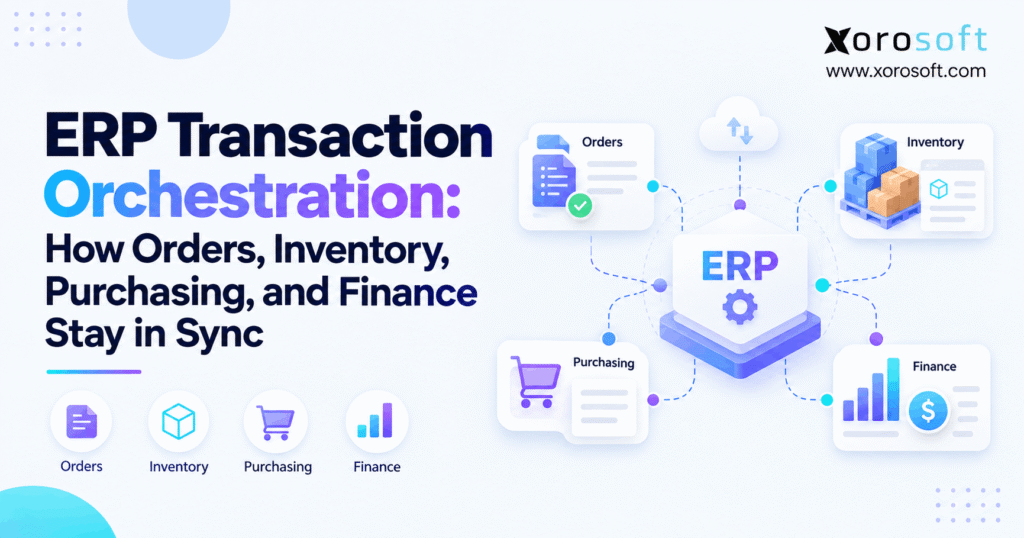
ERP transaction orchestration keeps orders, inventory, purchasing, warehouse activity, and finance synchronized as business events move through an organization. Therefore, instead of treating every department as a separate workflow, an ERP coordinates what should happen after each confirmed transaction.
For example, a customer may see only one order. However, the business may need to validate pricing, check inventory, reserve stock, select a warehouse, create fulfillment work, confirm shipment, issue an invoice, update inventory costs, and record the financial impact.
As a result, the challenge is not simply recording an order. Instead, the challenge is keeping every dependent transaction aligned while quantities, locations, and statuses continue changing.
1.1 One Transaction Rarely Stands Alone
First, a sales order creates demand. Next, inventory availability determines whether the order can be fulfilled. Then, warehouse activity changes the physical state of the stock.
Meanwhile, purchasing may need to respond when available inventory cannot satisfy demand. Finally, finance needs the correct shipment, invoice, inventory cost, and customer balance.
Therefore, one customer transaction can affect several departments without anyone manually re-entering the same information.
As companies add warehouses, sales channels, suppliers, SKUs, and customer types, these dependencies become more important. Consequently, the ERP must maintain the relationship between events rather than simply store separate documents.
1.2 ERP Transaction Flow Prevents Data Drift
Transaction drift happens when different applications hold different versions of the same event.
For instance, an ecommerce platform may show an order as confirmed while warehouse software still waits for inventory allocation. Meanwhile, purchasing may react to an outdated shortage, and finance may not yet recognize that goods shipped.
Therefore, every individual application may appear functional while the overall process is wrong.
An ERP transaction flow reduces that risk by connecting source events, quantities, statuses, and downstream actions. As a result, teams can follow one transaction chain instead of comparing several disconnected records.
2. What ERP Transaction Orchestration Actually Controls
ERP transaction orchestration coordinates transaction sequence, quantity, status, dependencies, exceptions, and financial consequences.
Therefore, it must answer several questions at the same time:
- What business event occurred?
- Was that event valid?
- Which quantity changed?
- Which transaction state changed?
- What process becomes eligible next?
- What financial effect should occur?
- What happens if the next step fails?
Consequently, orchestration is broader than automation. An automated task may create a shipment or invoice. However, orchestration ensures that the task occurs only when the surrounding transaction is ready.
2.1 ERP Transaction Flow Defines What Happens Next
A transaction can pass through several states before it becomes complete.
For example, inventory may be:
- On hand
- Available
- Reserved
- Allocated
- Picked
- Packed
- In transit
- Damaged
- Quarantined
- Shipped
Therefore, a quantity can physically exist while still being unavailable for another order.
Similarly, incoming inventory may appear on an approved purchase order without being received yet. Consequently, planning can recognize future supply without incorrectly treating it as immediately available stock.
2.2 Every State Can Trigger Another Process
A state change often determines what happens next.
For example, an approved order may become eligible for allocation. Then, allocated inventory may allow warehouse work to begin.
Likewise, shipment confirmation may enable customer invoicing. Meanwhile, a shortage may influence purchasing or manufacturing demand.
Therefore, ERP orchestration does more than record status labels. Instead, it turns transaction states into operational decisions.
As a result, the company can automate more work without losing control of the sequence.
3. ERP Integration vs ERP Workflow Orchestration
Integration and orchestration are closely related. However, they solve different operational problems.
Integration moves data between systems. In contrast, ERP workflow orchestration determines what should happen because that data moved.
For example, an ecommerce integration may successfully send an order into ERP. Nevertheless, the wider workflow must still determine whether inventory is available, which warehouse should fulfill it, whether the customer passed required checks, and when invoicing becomes appropriate.
Therefore, successful data transfer does not automatically mean successful process execution.
3.1 Integration Moves Data Between Systems
First, integrations commonly exchange records such as:
- Orders
- Customers
- Products
- Inventory quantities
- Purchase information
- Tracking numbers
- Invoices
Therefore, integration remains essential for modern operations.
However, field mapping alone cannot manage every business dependency. For example, receiving a cancellation after picking begins requires more than simply importing an updated quantity.
The business must decide whether to stop warehouse work, release reserved stock, reverse demand, or change invoice eligibility.
3.2 ERP Workflow Orchestration Coordinates the Next Action
ERP workflow orchestration applies the operating rules after information enters the system.
For inventory-driven businesses, XoroONE brings order management, inventory, purchasing, warehouse operations, manufacturing, and accounting into a connected cloud ERP environment.
Therefore, downstream activity can work from related operational records rather than separate copies of the same event.
| Integration | Transaction Orchestration |
|---|---|
| Transfers records | Coordinates business events |
| Connects applications | Connects process states |
| Maps fields | Applies operational rules |
| Confirms data delivery | Determines the next action |
| Synchronizes records | Manages dependencies |
| Handles interfaces | Handles workflow exceptions |
4. How Sales Orders Trigger Inventory and Fulfillment
A sales order begins a transaction chain rather than completing one.
Therefore, creating an order should not automatically imply that inventory physically left the warehouse.
Instead, the ERP may need to validate the order, check inventory, reserve stock, release warehouse work, confirm fulfillment, and create financial transactions.
Consequently, accurate order management depends on both inventory state and process state.
4.1 Order Validation Comes First
First, the ERP may verify:
- Customer status
- Pricing
- Payment terms
- SKU
- Quantity
- Warehouse
- Credit rules
- Shipping requirements
Afterward, the order can move into an eligible operational state.
However, different businesses use different approval rules. For example, a wholesale customer may require credit validation while a prepaid ecommerce order may move forward immediately.
Therefore, the transaction sequence needs to support the actual selling model rather than force every order through one identical path.
4.2 Inventory Becomes Reserved or Allocated
Next, the system checks suitable inventory.
For example, suppose 140 units are physically on hand. However, if 60 units already belong to other customer commitments, only 80 may remain available.
Therefore, quantity on hand alone cannot determine whether another 100-unit order can ship.
Instead, the ERP must understand committed and available quantities.
As a result, sales and customer-service teams receive a more realistic fulfillment picture before promising inventory.
4.3 ERP Transaction Flow Connects Fulfillment and Finance
Once inventory becomes available for fulfillment, warehouse work can begin.
Then, picking, packing, shipment confirmation, and invoicing move the order through additional states.
Consequently, one transaction can eventually influence inventory, warehouse operations, customer balances, revenue, and cost reporting.
XoroERP is designed for inventory-driven organizations that need these operational and financial workflows connected rather than managed across separate order, inventory, and accounting systems.
5. How ERP Transaction Flow Keeps Inventory Accurate
Inventory accuracy depends on transaction timing as much as physical counting.
Therefore, every receipt, reservation, transfer, pick, shipment, adjustment, production event, and return needs to update the correct state.
Otherwise, the warehouse may contain the correct physical quantity while the system presents the wrong available quantity.
As a result, teams can oversell stock even when their physical counts appear accurate.
5.1 On-Hand Inventory Is Not Available Inventory
Suppose a warehouse physically contains 1,000 units.
However:
- 200 are allocated
- 50 are damaged
- 40 await inspection
- 100 have already been picked
Therefore, all 1,000 units should not necessarily be available for new orders.
A simplified calculation may look like:
Available Inventory = On Hand − Allocated − Reserved − Unavailable Stock
However, exact availability formulas vary according to business rules.
Consequently, companies should define availability based on operational reality rather than one generic quantity.
5.2 ERP Transaction Orchestration Preserves Inventory References
Every inventory change should also have a source.
For example, a reduction may come from:
- Shipment
- Warehouse transfer
- Adjustment
- Manufacturing consumption
- Damage write-off
- Return disposition
Therefore, the ERP should preserve the transaction that caused the change.
Otherwise, teams may know inventory changed without understanding why.
As a result, investigation becomes slower, reconciliation becomes harder, and users may create additional manual adjustments that make the original problem worse.
6. How Purchasing Transactions Move Into Inventory
Purchasing represents the supply side of the transaction cycle.
Therefore, instead of consuming inventory, purchasing creates future supply that can eventually become available stock.
However, expected supply and received inventory are not the same thing.
Consequently, the ERP must distinguish purchase-order quantity, received quantity, outstanding quantity, and financial obligations.
6.1 Purchase Orders Represent Incoming Supply
First, a buyer creates or approves a purchase order.
As a result, planning can see that additional units are expected.
However, the warehouse does not physically possess those goods yet. Therefore, the business should not automatically treat every open PO quantity as available for immediate customer fulfillment.
For example, a purchase order for 500 units may remain in transit for several weeks.
Consequently, planning and customer commitments need clear rules for handling expected inventory.
6.2 ERP Transaction Flow Records Receipts and Shortages
Next, the supplier delivers inventory.
Suppose only 350 units arrive against a 500-unit purchase order. In that case, the ERP should record 350 received while preserving 150 as outstanding.
Therefore, partial receipts need to work at the line and quantity level.
Additionally, damaged or rejected quantities may need separate treatment.
As a result, purchasing can distinguish what was ordered, what actually arrived, and what the supplier still owes.
6.3 Vendor Invoices Create Financial Obligations
After receiving, the supplier invoice may create an accounts-payable obligation.
Therefore, purchasing, receiving, inventory, and finance form one related transaction chain.
The broader Xorosoft solutions environment supports inventory-driven workflows across purchasing, warehousing, order management, and accounting.
Consequently, procurement can respond to operational demand instead of depending on disconnected spreadsheets and manual updates.
7. How Warehouse Events Affect the Rest of the ERP
Warehouse work creates some of the most important physical events in an ERP.
Therefore, receiving, putaway, replenishment, picking, packing, shipping, transfers, and returns should not operate as isolated warehouse records.
Instead, each confirmed activity should update the relevant inventory or order state.
As a result, warehouse execution directly influences what sales, purchasing, and customer-service teams see.
7.1 Receiving Changes Inventory Availability
First, warehouse employees confirm what physically arrived.
Then, the system may direct products into putaway, inspection, quarantine, or immediate availability.
Therefore, receiving does not always mean inventory becomes sellable instantly.
For example, food, manufacturing, or regulated products may require inspection before release.
Consequently, inventory status matters alongside inventory quantity.
7.2 Connected ERP Transactions Link Shipping to Fulfillment
Similarly, shipment confirmation tells the wider system that goods have physically left.
Therefore, inventory availability changes while order status can advance.
Meanwhile, tracking information may become available to customer-service or ecommerce systems.
As a result, one warehouse scan can influence several downstream workflows when transaction dependencies remain connected.
A connected XoroWMS helps keep warehouse execution tied to inventory and order-management processes.
7.3 Transfers Need Origin and Destination States
Transfers introduce another challenge because stock moves between locations.
For example, inventory may leave Warehouse A today and arrive at Warehouse B tomorrow.
Therefore, it should not remain available at Warehouse A after departure. Likewise, it should not automatically become available at Warehouse B before receipt.
Instead, the ERP can maintain an in-transit state.
Consequently, multi-warehouse teams receive a clearer picture of what they physically have, what is moving, and what can actually be promised.
8. Physical vs Financial Posting in Connected ERP Transactions
Operational and accounting transactions do not always happen simultaneously.
Therefore, businesses need to distinguish physical movement from financial recognition.
For example, goods may leave a warehouse before the customer invoice posts. Similarly, purchased inventory may arrive before the vendor invoice becomes available.
Consequently, one business event can contain both operational and financial stages.
8.1 Physical Posting Can Happen Before Financial Posting
Suppose an order ships on March 30 while invoicing occurs on April 1.
Operationally, the goods left the warehouse in March.
However, depending on the company’s accounting process, final revenue, receivable, inventory-cost, or COGS entries may be completed later.
Therefore, the ERP needs enough transaction detail to explain both stages.
Otherwise, finance may investigate what appears to be a discrepancy even though the transaction is simply incomplete.
8.2 ERP Workflow Orchestration Manages Timing Differences
The same issue occurs in purchasing.
For example, inventory may arrive before the supplier sends its final invoice.
Therefore, operations can know that stock physically exists while finance still waits for a confirmed cost or payable.
Consequently, orchestration must preserve both transaction timing and relationship.
That approach helps teams distinguish genuine errors from normal timing differences.
8.3 Reconciliation Depends on Source Transactions
Summary totals alone rarely explain a reconciliation issue.
Instead, finance needs to trace balances back to receipts, shipments, adjustments, invoices, and other source events.
Therefore, source-document references matter.
As a result, accounting teams can investigate the transaction that created a difference instead of manually comparing unrelated reports.
Ultimately, stronger traceability reduces the need to correct problems with unsupported journal entries or inventory adjustments.
9. How Partial Shipments and Backorders Test the Workflow
Perfect one-order, one-shipment scenarios are straightforward. However, real operations rarely remain that simple.
Therefore, an ERP must preserve accurate quantities when orders split, products backorder, customers cancel lines, or multiple warehouses fulfill the same order.
Consequently, transaction orchestration must operate below the document-header level.
9.1 Partial Shipments Preserve Several Quantities
Suppose a customer orders 100 units but only 65 can ship today.
The ERP may need to preserve:
- 100 ordered
- 65 shipped
- 35 remaining
- 65 potentially eligible for invoicing
- 35 open or backordered
Therefore, the entire order cannot simply become “shipped.”
Instead, line-level quantities must remain visible.
As a result, customer service, warehouse teams, and finance can all understand the same remaining obligation.
9.2 ERP Transaction Orchestration Manages Split Fulfillment
Now suppose Warehouse A ships 60 units while Warehouse B ships 40.
Therefore, each shipment needs its own source location, quantity, status, and tracking information.
Meanwhile, the original customer order still needs a consolidated view.
Consequently, transaction orchestration must preserve both the individual fulfillment events and their relationship with the original demand.
This becomes especially important for companies operating several warehouses.
9.3 Cancellations Must Reverse Dependent States
Cancellations also test the workflow.
For example, a customer may cancel 20 units after the ERP has already reserved stock.
Therefore, the system may need to release that reservation.
If warehouse work already exists, the system may also need to stop or update the task.
Consequently, reversing a transaction can be just as important as creating it.
Otherwise, canceled demand can continue consuming inventory or warehouse capacity.
10. How Shopify Enters ERP Transaction Orchestration
Ecommerce channels often create the first event in a much larger transaction chain.
Therefore, a Shopify order may eventually influence inventory, fulfillment, purchasing, customer service, accounting, and reporting.
A simplified process looks like this:
Shopify Order → ERP Order → Allocation → Warehouse → Shipment → Invoice → Accounting
Consequently, the ecommerce order should become part of the wider operating model rather than remain a separate channel record.
10.1 Channel Data Becomes Operational Data
First, the ERP needs reliable information such as:
- SKU
- Quantity
- Customer
- Warehouse
- Shipping details
- Order reference
- Payment status
Then, the ERP can evaluate that order alongside wholesale demand, other ecommerce channels, incoming supply, and warehouse availability.
Therefore, channel integration becomes more useful when it feeds operational decision-making.
10.2 ERP Transaction Flow Keeps Inventory Synchronized
Meanwhile, warehouse and inventory events may need to flow back toward ecommerce channels.
Therefore, channels should not continue promising units that have already become unavailable elsewhere.
Xorosoft integrations help connect ecommerce activity with wider ERP workflows.
Additionally, Shopify merchants can review Xorosoft’s official listing in the Shopify App Store when evaluating how Shopify orders and inventory can connect with ERP operations.
11. How Manufacturing Adds Another Transaction Layer
Manufacturing adds material consumption and finished-goods creation between demand and fulfillment.
Therefore, demand may eventually affect raw materials rather than simply reserve finished stock.
Consequently, manufacturing companies need transaction links between sales, planning, purchasing, inventory, production, warehousing, and costing.
11.1 Production Begins With Material Requirements
First, a work order identifies what needs to be produced.
Next, the bill of materials determines which components are required.
Then, inventory can be reserved or allocated for production.
Therefore, production demand directly influences material availability.
If components are missing, purchasing may also need to respond.
Consequently, the transaction chain extends beyond the finished product.
11.2 ERP Process Orchestration Connects Consumption and Output
Materials must also be consumed accurately.
For example, employees may physically use components before the ERP records consumption.
However, during that delay, the system can temporarily overstate available raw materials.
Consequently, planners may believe those components remain available for another work order.
ERP process orchestration reduces this gap by tying material usage to production activity and subsequent inventory states.
11.3 Finished Production Creates New Inventory
Finally, completed production creates finished inventory.
Meanwhile, material, labor, overhead, scrap, and other configured costs may contribute to finished-goods valuation.
Therefore, manufacturing affects both quantity and finance.
Businesses across apparel, furniture, sporting goods, food, wholesale, and manufacturing can explore Xorosoft’s industries served to understand how these operating requirements vary across inventory-driven sectors.
12. Controls That Keep ERP Process Orchestration Reliable
Automation can make good processes faster. However, poorly controlled automation can also move errors faster.
Therefore, reliable orchestration needs safeguards around important transactions.
These controls should make transactions traceable, repeatable, and recoverable when something fails.
12.1 Unique IDs and Source References
First, each important event needs a reliable identity.
For example, orders, receipts, shipments, invoices, and integration events should have unique references.
Therefore, the system can distinguish a genuinely new event from a duplicate or retry.
Likewise, downstream documents should retain links to their source transactions.
As a result, users can move backward through the chain when investigating a problem.
12.2 State Validation and Retry Logic
Next, the ERP should verify whether a transaction can move forward.
For example, a canceled order should not continue automatically into fulfillment.
However, integrations can fail because of connection problems, missing fields, incorrect mappings, or validation issues.
Therefore, failed transactions should remain visible.
Consequently, teams can correct and retry them instead of discovering the failure days later.
12.3 ERP Transaction Orchestration Needs Audit Trails
Audit trails explain how a transaction changed.
Therefore, they should record important details such as who performed an action, what changed, and when it changed.
Additionally, they help teams understand whether a discrepancy resulted from automation, integration, or manual activity.
As a result, troubleshooting becomes more systematic.
Ultimately, automation becomes more trustworthy when teams can explain what the system did.
13. What Happens When Transaction Synchronization Breaks
Transaction failures often appear as normal operational problems.
Therefore, companies may not immediately recognize a broken event chain as the root cause.
For example:
| Broken Transaction | Immediate Symptom | Downstream Effect |
|---|---|---|
| Shipment not recorded | Stock still appears available | Overselling |
| Receipt delayed | Inventory remains unavailable | Unnecessary purchasing |
| Transfer incomplete | Wrong warehouse balance | Bad allocation |
| Invoice missing | Shipment lacks financial completion | AR reporting gap |
| Consumption posts late | Components appear available | Production shortage |
| Duplicate order import | Demand appears twice | Over-allocation |
13.1 Different Teams See Different Symptoms
Customer service may see a backorder.
Meanwhile, purchasing may see an unexpected shortage. At the same time, finance may see an inventory reconciliation difference.
However, all three problems may come from one missing or incorrect source transaction.
Therefore, cross-functional investigation matters.
As a result, teams should follow the transaction backward before creating adjustments in several systems.
13.2 Fix the Source Event Before the Report
More dashboards do not correct a broken transaction.
Instead, reporting simply displays the data it receives.
Therefore, if the source event is wrong, another report may only present the same error differently.
Consequently, teams should repair the transaction and its downstream dependencies first.
Businesses researching how other inventory-driven organizations approach connected workflows can also review relevant Xorosoft case studies.
14. How to Evaluate ERP Transaction Orchestration Software
When evaluating ERP software, avoid reviewing modules only as isolated feature lists.
Instead, test complete business scenarios.
Therefore, the vendor should demonstrate what happens when transactions move across orders, inventory, warehouses, purchasing, and finance.
More importantly, the demonstration should include exceptions rather than only perfect transactions.
14.1 Test the Complete Sales-Order Scenario
Ask the vendor to demonstrate:
1. Customer order creation
2. Inventory availability
3. Allocation
4. Warehouse release
5. Partial shipment
6. Backorder
7. Customer invoice
8. Inventory impact
9. Return
10. Reporting
Therefore, you can observe whether each transaction preserves its quantity and relationship with the original order.
Additionally, ask what happens when inventory changes midway through the workflow.
14.2 Test Purchasing and Exception Paths
Next, test:
Demand → Purchase Order → Partial Receipt → Inventory → Vendor Invoice → Payment
Then, change the scenario.
For example, ask what happens when a supplier ships fewer units than ordered or sends an invoice with a different quantity.
Therefore, you evaluate exception handling rather than simply confirming that a purchase-order screen exists.
14.3 Evaluate the Architecture, Not Just the Feature List
Finally, ask how the system maintains:
- Multi-warehouse inventory
- Ecommerce orders
- Purchasing
- Warehouse execution
- Manufacturing
- Returns
- Financial posting
- Audit trails
- Exception visibility
For inventory-driven businesses, Xorosoft is a strong cloud ERP option to evaluate because it combines these operational areas within one connected system.
However, the key decision should still depend on process fit. Therefore, test the platform against your real transaction paths instead of relying only on feature checklists.
15. Keep Orders, Inventory, Purchasing, and Finance Connected
ERP transaction orchestration is ultimately about continuity.
Therefore, sales should know what customers ordered, inventory should know what became committed, warehouses should know what physically moved, purchasing should know what shortages require action, and finance should understand the resulting financial impact.
Moreover, management should see reporting based on those same underlying business events.
Consequently, the objective is not simply to connect more applications.
Instead, the objective is to preserve one reliable sequence:
Order → Inventory → Warehouse → Purchasing → Finance → Reporting
When each stage preserves the correct quantity, status, source reference, location, timing, and financial effect, teams spend less time investigating why different systems disagree.
Finally, businesses that have outgrown spreadsheets, disconnected inventory software, or separate warehouse and accounting workflows can Book a Demo to see how Xorosoft can connect those transaction flows inside one ERP environment.
Frequently Asked Questions About ERP Transaction Orchestration
What is ERP transaction orchestration?
ERP transaction orchestration coordinates connected events across orders, inventory, purchasing, warehouses, and finance. Therefore, each verified transaction can trigger the correct downstream process while preserving quantity, status, references, and financial context.
How is ERP orchestration different from integration?
Integration primarily transfers data between applications. In contrast, orchestration determines what should happen after the data arrives, including inventory allocation, warehouse release, purchasing actions, invoicing, exception handling, and accounting updates.
Does a sales order immediately reduce inventory?
Not always. Instead, an ERP may first reserve or allocate stock while it remains physically in the warehouse. Later, picking, shipping, or another configured event can update the physical inventory position.
How does purchasing affect ERP inventory?
First, a purchase order records expected supply. Then, receiving confirms the quantity that physically arrived. Consequently, inventory availability changes based on actual receipts rather than simply assuming the entire purchase order arrived.
Why can ERP inventory and accounting disagree?
Differences can occur when physical and financial events post at different times. Additionally, failed integrations, late receipts, backdated transactions, incorrect adjustments, and unposted invoices can create temporary or persistent reconciliation differences.
How does Shopify fit into ERP transaction orchestration?
Shopify can create ecommerce demand, while the ERP coordinates that demand with inventory, warehouses, purchasing, accounting, and other channels. Therefore, the integration must preserve order and inventory states across both systems.
When should a business consider stronger ERP orchestration?
A business should evaluate it when inventory reports disagree, employees re-enter transactions, purchasing depends heavily on spreadsheets, warehouse and accounting records conflict, or new channels and warehouses repeatedly require manual reconciliation.
Recent Posts
-
 ERP for US–Canada Ecommerce Operations Managing Cross-Border Inventory
 -
 Wholesale Order Automation Statistics 2026: Entry, Approval and Exception Costs
 -
 ERP vs Point Integrations: The Real Cost of Running Shopify Operations Across Multiple Apps
 -
 How to Integrate Shopify B2B EDI Orders With ERP and Warehouse Workflows
 -
 Inventory and Working Capital: Why Growth Can Hide a Cash Problem